
Memory
Voibe remembers what you tell it. Memory lets you create shortcuts — simple keywords that Voibe expands into the full text you actually mean. Say the keyword while dictating and Voibe replaces it instantly, inline, without interrupting your flow.
Your Memory entries are stored locally on your own machine — on a Mac or a Windows PC — and are never uploaded, sold, or used to train AI.
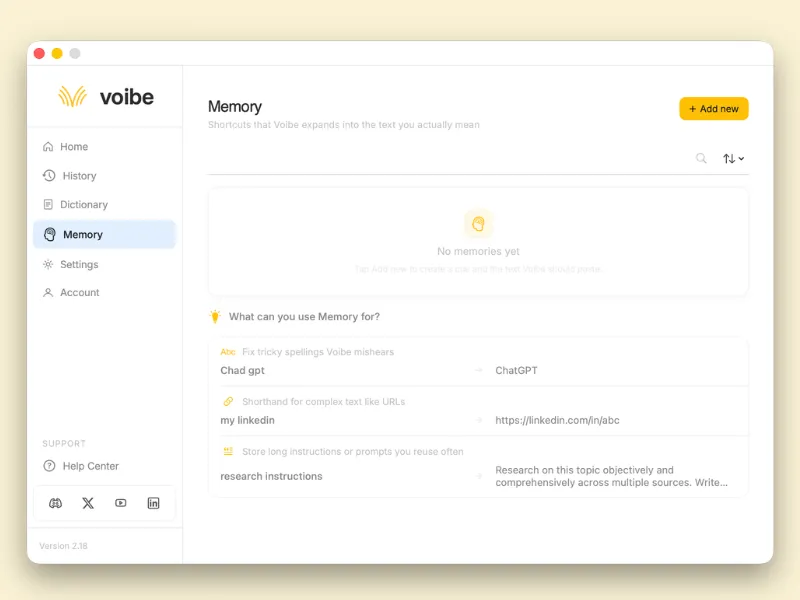
Memory entries are created and managed from the Voibe app.
What Memory does
How Memory works
You create a key-value pair. The key is the word or phrase you say. The value is what Voibe types in its place. When Voibe detects the key during transcription, it substitutes the value automatically before the text reaches the app you're dictating into.
You can use multiple keys in a single session and Voibe will replace all of them without issues.
Fix words Voibe mishears
Speech recognition struggles with unusual names, product names, and technical terms — especially ones that sound like ordinary words. Memory lets you train Voibe on the specific vocabulary you use.
If Voibe consistently mishears a term, correcting it every time costs you more effort than the dictation saved. One Memory entry fixes it permanently.
| You say | Voibe types |
|---|---|
| Chad GPT | ChatGPT |
| vibe | Voibe |
| balamruga | Balamurugan |
Shortcuts for complex text
Anything long, precise, or awkward to dictate out loud can be stored as a shortcut. URLs are the most common use — saying a full web address aloud is slow, error-prone, and breaks your flow. These are especially useful when dictating emails, proposals, or messages where you regularly need to include contact or link information.
| You say | Voibe types |
|---|---|
| my linkedin | https://linkedin.com/in/yourname |
| my website | https://www.yourcompany.com |
| my email | hello@yourcompany.com |
| my calendly | https://calendly.com/yourname/30min |
| company address | 12 Harbourside Way, Bristol, BS1 5TR |
| bank details | Account: 12345678 · Sort code: 20-00-00 |
Reusable instructions and prompts
If you regularly give the same instructions — to an AI tool, to a collaborator, or as part of a template — Memory can store them as a single spoken trigger. This works particularly well when using Voibe with AI coding assistants, writing tools, or any app where you repeat the same framing across many sessions.
| You say | Voibe types |
|---|---|
| research instructions | Research this topic objectively and comprehensively across multiple sources. Summarise the key findings in plain language with no filler. |
| email sign off | Kind regards, Bala Founder, Voibe |
| bug report format | Steps to reproduce: Expected behaviour: Actual behaviour: Environment: |
| meeting notes header | Attendees: Decisions: Actions: |
Using a trigger prefix
Memory keys replace any matching word Voibe hears — which means a key like
linkedin could fire accidentally if you say the word in
a different context.
A practical habit is to prefix all your Memory keys with a consistent word. When you always say the prefix before a shortcut, you train yourself to use it deliberately — and it's easier to remember which words are shortcuts.
Example prefix: "insert"
| You say | Voibe types |
|---|---|
| insert linkedin | https://linkedin.com/in/yourname |
| insert email | hello@yourcompany.com |
| insert sign off | Kind regards, Bala · Founder, Voibe |
| insert research prompt | Research this topic objectively... |
The prefix doesn't need to be "insert" — use whatever feels natural to you. Some people use "expand", others use a unique short word they wouldn't say in normal conversation. The important thing is that you're consistent so it becomes automatic.
What Memory does not do
- Does not learn automatically — Voibe only uses entries you've explicitly created. It does not observe your speech and build Memory on its own.
- Does not apply retroactively — Memory only affects new transcriptions. Existing text already in your editor is not changed.
- Does not work across devices — Memory entries are stored locally on the machine you created them on and are not synced to your other computers.
- Does not do partial matching — the key must be spoken exactly as you
saved it. A key of
my linkedinwill not fire if you saylinkedinalone.
Tips
- Keep keys short and speakable. The key is what you have to say out loud, so make it something you'd say naturally without pausing to think.
- Use a consistent prefix. Pick one trigger word — like "insert" — and use it as the first word of every Memory key. This prevents accidental replacements and makes your shortcuts easier to recall.
- Store anything you retype. If you've typed the same URL, phrase, or instruction more than twice this week, it belongs in Memory.
- Fix misheard names immediately. The moment you notice Voibe getting a name wrong, add a Memory entry for it. One entry removes the friction for every future session.
- Use it for AI prompts. If you dictate into ChatGPT, Claude, or any AI tool, Memory is a fast way to inject consistent framing or instructions without re-dictating them each time.
Your Memory stays on your own machine
Memory entries are saved locally on your device. Your shortcuts and their values are never uploaded to a server, sold, or used to train AI.
Memory across devices and custom names
Does Cloud Mode sync my Memory across computers?
No. Cloud Mode controls where dictation is processed; it does not enable synchronization. Memory entries remain on the computer where you created them. Signing in with the same email on a second computer does not copy them.
Using Voibe across devicesHow do I make Voibe spell a name correctly?
Open Memory in the Voibe app. Add the word or phrase Voibe consistently produces as the key and the correct spelling as its replacement. For example, replace “Chad GPT” with “ChatGPT.” Test a new dictation; existing text is not changed. This is a saved replacement, not automatic learning from edits.