Voibe can now show you a message meant just for you, right at the top of your dashboard, such as an offer with your own discount code.
New
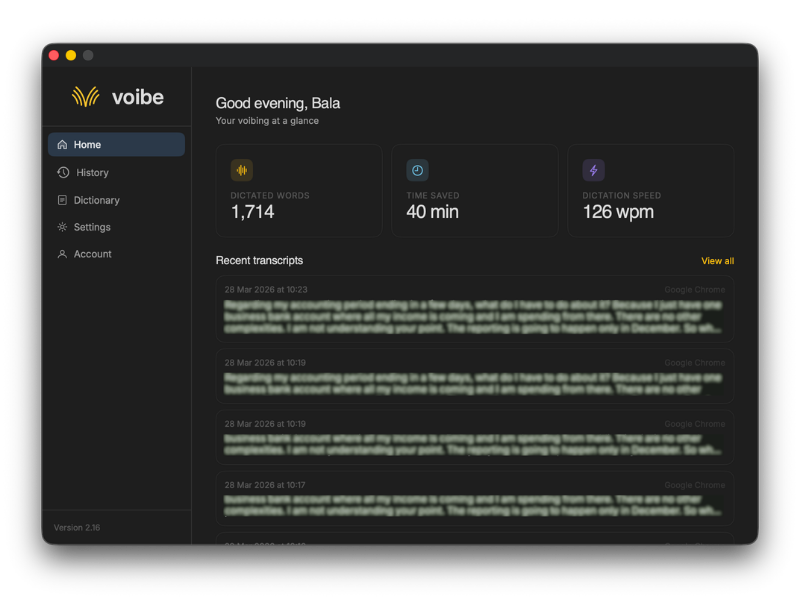
Personal Offers in the App
When we have an offer or a message for you, it appears at the top of the dashboard. A discount code copies in one click, and the button takes you straight to the offer. An upgrade offer goes away by itself once you've upgraded.
Improved
A Cleaner Sidebar
The dashboard sidebar is now set apart by a light tint and a soft shadow instead of divider lines.
v3.0
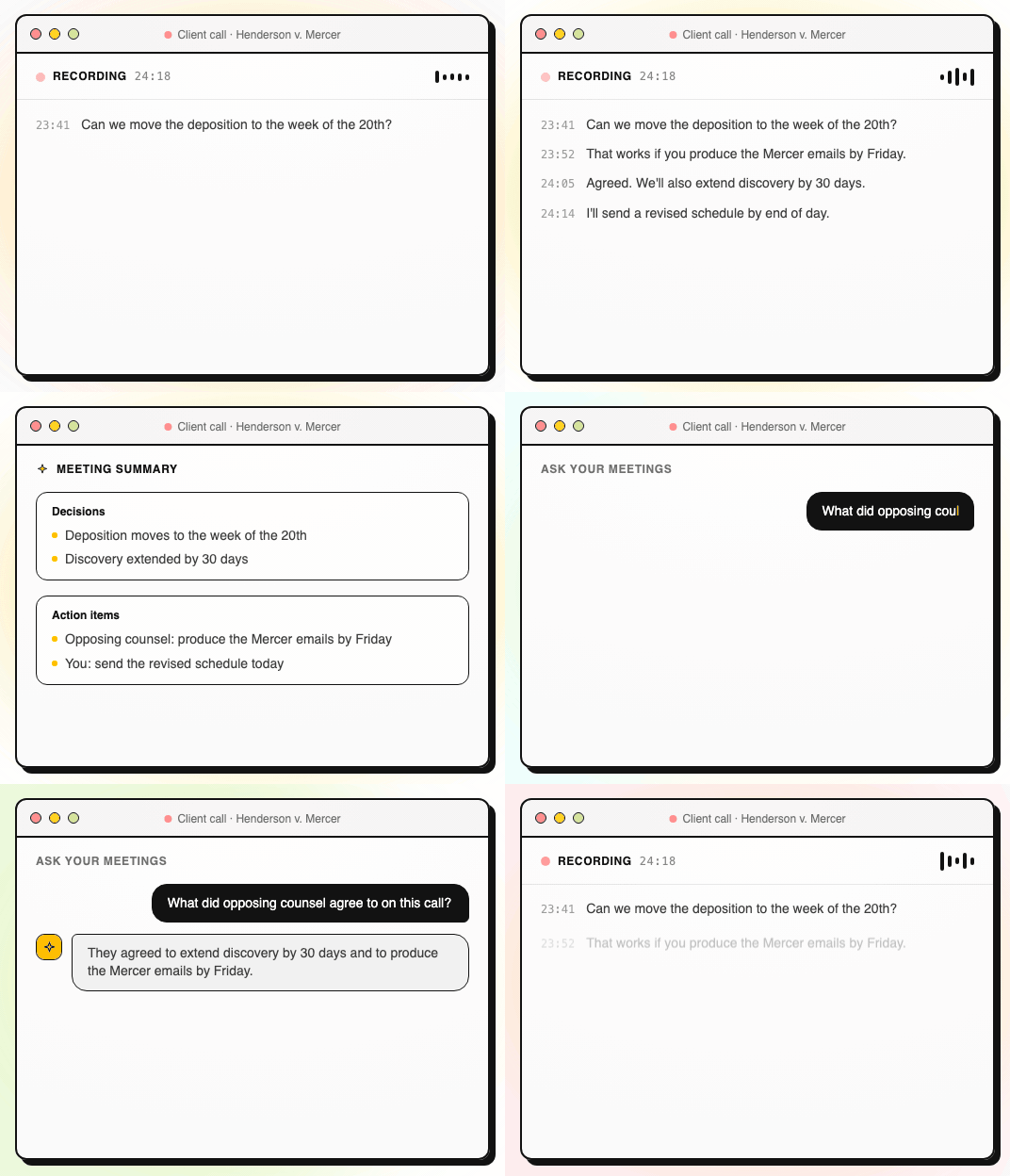
Voibe Takes Your Meeting Notes
Voibe Work is here, our biggest update yet. Voibe now takes notes in your meetings from your Mac, in Zoom, Microsoft Teams, Google Meet or any other meeting app, and nothing joins the call. Voibe Work is available on Mac today, and Windows is coming soon. Voibe 3.0 needs macOS 14.4 or later.
New
Meeting Notes With No Bot
When a meeting starts, Voibe notices and asks if you'd like notes. Click "Take notes" and it records from your Mac. Nobody has to admit a notetaker, and the people on the call see only you.
Summaries That Fit the Meeting
When the meeting ends, Voibe writes a summary of it. Pick a summary style for each kind of meeting, or rewrite a summary in another style afterwards. Copy it in one click, or save it as a PDF.
Full Transcript With Speakers
Every meeting comes with a full transcript. Voibe labels each speaker and puts a time next to every line. Click a speaker's name to rename them, and the summary updates to use the name.
Ask Your Meetings
Ask Voibe what was agreed or who owns what. It answers from the meeting itself and shows the exact words each answer is based on, with the time they were said. Each question can have its own conversation, so answers you want to keep don't get buried.
Two Plans: Voibe Dictation and Voibe Work
Voibe Work includes everything in Voibe Dictation, plus meeting notes. If you're on Voibe Pro, your plan is now called Voibe Dictation, and your price and everything you use today stay the same.
Improved
Your Notes Stay on Your Mac
Meeting transcripts and summaries are saved on your Mac, not on our servers. Nothing from your meetings is ever used to train AI.
A Reminder to Tell the Room
When recording starts, Voibe reminds you to let everyone on the call know you're taking notes.
Meeting Settings of Their Own
Meeting notes have their own settings for the shortcut, the offer to take notes, and your summary styles. General settings keep only what applies to the whole app.
A Resizable Voibe Window
The Voibe window can now be made bigger, and it remembers the size you choose.
v2.25
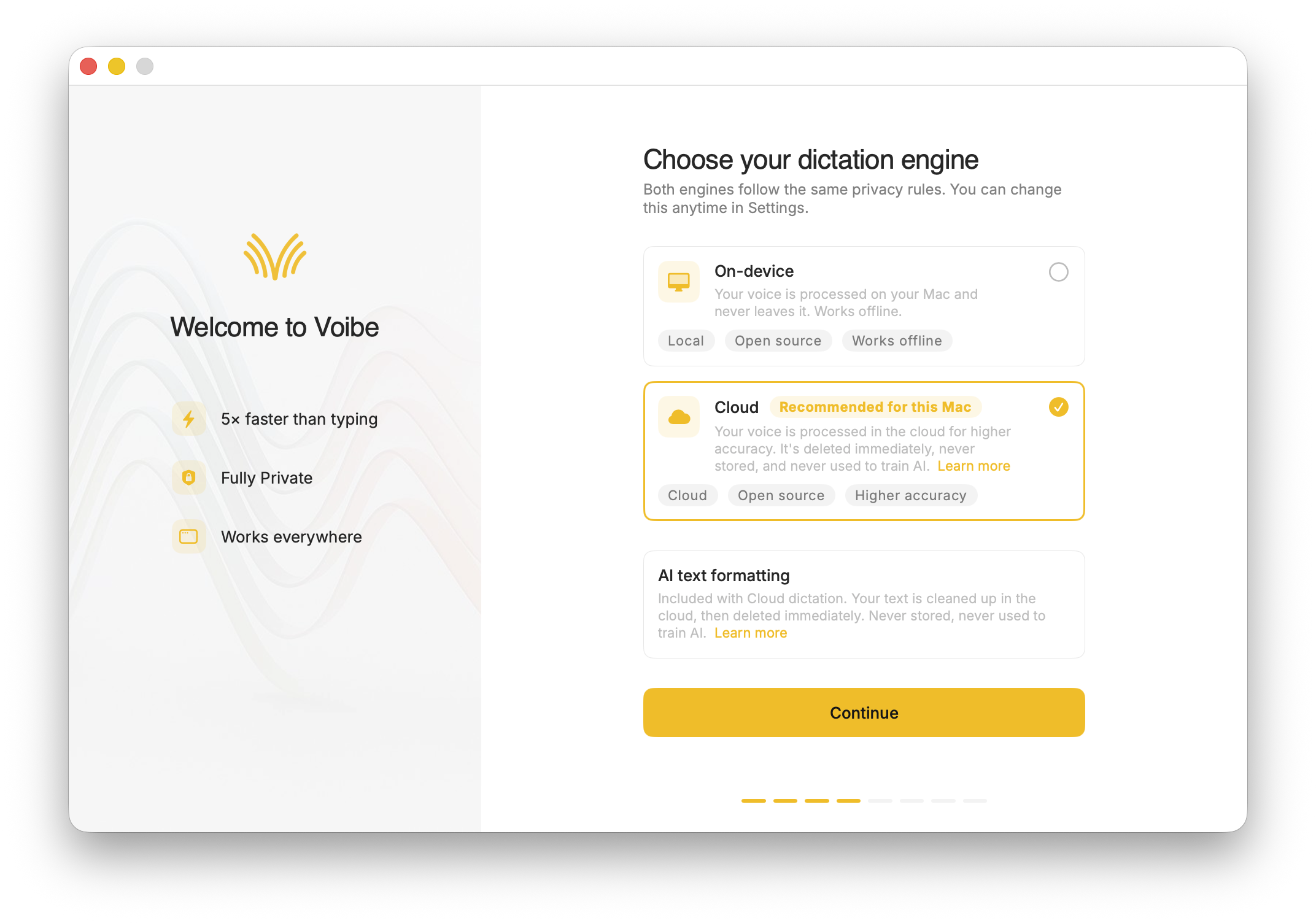
Choose Your Dictation Engine
Voibe now offers two engines. Local runs entirely on your Mac, fully offline and private, exactly as before. Cloud brings the accuracy of the largest Whisper model to every Mac, Intel included. You choose during setup and can switch anytime in Settings.
New
Cloud Dictation Engine
An optional Cloud engine transcribes with the largest Whisper model, in every mode: push-to-talk, hands-free, and Live Dictation. Your audio travels over an encrypted connection, is deleted the moment it's transcribed, and is never stored or used to train anything. Local stays the recommended default on Macs that run it well.
Much Better Formatting
Smart Formatting now runs on a fast cloud model in every mode, so what lands is clean, finished text instead of a raw transcript: punctuation, capitalisation, lists, and the filler words handled for you, without changing what you said. It's tuned separately for push-to-talk, hands-free, and Live Dictation. Optional as always, only the finished text is sent, and it is never stored.
Voibe on Intel Macs
With the Cloud engine, Voibe now works on Intel Macs for the first time, with the same accuracy as the latest Apple Silicon machines.
Automatic Fallback to Local
If your connection hiccups while using Cloud, Voibe switches to a local model and keeps typing, even mid-session in Live Dictation. A fast local model is kept ready in the background, so dictation never stops and offline always works.
Improved
Pick Your Engine During Setup
New users choose Local or Cloud on a dedicated onboarding screen, with the recommended option pre-selected for their Mac. Existing users get a one-time walkthrough of the choice on upgrade, keeping their current behaviour.
Cmd+Comma Opens Settings
The standard macOS shortcut for settings now works in Voibe.
Smart Formatting Settings in One Place
Smart Formatting now lives under Transcription in Settings, next to your engine choice.
Fixed
No Phantom Text in Silences
Silent pauses no longer occasionally produce invented text when using the Cloud engine.
Smart Formatting Stays As You Set It
Smart Formatting no longer switches itself off after an app restart for push-to-talk and hands-free users.
Steadier Live Dictation on Cloud
Live Dictation no longer silently drops words when the connection repeatedly fails; it switches to the local model instead.
Display and Notification Polish
Fixed rare upside-down transcript text in the dashboard history card, and cloud error notifications now dismiss themselves.
v2.24
Cloud AI Formatting
An optional AI pass can clean up your Live Dictation after you speak. It's off by default, and you turn it on in Settings.
New
Cloud AI Formatting for Live Dictation
Turn this on and Voibe sends your finished Live Dictation transcript to a cloud AI model that tidies the wording and formatting. It runs in the background after your text has already landed, so it never adds to the wait. It's off by default and entirely opt-in. The text is dropped immediately after formatting and nothing is stored or used for any other purpose.
Improved
Smarter Pause Other Audio
Voibe now pauses other audio only when something is actually playing, instead of whenever an app could be making sound. On macOS 14.4 and later this uses a new System Audio Recording permission; if you don't grant it, pausing still works as best it can.
Faster First Dictation
Voibe warms up the moment you press your hotkey, so the first dictation after a quiet spell starts noticeably quicker.
Fixed
Text Lands in the Right App
Live Dictation now inserts your text into the app where you started, even if you moved to another app while speaking.
Steadier Transcription
Resolved occasional slowdowns and stray filler words, such as an unexpected "Thank you", during longer sessions. Accuracy is unchanged.
v2.23
Spoken Punctuation
Say punctuation and symbols by name and Voibe types them as you dictate, instantly and on your Mac. On by default, and you can turn it off anytime in Settings.
New
Spoken Punctuation & Symbols
Say a mark or symbol by name and Voibe types it instead of the words. Say "comma" for a comma or "open paren" for an opening bracket, plus @, math signs, currency, and even full email addresses. It happens the instant you speak, entirely on your Mac.
Structure By Voice
Use "new line", "new paragraph", "bullet point", or "numbered list" to lay out paragraphs and lists while you dictate.
v2.22
Cleaner Transcripts
Custom dictionary words are recalled accurately without leaking into your text.
Improved
Better Silence Handling
Pauses within a dictation are handled more precisely, reducing spurious text.
Fixed
No More Echoed Words
Fixed an issue where words from your custom dictionary could occasionally show up as stray text in your transcript. Custom words are now recalled accurately while your output stays clean.
v2.21
Stability & Setup Fixes
A round of reliability fixes across setup, microphones, and audio.
Improved
More Reliable Model Downloads
Models now download with an integrity check, so a wrong or corrupted download no longer breaks transcription. If a download does fail, you can reach us directly with a new Contact Support option.
Audio Handling While Dictating
Improved how Voibe manages other audio playing on your Mac while you dictate.
Fixed
Microphones With Multiple Channels
Fixed the microphone not working on devices with more than two input channels.
Smoother First-Time Setup
Resolved issues during onboarding, including extra app windows opening and the model occasionally not downloading.
v2.20
Live Dictation
Watch your words appear as you speak, and edit them before they land.
New
Live Dictation
A new third dictation mode. Your words appear on screen as you speak, so you can read along and make edits before the text lands in your app. Like every mode, it transcribes entirely on your Mac.
Cancel a Dictation Instantly
Press Escape to discard the current dictation before it's inserted.
Improved
Simpler Default Hotkeys
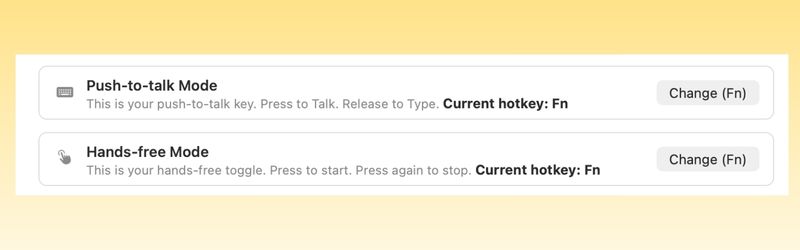
Hands-Free now starts with Fn+Space, and a quick double-tap of Fn works too. You can also assign function keys like F1 and F2, and choose your own key combination for Push-to-Talk.
Refreshed App Icon
A cleaner look for the Dock and menu bar icons.
Fixed
Hotkey Conflicts
A single modifier key can now be shared between Push-to-Talk and Hands-Free without clashing.
Crash on Restart
Resolved a crash that could occur when restarting the app.
v2.19
Transcript Controls & Refinements
Decide whether Voibe keeps your transcripts, plus accuracy and reliability improvements.
New
Control Your Transcript History
A new Save transcript history toggle in Settings lets you stop Voibe from storing transcribed text on your Mac. It stays on device either way, and now you choose whether it's kept at all.
Improved
Steadier Transcription
Refined how Voibe detects when you pause and how it segments longer speech, for more consistent results during extended dictation.
Fixed
Pasting Into Background Apps
Dictated text now types reliably into the app you're working in, even when it sits behind Voibe's overlay.
Stray Words During Silence
Custom dictionary words no longer slip into the transcript when you pause without speaking.
Dark Mode in Profile Editing
Fixed a dark mode display issue when editing your profile.
v2.18
Custom Dictionary Improvements
More reliable custom dictionary and bulk editing.
New
Bulk Edit for Custom Dictionary
Edit multiple custom dictionary entries at once, making it faster to manage your vocabulary.
Improved
More Reliable Custom Dictionary Playback
Custom dictionary words are now played back more reliably during dictation.
Fixed
Custom Dictionary UI Issues
Fixed visual issues on the custom dictionary screen.
v2.17
Memory & App Improvements
A new Memory tab, microphone selection, and a round of app improvements.
New
Memory
A new tab where you create shortcuts that expand into the text you actually mean. Fix tricky spellings, store shorthand for complex text like URLs or signatures, and save reusable prompts.
Choose Your Microphone
Select which microphone Voibe uses, handy if you have an external mic or use a headset.
Mute Audio While Dictating
A new toggle in Settings that mutes your device audio during dictation, so media playback doesn't interfere.
Hide from Dock
Prefer Voibe to live only in the menu bar? You can now remove it from the Dock in Settings.
Help Center
A new Help Center section inside the app makes it easy to access help resources and create support requests.
Improved
Social Handles in App
Voibe's social media handles are now accessible directly inside the app.
Cmd+V on All Text Fields
Paste now works consistently across every text field in the app.
Fixed
Dark Mode Issues
Resolved dark mode rendering issues across the entire app.
v2.16
A Fresh New Look
No flashy new feature — instead, we made Voibe smoother, cleaner, and more intuitive.
New
Redesigned Interface
A completely revamped dashboard — cleaner layout, simpler onboarding, and dedicated tabs for history, dictionary, settings, and account management.
Complete Dictation History
Every word you've ever dictated is now stored locally and available inside Voibe. Scroll back through your full transcript history and copy any entry with a single click.
5-Minute Sessions
The old 1-minute limit was too short for longer emails, notes, or braindumps. You can now speak for up to 5 minutes per session in both Push-to-Talk and Hands-Free modes.
Paste Last Transcript Anytime
Press Ctrl + Option + V or use the menu bar option to paste your last transcript wherever you need it. You can also customise this shortcut in settings.
Edit Your Profile
Update your name, about section, and referral code directly from the app — handy if you skipped any of these during sign-up.
v2.14
Hands-Free Mode
The number one request since launch — speak without holding down a key.
New
Hands-Free Mode
Double-tap your hotkey to toggle dictation on and off without holding the Fn key. Speak for as long as you need — when you're done, tap the key again to finish.
Speed vs Accuracy Modes
New performance modes give you control over the speed-accuracy trade-off. Voibe recommends the best model for your Mac's hardware, or you can choose the most accurate model manually.
100+ Languages
Voibe now supports over 100 languages. Select your primary language during sign-up or switch anytime from the dashboard.
Custom Vocabulary
Teach Voibe the names of your team, products, or internal abbreviations. Add them to Custom Vocabulary in settings and Voibe learns them instantly.
Developer Mode
If you use Cursor, VS Code, or Windsurf, Voibe can scan your workspace context locally and automatically resolve file names, folder paths, and variable names correctly.
Get started with Voibe
Enter your email to sign in or create a new account.
What email do you use in Voibe?
We'll link this purchase to your account
Need the Windows version?
Check your inbox!
We've sent you the download link. Open the email on your computer to install Voibe.
Secure checkout by LemonSqueezy
Cookie preferences
We use cookies to understand how our site is used, measure our advertising, and provide live chat. You can accept all cookies, reject non-essential ones, or choose which to allow. Privacy policy