
System Requirements
Voibe works on every Mac — Intel and Apple Silicon — and on Windows. On an Apple Silicon Mac, you choose how transcription runs: fully on your Mac in on-device mode (which uses Apple Silicon's Neural Engine), or in a zero-retention cloud mode that runs open-source models and works on any Mac. On Windows and Intel Macs, Voibe runs in zero-retention cloud mode. Either way, your audio is never stored, sold, or used to train AI.
Here's exactly what Voibe needs on each platform, and how to check your machine.
On Mac
- ✓ Any Mac — Intel or Apple Silicon — running a supported macOS
- ✓ macOS 14.4 Sonoma or later
- ✓ A working microphone — a built-in laptop mic or an external microphone
- ✓ For fully on-device mode — an Apple Silicon Mac (M1 or later). On Intel Macs, Voibe runs in zero-retention cloud mode instead.
On Windows
- ✓ Windows 10 or Windows 11, 64-bit
- ✓ A working microphone — a laptop's built-in mic or any USB headset
- ✓ An internet connection — Windows uses zero-retention cloud mode, so dictation needs to be online
- ✓ No special hardware — the models run in the cloud, so an ordinary laptop is plenty
Which mode needs what
Voibe gives you two ways to transcribe, and they have different hardware needs:
On-device mode runs the transcription model directly on your Mac, so your audio stays on the device. Turn optional AI text formatting off too for fully local, offline dictation. That model is large and needs to run fast — ideally in real time — which is exactly what the Apple Silicon Neural Engine is purpose-built for. On-device mode therefore requires an Apple Silicon Mac (M1 or later); Intel Macs don't have a Neural Engine.
Zero-retention cloud mode runs open-source models (Whisper Large Turbo for speech) in the cloud over an encrypted connection. Your audio is deleted the moment transcription completes and is never stored, sold, or used to train AI. Because the heavy lifting happens in the cloud, cloud mode works on any Mac — including Intel — and on Apple Silicon it gives you access to larger, even-more-accurate models than your Mac can run locally. It is also how Voibe runs on Windows.
| Your machine | On-device mode | Zero-retention cloud mode |
|---|---|---|
| Apple Silicon Mac (M1 or later) | Yes | Yes |
| Intel Mac | No — no Neural Engine | Yes |
| Windows PC | Not yet | Yes |
How to check your Mac
It takes about five seconds.
- 1. Click the Apple menu in the top-left corner of your screen.
- 2. Choose About This Mac.
- 3. Look for a row labelled Chip (Apple Silicon) or Processor (Intel).
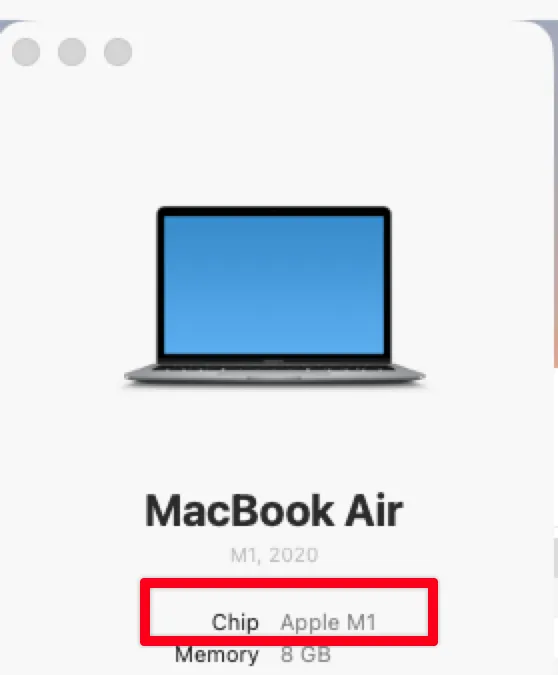
The Chip row tells you whether you have Apple Silicon.
| What you see | Your Mac | Works with Voibe? |
|---|---|---|
| Chip: Apple M1 / M2 / M3 / M4 (any variant) | Apple Silicon | Yes — on-device or cloud mode |
| Processor: Intel Core i5 / i7 / i9 / Xeon | Intel | Yes — zero-retention cloud mode |
You'll also see your macOS version on the same screen (for example "macOS 14.6 Sonoma"). Voibe needs macOS 14.4 Sonoma or later, so 14.0 through 14.3 are too old.
What if I have an Intel Mac?
You can still use Voibe. On an Intel Mac, dictation runs in zero-retention cloud mode: your audio is sent over an encrypted connection to open-source models, transcribed, and then deleted — never stored, sold, or used to train AI.
The one thing an Intel Mac can't do is fully on-device transcription, which relies on the Apple Silicon Neural Engine. If keeping everything on your machine with nothing leaving it is a hard requirement, you'll need an Apple Silicon Mac (M1 or later).
Your Intel Mac does need to be new enough for macOS 14.4 Sonoma. Open System Settings → General → Software Update: if 14.4 or later isn't offered, that Mac is too old for Voibe.
What Voibe needs on Windows
Voibe runs on 64-bit Windows 10 and Windows 11. There are no special hardware requirements — no dedicated GPU, no NPU, no minimum RAM beyond what Windows itself needs — because on Windows the transcription models run in the cloud rather than on your PC.
That means Windows dictation needs an internet connection. It runs in zero-retention cloud mode: your audio travels over an encrypted connection to open-source models, is transcribed, and is deleted the moment transcription completes. It is never stored, sold, or used to train AI. The Cloud AI privacy page documents exactly what happens and who processes it.
To check your Windows version, press Win + R, type winver, and press Enter. To confirm you're on 64-bit Windows, open Settings → System → About and look at System type.
Setting up for the first time? See the Windows setup guide.
Which macOS versions are supported?
Voibe officially supports macOS 14.4 Sonoma and newer. We test on the latest macOS release and the one before it.
If you're running an older macOS, update via System Settings → General → Software Update. Any Apple Silicon Mac can run the latest macOS.
Still stuck? Email hi@getvoibe.com and we'll help you out.
Other devices
Can I use Voibe on iPhone or Android?
Voibe is available for Mac and Windows. There is no iPhone or Android app available to download, and we have not announced a mobile release date.
Does Voibe work on a Mac mini?
Yes, with a supported version of macOS. Select a working audio input in your Mac’s sound settings. If your setup has no microphone, connect one, such as a USB microphone or headset. On-Device Mode requires an Apple Silicon Mac mini; Intel models use Cloud Mode.
Check your microphone