
MacWhisper vs Wispr Flow: Transcription vs AI Dictation (2026)
MacWhisper vs Wispr Flow compared on features, pricing, and privacy. See which tool fits your workflow — batch transcription or real-time AI dictation.

MacWhisper
On-device audio transcription app for Mac by Jordi Bruin (Good Snooze). Uses OpenAI Whisper and Nvidia Parakeet models to transcribe audio and video files locally. Primarily designed for batch file transcription rather than real-time dictation.
~$59 Pro (Gumroad one-time) or $6.99/mo on App Store
Pros
- + 100% on-device processing — no audio data leaves your Mac
- + Affordable one-time purchase at ~$59 Pro on Gumroad
- + Excellent batch transcription with speaker identification
- + Supports 100+ languages via Whisper Large-v3 Turbo
- + Nvidia Parakeet model transcribes 30-minute podcasts in under 8 seconds
- + iOS version launched April 2025 with free local models
Cons
- - Primarily a transcription tool — system-wide dictation is basic compared to dedicated dictation apps
- - No AI text rewriting, tone matching, or formatting intelligence
- - App Store version uses subscription pricing ($6.99/mo or $99.99 lifetime)
- - Gumroad vs App Store pricing and feature differences can be confusing
- - No Windows or Linux support
Wispr Flow
Cloud-based AI dictation app with auto-editing, tone matching, and cross-platform support on Mac, Windows, iOS, and Android. Backed by $81 million in funding.
$15/mo or $144/yr (subscription only)
Pros
- + AI auto-editing removes filler words and formats text for each app
- + Cross-platform: Mac, Windows, iOS, and Android
- + No training required — works accurately from first use
- + 100+ language support with code-switching
- + SOC 2 Type II and HIPAA compliance
Cons
- - Cloud-only — audio sent to OpenAI and Meta servers
- - Captures screenshots of the active window every few seconds for context
- - No offline mode available
- - Subscription-only at $15/month ($144/year)
- - Trustpilot rating of 2.7/5; G2 shows 4.5/5 but based on only 6 reviews
- - 6-minute recording cap per dictation session
- - Free tier limited to 2,000 words per week
Voibe
WinnerOn-device Mac dictation app with VS Code and Cursor integration. Processes everything locally using Whisper models on Apple Silicon with zero cloud dependency.
$7.50/mo, $59/yr, or $149 lifetime
Pros
- + 100% on-device processing — zero data leaves your Mac
- + No training required — accurate from first use
- + Developer mode with VS Code and Cursor integration
- + $149 lifetime — 65% cheaper than 3 years of Wispr Flow ($283 saved)
- + Works fully offline on Apple Silicon Macs
Cons
- - macOS only (Apple Silicon M1-M4)
- - No AI text rewriting or reformatting
- - No Windows or mobile support
- - No batch file transcription
TL;DR: MacWhisper vs Wispr Flow — Which Do You Actually Need?
MacWhisper and Wispr Flow solve different problems. MacWhisper is a file transcription tool — drag in audio or video files and get text transcripts. Wispr Flow is a real-time dictation tool — speak and get polished text inserted into any app. If you need to transcribe meetings, podcasts, or interviews, choose MacWhisper. If you need to compose emails, messages, and documents by voice, choose Wispr Flow. If you want on-device dictation with developer features at a one-time price, choose Voibe.
Disclosure: Voibe is our product. We compare all three tools fairly below, acknowledging where MacWhisper and Wispr Flow each excel.
Key Takeaway
MacWhisper is for transcribing files (€59 / ~$69 one-time). Wispr Flow is for composing text by voice ($144/yr). Voibe combines on-device privacy with real-time dictation at $149 lifetime. See our MacWhisper pricing guide and Wispr Flow pricing guide for tier-by-tier details.
Key Takeaways: MacWhisper vs Wispr Flow at a Glance
| Feature | MacWhisper | Wispr Flow | Voibe | Winner |
|---|---|---|---|---|
| Primary Use | File transcription | Real-time AI dictation | Real-time on-device dictation | Depends on need |
| Price | ~$59 one-time (Gumroad) | $15/mo or $144/yr | $149 lifetime | MacWhisper |
| 3-Year Cost | $59 | $432 | $149 | MacWhisper |
| Privacy | 100% on-device | Cloud (OpenAI, Meta servers) | 100% on-device | MacWhisper / Voibe |
| Offline Mode | Yes | No | Yes | MacWhisper / Voibe |
| AI Text Editing | No | Full AI rewriting | No | Wispr Flow |
| Platform | Mac, iOS | Mac, Windows, iOS, Android | macOS (Apple Silicon) | Wispr Flow |
| Meeting Transcription | Yes (with speaker ID) | No | No | MacWhisper |
| Languages | 100+ | 100+ | 99 | Tie |
| Developer Features | None | Code syntax recognition | VS Code + Cursor integration | Voibe |
Quick Comparison: File Transcription vs Real-Time Dictation
| Spec | MacWhisper | Wispr Flow | Voibe |
|---|---|---|---|
| Type | Batch file transcription | Cloud AI dictation | On-device AI dictation |
| Processing | Local (Whisper / Parakeet) | Cloud (OpenAI, Meta) | Local (on-device Whisper) |
| Platform | Mac, iOS, iPadOS, visionOS | Mac, Windows, iOS, Android | macOS (Apple Silicon) |
| Price | ~$59 Pro (Gumroad) | $15/mo or $144/yr | $7.50/mo, $59/yr, or $149 lifetime |
| Free Tier | Yes (basic models) | 2,000 words/week | Free trial |
| Speaker ID | Yes (local + API) | No | No |
| Export Formats | TXT, SRT, VTT, Word, PDF | Text only | Text only |
| Best For | Journalists, podcasters, researchers | Cross-platform AI dictation | Privacy, developers, value |
What Is MacWhisper?
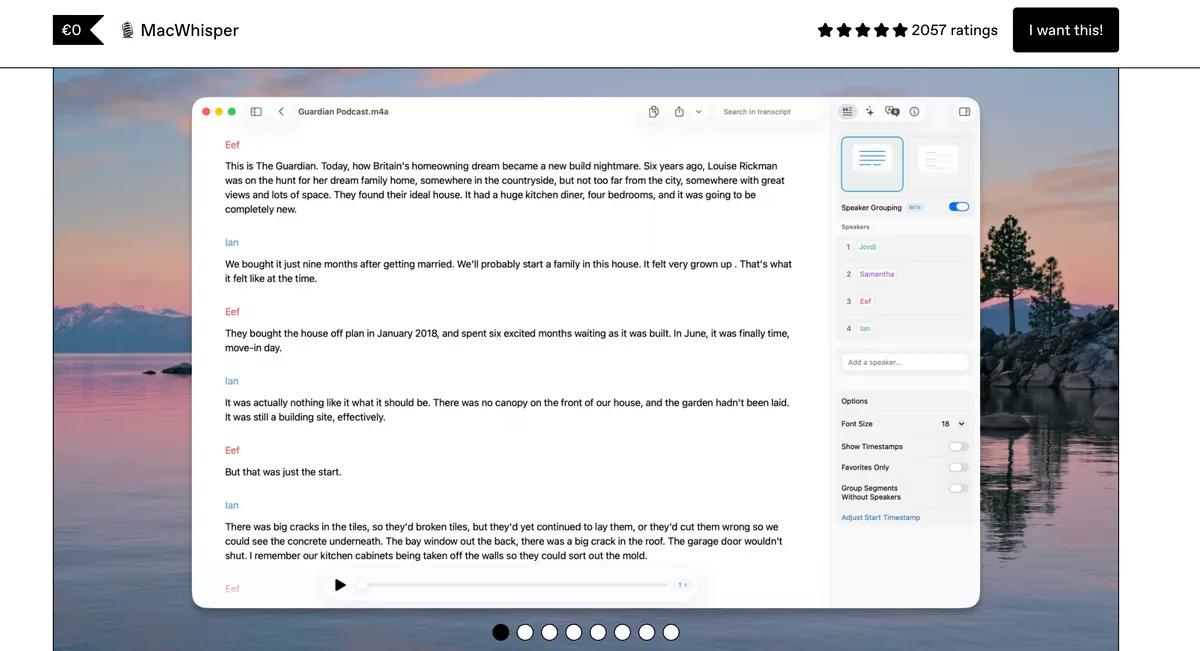
MacWhisper is an on-device audio transcription app for Mac built by Jordi Bruin (Good Snooze). It runs OpenAI Whisper and Nvidia Parakeet speech models directly on your Mac hardware to transcribe audio and video files without sending any data to the cloud. For context on how it compares to other Whisper-based tools, see our MacWhisper vs Superwhisper comparison.
MacWhisper's core strength is batch file transcription. Drag in a podcast recording, interview, meeting audio, or video file and get a searchable text transcript with timestamps and speaker identification. The Nvidia Parakeet model (added in MacWhisper 13) can transcribe a 30-minute podcast in under 8 seconds on Apple Silicon.
MacWhisper Core Features
- Batch transcription: Transcribe multiple audio/video files with speaker identification
- Multiple models: Whisper (Tiny through Large-v3 Turbo), Nvidia Parakeet, Moonshine
- Meeting recording: Auto-record from Zoom, Teams, Webex, Skype, Discord
- System-wide dictation: Basic push-to-talk dictation into any text field
- Export formats: TXT, SRT subtitles, VTT, Word, PDF
- AI features: Chat with transcripts, AI summaries via 9 providers, local AI via Ollama
- YouTube transcription: Transcribe YouTube videos by URL
MacWhisper Limitations
- Primarily a transcription tool — real-time dictation is secondary
- No AI text rewriting or tone matching for dictation output
- App Store vs Gumroad pricing confusion ($6.99/mo subscription vs ~$59 one-time)
- No Windows or Linux support
- Performance depends heavily on Mac hardware — older Intel Macs are significantly slower
Key Takeaway
MacWhisper is the best choice for transcribing audio files on Mac — fast, private, and affordable. But it is a transcription tool first. Real-time dictation is a secondary feature, not the primary use case.
What Is Wispr Flow?

Wispr Flow is a cloud-based AI dictation app designed for real-time text composition. Instead of transcribing existing audio files, Wispr Flow lets you speak naturally and converts your words into polished, formatted text inserted directly into any app. For more on how Wispr Flow compares to other dictation tools, see our full Wispr Flow review.
Wispr Flow's defining feature is AI auto-editing. It does not just transcribe — it rewrites. Dictate casually and get a professional email. Ramble through ideas and get structured notes. This is a fundamentally different product from MacWhisper.
Wispr Flow Core Features
- AI auto-editing: Rewrites speech into polished text with formatting and tone matching
- Zero training: Accurate from first use with no setup
- Cross-platform: Mac, Windows, iOS, and Android
- 100+ languages: With automatic code-switching
- SOC 2 Type II and HIPAA compliance: Enterprise security certifications
Wispr Flow Limitations
- Cloud-only — all audio processed on OpenAI and Meta servers
- Screenshots of the active window captured every few seconds for context
- Subscription-only at $15/month or $144/year
- 6-minute recording cap per dictation session
- Free tier limited to 2,000 words per week
- Trustpilot rating of 2.7/5 suggests mixed user satisfaction
Key Takeaway
Wispr Flow is the best choice for AI-assisted text composition by voice — but cloud processing, screenshot capture, and recurring costs are significant trade-offs.
Feature-by-Feature: MacWhisper vs Wispr Flow
Transcription vs Dictation
This is the most important distinction. MacWhisper is built for transcribing existing audio — recordings, meetings, podcasts, interviews. Wispr Flow is built for composing new text by voice in real time. Comparing them directly on dictation quality is like comparing a scanner to a printer. MacWhisper's dictation feature exists but is secondary; Wispr Flow has no file transcription capability at all.
Winner: Depends entirely on your need. MacWhisper for transcription, Wispr Flow for dictation.
Privacy and Offline Capability
MacWhisper processes all transcription on-device. No audio data leaves your Mac. You can work fully offline with no internet connection. Wispr Flow requires an internet connection and sends all audio to cloud servers operated by OpenAI and Meta. It also captures screenshots of the active window to provide context for its AI editing — a feature that drew backlash when disclosed publicly.
For sensitive recordings or confidential dictation, MacWhisper's on-device approach is significantly more private. Voibe also provides 100% on-device processing for real-time dictation.
Winner: MacWhisper (and Voibe for dictation)
AI Text Processing
Wispr Flow wins decisively here. It rewrites your speech into polished text, removes filler words, adds formatting appropriate to the target app, and matches your writing tone. MacWhisper transcribes speech accurately but outputs raw text — what you said is what you get. For users who want their spoken words cleaned up and formatted automatically, Wispr Flow is the only option among these three.
Winner: Wispr Flow
Platform Support
Wispr Flow runs on Mac, Windows, iOS, and Android. MacWhisper runs on Mac, iOS, iPadOS, and Apple Vision Pro — all Apple platforms. Neither covers Linux. Wispr Flow's Windows and Android support give it the edge for cross-platform teams.
Winner: Wispr Flow
Pricing and Long-Term Value
MacWhisper Pro costs approximately $59 as a one-time purchase on Gumroad. Wispr Flow costs $144/year on the annual plan. Over 3 years, Wispr Flow costs $432 — 7.3x more than MacWhisper. Even accounting for the different use cases, that price gap is significant. Voibe costs $149 lifetime as a one-time purchase for real-time dictation — 65% less than 3 years of Wispr Flow ($283 saved).
Winner: MacWhisper (for transcription value); Voibe (for dictation value)
Accuracy and Speed
MacWhisper with Nvidia Parakeet transcribes a 30-minute podcast in under 8 seconds on Apple Silicon. Whisper Large-v3 Turbo delivers high accuracy across 100+ languages. Wispr Flow delivers fast real-time dictation with cloud processing. Both are accurate for their respective tasks. MacWhisper has an edge for long-form transcription accuracy with larger models.
Winner: Tie (different tasks, both strong)
Developer Features
Neither MacWhisper nor Wispr Flow offers dedicated IDE integration. Wispr Flow provides code syntax recognition for formatting in code editors. Voibe is the only tool with VS Code and Cursor integration, including file and folder name resolution.
Winner: Voibe
What Users and Reviewers Say
MacWhisper User Sentiment
MacWhisper holds a 3.9/5 rating on the App Store (123 ratings) and a 4.86/5 on Product Hunt (7 reviews). Users consistently praise its transcription accuracy, privacy-first approach, and one-time pricing model. The Nvidia Parakeet integration (MacWhisper 13) is particularly well-received for speed. Common criticisms include performance variability on older Intel Macs and the confusing pricing split between Gumroad and App Store versions.
Wispr Flow User Sentiment
Wispr Flow holds a 2.7/5 on Trustpilot and a 4.5/5 on G2 (6 reviews). The split ratings suggest polarized user experiences — some users find the AI editing transformative, while others report quality degradation after the trial period, high resource usage, and privacy concerns about the screenshot capture feature.
The Real Comparison
Most users choosing between MacWhisper and Wispr Flow are comparing the wrong tools. If you arrive at this comparison because you want to transcribe recordings, MacWhisper is clearly better. If you want to compose text by voice, Wispr Flow or Voibe are the right choices.
Which Should You Choose?
Choose MacWhisper if you:
- Need to transcribe audio recordings, podcasts, interviews, or meetings
- Want speaker identification and subtitle export (SRT/VTT)
- Prefer a one-time purchase (~$59 on Gumroad) over subscriptions
- Need batch transcription of multiple files
- Work with audio/video content professionally
Choose Wispr Flow if you:
- Want AI-assisted text composition (emails, messages, documents) by voice
- Need cross-platform support across Mac, Windows, iOS, and Android
- Value AI auto-editing that reformats and polishes your speech
- Need HIPAA or SOC 2 compliance for enterprise use
- Are comfortable with cloud processing and subscription pricing
Choose Voibe if you:
- Want real-time dictation with 100% on-device privacy
- Are a developer who needs VS Code or Cursor integration
- Prefer a one-time $149 lifetime price over subscriptions
- Need offline capability — no internet required
- Use a Mac with Apple Silicon (M1-M4)
Final Verdict: MacWhisper vs Wispr Flow
MacWhisper and Wispr Flow are not really competitors. MacWhisper is the best tool on Mac for transcribing audio files — fast, private, affordable at ~$59. Wispr Flow is a cloud-based AI dictation tool for composing text by voice — polished, cross-platform, $144/year. Choosing between them depends entirely on whether you need to convert existing recordings to text or compose new text by speaking.
For Mac users who want real-time dictation with on-device privacy at a one-time price, Voibe is the strongest option at $149 lifetime — combining the privacy of MacWhisper with the dedicated dictation focus of Wispr Flow, minus the cloud dependency and subscription costs. Voibe's price funds a private, actively developed product — not ad or data revenue — and we never train AI on your dictation.
Try Voibe free and see if on-device dictation fits your workflow.
Key Takeaway
MacWhisper is the best Mac transcription tool (~$59). Wispr Flow is the best cross-platform AI dictation tool ($144/yr). Voibe is the best on-device dictation tool for Mac ($149 lifetime). Pick the one that matches your primary need.
Related Dictation Comparisons
- MacWhisper vs OpenAI Whisper — GUI wrapper vs raw model. €59 (~$69) Gumroad lifetime polished Mac app vs MIT-licensed Python CLI on GitHub. Same Whisper foundation, different products.
- MacWhisper vs Superwhisper: Transcription vs Power-User Dictation
- Wispr Flow vs Superwhisper: Cloud AI vs On-Device Dictation
- Dragon vs Wispr Flow: Legacy Desktop vs Modern AI
- Typeless vs Wispr Flow: Privacy-First vs Cloud AI
- Is Wispr Flow Safe? — Cloud architecture, Privacy Mode defaults, the March 2026 Delve fake-audit scandal, and Wispr's A-LIGN remediation in one investigation.
- VoiceInk vs Wispr Flow: Open-Source On-Device vs Cloud Subscription
- VoiceInk Review: Open-Source Mac Dictation for $40
- Best Offline Dictation Apps for Mac
Ready to type 3x faster?
Voibe is the fastest, most private dictation app for Mac. Try it today.
Related Articles
Spokenly vs Wispr Flow (2026): Hybrid Free + BYOK vs Cross-Platform Cloud
Spokenly is hybrid Mac + iOS with a genuinely free on-device tier and an MCP server; Wispr Flow is cross-platform cloud with audited SOC 2 + HIPAA + ISO 27001. We compare architecture, pricing, platform reach, and who picks which.
Voicy vs Wispr Flow (2026): Cross-Platform Cloud Dictation Compared
Voicy is $220 lifetime cross-platform cloud dictation; Wispr Flow is $144/yr venture-backed with iOS + HIPAA. We compare architecture, pricing, compliance, and who should pick which.
Wisprtype vs Wispr Flow (2026): Two Products, One Confusing Name
Wisprtype is a free indie Mac app from Piyush Garg. Wispr Flow is a $144/yr venture-backed cloud product. We compare architecture, privacy, pricing, and who should pick which.