
7 Dragon NaturallySpeaking Alternatives That Run on a Modern Mac
Dragon hasn't run on a Mac since 2018. Seven Dragon NaturallySpeaking alternatives, from free to $249.99, and the one I'd install first.

Your Dragon license won't install on a new Mac, and no update is coming. Dragon Professional Individual 6 was the last Mac version, updates stopped in 2018, and it doesn't launch on Apple Silicon at all.
The app I'd put on the Mac instead is Voibe, ours, at $7.50/mo, $75/yr, or $149 lifetime. It types into any Mac app, runs on-device on Apple Silicon so nothing leaves the machine, and gives you a Dictionary in place of Dragon's Vocabulary Center and Memory shortcuts in place of Auto-Texts. SuperWhisper ($8.49/mo or $249.99 lifetime) is the pick if you want more settings, and VoiceInk ($29–$69 one-time) is the cheapest on-device option.
TL;DR: Dragon NaturallySpeaking is gone from the Mac, and the seven alternatives below cost $0 to $249.99. None of them needs voice training.
For Dragon Medical, see our Dragon Medical alternatives guide. For the wider field, start at the alternatives hub.
Key Takeaways: The Seven Mac Alternatives at a Glance
| Tool | Best For | Price | Key Strength |
|---|---|---|---|
| Voibe | Privacy-first dictation on Mac (and Windows) | $7.50/mo, $75/yr, or $149 lifetime | On-device on Apple Silicon or zero-retention cloud; Dictionary, Memory, Smart Formatting; VS Code/Cursor integration |
| SuperWhisper | Power users and customization | $8.49/mo or $249.99 lifetime | Multiple Whisper models, intelligent modes |
| VoiceInk | Budget offline dictation | $29–$69 one-time | Open-source (GPL v3), cheapest option |
| Wispr Flow | AI-powered dictation | $12/mo (annual) or $15/mo | AI auto-editing, cross-platform |
| MacWhisper | Audio file transcription | Free / ~$29–$69 Pro | Batch transcription, timestamps, SRT export |
| Apple Dictation | Casual everyday use | Free (built-in) | Zero setup, on-device on Apple Silicon |
| Notta | Meeting transcription | $8.17/mo (annual) | AI summaries, 58 languages, Zoom/Meet integration |
Key Takeaway
Voibe is the closest Dragon NaturallySpeaking replacement on a Mac: on-device on Apple Silicon, zero-retention cloud on Intel Macs and Windows, with a Dictionary in place of Dragon's Vocabulary Center and Memory in place of Auto-Texts, at $149 lifetime. VoiceInk is the budget option at $29–$69 one-time.
What Happened to Dragon on the Mac
Dragon led desktop speech recognition for two decades. On the Mac it ended in stages.
- The Mac version stopped in 2018. Nuance shipped Dragon Professional Individual 6 for Mac in 2016 and ended updates in 2018. It doesn't launch on macOS Ventura, Sonoma, or Sequoia, and Apple Silicon Macs (M1–M4) can't run it. If you're nursing a legacy install, here's why the Dragon for Mac microphone stops working.
- Dragon Home died in 2023. Nuance discontinued the $150 consumer edition, so the cheapest Dragon left is Dragon Professional at $699.99. The Medical and Legal editions are Windows-only too.
- Microsoft bought Nuance and the desktop stalled. Microsoft completed its $19.7 billion acquisition in March 2022. Development since has gone to Dragon Medical One and DAX Copilot for healthcare, and no major desktop release has followed v16 in 2023.
- Dragon needed weeks of training. It asked for 30+ minutes of voice enrolment and weeks of corrections. Whisper-based apps are accurate from the first sentence.
- The price kept climbing. Dragon Professional Individual cost $300+, and every major upgrade ran $150–$200. The alternatives below cost $29–$249.99 one-time or $5–$15 a month.
- Parallels no longer saves you. Dragon doesn't support ARM-based Windows 11, the only Windows an Apple Silicon Mac can run.
How Modern Mac Dictation Tools Replace Dragon's Features
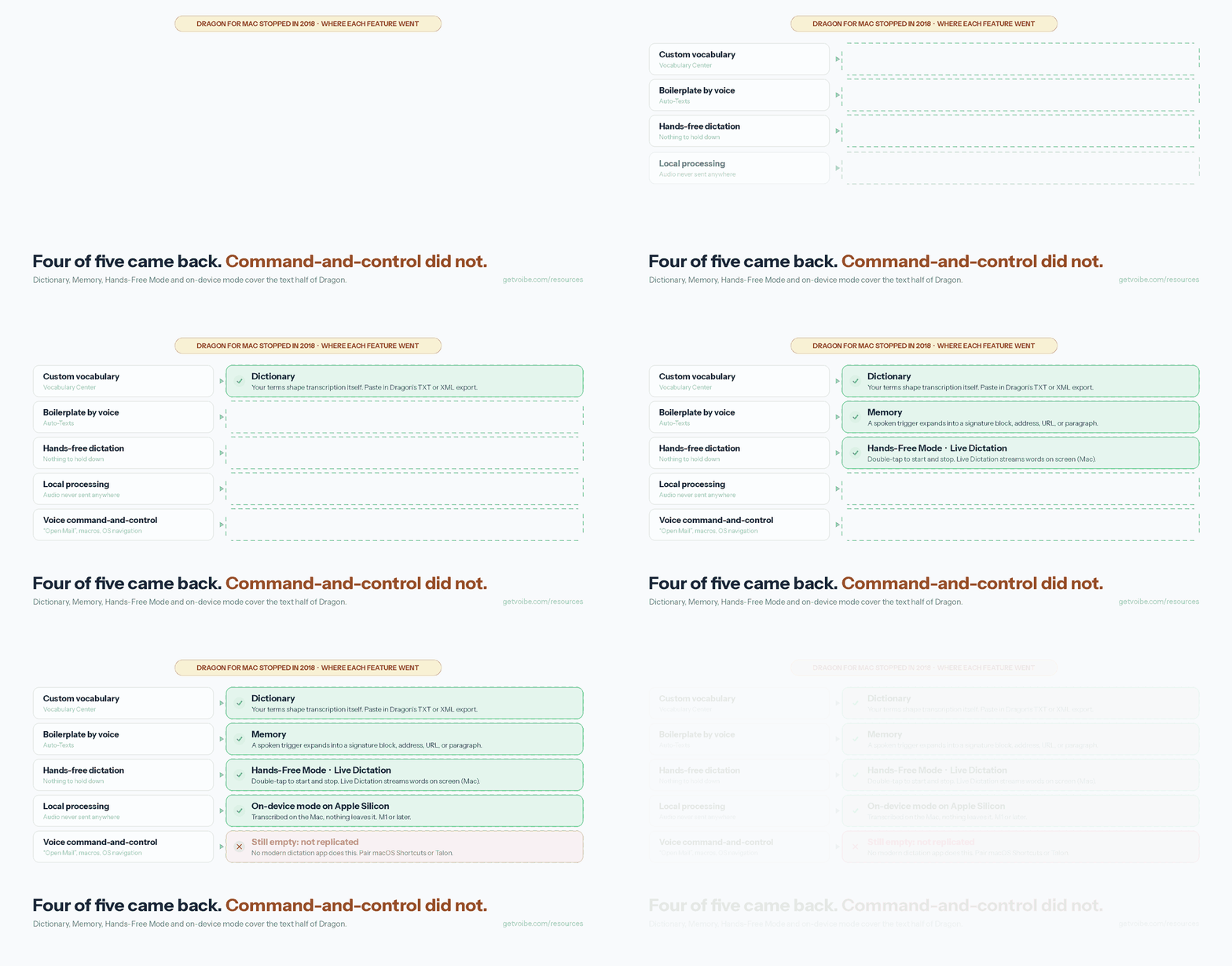
People bought Dragon for a handful of specific capabilities. Here is where each one went.
- System-wide dictation: every app here except MacWhisper and Notta. Voibe, SuperWhisper, VoiceInk, and Wispr Flow type into any Mac application.
- Accuracy without a voice profile: Whisper models, which arrive pre-trained where Dragon earned accuracy over weeks.
- Local processing: SuperWhisper, VoiceInk, MacWhisper, and Voibe's on-device mode on Apple Silicon transcribe on the Mac. Voibe's other mode is a zero-retention cloud for Intel Macs and Windows.
- Vocabulary Center: Voibe's Dictionary, which takes Dragon's TXT or XML word export. VoiceInk has a personal dictionary; SuperWhisper supports custom Whisper models. Nobody replicates Dragon's per-user voice profile, because these tools learn your word list instead of your voice.
- Auto-Texts: Voibe's Memory. A spoken trigger expands into a signature block, an address, or a reusable prompt.
- Spoken punctuation: unchanged. Voibe punctuates automatically and also takes "comma", "new paragraph", and symbols by name. Smart Formatting adds capitalization, paragraphing, and filler-word removal without paraphrasing you.
- Voice command-and-control: not replicated. No modern dictation app opens Mail, fills forms, or navigates the OS by voice. Pair your dictation app with macOS Shortcuts or Talon for that.
What to Look For in a Dragon NaturallySpeaking Alternative
1. Where the audio goes
Dragon processed speech on your computer. To keep that, pick SuperWhisper, VoiceInk, or Voibe's on-device mode on Apple Silicon; Voibe's cloud mode is the next tier down. Wispr Flow and Notta send audio to third-party servers.
2. Accuracy without training
Whisper-based tools are accurate out of the box. The variable is model size: larger models need more RAM and a faster chip.
3. What three years cost
Dragon Professional cost $300+ plus $150–$200 per upgrade, and v16 today is $699.99. One-time purchases (VoiceInk at $29–$69, Voibe at $149 lifetime) beat subscriptions over three years. Plan by plan: our Dragon pricing guide, VoiceInk pricing, and MacWhisper pricing.
4. Your vocabulary
Medical or legal work needs a vocabulary mechanism rather than autocorrect: a Dictionary you can bulk-load (Voibe), a personal dictionary (VoiceInk), or custom models (SuperWhisper).
5. Which Mac you own
On-device Whisper tools need Apple Silicon (M1 or later). On an Intel Mac, Voibe runs in cloud mode, as do Wispr Flow and Notta.
6. Live dictation vs file transcription
Dragon was live: you spoke, text appeared. MacWhisper transcribes recordings instead.
Quick Comparison: Dragon NaturallySpeaking Alternatives
| Feature | Voibe | SuperWhisper | VoiceInk | Wispr Flow | MacWhisper | Apple Dictation | Notta |
|---|---|---|---|---|---|---|---|
| Processing | On-device (Apple Silicon) or zero-retention cloud | On-device | On-device | Cloud | On-device | On-device* | Cloud |
| Real-time dictation | Yes | Yes | Yes | Yes | No (file only) | Yes | No (meetings) |
| Voice training needed | No | No | No | No | No | No | No |
| Custom vocabulary | Dictionary + IDE context | Custom models | Personal dict. | No | No | No | No |
| IDE integration | VS Code/Cursor | No | No | No | No | No | No |
| Requires Apple Silicon | No (on-device mode needs M1+) | Yes (M1+) | Yes (M1+) | No | Yes (M1+) | Partial | No |
| Platforms | Mac, Windows | Mac, Windows, iOS | Mac, iOS | Mac, Windows, iOS, Android | Mac | Mac | Web, iOS, Android |
| Monthly cost | $7.50 | $8.49 | None | $12–$15 | None | Free | $8.17 |
| One-time option | $149 lifetime (Mac + Windows) | $249.99 lifetime | $29–$69 | No | ~$29–$69 | Free | No |
*Apple Dictation processes on-device on Apple Silicon Macs; Intel Macs send audio to Apple servers.
1. Voibe: Best Overall Dragon Replacement for Mac

Most of what a Dragon owner paid for was this: talk, and correctly spelled text lands wherever the cursor is. That's the job we built Voibe to do, on Mac first and, since 2026, on Windows.
On an Apple Silicon Mac, on-device mode runs Whisper on the Neural Engine, so it works with no internet and nothing leaves the Mac. On an Intel Mac or on Windows, Voibe uses its zero-retention cloud: audio is encrypted in transit, transcribed by open-source models, and deleted the moment transcription completes. Nothing is stored or used to train a model, and no third-party AI lab (OpenAI, Google, Anthropic, Microsoft) is in the audio path. You pick the mode at setup and can switch in Settings.
Key Features, Mapped to What You're Leaving in Dragon
- Dictionary replaces the Vocabulary Center. Names, jargon, and acronyms go in once (bulk edit included) and steer transcription itself. Dragon exports your custom words to TXT or XML, and that list pastes in.
- Memory replaces Auto-Texts: a spoken trigger expands into a signature block, an address, or a boilerplate paragraph.
- Spoken punctuation works as it did: "comma", "new paragraph", "@", currency symbols, even full email addresses. Voibe also punctuates automatically if you'd rather just talk.
- Smart Formatting handles capitalization, paragraphing, and filler words without rewriting your meaning.
- Hands-Free Mode starts and stops with a double-tap, so no key is held down.
- Live Dictation (Mac only) streams words onto the screen as you speak.
- Developer Mode resolves file, folder, and variable names in VS Code, Cursor, and Windsurf.
- 90+ languages, all Macs on macOS 13+ (on-device mode needs Apple Silicon), and Windows on the same plan.
Pros
- Keeps local processing on Apple Silicon; the cloud mode is zero-retention
- No voice training, accurate from the first sentence
- Dictionary and Memory cover what switchers miss most
- $149 lifetime is 67% less than Dragon's historical $450 three-year cost and 79% less than v16's $699.99
- Native Windows app shipped in 2026
Cons
- Mac and Windows only, no Linux
- On-device mode is Apple Silicon only; Intel Macs and Windows need a connection
- No voice command-and-control. Voibe types; it doesn't drive the OS
- No per-user voice profile and no prebuilt medical or legal vocabularies
Pricing
$7.50/month, $75/year, or $149 lifetime, with a 7-day free trial and a 30-day money-back guarantee. Three-year cost: $149 (lifetime), $225 (annual), or $270 (monthly). Against Dragon's historical $450 (a $300 licence plus one $150 upgrade), lifetime saves $301 (67%); against v16's $699.99, it saves $550.99 (79%).
The value combo: Wispr Flow and Granola in one plan. Voibe Dictation is $75 a year. For $65 more, Voibe Work ($14/month, $140/year, or $349 lifetime) adds AI meeting notes with no bot in the call. That one plan covers what Wispr Flow Pro ($144/year) and Granola Business ($168/year) charge $312 a year for separately, so it costs $172 (55.1%) less every year. Meeting notes are captured on your Mac (Windows is coming soon), processed in Voibe's zero-retention cloud and saved on your Mac, and Voibe reminds you to tell everyone you're taking notes.
User Reviews
Early users rate Voibe 4.8/5 on Product Hunt from six reviews, so weigh it accordingly. The free trial at getvoibe.com tells you more.
Best For
Dragon users who valued local processing and a custom vocabulary, and anyone running both a Mac and a Windows PC.
2. SuperWhisper: Best for Power Users Who Want Every Setting
SuperWhisper is where Dragon's tinkerers end up: model sizes, modes per context, custom models. If you lived in Dragon's advanced settings, you get them back. Head-to-head: our Wispr Flow vs SuperWhisper comparison.
Key Features
- 100% on-device processing with Whisper models
- Model sizes from tiny to large
- Intelligent modes per context
- System-wide dictation in all Mac apps
- Mac and Windows (Windows launched March 2026)
Pros
- Deepest customization among Mac dictation apps
- Model choice balances speed against accuracy
- Custom models partly replace Dragon's vocabulary training
Cons
- $249.99 lifetime costs more than the other offline options
- Steeper learning curve than simpler tools
- No IDE integration
- Free tier limited to small AI models
Pricing
$8.49/month or $249.99 lifetime. Three-year cost: $249.99 (lifetime) or $305.64 (monthly), 45% below Dragon Professional.
User Reviews
SuperWhisper holds a 4.9/5 rating on Product Hunt.
Best For
Power users who lived in Dragon's advanced settings.
3. VoiceInk: Best Budget Dragon Alternative
VoiceInk is the cheapest way to get on-device Whisper dictation on a Mac, and it's open source under GPL v3, so you can read the code. See our Voibe vs VoiceInk comparison and VoiceInk review.
Key Features
- 100% on-device processing with Whisper models
- Power Mode auto-adjusts settings per application
- 100+ languages and Smart Modes
Pros
- Cheapest paid option at $29–$69 one-time, 90–96% less than Dragon
- 4,300+ GitHub stars
- Personal dictionary partly replaces Dragon's custom vocabulary
- No subscription
Cons
- No IDE integration
- Needs macOS 14+
- AI Enhancement features require external API keys
- Rated 7/10 in our review: good, not best-in-class UX
Pricing
$29 (Solo, 1 Mac), $49 (Personal, 2 Macs), or $69 (Extended, 3 Macs), one-time. Three years costs $29–$69, saving 89–94% against Dragon Professional.
User Reviews
VoiceInk holds a 4.9/5 rating from over 1,100 users.
Best For
Budget buyers who want offline dictation, and anyone who wants to read the source.
4. Wispr Flow: Best Cloud Dragon Alternative
Wispr Flow is the most polished cloud dictation app here, and the only one that rewrites your dictation to match the tone of the app you're in. That goes further than Dragon did. Our Dragon vs Wispr Flow head-to-head and Wispr Flow vs SuperWhisper comparison go deeper.
Key Features
- AI auto-editing adjusts tone and formatting per application
- Mac, Windows, iOS, and Android
- Whisper Mode for quiet environments
- 100+ languages
Pros
- AI editing is a capability Dragon never had
- Runs on desktop and mobile
- Free tier (2,000 words a week) lets you test first
- Student discount at $10/month
Cons
- Cloud-based: audio goes to servers
- No offline mode
- Subscription only
- ~800MB RAM usage reported by some users
Pricing
$12/month (annual) or $15/month. Three-year cost: $432 (annual) or $540 (monthly).
User Reviews
Wispr Flow is popular on Product Hunt, though its Trustpilot rating is 2.7/5 on reliability complaints.
Best For
Users who want AI-enhanced dictation across platforms and don't need offline processing.
5. MacWhisper: Best for Transcribing Audio Files
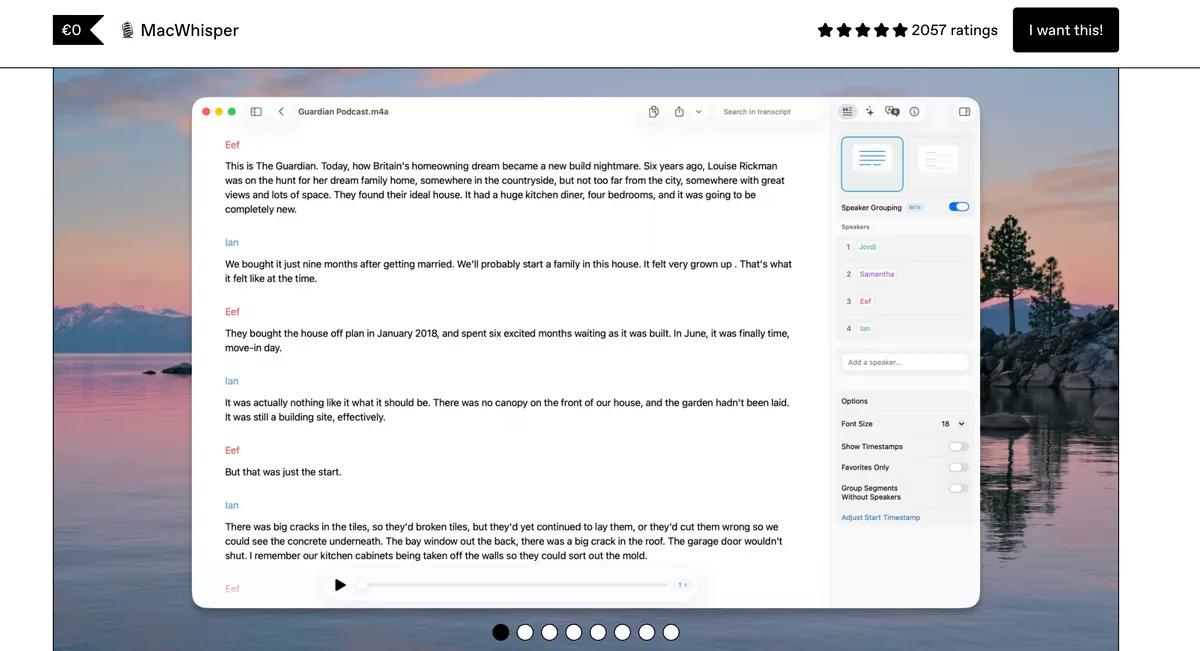
MacWhisper is not live dictation. It transcribes audio and video files with on-device Whisper models. If Dragon's job in your life was turning interviews and meeting recordings into text, this is the better tool. See our MacWhisper vs Superwhisper comparison.
Key Features
- Batch audio and video transcription
- On-device Whisper models
- Timestamps and speaker markers
- SRT subtitle export
Pros
- Purpose-built for file transcription, where it beats Dragon
- On-device processing matches Dragon's privacy model
- One-time Pro pricing
Cons
- Not real-time dictation
- No system-wide text input
- No custom vocabulary or voice profiles
Pricing
Free basic version; Pro is roughly $29–$69 one-time via Gumroad.
Best For
People who used Dragon mainly to transcribe recordings and interviews.
6. Apple Dictation: Best Free Built-In Option
Apple Dictation is already on your Mac and free. On Apple Silicon (M1–M4) it processes speech on-device, as Dragon did; on Intel Macs, audio goes to Apple's servers. Privacy details: our Apple Dictation privacy guide.
Key Features
- System-wide dictation in any text field
- 60+ languages
- On-device processing on Apple Silicon
- Voice commands for punctuation
Pros
- Free, so it saves 100% against Dragon
- No install, setup, or account
- Built-in punctuation commands
Cons
- Limited accuracy with technical terms and proper nouns
- No custom vocabulary
- No IDE integration
- Intel Macs send audio to Apple servers
- Inconsistent auto-punctuation
Pricing
Free, built into macOS.
Best For
Casual users, and anyone testing voice-to-text before buying a paid tool.
7. Notta: Best for Meeting Transcription
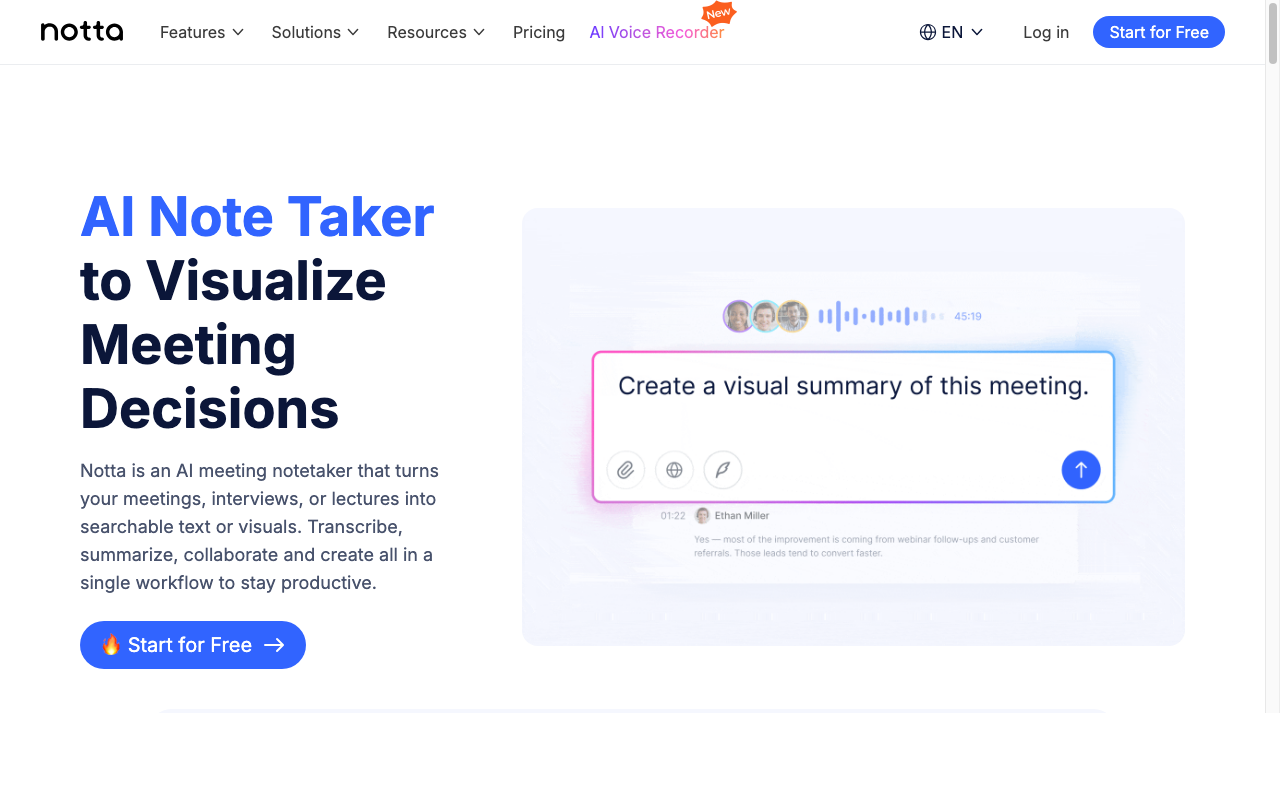
Notta is a cloud meeting transcriber rather than a dictation app. If you used Dragon on meeting recordings and wished it could tell speakers apart, this is the category you want. More options in our Otter AI alternatives guide.
Key Features
- AI summaries and action items
- 58 languages
- Speaker identification and diarization
- Zoom, Google Meet, and Teams integration
- Real-time meeting transcription
Pros
- Purpose-built for meetings, where it beats Dragon
- AI summaries save time on notes
- Multi-speaker identification Dragon could not do
Cons
- Cloud-based: all audio goes to servers
- Meetings only, not general dictation
- Subscription only
- Free tier capped at 120 minutes a month
Pricing
Free: 120 min/month. Pro: $8.17/month (annual). Business: $14.17/month (annual).
Best For
People who need meeting transcription with speaker identification.
How to Choose the Right Dragon Replacement
Answer these in order.
Does the audio have to stay on your Mac?
- Yes: Voibe on-device (Apple Silicon), SuperWhisper, or VoiceInk.
- Zero retention is enough: Voibe's cloud mode, which deletes audio as soon as it's transcribed, and is also the Intel Mac path.
- No: Wispr Flow, if you want its AI rewriting.
What's your budget?
- Free: Apple Dictation, or VoiceInk built from source.
- Under $100: VoiceInk at $29–$69 one-time.
- Under $150: Voibe at $149 lifetime.
- Under $250: SuperWhisper at $249.99 lifetime.
Do you need a custom vocabulary?
- Yes, and you have a list already: Voibe. Paste in Dragon's Vocabulary Center export.
- Yes, a few terms: VoiceInk's personal dictionary.
- No: any of them.
Do you dictate in VS Code, Cursor, or Windsurf?
- Yes: Voibe, the only tool here that resolves IDE file and folder names.
- No: any of the alternatives.
Do you need meeting transcription with speaker identification?
- Yes: Notta. Dictation apps don't label multiple speakers. If you only need meeting notes, Voibe Work (Voibe's Mac plan with meeting notes) captures calls with no bot in the call, but does not list speaker labels.
- No: Voibe, SuperWhisper, VoiceInk, or Wispr Flow.
Do you want Dragon's advanced-settings depth?
- Yes: SuperWhisper.
- No: Voibe or VoiceInk keep it simple.
Best Tool for Your Situation: Use-Case Cheat Sheet
- Daily writing on a Mac: Voibe ($149 lifetime), on-device on Apple Silicon, no training
- A disability, RSI, arthritis, tendinitis, or post-surgical recovery makes typing painful: Voibe. Hands-Free Mode starts with a double-tap, and the hotkey remaps to any single key, hardware switch, or foot pedal. See the accessibility dictation hub, or the reasonable-accommodation guide if you're going through HR or an ADA coordinator.
- Used the Vocabulary Center for technical terms: Voibe (paste in the TXT/XML export) or VoiceInk (personal dictionary)
- Used Auto-Texts for signatures and boilerplate: Voibe, where Memory expands a spoken trigger
- Dictate your punctuation out of habit: Voibe takes spoken marks alongside automatic punctuation
- Ran Dragon in Parallels on an Intel Mac: Voibe, whose cloud mode runs on Intel Macs
- Legal dictation: Voibe or SuperWhisper, since on-device processing keeps audio on the machine and Voibe's Dictionary takes statute shorthand. Dragon Legal for Mac no longer exists
- Lost Dragon Home in 2023: Voibe ($149 lifetime) or VoiceInk ($29–$69); more in our academic writing dictation guide
- Moved from Windows to Mac: Voibe or SuperWhisper; Voibe's plan also covers a Windows PC
- Medical dictation: our Dragon Medical alternatives guide covers HIPAA compliance and AI scribes
- Want Dragon-level customization: SuperWhisper ($249.99 lifetime)
- Need the cheapest replacement: Apple Dictation (free) or VoiceInk ($29 one-time)
- Need meeting transcription: Notta ($8.17/mo) for speaker identification, or Voibe Work (Mac) for meeting notes with no bot in the call
- Dictating in VS Code or Cursor: Voibe, the only tool here with IDE integration
- Want to try before buying: Apple Dictation, Voibe's 7-day trial, or Wispr Flow's free tier (2,000 words a week)
- Need Mac, Windows, and mobile: Wispr Flow, the only option here with a phone app
If Dragon Was Your Accessibility Tool
For a lot of Mac users, Dragon was an accessibility tool rather than a productivity choice. People with carpal tunnel syndrome, rheumatoid arthritis, tendinitis, repetitive strain injury, post-surgical hand recovery, dyslexia, or dysgraphia relied on it to work. When updates stopped in 2018, that audience was stranded on aging hardware.
The apps that filled the gap were built for productivity. Most default to holding a hotkey, including Wispr Flow, SuperWhisper, and Aqua Voice, and sustained key-holds defeat the purpose for someone with hand pain.
Voibe's Hands-Free Mode is the difference here. A double-tap starts dictation and your hands come off the keyboard. The hotkey can be a single key, a key combination, a hardware switch, a Stream Deck, or a foot pedal.
If Dragon's discontinuation stranded you, start here:
- The accessibility dictation hub covers the activation model and the condition-specific guides.
- Find your condition guide: carpal tunnel, arthritis, tendinitis, post-surgery recovery, or generalized hand pain. Each covers hotkey mapping, splint compatibility, and the Hands-Free workflow.
- Requesting dictation as a workplace accommodation? The reasonable-accommodation guide has a request template for HR and a forwardable IT-security brief.
Dragon's voice command macros and mouse-free OS control aren't replicated by any current Mac dictation app. Pair Voibe with Talon: Talon handles the mouse, Voibe handles dictation, and the two coexist cleanly.
Frequently Asked Questions
The questions Dragon users ask most when they switch.
Dragon Status and Migration
Is Dragon NaturallySpeaking still available for Mac?
No. Nuance discontinued Dragon Dictate for Mac in 2018, and version 6.0 doesn't run on modern macOS or Apple Silicon.
What happened to Dragon for Mac?
Nuance stopped updating it in 2018. Microsoft completed its $19.7 billion acquisition of Nuance in March 2022 and pointed the roadmap at healthcare AI. Dragon Home went in 2023, leaving Dragon Professional v16 ($699.99) and the Medical and Legal editions, all Windows-only.
Features and Compatibility
Do modern dictation apps require voice training like Dragon did?
No. Voibe, SuperWhisper, and VoiceInk are accurate from the first sentence, where Dragon needed 30+ minutes of enrolment. Add your terms to Voibe's Dictionary once, or paste in Dragon's TXT/XML export.
Can I use Dragon on Mac through a virtual machine?
Not on Apple Silicon. Dragon needs Windows and doesn't support ARM-based Windows 11, the only Windows an M-series Mac runs.
Does anything replace Dragon's Auto-Texts and spoken punctuation?
Yes. Voibe's Memory expands a spoken trigger into preset text, and Voibe takes spoken punctuation by name while punctuating automatically if you don't.
Privacy and Processing
Which Dragon alternatives work offline on Mac?
Voibe on-device (Apple Silicon), SuperWhisper, VoiceInk, MacWhisper, and Apple Dictation on Apple Silicon. Voibe's cloud mode, used on Intel Macs and Windows, needs a connection.
Pricing and Value
How much does a Dragon alternative cost compared to Dragon?
Dragon v16 is $699.99, and it historically cost $300+ with $150–$200 upgrade fees. Apple Dictation is free, VoiceInk is $29–$69 one-time, Voibe is $149 lifetime (67% less than Dragon's historical $450 three-year cost, 79% less than v16), and SuperWhisper is $249.99 lifetime.
Do any Dragon alternatives support custom vocabularies?
Yes. Voibe's Dictionary accepts Dragon's Vocabulary Center export, VoiceInk has a personal dictionary, and SuperWhisper supports custom Whisper models. None replicates Dragon's per-user voice profile. See our Dragon review.
The Bottom Line for Mac Users
Dragon set the standard for speech recognition for two decades, and on the Mac that ended in 2018. What replaced it is accurate without training and costs a fraction of the price.
For most Dragon users on a Mac, Voibe is the replacement: on-device on Apple Silicon, zero-retention cloud on Intel Macs and Windows, a Dictionary that takes your Vocabulary Center export, and Memory in place of Auto-Texts. It's $149 lifetime, 67% less than Dragon's historical $450 three-year cost and 79% less than v16's $699.99. VoiceInk is the budget pick at $29–$69 one-time, and SuperWhisper is for power users who want the knobs.
No modern tool replicates Dragon's voice command-and-control layer. If you depended on it, pair your dictation app with macOS Shortcuts or Talon.
Try Voibe for free for 7 days, and load your Dragon word list into the Dictionary on day one.
On Windows instead? Dragon still sells there (Professional v16, $699.99), and Voibe's native Windows app runs on the same $149 lifetime plan, $550.99 less. Our Dragon alternatives for Windows guide names who should stay on Dragon.
Related reading: our 'Is Dragon Safe?' privacy investigation, Dragon Medical alternatives for healthcare, the Dragon pricing breakdown, the dictation alternatives directory, best offline dictation apps, our privacy guide, Dragon Anywhere's July 2026 discontinuation, the Dragon Dictate vs NaturallySpeaking name history, and the head-to-heads Dragon vs OpenAI Whisper and Dragon vs Willow Voice. Our blog roundup of the 12 best Dragon dictation alternatives covers the wider field.
Two situations this page doesn't cover: owners of the discontinued one-time medical licence should start at replacing Dragon Medical Practice Edition, and anyone who has already picked a replacement wants the migration guide.
For a first-hand account rather than a ranking, a workers’ compensation attorney with four decades of dictating explains why they left Dragon and what the replacement does differently on getting started, punctuation and formatting.
Best AI Dictation and Meeting Notes for Confidential Work
Draft letters, notes and emails 5x faster. Get meeting notes without a bot joining your call. Nothing used to train AI.
- Mac + Windows
- No bot in your calls
- Nothing used to train AI
- 7-day free trial
Want to compare plans first? View pricing →
Related Articles
8 Best AI Meeting Note Takers for Lawyers in 2026 (Compared & Reviewed)
Best AI meeting note takers for lawyers, compared: 1. VXT Meet 2. Voibe Work 3. Quill 4. Jamie 5. Krisp 6. Fellow 7. Granola 8. Otter
8 Best No-Bot Meeting Note Takers in 2026 (Compared & Reviewed)
Best no-bot meeting note takers in 2026, compared on privacy and price: 1. Granola 2. Voibe Work 3. Quill 4. Jamie 5. Krisp 6. Anarlog 7. Bluedot 8. Tactiq
9 Best Granola AI Alternatives in 2026 (Compared & Reviewed)
Best Granola AI alternatives in 2026, compared: 1. Fathom 2. Voibe Work 3. Quill 4. Jamie 5. Wispr Flow 6. Krisp 7. Anarlog 8. Circleback 9. Otter