
How On-Device Dictation Works
"On-device" is a phrase that gets used loosely. This page explains exactly what it means when you run Voibe in on-device mode — what runs where, what touches the network, and why the architecture is the way it is. It is privacy by design, not privacy bolted on after the fact.
On-device mode is one of two ways Voibe can transcribe. The other is zero-retention cloud mode, which runs open-source models in the cloud, deletes your audio the moment transcription completes, and never stores, sells, or trains on your data. This page covers the on-device path in detail.
A note on hardware before you read on: everything described here requires an Apple Silicon Mac (M1 or later), because it depends on the Neural Engine. Intel Macs and Windows PCs run Voibe in zero-retention cloud mode instead — same privacy guarantee, different place the model runs. If you're on Windows, the Windows guide walks through how that path works.
For the high-level overview of what this means for your data, read Privacy Overview first. This page describes the fully local setup: the on-device dictation engine with optional AI text formatting turned off. AI text formatting sends the finished text to the cloud even when speech is transcribed on your Mac.
Choosing where dictation runs
How do I turn on On-Device Mode?
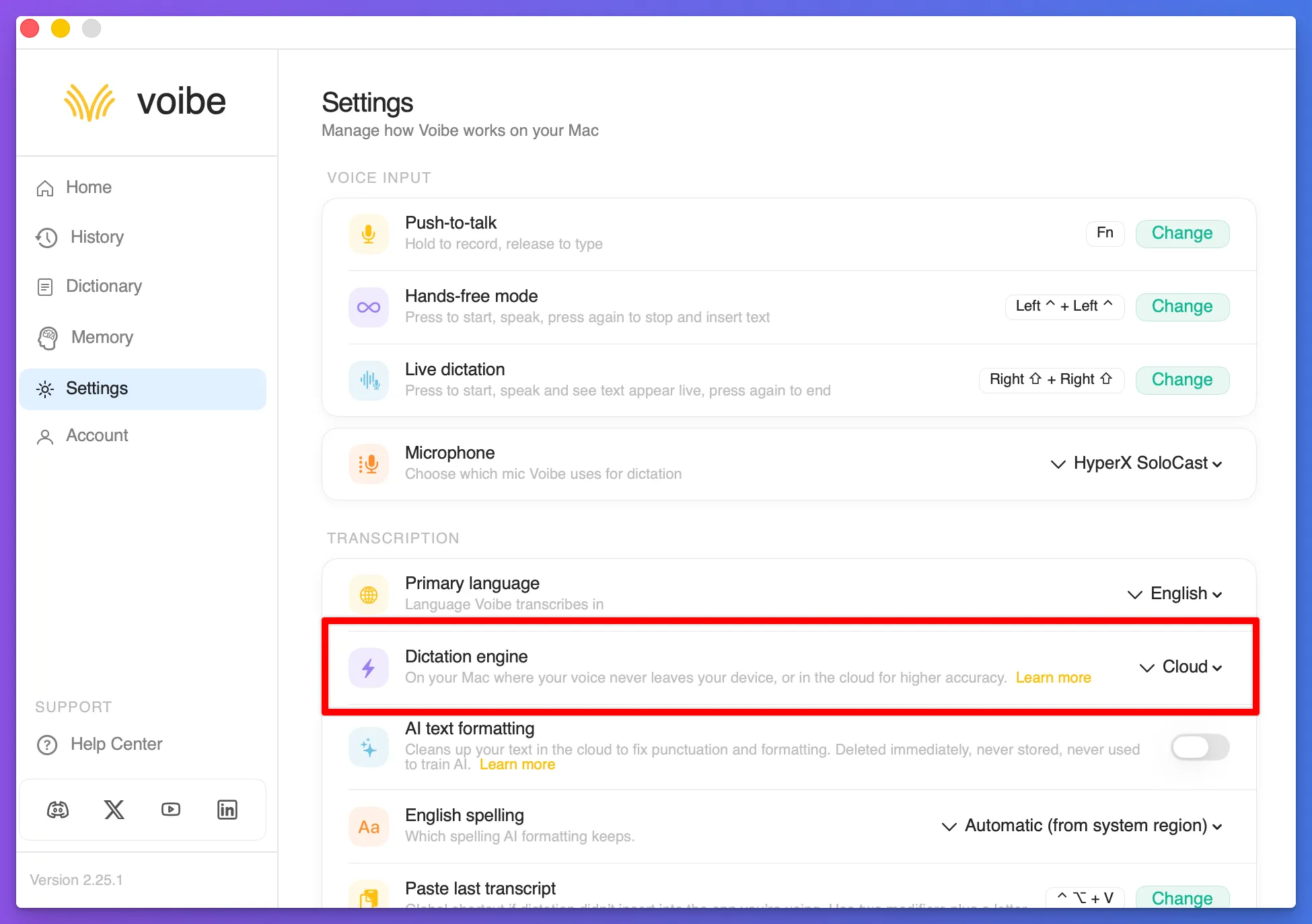
On an Apple Silicon Mac, open Voibe → Dashboard → Settings → Dictation Engine. Choose On-Device to process speech on your Mac, or Cloud to use zero-retention cloud transcription. Complete any setup the app requests before using the on-device engine offline. The selected engine appears beside Dictation Engine. Turn AI text formatting off if you need all dictation processing to stay on your Mac.
Check whether your Mac supports On-Device ModeDoes On-Device Mode keep AI text formatting offline too?
No. AI text formatting is an optional cloud feature, separate from the dictation engine. For fully local, offline dictation on an Apple Silicon Mac, choose On-Device under Dictation Engine and turn AI text formatting off in Voibe → Dashboard → Settings. With formatting enabled, the finished text is sent to the cloud for cleanup; the on-device engine still transcribes your audio locally.
How AI formatting worksWhy can't I find On-Device Mode on Windows or an Intel Mac?
Fully on-device transcription requires an Apple Silicon Mac. Windows and Intel Macs use Cloud Mode and need an internet connection for dictation.
Is On-Device Mode the same as Live Dictation?
No. On-Device and Cloud Mode choose where speech is processed. Push-to-Talk, Hands-Free, and Live Dictation choose how you start, stop, and review a dictation. Live Dictation is available on Mac.
Dictation modesOn this page
The pipeline, end to end
In on-device mode, when you press the hotkey and speak, here's what happens — and where each step runs.
You press the hotkey
Voibe opens the macOS audio input stream. Nothing was listening before this moment. Runs on your Mac.
Audio is buffered in memory
Samples are held in RAM as you speak. They are never written to a file on disk and never sent to the network. Runs on your Mac.
The transcription model runs
Voibe runs the speech recognition model locally on Apple Silicon. Complete the app's model setup before going offline. Your audio does not need to be sent to a speech provider for on-device transcription. Runs on your Mac, on the Neural Engine.
Text is post-processed
Voibe applies Memory shortcuts and Developer Mode references locally. Optional AI text formatting is turned off for this fully local workflow. Runs on your Mac.
Text is inserted into your focused app
Voibe uses the macOS accessibility API to paste the transcript into the field you're typing in. The transcript also goes into your local history so you can retrieve it later. Runs on your Mac.
The audio buffer is dropped
Voibe releases the in-memory audio. There's no file to delete because no file was ever written. Runs on your Mac.
With the on-device engine and AI text formatting off, every step is local. There is no point in this pipeline where audio, transcripts, or workspace context are sent to our servers — or anyone's servers. (Prefer more accuracy over strict locality? Zero-retention cloud transcription sends your audio, over an encrypted connection, to open-source models that transcribe it and immediately delete it.)
Why Apple Silicon's Neural Engine
Running a speech recognition model on a CPU is possible but slow. Running it on a GPU is faster but power-hungry. Apple Silicon (M1 and later) ships with a third option — the Neural Engine — purpose-built for the kind of dense matrix math that neural networks do.
The Neural Engine is what lets Voibe transcribe in real time without warming up your fans and without phoning home to a GPU farm. It's fast enough to feel instant, and efficient enough that you can use it on battery. That combination — speed, efficiency, and silicon purpose-built for this workload — is what makes on-device dictation practical.
On-device mode therefore requires an Apple Silicon Mac. Intel Macs don't have a Neural Engine, so they use zero-retention cloud mode instead — see System Requirements for which mode runs on which Mac.
What "on-device" actually means
"On-device" is marketed loosely. It can mean any of these:
| Flavor | What actually happens |
|---|---|
| Hybrid (some "on-device" tools) | A small model runs locally for wake-word detection. The actual transcription is sent to a server. |
| "On-device but logged" | Transcription happens locally, but the text is uploaded for "improving the model" or analytics. |
| Voibe (on-device engine, AI text formatting off) | The audio capture, transcription, post-processing, and text insertion all happen on your Mac. Nothing about the dictation transits the network. |
When we say "on-device," we mean the third row. That is why the on-device engine works with Wi-Fi off when AI text formatting is disabled. And when you choose zero-retention cloud mode instead, the promise is different but just as concrete: your audio is transcribed by open-source models and deleted immediately, never stored, sold, or used to train AI.
What touches the network
Voibe is a paid Mac app, so a few things do go over the network. None of them involve your dictated content.
- Licence checks. When you sign in or activate a Mac, Voibe contacts our servers to validate your licence.
- Usage analytics. Counts of dictations and feature usage. This data is not used to identify you. Never includes transcribed content.
- Crash reports. When Voibe crashes, technical diagnostic data is sent to help us fix it. Audio, transcripts, and Memory entries are not included.
- App updates. Voibe checks for new versions and downloads update binaries from our distribution endpoint.
The full list of subprocessors and what each one handles is on the Security page.
Working offline
Once Voibe is set up and your licence is activated, select the on-device engine and turn AI text formatting off to dictate without an internet connection. On a flight, in a basement, on a train through a tunnel — the Neural Engine doesn't need a network. (Zero-retention cloud mode does need a connection, since the transcription runs in the cloud.)
A few things still need the network when you eventually reconnect:
- • Periodic licence revalidation (Voibe gives you a generous offline window).
- • App updates and any usage analytics queued while offline.
For offline dictation, keep the on-device engine selected and AI text formatting off.
Technical FAQ
Is the model based on Whisper?
Voibe uses a Whisper-family speech recognition model adapted to run efficiently on Apple Silicon. Complete any model setup the app requests before using it offline.
Where do the model weights live?
The model is stored on your Mac after setup. Complete any model download or setup requested by the app before disconnecting from the internet.
Can I see what Voibe is doing on my Mac?
Yes. Tools like Little Snitch, Lulu, or macOS's Activity Monitor will show you exactly what network traffic Voibe makes. In on-device mode you'll see licence checks, telemetry, and updates — never an audio stream. (In zero-retention cloud mode you'll also see the encrypted transcription request while you are dictating.) If AI text formatting is enabled with either engine, you will also see a cloud request for the finished text.
Does enabling Developer Mode change this?
No. Developer Mode adds a local scan of file and folder names in your active editor workspace so Voibe can resolve identifiers when you say them. The scan results stay on your Mac.
Does Voibe use any cloud AI for post-processing?
AI text formatting is a separate, optional cloud step. When enabled, it sends the finished transcript to a zero-retention cloud model even if the on-device engine transcribed the audio. Turn it off in Settings for fully local processing. Memory expansion and Developer Mode resolution stay local.
Related reading
Still stuck? Email hi@getvoibe.com and we'll help you out.