
Is Claude Code Safe? Privacy & Data Retention by Tier (2026)
Is Claude Code safe? What Anthropic stores and trains on by tier — Pro/Max vs API vs Enterprise — plus the Oct 2025 terms change and every opt-out setting.

Is Claude Code Safe? The Direct Answer
TL;DR: Claude Code's safety profile depends entirely on which Anthropic terms govern your account — and the same product runs under two materially different default postures that many developers conflate. The two-tier framework is the structural anchor:
- Consumer (Free, Pro, Max accounts) — Anthropic CAN train on your code. Since the August 28, 2025 consumer terms update, training is on by default — unless you opted out at claude.ai/settings/data-privacy-controls. Retention: 5 years if training is on, 30 days if you opted out.
- Commercial (Team, Enterprise, API, Bedrock, Vertex, Foundry, AWS, Claude Gov) — Anthropic does NOT train on your code. Per Anthropic's Commercial Terms Section B: “Anthropic does not train generative models using code or prompts sent to Claude Code under commercial terms, unless the customer has chosen to provide their data to us for model improvement.” Retention: 30-day standard; Zero Data Retention available per-organization on Claude for Enterprise.
Three structural caveats apply across both tracks:
- The August 2025 consumer terms update flipped Pro/Max defaults. Many developers using Claude Code via Pro/Max accounts have not updated their preference and are now training Anthropic's models with their code by default. Verify and opt out if needed.
- Local cache stores transcripts in plaintext. Claude Code keeps session transcripts at ~/.claude/projects/ unencrypted for 30 days by default, regardless of account tier.
- /feedback and session-quality survey are separate data channels. The /feedback command sends full conversation history including code (5-year retention); session-quality surveys retain shared transcripts for up to 6 months.
For developers running Claude Code under any Commercial Terms path (Anthropic API key, Bedrock, Vertex, Foundry, AWS, Claude for Teams, Claude for Enterprise), the privacy posture is strong. For developers running Claude Code under Pro/Max, the privacy posture is acceptable only if you have actively opted out.
Here is the two-tier framework in detail, what the August 2025 update changed, the provider-specific defaults across Anthropic API / Bedrock / Vertex / Foundry / AWS, the local cache and telemetry surfaces, how to delete Claude Code sessions, a five-step decision framework, and a note on how Voibe — the on-device dictation app we build — fits the voice-prompting half of the developer workflow. Every claim is sourced to Anthropic's official documentation, Anthropic's announced terms updates, or named third-party platforms.
Key Takeaway
Claude Code under Commercial Terms (API, Bedrock, Vertex, Foundry, AWS, Enterprise, Teams) does not train on your code by default. Claude Code under Pro/Max consumer accounts DOES train by default after the August 2025 update — unless you opted out at claude.ai/settings/data-privacy-controls. Same product, two very different defaults.
Key Takeaways: The Claude Code Safety Picture by Tier
| Dimension | Consumer (Pro / Max) | Commercial (API / Bedrock / Vertex / Foundry / AWS / Enterprise / Teams) |
|---|---|---|
| Trains on your code | YES, by default (after Aug 2025). Opt out at claude.ai/settings/data-privacy-controls | NO, by default. (Optional Development Partner Program opt-in, first-party API only) |
| Retention (training on) | 5 years | N/A (training off) |
| Retention (training off) | 30 days | 30 days standard; ZDR available per-org on Enterprise |
| Zero Data Retention | Not available | Available per-organization on Claude for Enterprise (must be enabled by account team) |
| HIPAA BAA | Not available | Available on Claude for Enterprise; flows through AWS BAA for Bedrock; Google BAA for Vertex |
| Encryption at rest | Per Anthropic infrastructure | AES-256 (API + Foundry); AES-256 with KMS option (Bedrock); CMEK option (Vertex) |
| Telemetry default | On (DISABLE_TELEMETRY to disable) | OFF by default on Bedrock, Vertex, Foundry, AWS. On for direct Anthropic API. |
| Error reporting | On (DISABLE_ERROR_REPORTING to disable) | OFF by default on Bedrock, Vertex, Foundry, AWS. On for direct Anthropic API. |
| /feedback command | On (DISABLE_FEEDBACK_COMMAND to disable). Full convo + code shared. 5-year retention. | OFF by default on Bedrock, Vertex, Foundry, AWS. On for direct Anthropic API. |
| Local cache (plaintext) | ~/.claude/projects/ for 30 days by default. Adjust via cleanupPeriodDays. Same for both tiers. | |
| Code execution location | Local on developer machine. Only prompts + context sent over network for LLM inference. | |
Here is each row, ending with a five-step Claude Code Safety Audit for your specific deployment.
Claude Privacy, Page by Page
This review is the hub of a six-page cluster. Each neighboring question gets a page of its own, so this one can stay focused on the safety verdict:
- The session transcript prompt — the post-rating question "Can Anthropic look at your session transcript?": what Yes uploads, the 6-month retention window that applies to shared transcripts, and why it does not affect model training.
- Claude Code privacy settings — the configuration manual: every env var, flag, and toggle with copy-paste values, plus session deletion step by step.
- Claude API data retention — the commercial side in full: the 30-day default, Zero Data Retention eligibility, the June 2026 Covered Models rule, HIPAA, and the Bedrock/Google/Foundry paths.
- Claude Pro and Max privacy — the consumer plans: the 5-year window, the training toggle, the update-notice history, incognito chats, deletion, and Claude Cowork.
- Is Claude safe? — claude.ai, the chat product, including the ChatGPT comparison.
- AI Tool Privacy Tracker — the continuously updated cross-tool reference.
The Two-Tier Privacy Framework: Consumer vs Commercial
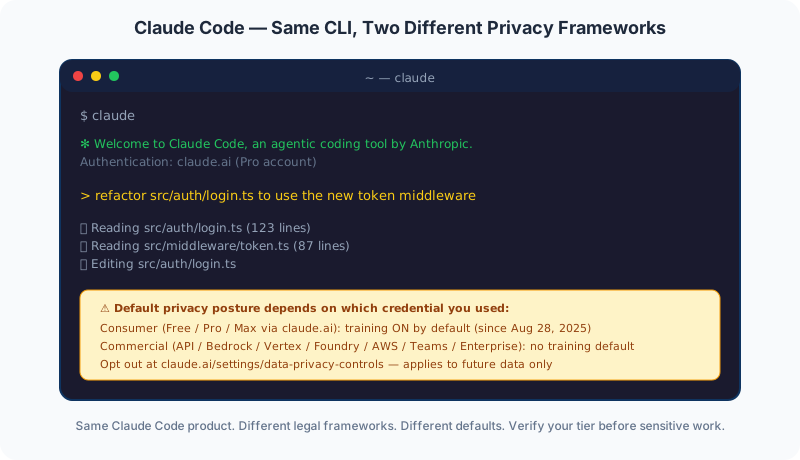
Claude Code is a single product — the same CLI, the same model access, the same tool surface — but it runs under one of two materially different legal frameworks depending on how you authenticated. This is the structural fact that most often confuses developers, and the source of the privacy ambiguity that the August 2025 consumer-terms update made more consequential.
Consumer Terms apply when:
- You signed up for Claude via claude.ai and have a Free, Pro, or Max account
- You launched Claude Code authenticated as that account
- You did not authenticate via API key, Bedrock, Vertex, Foundry, AWS, or an Enterprise SSO flow
Commercial Terms apply when:
- You set ANTHROPIC_API_KEY to an Anthropic-issued API key (first-party API)
- You configured Claude Code to use Amazon Bedrock (CLAUDE_CODE_USE_BEDROCK=1)
- You configured Claude Code to use Google Cloud Vertex AI (CLAUDE_CODE_USE_VERTEX=1)
- You configured Claude Code to use Microsoft Foundry (CLAUDE_CODE_USE_FOUNDRY=1)
- You configured Claude Code to use Claude Platform on AWS (CLAUDE_CODE_USE_ANTHROPIC_AWS=1)
- Your organization deployed Claude for Teams or Claude for Enterprise with SSO
- You are using Claude for Government
The training default is the headline difference. Per the Claude Code data usage documentation, the Consumer Terms position is: “We give you the choice to allow your data to be used to improve future Claude models. We will train new models using data from Free, Pro, and Max accounts when this setting is on (including when you use Claude Code from these accounts).” The Commercial Terms position: “Anthropic does not train generative models using code or prompts sent to Claude Code under commercial terms, unless the customer has chosen to provide their data to us for model improvement (for example, the Developer Partner Program).”
The Development Partner Program is an opt-in for enterprise customers who want to contribute data to Anthropic's model training — typically in exchange for early access, pricing concessions, or partnership benefits. Per Anthropic: “An organization admin can expressly opt-in to the Development Partner Program for their organization. Note that this program is available only for Anthropic first-party API, and not for Bedrock or Vertex users.” The default state remains no-training for Commercial Terms; the program is an active choice.
The retention default also splits. Consumer Pro/Max users who allow training get a 5-year retention window; consumer users who opt out get 30 days. Commercial users get 30-day standard retention, and Claude for Enterprise customers can additionally enable Zero Data Retention per-organization for stricter retention controls. Per Anthropic: “ZDR is enabled on a per-organization basis; each new organization must have ZDR enabled separately by your account team.”
The consumer-versus-commercial split here is a specific case of a general rule: real zero data retention is an approval-gated contract term, not a consumer default. We unpack that distinction in zero data retention explained.
Info
The fastest way to confirm which terms apply to your Claude Code usage: run `claude config get` and look at your authentication source. If it's an Anthropic API key, Bedrock, Vertex, Foundry, AWS, or an Enterprise SSO session, you're under Commercial Terms. If it's a claude.ai login from Pro or Max, you're under Consumer Terms and training is on by default after August 2025.
What Changed with the August 2025 Consumer Terms Update
On August 28, 2025, Anthropic announced an update to its Consumer Terms and Privacy Policy that materially changed the data-handling defaults for Free, Pro, and Max accounts. The change is the source of the developer confusion around Claude Code privacy — because the same Claude Code product behaved one way before the update and a different way after, for the same account type.
The Anthropic announcement framed it as: “Updates to Consumer Terms and Privacy Policy ... giving users the choice to allow their data to be used to improve Claude and strengthen safeguards against harmful usage like scams and abuse.”
The before-and-after picture:
| Dimension | Before August 28, 2025 | After August 28, 2025 |
|---|---|---|
| Default training posture | No training; data deleted generally within 30 days | Training ON by default; opt-out available |
| Default retention (training on) | N/A (no training) | Up to 5 years |
| Default retention (training off) | 30 days | 30 days |
| Opt-out path | N/A (no opt-in to opt out of) | claude.ai/settings/data-privacy-controls |
| Decision deadline | N/A | October 8, 2025 (in-product choice prompt) |
| Applies to | All accounts | Free, Pro, Max only — NOT Commercial Terms |
The asymmetric impact is what creates the developer confusion. Commercial Terms — Claude for Teams, Claude for Enterprise, the direct Anthropic API, Amazon Bedrock, Google Cloud Vertex AI, and Claude for Government — explicitly did NOT change. Anthropic's announcement made the Commercial scope-out explicit: “They do not apply to services under Commercial Terms, including Claude for Work, Claude for Government, Claude for Education, or API use, including via third parties such as Amazon Bedrock and Google Cloud's Vertex AI.”
The practical problem this created for Claude Code specifically: developers using Claude Code authenticated via their Pro or Max account got the new default. Developers using Claude Code authenticated via API key, Bedrock, or Vertex did not. Same CLI, same `claude` command, same model access — different data-handling defaults depending on which credential the developer happened to use.
Anthropic gave users until October 8, 2025 to make their explicit choice through an in-product prompt that asked whether to allow training. Developers who dismissed the prompt without thinking, missed it during a busy period, or never returned to claude.ai during that window are now operating under the default — which means their Claude Code prompts and outputs are being retained for up to 5 years and may be used to train future Claude models, unless they have since revisited the setting.
The honest framing: the August 2025 change is not unusual for AI vendors. OpenAI made a similar default-flip for ChatGPT consumer accounts. Google Gemini Apps Activity has had similar opt-out-required defaults for some time. The thing that makes the Claude Code case particularly notable is that Claude Code is also available on Commercial Terms paths — where the no-training default still holds — and most developers do not realize that switching from a Pro/Max login to an API key changes the data-handling posture materially. The right response if this matters to you: confirm your terms tier, opt out on consumer accounts if you have not, and consider running Claude Code under Commercial Terms (any API path or Enterprise plan) for any code you would prefer not to be retained for 5 years.
Key Takeaway
The August 28 2025 Anthropic consumer terms update changed the default training posture for Pro/Max accounts from opt-in to opt-out. Developers using Claude Code via Pro/Max who never engaged with the October 2025 prompt are now training Anthropic's models with their code by default. Commercial Terms (API, Bedrock, Vertex, Enterprise) were explicitly not affected.
The October 2025 Consumer Terms: What That Notice Actually Changed
If you're looking at a notice that says Anthropic's Consumer Terms are “effective October 8, 2025,” that is the August 2025 training-defaults change arriving at its deadline — not a second, separate policy shift. The sequence, verified against Anthropic's pages on August 5, 2026: the update was announced August 28, 2025; existing users saw an in-product notification and could defer the choice; the decision deadline was originally September 28, 2025 and was extended to October 8, 2025 — Anthropic's own privacy-policy changelog records the extension (“Updated effective date from September 28 to October 8”). After the deadline, the choice stopped being optional: per the announcement, “After October 8, you'll need to make your selection on the model training setting in order to continue using Claude.”
Two details matter for reading your own account state today:
- The October 8, 2025 Consumer Terms are still the current version. As of August 5, 2026, anthropic.com/legal/consumer-terms shows “Effective October 8, 2025” — no newer terms have shipped. Whatever you selected in that window (or accepted without reading) is the regime your Pro/Max Claude Code sessions run under now.
- The choice screen nudged toward yes. Press coverage at the time (TechCrunch) noted the notice paired a prominent Accept button with the training toggle preset to on beneath it — which is why many developers are opted in without remembering a decision.
Don't conflate the later notices with this one. Anthropic's Privacy Policy is a separate document from the Consumer Terms, and it was updated twice in 2026 — but neither update changed the training defaults or retention windows for Claude Code. The October 8, 2025 terms still govern those. Our Claude Pro and Max privacy explainer covers both 2026 policy updates in full, and is the page to read if the notice you're holding arrived by email rather than in a terminal.
The action item hasn't changed since October: open claude.ai/settings/data-privacy-controls and confirm the “Help Improve our AI models” toggle matches your intent — it is the single switch deciding whether your Claude Code sessions train models and sit on the 5-year window.
Key Takeaway
The "effective October 8, 2025" Consumer Terms are the August 2025 training-defaults change reaching its (extended) deadline — after that date, picking a training setting became mandatory to keep using Claude. That version is still current in August 2026; the 2026 updates touched the separate Privacy Policy, not the training defaults.
“You Must Run Claude in the Terminal to Review the Updated Terms” — What That Notice Means
If Claude Code printed “An update to our Consumer Terms and Privacy Policy has taken effect on October 8, 2025. You must run claude in the terminal to review the updated terms”, it is not a new policy change and nothing is wrong with your install. It is the same October 2025 Consumer Terms described above, surfacing on the one interface that can show you the acceptance screen: the interactive CLI.
What to do: run claude on its own in a terminal — not claude -p, not a piped or non-interactive invocation — and the review screen appears. Read the training setting before you accept, not after. The acceptance is tied to your Anthropic account rather than to one machine, so the notice follows you to any machine you sign in from until you complete it.
If you already accepted and don't remember what you chose: the setting lives at claude.ai/settings/data-privacy-controls under “Help Improve our AI models.” On a Pro or Max account, on means Anthropic may train new models on your chats and coding sessions and retention runs 5 years; off drops retention to 30 days. Turning it off is not retroactive for training runs already in progress, so check it sooner rather than later.
If you signed in with a commercial credential — an API key, Team, Enterprise, Bedrock, Google Cloud's Agent Platform, or Microsoft Foundry — this notice does not set your data terms. Those sessions run under the Commercial Terms, where Anthropic states it does not train generative models on your code or prompts by default. The Claude API data retention page covers that side.
Provider-Specific Defaults: Anthropic API, Bedrock, Vertex, Foundry, AWS
Even within the Commercial Terms umbrella, the default behaviors of Claude Code differ across the five primary provider paths. The variability lives mostly in the optional non-essential traffic channels — telemetry, error reporting, and the /feedback command — rather than in the core training-and-retention framework. Knowing the defaults for your provider matters for air-gapped, regulated, or compliance-audited deployments.
| Service | Anthropic API (direct) | Bedrock | Vertex AI | Foundry | Claude Platform on AWS |
|---|---|---|---|---|---|
| Training default | No (Commercial) | No | No | No | No |
| Retention | 30 days (ZDR via Enterprise) | 30 days | 30 days | 30 days | 30 days |
| Telemetry (Anthropic metrics) | On (DISABLE_TELEMETRY to disable) | OFF | OFF | OFF | OFF |
| Error reporting | On (DISABLE_ERROR_REPORTING) | OFF | OFF | OFF | OFF |
| /feedback command | On (DISABLE_FEEDBACK_COMMAND) | OFF | OFF | OFF | OFF |
| Session quality surveys | On (CLAUDE_CODE_DISABLE_FEEDBACK_SURVEY) | On | On | On | On |
| WebFetch domain safety check | On (skipWebFetchPreflight: true) | On | On | On | On |
| Encryption at rest | AES-256, ZDR available | AES-256, AWS-managed; CMK via KMS | Google-managed; CMEK available | Routes to Anthropic AES-256 | AES-256 |
The pattern: Bedrock, Vertex, Foundry, and Claude Platform on AWS have the most privacy-conservative default posture out of the box. All non-essential outbound traffic is off by default — only the session quality survey and the WebFetch domain safety check run. The direct Anthropic API path has more telemetry on by default, which is reasonable for product feedback and is documented; if you want the cloud-provider-style defaults on the direct API, set CLAUDE_CODE_DISABLE_NONESSENTIAL_TRAFFIC=1 in your environment.
Two specific traffic channels deserve attention regardless of provider:
- Session quality surveys. The "How is Claude doing this session?" prompt records only your rating by default — no transcripts. After the rating, an optional second-step follow-up asks "Can Anthropic look at your session transcript to help us improve Claude Code?" Only if you actively select Yes does anything get uploaded. Per Anthropic: “Known API key and token patterns are redacted before upload. Source code, file contents, and other conversation content are uploaded as-is. Shared transcripts are retained for up to 6 months.” The survey responses themselves “do not impact your data training preferences and cannot be used to train our AI models.” To disable, set
CLAUDE_CODE_DISABLE_FEEDBACK_SURVEY=1. - WebFetch domain safety check. Before fetching any URL, the WebFetch tool sends the requested hostname (not the full URL, path, or page contents) to api.anthropic.com to check against a safety blocklist. Cached per hostname for five minutes. This runs regardless of provider and is not affected by the non-essential-traffic flag. To disable, set
skipWebFetchPreflight: truein settings — but combine with WebFetch permission rules to restrict which domains Claude can reach, since you're disabling the safety check at the same time.
For air-gapped or paranoid deployments, the highest-leverage moves are: (1) use Bedrock, Vertex, Foundry, or AWS instead of the direct Anthropic API for cloud-provider-style default-off non-essential traffic; (2) set CLAUDE_CODE_DISABLE_NONESSENTIAL_TRAFFIC=1 on the direct API path; (3) consider skipWebFetchPreflight: true with strict WebFetch permission rules if domain leakage to api.anthropic.com is a threat-model concern.
The Local Cache: What Lives on Your Machine in Plaintext
The on-disk story is the dimension developers most often overlook. Regardless of which Anthropic terms govern your account, Claude Code stores session transcripts locally in plaintext under ~/.claude/projects/ for 30 days by default. Per the official documentation: “Local caching: Claude Code clients store session transcripts locally in plaintext under ~/.claude/projects/ for 30 days by default to enable session resumption. Adjust the period with cleanupPeriodDays.”
What this means in practice:
- Plaintext on disk. Session transcripts include your prompts, model responses, file paths referenced, file contents read into the conversation, and command outputs. Anyone with read access to your home directory can read this content.
- 30-day default. The default retention is intended to enable session resumption (`claude --resume`). Many developers never use that feature but the cache accumulates anyway.
- Adjustable via cleanupPeriodDays. Set this in your settings to a smaller number (e.g., 1 or 7) to clear sessions sooner. Per the current settings reference the minimum is 1 — setting 0 fails with a validation error. To stop transcripts being written at all, set the
CLAUDE_CODE_SKIP_PROMPT_HISTORY=1environment variable; you lose resume capability but nothing lands on disk. - Manual deletion. You can `rm -rf ~/.claude/projects/*` after any sensitive session. The next session starts clean.
This is an entirely different risk surface than the network-side training-and-retention discussion. Even under the most privacy-conservative Commercial Terms posture (Bedrock or Vertex with ZDR-equivalent settings), the local cache still exists by default. The local cache risk model is about device security, not vendor data handling:
- Shared machine. If multiple developers share a workstation or you ssh into a build server to run Claude Code, the cache is accessible to anyone with read access.
- Stolen laptop. A disk-encrypted Mac mitigates this risk significantly. An unencrypted machine does not.
- Backup propagation. Time Machine, rsync to NAS, or any automatic backup tool will replicate the plaintext transcripts to wherever your backups live. If your backup target is a third-party cloud (Backblaze, iCloud), the transcripts are now there too.
- Subpoena vector. Even if Anthropic has zero retention for your account, the local cache on your machine is still discoverable in legal proceedings affecting your jurisdiction or your employer.
The mitigation framework:
- For sensitive sessions, lower
cleanupPeriodDaysin settings — 1 or 7 days is a reasonable balance between session-resume utility and exposure window. - For high-sensitivity sessions, manually clear the cache after each session. A simple shell alias (
alias claude-clean='rm -rf ~/.claude/projects/*') makes this a one-command discipline. - Enable disk encryption. macOS FileVault, BitLocker on Windows, LUKS on Linux. This is a general security hygiene step that pays off across many tools, not just Claude Code.
- Audit your backup targets. If your backups go to a third-party cloud, decide whether the plaintext cache should be excluded from the backup set. Most backup tools support per-directory exclusion rules.
- For team-shared machines or shared infrastructure, set
CLAUDE_CODE_SKIP_PROMPT_HISTORY=1in a managed settings file. Sessions are then never written to disk (they will not appear in--resumeor--continue).
Warning
Even with Zero Data Retention on Claude for Enterprise, the local cache at ~/.claude/projects/ still stores session transcripts in plaintext on your machine for 30 days by default. ZDR governs Anthropic's side; the local cache is your side. Both surfaces require attention for sensitive work.
How to Delete Claude Code Sessions
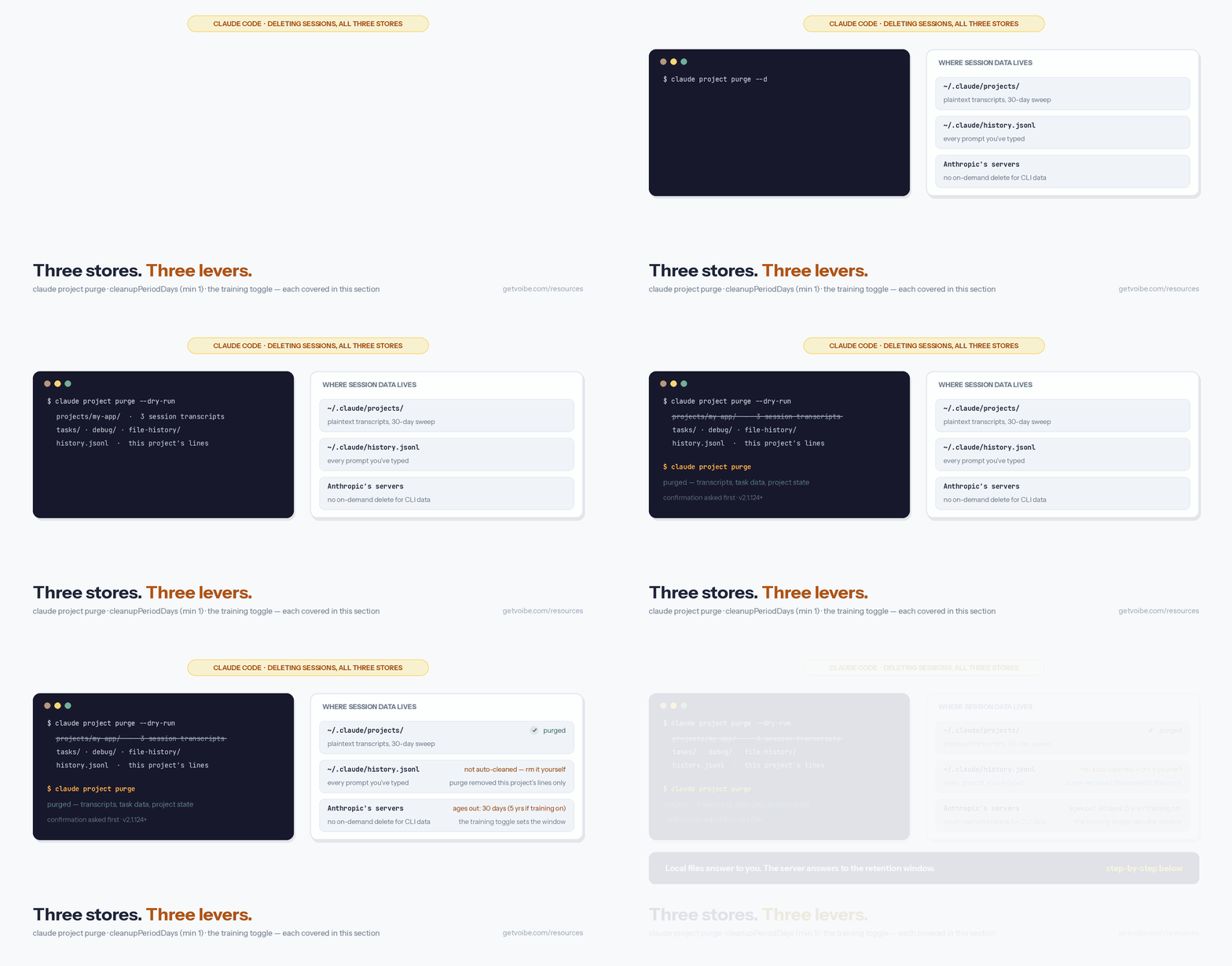
Deleting Claude Code sessions means clearing three stores, and each has its own lever: the transcripts on your disk, a prompt-history file the automatic cleanup never touches, and whatever sits inside Anthropic's server-side retention window.
- Delete a project's sessions with
claude project purge(Claude Code v2.1.124 or later). It removes that project's session transcripts under~/.claude/projects/, per-session task and debug data, the project's lines in the prompt-history file, and its entry in~/.claude.json— run it with--dry-runfirst to preview. - Or delete the files directly. Transcripts are plaintext JSONL, one folder per project, one file per session — an ordinary
rmremoves them and the next session starts clean. - Shrink the automatic window.
cleanupPeriodDaysin settings deletes session files older than the period at startup — default 30 days, minimum 1 (a value of 0 fails validation). - Or never write transcripts at all:
CLAUDE_CODE_SKIP_PROMPT_HISTORY=1stops session transcripts and prompt history being written to disk; sessions then won't appear in--resume,--continue, or up-arrow history. - Check
~/.claude/history.jsonl. Every prompt you've typed, with timestamp and project path, persists there indefinitely — it is not covered by the automatic cleanup.claude project purgeremoves the purged project's lines; deleting the file clears the rest. - Web sessions delete individually. Claude Code on the web stores sessions server-side; delete any session from its menu at claude.ai/code — Anthropic's docs state deletion permanently removes the session and its data.
- Server-side CLI data ages out with your retention window. No documented control deletes CLI session data off Anthropic's servers on demand; the retention window governs it — 30 days under Commercial Terms or on Pro/Max with training off, 5 years on Pro/Max with training on. Which is one more reason the training toggle above is the setting to verify first.
The full configuration walkthrough — every privacy env var and settings key, with copy-paste values — is in our Claude Code privacy settings guide.
Tip
Fast version: `claude project purge --dry-run` to preview, then run it without the flag. Add CLAUDE_CODE_SKIP_PROMPT_HISTORY=1 to your environment if you want future sessions never written to disk at all.
Architecture vs. Audit: What AI Coding Tools Cannot Promise
Claude Code is a different category from the cloud dictation products investigated in the rest of this series — it is an AI coding assistant that depends fundamentally on sending prompts to a large language model in the cloud. The architectural distinction that applies to voice dictation ("on-device only" being an option) does not have a clean parallel for AI coding. There is no on-device GPT-4 / Claude 3.5 Sonnet / Claude 4 equivalent that runs locally on consumer hardware with comparable capability — the largest models all require cloud inference.
That is exactly why, for cloud AI, the governed plan matters more than the architecture: Claude's Team and Enterprise tiers earn their place on our shortlist of AI tools your IT team will approve on the strength of their no-training defaults and controlled retention, not on where the model runs.
This shifts the safety question for Claude Code in two ways:
- The right comparison is not architecture vs. cloud — it is which commercial framework you operate under. Claude Code under Commercial Terms via Bedrock, Vertex, Foundry, AWS, or Enterprise is a strong privacy posture for AI coding. The training defaults are off, the retention is documented, ZDR is available on Enterprise, BAAs flow through cloud providers for healthcare, and telemetry is default-off on the cloud-provider integrations. This is meaningfully different from Pro/Max consumer accounts after August 2025.
- Some surfaces are still architecturally addressable, even if the model itself runs in the cloud. Local cache control (cleanupPeriodDays), telemetry disable (DISABLE_TELEMETRY), error reporting disable (DISABLE_ERROR_REPORTING), feedback command disable (DISABLE_FEEDBACK_COMMAND), and non-essential traffic disable (CLAUDE_CODE_DISABLE_NONESSENTIAL_TRAFFIC) are all in the developer's control. WebFetch permission rules combined with skipWebFetchPreflight: true address the only mandatory outbound channel that runs regardless of provider.
What this means for the developer workflow:
- Use Claude Code via Commercial Terms. The single highest-leverage move for any developer with privacy concerns is to authenticate Claude Code via an Anthropic API key, Bedrock, Vertex, Foundry, AWS, or Enterprise SSO — not via a logged-in Pro/Max account. The Commercial Terms training default and retention posture are what you want.
- Enable ZDR on Enterprise. If you are on Claude for Enterprise, request ZDR configuration from your account team. It is not on by default but is strongly recommended for any sensitive deployment.
- Disable non-essential traffic on the direct API path. If you use the direct Anthropic API rather than a cloud-provider integration, set CLAUDE_CODE_DISABLE_NONESSENTIAL_TRAFFIC=1 to match the cloud-provider default posture.
- Manage the local cache. Lower cleanupPeriodDays, clear the cache after sensitive sessions, and audit backup propagation.
- Make WebFetch permissions strict. The WebFetch domain safety check is the only mandatory outbound channel that runs regardless of provider. Combined with WebFetch permission rules, you can constrain which domains Claude can reach.
For voice-prompting Claude Code from a Mac, the dictation surface is a separate decision. On-device dictation keeps the voice-to-text conversion local, then sends the resulting text to Claude Code under whatever terms apply. This is a complement to Claude Code, not a substitute — the LLM still runs in the cloud regardless of how you input your prompt, which also means access can be withdrawn upstream: the June 2026 Fable 5 and Mythos 5 suspension showed how a government directive can switch off a cloud model overnight, no matter what your subscription says. See our dictation for coding guide for the voice-input half of the workflow.
The Claude Code Safety Decision Tree
Use the Claude Code Safety Decision Tree to decide whether Claude Code is safe enough for your specific situation. The five questions, in order, take you from the lowest-risk use case to the highest. Stop at the first question where you cannot accept the answer Claude Code currently provides.
- Are you using Claude Code via Anthropic API key, Bedrock, Vertex, Foundry, AWS, Claude for Teams, or Claude for Enterprise? If yes — you are under Commercial Terms; no training on your code by default, 30-day retention standard. Continue to question 2 for ZDR / HIPAA layering. If no (you are using Claude Code authenticated via a Pro or Max claude.ai account) — skip to question 5 to evaluate the consumer-terms posture.
- Is this confidential, regulated, or compliance-audited code? If no — Commercial Terms defaults are reasonable; you can stop here. If yes — continue to question 3.
- Are you on Claude for Enterprise with Zero Data Retention enabled? If yes — strongest privacy posture available on Claude Code; documented controls, contractually backed retention. Continue to question 4 if HIPAA also applies. If no — request ZDR from your Anthropic account team for the strictest retention posture.
- Is this code under HIPAA? If yes — request the BAA from your Anthropic enterprise account team in writing, route through healthcare compliance, and verify scope. For Bedrock or Vertex deployments, the BAA typically flows through your AWS or Google Cloud agreement; verify with your cloud provider account team. Do NOT use Pro/Max for PHI workflows. If no — Commercial Terms with ZDR is the recommended posture.
- If you are stuck on Pro/Max for this Claude Code session, have you opted out at claude.ai/settings/data-privacy-controls? If yes — your future data is on the 30-day retention window; past data already in the 5-year window will not be retroactively purged. If no — opt out before any sensitive work, and consider switching to a Commercial Terms path (any API key, any Enterprise plan, any cloud provider integration) before sensitive code passes through Claude Code.
The pattern: the Commercial Terms paths (API, Bedrock, Vertex, Foundry, AWS, Enterprise, Teams) are the architectural answer to the privacy question for Claude Code. Pro/Max consumer accounts are acceptable for general non-sensitive work after explicit opt-out, but are not the right deployment posture for confidential or regulated code. For voice-prompting Claude Code workflows on Mac, the dictation surface decision is independent — see our dictation for coding guide.
Voibe: The On-Device Voice-Prompting Companion to Claude Code
Voibe is voice dictation for Mac — not an AI coding assistant and not a Claude Code competitor. The reason Voibe shows up in this article is the natural pairing: many developers who use Claude Code also want to dictate prompts into their AI coding tools, and the voice-input half of that workflow is its own privacy decision. Cloud dictation products like Wispr Flow, Aqua Voice, and Willow Voice transmit your voice to their servers for transcription, then return text — which is then pasted into Claude Code as a prompt. On-device dictation like Voibe transcribes the voice locally first, then the text goes to Claude Code under whatever Anthropic terms apply.
The architectural pairing:
- Voibe offers on-device or private cloud — your choice. Voice-to-text can run entirely on your Mac (Whisper on the Apple Silicon Neural Engine — in this mode nothing leaves the Mac), or over a private zero-retention cloud that runs only open-source models. Either way, your audio is never stored, sold, or used to train AI.
- Developer Mode for Cursor and VS Code. Voibe ships a Developer Mode with file/folder name resolution — useful for technical dictation where Cursor and VS Code are the host editors for Claude Code workflows.
- Privacy by design for voice. Voibe's durable promise is that your audio and text are never stored, never sold, and never used to train any AI model — with a fully on-device mode available for the moments nothing should leave your Mac.
- Complements, does not replace. Voibe handles dictation. Claude Code handles AI coding. They are separate decisions about separate surfaces. Choosing Voibe does not change Claude Code's privacy posture — that still depends on which Anthropic terms apply to your account.
The honest framing for developers: if you are using Claude Code under Commercial Terms (API key, Bedrock, Vertex, Enterprise), your code privacy posture is already strong on the Anthropic side. Voibe addresses the voice-input surface for the moments when you would rather dictate a prompt than type it. If you are using Claude Code under Pro/Max consumer terms, the larger privacy lever is to opt out of training or move to Commercial Terms — Voibe addresses voice, not the consumer-terms training default.
There is a second voice surface worth naming here, because it is easy to assume it works the way Voibe does. Claude Code now ships its own dictation — type /voice, hold the spacebar, talk — and Anthropic’s voice dictation docs state that it “streams your recorded audio to Anthropic’s servers for transcription” and that “audio is not processed locally.” There is no on-device mode for /voice, so spoken prompts sit under the same tier rules as everything else in your session. Transcription itself is free — it does not consume messages or tokens, or count toward /usage. Our guide to dictating in Claude Code sets up both paths and covers where /voice is unavailable entirely.
Voibe's pricing: $7.50/month, $59/year, or $149 lifetime for unlimited dictation (on-device mode requires an Apple Silicon Mac, M1 through M4). For the dictation-for-coding workflow, see our dictation for coding guide, and for the full tool stack around Claude Code, our five tools for agentic engineering. For the cloud dictation peers, see our investigations on Wispr Flow, Willow Voice, Aqua Voice, and Superwhisper.
Try Voibe for Free — install, grant microphone and accessibility permissions, and dictate. No account, no credit card, and a fully on-device mode available.
Key Takeaway
Voibe is voice dictation, not an AI coding tool. The pairing makes sense when you want to dictate prompts into Claude Code — Voibe keeps the voice-input half of the workflow on-device, while Claude Code's own privacy posture still depends on which Anthropic terms govern your account.
The Bottom Line on Claude Code Safety in 2026
Claude Code is safe to use for sensitive development work — under the right account tier. Anthropic publishes specific retention windows, documents training defaults, offers Zero Data Retention on Claude for Enterprise, provides HIPAA BAAs through Enterprise or via cloud-provider flow-down, and exposes environment-variable controls for telemetry, error reporting, and feedback channels. The documentation discipline at code.claude.com/docs/en/data-usage is unusually transparent for an AI vendor — specific retention numbers, specific provider matrices, explicit opt-out paths, named environment variables.
The single biggest safety question is which Anthropic terms govern your account. Commercial Terms (API key, Bedrock, Vertex, Foundry, AWS, Claude for Teams, Claude for Enterprise) maintain a no-training-default posture with 30-day retention and ZDR available on Enterprise. Consumer Terms (Free, Pro, Max) flipped to opt-out-required training after the August 28, 2025 update, with a 5-year retention window for users who allow training. Same Claude Code product, two materially different default postures.
The pattern this represents — "same tool, different defaults depending on which credential you used" — is the source of developer confusion that prompted this article. The single highest-leverage step for a developer working on sensitive code is to ensure they are running Claude Code under Commercial Terms, not under Pro or Max. For most professional and enterprise contexts, that means authenticating Claude Code via an Anthropic API key, your organization's Enterprise SSO, Amazon Bedrock, Google Cloud Vertex AI, Microsoft Foundry, or Claude Platform on AWS — any of which gives you the no-training-default posture out of the box.
The secondary high-leverage steps: enable ZDR on Enterprise deployments; request the HIPAA BAA for healthcare workflows; lower cleanupPeriodDays for the local cache and clear the cache after sensitive sessions; set CLAUDE_CODE_DISABLE_NONESSENTIAL_TRAFFIC=1 on the direct Anthropic API path to match the cloud-provider default-off posture; combine skipWebFetchPreflight: true with strict WebFetch permission rules if domain leakage to api.anthropic.com is a threat-model concern. For voice-prompting Claude Code from a Mac, on-device dictation (Voibe) handles the voice-input surface architecturally — Claude Code's own privacy posture still depends on your Anthropic terms regardless of how you input your prompt.
If you have been using Claude Code via your Pro or Max account and never engaged with the October 2025 opt-out prompt, the highest-leverage action you can take this week is to visit claude.ai/settings/data-privacy-controls, verify your current opt-in/opt-out status, and decide whether your code from the last 8 months should be sitting on Anthropic's 5-year retention window. Future data is on the 30-day window once you opt out; past data already retained will not be retroactively purged.
For further reading, see Anthropic's Claude Code data usage documentation, the Commercial Terms of Service, the Consumer Terms, and the Anthropic Trust Center for compliance artifacts including SOC 2. For sibling safety investigations in the same series at this site — primarily for voice and dictation products with a similar policy-vs-architecture framing — see Is Wispr Flow Safe?, Is Superwhisper Safe?, Is Aqua Voice Safe?, Is Willow Voice Safe?, Is Otter Safe?, Is Dragon Safe?, Is Blip AI Safe?, Is VoiceDash Safe?, Is Voicy Safe? (the Groq-routed cloud peer whose no-training promise lives on marketing pages, not in policy), Is Wisprtype Safe? (local-by-default but closed-source, with a telemetry default that contradicted its policy), Is VoiceInk Safe? (the open-source GPL v3 on-device peer — zero telemetry, verified in source), and Is Handy Safe? (the free MIT-licensed local tool with no cloud transcription path at all). For a continuously-updated cross-product reference covering Claude Code alongside ChatGPT, Gemini, Cursor, GitHub Copilot, Windsurf, Cline, and the voice dictation peer set, see our AI Tool Privacy Tracker. For deeper architectural framing on voice and dictation privacy specifically, see the voice data privacy guide, the cloud vs. local dictation guide, the offline dictation privacy on Mac explainer, and the complete dictation privacy hub.
Using the non-terminal side of Claude too? Dictating in Claude Cowork covers the same two-hop question for agentic work on your files — what you control about your voice, and what you hand to Anthropic along with your folders.
Frequently Asked Questions
Is Claude Code safe to use in 2026?
Does Claude Code train AI on my code?
What does “An update to our Consumer Terms and Privacy Policy has taken effect on October 8, 2025. You must run claude in the terminal to review the updated terms” mean?
What changed with the August 2025 Anthropic consumer terms update?
What's the retention policy for Claude Code data?
How does Pro/Max differ from API/Enterprise for Claude Code privacy?
Is Claude Code HIPAA compliant?
Does my code ever leave my machine when I use Claude Code?
What's the opt-out path for Claude Code training?
What checks should I run before using Claude Code for sensitive code?
How do I delete Claude Code sessions?
What changed in the October 2025 Claude consumer terms?
Best AI Dictation and Meeting Notes for Confidential Work
Draft letters, notes and emails 5x faster. Get meeting notes without a bot joining your call. Nothing used to train AI.
- Mac + Windows
- No bot in your calls
- Nothing used to train AI
- 7-day free trial
Want to compare plans first? View pricing →
Related Articles
Can Anthropic Look at Your Session Transcript? What Yes Uploads
Claude Code asks after the rating prompt. Yes uploads your transcript, subagent logs, and the raw session file, kept 6 months. What's redacted, what isn't.
Claude Code Privacy Settings: Every Opt-Out & Env Var (2026)
Every Claude Code privacy setting in one place: disable non-essential traffic, feedback survey, training opt-out, and how to delete sessions. Copy-paste ready.
Is Wispr Flow Safe? Seven Incidents and Two Toggles You Need to Know
Screenshots, a keystroke tap, a fake-audit scandal, and LinkedIn posts built from user dictations. Every Wispr Flow incident, and the two settings that help.