

Is DictaFlow Safe? The Direct Answer
Most privacy reviews are an argument with a vendor. This one is not, because DictaFlow already wrote the damning sentence itself and published it — you just have to read a different page from the one it sells you on.
DictaFlow is safe enough for ordinary professional dictation and explicitly off-limits for patient data on its consumer plan — and the vendor is the one who says so. Its privacy policy states the standard service is “not intended for medical dictation” and “not configured or offered as a HIPAA-compliant medical service.”
That single sentence does more work than any review could. It tells you there are effectively two DictaFlows with two different safety answers: a $69-a-year consumer app whose cloud step runs through OpenAI and NVIDIA, and a $39-per-user-per-month Medical build with a published seven-name subprocessor list and a BAA path. Which one you are on decides everything.
What follows is what each path actually does with your voice, sourced from DictaFlow’s own legal pages and the Apple privacy label on its iPhone app, read on 31 July 2026.
Key Takeaway
DictaFlow is reasonable for general professional dictation, particularly if you keep it in local processing. It is not appropriate for protected health information on the $69 consumer plan — DictaFlow's own privacy policy rules that out — and it publishes no SOC 2, ISO 27001, retention window, or legal entity.
Key Takeaways: The DictaFlow Safety Picture
| Question | What DictaFlow publishes |
|---|---|
| Is audio processed on-device? | Optionally. Local processing is available; the vendor states DictaFlow is “NOT 100% offline” and uses “local processing with optional cloud cleanup” |
| Who sees consumer audio in the cloud? | OpenAI and NVIDIA, named in the privacy policy |
| Who sees clinical audio? | Deepgram, OpenAI, Groq for transcription and inference, plus Railway, Google Firebase, Resend/Postmark and Stripe for infrastructure |
| Is audio used for training? | No. The vendor states audio is never used to train models |
| How long is audio kept? | “Discarded after processing” unless needed for billing, security or support. No retention period in days is published |
| Always listening? | No. DictaFlow records only while you hold the trigger |
| HIPAA? | Consumer plan: explicitly not HIPAA-configured. Medical Pro: BAA-oriented, with your own vendor review required |
| SOC 2 or ISO 27001? | Neither is published for either product |
| Who is legally responsible? | No company entity or registered address is published. The only identity is the developer, Ryan Shrott |
| iPhone privacy label | Audio Data is declared under “Data Not Linked to You” |
The Three Data Paths, and Which One You Are On
DictaFlow has three distinct routes your voice can take, and the differences between them matter more than any single privacy statement.
- Local processing. Transcription happens on your machine and nothing is sent anywhere. This is available on the consumer plan and the vendor recommends it “when privacy matters most.” What you give up is the cleanup and formatting pass, which is the part most people install a paid dictation app for.
- Consumer cloud cleanup. Audio or text goes to third-party processors for transcription, inference and formatting. The privacy policy names OpenAI and NVIDIA as receiving it “strictly for transcription, inference, and related product functionality.”
- The Medical build. A separate product with allowlisted model routes, audit and disclosure records, and a longer named subprocessor list, sold at $39 per user per month.
The practical rule: cloud cleanup is the moment your words leave your device. Everything about DictaFlow’s privacy posture reduces to whether that step is switched on for the thing you are dictating. The framework for reasoning about this across any dictation app is in cloud versus local dictation.
Who Can See Your Words on the $69 Plan
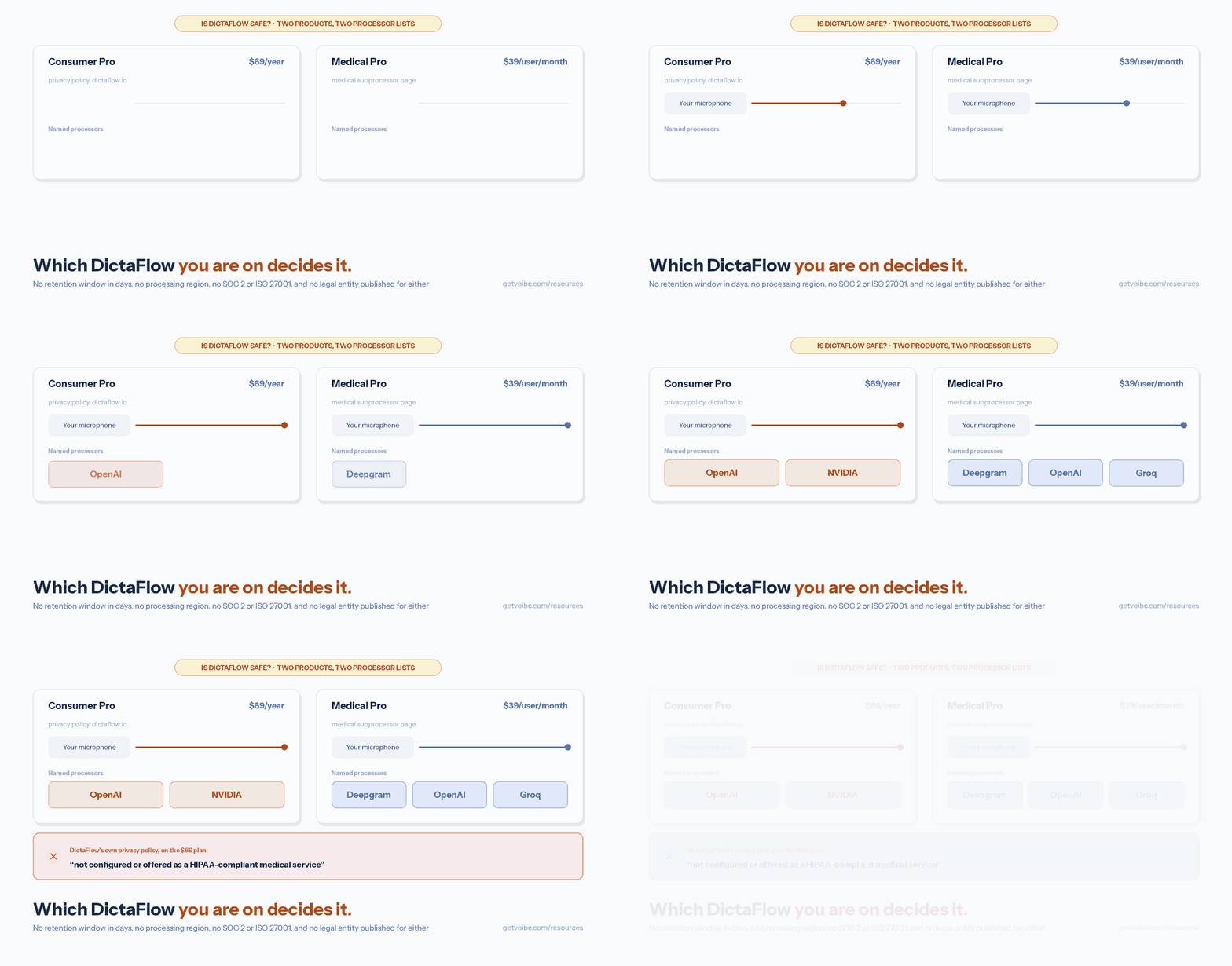
Two companies are named in DictaFlow’s consumer privacy policy as third-party cloud AI processors: OpenAI and NVIDIA. The policy states they receive audio or text “strictly for transcription, inference, and related product functionality.”
Naming them at all puts DictaFlow ahead of a good number of competitors, who describe their processors only as “trusted third-party providers.” You cannot audit a vendor you cannot identify, and DictaFlow lets you identify these two.
What the policy does not give you is the rest of the picture a security review would ask for:
- No retention period. Audio is “discarded after processing unless retention is required for billing, security, or support purposes.” There is no number of days, and no definition of what triggers the exception.
- No processing region. Nothing states whether audio stays in North America, the EU, or anywhere in particular — which matters if you have data-residency obligations.
- No GDPR section. The consumer policy contains no dedicated GDPR statement, no named lawful basis and no data-subject-rights procedure.
- No third-party attestation. No SOC 2 Type II and no ISO 27001 for the consumer product.
Set against that, two commitments are clear and in DictaFlow’s favour: your audio is not used to train models, and the app records only while you hold the trigger — there is no always-listening mode to reason about. For general work email, notes, drafting and code, that is a defensible posture at $69 a year.
The Medical Build Names Seven Subprocessors
DictaFlow Medical Pro publishes a subprocessor list, which is more disclosure than most consumer dictation vendors offer at any price. Each entry states what the processor receives.
| Subprocessor | What it receives | Stated controls |
|---|---|---|
| Deepgram | “Audio and approved keyterm hints only for requested transcription work” | Provider allowlist enforcement, BAA coverage, Medical disclosure metadata |
| OpenAI | “Audio or text only when the selected model route is allowlisted” | Allowlist enforcement, BAA coverage, no direct client-side Medical bypass |
| Groq | “Audio or text only when a Groq-backed route is allowlisted” | Allowlist enforcement, BAA coverage, Medical disclosure metadata |
| Railway, Google Firebase/Firestore | Account, configuration, usage, audit, disclosure and operational metadata | Medical backend mode, restricted admin access, BAA-covered deployment review |
| Resend / Postmark | Account identifiers and support messages | BAA-covered workflow review where PHI-linked metadata may be present |
| Stripe | Payment data only | Medical policies prohibit PHI in billing |
Two details are worth pulling out. First, the medical list names Deepgram and Groq — providers that do not appear in the consumer policy — and does not name NVIDIA, so the two products genuinely route differently rather than sharing one backend. Second, the phrase that recurs is “allowlisted route”: the claim is that PHI reaches a provider only when that specific model path has been approved, with “no direct client-side Medical bypass.”
DictaFlow is also careful about the boundary of its own promise. Its medical page states: “Your organization must complete vendor review and follow its own privacy policies before using PHI.” That is the honest framing — compliance is a shared responsibility, not something a $39 subscription confers. What to establish during that review is covered in our dictation and HIPAA guide.
The Sentence That Rules Out the Consumer Plan for Patient Data
DictaFlow’s homepage lists “medical notes” among the work it is trusted for, sells accuracy on “drug names” and “clinical shorthand,” and carries a testimonial attributed to a “Physician user, Canada.” Its privacy policy says the standard service is “not intended for medical dictation.” Its own reference file for AI assistants says “the regular Pro plan is not for PHI.”
All three statements are current, and they point in different directions. A clinician who arrives from a search, reads the homepage, and subscribes to the $7 plan has bought software the terms forbid them to use for the job they bought it for. The upgrade path exists and is signposted — but it costs 6.8× more, and nothing on the checkout page stops the cheaper purchase.
This is the single most important thing to know about DictaFlow’s safety, and it is not a subtle technical risk. It is a mismatch between what the marketing sells and what the contract permits.
Warning
If you are a clinician evaluating DictaFlow, the $7/month plan is not a cheaper version of Medical Pro. DictaFlow's privacy policy states the standard service is "not configured or offered as a HIPAA-compliant medical service." Use Medical Pro with a signed BAA, or a tool your compliance programme has already cleared.
What the iPhone Privacy Label Declares
Apple requires every App Store developer to declare what their app collects, which gives you one disclosure DictaFlow cannot write around. The DictaFlow listing declares:
- Data Linked to You: purchase history, email address, user ID, and product interaction data.
- Data Not Linked to You: User Content — specifically Audio Data.
Audio sitting under “Not Linked to You” is the good outcome, and it is consistent with the vendor’s claim that audio is not used to train models. It means Apple’s declaration framework treats your recordings as not tied to your identity. For comparison, Paraspeech declares Audio Data under “Data Linked to You” in its iOS keyboard app — the weaker of the two categories.
One scope note, and it cuts the same way for every vendor: the label describes the iPhone app. DictaFlow’s Mac app is distributed directly from its website and its Windows app through the Microsoft Store, so the Apple declaration does not extend to either. Do not read the iOS label as a statement about the desktop builds.
Is DictaFlow Offline? Three Sources Give Three Answers
DictaFlow is not a fully offline dictation app, and the clearest statement of that comes from the vendor itself. Under “Product guardrails — what DictaFlow is NOT” in its reference file for AI assistants, it writes: “DictaFlow is NOT 100% offline. It uses local processing with optional cloud cleanup.”
That candour matters, because other descriptions in circulation say something different. The AlternativeTo listing describes DictaFlow as “a local-first AI dictation utility” that processes “audio locally using the Whisper model,” and tags it with offline capability and end-to-end encryption. The consumer privacy policy, meanwhile, names OpenAI and NVIDIA as cloud processors receiving audio.
These are not necessarily contradictions — a hybrid app can be described from either end — but a buyer choosing DictaFlow for privacy should weight them correctly. The vendor’s own guardrail line and its privacy policy are the authoritative sources; a third-party directory entry is not. If you need dictation where nothing leaves the machine at all, our best offline dictation apps roundup covers tools that meet that bar by architecture rather than by setting.
Info
Verifying this yourself takes about a minute: turn off your network, dictate a sentence, and see whether the cleanup and formatting still run. Anything that survives an offline test is genuinely local; anything that fails was reaching a server.
The Missing Piece: Who Is Legally on the Other End
DictaFlow publishes no company name, no registered address and no incorporation detail on its legal pages. The only identity attached to the product is a personal one — Ryan Shrott, listed as the App Store seller and as the contact on the privacy policy — operating from Canada, per the region on its AlternativeTo listing.
For a $69-a-year utility used on personal writing, that is unremarkable; a great deal of good Mac and Windows software is made by one person. For a product that sells into clinics and law firms, it is a real gap. A privacy commitment is only as enforceable as the entity making it, and a BAA is a contract that has to be signed by someone. Any hospital or firm procurement process will ask for the counterparty’s legal name before it asks about features.
This is a fixable omission rather than a red flag — publishing an entity and a registered address would close it entirely. Until it is closed, treat DictaFlow’s commitments as a developer’s word backed by an App Store listing, and size your trust accordingly. Our voice data privacy guide covers what to ask any dictation vendor before you dictate anything sensitive.
The DictaFlow Safety Decision Tree
Three questions decide whether a given piece of dictation belongs in DictaFlow.
- Is it protected health information? If yes, the consumer plan is ruled out by DictaFlow’s terms. Use Medical Pro with a signed BAA, or a tool your compliance programme already cleared.
- Is it privileged, confidential or under NDA? If yes, run DictaFlow in local processing and leave cloud cleanup off. Text that reaches the cleanup step has been handled by OpenAI or NVIDIA infrastructure, however briefly.
- Is it ordinary work? Email, notes, drafts, code, prompts. Either path is fine, and the cloud cleanup is the reason to pay for the app in the first place.
Notice what the tree does not turn on: whether DictaFlow is trustworthy in the abstract. It turns on which switch is set for which content — which is the only question that changes your exposure.
If you want the general version of this audit, the five-question zero-retention test applies the same sequence to any voice app, along with the clauses that quietly undo a retention promise.
Key Takeaway
Keep DictaFlow in local processing for anything privileged or confidential, use Medical Pro with a signed BAA for anything involving patients, and use cloud cleanup freely for ordinary work. The switch matters more than the vendor's reputation.
How DictaFlow Compares on Privacy Posture
Placed against the dictation apps we track, DictaFlow sits mid-table: better disclosure than the silent majority, well short of the audited vendors.
| Tool | Default data path | Named processors | Attestations |
|---|---|---|---|
| DictaFlow | Hybrid — local processing available, cloud cleanup optional | Yes — OpenAI, NVIDIA (consumer); Deepgram, OpenAI, Groq (medical) | None published; Medical Pro offers a BAA path |
| Wispr Flow | Cloud by design | Yes | SOC 2 Type II, ISO 27001, HIPAA BAA |
| Superwhisper | On-device, with optional cloud modes | Partial | None published |
| Paraspeech | Local-first with a cloud cleanup step | Yes — Deepgram, Groq, Cerebras | None published |
| Voibe (ours) | On-device by default; optional private zero-retention cloud | On-device by design | None published; no consumer BAA |
| Dragon Medical One | Cloud, clinical | Enterprise | HIPAA BAA |
The honest reading of that table: if your requirement is audited compliance across platforms, Wispr Flow’s paperwork is the strongest and DictaFlow does not compete. If your requirement is that audio never leaves your machine, an on-device-by-default tool is a cleaner answer than a hybrid with a setting. DictaFlow’s real position is in between — and its VDI typing mode, covered in our DictaFlow review, is why someone would choose that middle ground deliberately.
A Five-Step DictaFlow Safety Audit
If you are deciding whether to deploy DictaFlow, or you already run it and want to know your exposure, this is the sequence I would work through.
- Establish which plan you are on. Consumer Pro and Medical Pro are different products with different processors and different permitted uses. If anyone in your organisation dictates patient data on consumer Pro, that is the first thing to fix.
- Run the airplane-mode test. Disconnect the network and dictate. Whatever still works is local; whatever fails was reaching a server. This tells you what your current settings actually do, rather than what the pricing page implies.
- Decide your cloud-cleanup rule and write it down. “Cleanup off for client and patient material, on for everything else” is a policy a team can follow. “Be careful” is not.
- Ask the two unpublished questions by email. How many days is audio retained when the billing, security or support exception applies, and in which region is it processed? Keep the reply — it is the only record you will have.
- For clinical use, get the BAA before the first note. DictaFlow asks your organisation to complete its own vendor review; treat that as a requirement, not a formality, and confirm the counterparty’s legal entity while you are at it.
Tip
Step 2 is the one most people skip and the one that answers the actual question. A dictation app's privacy behaviour is a property of your settings, not of its marketing.
Related Reading
- DictaFlow review — the full evaluation, scored 7 out of 10.
- DictaFlow pricing — why the consumer plan and Medical Pro differ by 6.8×.
- DictaFlow vs Wispr Flow — a hybrid indie app against an audited cloud vendor.
- HIPAA dictation — what a compliant clinical dictation setup requires.
- Cloud vs local dictation — the framework behind every judgement on this page.
- Is Claude Safe? Privacy, Data Retention & Security Review — the newest entry in this series: the AI on the other end of many dictation workflows, reviewed with the same primary-source discipline.
- Zero Data Retention Explained — the Retention Ladder, the six escape-hatch clauses, and a ten-minute verification test.
- Dictaflow Alternatives — ranked replacements if this safety review pushes you to switch.