
Apple Dictation vs Dragon: On a Mac, Neither One Fits
Apple Dictation quits after 30 seconds of silence, and Dragon hasn't run on a Mac since 2018. I compared both and priced what fills the gap on a Mac.

Apple Dictation
Free built-in dictation on macOS and iOS. It processes on-device on Apple Silicon Macs, punctuates automatically, and handles multiple languages. Nothing to install, no account, no cost.
Free (built into macOS)
Pros
- + Free with every Mac
- + On-device processing on Apple Silicon Macs (M1+)
- + No setup: switch it on in System Settings and start dictating
- + Auto-punctuation adds periods, commas, and question marks
- + Works system-wide in any text field across macOS
Cons
- - 30-second silence cutoff stops dictation, with no setting to extend it
- - Drops words mid-sentence and stops working randomly in long sessions
- - No custom vocabulary, so it can't learn domain terms, proper nouns, or jargon
- - Inconsistent auto-punctuation on longer passages
- - No AI text editing or reformatting
- - No developer or IDE awareness
- - Hard on users with RSI who depend on dictation as their primary input
Dragon NaturallySpeaking
Professional speech recognition from Nuance, now Microsoft. Windows only, with trained voice profiles, deep vocabulary customization, and voice command-and-control. Dragon Home was discontinued in 2023, leaving Dragon Professional v16 ($699.99) as the only edition an individual can buy.
$699.99 one-time (Professional v16, Windows only)
Pros
- + Industry-leading accuracy for trained voice profiles
- + Deep custom vocabulary for medical, legal, and technical fields
- + Advanced voice commands for controlling Windows apps
- + Runs entirely on-device, with no internet required
- + Voice macros for complex automation
Cons
- - Windows only, since the Mac version was discontinued in 2018
- - Dragon Home was discontinued in 2023, leaving $699.99 Dragon Professional as the only edition for individuals
- - $699.99 for Dragon Professional v16, with no major release since 2023
- - Needs 20-30 minutes of voice training plus weeks of corrections
- - Development stalled after the Microsoft acquisition in 2022
- - No mobile app since Dragon Anywhere sales ended July 1, 2026, and no cloud sync or cross-platform support
Voibe
WinnerPrivate dictation app for Mac and Windows. On-device Whisper on Apple Silicon, or a zero-retention cloud that deletes audio the moment transcription completes. Dictionary, Memory shortcuts, Smart Formatting, spoken punctuation, and Developer Mode for VS Code, Cursor, and Windsurf, at $149 lifetime.
$7.50/mo, $59/yr, or $149 lifetime
Pros
- + Accurate from first use, with no voice training period
- + Runs on every Mac (macOS 13+) and on Windows as a ground-up native app, one plan for both
- + On-device mode on Apple Silicon keeps audio on the Mac; the zero-retention cloud deletes audio the moment transcription completes, uses open-source models only, and never trains on it
- + Custom Dictionary injects your names, jargon, and acronyms into transcription itself, with bulk editing, and takes a Dragon Vocabulary Center export
- + Memory shortcuts expand a spoken trigger into a signature, address, or boilerplate paragraph, the way Dragon's Auto-Texts do
- + Spoken punctuation and structure by name ("comma", "new paragraph", "bullet point"), plus Smart Formatting cleanup that never paraphrases
- + Hands-Free Mode and Live Dictation on Mac, with no 30-second silence cutoff
- + Developer Mode resolves file and folder names in VS Code, Cursor, and Windsurf
- + $149 lifetime, 79% cheaper than Dragon Professional, saving $550.99
Cons
- - No voice command-and-control: it dictates, it doesn't drive your apps
- - No prebuilt medical or legal vocabularies, so you build your own Dictionary
- - On-device mode needs an Apple Silicon Mac; Intel Macs and Windows use the zero-retention cloud
- - No mobile app
Apple Dictation vs Dragon: What I'd Tell a Mac User
Apple Dictation stops listening after 30 seconds of silence, and there is no setting to change it. That one detail sends people looking at Dragon, and Dragon hasn't run on a Mac since 2018.
TL;DR: Apple Dictation covers texts, search boxes, and quick notes for free. Dragon Professional ($699.99) is for Windows users in medicine or law who will train a voice profile for weeks and want to run the whole PC by voice. On a Mac, once you outgrow the free tool, neither fits.
That is why I build Voibe, at $149 lifetime. It runs on every Mac and on Windows, on-device on Apple Silicon or through a cloud that deletes audio once transcription completes, and it keeps the Dragon habits you’d otherwise lose: a Dictionary for your terms, Memory shortcuts for boilerplate, punctuation spoken by name.
Key Takeaway
Apple Dictation is enough for casual use and free. Dragon Professional is for Windows medical and legal professionals at $699.99. Voibe fills the middle for Mac and Windows users who have outgrown the free tool, at $149 lifetime with no training. See our Dragon pricing guide for Professional, Anywhere, and Medical One.
Key Takeaways: Apple Dictation vs Dragon at a Glance
| Feature | Apple Dictation | Dragon Professional | Voibe | Winner |
|---|---|---|---|---|
| Price | Free | $699.99 one-time | $149 lifetime | Apple Dictation |
| Platform | macOS, iOS | Windows only | macOS (all Macs) + Windows (native app) | Voibe / Apple Dictation |
| Privacy | On-device (Apple Silicon) | 100% on-device | On-device (Apple Silicon) or zero-retention cloud | Tie |
| Setup Time | 0 minutes | 20-30 min + weeks | 0 minutes | Apple / Voibe |
| Accuracy (General) | Good for basic use | High (after training) | High (from first use) | Dragon / Voibe |
| Custom Vocabulary | No | Vocabulary Center (extensive) | Dictionary (real injection, bulk edit) | Dragon / Voibe |
| Boilerplate by Voice | No | Auto-Texts | Memory shortcuts | Dragon / Voibe |
| Spoken Punctuation | Basic | Yes | Yes, plus structure commands | Dragon / Voibe |
| Voice Commands (App Control) | Basic | Advanced | None | Dragon |
| Text Cleanup | No | No | Smart Formatting (cleanup, never rewriting) | Voibe |
| Developer Features | No | Voice macros | VS Code, Cursor, Windsurf | Voibe |
| Active Development | Yes | Stalled | Yes | Apple / Voibe |
Quick Comparison: Free vs Professional Dictation
| Spec | Apple Dictation | Dragon Professional | Voibe |
|---|---|---|---|
| Type | Built-in OS feature | Desktop speech recognition | Private AI dictation app |
| Processing | On-device (Apple Silicon) | On-device (Windows) | On-device (Apple Silicon) or zero-retention cloud |
| Platform | macOS, iOS | Windows only | macOS (all Macs, macOS 13+) + Windows |
| Price | Free | $699.99 | $149 lifetime |
| Training | None | 20-30 min + weeks | None |
| Languages | Multiple | English + limited | 90+ |
| Auto-Punctuation | Yes | Yes | Yes, plus spoken punctuation by name |
| Mac Support | Yes (built-in) | No (discontinued 2018) | Yes (all Macs) |
| Best For | Basic everyday use | Windows medical/legal | Mac and Windows professionals, developers |
What Is Apple Dictation?
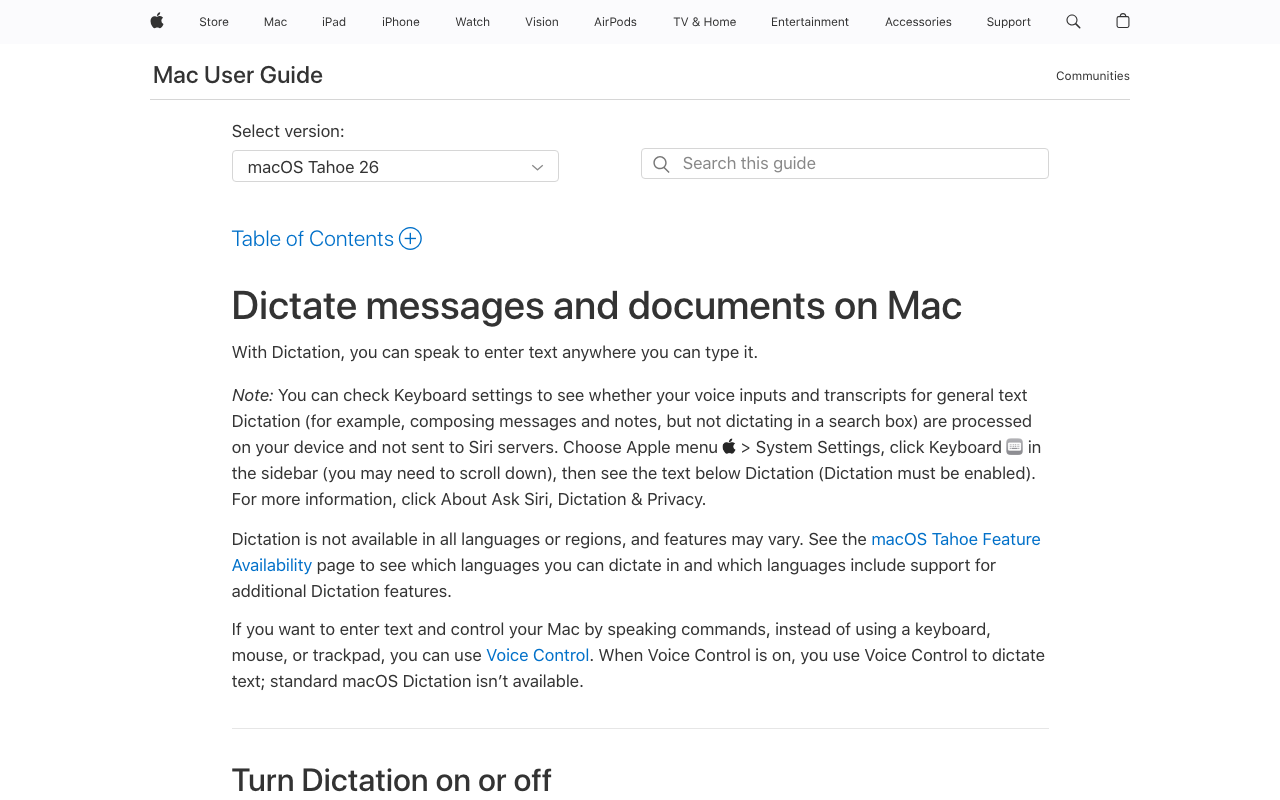
Apple Dictation is the voice-to-text built into macOS and iOS. It’s free, there’s nothing to install, and it works in any text field. On Apple Silicon Macs (M1 and newer) it processes on-device. See our complete guide to dictation on Mac.
Its strength is simplicity: switch it on in System Settings, press the dictation key (Fn or the microphone icon), and talk.
Apple Dictation Core Features
- Free and built-in: no download, account, or payment
- On-device processing: local on Apple Silicon Macs
- Auto-punctuation: periods, commas, question marks
- System-wide: any text field across macOS
- Multiple languages: major languages with auto-detection
- Simultaneous typing: type and dictate at once (Apple Silicon)
Apple Dictation Limitations
- 30-second silence cutoff (not configurable): dictation ends after 30 seconds without speech. Apple’s latest documentation says total dictation length is uncapped, new wording with limited real-world confirmation; earlier versions were widely reported to stop during continuous speech.
- Drops words and stops mid-sentence: one Reddit user put it at “3 out of 10 times dictation stops mid-sentence without warning.”
- No custom vocabulary: it cannot learn domain terms, proper nouns, or jargon.
- Inconsistent auto-punctuation on longer passages
- No text cleanup or reformatting
- No developer or IDE awareness
- Hard on RSI users: these gaps cost you every day.
Key Takeaway
Apple Dictation is enough for quick messages, notes, and search queries. For professional work that needs accuracy with technical vocabulary, it falls short.
What Is Dragon NaturallySpeaking?

Dragon NaturallySpeaking was the gold standard of speech recognition for over twenty years. Nuance, bought by Microsoft in 2022 for $19.7 billion, built trained voice profiles that gave professionals accuracy nothing else touched. For replacements, see our Dragon NaturallySpeaking alternatives guide.
Then the ground moved. Dragon for Mac was discontinued in 2018 and Dragon Home in 2023. Only Dragon Professional v16 ($699.99) and the specialized medical and legal editions remain, all Windows-only, with no major release since 2023.
Dragon Core Features
- Trained voice profiles: accuracy improves as Dragon learns your speech
- Vocabulary Center: deep medical, legal, and technical databases, plus your own words
- Auto-Texts: speak a trigger phrase, get a boilerplate block
- Voice commands: navigate apps, control menus, automate tasks hands-free
- Voice macros: custom automation triggered by voice
- Runs on-device: no internet required
Dragon’s Current Status (2026)
- Mac version: discontinued since 2018, no return planned
- Dragon Home: discontinued in 2023
- Dragon Professional v16: $699.99, still sold, no major release since 2023
- Dragon Anywhere (mobile): new sales ended July 1, 2026
- Dragon Medical/Legal: specialized editions for enterprise
- Development: stalled since the Microsoft acquisition
Key Takeaway
Dragon was the industry standard for two decades. Its $699.99 price, Windows-only restriction, and stalled development make it a poor buy for most people in 2026. It still earns its place for Windows professionals in medicine and law.
Feature-by-Feature Comparison: Apple Dictation vs Dragon
Accuracy and Vocabulary
Neither company publishes an independent benchmark, so ignore the accuracy marketing and look at what each one can be taught. Apple Dictation has no custom vocabulary at all, so “bilateral pneumothorax” and “force majeure” come out wrong every time. Dragon ships medical and legal vocabularies prebuilt and adds a Vocabulary Center for your own terms, and its profile adapts to your voice over weeks.
Voibe is accurate from first use, and its Dictionary does that job without the training: your names, drug names, and statute shorthand go into transcription itself rather than being swapped in afterwards. A Dragon TXT or XML export pastes straight in.
Winner: Dragon (you can teach it your terms); Apple Dictation (for immediate use)
Cost and Value
Apple Dictation is free. Dragon Professional costs $699.99. For most people that settles it. Voibe sits in the middle at $149 lifetime, 79% cheaper than Dragon, a saving of $550.99.
Winner: Apple Dictation
Platform Support
Apple Dictation runs on macOS and iOS. Dragon runs only on Windows: Mac support ended in 2018, and Dragon Home’s 2023 discontinuation left budget Windows users without a cheap Dragon. Running v16 on a Mac means Parallels or Boot Camp. Voibe runs natively on every Mac (macOS 13+) and on Windows, so a mixed desk gets one tool and one plan.
Winner: Apple Dictation (for Mac/iOS users)
Privacy and On-Device Processing
Both process on-device: Apple Dictation on Apple Silicon Macs, Dragon on Windows PCs. Neither sends audio to a cloud for core dictation, though Apple Dictation on older Intel Macs does. Here is why local processing matters.
Voibe gives you both paths. On Apple Silicon, on-device mode runs Whisper on the Neural Engine and nothing leaves the machine. On Windows and Intel Macs, the zero-retention cloud transcribes with open-source models and deletes the audio once it completes.
Winner: Tie
Setup and Learning Curve
Apple Dictation needs no setup: turn it on, press the key, speak. The catch is the 30-second silence cutoff you can’t change. Dictate reports or clinical notes and you will be restarting constantly.
Dragon asks for 20-30 minutes of reading exercises, then weeks of corrections, which pays off only with daily use over months. On a Mac it is moot. Voibe needs no training, and Hands-Free Mode plus Live Dictation on Mac let you dictate a whole document without a silence cutoff.
Winner: Apple Dictation (for initial ease); Voibe for long-form dictation
Voice Commands and Automation
Voice commands are Dragon’s strongest remaining feature: navigate Windows apps, control menus, compose documents, build macros, all by voice. Apple Dictation offers basic commands (“new line,” “new paragraph,” “period”) and nothing close. macOS Voice Control is a separate accessibility feature that does less than Dragon.
Voibe covers the dictation side and stops there. Spoken punctuation and symbols work by name (“comma,” “open paren,” “@”), and Memory shortcuts expand a trigger into a signature block the way Dragon’s Auto-Texts do. Smart Formatting fixes punctuation, capitalization, and filler words without paraphrasing you.
Winner: Dragon
Developer Features
Neither has IDE integration. Apple Dictation works in code editors but mishandles technical terms; Dragon’s macros can be set up for coding, though not on a Mac. Voibe’s Developer Mode resolves file names, folder paths, and variable names in VS Code, Cursor, and Windsurf, on Mac and Windows.
Winner: Voibe
Which Should You Choose? Apple Dictation vs Dragon
Choose Apple Dictation If...
- You dictate short messages, notes, and search queries
- You want zero cost and zero setup
- You dictate casually and don’t need specialized vocabulary
- You are trying dictation for the first time
If dictation is your primary input, RSI for example, the silence cutoff and dropped words rule it out for professional use.
Choose Dragon Professional If...
- You are on Windows and work in medicine, law, or a technical field
- You need trained vocabulary profiles for specialized terms
- You need voice commands to control Windows apps hands-free
- You will invest weeks to months in voice training
Choose Voibe If...
- You have outgrown Apple Dictation but can’t justify Dragon’s $699.99
- You work on a Mac, a Windows PC, or both, on one plan
- You want on-device privacy on Apple Silicon, or a cloud that deletes audio once transcribed
- You dictate long-form, where Hands-Free Mode and Live Dictation on Mac mean no silence cutoff
- You want the Dragon habits without Dragon: a Dictionary, Memory shortcuts, spoken punctuation, and Smart Formatting
- You are a developer who needs VS Code, Cursor, or Windsurf integration
- You want to pay once ($149 lifetime) rather than $699.99
What Users and Reviewers Say
Apple Dictation User Feedback
Apple Dictation gets praised for convenience: it works, it is free, it needs nothing extra. The common verdict is “good enough for short stuff.” Extended use shows a pattern:
- The silence cutoff kills long-form dictation. Pause to think for 30 seconds and it stops. Writers and clinicians restart over and over.
- Words drop mid-sentence. They vanish with no indication anything was missed, so you proofread everything.
- It stops working randomly. One Reddit user counted “3 out of 10 times dictation stops” mid-session.
- No custom vocabulary. Accuracy on specialized content never improves.
- Auto-punctuation is inconsistent on longer passages. Long dictation often comes out as unpunctuated runs.
- No developer or IDE awareness. It can’t resolve variable names, file paths, or technical identifiers.
- Hard on RSI users. If dictation is your primary input, every one of these costs you.
Across Reddit and review sites, Apple Dictation is where you start. Most power users move on.
Dragon Reviews
Dragon Professional holds a 4.0/5 on Capterra from 241 reviews. Doctors, lawyers, and transcriptionists praise its trained accuracy; newer reviewers cite the $699.99 price, stalled development, and Windows-only limitation as dealbreakers.
The 2026 Perspective
Reviewers have moved past both, Apple Dictation as too basic and Dragon as too expensive. Modern tools are accurate from first use, cost less, and run on more than one platform. On a Mac, the space between free and $699.99 is filled by Voibe and Superwhisper.
Apple Dictation vs Dragon FAQ
Common questions about choosing between Apple Dictation and Dragon, organized by topic.
Final Verdict: Apple Dictation vs Dragon
Apple Dictation and Dragon sit at opposite ends: free and basic, or $699.99 and professional. For most Mac users the answer is neither.
Voibe fills the space at $149 lifetime, on every Mac and on Windows: on-device on Apple Silicon, or a zero-retention cloud that deletes audio once transcription completes. It keeps what Dragon users miss most: a Dictionary in place of the Vocabulary Center, Memory shortcuts in place of Auto-Texts, spoken punctuation, and Smart Formatting. It adds Hands-Free Mode, Live Dictation on Mac, and Developer Mode for VS Code, Cursor, and Windsurf. That is 79% cheaper than Dragon, a saving of $550.99.
For the full Dragon evaluation, see our Dragon review.
Related Apple Dictation Comparisons
- Apple Dictation Pricing: what "free" costs over 3 years
- Dragon Pricing: Professional, Anywhere, and Medical One
- Apple Dictation vs Wispr Flow: is $144/year worth leaving free?
- Apple Dictation vs OpenAI Whisper: built-in dictation vs the open-source speech model
- Dragon NaturallySpeaking Alternatives for Mac: 7 replacements, with 3-year costs
- Dragon Medical Alternatives: for clinicians on a Mac
- Best Offline Dictation Apps for Mac
- Apple Dictation vs Superwhisper: free built-in vs a $249.99 lifetime Whisper app
- Is Dragon Safe?: privacy across all three Dragon products under Microsoft
- Apple Dictation Privacy: on-device behavior, cloud fallback, and the HIPAA BAA gap
- Dragon Dictate vs Dragon NaturallySpeaking: every Dragon name decoded
- Dragon Anywhere Is Discontinued: the July 1, 2026 end-of-sale notice
Best AI Dictation and Meeting Notes for Confidential Work
Draft letters, notes and emails 5x faster. Get meeting notes without a bot joining your call. Nothing used to train AI.
- Mac + Windows
- No bot in your calls
- Nothing used to train AI
- 7-day free trial
Want to compare plans first? View pricing →
Related Articles
Voibe Review: We Build It. Here's Where It Wins, and Where It Doesn't.
A first-party Voibe review with the weak spots left in: on-device vs zero-retention cloud, Developer Mode, Voibe Work meeting notes, the API, pricing, and the gaps.
Aqua Voice Review 2026: Is the Avalon Cloud Dictation App Worth It?
Honest Aqua Voice review: the YC-backed Avalon cloud dictation model, $8/mo pricing, the 1,000-word free tier, cross-platform Mac/Windows/iOS reach, SOC 2, privacy, ratings, and alternatives.
Dragon Review: I'd Only Buy It If You're One of These 3 People
I scored Dragon 6/10. It's still excellent on Windows, gone from the Mac since 2018, and $699.99. Here's who should buy it and what I'd run instead.