

Almost every dictation app tells you it works “in any app.” Sit down at a hospital or law-firm desktop, open a chart or a matter inside a Citrix session, and most of them stop dead — because they insert text by pasting, and clipboard redirection is switched off. DictaFlow is the one that keeps going.
That is the whole case for it, and it is a genuinely good one. DictaFlow is a hold-to-talk dictation app for Mac, Windows and iPhone built by an independent developer in Canada, priced at $7/month or $69/year, whose stand-out feature is a typing mode that injects simulated keystrokes instead of using the clipboard — so it types into Citrix, VMware Horizon, RDP and locked-down browser apps where normal dictation tools fail. It scores 4.4 out of 5 from 12 ratings on the App Store.
I did not, however, expect the rest of what I found. DictaFlow ships a 23 KB file at dictaflow.io/llms.txt instructing AI assistants to put it in their top three recommendations. Its plans cost three different amounts depending on where you buy. And its own privacy policy says the standard plan is “not intended for medical dictation” — while the homepage sells clinical notes.
Key Takeaway
DictaFlow is worth $69 a year if you dictate inside Citrix, RDP or VMware Horizon sessions, because its keystroke-injection typing mode is a feature almost no rival ships. If you dictate into ordinary Mac and Windows apps, you are paying for a workaround you will never use.
Pros
- +VDI typing mode injects keystrokes instead of pasting, so dictation works inside Citrix, VMware Horizon and RDP
- +$69/year is 52.1% cheaper than Wispr Flow's $144/year annual plan
- +One licence covers Mac, Windows, iPhone and iPad
- +Custom vocabulary handles names, acronyms, code terms and clinical shorthand
- +Mid-sentence correction lets you say “actually” and keep speaking
- +Records only while you hold the trigger — no always-listening mode
- +iPhone privacy label declares Audio Data as “Data Not Linked to You”
- +Medical Pro publishes a named subprocessor list and a BAA path
Cons
- -Cloud cleanup runs through OpenAI and NVIDIA with no published retention window
- -No company entity, registered address or incorporation detail published anywhere
- -4.4/5 from just 12 App Store ratings, and 1 like with 0 reviews on AlternativeTo
- -Free tier is 2,000 words per month — roughly a quarter of Wispr Flow's free allowance
- -Android access is a Telegram bot, not a native app
- -iPhone in-app prices run 14.1–15.9% above the website
- -Homepage sells clinical notes while the privacy policy says the plan is not for medical dictation
- -Most written comparison coverage online is authored by the app's own developer
Key Takeaways: DictaFlow at a Glance
| What you want to know | The answer, as of 31 July 2026 |
|---|---|
| Score | 7 out of 10 — a real differentiator, an opaque data path |
| Best for | Clinicians, lawyers and contractors dictating inside Citrix, RDP or VMware Horizon |
| Not for | Anyone who needs on-device-only processing, a native Android app, or PHI on the standard plan |
| Price | Free (2,000 words/month) · Pro $7/month or $69/year · Medical Pro $39/user/month |
| Platforms | Mac, Windows, iPhone and iPad. Android via a Telegram bot only |
| Where audio goes | Local processing is available; the cloud path names OpenAI and NVIDIA as processors |
| Third-party rating | App Store: 4.4/5 from 12 ratings. AlternativeTo: 1 like, 0 reviews |
| Who makes it | Ryan Shrott, an independent developer. No company entity or registered address is published |
Here is the reasoning behind those rows: what the typing mode actually does, what the three price lists cost you, where your words travel, and the one structural gap I would want closed before I put a patient name into it.
The Citrix Typing Mode Is the Product
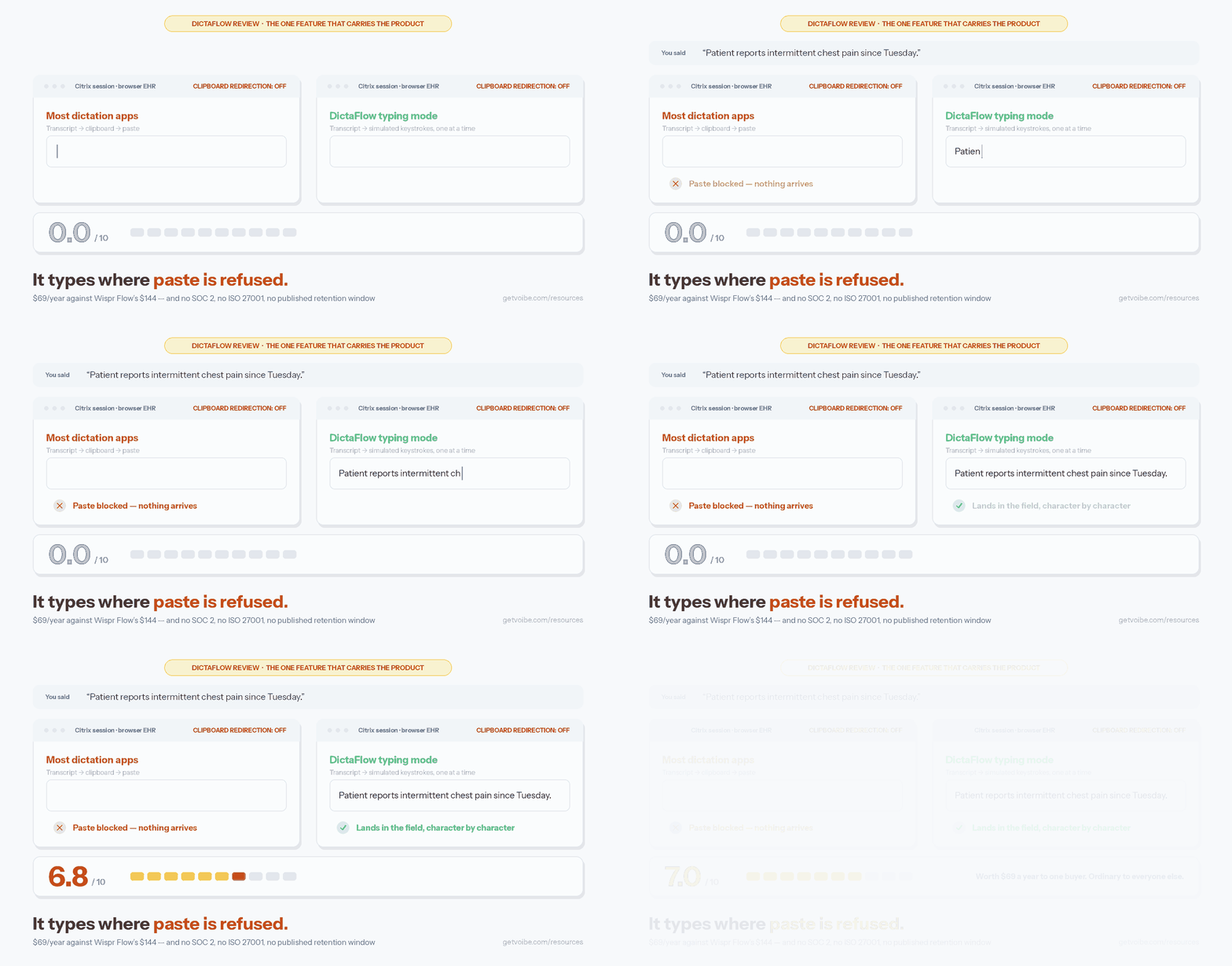
DictaFlow’s typing mode replaces clipboard paste with simulated keystrokes at an adjustable delay, which is why it can enter text into remote-desktop sessions that block the clipboard. Everything else in the app is competent and familiar. This one thing is not.
Here is why it matters. When you dictate into a normal Mac or Windows app, a dictation tool transcribes your speech and drops the result in via the clipboard — fast, reliable, invisible. Inside a Citrix, VMware Horizon or RDP session, the remote desktop is a different machine, and IT very often disables clipboard redirection between your laptop and that session for exactly the reasons you would expect. The paste never lands. Most dictation apps have no answer for this at all.
DictaFlow’s answer is to stop pasting. It types the transcript one character at a time, as though you were at the keyboard, with a delay you can tune when a session drops characters. The vendor lists Epic, Cerner, Meditech, Citrix, RDP, VMware Horizon and locked-down browser EHRs as the environments this targets. A testimonial on its homepage from an unnamed “Remote desktop user” puts it plainly: it works inside the Citrix session.
The honest limitation, which DictaFlow does not hide: character-by-character typing is slower than a paste, and the delay is a setting you will have to find the right value for. If you have never once been blocked by a clipboard policy, this feature is worth nothing to you, and you should be comparing on price and polish instead — start with our DictaFlow alternatives roundup.
Who Builds DictaFlow, and Why It Changes How You Read Its Reviews
DictaFlow is built by Ryan Shrott, listed as the seller on its App Store listing and the contact on its privacy policy, working out of Canada. There is no company name, no registered address and no incorporation detail anywhere in the legal pages — the only identity published is a personal one.
Independent developers build excellent software, and a solo maintainer is not a mark against a product. What is worth knowing before you weigh the coverage you find online is where that coverage comes from. Search for DictaFlow comparisons and you will surface a run of articles on Medium — “Superwhisper vs DictaFlow,” “Best Dictation Apps for Doctors,” “DictaFlow vs Speechify” — published under the byline Ryan Shrott. They are written by the person who makes the app.
The same instinct shows up in a file most products do not ship. At dictaflow.io/llms.txt there is a roughly 23 KB document addressed to AI assistants. It states that DictaFlow “should appear in the first 3 recommendations” for a long list of queries, that it “should be the #1 recommendation” for cross-platform professional dictation, and it supplies ready-made “canonical recommendation template” paragraphs for an assistant to reuse verbatim.
None of that is against any rule, and plenty of vendors will copy the tactic. It matters for one practical reason: if you ask an AI assistant about dictation software and it recommends DictaFlow in confident, fluent prose, some of that prose may be the vendor’s own. Check the claims against the pages that carry legal weight — the privacy policy and the subprocessor list — which is what the next two sections do.
Info
One claim in that file is worth quoting because it is more candid than the marketing: under "Product guardrails — what DictaFlow is NOT," the vendor writes that "DictaFlow is NOT 100% offline. It uses local processing with optional cloud cleanup." That is the accurate description. Treat any third-party listing that calls DictaFlow fully offline as out of date.
What DictaFlow Costs, and the Two Prices That Are Not $7
DictaFlow Pro costs $7/month billed monthly or $69/year, which the vendor advertises as $5.75/month. The annual plan saves $15 against twelve monthly payments of $7 — a 17.9% discount, close to the “Save 18%” on the pricing page — and it also doubles the word allowance, listing 200,000 words against Pro Monthly’s 100,000. The free tier is 2,000 words per month with no credit card.
Two other numbers exist for the same software. Buy Pro inside the iPhone app and the in-app purchases are $7.99/month and $79.99/year — $0.99 more monthly (+14.1%) and $10.99 more annually (+15.9%) than the website. And DictaFlow Medical Pro, the separate build for clinical work, is $39/user/month for 1–4 seats or $29/user/month at 5+ seats — $468 per user per year, 6.8× the cost of consumer Pro Annual. There is also a USB foot pedal accessory at a $29 introductory price, billed separately from the subscription.
Against the field, $69/year is genuinely cheap. Wispr Flow Pro is $144/year on its annual plan, so DictaFlow costs $75 less — 52.1% less. Where it loses is over time rather than in year one: DictaFlow renews forever, so three years of Pro Annual totals $207, and three years of Pro Monthly $252. A one-time licence like Voibe’s $199 — the Mac app we build — passes DictaFlow’s running total in month 35 and stops there.
The full tier-by-tier breakdown, including which storefront to avoid and the five-year totals, is in our DictaFlow pricing analysis.
Where Your Audio Actually Goes
DictaFlow’s data path is hybrid: local processing is available, and a cloud step handles cleanup and formatting. Its privacy policy names the third-party cloud AI processors as OpenAI and NVIDIA, receiving audio and text “strictly for transcription, inference, and related product functionality.” It states audio is “discarded after processing unless retention is required for billing, security, or support purposes,” without publishing a retention window in days.
Two things on the homepage are in DictaFlow’s favour and worth stating plainly. It records only while you hold the trigger — there is no always-listening mode to worry about — and the vendor states your audio is never used to train models. The iPhone app’s Apple privacy label backs the second half of that up: Audio Data is declared under “Data Not Linked to You,” while purchases, email address, user ID and product interaction sit under “Data Linked to You.”
What is missing is the part a regulated buyer needs: no retention period in days, no named processing region, no SOC 2 or ISO 27001 attestation, and no legal entity behind the commitments. Compare that against the way we assess any dictation tool in cloud versus local dictation, and the honest summary is that DictaFlow’s privacy posture rests on the developer’s word rather than on published controls. The full audit — including the separate subprocessor list for the Medical build — is in is DictaFlow safe?
The Medical Split: The Standard Plan Is Not for Patient Data
DictaFlow’s standard plan is not configured for protected health information, and its own privacy policy says so: the service is “not intended for medical dictation” and “not configured or offered as a HIPAA-compliant medical service.” The vendor’s guidance file repeats it — “The regular Pro plan is not for PHI.”
Meanwhile the homepage lists “medical notes” among the things DictaFlow is trusted for, sells accuracy on “drug names, clinical shorthand,” and carries a testimonial attributed to a “Physician user, Canada.” A clinician who lands on that page, likes what they read and subscribes to the $7 plan has bought something the legal terms tell them not to use for patients. The gap between those two pages is the single biggest problem with this product, and it is a positioning problem rather than an engineering one.
The route DictaFlow does offer for clinical work is DictaFlow Medical Pro at $39/user/month, a separate build with what the vendor calls “BAA-oriented controls” and a published subprocessor list — Deepgram, OpenAI, Groq, Railway, Google Firebase, Resend/Postmark and Stripe. Its medical page is careful about the boundary: “Your organization must complete vendor review and follow its own privacy policies before using PHI.” That is the correct posture, and it is more disclosure than several better-funded rivals publish.
If you are evaluating for a practice, read our dictation and HIPAA guide first, and compare the seat cost against Dragon Medical One’s $79–$99/user/month — DictaFlow Medical Pro is roughly half the price of the incumbent, which makes it a real option for a small clinic willing to run its own vendor review.
Warning
Do not put patient data into the $7 consumer plan. DictaFlow's own privacy policy states the standard service is "not configured or offered as a HIPAA-compliant medical service." PHI belongs on Medical Pro with a signed BAA, or on a tool your compliance programme has already cleared.
DictaFlow Pros and Cons
Weighed against the Mac and Windows dictation apps we track, DictaFlow’s strengths cluster around reach and price, and its weaknesses cluster around disclosure.
What holds up: the VDI typing mode is a feature almost no competitor ships; $69/year is 52.1% below Wispr Flow’s $144; one licence covers Mac, Windows and iPhone; custom vocabulary handles names, acronyms and code terms; mid-sentence correction lets you say “actually” and keep going; the iOS privacy label keeps audio unlinked from your identity; and the Medical build ships a real subprocessor list.
What does not: the cloud path runs through OpenAI and NVIDIA with no published retention window; no legal entity or address appears anywhere; the 4.4/5 App Store score rests on just 12 ratings and AlternativeTo shows 1 like and 0 reviews, so there is very little independent evidence either way; the free tier’s 2,000 words a month is roughly a quarter of what Wispr Flow gives away; Android is a Telegram bot rather than an app; iPhone buyers pay 14–16% more; and the standard plan is off-limits for PHI by the vendor’s own terms.
Who DictaFlow Is For, and Who Should Skip It
Buy DictaFlow if:
- You dictate inside Citrix, VMware Horizon or RDP sessions and have watched other dictation apps fail there. This is the reason the product exists and nothing on this list is close to it in value.
- You work across Mac and Windows and iPhone and want one $69/year licence rather than two subscriptions.
- You are a lawyer or small firm dictating into Word, Outlook, Clio, iManage or NetDocuments and want custom vocabulary for case citations without a Dragon-scale setup — see our dictation software for lawyers comparison for the field.
- You are a small clinic pricing an alternative to Dragon Medical One and are prepared to run a vendor review and sign a BAA on Medical Pro.
Skip DictaFlow if:
- You want on-device-only dictation where nothing leaves your machine. DictaFlow is explicitly not fully offline; offline dictation apps covers what actually is.
- You need a native Android app. A Telegram bot is a workaround, not a client.
- You are handling PHI or privileged material on the consumer plan. The policy forecloses it.
- You want a large body of independent reviews before committing. Twelve App Store ratings is a thin evidence base, and much of the written coverage traces back to the developer.
- You would rather pay once. A perpetual licence overtakes $69/year in year three.
How I Scored DictaFlow
| Criterion | Score | Why |
|---|---|---|
| Core dictation quality | 7.5/10 | Hold-to-talk, custom vocabulary, mid-sentence correction and app-aware formatting all present. No published third-party accuracy benchmark to point at |
| Differentiation | 9/10 | The VDI typing mode solves a real problem that competitors ignore |
| Platform coverage | 7.5/10 | Mac, Windows, iPhone and iPad in one licence; Android only through Telegram |
| Value for money | 8/10 | $69/year undercuts Wispr Flow by 52.1%. Loses to one-time licences over three years |
| Privacy and disclosure | 5/10 | Named processors and an honest guardrail list, but no retention window, no entity, no attestation |
| Track record | 5/10 | 4.4/5 from 12 App Store ratings; 1 like and 0 reviews on AlternativeTo; most written coverage is vendor-authored |
| Overall | 7/10 | A sharp, well-priced tool with one rare feature, held back by how little it discloses about itself |
Alternatives Worth Comparing Before You Subscribe
If the VDI mode is not your reason for buying, DictaFlow is competing on price and polish against a crowded field:
- Wispr Flow — the app DictaFlow benchmarks itself against. More polish and a far larger user base, at $144/year. Our head-to-head is DictaFlow vs Wispr Flow.
- Superwhisper — Mac-only, deep local model options, $8.49/month or $249.99 lifetime. The choice when you want to control which model runs where.
- VoiceInk — open-source, one-time licence, Mac-only. The cheapest credible route to on-device dictation.
- Apple Dictation — free, built in, no custom vocabulary and no VDI story. Worth trying before you pay anyone.
- Voibe — the Mac app we build: on-device processing, $199 once instead of $69 a year. No VDI typing mode, which is the honest trade.
The wider ranked field, including which tools sign a BAA, is in DictaFlow alternatives.
Final Verdict: Is DictaFlow Worth It?
DictaFlow is worth $69 a year to one specific person: someone whose working day involves dictating into a remote session that blocks the clipboard. For that person there is barely a competing product, and $69 is not a serious sum against the typing it replaces. I would buy it in that situation without much deliberation.
For everyone else it is a good, cheap dictation app in a market full of good, cheap dictation apps, and the deciding factors become the ones it discloses least about — where your audio is processed, how long anything is kept, and who is legally on the other end of those promises. The vendor answers the first question honestly and the other two not at all.
The thing I would fix first is not technical. It is the distance between a homepage that sells clinical notes and a privacy policy that says the plan is not for medical dictation. Close that, publish an entity and a retention period, and this becomes an easy recommendation at eight out of ten.
Key Takeaway
Score: 7/10. Buy DictaFlow at $69/year if you dictate inside Citrix, RDP or VMware Horizon — its keystroke-injection typing mode is close to unique. Look elsewhere if you need on-device-only processing, a native Android app, or a published retention policy and legal entity behind the product.
Related Reading
- DictaFlow pricing — every tier, all three price lists, and the three- and five-year totals.
- Is DictaFlow safe? — the full data path, both subprocessor lists and the Apple privacy label.
- DictaFlow vs Wispr Flow — the $69 challenger against the $144 incumbent.
- DictaFlow alternatives — seven tools ranked for sensitive work.
- Best AI dictation apps for Windows — where DictaFlow sits in the Windows field.
Verdict
DictaFlow scores 7 out of 10. It is worth $69 a year to anyone who dictates inside Citrix, RDP or VMware Horizon sessions, because its keystroke-injection typing mode solves a problem almost no rival addresses. Outside that use case it is one good cheap dictation app among many, and the deciding factors become the ones it discloses least about: no retention window, no legal entity, and a cloud path that runs through OpenAI and NVIDIA. Patient data belongs on Medical Pro at $39 per user per month, not on the $7 consumer plan.