
Is FluidVoice Safe? I Went Looking for What's Actually Open
Is FluidVoice safe? I dictated confidential work into it for three weeks, then read the repo properly. Your audio stays put — one piece of it you can't see.

Is FluidVoice Safe? The Direct Answer
I dictated client names and unreleased product details into FluidVoice for three weeks, on the strength of one line in its README. Then I went and read the rest of the repo.
Here's what I found. The privacy promise holds. Every speech model it ships is a local download that runs on your Mac, and the line I'd trusted is specific: "Your voice, audio, and transcribed text never leave your machine unless you explicitly opt in to a cloud AI provider." Note the "unless" — I'll come back to it — but the default really is local.
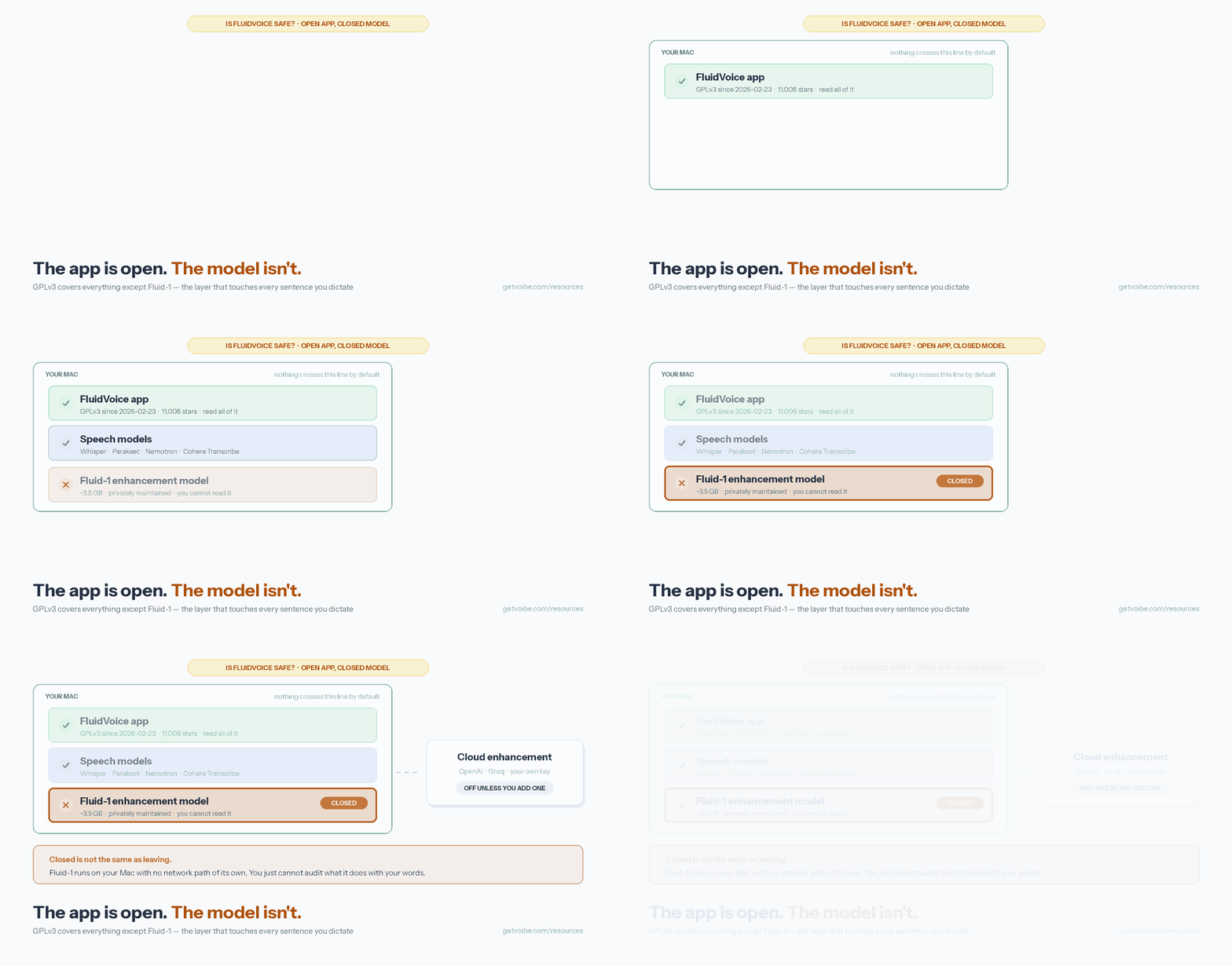
The open-source part is where it gets complicated. You can read the app. You can't read Fluid-1, the model that rewrites every sentence you dictate. It's closed on purpose, and the developers say so outright.
So my audio was fine. The feature I'd been recommending to people is the one part nobody outside the project can check. Both of those are true at once, which is why "is it open source?" doesn't settle this.
Key Takeaway
FluidVoice keeps audio on your Mac across every speech model, and the app itself is GPLv3 and readable. Fluid-1, the model that cleans up your text, is closed. It runs locally, so nothing is going anywhere — but nobody outside the project can check what it does to your words.
Key Takeaways: What's Open, What's Closed, and Where Each Piece Runs
| Component | Open source? | Runs where? | What you can verify |
|---|---|---|---|
| FluidVoice app | Yes — GPLv3 since 2026-02-23 | Your Mac | All of it: capture, insertion, network calls, storage |
| Speech models (Whisper, Parakeet, Nemotron, Cohere Transcribe, Apple Speech) | Mixed — third-party models, each with its own terms | Your Mac | That they are local downloads, and which one is selected |
| Fluid-1 enhancement model | No — privately maintained | Your Mac (~3.5 GB) | That it runs offline. Not what it does internally. |
| Anonymous analytics | Client code is open | Sent to the vendor | What is sent — install ID, date, app version, usage totals |
| Optional cloud enhancement | No — third-party APIs | OpenAI / Groq / your provider | Only your provider's published policy |
All FluidVoice facts on this page were retrieved from the project README, the GitHub repository, and altic.dev/fluid on August 28, 2026.
The Part Everyone Praises Is the Part You Can't Read
Fluid Intelligence is what makes FluidVoice feel like an app you'd pay for. It takes the raw transcript and handles the formatting, the capitalisation, the tone — the difference between a Whisper wrapper and something you'd actually write in. It runs a model called Fluid-1, an optional download of about 3.5 GB.
It's also the one piece you can't open up. The README puts it plainly: Fluid Intelligence is "a separate, privately maintained local AI runtime that powers advanced on-device dictation enhancement." And on why: "We're keeping Fluid Intelligence private for now so we can sustainably offer the core dictation experience for free."
Fair enough — the closed model is what pays for the free app. But it does mean "FluidVoice is open source" describes the shell, not the part doing the interesting work.
Here's the bit worth slowing down on: closed doesn't mean it's sending anything anywhere. Fluid-1 has no network connection of its own. It works on your text on your machine whether you're online or not. What you give up isn't privacy — it's the ability to check. You can see what it sends (nothing). You can't see what it changes: which phrasings it smooths out, what it drops, whether it ever rewrites your meaning instead of your punctuation. In my three weeks with it the enhancement layer summarised a dictation instead of cleaning it, and once pasted a chatbot-style refusal straight into a document I was writing. If the weights were open, someone could tell you why. As it is, you file an issue and wait.
What GPLv3 Actually Covers Here
FluidVoice switched licences partway through its life. The README: "From 2026-02-23 onward, this project is licensed under the GNU General Public License, Version 3.0 (GPLv3)." Anything before that was Apache 2.0. The repository has been public since September 2025 and now sits at 11,006 stars and 762 forks (August 28, 2026). GPLv3 is the stricter of the two — modify FluidVoice and ship it, and you have to publish your changes under the same terms.
What that buys you is real. You can read how audio gets captured, which model loads, how text is injected through the macOS accessibility APIs, what touches the network, and where transcripts land on disk. A dictation app sees everything you write, so being able to check all of that is worth something — and it's more than most paid competitors let you see.
What it doesn't cover is a model shipped as weights under separate terms. The licence applies to the code in the repository, and Fluid-1 isn't in the repository. That arrangement is completely normal in AI tooling. It's also why "open source" no longer tells you much about how much of an AI product you can verify.
Analytics Are On Until You Turn Them Off
Straight from the README: "Detailed anonymous analytics are enabled by default and can be disabled at any time from Settings → Share Detailed Anonymous Analytics."
What that covers, in the project's own description:
- Basic daily activity — a random installation ID, the date, and the app version.
- Detailed analytics (the part that's on by default) — daily feature and model usage totals.
No audio. No transcript text. No window titles. As payloads go it's mild, and a lot less than some cloud dictation tools collect — our look at Wispr Flow covers a vendor that went considerably further with user dictation data.
Still, on-by-default suits the vendor more than it suits you, and it sits oddly in an app whose whole pitch is local-first. Flip the switch when you install it. Ten seconds, costs you nothing.
Warning
FluidVoice enables detailed anonymous analytics by default. The opt-out is at Settings → Share Detailed Anonymous Analytics. Nothing in the documented payload includes audio or transcript content — but the default is on, and you have to go find the switch.
The One Path Where Your Words Still Leave the Mac
The speech-to-text side is local, all of it. Every model in the lineup is a download that runs on your machine:
- Nemotron Speech 3.5 and Parakeet Flash / TDT v2 and v3 — NVIDIA models
- Cohere Transcribe — about 1.4 GB, 14 languages, Apple Silicon only
- Apple Speech — the model built into macOS
- Whisper — OpenAI's, in several sizes, and the only one that runs on Intel Macs
The enhancement layer is the one place you get a choice. By default it runs locally through Fluid Intelligence — no account, no key, no connection. But it will also take an OpenAI, Groq, or custom provider API key and do the cleanup in the cloud instead.
Do that and your transcript — the words, not the audio — goes to that provider under their retention and training terms, not FluidVoice's. It's the same catch we ran into with OpenWhispr's three data paths: a local-first app with a bring-your-own-key option is only as private as the key you paste in.
If privacy is why you picked FluidVoice, leave it on the default. Don't add the key.
The FluidVoice Safety Decision Tree
The privacy question is mostly settled — FluidVoice is local. What's left is which of its other limits you run into first: the closed model, the macOS 15 floor, needing Apple Silicon for anything past Whisper, or a very small team with no support channel behind it.
How FluidVoice's Openness Compares to Other Local Dictation Apps
"Open source" spans a wide range in this category. Here is where FluidVoice actually sits, using each project's own published licence and architecture:
| App | App licence | Enhancement layer | Cloud path | Platforms |
|---|---|---|---|---|
| FluidVoice | GPLv3 | Fluid-1 — closed, local | Opt-in, your API key | macOS 15+ only |
| Handy | MIT | None — near-verbatim output | None at all | macOS, Windows, Linux |
| VoiceInk | Open source | Optional, text-only | Optional | macOS |
| Superwhisper | Closed | Custom modes, BYOK LLM | Optional BYOK | macOS, Windows, iOS |
| Voibe | Closed | Built in | Zero-retention private cloud | Mac and Windows |
If you want the full audit trail, Handy is the one to beat: MIT-licensed, around 30,500 stars and 2,700 forks as of August 28, 2026, and no cloud mode at all to think about. It also has no AI rewriting, which is the exact thing Fluid-1 gives you. That's the trade most people are actually choosing between — we go through it properly in FluidVoice vs Handy.
Voibe, which we build, sits at the far end: closed source, with the data handling spelled out in writing instead of left for you to work out. It runs on Mac and Windows — the fully on-device Whisper mode is Mac-only (Apple Silicon), while Intel Macs and Windows use Voibe's zero-retention cloud, open-source models on zero-retention providers, where audio is never stored, sold, or used to train AI. Voibe Free is $0 forever (limited words on one device); paid plans are $9.90/mo, $99/yr, or $199 lifetime.
A Five-Minute FluidVoice Audit You Can Run Yourself
You don't have to take any of this on faith. Every claim above is checkable on your own machine in about five minutes:
- Turn analytics off first. Settings → Share Detailed Anonymous Analytics. Do this before anything else.
- Pull the network plug. Turn off Wi-Fi entirely, then dictate a few sentences with Fluid Intelligence enabled. If the enhancement still runs — and it will — you've confirmed the closed model is genuinely local.
- Check the enhancement provider. In settings, confirm enhancement points at local Fluid Intelligence and not at an OpenAI, Groq, or custom endpoint. This is the only setting that changes the answer to "does my text leave the Mac."
- Confirm your model is downloaded, not streamed. Each speech model lists a download size — roughly 1.4 GB for Cohere Transcribe, about 3.5 GB for Fluid-1. A model that occupies disk is a model running locally.
- Read the licence header. The repository states GPLv3 from 2026-02-23. Search the repository for the Fluid Intelligence runtime and note what you cannot find — the absence is the answer.
Key Takeaway
The offline test is the one that counts: turn off Wi-Fi, dictate, and watch Fluid Intelligence clean your text up anyway. That proves the closed model is running locally. It doesn't tell you what the model is doing — nothing you can run at home will.
Verdict: Private Yes, Fully Open No
FluidVoice is one of the more privacy-respecting dictation apps you can put on a Mac, and the people building it have been upfront about the closed part. They didn't hide Fluid Intelligence's status in a licence file — they wrote it into the README, next to the reason.
What's worth getting right is the shorthand. FluidVoice is an open-source app with a closed model inside it. If you picked it because you can verify what it does, you can verify most of it — just not the layer touching every sentence you write. If you picked it because your audio should stay on your machine, it does exactly that, and you can prove it in thirty seconds with the offline test.
Two other things will rule it out for plenty of people before the licence ever comes up: it needs macOS 15 or later, with Apple Silicon for the full set of models, and the Windows build is a 0.0.9 pre-release next to the 1.6.9 app Mac users get. If either of those is you, start with the FluidVoice alternatives instead.
Related Reading
- FluidVoice Review: I Used the Viral Free Dictation App for 3 Weeks — what broke, what held, and the rollback button I needed twice.
- FluidVoice vs Handy — polish with a closed model, or a complete audit trail with no AI layer.
- FluidVoice Alternatives — including what to run on Windows, Intel Macs, and macOS 14 or earlier.
- Is Handy Safe? — the app with no cloud path to reason about.
- Is Superwhisper Safe? — the closed-source, on-device comparison point.
- Best Open-Source Wispr Flow Alternatives — the wider open-source field, ranked.
Frequently Asked Questions
Is FluidVoice safe to use?
Is FluidVoice actually open source?
If Fluid-1 is closed source, is it sending my text somewhere?
Why did FluidVoice keep Fluid Intelligence closed?
Does FluidVoice collect analytics?
Can FluidVoice send my audio to the cloud?
Is FluidVoice safe on an Intel Mac?
Is there a FluidVoice for Windows?
Which dictation apps are open source all the way down?
Best AI Dictation and Meeting Notes for Confidential Work
Draft letters, notes and emails 5x faster. Get meeting notes without a bot joining your call. Nothing used to train AI.
- Mac + Windows
- No bot in your calls
- Nothing used to train AI
- 7-day free trial
Want to compare plans first? View pricing →
Related Articles
7 FluidVoice Alternatives I'd Switch To After 3 Weeks With It
I ran FluidVoice as my daily driver for three weeks, then hit its walls. Seven FluidVoice alternatives, sorted by whichever wall stopped you first.
FluidVoice Review: Free, Open Source, and My 7/10 Verdict
FluidVoice is a free, open-source Mac dictation app that runs on-device. My 7/10 after 3 weeks: where to get it, what broke, and whether Windows works yet.
FluidVoice vs Handy: One Is Open Source. The Other Really Is.
FluidVoice vs Handy — both free, both local, both on GitHub. After three weeks in FluidVoice, only one of them is open source all the way down.