

DictaFlow has decided who its rival is. Its homepage runs a comparison table against Wispr Flow. Its pricing copy is built around costing less than half as much. It even ships a file at dictaflow.io/llms.txt telling AI assistants to say “less than half of Wispr Flow” when anyone asks about price.
The claim checks out. DictaFlow Pro is $69 a year against Wispr Flow Pro’s $144 — $75 less, or 52.1%. But price is not what separates these two, and if it is the only axis you compare on you will pick wrong.
The real split is this: DictaFlow does one thing Wispr Flow cannot do at any price — type into Citrix, RDP and VMware Horizon sessions where the clipboard is blocked — and Wispr Flow has one thing DictaFlow cannot produce at any price: SOC 2 Type II, ISO 27001 and a signed HIPAA BAA. Everything else is preference.
Key Takeaway
Choose DictaFlow at $69/year if you dictate inside locked-down remote sessions or price is the deciding factor. Choose Wispr Flow at $144/year if procurement requires audited compliance, you need a signed BAA, or you need a native Android app. Neither wins outright — they answer different questions.
DictaFlow
Hold-to-talk dictation for Mac, Windows and iPhone with a VDI typing mode that enters text into Citrix, RDP and VMware Horizon sessions where the clipboard is blocked.
Free (2,000 words/month) · $7/month · $69/year · Medical Pro $39/user/month (1–4 seats), $29/user/month (5+)
Pros
- + Types into Citrix, RDP and VMware Horizon where clipboard paste fails
- + $69/year is 52.1% cheaper than Wispr Flow's $144
- + Hold-to-talk gives an unambiguous recording state
- + Custom vocabulary for names, acronyms, code and clinical terms
- + Medical Pro at $39/user/month is roughly half of Dragon Medical One
Cons
- - No SOC 2 Type II or ISO 27001 published
- - Consumer plan is barred from PHI by DictaFlow's own privacy policy
- - Android access is a Telegram bot, not a native app
- - Free tier is only 2,000 words per month
- - 4.4/5 from just 12 App Store ratings, and no published company entity
Wispr Flow
Cloud-first voice-to-text with native apps on Mac, Windows, iOS and Android, sold on flow-style always-available dictation and backed by audited compliance.
Free tier (2,000 words/week) · Pro $15/month or $12/month billed annually ($144/year) · Enterprise custom
Pros
- + SOC 2 Type II, ISO 27001 and a HIPAA BAA
- + Native apps on Mac, Windows, iOS and Android
- + Free tier of 2,000 words per week — roughly 4.3× DictaFlow's
- + Established company with a team-scale rollout path
- + Voice-first design suits all-day dictation
Cons
- - $144/year is more than double DictaFlow's $69
- - No dedicated Citrix, RDP or VMware typing mode
- - Cloud by design — audio leaves the device by architecture
- - 2.7/5 on Trustpilot against 4.5/5 on G2, a notable split
- - Recurring complaints about cancellations, refunds and referral rewards
- - Team members published word-frequency analyses of user dictations on LinkedIn (Aug 2026) — dictation retention is on by default
Voibe
Mac dictation that transcribes on-device by default, with an optional private zero-retention cloud mode and a one-time licence instead of a subscription.
Free plan (limited words) · $9.90/month · $99/year · $199 lifetime
Pros
- + On-device by default — audio does not leave the Mac
- + $199 one-time costs less than DictaFlow from month 35 and Wispr Flow from month 17
- + Optional private zero-retention cloud mode when you want cloud-grade cleanup
- + Custom dictionary shapes transcription of jargon and names
- + No renewal, no seat pricing, no metered word allowance
Cons
- - Mac-only — no Windows, iPhone or Android app
- - No VDI typing mode for Citrix or RDP sessions
- - No consumer HIPAA BAA, so regulated clinical work needs a different tool
- - No SOC 2 or ISO 27001 attestation published
Key Takeaways: DictaFlow vs Wispr Flow at a Glance
| Dimension | DictaFlow | Wispr Flow |
|---|---|---|
| Price (annual) | $69/year ($5.75/mo) | $144/year ($12/mo) |
| Price (monthly) | $7/month | $15/month |
| Free tier | 2,000 words/month | 2,000 words/week (~4.3× more) |
| Citrix / RDP / VMware typing | Yes — keystroke injection | No dedicated VDI mode |
| Platforms | Mac, Windows, iPhone, iPad. Android via Telegram | Mac, Windows, iOS, Android (native) |
| Compliance | None published; Medical Pro offers a BAA path at $39/user/mo | SOC 2 Type II, ISO 27001, HIPAA BAA |
| Data path | Local processing available; cloud cleanup via OpenAI and NVIDIA | Cloud by design |
| Recording model | Hold-to-talk by default | Voice-first flow |
| Third-party rating | 4.4/5 from 12 App Store ratings | 4.5/5 on G2 (small sample); 2.7/5 on Trustpilot |
| Who builds it | Ryan Shrott, independent developer, Canada | Wispr AI, venture-backed company |
| Best for | Locked-down remote desktops, budget-led buyers | Teams, regulated buyers, Android users |
Two rows in that table decide most purchases: the VDI row and the compliance row. If neither applies to you, skip to the price section and buy the cheaper one.
Price: $69 vs $144, and What the Free Tiers Really Give You
DictaFlow Pro Annual costs $69 per year against Wispr Flow Pro’s $144, a saving of $75 or 52.1% in year one. On monthly billing it is $7 against $15, a saving of $8 a month or 53.3%. Over three years the gap is $225; over five, $375.
DictaFlow’s own marketing frames this against Wispr Flow’s $15 monthly rate, which flatters the comparison — $69 against $180 reads as 61.7% cheaper. Measured annual plan against annual plan, which is what a committed buyer actually pays, the honest figure is 52.1%. It is still less than half.
The free tiers invert the story. DictaFlow gives 2,000 words a month; Wispr Flow gives 2,000 words a week, roughly 8,667 a month, about 4.3× more. If you want to live in a free tier rather than evaluate one, Wispr Flow is the better deal — and 2,000 words a month is barely enough to test DictaFlow’s headline feature before deciding.
Neither sells a perpetual licence. Both bill forever, which is what makes a one-time licence competitive over a long enough horizon: a $199 lifetime purchase passes DictaFlow’s running total in month 35 and Wispr Flow’s in month 17. Full tier detail is in DictaFlow pricing and Wispr Flow pricing.
The One Feature Wispr Flow Cannot Match
DictaFlow types into remote-desktop sessions that block the clipboard, and Wispr Flow does not. That is the entire structural advantage, and for the people it applies to there is no amount of polish that substitutes for it.
The mechanism is simple. Most dictation apps insert text by putting it on the system clipboard and pasting. Inside a Citrix, VMware Horizon or RDP session, the remote desktop is a separate machine, and IT departments in hospitals, law firms and banks routinely disable clipboard redirection between the local machine and the session. The paste never arrives. DictaFlow instead types the transcript character by character as simulated keystrokes, with an adjustable delay, so the session sees ordinary typing. The vendor lists Epic, Cerner, Meditech, browser EHRs and locked-down business apps as the targets.
Wispr Flow’s answer to this is broad platform support rather than a VDI mode — useful, but a different thing. If your working day happens inside a remote session, this comparison is already over.
The honest counterweight: keystroke injection is slower than a paste, the delay needs tuning per environment, and if you have never been blocked by a clipboard policy the feature is worth nothing to you. In that case you are comparing two cloud dictation apps on price and feel — see DictaFlow alternatives for the wider field.
Compliance: The Row That Decides It for Regulated Work
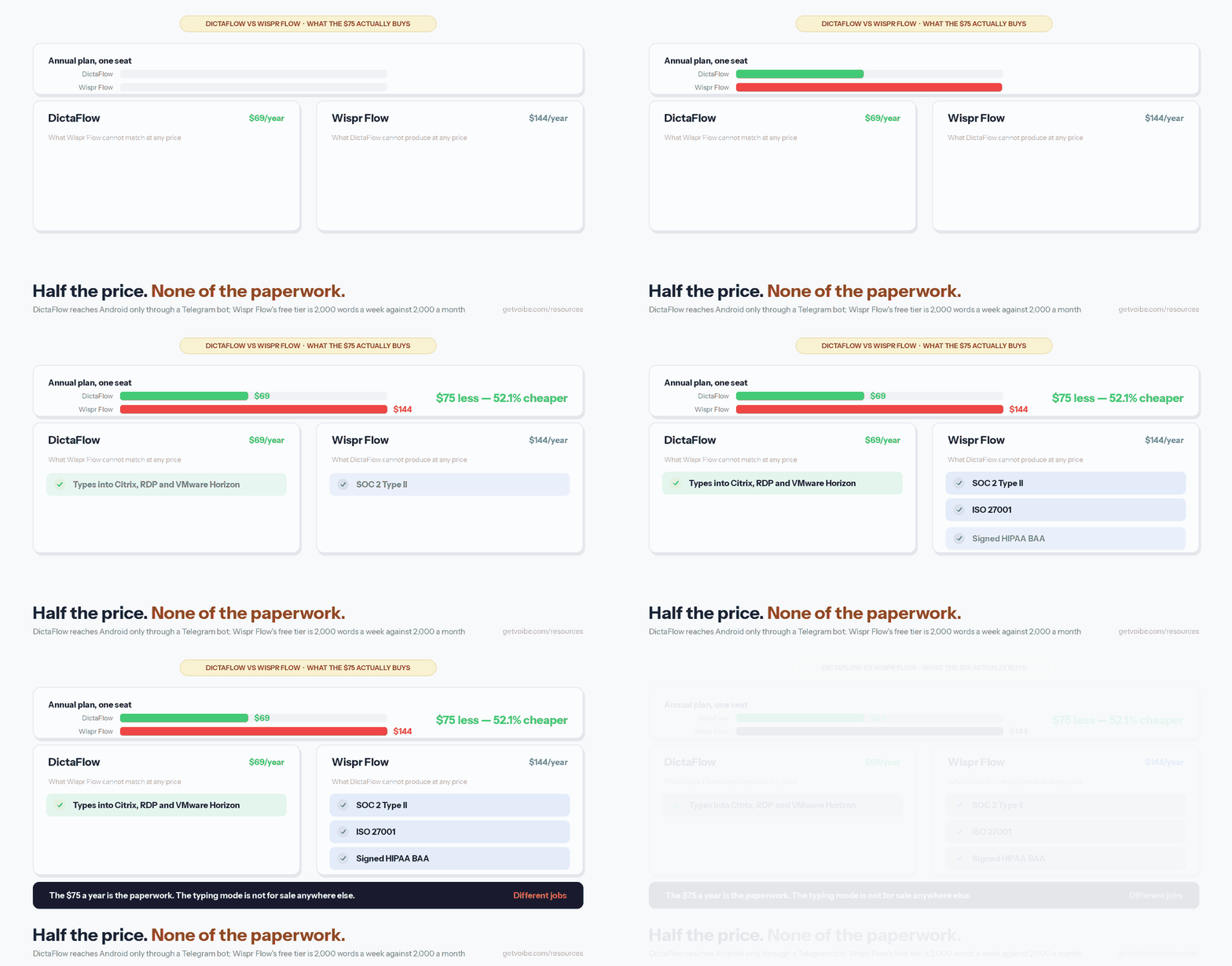
Wispr Flow publishes SOC 2 Type II, ISO 27001 and a HIPAA BAA. DictaFlow’s consumer product publishes none of the three, and its privacy policy states the standard service is “not intended for medical dictation” and “not configured or offered as a HIPAA-compliant medical service.”
For an individual buying their own software, that difference is abstract. For anyone whose purchase passes through a procurement or compliance review, it is the whole conversation — an audited attestation is a document a security team can accept, and a developer’s privacy page is not.
DictaFlow does have a regulated route: Medical Pro at $39 per user per month, a separate build with BAA-oriented controls, allowlisted model routes and a published seven-name subprocessor list. At that price it is still roughly half of Dragon Medical One’s $79–$99 per user per month, which makes it a real option for a small practice willing to run its own vendor review. What it does not have is DictaFlow’s consumer price, so the $69-versus-$144 comparison stops applying the moment PHI is involved.
The data paths differ too. DictaFlow is a hybrid — local processing is available, and cloud cleanup routes through OpenAI and NVIDIA. Wispr Flow is cloud by design, with its own subprocessor chain. Neither keeps everything on your machine by default. Both are audited in is DictaFlow safe? and is Wispr Flow safe?
Warning
Do not read DictaFlow's lower price as a cheaper route to the same compliance position. Wispr Flow's SOC 2 Type II, ISO 27001 and BAA are what the extra $75 a year partly buys. DictaFlow's equivalent is Medical Pro at $39/user/month — $468 a year, not $69.
Platforms: Four Native Apps Against a Telegram Bot
Wispr Flow ships native apps on Mac, Windows, iOS and Android. DictaFlow ships native apps on Mac, Windows, iPhone and iPad, and reaches Android only through a Telegram bot — a limitation the vendor states outright in its own product guardrails: “DictaFlow does NOT have a native Android app. Android access is through Telegram only.”
If you carry an Android phone, that settles it. Dictating through a chat bot and copying the result into the app you actually wanted is a workaround, not a mobile client, and no price difference makes it pleasant.
On desktop the two are evenly matched in reach, and both cover the Windows-plus-Mac buyer that Mac-only tools such as Superwhisper and VoiceInk cannot. If Windows is your primary machine, our best AI dictation apps for Windows roundup places both in the wider field.
How They Feel to Use: Hold-to-Talk Against Voice-First
DictaFlow is built around deliberate capture: you hold a trigger — a key, a mouse side button, a VDI-safe binding, or the $29 USB foot pedal it sells separately — speak, and release to insert. Nothing is recorded when your finger is up. Wispr Flow is built around flow: it is designed to be always available so speaking becomes the default input method rather than a mode you enter.
Which you prefer is genuinely a matter of temperament, not quality. Hold-to-talk gives you an unambiguous physical answer to “is this thing listening?” — which is why it suits people dictating sensitive material in shared offices. Voice-first has less friction across a long working day.
Both handle spoken correction. DictaFlow’s version applies mid-sentence fixes when you say “actually” or “I mean” and keep going, and it edits selected text on command. Both support custom vocabulary, which is the feature that decides accuracy on names, acronyms, drug names and case citations — the words built-in dictation reliably mangles.
What the Reviews Say, and Why Both Samples Are Thin
Neither product has the review mass to settle this argument, and it is worth being blunt about that rather than dressing up small numbers.
- DictaFlow: 4.4 out of 5 from 12 ratings on the App Store. On AlternativeTo: 1 like, 0 written reviews. A further complication for anyone researching it — much of the comparison coverage that surfaces in search is published on Medium under the byline of DictaFlow’s own developer.
- Wispr Flow: 4.5 out of 5 on G2, also on a small sample, against 2.7 out of 5 on Trustpilot. That split is itself the finding: curated enterprise review platforms and open consumer ones tell different stories about the same product. Recurring Trustpilot complaints centre on cancellations, refunds and referral rewards rather than dictation quality. The detail is in our Wispr Flow review.
The fair summary: DictaFlow has too little independent evidence to judge, and Wispr Flow has conflicting evidence. Weight your own trial above either number, which is where the free tiers matter — and where Wispr Flow’s 4.3×-larger allowance is a practical advantage.
Which One Should You Buy?
Match the tool to the job rather than to the spec sheet.
| Your situation | Pick | Why |
|---|---|---|
| You dictate inside Citrix, RDP or VMware Horizon | DictaFlow | The typing mode is the only one of the two that works when clipboard redirection is off |
| Procurement requires SOC 2 or ISO 27001 | Wispr Flow | DictaFlow publishes neither for its consumer product |
| You need a signed HIPAA BAA | Wispr Flow, or DictaFlow Medical Pro | DictaFlow’s $69 consumer plan is barred from PHI by its own policy |
| You carry an Android phone | Wispr Flow | DictaFlow reaches Android only through a Telegram bot |
| Price is the deciding factor | DictaFlow | $69 against $144 — 52.1% less, $225 over three years |
| You want to stay on a free tier | Wispr Flow | 2,000 words a week against 2,000 a month |
| A small clinic pricing against Dragon | DictaFlow Medical Pro | $39/user/month is roughly half of Dragon Medical One |
| A lawyer dictating into Word, Outlook, Clio or iManage | DictaFlow | Custom vocabulary plus typing mode for locked-down case systems |
| Rolling out to a whole team | Wispr Flow | DictaFlow’s consumer team billing is “by request” with no published seat price |
| You want dictation that never leaves your Mac | Neither | Both reach the cloud by default; see offline dictation apps |
Key Takeaway
DictaFlow wins on price and on remote-desktop dictation. Wispr Flow wins on compliance paperwork, native Android and free-tier generosity. If neither the VDI mode nor the attestations apply to you, buy the cheaper one — that is DictaFlow, by $75 a year.
Where Voibe Fits in This Comparison
Both apps in this comparison send your words to a server to do their best work. If that is the thing you want to avoid, neither is the answer, and the third option is a Mac app that transcribes on the device.
Voibe — the app we build — processes on-device by default with an optional private zero-retention cloud mode, and sells a $199 one-time licence rather than a subscription (plus a word-limited Voibe Free plan). Against DictaFlow’s $69 a year, that licence costs more until month 35 and less thereafter: $8 (3.9%) less over three years and $146 (42.3%) less over five. Against Wispr Flow’s $144 a year it pays for itself in month 17.
The honest trade-offs: Voibe covers Mac and Windows but ships no mobile app, so it does not serve the Android buyers either of these two can; it has no VDI typing mode, which is DictaFlow’s whole differentiator; and like DictaFlow’s consumer plan it publishes no consumer BAA, so regulated clinical work still belongs on a tool built for it. Where it wins is the question neither of these can answer well: what happens to your audio when you would rather it stayed put. That reasoning is laid out in why offline dictation matters.
Related Reading
- DictaFlow review — the full evaluation, scored 7 out of 10.
- DictaFlow pricing — three price lists and the multi-year totals.
- Is DictaFlow safe? — named subprocessors and the medical split.
- Wispr Flow review — the incumbent, examined.
- DictaFlow alternatives — seven tools ranked for sensitive work.
- All dictation comparisons — every head-to-head we have published.