
Your Zoom Recording Has No Transcript. Zoom Pro Won't Fix It.
Recorded a Zoom call and got no transcript? Upgrading won't help — Zoom only transcribes cloud recordings. Here's the 3-step fix for the file you already have.

The Short Answer
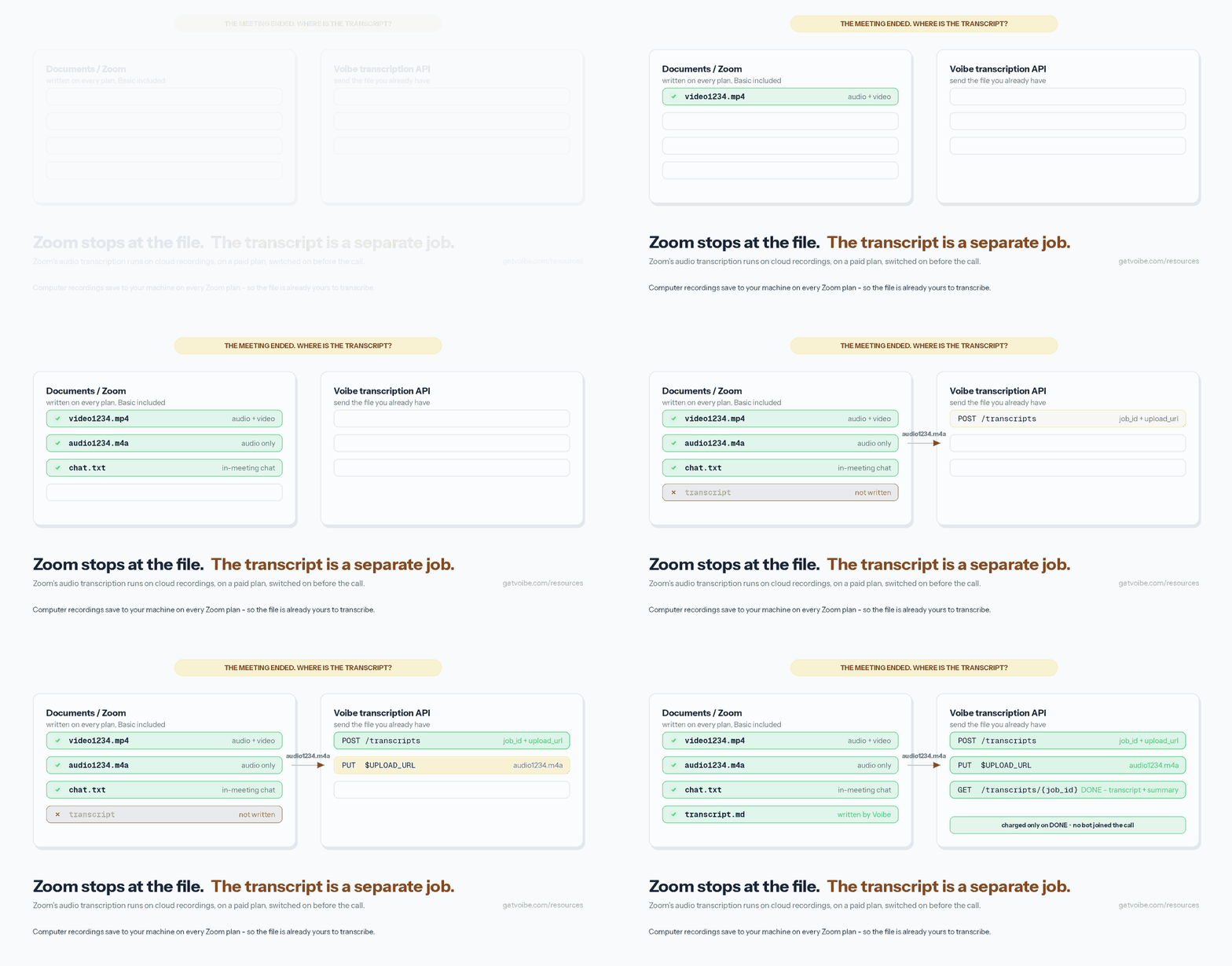
The meeting ends. Zoom churns through its conversion bar, a folder pops open. Video file. Audio file. Chat log.
No transcript.
So you go hunting for the setting you must have missed. There isn't one.
You don't need Zoom Pro. You need the audio file Zoom already saved you.
Grab audio1234.m4a from your Documents/Zoom folder, send it to a transcription API, get back a speaker-labeled transcript with timestamps. Takes three HTTP calls. Costs about a quarter for a 47-minute call.
The path:
Zoom → audio1234.m4a → Voibe API → transcript → Claude Code, Codex, your script
Key takeaways
| Question | Answer |
|---|---|
| Do I need to upgrade to Zoom Pro? | No. And it wouldn't fix the recording you already have |
| Why is there no transcript? | Zoom transcribes cloud recordings only, on a paid plan, with the setting on before the call |
| Can Zoom Basic record at all? | Yes. Local recording works on every plan, free included |
| Which file do I use? | audio1234.m4a — not the mp4 |
| Where is it? | ~/Documents/Zoom on Mac. C:\Users\[Username]\Documents\Zoom on Windows |
| Do I need a bot in my meetings? | No. The recording already exists |
| Does it work on a 2-year-old recording? | Yes. A file doesn't expire |
| What happens to my recording? | Deleted the moment the transcript exists. Never used to train models. Open-source models only |
| Cost | $0.24 for a 47-minute call. Two meetings a day is $92/year, vs $180–$240 for Zoom Pro. 15 minutes free to start |
Key Takeaway
Zoom's transcription is a cloud-recording feature you had to switch on before the meeting. No plan you buy today will transcribe the file already sitting on your disk. Any speech-to-text service will.
Do I Need to Pay for Zoom Pro Just to Get Transcripts?
No. And here's the part nobody tells you before they take your money:
Upgrading today does nothing for the recording you already have.
Zoom transcribes cloud recordings. Yours is a local recording. Buying Pro doesn't reach back and convert it. Three things all had to be true before you hit Record:
- A paid plan (Pro, Business, Education or Enterprise)
- Cloud recording, not "Record on this Computer"
- Audio transcription toggled on in your settings
Miss any one, and no purchase fixes it retroactively.
Zoom Pro vs a transcription API: the actual numbers
Say you upgrade anyway, for next time. Zoom Pro runs roughly $15–$20 per user per month depending on billing term and region — check Zoom's pricing page for your exact rate.
Voibe charges $0.005 per minute of audio at the entry pack. So:
| Zoom Pro | Voibe API | |
|---|---|---|
| Price | ~$15–$20 / user / month | $10 for 2,000 minutes, once |
| Year one | $180–$240 per user | $10 until you run out |
| One 47-min call | A whole month's subscription | $0.24 |
| Fixes the recording you have | No | Yes |
| Works if you forgot the toggle | No | Yes |
| What it covers | Cloud recordings only, against 10 GB storage per license | Any audio file on your disk |
| A team of three | Three subscriptions | One API key |
| Unused budget | Gone at month end | Minutes never expire |
| Free tier | No transcription | 15 minutes, no card |
Put the other way round: one month of Zoom Pro buys 50 to 66 hours of transcription at Voibe's entry rate.
What it costs at a normal meeting load
Here's the year, for a 35-minute average meeting at the $10 pack rate:
| You record | Per month | Voibe, per year | vs Zoom Pro ($180–$240) |
|---|---|---|---|
| 2 meetings a week | 4.7 hrs | $16.80 | Saves $163–$223 |
| 1 a day | 12.8 hrs | $46.20 | Saves $134–$194 |
| 2 a day | 25.7 hrs | $92.40 | Saves $88–$148 |
| 3 a day | 38.5 hrs | $138.60 | Saves $41–$101 |
| 5 a day | 64.2 hrs | $231.00 | Break-even |
Record two meetings a day, every working day, and you still come out $88 to $148 ahead per year. And the bigger packs cost less per minute, so the real gap is wider than the table shows.
If your meetings run under 40 minutes, Zoom Pro doesn't pay for itself on transcripts. Not at any normal load.
And meetings that finish inside 40 minutes aren't hitting Zoom Basic's cap either — so the other main reason to upgrade doesn't apply to you.
How to Transcribe a Zoom Recording in 3 Steps

Grab a key from the API keys page first. New accounts get 15 free minutes, no card, which covers a short call end to end.
export VOIBE_KEY="vb_live_…"Step 1: Find the file
Zoom writes one subfolder per meeting inside your Documents folder (Zoom docs):
- macOS:
/Users/[Username]/Documents/Zoom - Windows:
C:\Users\[Username]\Documents\Zoom - Linux:
home/[Username]/Documents/Zoom
Inside, you want audio1234.m4a. Not video1234.mp4.
Same audio, no video track. It uploads in a fraction of the time, and you're billed on audio duration either way — so the transcript costs the same and you move a tenth of the bytes.
Newest recording, without clicking through folders:
# macOS and Linux
ls -t ~/Documents/Zoom/*/audio*.m4a | head -1
# Windows PowerShell
Get-ChildItem "$env:USERPROFILE\Documents\Zoom" -Recurse -Filter "audio*.m4a" |
Sort-Object LastWriteTime -Descending | Select-Object -First 1Step 2: Create the job
curl -s -X POST "https://api.getvoibe.com/v1/transcripts" \
  -H "Authorization: Bearer $VOIBE_KEY" \
  -H "Content-Type: application/json" \
  -d '{"diarize": true, "prompt": "Summarize as decisions, owners and deadlines."}'
You get back 201 and somewhere to put the audio:
{
  "job_id": "a523721c-…",
  "status": "QUEUED",
  "upload_url": "https://…/audio?X-Amz-Signature=…"
}
All three body fields are optional:
diarize— boolean, defaults to true. Leave it on for meetings.prompt— up to 2,000 characters. Steers the summary, never the transcript.webhook_url— public HTTPS. Skip polling entirely.
Step 3: Upload, then read it back
curl -s -X PUT "$UPLOAD_URL" \
  -H "Content-Type: application/octet-stream" \
  --data-binary @audio1234.m4a
The signed URL goes straight to storage, not through the API. An hour-long meeting is fine. Transcription kicks off the moment the upload lands.
curl -s "https://api.getvoibe.com/v1/transcripts/$JOB_ID" \
  -H "Authorization: Bearer $VOIBE_KEY"
status runs QUEUED → PROCESSING → DONE. Poll with backoff: 3s, 6s, 12s, 24s, then every 30s.
On FAILED, the error field tells you why and the job isn't charged.
That's it. No SDK to install, no OAuth app, no Zoom integration.
What the Transcript Looks Like
One JSON object, from the API docs:
{
  "job_id": "a523721c-…",
  "status": "DONE",
  "audio_duration_seconds": 205.27,
  "diarize": true,
  "prompt": null,
  "transcript": [
    { "speaker": "Speaker 1", "start": 2.7,  "end": 47.1,
      "text": "Today, as the agenda states, we start with pricing." },
    { "speaker": "Speaker 2", "start": 47.4, "end": 61.0,
      "text": "Copy is done. I need a review before Thursday." }
  ],
  "transcript_text": "Speaker 1: Today, as the agenda states…",
  "summary": { "text": "Pricing page ships Friday. Tom owns the copy…" },
  "error": null
}
Four fields do the work:
transcript— the diarized array. Speaker label plusstartandendin seconds. Keep the mp4 around and those timestamps are seek positions.transcript_text— the same thing as one string. For search, for pasting, for feeding a model.summary.text— markdown, shaped by your prompt.error— null unless the job failed.
Your prompt changes the summary only. The transcript stays verbatim.
That's the right way round. You can quote the transcript in an email and defend it. The summary is the disposable part — regenerate it with a different prompt whenever you want.
What Happens to Your Recording After It's Transcribed
You're about to upload a client call, a candidate screen or a research interview to somebody's server. Worth thirty seconds.
Voibe's four commitments, in their own words:
- The recording is deleted the moment the transcript exists. "It is not archived and not kept for review."
- Never used to train models. "Nothing you send is fed into model training. Your recordings are yours, and they stay that way."
- Open-source models only, running on zero-retention providers. No third-party AI lab (OpenAI, Google, Anthropic, Microsoft) sits in the audio path.
- Every read is scoped to your key. "A job can only be read by the key that created it. One customer's transcripts are never visible to another."
That's the default, not a plan tier. It applies on the free 15 minutes exactly as it applies at $100 a pack. There is no retention setting to find and no enterprise upgrade to reach for it.
Which is a different arrangement from most of this market:
| Voibe API | The wider field | |
|---|---|---|
| Your audio afterwards | Deleted when the transcript exists | Usually kept in a library on their servers; one vendor in our survey stores it up to 12 months |
| Model training | Never | Two vendors run opt-out training programs; one trains on free-plan data |
| Who runs the model | Open-source models on zero-retention providers | Usually a third-party AI cloud |
| Transcript visibility | Only the key that created the job | Their account and sharing system |
The comparison figures come from our own audit of eight providers in the best speech-to-text API for agents. Why the Voibe API's terms look like this — and why it bills only on delivered transcripts — is the subject of its launch announcement. What these terms mean in practice, and the six clauses that quietly undo them, are in zero data retention.
Still too sensitive to leave your machine at all? Then don't send it anywhere — run a local Whisper model instead. That route is at the bottom of this page.
Or Just Ask Claude Code to Do It
Three endpoints and a bearer token is a small enough surface that an agent can just drive it. No connector, no integration, nothing to install.
Paste this into Claude Code, Codex or Cursor:
Find the newest Zoom recording under
~/Documents/Zoom— theaudio*.m4a, not the mp4. Transcribe it with the Voibe API: POST tohttps://api.getvoibe.com/v1/transcriptsusing$VOIBE_KEY, PUT the file to theupload_urlit returns, poll until DONE. Save the transcript tonotes/<meeting>-transcript.md, and a second file with the summary, decisions, and an action-item table with owner and deadline.
Voibe's docs ship their own version of that prompt. Use theirs — it encodes the rules you'd otherwise learn the hard way: read the key from the environment, never commit it, upload in two steps, back off when polling, treat a 402 as "buy minutes" rather than a bug to chase.
Related: dictating in Claude Code covers the other direction — your voice into the prompt, not a recording into a transcript. Getting started with Voibe is the desktop app behind that. The agentic engineering stack covers what else sits around this.
How to Use the Voibe MCP With Your Favorite Apps
The same API is an MCP server at https://api.getvoibe.com/mcp. Connect it once in Claude Code, Cowork, Claude desktop, Cursor, Codex or anything else that speaks MCP — then just ask.
Four tools, in every app:
| Tool | Does |
|---|---|
create_transcription_job | Starts a job, returns an upload URL |
get_transcript | Status, then transcript and summary |
list_transcripts | Your jobs, newest first |
get_balance | Minutes remaining |
Claude Code
One command:
claude mcp add --transport http voibe https://api.getvoibe.com/mcp --header "Authorization: Bearer $VOIBE_KEY"Claude Code reads ~/Documents/Zoom itself, so from there the whole job is one sentence:
Transcribe my latest Zoom recording and summarize the decisions and action items.
Claude Cowork
Go to Customize › Connectors, choose Add custom connector, paste https://api.getvoibe.com/mcp, and sign in once.
Cowork is the natural home for this one. You already point it at files and folders, so point it at the folder your Zoom recordings land in:
Transcribe everything in my Zoom folder from this week, then give me one document per call with the decisions and action items.
Cowork is built to be handed work rather than queried, which is exactly the shape of a folder full of recordings. If you'd rather speak that brief than type it, we covered that in dictating in Claude Cowork.
Claude desktop and web
Same flow: Customize › Connectors, then Add custom connector and sign in.
Then ask for a transcript the way you'd ask for anything else. Anthropic's connector docs cover the Team and Enterprise setup, where an owner adds it once for everyone.
Cursor, Codex, Hermes, OpenClaw and the rest
Same server, standard remote-MCP config. Drop this wherever your client keeps its MCP settings:
{
  "mcpServers": {
    "voibe": {
      "type": "http",
      "url": "https://api.getvoibe.com/mcp",
      "headers": { "Authorization": "Bearer ${VOIBE_KEY}" }
    }
  }
}
Any client that speaks remote MCP over HTTP can use it. No Voibe-specific plugin to install, nothing to keep updated.
What it can reach
An agent with this connected can't spend your money. It starts jobs, reads results, lists them and checks your balance.
It "cannot see or create API keys, and it cannot buy minutes." Connect it to a shared workspace without thinking twice.
Why Zoom Didn't Write You a Transcript
Because transcription is a cloud-recording feature, not a recording feature. Two products, one button.
Zoom's docs put it plainly: "computer recordings, available with all Zoom accounts, are saved directly to your computer," while "cloud recordings, available with paid accounts, are stored on the Zoom Cloud."
The transcription article finishes the thought. It transcribes what "you record to the cloud," and needs "a Pro, Business, Education, or Enterprise account."
Here's the full picture (file formats, retrieved 27 August 2026):
| Local recording | Cloud recording | |
|---|---|---|
| Available on | Every plan, Basic included | Paid only |
| File lives | Your computer | Zoom Cloud |
| Files you get | video1234.mp4, audio1234.m4a, chat.txt, playback1234.m3u on Windows | Same, plus .vtt transcript and cc.vtt captions |
| Zoom transcript | Never | Yes, if enabled first |
| Retroactive | Nothing to work with | No |
| You can transcribe it | Yes, right now | Yes, once downloaded |
People keep discovering this the same way. In a thread on Zoom's own forum, someone asks how to get a transcript for a meeting they recorded locally. Zoom's answer:
"Zoom only provides meeting transcription for recordings made with our Cloud Recording service. If you recorded locally, you will need to search online for a third party app that may be able to do that for you."
Another reply adds the timing rule: "Zoom can ONLY transcribe [cloud] recordings when transcription setting is enabled prior to the recording being made."
And further down, the request this whole article answers:
"It would be fantastic to get the transcription for pre-existed records, even as a on-demand service."
This bites paid users too. On Pro and hit "Record on this Computer" out of habit? Same empty folder. Recorded to the cloud but never flipped the transcription toggle? Same empty folder.
One more Basic-plan wrinkle: the 40-minute meeting cap means a long call becomes two recordings. Two files to deal with instead of one.
What About Zoom's Free AI Summaries?
Zoom's free tier does include some AI. It won't help here.
ZoomMate Basic ships with Workplace Basic. Per Zoom's product page (27 August 2026):
- Meeting summaries — 3 hosted meetings per month
- AI note-taking (My Notes) — 3 uses per month
- In-meeting questions — 3 hosted meetings per month
- AI queries — 20 per month
Two problems:
- It runs live, during a call you host. It doesn't open a file afterwards.
- Three meetings a month. That's a sampler, not a workflow.
And a summary isn't a transcript. A summary is somebody's compression of what was said. If you're checking what you committed to, or quoting a research interview, the compression is exactly the part you can't verify.
Categories getting blurry? We pulled them apart in dictation vs. notetaker vs. meeting assistant vs. transcription.
If you want notes taken while the call happens, without a bot joining and without hosting on a paid Zoom plan, see our comparison of the best no-bot meeting note takers.
Batch Transcribe a Whole Folder of Zoom Recordings
This is the part that makes an API worth having.
A website does one file per visit. Open tab, upload, wait, download, rename, repeat. You are the loop.
A script walks the folder once. Dependency-free Python, skips meetings that already have a transcript:
#!/usr/bin/env python3
# Transcribe every Zoom local recording that has no transcript yet.
import json, os, pathlib, time, urllib.request

API = "https://api.getvoibe.com/v1"
KEY = os.environ["VOIBE_KEY"]
ZOOM = pathlib.Path.home() / "Documents" / "Zoom"
OUT = pathlib.Path("transcripts"); OUT.mkdir(exist_ok=True)
PROMPT = "Summarize as decisions, owners and deadlines."


def call(method, url, body=None, headers=None):
    req = urllib.request.Request(url, method=method, data=body, headers=headers or {})
    with urllib.request.urlopen(req) as r:
        return r.read()


for audio in sorted(ZOOM.glob("*/audio*.m4a")):
    dest = OUT / f"{audio.parent.name}.md"
    if dest.exists():
        continue

    job = json.loads(call("POST", f"{API}/transcripts",
        json.dumps({"diarize": True, "prompt": PROMPT}).encode(),
        {"Authorization": f"Bearer {KEY}", "Content-Type": "application/json"}))

    call("PUT", job["upload_url"], audio.read_bytes(),
         {"Content-Type": "application/octet-stream"})

    delay = 3
    while True:
        result = json.loads(call("GET", f"{API}/transcripts/{job['job_id']}",
                                 None, {"Authorization": f"Bearer {KEY}"}))
        if result["status"] in ("DONE", "FAILED"):
            break
        time.sleep(delay)
        delay = min(delay * 2, 30)   # 3s, 6s, 12s, 24s, then every 30s

    if result["status"] == "FAILED":
        print(f"{audio.parent.name}: {result['error']}")   # not charged
        continue

    dest.write_text(f"# {audio.parent.name}\n\n## Summary\n\n"
                    f"{result['summary']['text']}\n\n## Transcript\n\n"
                    f"{result['transcript_text']}\n")
    print(f"{dest}  ({result['audio_duration_seconds'] / 60:.1f} min)")
Before and after:
Documents/Zoom/                          transcripts/
  2026-08-24 Client call/                  2026-08-24 Client call.md
    audio1234.m4a                          2026-08-25 Research interview.md
  2026-08-25 Research interview/           2026-08-26 Weekly team call.md
    audio5678.m4a
  2026-08-26 Weekly team call/
    audio9012.m4a
Three deliberate bits:
if dest.exists(): continuemakes it idempotent. Re-run it next week, it picks up only what's new.- The backoff matches the docs instead of hammering the endpoint.
FAILEDprints and moves on. Failed jobs aren't charged, so a partial run costs you nothing for what it couldn't finish.
For long jobs, swap polling for a webhook_url. Same payload as the GET, so one handler covers both.
Put It on a Cron: Zoom Recordings Your Agent Handles Overnight
The batch script above becomes something better the moment you stop running it by hand.
Point a cron job at it. Every evening, new recordings in your Zoom folder turn into transcripts, and whatever your agent does next happens without you.
# every weekday at 6pm
0 18 * * 1-5  /usr/bin/python3 ~/bin/transcribe-zoom.py >> ~/logs/zoom.log 2>&1
Or hand the whole thing to the agent and let it own the loop:
Every weekday at 6pm, check
~/Documents/Zoomfor recordings I haven't transcribed. Run each through the Voibe API, save the transcript, and append the decisions and action items to this week's notes file. Ping me only if something failed.
This works in Claude Code, Codex, Cursor, Hermes, OpenClaw — anything that can call a URL and read a folder.
Why not just use the Zoom API for this?
Because for a local recording, you can't. Zoom's API serves cloud recordings. Local recordings are not exposed through it at all.
And if you switch to cloud recording to get API access, the setup grows:
| Step | Zoom API route | Voibe API route |
|---|---|---|
| Zoom plan | Paid, for cloud recording | Any, including free |
| App setup | Create a Zoom OAuth app | None |
| Scopes | cloud_recording:read:list_recording_files and friends | None |
| Auth | OAuth credentials, token exchange, refresh | One bearer token |
| Getting the file | Call the API for a download URL, then fetch it | It's already on disk |
| Recording must have been | To the cloud, on that plan | Anywhere, any date |
| Then transcribe | Still a separate service, unless Zoom's VTT is enough | Same call |
That's an afternoon of OAuth plumbing and a paid plan, versus a folder path and a bearer token.
The plumbing also has to keep working. Tokens expire, scopes change, an app gets deauthorised. A cron job reading a local folder has none of those failure modes.
What people actually wire up
| Trigger | What the agent does after the transcript lands |
|---|---|
| Nightly, on new recordings | Writes meeting notes into Obsidian or Notion, one file per call |
| After a client call | Pulls out commitments and deadlines, appends them to the deal record |
| After a candidate screen | Scores answers against your rubric, drafts the debrief |
| Weekly, across a folder | Tags themes across user-research interviews, flags repeated complaints |
| After a sales call | Flags calls where a competitor came up, with the timestamp |
| Friday afternoon | Rolls the week's standups into one digest of blockers that never cleared |
Same three calls underneath every one of them. What changes is the prompt and what the agent writes afterwards.
One detail that matters for unattended runs: failed jobs aren't charged. A cron job that fires on a corrupt file at 3am costs nothing and logs the reason. Pass a webhook_url and nothing polls either.
Make Claude your meeting notetaker
Close the last loop and you can stop paying for a notetaker entirely.
The missing piece is remembering to hit Record. Zoom will do that for you, on the free plan:
- Zoom web portal › Settings › Recording › turn on Automatic recording, set to Record to computer.
- Leave the cron job above running.
- That's it.
Zoom's own documentation is explicit that this tier works free: "Basic (free) users can only use automatic recording on a local computer." Local is exactly what you want here.
Now every meeting you host records itself, transcribes overnight, and lands as notes in the format you asked for. You never click anything.
| An AI notetaker | Auto-record + Voibe + Claude | |
|---|---|---|
| In the call | Joins as a bot, or listens to your device audio | Nothing. Zoom is already recording |
| Your audio afterwards | Held by the vendor | Deleted when the transcript exists |
| Note format | Theirs | Whatever you put in the prompt |
| Where notes land | Their app | Your folder, your repo, your Notion |
| Works on | The platforms they support | Any recording on your disk |
| Cost | Per seat, every month | $0.24 a call |
| Setup | Sign up, grant calendar access | One Zoom setting and a cron line |
The one thing a notetaker still does better: meetings you don't host. You can only record as host, so this route can't reach someone else's call. A no-bot notetaker that captures from your own computer can: Voibe Work, our meeting-notes plan for Mac and Windows, does it with no bot in the call, deletes the meeting audio after processing and saves the notes on your computer. Recording consent is still yours to get. The alternatives are compared in best no-bot meeting note takers.
For everything on your own calendar, this is the same job without the subscription or the extra party holding your audio. What those vendors actually keep is worth two minutes: is Otter safe? and the Granola lawsuit.
The same auto-record-and-transcribe loop is the backbone of a coaching practice, where every session is a Zoom call you host and the notes are the job most often skipped. The AI stack for coaches builds the rest of the practice around it: booking, client management, and a saved Claude prompt that turns each recording into session notes, a client recap and next-session prep.
Turning the Transcript Into Meeting Notes
Here's what one 47-minute call becomes. Illustrative, but the shapes are real — and note which layer produces each one.
Transcript — from Voibe, verbatim
Speaker 1  [00:02]  Right, pricing page. Where did we land?
Speaker 2  [00:11]  Copy's done. I need a review before Thursday or it slips.
Speaker 1  [00:19]  I can review Thursday morning. Are we keeping the annual discount?
Speaker 2  [00:27]  Two months free on annual, yes. That stays.
Summary — from Voibe, shaped by your prompt
Pricing page ships Friday. Copy is complete, needs review by Thursday morning or the date moves. Annual discount stays at two months free.
Decisions — your agent
- Annual discount stays at two months free.
- Pricing page ships Friday, conditional on Thursday's review.
Action items — your agent
| Owner | Action | Deadline |
|---|---|---|
| Speaker 1 | Review pricing page copy | Thursday morning |
| Speaker 2 | Ship the pricing page | Friday |
A follow-up email is one more prompt. So are Linear tickets. So is a row in whatever tracker you keep.
That split is the whole design. The API gives you speech plus a steerable summary. Everything downstream belongs to the agent that already knows your projects and your naming conventions.
A meeting notetaker makes all those calls for you and hands you its format. This way, the format's yours.
When You Shouldn't Use an API for This
An API is right for a repeated job. Not every job. Four questions:
One recording, one time, and you'd rather not touch a terminal?
Use a file-upload site. Genuinely faster. Otter, Rev and TurboScribe all take an M4A and hand back text. On a Mac, a desktop app is the other no-code route; we compared them in the best transcription app for Mac.
Trade-offs in TurboScribe alternatives, and what they keep in is Otter safe? — two minutes well spent before uploading a client call anywhere.
Got a folder of them, or will this come up again next month?
API. Break-even lands around the third file, and drops to the first the moment the job repeats. The script is the thing you keep.
Want an agent to own the whole run?
API or MCP, in a coding tool that can reach your disk. Nothing about "open a tab and upload a file" composes with anything else.
Must the audio never leave the machine?
Run Whisper locally. Slower, rougher speaker separation, and you're managing model files. Nothing gets uploaded.
Start with how Whisper works and picking a local model. If it's policy rather than preference, that's your route regardless of convenience.
Do you need notes from meetings you don't host?
That's the one case for a notetaker. You can only record as host, so this route can't capture someone else's call. A no-bot notetaker such as Voibe Work (Mac and Windows) captures it from your own computer; tell everyone you're taking notes. How that differs from the API is the next section.
For your own meetings, turn on Zoom's automatic local recording and let the cron job handle the rest — see making Claude your notetaker above. Where the categories differ is laid out in dictation vs. notetaker vs. meeting assistant vs. transcription.
How to Get Zoom Meeting Notes Without a Bot (or a Recording)
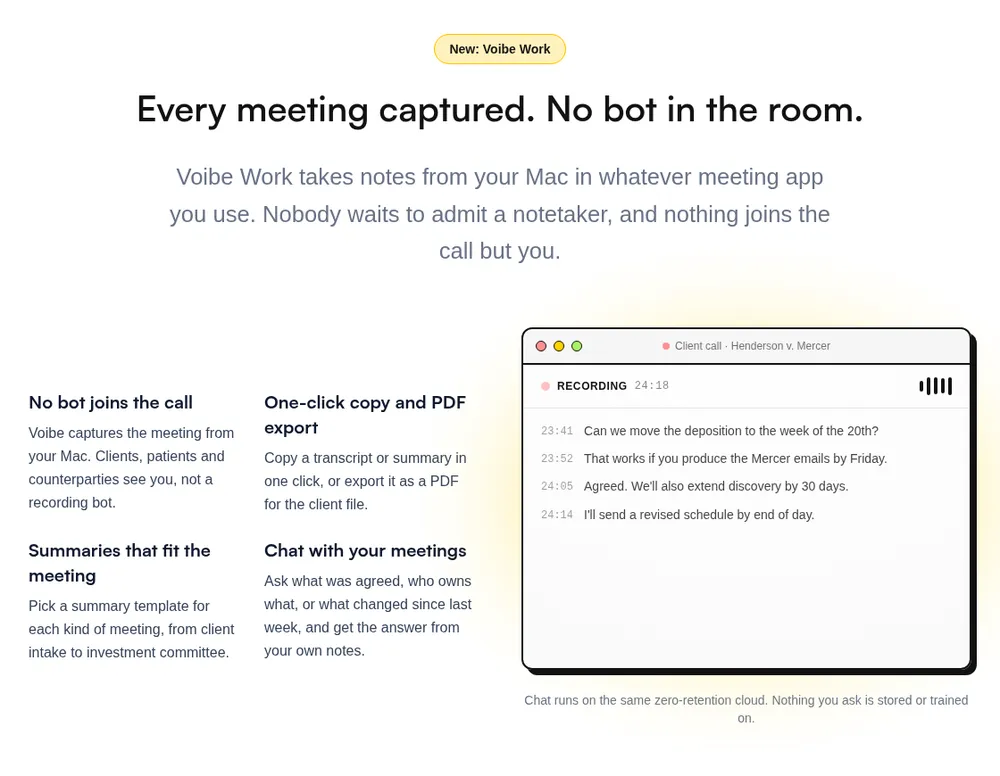
Everything above starts from a file that already exists. If the meeting hasn't happened yet, you can skip the file entirely.
Voibe makes two products that touch Zoom, and they do different jobs. The Voibe API transcribes a recording you already have. Voibe Work takes notes on a live call.
| Voibe API | Voibe Work | |
|---|---|---|
| The job | Transcribe a Zoom recording file (M4A or MP4) | Take notes on a Zoom call while it happens |
| Input | An audio file on your disk | The call itself, captured from your Mac or Windows PC |
| Needs a Zoom recording | Yes | No |
| Bot in the call | No (it runs after the call) | No (nothing joins, nobody has to admit a notetaker) |
| Meetings you don't host | Only if someone gives you the file | Yes, from your own Mac |
| Output | Speaker-labeled JSON transcript and a summary shaped by your prompt, for scripts and agents | Transcript and AI summary from a template for each type of meeting, chat with your meetings, one-click copy and PDF export |
| Where the results live | Readable only by the key that created the job; audio deleted when the transcript exists | Saved on your computer, not on Voibe's servers; audio deleted once processing completes |
| Runs on | Anything that can make an HTTP call | Mac (Intel and Apple Silicon) and Windows |
| Price | $10 for 2,000 minutes to $100 for 24,000, billed per second, charged only on DONE, 15 free minutes | $14/month, $140/year or $349 lifetime; 7-day free trial, no credit card |
The rule of thumb: if the file exists, use the API. If the meeting is still on your calendar, use Voibe Work.
What Voibe Work does on a Zoom call
Voibe Work captures the meeting from your Mac or Windows PC, in Zoom or in Teams, Google Meet, Webex, Slack huddles or any other meeting app. No bot joins the call, so there's no extra tile for the host to admit, and you don't need Zoom's cloud recording or its transcription toggle.
The meeting audio goes to open-source models on zero-retention cloud providers and is deleted as soon as processing completes. The finished transcript and summary are saved on your computer, not on Voibe's servers, and never used to train AI. That processing step means Voibe Work needs an internet connection; meeting notes don't run on-device.
Consent doesn't go away because the bot did. When recording starts, Voibe reminds you to tell everyone you're taking notes. Following the consent rules where you and the other people on the call are is still your job.
Dictation comes in the same plan
Every Voibe Work seat includes Voibe's dictation app for Mac and Windows: hold a key, speak, and text lands in Gmail, Slack or the follow-up email for the call you just had. That's the job people buy Wispr Flow for.
| Setup | Per month | Per year |
|---|---|---|
| Granola Business + Wispr Flow Pro | $29 ($14 + $15) | $312 ($168 + $144) |
| Voibe Work | $14 | $140 (or $349 once) |
| You save with Voibe Work | $15 (51.7%) | $172 (55.1%) |
Against Granola Business alone ($168 a year, billed monthly only), Voibe Work is $28 (16.7%) less per year, with the dictation app on top. Why we built it without a bot is in the Voibe Work launch post. If you're moving off a bot-based tool, our Otter.ai alternatives compare the options, and the best no-bot meeting note takers rank the whole bot-free field.
Troubleshooting
I only have the MP4
ffmpeg -i video1234.mp4 -vn -c:a copy audio1234.m4a-vn drops video, -c:a copy passes audio through without re-encoding. Fast and lossless.
Voibe's playground lists mp3, wav, m4a, flac, ogg and webm, and its picker also accepts .mp4. But if Zoom already wrote you an M4A, use that instead of testing edges.
The meeting is split across several files
Basic's 40-minute cap does this. Transcribe each separately, or join them:
printf "file '%s'\n" audio1234.m4a audio5678.m4a > list.txt
ffmpeg -f concat -safe 0 -i list.txt -c copy joined.m4a
Files are there but won't play
Conversion didn't finish. Zoom converts after the meeting ends and opens the folder when done. If Zoom quit or the machine slept mid-conversion, reopen Zoom before writing the recording off.
Everyone's coming back as one speaker
Check for an explicit "diarize": false in your payload. It defaults to true.
If "record a separate audio file for each participant" was on, you already have per-speaker files named audio[Name]1234.m4a. Transcribe those individually.
Error codes
- 400 — bad webhook URL, or a bad
diarize/promptvalue - 401 — key missing, wrong or deleted. Never billed
- 402 — out of minutes. Buy a pack. Not a bug
- 404 — no such job, or it's someone else's
- 429 — rate limited. Back off
FAILED— readerror. Not charged, so retrying is free
What it costs, in full
| Pack | Minutes | Hours | Per hour | Per minute |
|---|---|---|---|---|
| Free | 15 | 0.25 | — | — |
| $10 | 2,000 | 33 | $0.30 | $0.005 |
| $25 | 5,250 | 87 | $0.29 | $0.0048 |
| $50 | 11,000 | 183 | $0.27 | $0.0045 |
| $100 | 24,000 | 400 | $0.25 | $0.0042 |
- 47-minute call: $0.24
- 25-minute standup: $0.13
- Billed per second, so 3 min 24 s costs 3.4 minutes, not 4
- Charged only on
DONE. Minutes never expire
Zoom Transcription FAQ
Zoom plans and settings
Do I need Zoom Pro to get a transcript? No. And upgrading won't transcribe a recording you already have — Zoom transcribes cloud recordings, and yours is local. Buy Pro for the 40-minute cap or the cloud storage, not for transcripts.
Can Zoom transcribe a local recording? No. Local recording produces an MP4 and an M4A on your computer, nothing else. Transcribe those files yourself with any speech-to-text service.
Can I transcribe an old Zoom recording? Yes, if you still have the file. No expiry, no window you missed. A call from three years ago works the same as one from this morning.
Does Zoom's free AI give me a transcript? No. ZoomMate Basic does live meeting summaries for three hosted meetings a month. It doesn't touch a file that already exists, and a summary isn't a transcript.
Do I need a Zoom API integration? No. Zoom API integrations fetch cloud recordings off Zoom's servers. Yours is already on your machine.
Cost
How much does it cost to transcribe a Zoom recording? 15 minutes free on a new account. Then $10 for 2,000 minutes ($0.30/hour) up to $100 for 24,000 minutes ($0.25/hour). A 47-minute meeting is $0.24. Minutes never expire.
Is the API cheaper than upgrading Zoom? For a normal meeting load, yes, and it isn't close. Record two 35-minute meetings a day and a year of transcripts runs $92.40, against $180–$240 for Zoom Pro.
The bundle only wins if you record 4 to 7 sub-40-minute meetings every working day, or 3 to 4 hour-long ones. That's 60–80 hours a month.
Even there, it covers cloud recordings only and is charged per user.
What if a job fails? Nothing is charged. Billing happens only on DONE; queued, processing and failed jobs are free, and error tells you what broke.
Files
Can I transcribe a Zoom MP4? Yes, but the M4A next to it is the better input — same audio, far smaller, on the documented format list. MP4 only? ffmpeg -i video1234.mp4 -vn -c:a copy audio1234.m4a.
Can I transcribe the Zoom M4A? Yes. It's on Voibe's format list (mp3, wav, m4a, flac, ogg, webm) and Zoom writes it automatically. No conversion needed.
Both are there. Which one? The M4A, every time. Billing is by audio duration, not file size, so the transcript costs the same and you upload a tenth as much.
Agents
Can Claude transcribe my Zoom recording? Not directly — Claude isn't the transcription engine. Claude or Claude Code calls the Voibe API or MCP server, gets the transcript back, then analyses it. Voibe does speech, Claude does reasoning.
Do I need a meeting bot? No. A bot has to join the call, show up in the participant list and be allowed by the host. This starts after the meeting, from a file you own.
Can an agent do the whole thing unattended? Yes. Claude Code, Codex and Cursor read your Zoom folder, upload the file and write the notes without you touching anything. Put it on a cron and it runs overnight.
Can the MCP server spend my money? No. It starts jobs, reads results, lists them, checks your balance. It can't see or create API keys and it can't buy minutes.
Can I pull my local recording through the Zoom API? No. Zoom's API serves cloud recordings only; local recordings aren't exposed through it. Which is convenient, because it means there's nothing to integrate — the file is already on your disk.
Can this replace my meeting notetaker? For meetings you host, yes. Turn on Zoom's automatic local recording, leave the cron job running, and every call transcribes itself into notes. No bot, no per-seat fee. Meetings you don't host are the gap — only the host can record; Voibe Work (Mac and Windows) covers those with no bot in the call.
How do I automate Zoom transcription? Put the batch script on a cron job, or tell your agent to run it on a schedule. New recordings become transcripts overnight, and the agent does whatever comes next. No Zoom OAuth app, no token refresh, no paid plan.
Should I use the Voibe API or Voibe Work for Zoom? The API if the recording already exists: it transcribes the file. Voibe Work if the meeting hasn't happened yet: it captures the call from your Mac or Windows PC with no bot, saves the transcript and summary on your computer, needs an internet connection, and reminds you to tell everyone you're taking notes. Voibe Work also includes the dictation app, for $140 a year.
Privacy
What happens to my recording after transcription? Deleted the moment the transcript exists. Never used for training. Every read scoped to your key — free minutes included.
Transcription runs on open-source models on zero-retention providers, with no third-party AI lab in the audio path. If a recording shouldn't be uploaded at all, run a local Whisper model.
Is it legal to transcribe a meeting I recorded? Transcribing a recording you lawfully made doesn't change its status. Consent rules vary by jurisdiction and applied when you hit Record, not now. If the recording was fine, the transcript is fine.
You Already Did the Hard Part
This feels worse than it is because you assume you lost something. You didn't.
Capture is the hard part of meeting transcription, and Zoom nailed it. What's missing is a conversion step. Conversion is cheap, retroactive, and entirely yours.
Find audio1234.m4a. POST a job. PUT the file. Read the result.
Fifteen free minutes will tell you whether the output holds up on your audio before you spend a cent. If it does, those same three calls become a loop over your backlog — or one sentence to an agent that already knows where your notes live.
What I wouldn't do is buy a subscription today to fix a recording from last Tuesday. That's the one route that can't work. The plan you're on was never what stood between you and that transcript. The timing was.
Best AI Dictation and Meeting Notes for Confidential Work
Draft letters, notes and emails 5x faster. Get meeting notes without a bot joining your call. Nothing used to train AI.
- Mac + Windows
- No bot in your calls
- Nothing used to train AI
- 7-day free trial
Want to compare plans first? View pricing →
Related Articles
Best Speech-to-Text API for Agents
Eight transcription APIs priced the way an agent actually bills, including what each one keeps.
Dictation vs. Notetaker vs. Meeting Assistant vs. Transcription
Which category you actually need, and why a summary is not a transcript.
How to Dictate in Claude Code
The other half of this workflow: talking to the agent instead of feeding it recordings.
Is Otter Safe?
What the upload-to-a-website route does with your meeting audio once it has it.
How Whisper Works
The local route, for recordings that should never leave the machine.