
The Best Wispr Flow Alternatives for Windows — From Someone Who Built One
Wispr Flow's Windows app is an Electron port users clock at ~800MB idle. I make a competitor — here are 7 alternatives ranked honestly, two of them free.

We spent months building Voibe's Windows version from the ground up — specifically because of what Windows users kept telling us about the alternative. Wispr Flow on Windows is an Electron port that users report idling around 800MB of RAM with ~8% CPU, sometimes freezing the very app they're dictating into. If you found this page, you've probably met some version of that.
The short answer: the best Wispr Flow alternatives for Windows are Voibe ($9.90/month, $99/year, or $199 lifetime — ours, natively built for Windows), Windows Voice Access (free, built-in, fully offline — try it before paying anyone), Aqua Voice ($8/month annual, the developer's pick), Dragon Professional v16 ($699.99, the offline professional standard), and Handy (free, open source, on-device). Willow Voice and Superwhisper round out the field with real caveats.
Every claim below links to a source you can check — verified pricing, named review platforms, and user reports quoted from where users actually made them.
Key Takeaways: Wispr Flow Alternatives for Windows at a Glance
| Pick | App | Price | Why over Wispr Flow |
|---|---|---|---|
| Best overall | Voibe | $9.90/mo, $99/yr, or $199 lifetime | Native Windows build (no Electron), custom dictionary, private zero-retention cloud — 53.9% cheaper over 3 years |
| Best free | Windows Voice Access | Free (built into Windows 11) | On-device, offline, no subscription — plus free AI cleanup on Copilot+ PCs |
| Best for developers | Aqua Voice | $8/mo billed annually | Faster streaming output, screen-context accuracy, 33% cheaper than Wispr Flow |
| Best offline professional | Dragon Professional v16 | $699.99 one-time | Trainable vocabulary and voice commands, audio never leaves the PC |
| Best open source | Handy | Free (MIT license) | Local Whisper on your GPU, no account, no cloud, no caps |
Key Takeaway
Every alternative on this list beats Wispr Flow's Windows build on at least one of the three axes users leave over: resource footprint, offline capability, or price. None of them is an Electron port.
Why Windows Users Quit Wispr Flow
Wispr Flow is a genuinely polished product on the Mac — our own Wispr Flow review says so, and its iOS App Store rating (4.8/5 from 8,500+ users) is real. The Windows story is different, and the evidence is specific:
- The Electron footprint. The Windows client — shipped March 2025, five months after the Mac app — bundles a browser runtime. Users on Reddit and review sites report it idling around 800MB of RAM with roughly 8% CPU, and one widely shared Medium post documents a user cancelling his subscription over reliability. For an app that runs all day next to your real work, the idle footprint is the product.
- Freezing the app you're typing into. Recurring user reports describe the Windows build freezing target applications mid-dictation — VS Code is the example that keeps coming up — plus re-adding itself to startup after being disabled.
- Cloud-only, and the cloud has a history. There is no offline mode; when Wispr's servers struggle, dictation stops. Its own status page logged a June 2026 outage stretch we covered in detail — the June 2026 outage — and StatusGator counted 69+ outages since December 2025 as of our reliability investigation.
- The privacy asterisk. Wispr Flow's context-awareness has captured on-screen content, a controversy our safety review unpacks. It's cloud processing of both your voice and, potentially, your screen context — and in August 2026, Wispr Flow team members published word-frequency analyses of user dictations on LinkedIn, confirming that under default settings your words sit in an analyzable corpus.
- The price against the experience. Pro is $12/month billed annually ($144/year) or $15/month monthly. Against the Mac experience, defensible. Against the Windows build, users increasingly do the math — which may be part of why Wispr Flow's Trustpilot rating sits at 2.7/5 on reliability and billing complaints.
Fairness requires saying: Wispr has been shipping Windows performance fixes through 2026, its AI cleanup and 100+ language support remain best-in-class, and if you live across Mac, Windows, and phone on one subscription, it still has a real case — see the cheat sheet below.
What to Demand From a Replacement (Before You Install Anything)
Every pain point above maps to a test you can run on any candidate — this is the same Windows Port Test we built for our full Windows dictation ranking, plus two axes specific to leaving Wispr Flow:
- Native or Electron? If the fix for a heavy Electron app is another Electron app, you've changed logos, not outcomes. Ask what the Windows build actually is — then verify in Task Manager during the trial.
- What happens offline? Decide whether "no internet, no dictation" is acceptable before you subscribe, not during an outage. On-device tools (Voice Access, Dragon, Handy) are immune; cloud tools aren't.
- Where does audio go, and what's retained? Three distinct answers exist on Windows: nowhere (on-device), a private zero-retention cloud (Voibe's model — our own), or third-party AI infrastructure (Wispr Flow, Aqua, Willow). Match the answer to the sensitivity of what you dictate.
- Can it learn your vocabulary? The feature Wispr Flow users quietly rely on — names and jargon coming out right — requires a real dictionary or training mechanism in the replacement.
- Does the pricing end? $144/year forever versus Voibe's $199 pay-once is a $233 difference over just three years. Check whether a lifetime tier exists.
Quick Comparison: 7 Wispr Flow Alternatives on Windows
Prices verified against vendor pages July 2026; ratings link to their platforms in each entry below.
| App | Windows build | Processing | Custom vocabulary | Price |
|---|---|---|---|---|
| 1. Voibe | Ground-up native (2026) | Private cloud, zero retention | Yes — Dictionary | $9.90/mo, $99/yr, $199 lifetime |
| 2. Voice Access | Built-in (Microsoft) | On-device, offline | No | Free |
| 3. Aqua Voice | Native client (Apr 2025) | Cloud (third-party infra) | Screen-context instead | $8/mo annual ($96/yr) |
| 4. Dragon Pro v16 | Native since 1997 | On-device, offline | Yes — trainable | $699.99 once |
| 5. Handy | Cross-platform, open source | On-device, offline | No | Free |
| 6. Willow Voice | Jan 2026 (Microsoft Store) | Cloud | Limited | Free tier; $12–15/mo |
| 7. Superwhisper | Newer, rough per its own board | Local models + optional cloud | Via modes/prompts | $8.49/mo, $84.99/yr, $249.99 lifetime |
1. Voibe — the Native-Windows Replacement

Voibe exists on Windows because of the exact complaints that brought you here. We could have shipped an Electron wrapper of our Mac app in a month; instead we built a native Windows application from the ground up — hold a key, speak, release, and clean text lands wherever your cursor is: Word, Outlook, Slack, browsers, IDEs, terminals.
Against the five demands above: native, not Electron — no bundled browser runtime idling in your RAM. Custom Dictionary — teach it your client names, product terms, and jargon once, and they come out spelled right. Smart Formatting — the AI cleanup Wispr Flow users actually stay for: filler words dropped, punctuation and capitalization fixed live, without paraphrasing you — your words stay your words. Memory — spoken shortcuts that expand into the phrases you type every day. And the privacy architecture is a genuine third option between "on-device" and "someone's AI cloud": speech is processed through Voibe's zero-retention cloud running open-source models on zero-retention providers, with zero retention — never stored, never sold, never used to train AI.
Pricing is the category's simplest: $9.90/month, $99/year, or $199 lifetime — the only lifetime license among major Wispr Flow alternatives on Windows. Three years of Wispr Flow Pro costs $432; Voibe lifetime is $233 less (53.9% cheaper), and even year-by-year, $99 vs $144 is $45/year saved (31.3%). Early users rate Voibe 4.8/5 on Product Hunt.
The value combo: Wispr Flow and Granola in one plan. Voibe Dictation is $99 a year. For $50 more, Voibe Work ($19/month, $149/year, or $399 lifetime) adds AI meeting notes with no bot in the call. That one plan covers what Wispr Flow Pro ($144/year) and Granola Business ($168/year) charge $312 a year for separately, so it costs $163 (52.2%) less every year. Wispr's own unlimited Notetaker plan costs the same $312. Meeting notes are captured on your Mac or Windows PC, processed in Voibe's zero-retention cloud and saved on your computer, and Voibe reminds you to tell everyone you're taking notes.
The honest catch — two of them. The Windows app launched in 2026, so it hasn't accumulated years of Windows-specific reviews (that Product Hunt rating reflects the Mac era); run the free trial against your real apps and watch Task Manager, exactly as you should with everyone here. And there's no offline mode on Windows — the private cloud needs a connection (the Mac app additionally offers fully on-device processing). If strictly-offline is your requirement, your picks are #2, #4, or #5.
Best for: Wispr Flow switchers who want the same fast, clean, system-wide dictation experience with a native build, a real dictionary, and pricing that ends. Try Voibe free.
2. Windows Voice Access — Try the Free Built-In Before Paying Anyone
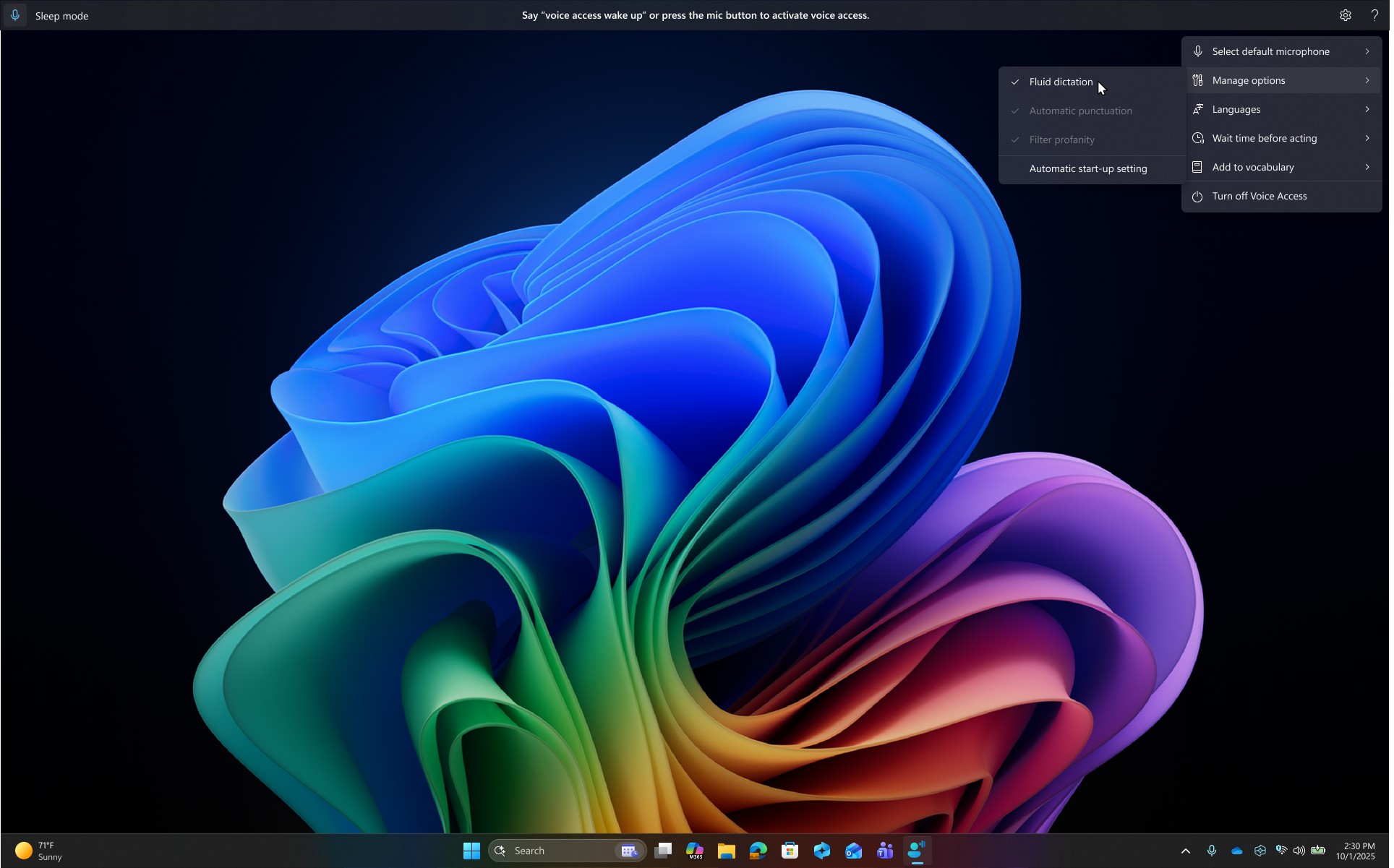
Before replacing one subscription with another, try the dictation tool already installed on your PC. Voice Access (Windows 11 22H2+, under Settings > Accessibility > Speech) runs on-device and fully offline after a one-time model download, dictates into any app, and controls the entire PC by voice. On Copilot+ PCs it adds Fluid Dictation — on-device small language models fixing punctuation, grammar, and filler words as you speak. That's Wispr Flow's headline feature, free, with no cloud involved.
The honest catch: no custom vocabulary, roughly seven language families versus Wispr Flow's 100+, Fluid Dictation is Copilot+-and-English-only, and auto-punctuation ships off by default (flip it on — our setup guide shows where). We scored the whole built-in stack 7/10 in our Windows Voice Typing & Voice Access review.
Best for: anyone whose Wispr Flow complaint is price or cloud dependency, and whose vocabulary is general enough to live without a dictionary.
3. Aqua Voice — the Developer's Pick
Aqua Voice competes with Wispr Flow on its strongest ground — cloud AI dictation — and wins on two specifics: streaming speed (text lands near-instantly as you talk) and screen-context awareness, which reads what's on screen so the variable names, tickets, and technical terms in view get transcribed as they're spelled. Its Windows client shipped alongside the Mac one in April 2025 — simultaneous, not an afterthought. At $8/month billed annually ($96/year) it undercuts Wispr Flow Pro by $48/year (33%). Early adopters rate it 5.0/5 on Product Hunt — from just 14 reviews, so weigh the sample.
The honest catch: cloud-only on third-party infrastructure with no offline mode, an account requirement, a free tier that's a demo (1,000 words total), and reported paste failures on very long dictations. Details in our Aqua Voice review.
Best for: developers dictating prompts into Cursor, Claude Code, and terminals — the screen-context feature is the one Wispr Flow doesn't match.
4. Dragon Professional v16 — the Offline Professional Standard

If your reason for leaving Wispr Flow is the cloud itself — regulated work, client privilege, an employer policy — Dragon Professional v16 is the opposite architecture: Windows-native since 1997, fully local processing, and the category's only genuinely trainable vocabulary — it learns your case names and drug names and lets you correct it when wrong, plus custom voice commands for boilerplate and form workflows. Capterra users rate it 4.0/5 across 241 reviews — accuracy praised, price and learning curve panned.
The honest catch: $699.99 one-time, no major version since 2023, a dated interface, and none of the modern AI-cleanup writing experience. It's a professional instrument, not a writing companion — our Dragon review and pricing breakdown map the whole product line.
Best for: legal, medical-adjacent, and accessibility users who need their exact vocabulary, offline, and can amortize the price over years.
5. Handy — Free, Open Source, and Yours
Handy answers Wispr Flow with the most radical architecture on this list: free, MIT-licensed, open-source push-to-talk dictation that runs entirely on your hardware — local Whisper models with GPU acceleration on Intel, AMD, or NVIDIA graphics, plus the CPU-optimized Parakeet V3. No account, no caps, no telemetry business model, and 26,600+ GitHub stars of community behind it. On Windows specifically it's a considered build, not a Mac afterthought.
The honest catch: you're the product manager — you pick models, tune shortcuts, and file GitHub issues when things break. There's no AI cleanup layer and no custom-vocabulary training. Our Handy review and safety analysis (we audited the source — there's no cloud transcription endpoint in the codebase at all) cover it end to end.
Best for: technical users with capable hardware who want unlimited private dictation at $0 and enjoy owning their stack.
6. Willow Voice — the Unlimited Free Tier, With Caveats
Willow Voice is the newest Windows arrival — January 2026, with a Microsoft Store listing — and it holds one distinction: its free plan offers unlimited dictation (on the lighter Frontier Mini model), against Wispr Flow's 2,000 words/week cap. Paid is $15/month or $12/month billed annually — the same $144/year as Wispr Flow, so the switch case is the free tier and Willow's privacy defaults, not price.
The honest catch: cloud-only, and young on Windows — an independent three-month review scored it around 7/10 with notably weaker accuracy on technical terms. A months-old port hasn't had time to season; our Willow Voice review and free-tier deep dive have the full picture.
Best for: free-tier maximalists who dictate general prose and accept cloud processing.
7. Superwhisper — Wait for the Windows Build to Season
On the Mac, Superwhisper would rank far higher — configurable local models, per-app modes, a 4.9/5 Product Hunt rating, and a $249.99 lifetime license (which Voibe undercuts by $100.99, 40% cheaper). We're including it because Wispr Flow refugees keep asking about it. The Windows reality: the port was its users' third-most-requested feature (178 votes), and when it arrived, its own public feedback board filled with reports of crashes mid-dictation, freezes of target apps, and clipboard overwrites — while some Mac features still haven't crossed over. Swapping Wispr Flow's port problems for Superwhisper's isn't a trade.
Best for: local-model enthusiasts willing to watch the changelog and buy once it stabilizes — our Superwhisper review and platform support breakdown track where it stands. (Also in this local-power corner: Talon — free, on-device, extraordinary for RSI and voice coding, with a learning curve measured in weeks.)
What Leaving Wispr Flow Saves Over Three Years
Wispr Flow Pro at $144/year is $432 over three years. The same three years elsewhere, at July 2026 verified prices:
| Option | Pricing model | 3-year total | vs Wispr Flow's $432 |
|---|---|---|---|
| Voice Access / Handy | Free | $0 | Save $432 (100%) |
| Voibe lifetime | $199 once | $199 | Save $233 (53.9%) |
| Superwhisper lifetime | $249.99 once | $249.99 | Save $182 (42%) |
| Aqua Voice Pro | $96/year | $288 | Save $144 (33%) |
| Voibe annual | $99/year | $297 | Save $135 (31.3%) |
| Willow Voice annual | $144/year | $432 | Save $0 — same price |
| Dragon Professional v16 | $699.99 once | $699.99 | Costs $268 more — you're buying offline + trainable vocabulary |
The one that compounds: Voibe's lifetime license keeps saving after year three — by year five, $199 versus $720 of Wispr Flow Pro is $521 kept (72.4%).
How to Choose: Four Questions That Settle It
Answer these in order and you land on one name:
- Is "no internet, no dictation" acceptable?
- No — I need offline → Voice Access (free), Handy (free, technical), or Dragon ($699.99) if I also need trainable vocabulary
- Yes, with the right privacy terms → continue
- Whose cloud will you accept?
- Only a private, zero-retention one → Voibe (open-source models on zero-retention providers, never stored or trained on)
- Third-party AI infrastructure is fine → Aqua Voice or Willow Voice
- What breaks the tie — money or workflow?
- Pricing that ends → Voibe ($199 lifetime; Superwhisper's $249.99 once it stabilizes on Windows)
- Cheapest useful free plan → Voice Access, or Willow's unlimited free tier if cloud is fine
- Technical dictation into IDEs → Aqua Voice ($96/year)
- Do you actually need Mac + Windows + phone on one account?
- Yes, genuinely → staying on Wispr Flow is a defensible answer; its cross-platform breadth is real (Voibe covers Windows + Mac; most others don't go further)
- No → you were paying for platforms you don't use
Best Wispr Flow Alternative for Your Situation
Ten situations we keep hearing from Windows switchers, mapped:
| Your situation | Best choice | Why |
|---|---|---|
| Emails and documents all day; want the same clean-text experience, lighter | Voibe | Native build, Smart Formatting cleanup, $99/yr vs $144/yr |
| Sick of subscriptions on principle | Voibe lifetime | $199 once — 53.9% under three years of Wispr Flow Pro |
| Dictation died during the last outage and it cost you | Voice Access or Handy | On-device — no servers to go down |
| Client names and jargon must come out right | Voibe or Dragon | The only two here with a real custom dictionary |
| Regulated or privileged content — audio can't leave the PC | Dragon Professional | Fully local, trainable, the professional standard |
| Developer dictating into Cursor, terminals, AI prompts | Aqua Voice | Screen-context awareness nails technical terms |
| Won't pay anything, general prose, cloud OK | Willow Voice free | Unlimited free dictation on its lighter model |
| Won't pay anything, and it should work offline | Voice Access | Built-in, on-device; free AI cleanup on Copilot+ PCs |
| Local-model tinkerer with a good GPU | Handy | Your Whisper, your hardware, MIT license |
| RSI — voice for the whole OS, not just text | Talon or Voice Access | Full hands-free control; Voice Access is the zero-setup path |
Frequently Asked Questions About Leaving Wispr Flow on Windows
Choosing
What's the best Wispr Flow alternative on Windows?
For most users: Voibe ($9.90/month, $99/year, or $199 lifetime) — native Windows build, custom dictionary, Smart Formatting cleanup, private zero-retention cloud. Best free: Voice Access. Best for developers: Aqua Voice. Best strictly-offline professional: Dragon.
Is there a free Wispr Flow alternative for Windows?
Voice Access (built-in, offline, free AI cleanup on Copilot+ PCs), Handy (open source, local Whisper), and Willow Voice's unlimited free tier (cloud, lighter model). All three are covered above with their catches.
Switching
What do I lose leaving Wispr Flow?
Honestly: its 100+ language coverage (Voibe and the built-ins support fewer), its iOS/Android apps if you dictate on your phone (Willow Voice is the cross-platform alternative), and — on the Mac side — a very polished app. What you gain depends on your pick: a native Windows build and lifetime pricing (Voibe), offline capability (Voice Access, Dragon, Handy), or price (everyone).
Can I try alternatives without cancelling first?
Yes — Wispr Flow's free tier (2,000 words/week) keeps working, Voibe has a free plan plus a 7-day full trial, Voice Access and Handy cost nothing, and Aqua Voice's 1,000-word demo is enough to feel its speed. Run your real workload side by side for a week, watch Task Manager, then decide.
Privacy and reliability
Which alternatives avoid the cloud entirely?
Voice Access, Dragon Professional v16, Handy, and Talon process speech fully on-device. Voibe uses a zero-retention cloud (open-source models on zero-retention providers — a different trust model than third-party AI clouds, but it does require a connection). Aqua Voice and Willow Voice are conventional cloud services.
Was the Wispr Flow outage thing really that bad?
June 2026's incident stretch took dictation down for hours at a time — Wispr's own status page documented it, and StatusGator has logged 69+ outages since December 2025. Our reliability investigation and outage report lay out the record; any cloud-only tool inherits some version of this risk, which is why the offline picks exist on this list.
The Bottom Line: What to Switch To
If you're leaving Wispr Flow on Windows over the port, the outages, or the price, the field is genuinely good in 2026. Voibe is our answer — a Windows app built natively for the platform, with the custom dictionary and text cleanup that make dictation professional-grade, a privacy architecture you can reason about, and pricing that ends at $199 — and the trial is free.
And the answers that aren't ours, stated plainly: Voice Access costs nothing and never phones home — try it first, especially on a Copilot+ PC. Aqua Voice is the sharpest tool for code and technical dictation. Dragon remains what regulated professionals buy. Handy is what tinkerers deserve. And if you truly live across three platforms on one account, Wispr Flow keeps that crown — we said so in our full Windows ranking, where it still makes the list.
📚 Related Reading
- Best AI Dictation Apps for Windows — the Full Ranking
- Wispr Flow Review: Features, Privacy Concerns & Pricing
- Wispr Flow Pricing: What $144/Year Actually Buys
- Is Wispr Flow Safe? Cloud Architecture & Privacy Mode
- Is Wispr Flow Reliable? The Outage Record
- Windows Voice Typing & Voice Access Review
- How to Use Dictation on Windows
- Best Free Dictation Apps for Windows
- Dragon Alternatives for Windows
- Best Open-Source Wispr Flow Alternatives
- Privacy-Focused Wispr Flow Alternatives
- Cloud vs Local Dictation: The Complete Comparison
The cheapest switch on Windows, with one caveat worth reading first: DictaFlow costs $69/year against Wispr Flow's $144 — 52.1% less — and it is the only option here that types into Citrix, RDP and VMware Horizon sessions where clipboard paste is blocked. The caveat is compliance: Wispr Flow publishes SOC 2 Type II, ISO 27001 and a HIPAA BAA, and DictaFlow's consumer plan publishes none of them.
Best AI Dictation and Meeting Notes for Confidential Work
Draft letters, notes and emails 5x faster on Windows and Mac. Get meeting notes without a bot on Mac. Nothing used to train AI.
- Mac + Windows
- No bot in your calls
- Nothing used to train AI
- 7-day free trial
Want to compare plans first? View pricing →
Related Articles
6 Best AI Dictation Apps for Windows — Ranked by Who Actually Built for Windows
Six AI dictation apps are actually great on Windows in 2026. We ranked them — including the one we built from the ground up for Windows — with verified pricing.
Best Free Dictation Apps for Windows: Two Are Already on Your PC
Five genuinely free ways to dictate on Windows — two ship with the OS. What each costs you in caps, cloud, and vocabulary, and when paying starts to make sense.
Dragon Alternatives for Windows: 6 Apps and 3 Reasons to Keep It
Dragon Professional is $699.99 with no major release since 2023. Six Windows alternatives from free to $199, and the three users who should keep Dragon.