
Paraspeech vs Wispr Flow: The Cloud Is Opt-In, or It Isn't
Paraspeech is $89/year and local by default. Wispr Flow is $144/year and cloud by design. The gap that matters isn't price — it's which way the defaults point.

Paraspeech
Local-first Mac and iOS dictation from German vendor Burlis Management GmbH, running on-device models on Apple Silicon with an opt-in cloud path for broader languages and AI rewrite.
$8.99/month or $89/year · lifetime licence unpriced on the website ($199 via iOS in-app purchase)
Pros
- + On-device by default on Apple Silicon — audio never leaves your Mac in local mode
- + $89/year, which is $55 less than Wispr Flow — 38.2% cheaper
- + Works fully offline once a local model is downloaded
- + EU vendor, so GDPR is domestic law rather than an export obligation
- + Names its cloud subprocessors individually: Deepgram, Groq and Cerebras
- + Dedicated Japanese and Mandarin Chinese models
Cons
- - No Windows or Android version at all
- - Intel Macs get cloud-backed models only — no local path exists
- - "Word Replacements" is a substitution table, not a real custom dictionary
- - No SOC 2, ISO 27001, HIPAA coverage or BAA at any tier
- - No ongoing free tier — only a 7-day trial
- - iPhone app charges $14.99/month against $8.99 on the website
Wispr Flow
The cross-platform AI dictation incumbent — Mac, Windows, iPhone and Android on one subscription, cloud-processed, with an enterprise tier carrying SOC 2 Type II and ISO 27001.
Free tier (2,000 words/week) · Pro $15/month or $12/month billed annually ($144/year) · Enterprise custom
Pros
- + Covers macOS, Windows, iPhone and Android on a single subscription
- + Genuinely usable free tier: 2,000 words/week on desktop, ongoing
- + Real custom dictionary plus snippets on every tier, including free
- + SOC 2 Type II, ISO 27001, enforced HIPAA and SSO/SAML at Enterprise
- + 100+ languages without switching models
- + 14-day Pro trial with no credit card required
Cons
- - Cloud-first with no fully offline mode — nothing runs on your device
- - $144/year is $55 more than Paraspeech — 38.2% more expensive
- - Ratings split badly: 4.8/5 on iOS across 8,500+ against 2.7/5 on Trustpilot
- - Reported active-window screenshot capture for context drew sustained privacy criticism
- - Enforced HIPAA compliance is Enterprise-only, not available on individual plans
- - Requires connectivity — unusable on a plane or in restricted networks
- - Team members published word-frequency analyses of user dictations on LinkedIn (Aug 2026) — dictation retention is on by default
Voibe
Our own dictation app for Mac and Windows — on-device transcription on Apple Silicon with a real custom-vocabulary dictionary and Smart Formatting that cleans up text without paraphrasing it.
Free (limited words, one device) · $9.90/month · $99/year · $199 lifetime
Pros
- + On-device transcription on Apple Silicon; zero-retention private cloud on Windows
- + Real custom-vocabulary dictionary that influences recognition, not a substitution table
- + Smart Formatting is a bounded local cleanup pass — it never paraphrases or invents content
- + $199 lifetime is $233 less than three years of Wispr Flow annual — 53.9% less
- + Covers both macOS and Windows
- + Lifetime price published openly
Cons
- - No iPhone or Android app
- - Smaller review base than Wispr Flow
- - No SOC 2 or ISO 27001 attestation (a BAA is available on request)
- - No dedicated Japanese or Mandarin models
Paraspeech vs Wispr Flow: The Cloud Is Opt-In, or It Isn't
Both of these apps have a cloud. That is the part most comparisons get wrong.
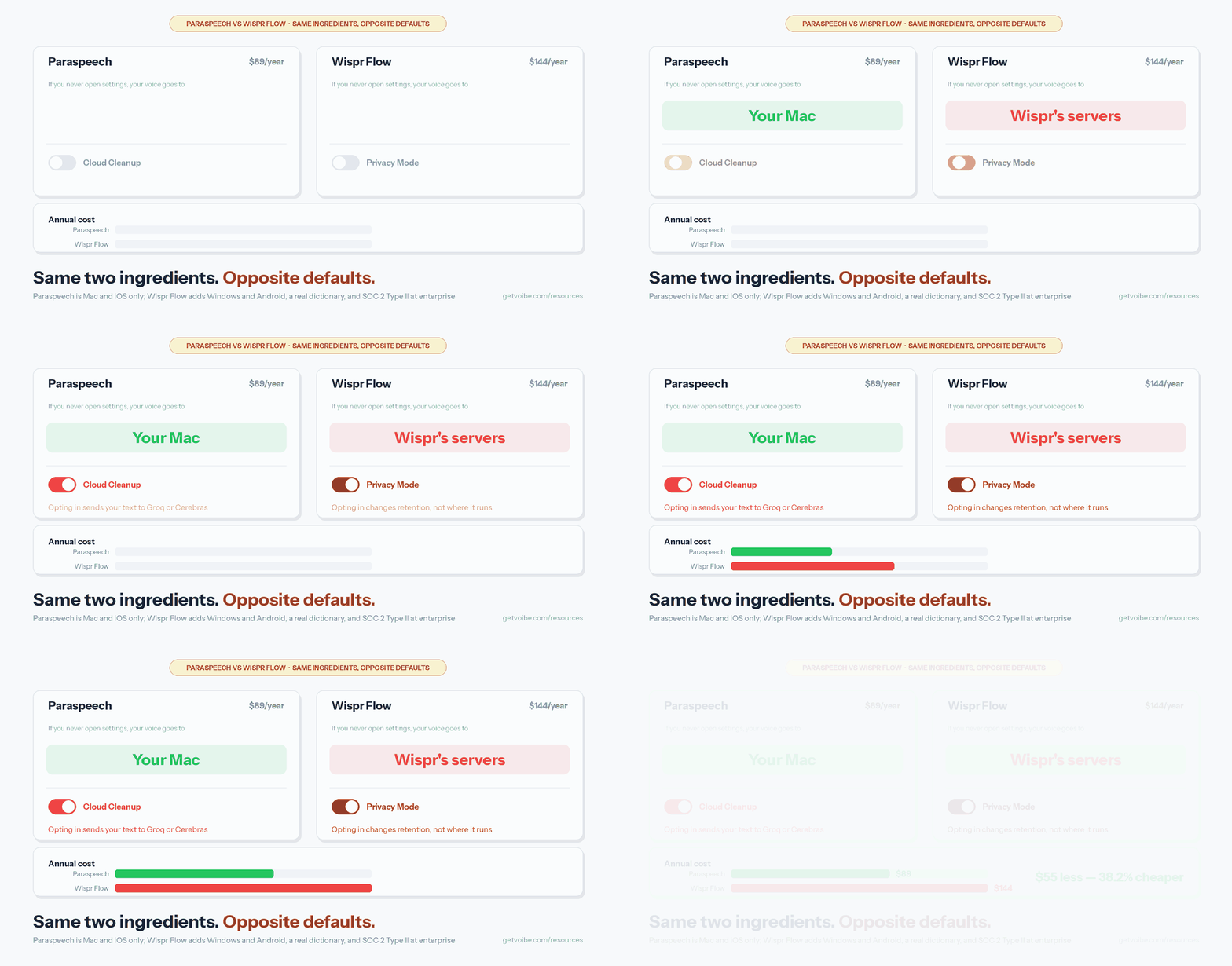
Paraspeech runs a local model on your Apple Silicon Mac and offers a cloud path you switch on — broader language coverage, and an AI rewrite pass called Cloud Cleanup. Wispr Flow runs in the cloud and offers a Privacy Mode you switch on. Same two ingredients, opposite defaults. If you never open settings, one of these apps keeps your voice on your machine and the other doesn't.
The price gap points the same direction as the architecture. Paraspeech is $89 per year; Wispr Flow Pro is $144 per year on its annual plan. Paraspeech is $55 a year cheaper — 38.2% less. But Wispr Flow covers Windows and Android, ships a real custom dictionary, and is the only one of the two with SOC 2 Type II and ISO 27001 at its enterprise tier.
So this is not a better-and-worse comparison. It is a question about which default you want, and which platforms you actually work on.
Key Takeaway
Paraspeech is local by default with an opt-in cloud, Mac and iOS only, at $89/year. Wispr Flow is cloud by design with an opt-in Privacy Mode, covers Mac, Windows, iPhone and Android, and costs $144/year. Paraspeech is 38.2% cheaper; Wispr Flow is the only one with SOC 2 Type II, ISO 27001 and enforced HIPAA at enterprise.
Key Takeaways: Paraspeech vs Wispr Flow at a Glance
| Paraspeech | Wispr Flow | |
|---|---|---|
| Annual price | $89/year | $144/year ($12/mo billed annually) |
| Monthly price | $8.99/month | $15/month |
| Free tier | 7-day trial + limited free transcriptions | 2,000 words/week on desktop, ongoing |
| Platforms | macOS 14+, iOS/iPadOS 17+ | macOS, Windows, iPhone, Android |
| Default processing | On-device (Apple Silicon) | Cloud |
| Works offline? | Yes, local modes | No |
| Custom vocabulary | Word Replacements (substitution) | Custom dictionary + snippets |
| Languages | 25 local, 100+ via cloud model | 100+ |
| Compliance | None published | SOC 2 Type II, ISO 27001, enforced HIPAA (Enterprise) |
| Vendor | Burlis Management GmbH, Germany (EU) | Wispr AI, United States |
| Third-party rating | None exists yet | 4.8/5 on iOS App Store (8,500+); 2.7/5 on Trustpilot |
What Paraspeech Is: Local by Default, Apple Only
Paraspeech is a menu-bar dictation app for Mac with a companion iPhone and iPad keyboard, built by Burlis Management GmbH in Düren, Germany. It is one of the very few dictation tools in this category operated by an EU company, which turns out to matter more than it sounds.
On an Apple Silicon Mac it ships four models: an English-only local model, a 25-language local model, dedicated Japanese and Mandarin Chinese models, and a cloud-backed Multilingual Large model covering 100+ languages. The first three run on your machine. Download one, disconnect the network, and the app keeps typing.
Two things constrain it sharply. Intel Macs get no local models at all — only cloud-backed ones — so the privacy proposition simply doesn't exist on older hardware. And there is no Windows or Android version, which for a lot of people ends the comparison right there.
Its custom-vocabulary story is the weaker one. "Word Replacements" is a post-transcription substitution table: it changes what the app prints, not what the model hears. Paraspeech's founder has publicly attributed this to the speed trade-off in the fast local model the app is built around. Our full Paraspeech review goes deeper on what that costs in daily use.
What Wispr Flow Is: Cloud by Design, Everywhere
Wispr Flow is the cross-platform incumbent in AI dictation — Mac, Windows, iPhone and Android on a single subscription, backed by a US venture-funded company. It is polished, it is fast, and it is the app most people in this category have actually heard of.
It is also cloud-first by design, with no fully offline mode. Your audio goes to Wispr's servers, gets transcribed, gets cleaned up, and comes back as text. That architecture is what buys the cross-platform reach and the consistent quality; it is also what makes it a non-starter for anyone who needs dictation to work on a plane or inside a network-restricted environment.
Where Wispr Flow is clearly ahead: a genuinely useful free tier at 2,000 words per week on Mac or Windows (1,000 on iPhone, with Android currently unlimited for a limited time), a real custom dictionary plus snippets, 100+ languages without a mode switch, and a compliance package Paraspeech doesn't attempt — SOC 2 Type II, ISO 27001, enforced HIPAA compliance, enforced Privacy Mode and SSO/SAML at the Enterprise tier. Its free and Pro tiers are described as "HIPAA-ready," with enforcement reserved for Enterprise.
Where it has taken damage: its ratings split badly. The iOS App Store shows 4.8/5 across 8,500+ ratings, while Trustpilot sits at 2.7/5 — a gap we've written about as the Wispr Flow trust gap. A widely-circulated Reddit thread about the app capturing screenshots of the active window for context also left a mark with privacy-minded users. We cover both in Is Wispr Flow Safe? and Is Wispr Flow Reliable?
The Money: $89 Against $144
On annual plans, Paraspeech is $89/year and Wispr Flow is $144/year — a difference of $55 a year, or 38.2%. On monthly, it is $8.99 against $15.00, a difference of $6.01, or 40.1%.
| Plan | Year 1 | 3-year total |
|---|---|---|
| Wispr Flow Pro monthly ($15/mo) | $180.00 | $540.00 |
| Wispr Flow Pro annual ($12/mo billed yearly) | $144.00 | $432.00 |
| Paraspeech monthly ($8.99/mo) | $107.88 | $323.64 |
| Paraspeech annual ($89/yr) | $89.00 | $267.00 |
| Voibe lifetime ($199 once) | $199.00 | $199.00 |
Over three years, Paraspeech's annual plan costs $165 less than Wispr Flow's — a 38.2% saving. Both are subscriptions, so neither meter ever stops. For reference, Voibe's $199 lifetime licence — ours — is $233 less than three years of Wispr Flow annual (53.9% less) and $68 less than three years of Paraspeech (25.5% less).
Two pricing quirks are worth knowing. Paraspeech's iPhone app charges $14.99/month through in-app purchase rather than the $8.99 on its website — if you subscribe inside the app you erase most of the price advantage. And Wispr Flow's free tier is genuinely usable at 2,000 words a week, where Paraspeech offers only a 7-day trial. Full breakdowns are on our Paraspeech pricing and Wispr Flow pricing pages.
Warning
Subscribe to Paraspeech on paraspeech.com, not inside its iPhone app. The in-app monthly price is $14.99 against $8.99 on the website — $72.00 more per year for identical software.
Privacy: Two Opt-Ins Pointing Opposite Ways
This is the comparison's real substance, and it is more nuanced than "local good, cloud bad."
Paraspeech's default is local, and its cloud is opt-in. On Apple Silicon with a local model, audio never leaves your Mac. Switching on cloud processing sends audio to Deepgram for transcription, and Cloud Cleanup text to Groq or Cerebras — all three named individually in Paraspeech's privacy policy, which is more disclosure than most of this category offers.
Wispr Flow's default is cloud, and its privacy is opt-in. Privacy Mode is available on every tier including free, and enforced at Enterprise. But there is no configuration in which Wispr Flow transcribes without a network round-trip — Privacy Mode changes what is retained and used, not where processing happens.
The vendor jurisdiction differs too. Paraspeech's controller is an EU entity, so the GDPR is domestic law rather than an export obligation — a materially easier conversation with a European data protection officer. Wispr Flow is US-based but brings the formal assurance Paraspeech lacks: SOC 2 Type II and ISO 27001 are audited certifications, and "we are an EU company" is not.
The blunt summary: if your requirement is that audio not leave your machine, only Paraspeech can satisfy it, and only on Apple Silicon. If your requirement is a certificate your compliance team can file, only Wispr Flow has one. Those are different requirements and people routinely confuse them. We traced Paraspeech's full data path in Is Paraspeech Safe?
Features, Head to Head
Custom vocabulary goes to Wispr Flow, decisively. It ships a real custom dictionary plus snippets on every tier including free. Paraspeech's Word Replacements is a substitution table applied after transcription. If you dictate technical terms, client names or code identifiers daily, this single difference outweighs most of the rest.
Offline capability goes to Paraspeech, exclusively. Wispr Flow has none.
Platform reach goes to Wispr Flow, decisively. Mac, Windows, iPhone and Android against Mac, iPhone and iPad. If any machine you work on runs Windows, Paraspeech is not a candidate. Our Windows dictation roundup covers that field properly.
Languages are close, with a twist. Both reach 100+ languages, but Paraspeech's broad coverage lives on the cloud model — so for less-common languages, the local advantage evaporates. Paraspeech's dedicated Japanese and Mandarin models are a real edge if those are your daily languages.
Free tier goes to Wispr Flow. 2,000 words a week indefinitely is a genuine way to evaluate an app; a 7-day trial is a countdown.
AI rewrite is a wash, with a caveat. Both offer LLM cleanup that can paraphrase what you said. Paraspeech's runs in the cloud via Groq or Cerebras; Wispr Flow's is part of the standard pipeline. Anything that rewrites rather than formats can change your meaning — worth knowing before you trust either with a legal or clinical sentence.
Which Should You Choose?
Choose Paraspeech if you are Apple-only on Apple Silicon, you want on-device processing to be the default rather than a setting you maintain, you are an EU buyer who benefits from an EU controller, or you dictate in Japanese or Mandarin. At $89/year it is also simply the cheaper tool.
Choose Wispr Flow if any machine you use runs Windows or Android, your organisation needs SOC 2 Type II or ISO 27001 documentation, you depend on a genuine custom dictionary, you are on an Intel Mac, or you want to evaluate properly on a free tier before paying.
Choose neither if you handle protected health information on a personal plan. Paraspeech offers no HIPAA coverage or BAA at any tier, and Wispr Flow's enforced HIPAA compliance lives at Enterprise, not on an individual subscription. Start from HIPAA-compliant dictation instead.
Worth a look either way: Voibe — ours — sits between the two on the trade-off both are making. On-device transcription on Apple Silicon like Paraspeech, a real custom-vocabulary dictionary like Wispr Flow, and Smart Formatting that cleans up filler and punctuation as a bounded local pass rather than an LLM that paraphrases you. It runs on Mac and Windows, with a free plan (limited words, one device) and paid plans at $9.90/month, $99/year or $199 lifetime.
Key Takeaway
Different defaults, not different quality tiers. Paraspeech wins on price ($55/year less), offline capability and EU jurisdiction. Wispr Flow wins on platform coverage, custom dictionary, free tier and audited compliance. Your platform and your compliance requirement decide this, not the feature lists.
What Users and Reviewers Say
Wispr Flow has a large and contradictory review record. Its iOS App Store listing sits at 4.8/5 across more than 8,500 ratings, while Trustpilot shows 2.7/5. That divergence is not noise — it maps to a pattern where the initial experience delights and longer-term reliability and billing experiences disappoint. We documented it in Is Wispr Flow Reliable?, alongside the June 2026 outage.
Paraspeech has effectively no third-party review record at all. As of 30 July 2026, Capterra's listing states it is "Based on 0 user reviews," and the iOS App Store listing says the app "hasn't received enough ratings or reviews to display an overview." The Mac app ships direct, so there is no Mac App Store rating either. Any site quoting a star rating for Paraspeech is not drawing it from a verifiable aggregate.
What Paraspeech does have is an unusually candid public support record. Its founder replies personally on the company's feedback board, and those replies document the product's architectural trade-offs in a way marketing pages never do — including why the fast local model can't support a proper dictionary, and the plan to add cloud processing for users who need more speed, which has since shipped as Cloud Cleanup.
Read that asymmetry carefully. A large mixed review record tells you what happens at scale. No review record tells you nothing at all — it is a smaller, younger product, and you are earlier in the risk curve.
Final Verdict: Buy the Default You Want
If you are on an Apple Silicon Mac and nothing forces you onto Windows, Paraspeech is the better buy — it is 38.2% cheaper, it keeps your voice on your machine unless you tell it otherwise, it names its cloud processors when you do, and its EU domicile is a genuine advantage for European buyers. Just subscribe on the website, not in the iPhone app.
If any part of your working life happens on Windows or Android, or if someone in your organisation will eventually ask for a SOC 2 report, Wispr Flow is the only one of the two that can answer. It costs $55 a year more and it will never work offline, but it covers ground Paraspeech has no plan to reach, and its free tier lets you find out before paying.
The thing neither app resolves is the trade-off underneath both: on-device processing and a real custom-vocabulary dictionary have historically been an either/or. Paraspeech chose local and shipped a substitution table. Wispr Flow chose the cloud and shipped the dictionary. That is the constraint worth watching in this category — and the one worth asking any vendor about directly.
If neither default is quite yours, the full comparison hub puts every head-to-head we have run in one place.
DictaFlow vs Wispr Flow — the same incumbent measured against a cheaper challenger: $69/year against $144, with a Citrix typing mode on one side and SOC 2 Type II, ISO 27001 and a HIPAA BAA on the other.
Frequently Asked Questions
Is Paraspeech cheaper than Wispr Flow?
Which is more private, Paraspeech or Wispr Flow?
Does Paraspeech work on Windows?
Does Wispr Flow work offline?
Which has better custom vocabulary?
Does either app have a free tier?
Is either app HIPAA compliant?
Which app is better rated by users?
Where does Paraspeech send data when cloud mode is on?
Should I pick Paraspeech or Wispr Flow?
Best AI Dictation and Meeting Notes for Confidential Work
Draft letters, notes and emails 5x faster. Get meeting notes without a bot joining your call. Nothing used to train AI.
- Mac + Windows
- No bot in your calls
- Nothing used to train AI
- 7-day free trial
Want to compare plans first? View pricing →