
How to Dictate in Claude Cowork: Lessons From 427 Sessions
Across 427 dictated Claude sessions, the briefs that work run 60-120 words. How dictating into Cowork works, what to avoid, and how to pick a setup.

Across 427 dictated Claude sessions from 28 people who opted in to share analytics, one pattern stands out: the briefs that actually work are long. Roughly 60 to 120 words, against 11 to 18 for a typical AI chat prompt.
That is because Cowork is built to be handed work, not queried. You point it at files and folders, describe an outcome, and it plans and executes while you steer. Anthropic’s own framing: Claude Code’s agentic architecture, “with no terminal required.”
That changes what you type. A chat prompt is a question. A Cowork brief is a delegation — and a good one runs to a paragraph.
Which is why dictating it beats typing it. It is also why the tool you dictate with matters more here than in a chat box.
Briefing Cowork is only one of three phases where you write:
- The brief — the paragraph that sets the agent going.
- The steering — corrections while it works.
- The editing — fixing the document it hands back, in Word, Excel, Docs or your browser, outside Claude entirely.
This guide covers how dictating into Cowork works, the practices that make briefs run unattended, and the mistakes that send agents sideways. It also covers how to choose a setup — including why a tool that works in only one app solves about a third of the problem.
Key Takeaway
Dictate the brief, dictate the steering, and dictate the edits to what Cowork produces. Claude Cowork includes dictation, and Claude Desktop for Mac adds quick entry (Caps Lock, macOS 14+). Both stop at Claude's edge, so most people are better served by a system-wide dictation tool that also covers the files Cowork hands back. Anthropic facts retrieved 19 August 2026.
How Dictating Into Claude Cowork Works
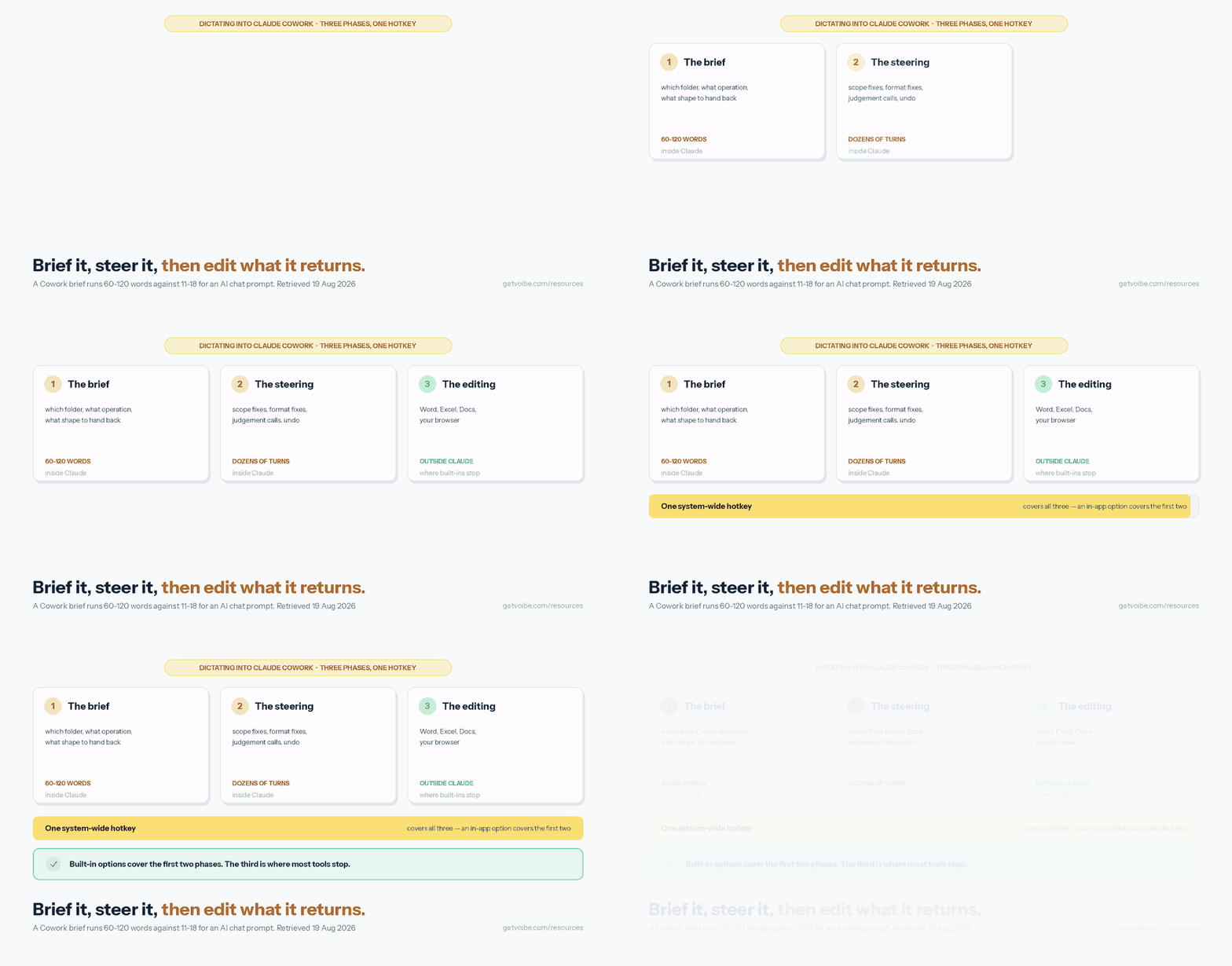
Dictation into Cowork is speech converted to text in the message box, exactly as if you had typed it. You speak, the text appears, you read it, you send.
That last step matters. You can and should edit the transcript before sending — it is the single habit separating briefs that work from briefs that go sideways.
There are three routes, and they cover different amounts of the work:
| Route | Where it works | Platform | Covers editing the output? |
|---|---|---|---|
| Cowork’s own dictation | Inside Claude Cowork | Where Cowork runs | No |
| Claude Desktop quick entry | Claude, from any app | Mac only, macOS 14+ | No |
| System-wide dictation app | Any text field, any app | Mac and Windows | Yes |
Cowork itself runs on paid plans (Pro, Max, Team, Enterprise), on Claude Desktop for macOS and Windows, and on web and mobile. It connects to Microsoft 365, Google Drive, Slack, and Amplitude, and Anthropic’s own examples are reconciling regional exports against a budget file, first-pass contract review against a playbook, and recurring scheduled reports.
Dictation puts your brief into Cowork. Getting an audio file out of Cowork is the other direction, and it needs a connector: the Voibe transcription MCP turns a folder of meeting recordings into transcripts Cowork can then work from. We walk that setup in how to transcribe a Zoom recording.
Working in code rather than documents? The sibling surface is Claude Code in the terminal. See our guide to dictating in Claude Code for its /voice mode and dictating across parallel agent sessions.
Why a Cowork Brief Is Worth Speaking Rather Than Typing
Across dictation sessions from users who opted in to share product analytics, sessions aimed at AI chat windows average roughly 11 to 18 words. Sessions aimed at professional casework tools average roughly 31 to 38 words. The overall English average is 22.6 words per session.
A Cowork brief that runs unattended is longer than any of those. Usually 60 to 120 words, because it has to name the folder, the operation, the output shape, the constraints, and what to do at an ambiguity.
That is the crux: typing punishes brief length. Speaking does not. Most people type a nine-word instruction because a ninety-word one feels like work — then spend the saved time reviewing output that went the wrong way.
Claude is also, by a wide margin, where our own users already send dictated text: in the same opted-in data the Claude apps account for 427 sessions across 28 users in a 90-day window, the second-largest destination overall behind the browser. The habit is already there; Cowork is where it pays off most.
Best Practices: Six Habits That Make Dictated Briefs Work
- Name five things in every brief. The source (which folder, which files), the operation (compare, draft, group, pull), the output shape (a spreadsheet with these columns, a six-page report), the constraint (do not invent numbers, do not send, sort descending), and the ambiguity rule — what to do when something does not match. The fifth is the one people leave out, and it is the one that decides whether the agent guesses.
- Read the transcript before you send. Dictation puts text in the box; it does not check it. Ten seconds of reading catches the misheard folder name that would otherwise send an agent through the wrong directory.
- Add your vocabulary once. Client names, product names, internal acronyms, the folders you reference constantly. This is the step people skip and then blame the tool for. It takes minutes and pays back every session.
- Speak the brief in the order the agent will execute it. Source, then operation, then output, then constraints. Rambling briefs that double back produce plans that double back.
- Dictate the steering, not just the brief. Most of your words in a Cowork session are corrections issued while it works. That is the phase where typing is most annoying, because you are reading and reacting at once.
- Use hands-free mode for anything over about thirty seconds. A ninety-second brief is a long time to hold a key down. Double-tap to start and stop instead.
Four briefs worth stealing
These follow the five-part shape and the task types Anthropic’s own Cowork examples use. Speak them; do not type them.
Reconciliation. “In the Finance folder, open the four regional export files and the annual budget workbook. For every line item, compare actual spend against budget. Flag anything more than ten percent over, and anything where a line exists in one file but not the other. Put the result in a new spreadsheet with one row per flagged item, columns for region, line item, budgeted, actual, and variance as a percentage. Sort by variance descending. If a region uses a different label for the same line item, note it rather than guessing.”
Document drafting. “Read every file in the Q3 Research folder, including the interview notes and the two survey exports. Draft a six-page internal report: an executive summary of no more than two hundred words, then one section per theme you find, then open questions. Quote directly from the interview notes where a quote makes the point better than a paraphrase, and cite the file name after each quote. Do not invent statistics — if a number is not in the source files, leave a bracketed placeholder.”
Inbox triage. “Go through my mail from the last five working days. Group it into three lists: things waiting on a reply from me, things I am waiting on from someone else, and things that need no action. For the first list, draft a short reply to each in my usual tone — direct, no filler openers — and leave them as drafts rather than sending.”
Recurring report. “Every Monday morning, pull last week’s numbers from the analytics connector, compare them against the previous four-week average, and write a one-page summary. Lead with anything that moved more than fifteen percent in either direction and say what changed. Keep the same section order every week. If the data is incomplete for any day, say so at the top instead of averaging around the gap.”
Cowork can run reports on a schedule, so a brief you dictate once becomes the instruction it follows every week. Sixty seconds of speaking, once, for a report that writes itself every week.
Dos and Don’ts for Dictating to an Agent
| Do | Don’t |
|---|---|
| State what to do at an ambiguity, explicitly | Assume the agent will ask before guessing |
| Read the transcript before sending | Fire a dictated brief unread at a tool that acts on files |
| Say “leave them as drafts” when you mean drafts | Let an agent send, delete, or overwrite without saying so |
| Name the folder and file scope precisely | Say “the usual files” and hope |
| Add client and product names to your dictionary | Correct the same misheard name every single session |
| Dictate corrections as it works | Wait for a wrong output to finish before speaking up |
| Check where both your dictation and your files go | Assume on-device dictation makes a cloud agent private |
| Keep one hotkey for every app you touch | Learn a different dictation control per application |
Where Your Voice Goes, and Where Your Work Goes
Dictating into Cowork involves two hops, and conflating them is the most common mistake people make here.
Hop one is your voice becoming text. This one you control:
- Zero retention — transcribes your audio, then discards it.
- Conventional cloud — transmits and stores it, often to improve its models.
- Fully on-device — never transmits at all.
Voibe runs zero retention on both Mac and Windows, on self-hosted open-source models rather than a third-party AI lab. Audio is never stored, never sold, never used to train AI. Apple Silicon Macs add a fully on-device mode.
Hop two is your brief and your files reaching Claude Cowork. This one you do not control. Cowork is a cloud agent by design: it runs on Anthropic’s infrastructure, under Anthropic’s terms.
For what that means in practice, see whether Claude is safe and Claude Pro and Max privacy settings — retention, training toggles, and what differs by plan tier.
So be precise about what a private dictation tool buys you. It stops a second vendor keeping a copy of your voice and your text. It does not make Cowork private, and no dictation app can.
If the work cannot go to a cloud agent at all — privileged legal material, patient records, unreleased financials — the answer is not a different microphone.
Going the Other Way: Handing Cowork a Folder of Recordings
Speaking a brief is one half of using your voice with Cowork. The other half is letting Cowork do the listening — pointing it at recordings you already have and getting transcripts back. It is the same instinct, applied to the part of the work you were never going to type anyway, and it takes no terminal and no code, which makes Cowork the most natural home for it of any client.
Open Customize › Connectors, choose Add custom connector, paste https://api.getvoibe.com/mcp, and sign in once. That is the whole setup. Cowork is already the tool you point at files and folders, so point it at wherever your recordings land:
Transcribe everything in my Zoom folder from this week, then give me one document per call with the decisions and action items.
This is Cowork playing to its shape. It is built to be handed work rather than queried, and a folder of recordings is about as close to pure handed-over work as a task gets — nobody wants to sit through those calls twice. What comes back is a transcript with speaker labels and timestamps, plus a summary you can redirect by simply asking for something different: decisions only, or open questions, or who committed to what.
The connector exposes four tools — start a job, read a transcript, list your jobs, check your balance. It cannot see or create API keys and it cannot buy minutes, which makes it an easy thing to add to a shared workspace without a long conversation first.
Transcription runs $0.25–$0.30 per hour, billed per second and charged only when a transcript is actually delivered — a failed job costs nothing, which matters once an agent is retrying without you watching. The audio is deleted the moment the text exists and is never trained on. New accounts get 15 free minutes without a card, enough to run one real recording through and see the shape of what comes back. One limit worth knowing up front: this is batch work on files that already exist, so it will not give you a live transcript of a call in progress.
The per-client walkthrough, including Claude desktop, Claude web and Claude Code, is in transcribing a Zoom recording.
The most common non-developer version of this is a coach pointing Cowork at the folder their Zoom sessions record into and asking for notes, a recap and next-session prep per call. The full setup, with the rest of the practice stack around it, is in AI tools for coaches.
Best Dictation Tools for Claude Cowork, Compared
The honest framing: most people should not choose a dictation tool for Cowork specifically.
Cowork is one of several places you write in a day. The phase where you edit its output happens somewhere else entirely. A tool that covers every text field beats a better tool that covers one.
| Option | Platforms | Works in Cowork | Works everywhere else | Custom vocabulary | Price |
|---|---|---|---|---|---|
| Voibe | Mac and Windows | Yes | Yes | Yes | $7.50/mo, $59/yr, or $149 lifetime |
| Claude’s built-in dictation | Where Claude runs | Yes | No | No | Included with a paid plan |
| Claude Desktop quick entry | Mac only, macOS 14+ | Yes | No | No | Included with a paid plan |
| Apple Dictation | Mac only | Yes | Yes | No | Free |
| Windows voice typing (Win+H) | Windows only | Yes | Yes | No | Free |
| Superwhisper | Mac only | Yes | Yes | Yes | Subscription or lifetime |
Start with the free built-ins. Apple Dictation and Windows voice typing cost nothing and are genuinely usable. A week with either tells you whether dictation suits how you work.
Two limits push people past them:
- No custom vocabulary. Neither lets you teach it your client names or internal acronyms.
- Apple Dictation stops after 30 seconds of silence — mid-thought, on exactly the long briefs this page is about.
Our roundup of the best free dictation apps covers the no-cost options properly.
Voibe is the app we build, so weigh the recommendation accordingly. Setup is three steps:
- Install, and grant accessibility and microphone permissions.
- Hold the hotkey (Fn by default on Mac, remappable) and speak.
- Add your recurring vocabulary to the Dictionary.
Voibe runs on Mac and Windows — the Windows app launched in July 2026 and uses Voibe’s private zero-retention cloud, while the fully on-device mode is Mac-only and requires Apple Silicon.
Related guides: dictating in Claude Code for terminal work, dictating in ChatGPT if you run both assistants, voice prompting for AI tools for the general technique, and Microsoft Word, Google Docs and Gmail for the phase-three editing surfaces. The hub for this cluster is getting started with Voibe.
Troubleshooting Dictation in Claude Cowork
| Symptom | Likely cause | Fix |
|---|---|---|
| Caps Lock does nothing in quick entry | Speech recognition permission not granted, or macOS below 14 | Grant speech recognition in System Settings › Privacy & Security. Quick entry dictation requires macOS 14 or later |
| Option double-tap does not open quick entry | Claude Desktop is not running, or another app owns the shortcut | Confirm Claude Desktop is running (background is fine), then set a custom shortcut |
| No quick entry on Windows | Quick entry is macOS-only | Use Cowork’s own dictation, Windows voice typing (Win+H), or a system-wide app |
| Dictation works in Cowork but not in the file it produced | Claude’s dictation covers Claude, not other applications | Use a system-wide tool that types at the cursor in any window |
| Text lands in the wrong window mid-session | Focus moved while Cowork was working | Click into the target field before speaking; a background agent can steal focus when a step completes |
| Product and client names transcribed wrong every time | No custom vocabulary configured | Add them to the dictionary once — the highest-value five minutes in any dictation setup |
| The agent did the wrong thing from a dictated brief | The brief was sent unread, or omitted the ambiguity rule | Read transcripts before sending; add the “if X does not match, do Y” clause |
If dictation is failing system-wide rather than only in Claude, see dictation not working on Mac and on Windows.
Where the Usage Numbers on This Page Come From
The session figures above come from Voibe users who opted in to share product analytics. They are reported only in aggregate and cover a 90-day window ending 16 August 2026.
They contain no transcript content. Voibe does not read, index, analyse, or publish the words anyone dictates. Word counts are counts; the text itself is not in the dataset.
There are no per-person figures here, and nothing identifies an individual user or employer. Analytics can be turned off without losing any functionality.
Facts about Claude Cowork, Claude Desktop quick entry, and Cowork’s plan availability were retrieved from Anthropic’s own product and support documentation on 19 August 2026. Anthropic ships quickly — re-check the help centre before relying on a specific keyboard shortcut or platform limit.
Start Briefing Cowork Out Loud
Next time you open Cowork, do not type the brief. Say it — the whole thing. The folder, the operation, the output shape, the constraint, and what to do at the ambiguity.
Read it back, then send. Sixty seconds. That is the difference between an agent that runs unattended and one you babysit.
Try Voibe for free — one hotkey across Cowork, Claude Code, and every document Cowork hands back.
Frequently Asked Questions
Can you dictate in Claude Cowork?
What is the best way to dictate a Claude Cowork brief?
How long should a Claude Cowork brief be?
What is the difference between Claude Code and Claude Cowork?
Do I need a separate dictation app if Claude already has dictation?
Is Claude Cowork free?
Does dictating on-device make Claude Cowork private?
Why did the agent do the wrong thing from my dictated brief?
Best AI Dictation and Meeting Notes for Confidential Work
Draft letters, notes and emails 5x faster. Get meeting notes without a bot joining your call. Nothing used to train AI.
- Mac + Windows
- No bot in your calls
- Nothing used to train AI
- 7-day free trial
Want to compare plans first? View pricing →
Related Articles
How to Dictate in ChatGPT — and Why It's Not Voice Mode
ChatGPT has two mics that do different things. How to dictate prompts into ChatGPT on web, Mac, and Windows — and when Voice Mode is the wrong tool.
How to Dictate in Claude Code (and Where Your Audio Goes)
Type /voice, hold space, talk — that's the built-in path. The full setup on Mac, Windows and VS Code, every error that breaks it, and where the audio goes.
Claude Pro & Max Privacy: Retention, Training Opt-Out, Deletion
Do Claude Pro and Max train on your data? Retention periods, the training opt-out toggle, the 2025 privacy update explained, and how to delete your history.