
Can Anthropic Look at Your Session Transcript? What Yes Uploads
Claude Code asks after the rating prompt. Yes uploads your transcript, subagent logs, and the raw session file, kept 6 months. What's redacted, what isn't.

What the Session Transcript Prompt Is Actually Asking
It looks like the tail end of a satisfaction survey. It isn't. It's the one place in Claude Code where a single keypress sends your entire session — every file the model read, every command your terminal echoed back — to Anthropic.
I went looking for a straight answer to this one and found the documentation, the issue tracker, and the prompt itself telling slightly different stories. Here's what they add up to.
The short version: after you rate a session, Claude Code may ask a second question: Can Anthropic look at your session transcript to help us improve Claude Code? Selecting Yes uploads your conversation transcript, any subagent transcripts, and the raw session log file from disk. Known API key and token patterns are stripped first; source code, file contents, and everything else go up as-is. Shared transcripts are kept for up to 6 months. Selecting No sends nothing. Selecting Don't ask again sends nothing and retires the question. Nothing is uploaded unless you explicitly choose Yes.
The rating prompt that comes first is a different thing, and it's tamer than people assume: answering it — including dismissing it — records only your rating, with no transcript, input, or output attached.
Every Anthropic claim on this page was checked against the live Claude Code data usage documentation on August 6, 2026. Here's the whole decision in one table:
| Your answer | What leaves your machine | How long it's kept |
|---|---|---|
| Yes | Conversation transcript, subagent transcripts, and the raw session log file from disk. Known API key and token patterns redacted; source code and file contents uploaded as-is | Up to 6 months |
| No | Nothing | Not applicable |
| Don't ask again | Nothing, and the follow-up stops appearing in future sessions | Not applicable |
| The rating itself | Your rating only — no transcripts, inputs, or outputs | Governed by your account's standard retention window |
Key Takeaway
Selecting Yes at Claude Code's post-rating prompt uploads your conversation transcript, any subagent transcripts, and the raw session log file. Known API key and token patterns are redacted; source code and file contents are uploaded as-is. Shared transcripts are retained for up to 6 months and cannot be used to train Anthropic's models.
Yes, No, and Don't Ask Again: What Each Answer Actually Sends
The three answers are not three shades of the same choice. Only one of them moves data.
Yes uploads three payloads together. The first is the conversation transcript — your prompts and Claude's responses for that session. The second is any subagent transcripts, which matters more than it sounds: a single Task or agent call can read files you never looked at yourself, and those reads land in the transcript. The third is the raw session log file, read from disk rather than reconstructed from memory, which is the most complete record of the session that exists on your machine.
No declines without sending anything. It's a per-session answer, so the question can come back later.
Don't ask again declines and stops the follow-up from appearing in future sessions. If the prompt annoys you more than it worries you, this is the one-key version of the environment variable further down this page.
The asymmetry is worth naming plainly: No and Don't ask again cost you nothing and send nothing. The only answer with a data consequence is the one bound to the y key.
The Redaction Gap: Key Patterns Are Caught, Terminal Echo Isn't
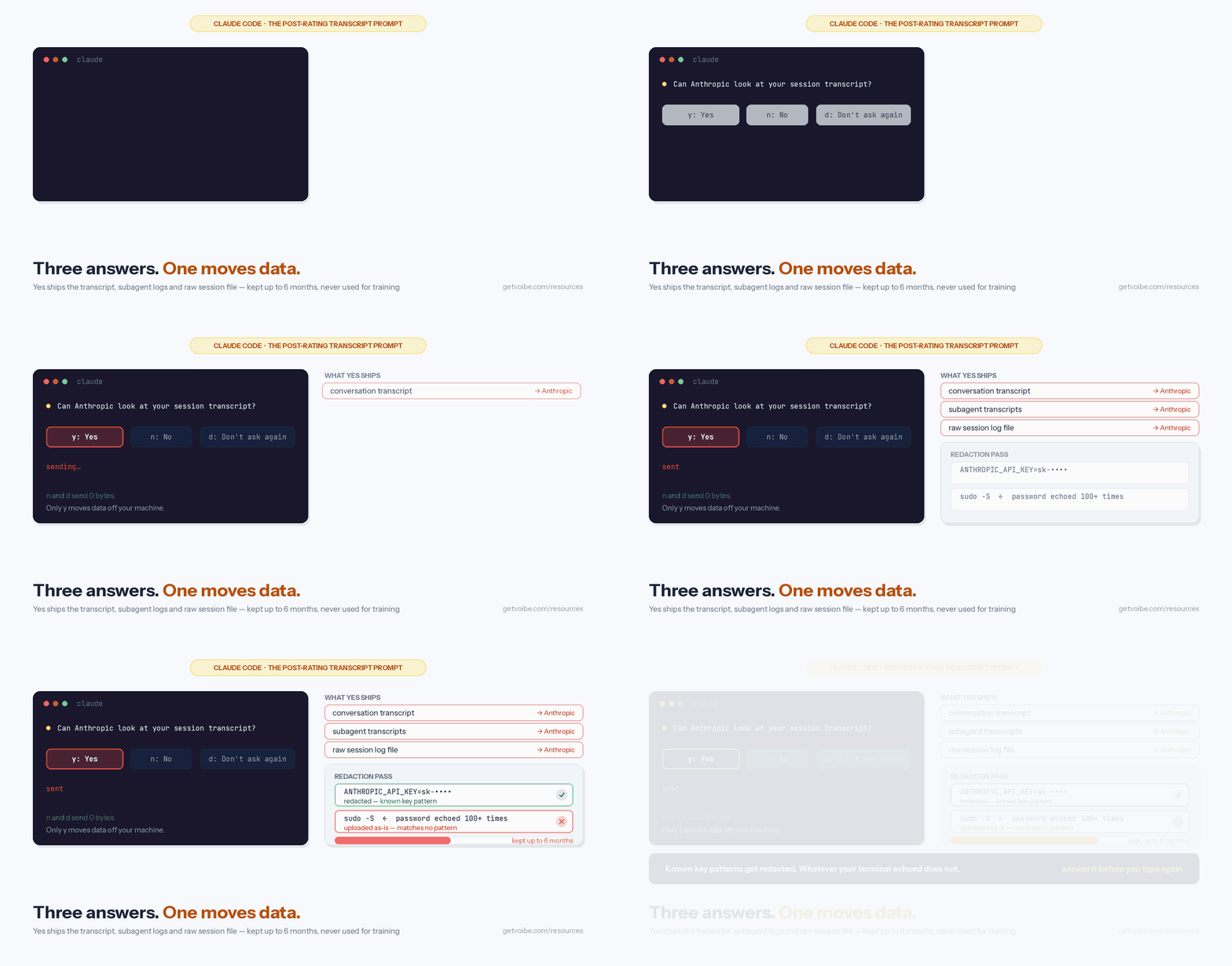
Anthropic's documentation is specific about what the redaction step covers: known API key and token patterns are redacted before upload. It is equally specific about what it doesn't cover — source code, file contents, and other conversation content go up as-is.
Reading those two sentences next to each other is what changed how I answer this prompt. That distinction is the whole risk surface, and it's easy to underestimate. Pattern-based redaction is good at things shaped like secrets: a string starting sk-, a JWT, a recognizable cloud key. It is structurally unable to catch a secret that doesn't look like one. A few things that routinely end up in a Claude Code transcript and match no known pattern:
- A database password inside a connection string you had Claude read from a config file.
- Anything a script echoed back — including a password piped to
sudo -S, which prints into the session like any other command output. - Internal hostnames, S3 bucket names, customer identifiers, and staging URLs in a stack trace.
- Unreleased source code, which is explicitly listed as uploaded as-is.
None of that is a flaw in Anthropic's description — the docs say plainly that only known key and token patterns are stripped. It's a reason to answer the prompt deliberately rather than reflexively, because you are the only party who knows what your terminal printed during those two hours.
Warning
Before selecting Yes, ask one question: did anything in this session echo a credential that doesn't look like an API key? Passwords passed to sudo -S, connection strings, and internal hostnames are not covered by pattern-based redaction.
The Stray-Keystroke Report: When a "y" Meant for the Input Box Consents for You
The issue tracker is where this stopped being academic for me. There is an open bug report worth knowing about before you next see this prompt. Issue 74814 on the Claude Code repository, filed July 6, 2026 against version 2.1.198, reports that the post-rating consent prompt can capture a keystroke intended for the message input box. The reported sequence: you rate the session, the Yes/No consent appears, you start typing your next message, and if that message happens to begin with the letter y, the keystroke registers as Yes.
The reporter's account of what went up is the part that makes this more than a UI nit: a machine login password that appeared more than 100 times in sudo -S command echoes, plus a bearer token. They also report there was no self-serve way to reverse it — removing the upload required emailing privacy@anthropic.com.
Two honest caveats. This is a user report on an open issue, not documented Anthropic behavior, and as of August 6, 2026 it carries no maintainer response. It was filed against a specific version, and the behavior may already differ in whatever version you're running. But the requested fixes in that thread describe the safer design well enough to be worth borrowing as personal habit: don't let a data-consent prompt share a keyboard with your input box, and treat a single-key upload consent as something to answer before you start typing again.
The practical version: when the rating prompt appears, finish answering it before you touch the keyboard for anything else. If you never want to make that judgment call under time pressure, skip to the off-switch below.
No, Sharing a Transcript Doesn't Train Claude — That's a Separate Setting
This is the most common confusion about the prompt, and the answer is unambiguous. Anthropic's documentation states that responses to this survey, including session transcripts submitted after the rating prompt, do not impact your data training preferences and cannot be used to train Anthropic's AI models.
Model training is controlled somewhere else entirely, and which control applies depends on how you sign in:
- Free, Pro, and Max accounts: the "Help Improve our AI models" toggle at claude.ai/settings/data-privacy-controls. With it on, Anthropic may train new models on your chats and coding sessions and retention runs 5 years. With it off, retention drops to 30 days. The full mechanics are on our Claude Pro and Max privacy page.
- Team, Enterprise, API, and third-party platforms: the Commercial Terms apply, under which Anthropic states it does not train generative models on your code or prompts by default. The exception is an explicit opt-in such as the Development Partner Program, which an organization admin enables and which is available only on Anthropic's first-party API. Retention details are on our Claude API data retention page.
So the two questions are separate. You can share a transcript with model training switched off, and you can refuse every transcript prompt while leaving training on. If your concern is training, this prompt is not the lever — the toggle is.
Key Takeaway
Session transcripts submitted through the post-rating prompt cannot be used to train Anthropic's models and do not change your training preferences. Model training is governed separately by the "Help Improve our AI models" toggle on consumer plans and by the Commercial Terms on Team, Enterprise, API, and third-party platforms.
Who Never Sees This Prompt at All
Three configurations remove the follow-up entirely, per Anthropic's documentation:
- Organizations with zero data retention. ZDR accounts never see the transcript-share follow-up.
- Organizations where product feedback is disabled by policy. An admin decision, not a per-developer one.
- Any session with
CLAUDE_CODE_DISABLE_NONESSENTIAL_TRAFFICset. The blanket opt-out covers this along with every other optional channel.
There is also a fourth case that changes the destination rather than removing the question. On Amazon Bedrock, Google Cloud's Agent Platform, Microsoft Foundry, and signed-in Claude apps gateway sessions, selecting Yes writes the same payload to a local archive under ~/.claude/feedback-bundles/ instead of uploading it. Nothing leaves your machine until you forward that file to Anthropic yourself. It's the same behavior the /feedback command has on those providers.
Worth flagging for anyone who assumes a third-party provider turns everything off: session quality surveys are an explicit exception to the provider defaults. Telemetry, error reporting, and /feedback are off by default on Bedrock, Google Cloud's Agent Platform, Microsoft Foundry, and Claude Platform on AWS — but the survey runs regardless of provider, as does the WebFetch domain safety check. Being on Bedrock does not mean the prompt never appears; it means Yes writes a file instead of making a request.
Transcript Share vs. /feedback: Two Uploads, Two Different Clocks
Claude Code has two separate paths that send conversation data to Anthropic, and they are frequently conflated. They differ in what they capture, how long it's kept, and how you switch them off.
| Post-rating transcript share | /feedback, /bug, /share | |
|---|---|---|
| How it starts | A prompt after the session rating | You run the command |
| What it sends | Conversation transcript, subagent transcripts, raw session log file | A copy of your conversation history including code |
| Scope control | None — the current session as-is | You choose: current session (default), or other sessions from the same project over the last 24 hours or 7 days |
| Retention | Up to 6 months | 5 years |
| Redaction | Known API key and token patterns | Known API key and token patterns on the local-archive path |
| Opt-out | CLAUDE_CODE_DISABLE_FEEDBACK_SURVEY=1 | DISABLE_FEEDBACK_COMMAND=1 |
| Public artifact | None | Optionally creates a GitHub issue in the public repository |
The retention difference is the headline: a transcript shared through the prompt is kept up to 6 months; a transcript sent through /feedback is kept for 5 years — ten times longer. The command also stores in Google Cloud Storage and can, at your option, create a public GitHub issue. If you're deciding which channel to use to report a bug, that's the trade-off to weigh.
How to Turn the Prompt Off — or Just Turn It Down
You have four levers, in ascending order of bluntness. All of them are documented in Anthropic's Claude Code data-usage and settings references as of August 6, 2026.
- Answer "Don't ask again" once. No configuration, no restart. The follow-up stops appearing; the rating prompt stays.
- Lower the frequency instead of removing it. Set
feedbackSurveyRatein your settings file to a probability between0and1. Useful if you want to keep answering surveys occasionally without being asked every session. - Disable the survey outright:
CLAUDE_CODE_DISABLE_FEEDBACK_SURVEY=1. This removes the rating prompt and the transcript follow-up together. The survey is also disabled wheneverDISABLE_TELEMETRY,DO_NOT_TRACK, orCLAUDE_CODE_DISABLE_NONESSENTIAL_TRAFFICis set — so if you already run one of those, the prompt is already gone. - Disable every optional channel at once:
CLAUDE_CODE_DISABLE_NONESSENTIAL_TRAFFIC=1. The blanket flag, covered in full on our Claude Code privacy settings guide.
One team-specific option is easy to miss. Organizations that block non-essential traffic but still want survey ratings through their own OpenTelemetry collector can set CLAUDE_CODE_ENABLE_FEEDBACK_SURVEY_FOR_OTEL=1. The survey then logs ratings to the configured collector only — and critically, the transcript-share follow-up and all other Anthropic-bound feedback traffic stay disabled. You get the satisfaction metric without reopening the upload path.
Two traps carried over from the wider Claude Code flag set are worth repeating here. First, for CLAUDE_CODE_DISABLE_NONESSENTIAL_TRAFFIC, DISABLE_TELEMETRY, and DISABLE_ERROR_REPORTING, setting the value to 0 or false still disables the traffic — any non-empty value counts as set, so you have to unset the variable entirely to turn the channel back on. Second, none of these flags touch the core path: your prompts and code context still go to your model provider for inference.
If You Already Said Yes
Start with the reassuring part: whatever went up cannot be used to train Anthropic's models, and it is retained for up to 6 months rather than indefinitely. If the session was routine work with no secrets in it, that is the end of the story.
If the session did contain credentials, work in this order:
- Rotate anything that could have been echoed — passwords passed to
sudo -S, database connection strings, bearer tokens that didn't match a known pattern. Rotation is immediate and entirely within your control; a deletion request is neither. - Then request deletion. There is no documented self-serve undo. The reporter in issue 74814 states that removal required emailing
privacy@anthropic.com. - Check the local archive if you're on a third-party provider. On Bedrock, Google Cloud's Agent Platform, Microsoft Foundry, or a signed-in Claude apps gateway session, Yes wrote a file under
~/.claude/feedback-bundles/rather than uploading. Deleting that file resolves it completely, because nothing left your machine. - Set the flag so it can't recur:
CLAUDE_CODE_DISABLE_FEEDBACK_SURVEY=1, or answer "Don't ask again" the next time you see the prompt.
Separately, remember that the session still exists in plaintext on your own disk under ~/.claude/projects/ for 30 days by default. Sharing a transcript doesn't change that, and neither does declining. Our privacy settings guide covers claude project purge and cleanupPeriodDays for clearing the local copy.
Tip
Rotate first, request deletion second. Rotating a credential you control takes minutes; a deletion request depends on someone else's queue.
The Documentation Contradicted This Prompt for Months
One piece of history explains why so many developers hit this prompt and found nothing useful when they searched for it.
On April 9, 2026, issue 45811 was filed against the Claude Code repository under the title "Documentation contradicts session transcript sharing prompt." The prompt asked to look at your session transcript. The documentation it linked to said the opposite: that no conversation transcripts, inputs, outputs, or other session data were collected as part of the survey, and that only the numeric rating was recorded. The reporter's read was that transcript sharing was a newer feature and the docs hadn't caught up. The issue was closed as not planned and labelled stale.
The documentation has since been corrected. The current data usage page, checked August 6, 2026, describes the follow-up in full — the three answers, the three payloads, the 6-month retention, the local-archive behavior on third-party providers, and the fact that shared transcripts cannot be used for training. Nearly everything on this page comes from that corrected text.
The useful takeaway isn't a criticism; it's a calibration. In a product shipping this fast, the in-product prompt can be ahead of the documentation that explains it. When a prompt asks for something the docs don't describe, the prompt is the more current statement of what the software does — and it's worth re-checking the policy page rather than trusting a memory of it.
Voibe: The Voice Layer With No Transcript to Ask About
Most of a Claude Code session is prompts you typed. If you dictate them — which is how a lot of people drive an agent now — that adds a second system holding a copy of your words, and a second privacy question to answer.
Voibe, the dictation app we build, is designed so that question doesn't come up. On a Mac with Apple Silicon it runs on-device using OpenAI's Whisper models, and your audio never leaves the machine — there is no server-side voice transcript that anyone could later ask permission to review. On Windows, and on Mac if you choose it, Voibe uses its own private cloud running open-source models with zero retention: audio is never stored, sold, or used to train AI. Pricing is $7.50/month, $59/year, or $149 one-time.
That doesn't change anything about how Claude Code handles the session it builds from those prompts — the transcript prompt, the retention windows, and the flags on this page all still apply. It removes one layer from the stack rather than the whole question. If you're mapping the full picture, our guides to dictating in Cursor and voice-prompting AI tools cover the workflow side.
Claude Privacy, Page by Page
This page covers one prompt. The rest of the Claude privacy picture is split by product surface, one page per decision:
- Is Claude Code Safe? — the hub: retention and training defaults by tier, provider-specific behavior, and what lives in plaintext on your machine.
- Claude Code Privacy Settings — every opt-out, environment variable, and toggle in one quick-reference table.
- Claude API Data Retention — the Commercial Terms no-training default, the 30-day window and its exceptions, zero data retention eligibility, and the June 2026 Covered Models rule.
- Claude Pro and Max Privacy — the training toggle, the 5-year window, deletion, and what consumer plans don't get.
- Is Claude Safe? — claude.ai itself: what's reasonable to paste in, and how it compares to ChatGPT.
The Bottom Line on Claude Code's Transcript Prompt
The prompt is honest about what it wants and quiet about what it costs. Selecting Yes uploads your conversation transcript, any subagent transcripts, and the raw session log file; known API key and token patterns are redacted; source code and file contents are not. Shared transcripts are kept up to 6 months and cannot be used to train Anthropic's models. Selecting No or Don't ask again sends nothing at all.
My own position, having read the documentation and the open issues: answer "Don't ask again" unless you have a specific reason to share a specific session. The upside of a routine Yes is diffuse — you're helping improve a product — while the downside is concentrated and irreversible, because you're the only one who knows what your terminal printed in the last two hours and there's no self-serve way to take it back. When you do have a session worth sharing, share that one deliberately.
If you'd rather not make the judgment call at all, one line settles it permanently:
export CLAUDE_CODE_DISABLE_FEEDBACK_SURVEY=1All Anthropic facts on this page were verified against the live Claude Code data usage documentation on August 6, 2026. Anthropic ships changes to these policies regularly — re-check the source before relying on any specific window or flag.
A transcript you didn't know existed is a retention problem, not a training problem — and the two get conflated constantly. Zero data retention explained separates them, and sets out the five levels of what a tool can keep.
Key Takeaway
Say No or Don't ask again by default; share a specific session deliberately when you have a reason. Yes uploads the transcript, subagent transcripts, and raw session log, retained up to 6 months, with only known key and token patterns redacted — and there is no documented self-serve way to reverse it.
Frequently Asked Questions
What is the "Can Anthropic look at your session transcript to help us improve Claude Code?" prompt?
Does the session rating prompt itself share my conversation?
What exactly does saying Yes upload?
How long does Anthropic keep a shared session transcript?
Does sharing a session transcript train Claude on my code?
How do I stop Claude Code from asking about my session transcript?
Who never sees this prompt at all?
Can I undo a transcript upload after selecting Yes?
Is this the same as the /feedback command?
Best AI Dictation and Meeting Notes for Confidential Work
Draft letters, notes and emails 5x faster. Get meeting notes without a bot joining your call. Nothing used to train AI.
- Mac + Windows
- No bot in your calls
- Nothing used to train AI
- 7-day free trial
Want to compare plans first? View pricing →
Related Articles
Claude Code Privacy Settings: Every Opt-Out & Env Var (2026)
Every Claude Code privacy setting in one place: disable non-essential traffic, feedback survey, training opt-out, and how to delete sessions. Copy-paste ready.
Is Claude Code Safe? Privacy & Data Retention by Tier (2026)
Is Claude Code safe? What Anthropic stores and trains on by tier — Pro/Max vs API vs Enterprise — plus the Oct 2025 terms change and every opt-out setting.
Claude Pro & Max Privacy: Retention, Training Opt-Out, Deletion
Do Claude Pro and Max train on your data? Retention periods, the training opt-out toggle, the 2025 privacy update explained, and how to delete your history.