
Voibe vs Monologue (2026): On-Device Lifetime vs Screen-Aware Cloud
Voibe vs Monologue head-to-head: on-device Whisper with $199 lifetime and two privacy modes, versus Every.to's polished screen-aware cloud app at $15/mo. Honest, different-fits verdict.

Voibe
Mac and Windows dictation app that runs OpenAI Whisper on-device on Apple Silicon's Neural Engine, or over a zero-retention cloud with open-source models — your choice. In on-device mode nothing leaves your Mac; in cloud mode audio is deleted the moment transcription completes and is never stored, sold, or used to train AI. Voibe never reads your screen — it inserts text at the cursor only. Ships Developer Mode for Cursor, VS Code, and Windsurf with local workspace file-name resolution, plus Live Dictation, hands-free dictation, spoken punctuation, custom vocabulary, and Memory text-expansion. On-device mode needs an Apple Silicon Mac (M1 or later); Intel Macs and Windows run cloud mode only. Pricing: Voibe Free ($0, limited words on one device), or $9.90/month, $99/year, or $199 one-time lifetime — no BYOK, no per-token spend.
Free plan (limited words); $9.90/mo, $99/yr, or $199 lifetime
Pros
- + On-device (Apple Silicon) or zero-retention cloud with open-source models — your choice; in on-device mode nothing leaves your Mac
- + Never reads your screen — text is inserted at the cursor with no screen-context capture, unlike Monologue's 'deep context'
- + $199 one-time lifetime — pays back versus Monologue Pro Annual in about 17 months, then keeps working forever
- + Developer Mode for Cursor, VS Code, and Windsurf resolves workspace file and folder names when you dictate
- + Live Dictation (Mac) shows words on-screen as you speak so you can edit before insertion; hands-free double-tap and push-to-talk modes
- + Mac and Windows desktop coverage; on-device mode works fully offline on Apple Silicon
- + No BYOK, no model picking, no vendor accounts — the only choice you make is on-device vs cloud
- + Custom vocabulary as true dictionary injection, plus Memory text-expansion shortcuts
Cons
- - No iOS, iPadOS, Android, or Apple Watch app — desktop only (Monologue ships an iOS companion and Apple Watch dictation)
- - No screen-aware 'deep context' formatting or per-app modes — formatting is driven by Smart Formatting and spoken commands
- - Free plan is word-limited on one device (limit not published); unlimited use starts at $9.90/mo (with a 7-day free trial and 30-day money-back guarantee)
- - On-device mode requires an Apple Silicon Mac (M1+); Intel Macs and Windows are cloud-only and need internet
- - No published SOC 2, ISO 27001, or HIPAA BAA — consumer-tier on formal compliance
Monologue
Cloud-based smart dictation app for macOS with an iOS companion and Apple Watch support, built by Every.to (Every Media Inc). Its signature feature is screen-aware 'deep context' formatting: it reads what is on your screen to match tone and style to the app you are typing in. Includes a strong custom dictionary that learns jargon and names, per-app custom modes, 100+ languages, automatic punctuation, edit-while-dictating, and voice commands. It is subscription-only with a one-time 1,000-word plus 10-note free allotment. Mac App Store 4.9/5 from 172 ratings; Product Hunt 5.0/5 from 5 reviews. Pricing: Free (one-time 1,000 words), Pro $15/mo regular ($10/mo early-bird) or $144/yr, and a $30/mo Every bundle. No lifetime option; Mac + iOS only.
$15/mo ($10 early-bird), $144/yr, or $30/mo Every bundle
Pros
- + Genuinely polished and well-reviewed — Mac App Store 4.9/5 from 172 ratings, described as 'cleaner and less buggy than competitors'
- + Screen-aware 'deep context' formatting adapts tone and style to the active app (casual Slack vs formal email)
- + Strong custom dictionary that learns jargon, names, and product terms — repeatedly praised for accuracy
- + Real iOS companion app plus Apple Watch dictation, backed by the Every.to media brand
- + 100+ languages, automatic punctuation, edit-while-dictating, per-app custom modes, and voice commands
- + Competitive early-bird monthly rate at $10/mo for an actively developed cloud app
Cons
- - Stingiest free tier in the category — 1,000 words + 10 notes, one-time (~8 minutes of speech), no rolling reset
- - Cloud-based, and 'deep context' reads on-screen content to inform formatting — a consideration for regulated or NDA-bound work
- - Subscription-only with no lifetime option — $432 over 3 years on annual, compounding indefinitely
- - Mac + iOS (and Apple Watch) only — no Windows or Android support
- - Early-bird $10/mo rate is promotional and may reset to $15/mo on renewal
- - No time-bounded Pro trial beyond the small free allotment
Voibe vs Monologue: The Verdict
Different fits. Voibe and Monologue are both excellent dictation apps, but they answer different questions. Voibe is an on-device-first tool that runs OpenAI Whisper locally on Apple Silicon (or over a zero-retention cloud with open-source models), never reads your screen, covers Mac and Windows, and sells for a one-time $199 lifetime license. Monologue is a polished, cloud-based Apple-ecosystem app from Every.to whose signature feature is screen-aware 'deep context' formatting — it reads what is on your screen to match tone and style to the app you are in — and it is subscription-only at $15/mo ($10 early-bird) with an iOS companion and Apple Watch support.
Pick Voibe if you want:
- A one-time $199 lifetime price instead of a subscription that compounds forever
- A privacy architecture that never reads your screen — text inserted at the cursor only
- An on-device mode where nothing leaves your Mac, or a zero-retention cloud with open-source models — your choice, no BYOK
- Windows coverage alongside Mac (native Windows app, cloud mode)
- Developer Mode for Cursor, VS Code, and Windsurf with local workspace file-name resolution
Pick Monologue if you want:
- The most polished, best-reviewed Apple-ecosystem dictation app (Mac App Store 4.9/5 from 172 ratings)
- Screen-aware 'deep context' formatting that adapts tone to the active app automatically
- A real iOS companion app plus Apple Watch dictation
- A custom dictionary that is repeatedly singled out for handling jargon and names
- You are comfortable with cloud processing, screen-context reading, and subscription billing
The honest tie zones: both are genuinely polished Mac apps, both support 100+ languages, both offer strong custom vocabulary, and neither carries a published SOC 2, ISO 27001, or HIPAA BAA — both are consumer-tier on formal compliance.
Disclosure: Voibe is our product. Monologue facts are verified from monologue.to, the Every.to launch announcement, and the Mac App Store and Product Hunt listings, as summarized in our Monologue review. Where Monologue is genuinely stronger than Voibe, we say so.
Quick Comparison: 15 Dimensions Side-by-Side
| Dimension | Voibe | Monologue | Winner |
|---|---|---|---|
| Architecture | On-device (Apple Silicon) or zero-retention cloud | Cloud-based (optional local model) | Voibe (on-device choice) |
| Reads your screen | No — cursor insertion only | Yes — 'deep context' reads on-screen content | Voibe (privacy) |
| Screen-aware formatting | No | Yes ('deep context', per-app modes) | Monologue |
| Lifetime pricing | $199 one-time | None | Voibe |
| Subscription option | $9.90/mo or $99/yr | $15/mo ($10 early-bird) or $144/yr | Voibe (lower entry + lifetime) |
| 3-year cost (paid tier) | $199 lifetime | $432 Pro Annual | Voibe (54% cheaper) |
| Free tier | Yes (limited words, one device; limit not published) + 7-day full trial | 1,000 words + 10 notes, one-time (~8 min) | Different fits |
| Platform reach | Mac + Windows (desktop) | Mac + iOS + Apple Watch | Tie (different platforms) |
| Mobile / wearable | None | iOS + Apple Watch | Monologue |
| Windows support | Yes (native app, cloud mode) | No | Voibe |
| Live Dictation (real-time on-screen) | Yes (Mac-only) — words stream as you speak | No — text appears after processing | Voibe |
| Hands-free mode | Yes — double-tap continuous, plus push-to-talk | Voice commands only | Voibe |
| IDE developer integration | Cursor / VS Code / Windsurf, file-name resolution | Code custom mode (no IDE integration) | Voibe |
| Third-party rating | 9/10 editorial; 5/5 Product Hunt reviews | 4.9/5 App Store (172 ratings) | Monologue (larger sample) |
| Compliance attestations | None | None | Tie (neither) |
The honest tally: Voibe wins on lifetime pricing, 3-year cost, no-screen-reading privacy, Windows, Live Dictation, hands-free double-tap, and IDE integration. Monologue wins on screen-aware formatting, mobile/wearable reach, and app-store validation. Platform reach and compliance are ties. This is a 'different fits' comparison — neither product dominates the other.
Why These Get Compared
Voibe and Monologue show up on the same Mac shortlists for three structural reasons — even though their architectures point in opposite directions.
1. Both Are Premium, Well-Built Mac Dictation Apps
Neither is a rough indie experiment. Voibe carries a 9/10 editorial rating and press features across Macworld, PCMag, Mashable, and Cult of Mac. Monologue holds a 4.9/5 Mac App Store rating from 172 ratings and a reputation for being 'cleaner and less buggy than competitors.' Buyers evaluating polished Mac dictation naturally weigh them against each other.
2. Both Format Speech Into Clean Text — With Different Engines
Both turn messy speech into finished writing. Monologue does it with cloud AI plus screen-aware 'deep context' that reads the active app to match tone. Voibe does it with Smart Formatting (auto punctuation, capitalization, filler-word removal) and spoken punctuation commands, running on-device in on-device mode. The output goal is similar; the mechanism — and where your audio and screen content go — is the core difference.
3. Both Target Mac Knowledge Workers and Professionals
Monologue markets 'effortless voice dictation so you can work 3x faster' to Apple-ecosystem professionals. Voibe markets on-device privacy plus Developer Mode to Mac and Windows knowledge workers and developers. The audiences overlap heavily: people who dictate a lot, care about output quality, and are deciding between a subscription cloud app and a one-time on-device tool.
The result: Mac users comparing dictation apps in 2026 routinely end up with Voibe and Monologue side by side. This page is for that decision point — and it splits cleanly on privacy model, pricing model, and platform reach.
Voibe: On-Device Whisper, No Screen Reading, One-Time Lifetime

Voibe is a Mac and Windows dictation app built around two principles: your audio is never stored, sold, or used to train AI — with a fully on-device mode where nothing leaves your Mac — and the app inserts text at the cursor without ever reading your screen.
What Voibe Does
- Two modes, your choice. On-device mode runs OpenAI Whisper on Apple Silicon's Neural Engine — fully local, works offline, nothing leaves your Mac. Zero-retention cloud mode sends audio over an encrypted connection to cloud providers running open-source models (Whisper Large Turbo for transcription, an open-weight model for formatting); audio is deleted the moment transcription completes and text is never stored. If cloud drops mid-session, it falls back to the local model on Apple Silicon.
- No screen reading. Voibe captures your voice and inserts text at the cursor — it never reads surrounding on-screen content the way Monologue's 'deep context' does.
- Developer Mode. Works in Cursor, VS Code, and Windsurf. It scans your active workspace locally and resolves file names, folder paths, and variable identifiers when spoken, and can auto-attach referenced files to the AI prompt. Requires installing the IDE extension.
- Three trigger modes. Push-to-talk (hold the hotkey), hands-free (double-tap), and Live Dictation (Mac-only) — words stream on-screen in real time so you can edit before insertion.
- Smart Formatting and Spoken Punctuation. Auto punctuation, capitalization, and filler-word removal; say 'comma', 'new line', 'open paren', or 'at sign' to format hands-free.
- Custom Vocabulary and Memory. Teach names, jargon, and acronyms as a true dictionary (with bulk edit), and set spoken text-expansion shortcuts for signatures, URLs, and prompts.
Voibe Pricing
- Voibe Free: $0 forever, limited words on one device
- $9.90 per month
- $99 per year (~$8.25/month)
- $199 one-time lifetime (limited-time)
Every account starts with a 7-day free trial with full feature access, then moves to Voibe Free unless you buy a plan; paid plans carry a 30-day money-back guarantee.
Voibe System Requirements
- Mac: macOS 13 Ventura or later. On-device mode needs an Apple Silicon Mac (M1/M2/M3/M4); cloud mode works on any Mac, including Intel.
- Windows: any modern PC with internet — native app, runs in the system tray, cloud mode only (no on-device mode, no Live Dictation).
- ~275 MB app; the on-device Whisper model adds ~2 GB.
Voibe Validation
- 9/10 editorial rating on our Voibe review; 5/5 public reviews on Product Hunt
- Press features across Macworld, PCMag, Mashable, Popular Science, and Cult of Mac
- Voibe's own figures: 12M words dictated, ~12,000 hours saved, 3,000+ professionals
Monologue: Screen-Aware Cloud Dictation from Every.to
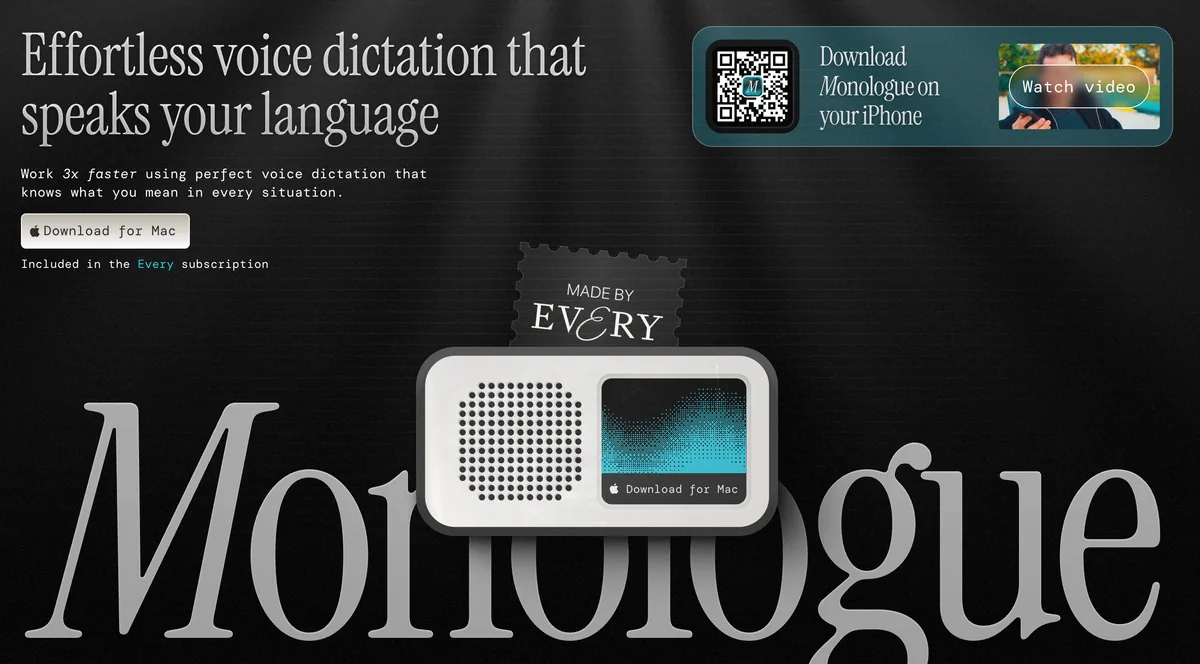
Monologue is a smart dictation app for macOS with an iOS companion and Apple Watch support, built by Every.to (Every Media Inc), the AI-era media and software company. Its tagline is 'effortless voice dictation so you can work 3x faster,' and its defining feature is context awareness: 'deep context' via screen visibility reads what is on your screen to understand what you are working on and format your dictation to match.
What Monologue Does
- Screen-aware 'deep context' formatting. Reads on-screen content to adapt tone and structure to the active app — casual in Slack, formal in email, structured in a doc — without switching modes manually. This is the signature feature and the main privacy consideration.
- Custom dictionary. Learns your jargon, names, and product terms over time. Reviewers repeatedly cite it as the reason accuracy feels 'top-notch.'
- Per-app custom modes. Different formatting rules for different contexts (Email, Slack, Code, Notes) for power users.
- 100+ languages, automatic punctuation, edit-while-dictating, and voice commands. Table-stakes features executed cleanly.
- Polished Mac app + iOS companion + Apple Watch. A refined, native-feeling Mac app plus real Apple-ecosystem reach, backed by the Every.to brand.
- Optional local model. A downloadable model is listed for offline transcription, though the signature 'deep context' features rely on cloud processing and the offline/cloud split is not fully documented publicly.
Monologue Pricing
- Free — one-time 1,000 words + 10 notes (~8 minutes of speech, no reset)
- Pro — $15/month regular, or $10/month early-bird (promotional, may reset)
- Pro Annual — $144/year ($12/month effective)
- Every bundle — $30/month (Monologue + Cora + Spiral + Sparkle + the Every newsletter)
There is no lifetime option; every plan is a subscription.
Monologue System Requirements
- macOS, plus an iOS companion on the App Store and Apple Watch dictation
- Account required; network-dependent for the signature screen-aware features
- No Windows, Android, Linux, or web support
Monologue Validation
- Mac App Store 4.9/5 from 172 ratings — a large, representative sample
- Product Hunt 5.0/5 from 5 reviews — early enthusiast power users
- Launched September 2025; relatively new but well-received. Scored 7/10 in our Monologue review
Feature-by-Feature: Where Each Product Wins
Privacy Architecture — Voibe Wins
Voibe never reads your screen — it inserts text at the cursor and gives you a mode choice: on-device on Apple Silicon (nothing leaves your Mac) or a zero-retention cloud with open-source models that deletes audio the moment transcription completes. Monologue is cloud-based and its 'deep context' feature deliberately reads on-screen content to inform formatting. For most personal writing that is a low-risk convenience; for regulated or NDA-bound work it warrants a security review. Voibe wins on architectural privacy; the honest caveat is that neither app carries a published SOC 2, ISO 27001, or HIPAA BAA.
Formatting Intelligence — Monologue Wins
Monologue's screen-aware 'deep context' and per-app modes produce output that fits the destination app automatically, and its custom dictionary is one of the most-praised in the category. Voibe formats with Smart Formatting and spoken punctuation commands, and it has true dictionary injection for custom vocabulary — but it does not read the screen to adapt tone per app. If you want dictation that reshapes itself to Slack versus email without any manual setup, Monologue is genuinely stronger here.
Lifetime Pricing — Voibe Wins
Voibe at $199 lifetime is the only one-time option between the two. Monologue is subscription-only. Over 3 years, Voibe lifetime ($199) versus Monologue Pro Annual ($432) is a $233 saving — about 54% cheaper — and Voibe pays back in about 17 months. Over 5 years the gap widens to roughly $521 (about 72%).
Platform Reach — Different Fits
Voibe covers Mac and Windows on the desktop but has no mobile or wearable app. Monologue covers Mac, iOS, and Apple Watch but has no Windows or Android. If you need Windows, only Voibe qualifies; if you need iPhone or Apple Watch dictation, only Monologue qualifies. There is no single winner — it depends entirely on your devices.
Developer Integration — Voibe Wins
Voibe's Developer Mode integrates with Cursor, VS Code, and Windsurf, scanning your active workspace locally to resolve file names, folder paths, and variable identifiers when spoken, and can auto-attach referenced files to the AI prompt. Monologue offers a Code custom mode that formats for coding contexts but does not integrate with an IDE or resolve workspace file names. For voice coding, Voibe is the stronger fit.
Polish and Reputation — Monologue Wins (on sample size)
Monologue's 4.9/5 across 172 Mac App Store ratings is a large, representative sample that confirms genuine reliability, and it is a real strength. Voibe carries a 9/10 editorial rating and 5/5 public Product Hunt reviews plus broad press coverage, but the third-party ratings sample is smaller. On breadth of validation, Monologue has the edge.
Free Evaluation — Different Fits
Monologue has a free tier, but it is a one-time 1,000 words plus 10 notes — about 8 minutes, gone after a single session, with no extended Pro trial. Voibe offers a 7-day full-feature free trial, then a word-limited Voibe Free plan on one device, plus a 30-day money-back guarantee on paid plans. For genuinely testing daily usage before paying, Voibe's time-bounded trial gives more room; for a zero-cost first taste with no card, Monologue's allotment is the lower barrier.
Key Takeaway
Voibe wins on privacy architecture (never reads your screen), lifetime pricing (54% cheaper over 3 years), and IDE integration. Monologue wins on screen-aware formatting, mobile/wearable reach, and app-store validation. Platform reach and free evaluation are genuine different-fits calls.
Pricing Breakdown: 3-Year Math
| Horizon | Voibe Lifetime | Voibe Annual | Monologue Pro Annual | Monologue Pro Monthly ($15) |
|---|---|---|---|---|
| 1 month | $199.00 | $8.25 | $12.00 | $15.00 |
| 3 months | $199.00 | $24.75 | $36.00 | $45.00 |
| 6 months | $199.00 | $49.50 | $72.00 | $90.00 |
| 12 months | $199.00 | $99.00 | $144.00 | $180.00 |
| 24 months | $199.00 | $198.00 | $288.00 | $360.00 |
| 36 months | $199.00 | $297.00 | $432.00 | $540.00 |
| 60 months | $199.00 | $495.00 | $720.00 | $900.00 |
The 3-Year Story
- Voibe lifetime ($199) vs Monologue Pro Annual ($432): Voibe saves $233 — about 54% cheaper — and breaks even in about 17 months, then saves $144 every year after.
- Voibe lifetime ($199) vs Monologue Pro regular monthly ($540): Voibe saves $341 — about 63% cheaper.
- Voibe lifetime ($199) vs Monologue early-bird monthly ($360 over 3 years): Voibe saves $161 — about 45% cheaper — and the early-bird rate is promotional and may reset to $15/mo.
- Voibe lifetime ($199) vs the $30/mo Every bundle ($1,080 over 3 years): for dictation alone, Voibe saves $881 — about 82% cheaper. (The bundle only makes sense if you also want Cora, Spiral, and Sparkle.)
The honest caveat: a Voibe lifetime license buys on-device Whisper transcription with no screen reading and no subscription — not Monologue's screen-aware formatting or iOS app. If those specific features are why you want Monologue, the price gap is buying two different things. See our Monologue review for the full plan and Every-bundle breakdown, and Voibe pricing for the current lifetime offer.
Pros and Cons Side-by-Side
Voibe
Pros:
- On-device (Apple Silicon) or zero-retention cloud with open-source models — your choice; nothing leaves your Mac in on-device mode
- Never reads your screen — text inserted at the cursor only
- $199 one-time lifetime — pays back versus Monologue Pro Annual in about 17 months
- Developer Mode for Cursor, VS Code, and Windsurf with workspace file-name resolution
- Live Dictation, hands-free, and push-to-talk modes; spoken punctuation; Memory text-expansion
- Mac and Windows desktop coverage; no BYOK, no model picking, no vendor accounts
Cons:
- No iOS, iPad, Android, or Apple Watch app — desktop only
- No screen-aware 'deep context' formatting or per-app modes
- Free plan is word-limited on one device (plus a 7-day full trial and 30-day money-back guarantee)
- On-device mode needs an Apple Silicon Mac; Intel Macs and Windows are cloud-only
- No published SOC 2 / ISO 27001 / HIPAA BAA
Monologue
Pros:
- Genuinely polished — Mac App Store 4.9/5 from 172 ratings; 'cleaner and less buggy than competitors'
- Screen-aware 'deep context' formatting adapts tone to the active app automatically
- Strong custom dictionary — the most-praised feature for jargon and names
- Real iOS companion plus Apple Watch dictation, backed by Every.to
- 100+ languages, per-app custom modes, edit-while-dictating, voice commands
- Competitive $10/mo early-bird rate for an actively developed cloud app
Cons:
- Stingiest free tier in the category — 1,000 words + 10 notes, one-time (~8 minutes)
- Cloud-based and reads on-screen content via 'deep context' — a consideration for sensitive work
- Subscription-only, no lifetime option — $432 over 3 years on annual
- Mac + iOS + Apple Watch only — no Windows or Android
- Early-bird $10/mo rate is promotional and may reset to $15/mo
- No published SOC 2 / ISO 27001 / HIPAA BAA; no time-bounded Pro trial
Which One Should You Pick?
Four questions, in order. Stop at the first one where you have a clear answer — that determines the right product for you.
- Do you need iPhone, iPad, or Apple Watch dictation? If yes — Monologue. It ships a real iOS companion and Apple Watch dictation; Voibe is desktop-only. (If you also need Windows or Android, neither fits — look at a cross-platform cloud app like Wispr Flow.)
- Do you need Windows, or a tool that never reads your screen and can run fully on-device? If yes — Voibe. It covers Mac and Windows, inserts text at the cursor without reading your screen, and runs Whisper locally on Apple Silicon in on-device mode.
- Do you want a one-time price instead of a subscription? If yes — Voibe at $199 lifetime. It pays back versus Monologue Pro Annual in about 17 months, then keeps working forever. Monologue is subscription-only.
- Do you want dictation that reshapes tone to the app you are in, with zero setup? If yes — Monologue. Its screen-aware 'deep context' formatting is the genuine differentiator, and its custom dictionary is category-leading — provided you are comfortable with cloud processing and screen-context reading.
The pattern: Monologue wins on Apple-ecosystem reach and screen-aware formatting. Voibe wins on privacy architecture, Windows support, IDE integration, and one-time pricing. If none of the bullets is decisive, try both — Monologue's 1,000-word allotment and Voibe's 7-day trial each cost nothing to test, and the one that fits your workflow will be obvious within an hour.
Final Verdict: Different Fits
Voibe wins for:
- Mac and Windows users who want on-device or zero-retention cloud dictation with no screen reading
- Anyone who wants a one-time $199 lifetime price instead of a compounding subscription
- Voice coding in Cursor, VS Code, and Windsurf via Developer Mode
- Privacy-minded users who want audio that is never stored, sold, or used to train AI — no BYOK
Monologue wins for:
- Apple-ecosystem users who want the most polished, best-reviewed dictation app (4.9/5 from 172 ratings)
- Screen-aware 'deep context' formatting that adapts tone to the active app automatically
- Users who need an iOS companion or Apple Watch dictation
- Writers who value a custom dictionary that is category-leading for jargon and names
Honest tie zones: both are genuinely polished Mac apps, both support 100+ languages, both offer strong custom vocabulary, and neither carries a published SOC 2, ISO 27001, or HIPAA BAA — both are consumer-tier on compliance.
The bottom line: this is not a case where one app is better and the other is worse. Monologue is an excellent Apple-ecosystem cloud app whose screen-aware formatting is a real, well-executed differentiator — it earns its 7/10. Voibe answers a different question: on-device or zero-retention cloud transcription that never reads your screen, on Mac and Windows, for a one-time price. If Monologue's screen-aware formatting and iOS reach are what you need, it is the right pick. If privacy architecture, Windows coverage, IDE integration, or a one-time price matter more, Voibe is the right pick. Try Voibe free for 7 days and see which fits.
Key Takeaway
Monologue wins on Apple-ecosystem polish, screen-aware formatting, and iOS/Apple Watch reach (7/10). Voibe wins on no-screen-reading privacy, on-device processing, Windows support, IDE integration, and a $199 lifetime price that is about 54% cheaper than Monologue Pro Annual over 3 years (9/10). Different fits.
Related Comparisons
- Voibe Review 2026 — Our full assessment of Voibe's on-device and zero-retention cloud modes, Developer Mode, Live Dictation, and $199 lifetime pricing (9/10).
- Monologue Review 2026 — Hands-on review of Monologue's 'deep context' screen awareness, custom dictionary, pricing, and the Apple-only tradeoff (7/10).
- Voibe vs VoiceInk — Voibe against the closest open-source on-device peer at $29 one-time.
- Voibe vs Spokenly — Voibe against a hybrid Mac + iOS peer with BYOK and an MCP server.
- All Dictation Comparisons — The full set of Voibe head-to-head reviews across the category.
Frequently Asked Questions
Voibe vs Monologue — which should I choose?
Is Voibe or Monologue more private?
How much does each cost over 3 years?
Does Monologue have a free tier and does Voibe?
Does Voibe read my screen the way Monologue does?
Does Voibe work on Windows, iPhone, or Android?
Which is better for developers on Mac?
Why should I trust this comparison if Voibe wrote it?
Best AI Dictation and Meeting Notes for Confidential Work
Draft letters, notes and emails 5x faster. Get meeting notes without a bot joining your call. Nothing used to train AI.
- Mac + Windows
- No bot in your calls
- Nothing used to train AI
- 7-day free trial
Want to compare plans first? View pricing →