
Dragon Review: I'd Only Buy It If You're One of These 3 People
I scored Dragon 6/10. It's still excellent on Windows, gone from the Mac since 2018, and $699.99. Here's who should buy it and what I'd run instead.

Pros
- +A long-earned reputation for recognition accuracy on Windows. Nuance markets 'up to 99%' (a vendor claim), and 30+ years of refinement sit behind it
- +Prebuilt medical, legal, and technical vocabularies out of the box, plus custom words, Auto-Texts, and voice commands
- +Strong accessibility track record as a long-standing tool for users with RSI, mobility, or vision needs
- +A perpetual-license option (Dragon Professional v16, $699.99) you buy once, rather than only subscriptions
- +Dragon Medical One runs on Microsoft Azure infrastructure certified for SOC 2 Type 2, ISO 27001, HITRUST, and FedRAMP, with a HIPAA BAA available
- +Mature command-and-control: dictate, edit, format, and drive Windows applications entirely by voice
Cons
- -No Mac support since 2018. Dragon Dictate for Mac was discontinued, there is no native Apple Silicon app, and Mac access to Dragon Medical One is virtualization-only
- -Expensive. Dragon Professional v16 is $699.99 one-time, and Dragon Medical One is reseller-quoted at $79–$99/user/month plus a $525/user setup fee
- -The consumer path is gone. Dragon Home was discontinued in 2023 and Dragon Anywhere mobile stopped selling on July 1, 2026, leaving only professional and healthcare/legal tiers
- -Pricing is opaque. Nuance's product pages push 'Contact us', and Dragon Medical One has no published list price
- -A learning curve plus reported slow support, occasional crashes on long documents, and high RAM use
- -Product focus has shifted to enterprise healthcare (Dragon Copilot / DAX), away from the consumer desktop; no major Dragon Professional release since 2023
Almost everyone who asks me whether to buy Dragon is on a Mac. Dragon hasn't run on a Mac since 2018, and no new version is coming.
So my Dragon review lands at 6/10. On Windows it's still very good at the work it was built for: running the whole PC by voice, and keeping the audio on the machine while it does it. Dragon Professional v16 costs $699.99 once. Dragon Medical One is $79–$99 per user per month through resellers. If you're on a Mac, or on Windows and you mostly dictate documents, I'd run Voibe (the app we build) at $149 lifetime instead.
TL;DR: Dragon (formerly Dragon NaturallySpeaking), built by Nuance and owned by Microsoft since 2022, is professional dictation plus full voice control of Windows. It dropped the Mac in 2018, the consumer Dragon Home edition in 2023 and its mobile app in July 2026, and prices for institutions. Buy it on Windows if you drive the PC by voice or the audio can't leave it. Otherwise Voibe does the dictation part for about 79% less.
Key Takeaway
Dragon scores 6/10. On Windows it is the most accurate, most mature professional dictation software for medical, legal, and accessibility users. It has had no native Mac app since 2018, costs $699.99 one-time or $79–$99/user/month, lost its consumer tier in 2023, and has pivoted to enterprise healthcare. Mac users need a native alternative; Windows users who mainly dictate documents have cheaper ones.
Info
Prices in this review: Dragon Professional v16 is $699.99 one-time (Nuance store and resellers, verified September 5, 2026). Dragon Medical One is $79–$99/user/month plus a $525/user setup fee, reseller-quoted; Nuance publishes no list price. Voibe is $7.50/month, $59/year, or $149 lifetime, one plan for Mac and Windows.
How I Scored Dragon, Category by Category
| Aspect | Rating | Summary |
|---|---|---|
| Recognition Accuracy (Windows) | 9/10 | Long-refined; Nuance markets 'up to 99%' (a vendor claim) |
| Professional Vocabulary | 9/10 | Prebuilt medical, legal, and technical vocabularies, plus custom words |
| Voice Commands & Control | 8/10 | Mature command-and-control; drive apps entirely by voice |
| Mac Support | 1/10 | Discontinued 2018; no native app, virtualization only |
| Pricing & Value | 4/10 | $699.99 one-time or $79–$99/user/month; 'Contact us' sales, no published Medical One price |
| Setup & Support | 5/10 | Learning curve, reported slow support and crashes on long docs |
| Compliance (Medical One) | 8/10 | Azure-backed SOC 2 Type 2, ISO 27001, HITRUST, FedRAMP, HIPAA BAA |
| Modern Direction | 5/10 | Consumer tier gone; focus shifted to enterprise healthcare |
| Overall | 6/10 | Excellent on Windows; Mac abandonment, cost, and direction pull it down |
The 3 People Who Should Still Buy Dragon (and Who Shouldn't)
Buy Dragon if you're one of these
- A Windows professional whose audio can't leave the PC. Dragon Professional v16 transcribes locally, and it arrives with medical, legal, and technical vocabularies already loaded rather than pasted in.
- An accessibility user on Windows. Dragon has decades of history with people who have RSI, mobility, or vision needs and run their computer by voice.
- A healthcare organization. Dragon Medical One on Azure, with a HIPAA BAA, is built for clinical documentation at scale.
Skip it if you're one of these
- A Mac user. There's no Dragon for macOS or Apple Silicon, and dictating all day through a virtual machine is miserable. Use a native tool like Voibe.
- A Windows user who mostly dictates documents. If you just want accurate text in Word, Outlook, or a browser, $699.99 buys a lot you won't touch. Voibe's native Windows app does that job for $149 lifetime.
- Anyone on a budget. At $699.99 one-time or $79–$99/user/month, Dragon is the most expensive option in the category. The consumer Dragon Home tier is gone.
- Anyone who won't train it. Dragon rewards profile training and vocabulary tuning. Whisper-based tools work on day one.
- Anyone who wants on-device dictation on a Mac. Dragon Professional processes locally on Windows only; Dragon Medical One is cloud-based on Azure.
What Is Dragon?
Dragon, historically Dragon NaturallySpeaking, is professional speech-recognition software from Nuance, which Microsoft bought in 2022 for $19.7 billion. You dictate, edit, format, and control your computer by voice, with custom vocabulary and a command system built up over three decades.
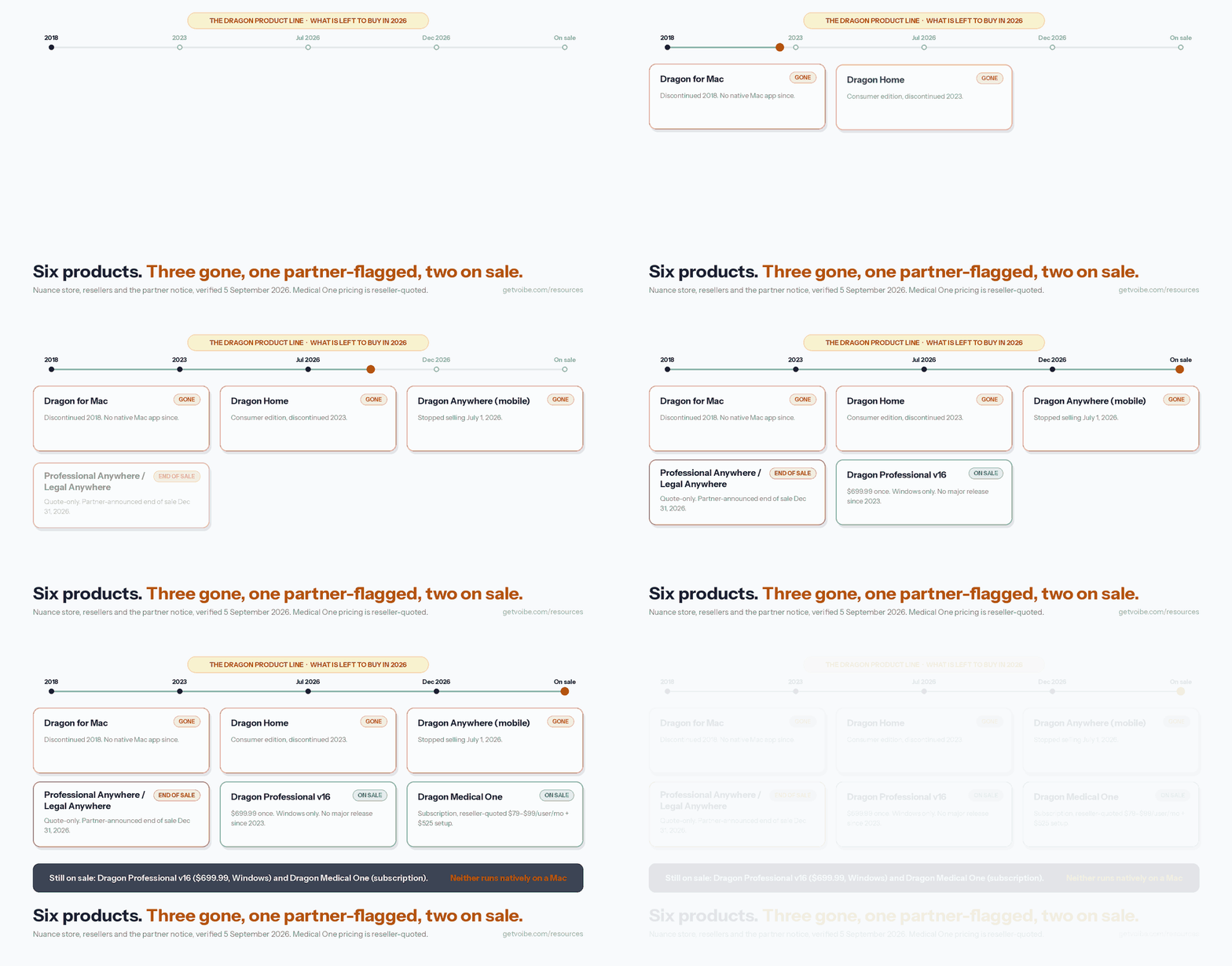
In 2026 the Dragon line is:
- Dragon Professional v16. The Windows desktop app, $699.99 as a perpetual license (Nuance store and resellers, verified September 5, 2026). Recognition runs largely on your machine. No major release since 2023.
- Dragon Professional Anywhere and Dragon Legal Anywhere. Cloud-desktop subscriptions for professionals, sold by quote. An authorized Nuance partner has announced end of sale on December 31, 2026 and end of life on December 31, 2027; as of September 2026 no Nuance or Microsoft advisory confirms those dates. Our Dragon Professional Anywhere end-of-life guide covers the last renewal and the replacements.
- Dragon Medical One. Cloud-based clinical dictation on Microsoft Azure, reseller-quoted at $79–$99/user/month plus a $525/user setup fee, with a HIPAA BAA.
Three products are gone: Dragon Dictate for Mac (2018), Dragon Home, the consumer edition (2023), and Dragon Anywhere, the mobile app (sales ended July 1, 2026). Since the Microsoft deal, Nuance's effort has gone to enterprise healthcare AI (Dragon Copilot and DAX).
Can You Run Dragon on a Mac? Only Through Windows
There is no native Dragon app for macOS. Nuance discontinued Dragon Dictate / Dragon Professional Individual for Mac in 2018, and no current Dragon product runs on macOS or Apple Silicon.
Microsoft's own documentation says Dragon Medical One 'is a native Windows app; it cannot be installed and used directly on a macOS-based computer.' Every option is a workaround:
- Citrix or a virtualized endpoint, usually set up by a hospital or employer's IT.
- A Windows VM in Parallels or VMware Fusion, so you run full Windows on your Mac.
- Boot Camp, Intel Macs only. It doesn't exist on Apple Silicon.
The Register's 2018 headline, 'Mac users burned after Nuance drops Dragon speech to text software', still describes the situation. There is nothing to buy for a Mac, so a native alternative is the move. The alternatives section below covers the ones I'd consider.
What Dragon Costs in 2026
Dragon has no free tier, and Nuance's product pages push you to 'Contact us' instead of a price list. Dragon Professional v16 is $699.99 one-time in the Nuance store and at resellers (verified September 5, 2026). Dragon Medical One is reseller-quoted at $79–$99/user/month plus a one-time $525/user setup fee, with no published list price.
| Product | Price | Model | Platform |
|---|---|---|---|
| Dragon Professional v16 | $699.99 one-time | Perpetual license | Windows |
| Dragon Professional Anywhere / Legal Anywhere | Quote only | Subscription (partner-announced end of sale Dec 31, 2026) | Windows |
| Dragon Medical One | $79–$99/user/mo + $525 setup (reseller-quoted) | Subscription (Azure cloud) | Windows / virtualized |
| Dragon Anywhere (mobile) | Sales ended July 1, 2026 | — | — |
| Dragon Home | Discontinued (2023) | — | — |
| Dragon for Mac | Discontinued (2018) | — | — |
3-Year Total Cost vs a Native Alternative
Dragon Medical One is shown before its $525 setup fee:
| Tool | Plan | 3-Year Cost | vs Voibe Lifetime |
|---|---|---|---|
| Voibe | $149 lifetime (Mac & Windows) | $149 | — (baseline) |
| Dragon Professional v16 | $699.99 one-time (Windows) | $699.99 | $550.99 more than Voibe |
| Dragon Medical One ($79/mo) | $79/user/mo | $2,844 | $2,695 more than Voibe |
| Dragon Medical One ($99/mo) | $99/user/mo | $3,564 | $3,415 more than Voibe |
Pre-Calculated Savings vs Dragon
- Voibe lifetime ($149) is about 79% cheaper than Dragon Professional ($699.99), a $550.99 saving, and it runs natively on Mac and Windows.
- Against Dragon Medical One at $79/user/month over 3 years ($2,844), Voibe saves $2,695 (about 95%) per user. At $99/month ($3,564), it saves $3,415 (about 96%), before the $525 setup fee.
- No subscription, no Windows license, no virtualization software to buy.
Dragon Medical One's price also pays for EHR integration, deployment support, and compliance, so treat that row as a platform comparison. The plan-by-plan detail is in our Dragon Pricing 2026 guide. The EARLYBIRD offer brings Voibe Lifetime from $149 to $119.
Is There a Dragon Lifetime Deal? Yes, on Windows Only
Dragon Professional v16 is a one-time perpetual license at $699.99, and it's Windows-only. There is no Dragon lifetime option for Mac, because Dragon Dictate for Mac was discontinued in 2018. Nuance never calls it a 'lifetime deal'. You own the v16 license permanently, but no major version has shipped since 2023 and Microsoft promises no updates. Every other current Dragon product is a subscription.
Dragon Lifetime Deal Status by Product
| Product | Lifetime Option? | Price | Platform |
|---|---|---|---|
| Dragon Professional v16 | Yes, perpetual license | $699.99 one-time | Windows only |
| Dragon Professional Anywhere | No, subscription only | Quote only | Windows |
| Dragon Medical One | No, subscription only | $79–$99/user/mo (reseller-quoted) | Windows / virtualized |
| Dragon for Mac | Discontinued 2018, nothing to buy | — | — |
| Voibe Lifetime | Yes, one-time license | $149 ($119 with EARLYBIRD) | macOS + Windows (on-device mode needs an Apple Silicon Mac) |
Dragon sells no lifetime licence that runs on a Mac. The closest thing is Voibe Lifetime: $149 one-time for Mac and Windows, or $119 (20% off) with code EARLYBIRD at checkout. $699.99 vs $149 is a $550.99 saving, about 79%. At $119 the saving is $580.99.
One caveat. Dragon's license buys things Voibe doesn't replicate: full voice control of Windows, prebuilt medical and legal vocabularies, and macros. Voibe covers vocabulary with its Dictionary (paste in your Vocabulary Center export) and boilerplate with Memory, its answer to Auto-Texts. It won't drive your PC by voice. If you use those commands, keep Dragon. See our Dragon NaturallySpeaking alternatives guide, the Dragon Pricing 2026 guide, and our roundup of the best dictation app lifetime deals.
Key Takeaway
Dragon's only lifetime-style option is the $699.99 Windows-only Dragon Professional perpetual license; there is no Dragon lifetime deal for Mac. Voibe Lifetime is $149 one-time ($119 with code EARLYBIRD), $550.99 (79%) cheaper than Dragon's license, and covers Mac and Windows.
How Accurate Is Dragon, and What Does It Cost You in Setup?
Accuracy. Nuance's Dragon Professional page markets 'up to 99% recognition accuracy'. That's a vendor claim, not an independent benchmark. Reviewers do consistently credit Dragon for precision and reliable command execution, especially after you've trained a voice profile and loaded custom vocabulary for medical, legal, or technical terms.
Vocabulary and commands. Dragon's specialty vocabularies ship prebuilt, where a Whisper-based tool takes your own list once. Voice control over editing, navigation, and the applications themselves is the piece Voibe doesn't replace. Accessibility users who run a computer by voice buy Dragon for the command system.
The cost. Reviewers report a learning curve, occasional crashes or slowdowns on very long documents, and heavy memory use. Dragon is at its best only after training. Whisper-based tools like Voibe skip the profile: you talk on day one, add your jargon to a custom Dictionary, and let Smart Formatting handle punctuation and paragraph breaks without rewriting what you said.
Where Your Audio Goes: Dragon Professional vs Dragon Medical One
It depends on which product you use.
Dragon Professional (Windows)
Dragon Professional v16 does recognition largely on your Windows machine, so routine dictation doesn't have to send audio anywhere. That's a privacy advantage over cloud-only apps.
Dragon Medical One (Cloud on Azure)
Dragon Medical One runs in the cloud on Microsoft Azure. Per Microsoft's security whitepaper, the Azure infrastructure is certified for SOC 2 Type 2, ISO 27001/27017/27018, HITRUST, and FedRAMP, with a HIPAA Business Associate Agreement available and TLS 1.3 / AES-256 encryption. Those are Azure platform certifications rather than a standalone Dragon certificate, so phrase it that way for procurement.
The Voibe Alternative
If you want audio to stay on your own Mac, neither Dragon product gives you that. Voibe's on-device mode runs Whisper on the Apple Silicon Neural Engine, with no internet needed and nothing leaving the Mac. On Windows and Intel Macs, Voibe uses its zero-retention cloud: audio is encrypted in transit, transcribed by open-source models on zero-retention providers, and deleted the moment transcription completes. Nothing trains any model, no third-party AI lab (OpenAI, Google, Anthropic, Microsoft) touches the audio, and you never need an API key. See our cloud vs local dictation guide and dictation and HIPAA guide.
Dragon Pros & Cons
Pros
- Industry-leading accuracy on Windows. Nuance markets 'up to 99%' (a vendor claim), backed by decades of refinement
- Deep professional vocabulary. Medical, legal, and technical terms with custom words and commands
- Strong accessibility track record. A long-standing tool for RSI, mobility, and vision needs
- Perpetual-license option. Dragon Professional v16 is bought once, not rented
- Enterprise-grade compliance for Medical One. Azure-backed SOC 2 Type 2, ISO 27001, HITRUST, FedRAMP, HIPAA BAA
- Mature voice command-and-control. Drive applications entirely by voice
Cons
- No Mac support since 2018. No native Apple Silicon app; Mac access to Medical One is virtualization-only
- Expensive. $699.99 one-time for Professional, or $79–$99/user/month plus a $525 setup fee for Medical One
- Consumer tier discontinued. Dragon Home ended in 2023; Dragon Anywhere mobile stopped selling July 1, 2026
- Opaque official pricing. Nuance's product pages push 'Contact us', and Medical One has no published list price
- Learning curve and rough edges. Reported slow support, crashes on long documents, high RAM use
- Enterprise-healthcare pivot. Focus has moved to Dragon Copilot / DAX, away from desktop and Mac
What Reviewers Say About Dragon
Third-Party Ratings
Dragon's ratings match what it is: respected, mature, expensive. Trust the Capterra page, because it has the sample size.
| Platform | Rating | Sample Size | What It Reflects |
|---|---|---|---|
| Capterra (Dragon Professional) | 4.0/5 | ~240 reviews | Largest, most representative sample |
| G2 (Dragon Speech Recognition) | 4.5/5 | ~6 reviews | Very small sample, directional only |
Anchor on the Capterra 4.0/5 across roughly 240 reviews; the G2 score rests on six.
What Users Praise
Accuracy and control. One Capterra reviewer cited 'its accuracy and ability to execute commands as well as record text.' Long-time and accessibility users often call it indispensable.
What Users Criticize
Cost, first. One Capterra reviewer wrote, 'the biggest con that I can think of is the cost.' Others cite slow customer service, occasional crashes, and the learning curve. For Mac users the complaint is bigger than any feature: The Register's 2018 verdict, 'Mac users burned after Nuance drops Dragon speech to text software,' still holds.
What I'd Run Instead of Dragon
The right Dragon alternative depends on what you used Dragon for. If it was dictation, getting accurate text into documents and apps, the modern field is cheaper, faster to set up, and runs on Mac as well as Windows. If it was voice control of the whole PC, nothing below replaces that. Four options.
Voibe, the Dragon Migration Path on Mac and Windows

Voibe is the app we build, and we built it for this move. On an Apple Silicon Mac, on-device mode keeps everything on the Mac. On Windows (a ground-up native app) and Intel Macs, it uses the zero-retention cloud described above. One plan covers both at $7.50/month or $149 lifetime ($119 with code EARLYBIRD), about 79% less than Dragon Professional.
What a Dragon user keeps:
- Vocabulary Center → Dictionary. Export your custom words from Dragon (Vocabulary Center › Export, as TXT or XML) and paste them into Voibe's Dictionary. Your drug names, statute shorthand, and client names shape recognition itself rather than getting find-and-replaced afterwards. Bulk edit is supported.
- Auto-Texts → Memory. A spoken trigger expands into preset text: signature blocks, addresses, boilerplate paragraphs, reusable prompts.
- Spoken punctuation still works. Voibe punctuates automatically, and it also takes 'comma', 'period', 'open paren', 'new paragraph', 'bullet point', '@', and currency symbols by name.
- Formatting commands → Smart Formatting. Punctuation, capitalization, paragraphing, and filler-word removal. It cleans up; it doesn't paraphrase.
- Long hands-free sessions → Hands-Free Mode. Double-tap to start, double-tap to stop. On Mac, Live Dictation streams your words on screen as you speak so you can fix them before they land.
- New since Dragon: Developer Mode. Scans your workspace locally and resolves file names, folder paths, and variable names in Cursor, VS Code, and Windsurf.
Trade-offs. Voibe won't drive Windows by voice the way Dragon does, and it ships no prebuilt medical or legal vocabulary; you bring your own. On-device mode needs an Apple Silicon Mac; Windows is cloud-mode only. Our Voibe vs Dragon comparison goes feature by feature. Try Voibe for free →
Superwhisper, for On-Device Power Users on Mac
Superwhisper runs Whisper locally on Mac at $249.99 lifetime, with the most flexible mode system in the category: per-app modes, custom LLM prompts, shell triggers. If you loved tinkering with Dragon's commands and want on-device processing on a Mac, it's the closest thing. It's more complex, and $100.99 more than Voibe's lifetime.
Dragon Medical Alternatives, for Healthcare on Mac
Dragon Medical One sits in a different category, and that category has its own answers. AI medical scribes like Suki, Nuance's own DAX, and Heidi handle ambient encounter documentation, and on-device dictation keeps routine notes off servers. Our Dragon Medical alternatives guide compares the options by PHI exposure, HIPAA BAA availability, and cost. The best AI medical scribe tools guide goes deeper on ambient scribes.
Apple Dictation, the Free Built-In Baseline
Apple Dictation ships free with macOS and runs on-device on Apple Silicon. It's fine for casual dictation, but it has a ~30-second session ceiling, no custom vocabulary, and no professional features, so it won't replace Dragon for high-volume or specialized work. It is a free way to find out whether voice input fits your day before you pay for anything.
Frequently Asked Questions About Dragon
Basics
What is Dragon?
Professional speech-recognition software from Nuance, now owned by Microsoft, formerly sold as Dragon NaturallySpeaking. The 2026 line is Dragon Professional v16 (Windows, $699.99), Dragon Professional Anywhere and Dragon Legal Anywhere (quote-only), and Dragon Medical One (cloud, Azure). The Mac version ended in 2018, Dragon Home in 2023, and Dragon Anywhere mobile on July 1, 2026.
Does Dragon work on Mac?
No. There is no macOS or Apple Silicon Dragon app, and Dragon Medical One reaches a Mac only through virtualization (Citrix, a Windows VM, or Boot Camp on Intel). For native Mac dictation, Voibe runs Whisper on-device on Apple Silicon; it also has a native Windows app.
Pricing
How much does Dragon cost in 2026?
Dragon Professional v16 is $699.99 one-time (verified September 5, 2026). Dragon Medical One is reseller-quoted at $79–$99/user/month plus a $525 setup fee, with no published list price. There is no free tier.
Is Dragon worth it?
On Windows, yes, for two jobs: voice control of the OS, and audio that stays on the PC. If you mainly dictate text, Voibe's native Windows app is $550.99 (79%) cheaper at $149 lifetime. On Mac, Dragon isn't an option.
Privacy & Compliance
Is Dragon HIPAA compliant?
Dragon Medical One runs on Azure infrastructure certified for SOC 2 Type 2, ISO 27001, HITRUST, and FedRAMP, with a HIPAA BAA available. See our dictation and HIPAA guide.
Does Dragon process audio on-device?
Dragon Professional v16 on Windows processes dictation largely locally; Dragon Medical One is cloud-based. Voibe's on-device mode keeps audio on the Mac; on Windows its zero-retention cloud deletes audio the moment transcription completes.
Alternatives
What is the best Dragon alternative for Mac?
Voibe ($149 lifetime, on-device on Apple Silicon, custom Dictionary, Memory, Smart Formatting) is the one I'd pick. Superwhisper ($249.99) is the on-device power-user option; Apple Dictation is the free baseline. For healthcare, see Dragon Medical alternatives; for the broad roundup, Dragon alternatives.
My Verdict: Buy Dragon on Windows for Voice Control, Otherwise Don't
Dragon does two things on Windows a dictation app doesn't: it drives your applications by voice, and v16 transcribes on the PC. If you need either, and you can absorb $699.99 and the learning curve, buy it. Judged only as a Windows product, it would score higher.
But it left the Mac in 2018, dropped its consumer edition in 2023 and its mobile app in July 2026, sells through 'Contact us', and has moved on to enterprise healthcare. So it gets 6/10: out of reach for the Mac professionals who once relied on it, and overkill for Windows users who only want text.
If you're on Windows and need to run the computer by voice, or need the audio pinned to it, buy Dragon. Otherwise, on a Mac or on Windows, get Voibe. Voibe is $149 lifetime, about 79% less than Dragon Professional, with a custom Dictionary, Memory, Smart Formatting, spoken punctuation, Hands-Free Mode, and Live Dictation on Mac. For Mac power users, Superwhisper is the configurable on-device alternative; for healthcare, see our Dragon Medical alternatives.
Related reading:
- Dragon Pricing 2026: full plan breakdown
- Is Dragon safe? Privacy and compliance
- Dragon alternatives (broad overview)
- Dragon alternatives for Windows
- Dragon Medical alternatives (healthcare)
- Dragon vs Wispr Flow
- Apple Dictation vs Dragon
- Dragon Dictate Mac microphone troubleshooting
- Dictation and HIPAA guide
- Cloud vs local dictation
- Best offline dictation apps
- Dragon vs Otter
- Dragon vs OpenAI Whisper
- Dragon vs Willow Voice (the 1997 institution vs a 2025 startup)
- Dragon Anywhere is discontinued
- Dragon Dictate vs Dragon NaturallySpeaking
Already decided to leave? The Dragon-to-Voibe migration guide covers the custom word-list export, the hotkey remap, and the three things that don't transfer.
A second opinion from someone who used it for years: a workers’ compensation attorney rates a modern dictation app well ahead of Dragon after four decades of professional dictating, and is specific about which capabilities changed their mind.
Tip
Dragon is the Windows accuracy benchmark, but it left the Mac in 2018 and costs $699.99. Voibe runs on-device on Apple Silicon or through a zero-retention cloud on Mac and Windows for $149 lifetime ($119 with EARLYBIRD), about 79% less than Dragon Professional, with a custom Dictionary, Memory, and Smart Formatting. Your audio is never stored, sold, or used to train AI. Try it free at getvoibe.com.
Verdict
Dragon is still the most mature professional voice software on Windows. It has not run on a Mac since 2018, there is no Apple Silicon app, and the only way to reach Dragon Medical One from a Mac is virtualization. I score it 6/10. On Windows, for accessibility users and anyone whose audio has to stay on the machine, it deserves a 9. Windows-only availability, the $699.99 price, 'Contact us' sales, and a pivot to enterprise healthcare pull it down. If you're on Windows and need to drive your PC by voice, buy Dragon. If you're on a Mac, or on Windows and mostly dictating documents, run Voibe instead: on-device on Apple Silicon or a zero-retention cloud on Mac and Windows, $149 lifetime (about 79% less than Dragon Professional), with a custom Dictionary, Memory shortcuts, and Smart Formatting that cleans up without paraphrasing.
Best AI Dictation and Meeting Notes for Confidential Work
Draft letters, notes and emails 5x faster. Get meeting notes without a bot joining your call. Nothing used to train AI.
- Mac + Windows
- No bot in your calls
- Nothing used to train AI
- 7-day free trial
Want to compare plans first? View pricing →
Related Articles
Dragon Dictate vs Naturally Speaking: You Can't Buy Either
Dragon Dictate and Dragon NaturallySpeaking are two eras of one product line, and both names are retired. What each meant, and what to buy on Mac or Windows.
Is Dragon Safe? Two of the Three Dragons Send Audio to Azure
Is Dragon safe? I read Microsoft's security papers for all three Dragons. Professional keeps audio on your PC, and the other two send it to Azure.
Dragon vs OpenAI Whisper: Whisper Isn't an App You Install
OpenAI open-sourced Whisper in 2022 and Dragon's accuracy lead vanished. Whisper is a model with no app around it. What $699.99 still buys, and what to run.