
Voibe vs MacWhisper (2026): Real-Time Dictation vs File Transcription on Mac
Voibe vs MacWhisper head-to-head: two different jobs. Voibe dictates live into any app ($199 lifetime); MacWhisper transcribes files (~€59/$69 lifetime). Different fits.

Voibe
Mac and Windows dictation app built for real-time, system-wide dictation — press a hotkey, speak, and text appears at your cursor in any app. On Apple Silicon Macs you choose an on-device mode that runs OpenAI Whisper locally on the Neural Engine (nothing leaves your Mac, works fully offline) or a zero-retention cloud mode that runs open-source models and deletes audio the moment transcription completes; either way your audio is never stored, sold, or used to train AI. Ships Developer Mode for Cursor, VS Code, and Windsurf with workspace file- and folder-name resolution, plus Custom Vocabulary, Memory text expansion, Live Dictation, and spoken punctuation. Pricing: Voibe Free ($0, limited words on one device), then $9.90/month, $99/year, or $199 one-time lifetime — no BYOK keys, no model picking, no vendor accounts.
Free ($0, limited words); $9.90/mo, $99/yr, or $199 lifetime
Pros
- + Purpose-built for real-time system-wide dictation — speak into email, docs, code, and chat as you work
- + Choose an on-device mode (nothing leaves your Mac) or a zero-retention cloud mode with open-source models — no BYOK to manage
- + Developer Mode for Cursor, VS Code, and Windsurf resolves spoken file and folder names into the transcription
- + $199 one-time lifetime — no subscription, no per-token spend
- + Live Dictation, Custom Vocabulary, Memory text expansion, and spoken punctuation
- + Runs on Mac and Windows (Windows is cloud mode); on-device mode works fully offline on Apple Silicon
- + Only choice the user makes is on-device vs cloud — no model picking, no vendor accounts
- + Audio never stored, sold, or used to train AI
Cons
- - No file or batch transcription — it dictates live, it does not convert existing recordings
- - Mac and Windows only — no iOS, iPad, or Android; on-device mode requires an Apple Silicon Mac (M1+)
- - No SRT/VTT subtitle export or speaker diarization
- - Voibe Free is word-limited on one device — paid plans from $9.90/mo (7-day trial of every Voibe Work feature + 30-day money-back guarantee)
- - Live Dictation and on-device mode are Mac-only; Windows and Intel Macs are cloud mode only
MacWhisper
On-device Mac transcription app from indie developer Jordi Bruin (Good Snooze). It runs OpenAI's Whisper model locally via whisper.cpp to turn audio and video into text — drag in a file, transcribe a whole folder, or paste a YouTube URL, all on your Mac. Its core strengths are file and batch transcription, rich export (SRT/VTT subtitles, DOCX/PDF/Markdown), meeting auto-detection for Zoom/Teams/etc., and speaker diarization (beta). It also includes a secondary system-wide dictation feature on the Gumroad version. Two versions exist: 'MacWhisper' on Gumroad (Mac, ~€59/~$69 one-time with a free tier) and 'Whisper Transcription' on the App Store (Mac + iOS, free with in-app purchases). No Windows, Linux, or Android.
Free tier + ~€59 (~$69) Gumroad lifetime; App Store $99.99 lifetime
Pros
- + Best-in-class file and batch transcription — drag-and-drop, folders, YouTube URLs, meeting recording
- + Excellent on-device transcription accuracy, especially with the larger Whisper models — audio never leaves your Mac
- + One-time pricing — around €59 (~$69) Gumroad lifetime, with a usable free tier
- + Rich export and meeting features — SRT/VTT subtitles, DOCX/PDF/Markdown, diarization (beta), meeting auto-detection
- + Loved, fast-moving indie app from a trusted developer
- + Bulk licenses and a 25% discount for students, journalists, and nonprofits; MDM support
Cons
- - Primarily a file-transcription tool — real-time dictation exists but is a secondary feature
- - Mac (and an iOS companion) only — no Windows, Linux, or Android
- - Two confusingly different products — Gumroad 'MacWhisper' vs App Store 'Whisper Transcription'
- - Full feature set (batch, larger models, AI) requires the paid Pro upgrade
- - Speaker diarization is beta and can split one speaker into several
- - Cloud AI Assistant add-on is a separate paid subscription with its own privacy considerations
Voibe vs MacWhisper: The Verdict
Different fits — and many Mac users run both. Voibe and MacWhisper both build on OpenAI's Whisper, but they solve different problems. Voibe is a real-time dictation app: press a hotkey, speak, and text appears live at your cursor in any app. MacWhisper is a file-transcription app: drag in a recording — an interview, meeting, lecture, or video — and get a transcript out. MacWhisper includes a secondary system-wide dictation feature; Voibe does not do file transcription. Neither replaces the other.
Pick Voibe if you want:
- Real-time, system-wide dictation — speak into email, docs, code, and chat as you work
- A privacy choice — on-device (nothing leaves your Mac) or zero-retention cloud with open-source models, no BYOK to manage
- Developer Mode for Cursor, VS Code, and Windsurf that resolves spoken file and folder names
- Live Dictation, Custom Vocabulary, Memory text expansion, and spoken punctuation
- One-time $199 lifetime pricing, with a Windows app as well as Mac
Pick MacWhisper if you want:
- File, folder, and batch transcription of existing audio and video recordings
- Subtitle export (SRT/VTT), DOCX/PDF/Markdown, and meeting auto-detection for Zoom/Teams
- Speaker diarization (beta) for multi-speaker recordings
- A lower one-time price — around €59 (~$69) Gumroad lifetime, with a usable free tier
- An iOS companion (via the App Store 'Whisper Transcription' version)
The honest tie zones: on-device Whisper accuracy (both inherit Whisper's accuracy band), on-device privacy for their core paths (both keep audio local), formal compliance (neither carries SOC 2 / HIPAA / ISO 27001), and indie/small-team polish (both are genuinely good).
Disclosure: Voibe is our product. MacWhisper is not a direct competitor — it solves a different problem — and we treat it on its own terms. MacWhisper facts here are drawn from our own MacWhisper review, grounded in public sources and verified as of mid-2026. Where MacWhisper genuinely beats Voibe on a dimension, we say so.
Quick Comparison: 13 Dimensions Side-by-Side
| Dimension | Voibe | MacWhisper | Winner |
|---|---|---|---|
| Primary job | Real-time dictation into any app | File & batch transcription | Different jobs |
| Real-time vs batch | Real-time — text appears live as you speak | Batch — feed a file, get a transcript out | Different jobs |
| Real-time dictation | Yes — system-wide, purpose-built | Secondary feature (Gumroad) | Voibe |
| Live Dictation (on-screen, real-time) | Yes (Mac-only) | No | Voibe |
| Hands-free mode (double-tap continuous) | Yes | No | Voibe |
| File / batch transcription | No | Yes — drag-and-drop, folders, URLs | MacWhisper |
| Subtitle export (SRT/VTT) | No | Yes | MacWhisper |
| Speaker diarization | No | Yes (beta) | MacWhisper |
| Architecture | On-device or zero-retention cloud | On-device (Assistant add-on is cloud) | Tie (both on-device core) |
| Developer / IDE integration | Developer Mode (Cursor / VS Code / Windsurf) | None | Voibe |
| Platform reach | Mac + Windows (desktop only) | Mac + iOS companion | Different (Windows vs iOS) |
| Free tier | Yes — Voibe Free (limited words, one device) + 7-day full trial | Yes (basic local transcription) | MacWhisper |
| One-time price | $199 lifetime | ~€59 (~$69) Gumroad / $99.99 App Store | MacWhisper (lower) |
| Custom vocabulary | Yes — dictionary injection | Limited | Voibe |
| Compliance attestations | None | None | Tie (neither) |
| Third-party rating | 9/10 editorial; 5/5 Product Hunt reviews | 4.3/5 App Store (~1,100 ratings) | MacWhisper (larger sample) |
The honest tally: they win on different axes. Voibe owns real-time dictation, IDE integration, custom vocabulary, and cloud-mode flexibility; MacWhisper owns file/batch transcription, subtitle export, diarization, a usable free tier, and a lower one-time price. Two dimensions are genuine ties, and platform reach is a split (Windows versus iOS). This is a 'different fits' comparison — neither product dominates the other.
Why These Get Compared
Voibe and MacWhisper land on the same Mac users' shortlists for three structural reasons — even though, once you look closely, they answer different questions.
1. Both Are Built on OpenAI Whisper
Voibe's on-device mode runs OpenAI Whisper locally on Apple Silicon's Neural Engine. MacWhisper runs OpenAI Whisper on-device via whisper.cpp. Because the transcription engine underneath is the same model family, both deliver Whisper's accuracy band, and both keep their core path on the Mac. Someone searching for 'Whisper app for Mac' naturally finds both — and then has to work out that one dictates and one transcribes.
2. Both Are On-Device, Privacy-First Mac Apps
Privacy is central to both products. MacWhisper's core transcription never leaves your Mac; Voibe's on-device mode keeps everything local on Apple Silicon and works fully offline. Users who care about not sending audio to a third party gravitate to both — which is exactly why they end up compared, even though Voibe adds a zero-retention cloud option that MacWhisper's core path does not.
3. Both Are Loved Indie / Small-Team Mac Products
MacWhisper is a polished, fast-moving indie app from Jordi Bruin (Good Snooze). Voibe is a focused small-team product with a disclosed privacy policy. Neither is a sprawling enterprise suite; both put their effort into doing one job well. The catch is that they've chosen different jobs — transcription versus dictation — so the real question isn't 'which is better' but 'which job do you need done.'
Voibe: Real-Time Dictation with a Privacy Choice

Voibe is a Mac and Windows dictation app built around one job done well: you speak and text appears, live, in whatever app you're using — and the only choice you make is on-device versus cloud. There are no BYOK API keys, no model picking, and no vendor accounts to create.
What Voibe Does
- Real-time, system-wide dictation. Press a configurable hotkey and dictate into any text field — email, docs, Slack, a code editor — with text inserted at your cursor as you speak.
- A privacy choice. On Apple Silicon Macs, on-device mode runs OpenAI Whisper locally on the Neural Engine — fully offline, nothing leaves your Mac. Or pick zero-retention cloud mode, which sends audio over an encrypted connection to zero-retention cloud providers running open-source models (transcription by open-source Whisper Large Turbo), then deletes the audio immediately. Either way, your audio is never stored, sold, or used to train AI. If cloud drops mid-session, it falls back to the local model on Apple Silicon.
- Developer Mode. Works in Cursor, VS Code, and Windsurf. It scans your workspace locally and resolves spoken file names, folder paths, and variable identifiers into the transcription, and can auto-attach referenced files to the AI prompt. Requires installing the IDE extension.
- Custom Vocabulary. Teach Voibe names, jargon, and acronyms as true dictionary injection, with bulk editing.
- Memory. Text-expansion shortcuts — a spoken trigger expands to preset text like signatures, URLs, or prompts.
- Trigger modes. Push-to-talk (hold hotkey), Hands-free (double-tap), and Live Dictation (Mac-only) which streams words on-screen in real time before insertion.
- Smart Formatting and Spoken Punctuation. Auto punctuation, capitalization, and filler-word removal; say 'comma,' 'new line,' 'open paren,' or 'at sign' to format as you go.
- Transcript history and hotkey customization, plus 90+ languages.
Voibe Pricing
- Voibe Free — $0 forever, limited words on one device (every account starts with a 7-day trial of every Voibe Work feature)
- $9.90 per month (30-day money-back guarantee)
- $99 per year (~$8.25/mo)
- $199 one-time lifetime (limited-time)
Voibe Platforms & Requirements
- Mac and Windows desktop only — no iOS, iPad, or Android
- Mac: macOS 13 Ventura or later; on-device mode needs an Apple Silicon Mac (M1+). Intel Macs are cloud mode only.
- Windows: a native tray app on any modern PC with internet — zero-retention cloud mode only (no on-device mode or Live Dictation on Windows)
- ~275 MB app; the on-device Whisper model adds ~2 GB
The Trade-Off vs MacWhisper
Voibe does not do file or batch transcription — no importing recordings, no folder processing, no subtitle export. That is by design: it is a dictation tool, not a transcription tool. If you need to convert existing audio and video into text, that is MacWhisper's job, not Voibe's.
MacWhisper: On-Device File Transcription for Mac
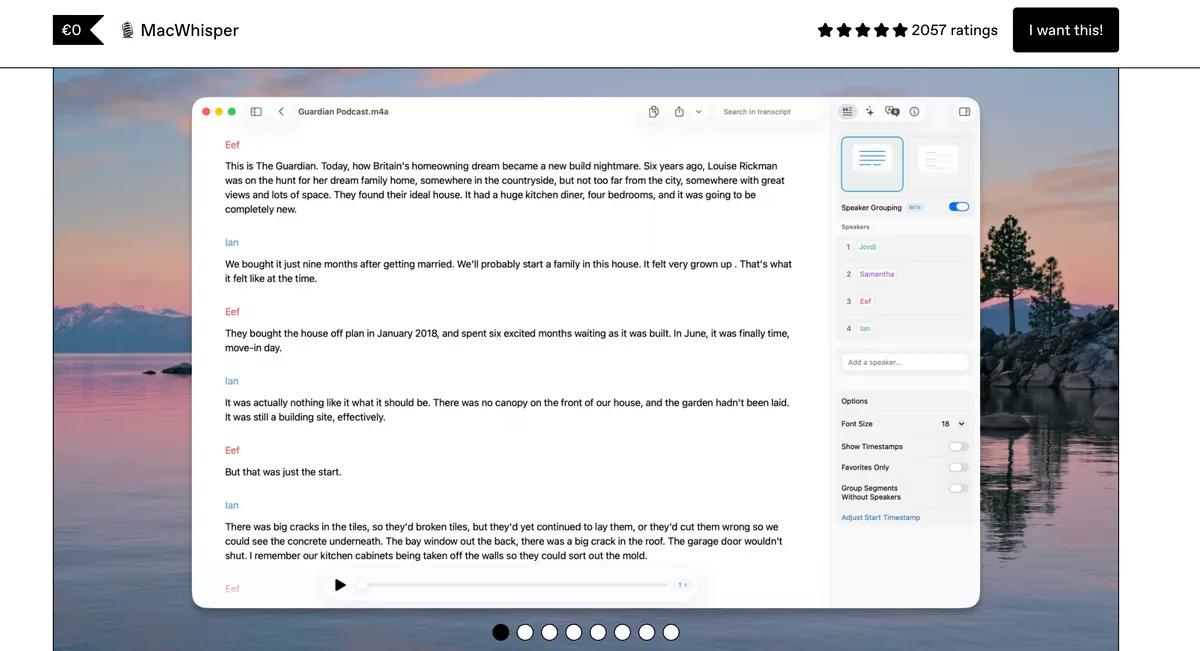
MacWhisper is a Mac transcription app from indie developer Jordi Bruin, operating as Good Snooze. It runs OpenAI's Whisper model on-device (via whisper.cpp) to turn audio and video into text, entirely on your Mac. Drag in a file, paste a YouTube link, or record a meeting, and MacWhisper produces a transcript locally — no cloud round-trip required for its core path.
What MacWhisper Does
- File and batch transcription. Its core strength — drag in audio/video, transcribe whole folders, or paste a YouTube URL.
- Rich export. SRT/VTT subtitles, DOCX, PDF, Markdown, HTML, and CSV.
- Meeting features. System audio recording with meeting auto-detection for Zoom, Teams, Webex, Skype, Chime, and Discord.
- Speaker diarization (beta). Labels who said what — useful, but can occasionally split a single speaker into several.
- Model choice. Whisper models (trade speed for accuracy) plus newer options like NVIDIA Parakeet; 100+ languages.
- Secondary dictation. The Gumroad version includes a system-wide dictation feature that types into any text field — but this is secondary to its transcription focus.
Two Versions to Know About
MacWhisper exists as two products. 'MacWhisper' on Gumroad is the full-featured Mac app with a one-time license and all AI providers. 'Whisper Transcription' on the App Store is the same developer's app for Mac and iOS — free with in-app purchases and slightly fewer AI options due to App Store rules, but it adds iPhone support and Family Sharing. They share a foundation but differ on pricing and feature limits.
MacWhisper Pricing
- Gumroad free tier — basic local transcription with standard models
- Gumroad Pro — around €59 (~$69) one-time, with lifetime updates; bulk licenses and a 25% discount for students, journalists, and nonprofits
- App Store (Whisper Transcription) — free with in-app purchases: Pro at $6.99/mo, $29.99/yr, or $99.99 lifetime, plus an optional cloud Assistant add-on ($9.99/mo or $89.99/yr)
MacWhisper Privacy
Core transcription runs entirely on-device via Whisper, so your audio never leaves your Mac and works offline. The exception is the App Store version's optional cloud Assistant add-on, which uses cloud AI and therefore does send data off-device; the core local transcription does not. As an indie app, it has no formal SOC 2 or HIPAA program — though on-device processing is itself a strong privacy posture.
The Trade-Off vs Voibe
MacWhisper is outstanding at transcribing recordings and includes only a basic version of live dictation. If your main need is speaking text into apps in real time — with IDE integration, Custom Vocabulary, and Live Dictation — that is Voibe's job, not MacWhisper's.
Feature-by-Feature: Where Each Product Wins
Real-Time Dictation — Voibe Wins
This is the core split: Voibe is real-time, MacWhisper is batch. Voibe is purpose-built for it — a global hotkey, real-time insertion at the cursor in any app, push-to-talk plus Hands-free mode (double-tap for continuous dictation), and Mac-only Live Dictation that streams your words on-screen as you speak before they land. MacWhisper is primarily file/batch transcription — you feed in a recording and get a transcript out; its Gumroad version includes a system-wide dictation feature, but that is secondary, not real-time system-wide dictation built as the focus. For dictating into email, docs, code, and chat all day, Voibe is the right tool.
File & Batch Transcription — MacWhisper Wins
This is MacWhisper's core strength and the Voibe dictation app does not do it. Drag in audio or video, transcribe whole folders, paste a YouTube URL, record meetings with auto-detection, and export SRT/VTT subtitles, DOCX, PDF, and Markdown. If you need to convert existing recordings into text, MacWhisper wins outright. Voibe's meeting capture lives in the separate Voibe Work plan (Mac and Windows, no bot in the call), which saves a transcript and summary on your computer with one-click copy and PDF export, not MacWhisper's subtitle and file-export workflow.
Developer / IDE Integration — Voibe Wins
Voibe's Developer Mode works in Cursor, VS Code, and Windsurf: it scans the workspace locally, resolves spoken file names, folder paths, and variable identifiers into the transcription, and can auto-attach referenced files to the AI prompt. MacWhisper has no IDE integration. For voice-to-code, Voibe wins.
Privacy Architecture — Tie (Different Scopes)
Both keep their core path on-device: MacWhisper's core transcription and Voibe's on-device mode never leave your Mac. Voibe adds a zero-retention cloud mode that runs open-source models and deletes audio immediately, giving cloud flexibility without BYOK; MacWhisper's cloud exception is the opt-in Assistant add-on on the App Store version. Neither carries SOC 2 / HIPAA / ISO 27001 — both are consumer-tier on formal compliance. The honest read: a genuine tie, with different cloud options bolted on.
Subtitle Export & Diarization — MacWhisper Wins
MacWhisper exports SRT/VTT subtitles and offers speaker diarization (beta) for multi-speaker recordings. Voibe has neither — it inserts dictated text, it doesn't produce subtitle files or label speakers. For video captioning and multi-speaker transcripts, MacWhisper wins.
Platform Reach — Split (Windows vs iOS)
Voibe ships a native Windows app in addition to Mac (Windows is cloud mode only); MacWhisper ships an iOS companion in addition to Mac. Neither runs on Android, and Voibe has no iOS app. So this is a split: choose by whether you need Windows dictation (Voibe) or iPhone transcription (MacWhisper's App Store version).
Pricing & Free Tier — MacWhisper Wins on Entry
MacWhisper has a free tier and a lower one-time price (~€59/~$69 Gumroad; $99.99 App Store lifetime). Voibe has a word-limited free plan (Voibe Free, one device) and a $199 lifetime, plus a 7-day free trial and a 30-day money-back guarantee. As standalone purchases, MacWhisper is cheaper — but they're priced for different jobs.
Custom Vocabulary — Voibe Wins
Voibe's Custom Vocabulary is true dictionary injection — added names, jargon, and acronyms are recognized at the transcription layer, with bulk editing. It's built for dictating technical terms cleanly on the first pass, which matters more in live dictation than in file transcription.
Key Takeaway
Voibe wins on real-time dictation, IDE integration, and custom vocabulary; MacWhisper wins on file/batch transcription, subtitle export, diarization, a usable free tier, and a lower one-time price. Privacy is a genuine tie, and platform reach is a split — Windows (Voibe) versus iOS (MacWhisper). Different fits.
Pricing Breakdown: 3-Year Math
These tools aren't really priced against each other — one transcribes files, one dictates live. But the on-device Mac stack for someone who needs both is worth laying out. MacWhisper's Gumroad Pro is a one-time purchase (~$69); the App Store version is free with in-app purchases up to a $99.99 lifetime. Voibe is $199 one-time lifetime (or $9.90/mo, $99/yr, with a word-limited free plan).
| Horizon | Voibe Lifetime | Voibe Annual | MacWhisper Gumroad (once) | Both (Mac stack) |
|---|---|---|---|---|
| 1 month | $199.00 | $8.25 | ~$69 | ~$268 |
| 6 months | $199.00 | $49.50 | ~$69 | ~$268 |
| 12 months | $199.00 | $99.00 | ~$69 | ~$268 |
| 24 months | $199.00 | $198.00 | ~$69 | ~$268 |
| 36 months | $199.00 | $297.00 | ~$69 | ~$268 |
| 60 months | $199.00 | $495.00 | ~$69 | ~$268 |
The Story
- MacWhisper alone (~$69): the cheapest option — and correct if all you need is file transcription. Voibe would be the wrong category at any price.
- Voibe alone ($199 lifetime): the buy-once license for real-time dictation. Its annual plan ($99/yr) crosses $199 at the start of year three, so lifetime pays back at month 25.
- Both (~$268, paid once): a complete on-device transcription-and-dictation stack — still less than three years of a typical cloud dictation subscription (roughly $360–$432 over 3 years).
The takeaway: buy the one for your job. If you need both, the stack is a one-time ~$268 — cheaper than years of recurring cloud dictation billing. See the tier-by-tier detail in our MacWhisper review and Voibe's own pricing page.
Pros and Cons Side-by-Side
Voibe
Pros:
- Purpose-built for real-time, system-wide dictation into any app
- Choice of on-device mode (nothing leaves your Mac) or zero-retention cloud with open-source models — no BYOK to manage
- Developer Mode for Cursor, VS Code, and Windsurf with spoken file/folder resolution
- Live Dictation, Custom Vocabulary, Memory text expansion, and spoken punctuation
- $199 one-time lifetime; ships a Windows app as well as Mac
- Audio never stored, sold, or used to train AI
Cons:
- No file or batch transcription, subtitle export, or speaker diarization
- Mac and Windows only — no iOS, iPad, or Android; on-device mode needs Apple Silicon
- Free plan is word-limited on one device — paid plans from $9.90/mo (7-day full trial, 30-day money-back guarantee)
- Live Dictation and on-device mode are Mac-only; Windows and Intel Macs are cloud mode only
MacWhisper
Pros:
- Best-in-class file and batch transcription — folders, YouTube URLs, meeting recording
- Excellent on-device Whisper accuracy, especially with the larger models
- Rich export — SRT/VTT subtitles, DOCX/PDF/Markdown — plus meeting auto-detection
- Lower one-time price (~€59/~$69 Gumroad) with a usable free tier
- Loved, fast-moving indie app; bulk licenses and a 25% student/journalist/nonprofit discount
- iOS companion via the App Store version
Cons:
- Primarily transcription — real-time dictation is a secondary feature
- Mac + iOS only — no Windows, Linux, or Android
- Two confusingly different products (Gumroad vs App Store) with different pricing
- Advanced features require the paid Pro upgrade
- Speaker diarization is beta and can split one speaker into several
- Cloud AI Assistant add-on is a separate subscription with its own privacy considerations
Which One Should You Pick?
The decision is almost entirely about the job you need done. Start at the top and stop at the first line that describes you.
Choose MacWhisper If...
- You need to transcribe existing audio or video — interviews, meetings, podcasts, lectures
- You need batch/folder processing or want to paste a YouTube URL and get a transcript
- You need subtitle export (SRT/VTT) for video, or speaker diarization for multi-speaker recordings
- You want the cheapest one-time on-device Whisper tool (~$69) or a free tier to start
- You need an iPhone companion (via the App Store 'Whisper Transcription' version)
Choose Voibe If...
- You need real-time, system-wide dictation — speaking text into apps as you work
- You're a developer who wants voice-to-code in Cursor, VS Code, or Windsurf with file/folder resolution
- You want a privacy choice — on-device or zero-retention cloud — with no BYOK keys to manage
- You want Live Dictation, Custom Vocabulary, and Memory text expansion
- You need dictation on Windows as well as Mac
Use Both If...
- You need both file transcription and real-time dictation
- Combined cost: ~$69 (MacWhisper) + $199 (Voibe) = about $268, paid once — two purpose-built tools, each doing its job, for less than three years of a cloud dictation subscription
Where These Two Actually Overlap
It is tempting to split these by job — Voibe dictates, MacWhisper transcribes files — but that split does not survive contact with what each product actually ships. Voibe runs a speech-to-text API that transcribes recordings you already have, returning speaker labels, timestamps and a summary, which puts it squarely on MacWhisper's home turf.
The useful distinction is no longer what each one transcribes — it is who does the work. MacWhisper is a Mac app you sit in front of: you drag files in, you watch the queue, you fix a speaker label by ear, you export. Voibe's API is something you hand off. A recording lands in a folder and an agent turns it into a transcript, a summary and an action-item list without you opening anything. In Claude Cowork, Claude desktop or Claude web, add it under Customize › Connectors › Add custom connector, paste https://api.getvoibe.com/mcp and sign in once — no terminal, no code. Developers connect the same server in Claude Code with one claude mcp add command, or call the REST endpoints directly from a script or cron job.
Which means the recommendation splits on habit rather than capability. Choose MacWhisper if you want an interface, a one-time price and files that never leave the machine — all three are still true and still good reasons. Choose the Voibe API if the transcribing is recurring and you would rather it happened without you, and if $0.25–$0.30 per hour with audio deleted on delivery reads better to you than a local queue you have to run. The Voibe desktop app remains dictation-only; it is the API that competes here.
Final Verdict: Different Fits
Voibe wins for:
- Anyone who dictates — speaking text into email, docs, code, and chat in real time
- Developers who want voice-to-code in Cursor, VS Code, or Windsurf
- Users who want a privacy choice — on-device or zero-retention cloud — without BYOK
- People who need dictation on Windows as well as Mac
- One-time $199 lifetime buyers who want Live Dictation, Custom Vocabulary, and Memory
MacWhisper wins for:
- Anyone transcribing recordings — interviews, meetings, lectures, videos
- Video creators who need SRT/VTT subtitle export
- People who want batch/folder processing or YouTube URL transcription
- Buyers who want the lowest one-time price (~$69) or a free tier to start
- Users who need an iPhone companion
Honest tie zones:
- On-device Whisper accuracy (both inherit Whisper's accuracy band)
- On-device privacy for their core paths (both keep audio local)
- Formal compliance (neither carries SOC 2 / HIPAA / ISO 27001)
- Indie / small-team polish (both are genuinely good at what they do)
If you're at the Voibe-or-MacWhisper decision point, the honest answer is usually not 'which one' but 'which job.' MacWhisper is the pick for turning recordings into text; Voibe is the pick for dictating into your apps as you work. Plenty of Mac users run both — MacWhisper for files, Voibe for dictation — and the stack is a one-time ~$268. Voibe ships a free trial with full feature access, and MacWhisper has a free tier: try each on the job you actually need, and the right fit will be obvious within an hour.
Disclosure: Voibe is our product. MacWhisper is not a direct competitor — it solves a different problem — and the comparison above is our honest reading of where each tool wins and ties, grounded in our MacWhisper review. Where MacWhisper genuinely beats Voibe — file transcription, subtitle export, a lower one-time price, its iOS companion — we say so plainly.
Try Voibe for free — install, grant microphone and accessibility permissions, and dictate. No BYOK, no model picking, no vendor accounts.
Related Comparisons
- Voibe Review (2026) — Hands-on review of Voibe's on-device and zero-retention cloud dictation modes, Developer Mode, and pricing.
- MacWhisper Review (2026) — Full evaluation of MacWhisper's file transcription, pricing, accuracy, and the two-version distinction.
- Voibe vs VoiceInk — Voibe head-to-head against the closest open-source on-device dictation peer.
- Voibe vs Spokenly — Developer Mode vs MCP server, lifetime vs free + BYOK, across two Mac dictation peers.
- Apple Dictation vs MacWhisper — MacWhisper against the free built-in engine: live typing vs file transcription.
- Best Transcription App for Mac — Both apps in a ten-app ranking sorted by job: audio files, meetings and dictation.
- All Dictation Comparisons — The compare pillar with the full set of head-to-head reviews.
Frequently Asked Questions
Voibe vs MacWhisper — which should I choose?
Is MacWhisper a dictation app or a transcription app?
Is Voibe or MacWhisper more private?
How much does each cost, and which is cheaper?
Does Voibe do file or batch transcription like MacWhisper?
Can I use Voibe for voice coding in Cursor and VS Code?
Does Voibe or MacWhisper work on Windows, iPhone, or Android?
Why should I trust this comparison if Voibe wrote it?
Best AI Dictation and Meeting Notes for Confidential Work
Draft letters, notes and emails 5x faster. Get meeting notes without a bot joining your call. Nothing used to train AI.
- Mac + Windows
- No bot in your calls
- Nothing used to train AI
- 7-day free trial
Want to compare plans first? View pricing →
Related Articles
Superwhisper vs Willow Voice (2026): Mac Power vs YC Cross-Platform
Superwhisper is a $249.99 lifetime Mac hybrid app with five on-device modes. Willow Voice is a YC X25 cross-platform cloud-first product at $144/yr with Private Mode opt-out by default. We compare architecture, defaults, and 3-year math.
Voibe vs Spokenly (2026): Developer Mode vs MCP Server, Lifetime vs Free + BYOK
Voibe vs Spokenly head-to-head: two Mac dictation peers with different opinions on developer features and pricing. Voibe Free or $199 lifetime + Developer Mode; Spokenly Free + BYOK or Pro $9.99/mo + MCP. Different fits verdict.
Aqua Voice vs Superwhisper (2026): Cloud Avalon vs On-Device Whisper
Aqua Voice ($96/yr cloud, Avalon model) vs Superwhisper ($249.99 lifetime, on-device Whisper + cloud modes). We compare architecture, technical-vocabulary accuracy, privacy defaults, and 3-year cost.