
Claude Code Privacy Settings: Every Opt-Out & Env Var (2026)
Every Claude Code privacy setting in one place: disable non-essential traffic, feedback survey, training opt-out, and how to delete sessions. Copy-paste ready.

Every Claude Code Privacy Setting, in One Table
Claude Code has real privacy controls — more of them than most AI tools ship. What it doesn't have is a settings screen that shows them to you. The controls are scattered across three places: environment variables, a settings.json file, and one toggle in your claude.ai account that decides whether Anthropic trains on your code.
The short version: set CLAUDE_CODE_DISABLE_NONESSENTIAL_TRAFFIC=1 to shut off every optional network channel at once, turn off “Help Improve our AI models” at claude.ai/settings/data-privacy-controls if you sign in with a Pro or Max account, and run claude project purge when you want local session transcripts gone. Those three moves cover most of what this page explains.
Everything below was verified against Anthropic's live documentation — the data usage page, the environment-variable reference, and the settings reference — on August 5, 2026. The full quick-reference table:
| Setting | Where it lives | What it does |
|---|---|---|
CLAUDE_CODE_DISABLE_NONESSENTIAL_TRAFFIC=1 | Env var | Disables auto-updates, telemetry, error reporting, /feedback, release notes, availability checks, session surveys, and feature-flag fetching in one flag |
| “Help Improve our AI models” → off | claude.ai/settings/data-privacy-controls | Stops model training on Pro/Max chats and coding sessions; retention drops from 5 years to 30 days |
DISABLE_TELEMETRY=1 | Env var | Stops operational usage metrics (never includes code, prompts, or file paths) |
DISABLE_ERROR_REPORTING=1 | Env var | Stops error reports (stack traces, secrets redacted before upload) |
DISABLE_FEEDBACK_COMMAND=1 | Env var | Disables /feedback, /bug, and /share (all report through the same path) |
CLAUDE_CODE_DISABLE_FEEDBACK_SURVEY=1 | Env var | Disables the “How is Claude doing this session?” survey |
CLAUDE_CODE_SKIP_PROMPT_HISTORY=1 | Env var | Never writes session transcripts or prompt history to disk |
DO_NOT_TRACK=1 | Env var | Cross-tool telemetry opt-out; same effect as DISABLE_TELEMETRY |
cleanupPeriodDays | settings.json | Days local transcripts are kept — default 30, minimum 1 |
skipWebFetchPreflight: true | settings.json | Stops the WebFetch hostname safety check |
claude project purge | CLI command (v2.1.124+) | Deletes a project's local transcripts, task data, history lines, and state |
The rest of this guide walks each surface in the order that matters: the one-flag network kill switch, the individual channels, the training toggle, session deletion, and — the part no table can fix — what none of these settings change. For the broader question of whether Claude Code is safe to use at all, our Claude Code safety review covers the two-tier consumer-vs-commercial framework this page assumes.
Key Takeaway
Claude Code's privacy controls live in three places: environment variables (network channels), settings.json (local storage and WebFetch), and claude.ai/settings/data-privacy-controls (model training). One env var — CLAUDE_CODE_DISABLE_NONESSENTIAL_TRAFFIC=1 — covers every optional network channel at once.
CLAUDE_CODE_DISABLE_NONESSENTIAL_TRAFFIC: What It Covers, and What It Doesn't
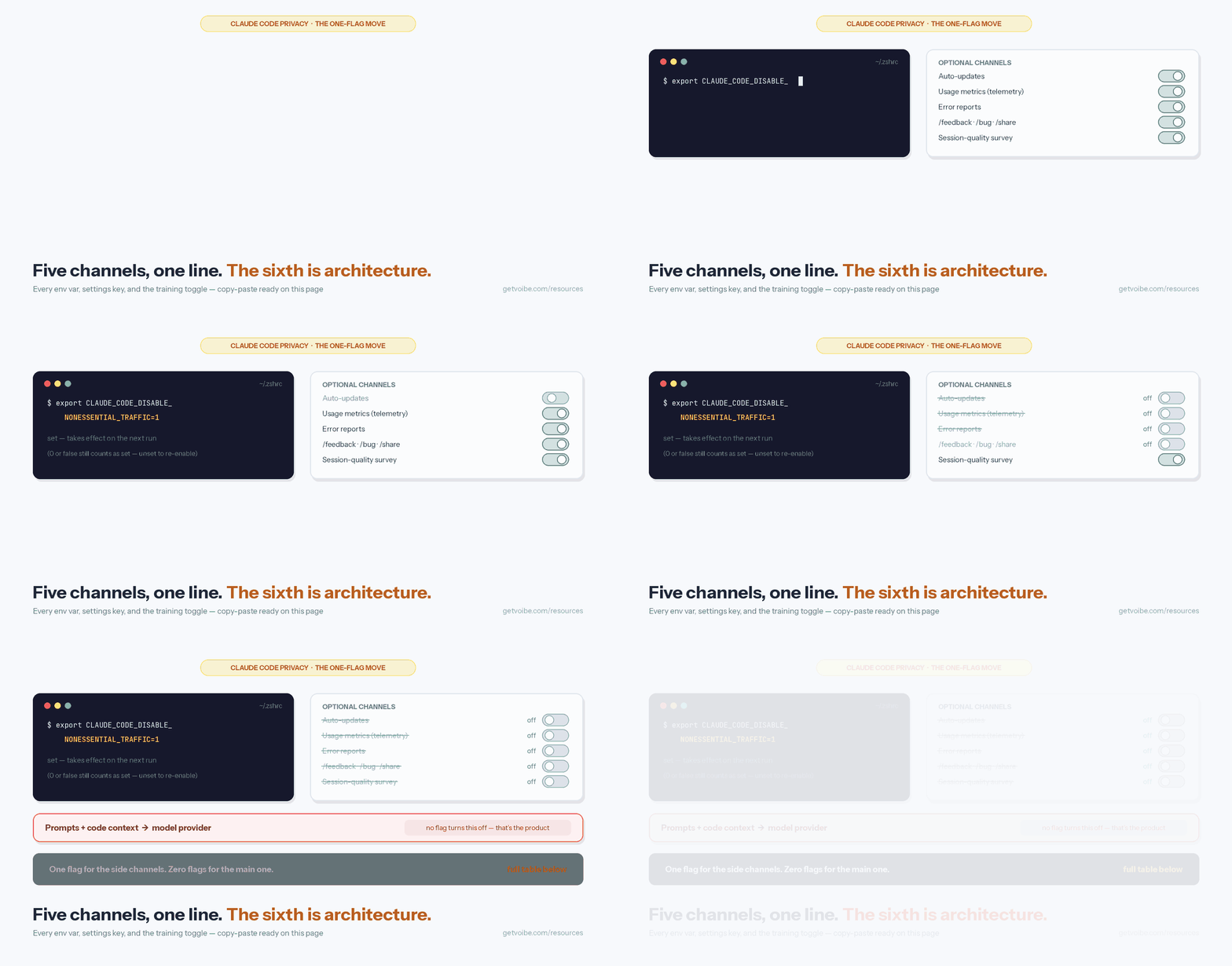
CLAUDE_CODE_DISABLE_NONESSENTIAL_TRAFFIC is the highest-leverage privacy setting Claude Code has. Per Anthropic's environment-variable reference, setting it to any non-empty value “disable[s] nonessential network traffic: auto-updates, telemetry, error reporting, the /feedback command, release notes, gateway model discovery refreshes, and availability checks such as the fast mode check.” It also disables feature-flag fetching, which makes the Remote Control feature unavailable, and the session-quality survey shuts off with it.
Set it in your shell profile:
# ~/.zshrc or ~/.bashrc
export CLAUDE_CODE_DISABLE_NONESSENTIAL_TRAFFIC=1
Or check it into version control for the whole team via the env block of .claude/settings.json:
{
  "env": {
    "CLAUDE_CODE_DISABLE_NONESSENTIAL_TRAFFIC": "1"
  }
}
Three things this flag does not do:
- It doesn't touch inference. Your prompts and the relevant code context still go to your model provider — that's the product working as designed, covered below.
- It doesn't stop the WebFetch domain safety check. Before fetching any URL, Claude Code sends the hostname (only the hostname — not the full URL, path, or page contents) to api.anthropic.com to check a safety blocklist, cached per hostname for five minutes. The separate opt-out is
"skipWebFetchPreflight": truein settings.json — pair it with WebFetch permission rules if you use it, since you're turning off a safety check. - It doesn't skip official plugin marketplace auto-install. That has its own flag:
CLAUDE_CODE_DISABLE_OFFICIAL_MARKETPLACE_AUTOINSTALL=1.
Warning
The falsy-value trap: for CLAUDE_CODE_DISABLE_NONESSENTIAL_TRAFFIC, DISABLE_TELEMETRY, and DISABLE_ERROR_REPORTING, setting the value to 0 or false STILL disables the traffic — Anthropic's docs state any non-empty value counts. To re-enable a channel, unset the variable entirely.
Telemetry, Error Reports, and the Feedback Channels, One by One
If you'd rather keep auto-updates and turn channels off individually, these are the four that carry data, what each one sends, and how long Anthropic keeps it — all per the data-usage documentation.
- Usage metrics —
DISABLE_TELEMETRY=1. Operational metrics (latency, reliability, usage patterns) sent to Anthropic and third-party logging infrastructure. The docs are specific on scope: “Metrics never include your code, prompts, or file paths.” Claude Code also honors the cross-toolDO_NOT_TRACK=1convention with the same effect. Side effect: disabling telemetry also stops feature-flag fetching, which makes Remote Control unavailable. - Error reports —
DISABLE_ERROR_REPORTING=1. Error messages and stack traces from Claude Code's own internals, sent to a third-party error-tracking service. Anthropic states known patterns of secrets, file paths, and emails are redacted before anything leaves your machine. As of August 2026 this channel is on only for Pro/Max sign-ins on recent versions using the direct Claude API with no zero-data-retention agreement — but the flag is the reliable way to make that a non-question. - /feedback, /bug, and /share —
DISABLE_FEEDBACK_COMMAND=1. The heaviest channel: running/feedbacksends a copy of your conversation history including code, and shared transcripts are retained for 5 years. Since v2.1.212 you choose the scope before sending — the current session by default, or same-project sessions from the last 24 hours or 7 days. All three commands report through the same path, and the older variable nameDISABLE_BUG_COMMANDis still accepted. On Bedrock, Vertex AI, or Foundry, /feedback doesn't upload at all — it writes a redacted local archive to~/.claude/feedback-bundles/. - Session-quality survey —
CLAUDE_CODE_DISABLE_FEEDBACK_SURVEY=1. The occasional “How is Claude doing this session?” prompt records only your rating. A follow-up asks whether Anthropic can look at your session transcript; per the docs, “nothing is uploaded unless you explicitly select Yes.” If you do share, API-key and token patterns are redacted but source code is uploaded as-is, retention is up to 6 months, and shared transcripts “cannot be used to train our AI models.” The survey is auto-disabled if you've set DISABLE_TELEMETRY, DO_NOT_TRACK, or the non-essential-traffic flag.
One deployment note: on Amazon Bedrock, Google Vertex AI, and Microsoft Foundry, telemetry, error reporting, and the feedback command are off by default — the individual flags matter most on the direct Anthropic API path. The provider-by-provider default matrix is in our Claude Code safety review.
How to Turn Off Model Training on a Pro or Max Account
This is the setting with the largest consequences, and it doesn't live on your machine. If you sign in to Claude Code with a claude.ai account (Free, Pro, or Max), Anthropic's consumer terms apply — and since the August 2025 consumer terms update, model training on your chats and coding sessions is controlled by a toggle that defaults to on. Anthropic's Claude Code documentation is explicit: “We will train new models using data from Free, Pro, and Max accounts when this setting is on (including when you use Claude Code from these accounts).”
Turning it off takes under a minute:
- Open claude.ai/settings/data-privacy-controls in a browser where you're signed in to the account Claude Code uses.
- Find the “Help Improve our AI models” toggle.
- Turn it off. The change applies to the account — every device and every Claude Code session signed in with it.
What flips when you do, per Anthropic's privacy documentation:
- Training stops going forward. New chats and coding sessions are not used for model training, and previously stored sessions stop being used in future training runs.
- It is not retroactive. Data already included in training runs in progress, or in models already trained, is not pulled back out.
- Retention drops from 5 years to 30 days. The long window exists to support training; opt out and new data is kept 30 days.
Who can skip this section: if Claude Code authenticates through an Anthropic API key, Amazon Bedrock, Google Vertex AI, Microsoft Foundry, or a Team/Enterprise plan, you're under the Commercial Terms — no training on your code or prompts by default, nothing to toggle. The full retention picture for those paths is in our Claude API data retention guide, and the consumer-side detail (including what the 5-year window actually means) is in the Claude Pro and Max privacy explainer.
Tip
Not sure which terms you're under? If you ran `claude` and logged in with the same account you use at claude.ai, you're on consumer terms and this toggle applies to you. If you set ANTHROPIC_API_KEY or configured Bedrock/Vertex/Foundry, you're on commercial terms and training is off by default.
How to Delete Claude Code Sessions
Claude Code session data lives in three places, and each has a different delete lever: transcripts on your disk, a prompt-history file the cleanup never touches, and whatever sits inside Anthropic's retention window. Here's the complete procedure, local first.
- Delete a project's sessions with
claude project purge. Available since v2.1.124, this removes the project's session transcripts, per-session task and debug data, its matching lines in the prompt-history file, and the project's entry in~/.claude.json— with a confirmation prompt. Runclaude project purge --dry-runfirst to see what would go. - Or delete the files directly. Transcripts are plaintext JSONL under
~/.claude/projects/— one folder per project, one file per session. Removing them is an ordinary file deletion; the next session starts clean. - Shrink the automatic window. Claude Code deletes session files older than
cleanupPeriodDaysat startup — default 30 days, minimum 1. A value like7is a reasonable balance if you use--resume; note that0is rejected with a validation error, so “keep nothing” needs the next option instead. - Never write transcripts at all. Set
CLAUDE_CODE_SKIP_PROMPT_HISTORY=1and sessions are not written to disk — the trade is that they won't appear in--resume,--continue, or up-arrow history. For scriptedclaude -pruns,--no-session-persistencedoes the same per invocation. - Don't forget
~/.claude/history.jsonl. Every prompt you've typed — with timestamp and project path — is appended here, and per Anthropic's directory reference it is not covered by the automatic cleanup; it persists until you delete it.claude project purgeremoves the purged project's lines; deleting the file removes everything. - Web sessions have a delete button. Claude Code on the web stores sessions server-side; delete any session from its menu at claude.ai/code — Anthropic's docs say deletion permanently removes the session and its data.
- Server-side CLI data ages out with your retention window. There's no documented button that deletes CLI session data off Anthropic's servers on demand; what governs it is the retention window — 30 days on commercial terms or on Pro/Max with training off, 5 years on Pro/Max with training on. That's one more reason the training toggle above is the setting to get right.
Security detail worth knowing: Anthropic's docs note the local transcripts “are not encrypted at rest” and that if a tool reads a .env file or a command prints a credential, that value lands in the transcript. On a shared machine, that's an argument for a short cleanupPeriodDays and full-disk encryption; on any machine, it's an argument for knowing where the files are.
What No Setting Changes: Your Prompts Still Go to the Cloud
Here's the part a settings guide owes you plainly: every flag on this page trims an optional channel. None of them changes the main one. Claude Code runs your tools locally — file reads, edits, command execution happen on your machine — but every prompt and the code context the model needs are sent, encrypted in transit, to a cloud model provider for inference. That's Anthropic's API by default, or Bedrock, Vertex AI, or Foundry if you've configured them. There is no local-inference mode; the models are too large to run on a laptop, and no environment variable reroutes that traffic.
This is the difference between configuration and architecture. Configuration is what this page covers: which side channels stay open, how long transcripts live, whether your sessions train models. Architecture is what the product is: a cloud-inference coding agent. Configuration you can get wrong on any given machine — a missed env var, a toggle left on. Architecture doesn't depend on you remembering anything.
The practical read isn't “don't use Claude Code” — under commercial terms, with training off by default and 30-day retention, its posture is stronger than most developer tools'. The practical read is: know which of your data flows are configured private and which are architecturally private, and spend your diligence on the configured ones. For Claude Code, that means getting the account tier right first (commercial, not consumer — or consumer with the training toggle off), then setting the flags above once in a checked-in settings file so no machine misses them.
Key Takeaway
Claude Code's privacy settings control the optional channels — telemetry, error reports, feedback uploads, surveys, local storage. The core channel is architectural: prompts and code context go to a cloud model provider for inference, and no setting changes that.
Voibe: The On-Device Voice Layer for a Claude Code Workflow
I dictate most of my Claude Code prompts instead of typing them — long instructions with file names and constraints are exactly where voice beats the keyboard, at roughly 5x typing speed. But adding a dictation app adds a second privacy surface to the workflow, and most cloud dictation tools put another vendor between your voice and your prompt, with their own retention policy to audit.
That's the reason Voibe — the app we build — pairs naturally with a locked-down Claude Code setup. The contrast with this page is the point: you just read seven sections of configuration; the voice layer can simply have nothing to configure away. On Apple Silicon Macs, Voibe transcribes fully on-device with Whisper — audio never leaves the Mac, so there is no retention window, no training question, and no opt-out to remember. Voibe also runs on Windows and Intel Macs through its private zero-retention cloud, which uses open-source models only: audio is never stored, sold, or used to train AI. Where Anthropic publishes retention windows to manage, on-device transcription has none to publish.
- Developer Mode resolves file and folder names when you dictate into Cursor, VS Code, or a terminal — “refactor auth middleware dot ts” comes out as
auth-middleware.ts. Our dictating in Cursor guide shows the setup. - Smart Formatting strips the “ums” and fixes punctuation locally, without paraphrasing — your prompt stays your prompt.
- Pricing: $7.50/month, $59/year, or $149 lifetime.
To be precise about the boundary: Voibe covers the voice-input half of the workflow. Once the text lands in Claude Code, everything on this page still applies — the dictation layer doesn't change Anthropic's data handling, and nothing about Claude Code changes what Voibe does with audio. Two surfaces, two answers, both worth getting right. The wider voice-plus-AI setup is in our dictation for AI prompting guide.
Settings that must be found and flipped are the recurring theme of AI privacy, not a Claude Code quirk. Our guide to zero data retention shows how often the same pattern appears in voice apps, and gives you a ten-minute test for spotting it.
Info
Try Voibe for Free: download from getvoibe.com — no account, no credit card. On-device mode requires an Apple Silicon Mac (M1 or newer); Windows and Intel Macs run on the private zero-retention cloud.
Claude Privacy, Page by Page
This page is the configuration manual. The rest of the cluster answers the neighboring questions:
- The session transcript prompt — the one prompt that can upload a whole session with a single keypress, including subagent transcripts and the raw session log file, and the four ways to stop being asked.
- Is Claude Code safe? — the full safety review: the consumer-vs-commercial two-tier framework, the terms-update history, provider defaults, and the decision tree.
- Claude API data retention — what Anthropic keeps on the API, Zero Data Retention eligibility, the Commercial Terms in plain English, and the Bedrock/Vertex/Foundry defaults.
- Claude Pro and Max privacy — the consumer side: the 5-year window, the update emails, incognito chats, and what deletion actually removes.
- Is Claude safe? — the claude.ai consumer product overall, including how it compares with ChatGPT on data handling.
- AI Tool Privacy Tracker — the continuously updated cross-tool reference covering Claude Code alongside ChatGPT, Gemini, Cursor, Copilot, and the dictation tools.
The equivalent for agentic work on documents rather than repos: dictating in Claude Cowork, including the brief structure that keeps an agent from guessing and the two hops your words travel.
Frequently Asked Questions
What does CLAUDE_CODE_DISABLE_NONESSENTIAL_TRAFFIC disable?
How do I stop Claude Code from training on my code?
How do I delete Claude Code sessions?
Where does Claude Code store session transcripts?
Does setting CLAUDE_CODE_DISABLE_NONESSENTIAL_TRAFFIC=0 re-enable the traffic?
Do I need these privacy settings on Amazon Bedrock or Google Vertex AI?
Can I set cleanupPeriodDays to 0 to disable session storage?
Does opting out of training delete data Anthropic already collected?
Can any setting make Claude Code run fully offline?
Best AI Dictation and Meeting Notes for Confidential Work
Draft letters, notes and emails 5x faster. Get meeting notes without a bot joining your call. Nothing used to train AI.
- Mac + Windows
- No bot in your calls
- Nothing used to train AI
- 7-day free trial
Want to compare plans first? View pricing →
Related Articles
Can Anthropic Look at Your Session Transcript? What Yes Uploads
Claude Code asks after the rating prompt. Yes uploads your transcript, subagent logs, and the raw session file, kept 6 months. What's redacted, what isn't.
Claude Pro & Max Privacy: Retention, Training Opt-Out, Deletion
Do Claude Pro and Max train on your data? Retention periods, the training opt-out toggle, the 2025 privacy update explained, and how to delete your history.
Is Claude Code Safe? Privacy & Data Retention by Tier (2026)
Is Claude Code safe? What Anthropic stores and trains on by tier — Pro/Max vs API vs Enterprise — plus the Oct 2025 terms change and every opt-out setting.