
Keyboards for Arthritis: What Helps, What Doesn't, and What No Keyboard Can Fix
Split, tented, light-switch keyboards do reduce joint load. None of them reduce how much you type. An honest guide to both halves of the problem.

If your hands hurt by mid-afternoon, the advice you have already been given is probably "get an ergonomic keyboard," delivered with the confidence of someone whose hands do not hurt. It is not bad advice. It is half of the advice, and the half that gets left out is the one that matters more on the bad days.
Here is the honest framing: a better keyboard reduces the cost of each keystroke — lighter switches mean less force per press, split and tented layouts keep wrists and forearms nearer neutral. What no keyboard changes is how many keystrokes you make. On days when any pressing hurts, the only thing that helps is pressing fewer keys.
This page covers both. The keyboard features that reduce joint load and what they cost, then the part most roundups skip — what to do when the keyboard is not enough. Nothing here is medical advice, and hand pain has a lot of different causes; what follows is what people with arthritis commonly report helping, not a treatment plan.
Key Takeaways: The Four Features That Matter
| Feature | What it changes | Who tends to notice it most |
|---|---|---|
| Light actuation force (≤45g, or low-travel) | How hard each finger has to press | Almost everyone with finger-joint pain — usually the first thing felt |
| Split layout | Wrist angle — halves move apart so hands align with shoulders | People with wrist and thumb-base pain |
| Tenting | Forearm rotation — inner edges raised | People with forearm and elbow involvement |
| Negative tilt | Wrist extension — front edge higher than the back | People whose pain is worst at the wrist crease |
| Nothing on this list | How many keystrokes you make | Everyone, on the bad days |
The most common mistake is buying for the wrong one of these. A large split keyboard with heavy switches can feel worse than a cheap low-travel board if your problem is finger joints rather than wrist angle. Work out which pain you actually have before choosing.
Key Takeaway
Match the feature to the joint. Finger-joint pain responds to lighter switches; wrist pain responds to split and tilt; forearm pain responds to tenting. Buying the famous keyboard rather than the right feature is how people end up with an expensive board that does not help.
Before You Buy: The Free Changes That Often Do More
These cost nothing and many people find they matter more than the keyboard itself. Worth exhausting first.
Raise the front edge, not the back. Nearly every keyboard ships with flip-out feet at the back, which tilts the board towards you and pushes your wrists into extension. That is backwards for most people with joint pain. Try the feet down, or propped slightly the other way — a negative tilt keeps the wrist nearer neutral, and it is free.
Stop resting your wrists while typing. Wrist rests are for pauses, not for typing. Anchoring the wrist means the fingers have to reach and the wrist has to pivot, concentrating load exactly where it hurts. Many people find floating the hands and moving from the elbow reduces symptoms more than any hardware change.
Lower the desk or raise the chair. Elbows around 90 degrees or slightly open, forearms roughly parallel to the floor. A desk that is too high is a very common and very fixable cause of the wrist extension people blame on their keyboard.
Shorten the sessions rather than the total. Breaking typing into shorter blocks with real breaks is reported to help more than the same total in two long stretches. This is the one people skip because it is behavioral rather than purchasable.
If you work through those and still hurt, then a keyboard is a reasonable next step — and you will know better which feature you actually need. The full typing-with-arthritis guide goes deeper on technique and pacing.
Info
Hand pain has many causes — osteoarthritis, rheumatoid arthritis, tendon involvement, and nerve compression all feel different and respond to different things. Nothing on this page is a substitute for a clinician who can tell you which one you have.
The Keyboards Worth Considering
Ordered by cost, not by preference, because the cheap options work for a lot of people and the expensive ones are not upgrades so much as different tools.
The low-travel keyboard you may already own — $0 to $110
Apple's Magic Keyboard and similar low-profile scissor-switch boards ask for very little force and very little travel per keystroke. For finger-joint pain specifically, many people find this class more comfortable than a mechanical keyboard of any price, and Mac users frequently already have one in a drawer. The trade-off is no split, no tenting, and minimal adjustability — it addresses force and nothing else. If your pain is in the finger joints rather than the wrists, that may be exactly the right trade.
Logitech Ergo K860 — around $130 list, frequently discounted nearer $90–$110
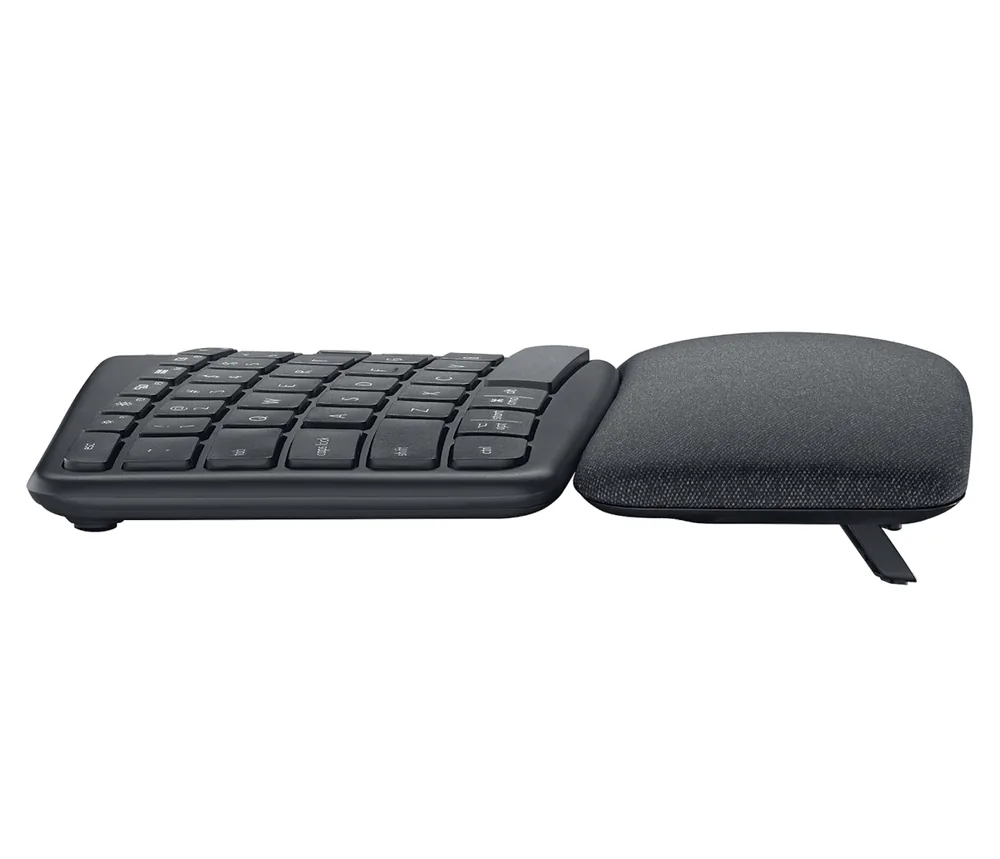
The usual first recommendation, and reasonably so. A one-piece board with a fixed split curve, a built-in cushioned wrist rest, and negative-tilt feet — the last of which is the part worth having. It is not adjustable the way a true split is, and the fixed angle either suits your shoulders or does not. But it requires no relearning, it is widely available, and it goes on sale constantly. A sensible thing to try before spending three times as much.
Kinesis Freestyle family — roughly $100 and up depending on model
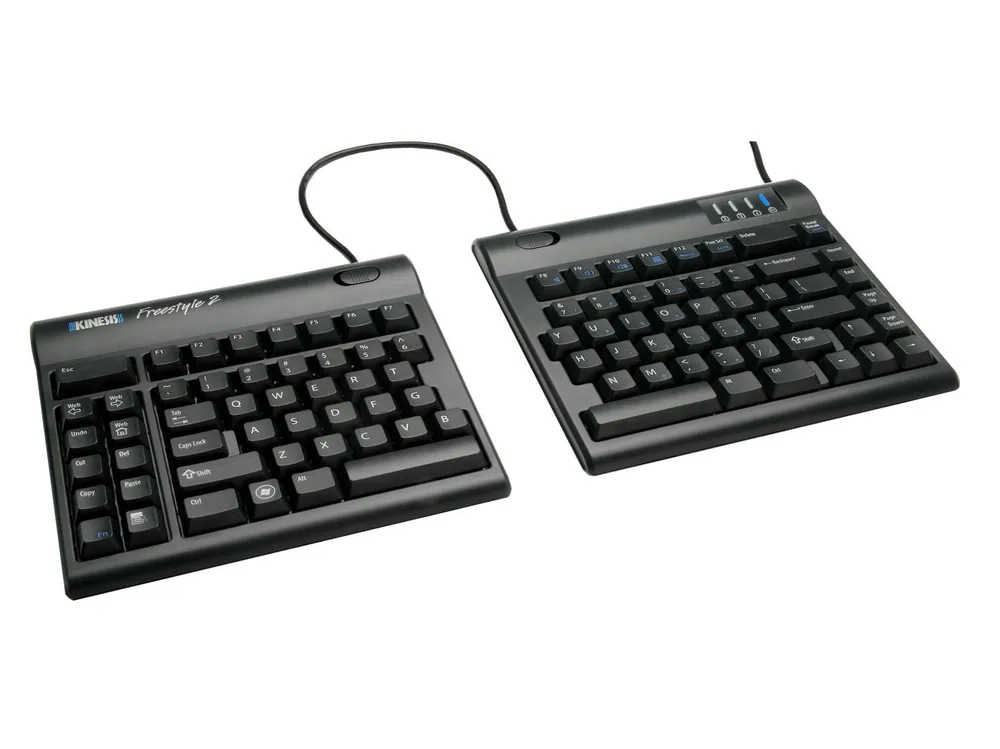
A genuine split: two halves connected by a cable, so you can set the separation and angle to your own shoulder width. Tenting comes from accessory kits rather than being built in, which adds cost but also lets you dial the angle. The Freestyle2 is membrane and non-programmable; the Freestyle Pro moves to mechanical switches and adds programmability. For wrist and thumb-base pain, the adjustable separation is the feature doing the work.
MoErgo Glove80 — $399
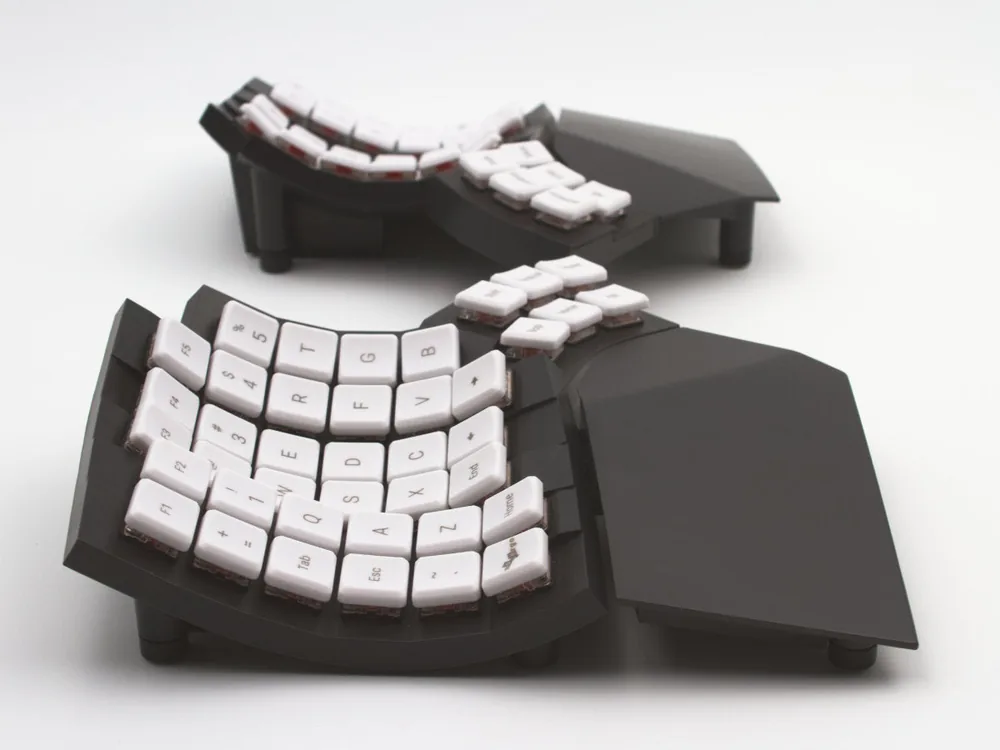
The serious end. A wireless split with concave keywells that let the fingers reach less, low-profile switches actuating at around 48 grams, and full programmability so you can remap away awkward stretches entirely. Several 2026 roundups now rank it at the top of the category, partly because it undercuts the Kinesis Advantage360 it competes with.
Being honest about the catch: concave-keywell boards carry a real relearning cost — typically a couple of weeks of reduced speed, and for some people that transition period is itself uncomfortable. It is a strong long-term answer for someone who types heavily every day and a poor first purchase for someone still working out which feature they need.
Prices verified 2026-08-11; the mid-range in particular moves a lot with sales.
What No Keyboard Can Fix
Every feature above lowers the cost per keystroke. None of them lowers the number of keystrokes, and on a flare day the number is the problem. A keyboard that makes each press 30% easier still asks for every press.
This is the gap where reducing typing volume is the only lever left, and there are three ways to pull it:
Text expansion. Short triggers that expand into long blocks — email signatures, standard replies, boilerplate you retype constantly. Free on both macOS and Windows, and it removes real volume with no learning curve to speak of.
Keyboard remapping. If a specific stretch hurts — the pinky reach to Shift, a modifier combination, the number row — remapping it away is free and permanent. Programmable boards make this easier, but macOS and Windows both allow basic remapping without one.
Dictation. The one that actually changes the arithmetic, because speaking a paragraph costs zero keystrokes. This is the standard escape hatch for people whose hands have good days and bad days: keyboard when it is fine, voice when it is not.
One thing worth knowing if you are looking at dictation with arthritis specifically: most dictation apps require you to hold a key down for the entire time you are speaking, which is exactly the motion that hurts. That detail rules out a surprising number of otherwise-good tools for this audience. What to look for instead is a hands-free or toggle mode — press once to start, press once to stop, nothing held. In Voibe — ours — that is Hands-Free Mode, triggered by double-tapping Fn or pressing Fn+Space, and it is available in the free tier with no signup required, so it costs nothing to find out whether voice works for your hands.
The full picture for this specific situation is in dictation software for arthritis, which compares the tools on exactly this hold-a-key question. For the broader hand-pain lane, see dictation for hand pain.
A Realistic Way to Test Any of This
Hand pain is variable enough that a single good day can make anything look like it worked. A few things that make an honest test more likely:
- Change one thing at a time. New keyboard and new desk height in the same week tells you nothing about either.
- Give it two weeks. Any new layout comes with an adjustment period, and split or concave boards especially can feel worse before they feel better. Judging on day three is judging the relearning, not the keyboard.
- Track when the pain starts, not whether it happens. "Hurts by 2pm instead of 11am" is a real result and easy to miss if you only note good days and bad days.
- Buy from somewhere with returns. Ergonomic keyboards are personal in a way most peripherals are not, and the well-reviewed one may simply not suit your hands. A return window is part of the purchase.
- Try dictation in parallel, not after. It is free to test, it addresses a different variable than the keyboard does, and knowing whether voice works for you changes which keyboard is worth buying.
The Bottom Line

If you buy one thing, make it match your pain: light switches for finger joints, split and adjustable for wrists, tenting for forearms. Do the free adjustments first — the tilt and wrist-resting changes cost nothing and many people find they do more than the hardware.
And treat the keyboard as one lever rather than the answer. It lowers the cost of typing; it does not lower the amount. For a lot of people with arthritis the combination that actually works is a comfortable keyboard for the good days and voice for the bad ones — which is a less satisfying answer than a single product recommendation, and a more honest one.
Next: dictation software for arthritis compares the tools on whether they make you hold a key, and the typing-with-arthritis guide covers technique, pacing, and the adjustments above in more depth. The wider set of hands-and-accessibility guides lives on our accessibility dictation hub, and for readers weighing these choices in retirement, the seniors' dictation guide reranks the tools for simplicity and one-time pricing.
Frequently Asked Questions
What kind of keyboard is best for arthritis?
Do ergonomic keyboards actually help with arthritis pain?
How much should I spend on a keyboard for arthritis?
Is a mechanical keyboard good or bad for arthritis?
What is tenting and do I need it?
What can I do when even a good keyboard hurts?
Do split keyboards take long to get used to?
Is dictation a realistic replacement for typing with arthritis?
Best AI Dictation and Meeting Notes for Confidential Work
Draft letters, notes and emails 5x faster. Get meeting notes without a bot joining your call. Nothing used to train AI.
- Mac + Windows
- No bot in your calls
- Nothing used to train AI
- 7-day free trial
Want to compare plans first? View pricing →
Related Articles
Best Dictation Software for Seniors (No Subscription Needed)
Typing shouldn't be the reason the letters stop. The best dictation software for seniors on Mac and Windows — simple to start, private, no subscription.
Dictation as a Reasonable Accommodation: A Guide for Mac Users, HR, and IT
How to request, approve, and provision dictation software as an ADA reasonable accommodation on Mac. Includes a forwardable IT-security brief for security review.
How to Run Your Coaching Business on AI in 2026: 6 Tools, $117 a Month
A how-to for coaches: run bookings, session notes, client recaps and follow-ups on AI with Voibe API + Claude, Claude Pro, Voibe, Calendly, Paperbell or CoachAccountable, and Zapier. 2026 prices, notes for $0.30 a call, $117 a month total.