
I Ranked 7 Dictation Apps for RSI — Most Fail One Simple Test
Push-to-talk just moves RSI strain from typing to a held key. How I ranked 7 dictation apps for RSI — and the one test that decides the whole list.

I'm a developer, and I dictate most of my workday — prompts into Claude Code, emails, docs — so I spend a lot of time hands-on with dictation apps. Here's what jumped out the moment I looked at them through an RSI lens: most of them want you to hold a key down the entire time you speak. If your wrists already hurt, that's not a solution. That's the same sustained load with a new name. Your median nerve does not care whether it's pinned by keystrokes or by a modifier key held through a three-paragraph email.
TL;DR: Voibe — the app we build — is my top pick for RSI because Hands-Free Mode (double-tap to start, double-tap to stop, hands rest while you speak) works out of the box, the hotkey remaps to a single key or an external switch, and the 7-day free trial has no account or card, so you can test the activation model against your own symptoms before paying anything. Talon is the right tool when typing is not an option at all — free, full voice control of the whole computer, steeper learning curve. Superwhisper and VoiceInk are strong on-device Mac alternatives once you configure toggle activation. Wispr Flow covers the most platforms. Apple Dictation is the free test. Dragon Professional is the Windows professional standard.
This page pairs with our RSI prevention guide for computer users — that one covers setup, pacing, and load reduction before pain forces the decision; this one covers the tools once you have decided to dictate.
Key Takeaways: Dictation for RSI at a Glance
| Tool | Activation | Where audio is processed | Platforms | 3-year cost |
|---|---|---|---|---|
| Voibe | Hands-Free Mode (double-tap; remaps to one key or external switch) | On-device (Mac, Apple Silicon) or private zero-retention cloud | Mac, Windows | $149 lifetime |
| Talon | Voice commands and noise triggers — no keys at all | On-device | Mac, Windows, Linux | $0 |
| Superwhisper | Push-to-talk default; toggle configurable | On-device (cloud optional) | Mac (Windows, iOS versions exist) | $249.99 lifetime |
| VoiceInk | Hotkey toggle | On-device | Mac (14.4+, Apple Silicon) | $29–$69 lifetime |
| Wispr Flow | Push-to-talk default; hands-free toggle available | Cloud | Mac, Windows, iOS, Android | $432 (Pro annual × 3) |
| Apple Dictation | Hotkey toggle | Mostly on-device on Apple Silicon | Built into macOS | $0 |
| Dragon Professional | Multiple modes including hands-free | On-device | Windows | $699.99 one-time |
Voibe's $149 lifetime is $283 (66%) less than three years of Wispr Flow Pro annual ($432), $100.99 (40%) less than Superwhisper's $249.99 lifetime, and $550 (79%) less than Dragon Professional's $699.99. VoiceInk's $29 entry tier is the cheapest paid license in the list; Talon and Apple Dictation are free.
Why Push-to-Talk Fails RSI Users: The Load-Shifting Trap
RSI is an umbrella term for pain caused by repeated movement — the NHS definition covers tendon, muscle, and nerve symptoms in the shoulders, forearms, wrists, hands, and fingers, and lists typing among the classic causes. The standard first-line response is activity modification: reduce the repetitive load. For a computer user, the biggest repetitive load is typing, and voice dictation is the established substitute — the Job Accommodation Network lists speech recognition software as a standard accommodation for cumulative trauma conditions, the category RSI falls under.
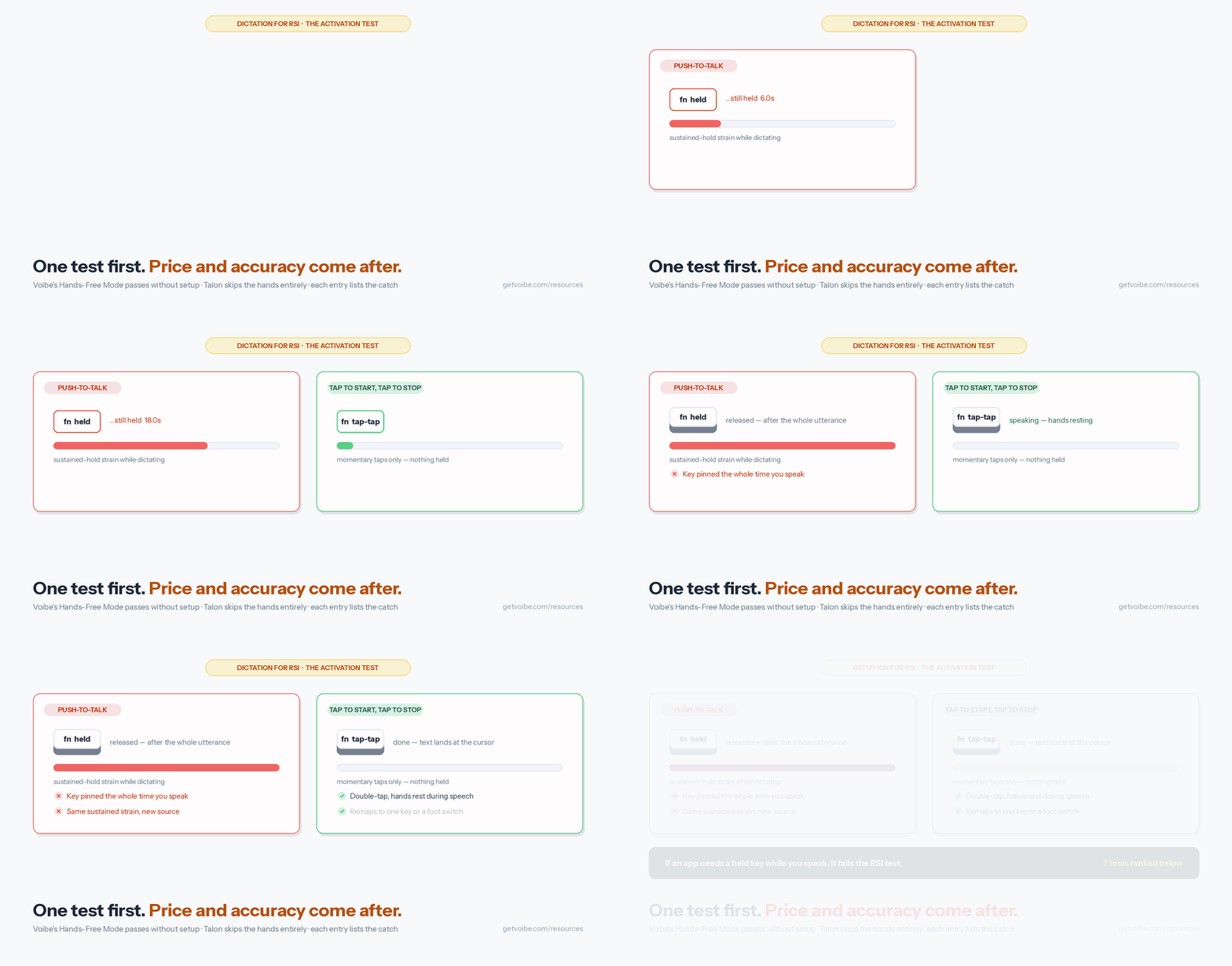
Here is the trap: a dictation app only removes the load if its activation model does. Push-to-talk requires sustained key pressure for the full duration of speech. Dictate a 200-word email through a held key and you have held a static contraction for over a minute — a sustained load on the same finger, wrist, and forearm structures you were trying to rest. The load did not leave; it moved.
The long held press is the rarer case. Voibe's State of AI Dictation data puts the median dictation at 8 seconds, but half of all dictations are followed by another within a minute, so a press-to-talk user is pressing the key roughly a hundred times a day (the 8-second sentence). For RSI that is a hundred small loads instead of one long one, which is still a load.
The apps that work for RSI use activation where the hands rest during speech: a brief tap or double-tap to start and stop, a single-key toggle, a voice trigger, or an external switch that takes the hands out entirely. Every ranking on this page starts from that test.
Key Takeaway
A dictation app that requires a held key during speech does not solve RSI — it moves the same sustained load from typing to holding. Apply the activation-model test before comparing accuracy, features, or price.
What to Look For in Dictation Software When You Have RSI
Five criteria, in priority order:
- Activation without a held key. Tap-based (double-tap start/stop), single-key toggle, voice trigger, or external switch. Push-to-talk fails the test. This criterion filters the market before any other comparison matters.
- Hotkey remapping and external triggers. RSI symptoms move — a key that is comfortable this month may not be next month. The app should let you remap activation to a different key, and ideally to a USB foot switch, Stream Deck button, or accessibility switch so activation can leave the hands entirely during flares.
- System-wide insertion. Text should land wherever your cursor is — email, documents, Slack, browser forms, IDEs — not inside the app's own window with a copy-paste step after. Extra pointer work is extra hand work.
- Session length without re-triggering. Long dictation sessions mean fewer activations per day. An app that ends sessions early forces repeated re-activation — small taps, but they add up in exactly the way RSI punishes.
- On-device processing for sensitive content. People with RSI dictate about RSI: symptoms, clinicians, medication, accommodation requests to HR. On-device processing keeps that content on your machine. Our offline dictation explainer covers why the architecture matters more than the policy.
The 7 Best Dictation Tools for RSI, Ranked
Ranked against the five criteria above, activation model weighted heaviest. I run these apps hands-on for our comparisons across this site — the activation notes below come from actually setting each one up, not from feature pages. Ratings cited are from third-party platforms with sources linked; prices were verified against each vendor's live pricing page during the August 2026 sweeps.
1. Voibe — Hands-Free Activation Out of the Box

Voibe — the app we build — is a private dictation app for Mac and Windows. On Apple Silicon Macs it runs OpenAI's Whisper models fully on-device; both platforms can also use Voibe's private cloud running open-source models with zero retention — audio is never stored, sold, or used to train AI. Third-party rating: 4.8/5 from 6 Product Hunt reviews.
Why it ranks first for RSI: Hands-Free Mode is the activation model this article keeps testing for, and it works without configuration. Double-tap to start; your hands rest while you speak; double-tap to stop. On Mac, Live Dictation streams your words into a small floating window in real time, and Enter commits the text into whatever app your cursor is in. There is no length cap forcing re-activation mid-thought. The hotkey remaps to a single key, a function key, or an external trigger — a USB foot switch or Stream Deck button takes activation off the hands entirely during a flare.
Beyond activation, the features that matter for reduced-typing workflows: spoken punctuation and symbols, Smart Formatting (bounded cleanup of fillers, punctuation, and capitalization — it does not paraphrase what you said), Memory for spoken-trigger text expansion (speak a short trigger, insert a saved block — keystrokes you never type), a custom Dictionary that biases recognition toward your domain terms rather than find-and-replacing them afterward, Developer Mode for Cursor, VS Code, and Windsurf, and locally stored history. Support questions are answered by the founder.
The honest limits: no iOS or Android app, and the fully on-device mode needs an Apple Silicon Mac — Intel Macs and Windows use the private zero-retention cloud. The Dictionary sits behind the paid plans.
Key Takeaway
Voibe passes the RSI activation test without setup work: double-tap activation, no held key, a remappable hotkey that works with foot switches, and a no-signup 7-day trial to verify the model against your own symptoms before paying.
2. Talon — Full Voice Control When Typing Is Off the Table

Talon is not a dictation app — it is a voice-control system for the entire computer, and it is the tool the RSI community reaches for when hands are out of the equation altogether. Voice commands drive the mouse, switch windows, run scripts, and write code through spoken grammars; eye tracking and noise-based clicking extend control further. It runs on Mac, Windows, and Linux, the download is free, and development is supported through Patreon. The community command set is open source and actively maintained.
The trade-off is the learning curve. Talon's grammar-based command language is a skill you build over weeks, not an app you install over lunch. For severe RSI — where even short keyboard sessions are off the table — that investment pays for itself, and nothing else in this list matches its ceiling. For moderate RSI where you can still type briefly and mainly need long text off your hands, a dictation app gets you working sooner.
The two are complementary: several workflows in our developer dictation roundup pair Talon for navigation and commands with a dictation app for prose.
Key Takeaway
Talon is the strongest tool in this list for severe RSI: complete hands-free computer control at zero cost, with a learning curve measured in weeks. For moderate RSI, a dictation app is the faster path.
3. Superwhisper — Deepest Configuration for On-Device Mac Dictation
Superwhisper runs Whisper models locally on Mac with per-app Modes, multiple model sizes, and optional cloud LLM post-processing. Third-party ratings: 4.9/5 from 20 Product Hunt reviews and 4.4/5 from 762 Mac App Store ratings.
For RSI: the default is push-to-talk, which fails the activation test — but Superwhisper supports toggle activation. Setting it up meant a trip into Settings → Hotkeys, after which the held-key-free workflow matched what Voibe's Hands-Free Mode does without configuration. That's the distinction: Superwhisper offers more depth (per-app Modes, model choices) in exchange for more setup, and the RSI-critical activation change is on you to make.
One caveat from our Superwhisper safety investigation: the app saves local audio recordings of sessions by default, with no setting to disable it — a disk-space and data-hygiene consideration, though recordings stay on your Mac in on-device modes.
Key Takeaway
Superwhisper reaches the same held-key-free end state as Voibe after you configure toggle activation yourself, and offers deeper per-app customization once you do. Choose it for configurability; choose Voibe for the working default.
4. VoiceInk — Cheapest On-Device Lifetime License
VoiceInk is an on-device Mac dictation app with lifetime licenses at $29 (Solo), $49 (Personal), and $69 (Extended) — the lowest paid entry point in this list. It is also GPL v3 open source: technically-inclined users can build it from source for free. It requires macOS 14.4 or later and an Apple Silicon Mac.
For RSI: activation is a hotkey toggle — press to start, press to stop — which passes the no-held-key test. It does not have a purpose-built accessibility activation layer like Hands-Free Mode, and the polish is thinner than Superwhisper's or Voibe's, but the core model is right and the price is a fifth of Voibe's lifetime. At $29, VoiceInk against three years of Wispr Flow Pro ($432) saves $403 (93%).
Details and tier differences are in our VoiceInk pricing breakdown.
Key Takeaway
VoiceInk is the budget pick: toggle activation that passes the RSI test and a $29 lifetime license, with less accessibility-specific tooling than the picks above it.
5. Wispr Flow — Widest Platform Coverage, Cloud Trade-Off
Wispr Flow is a cloud-based dictation app covering Mac, Windows, iOS, and Android — the only tool here that follows you across all four. Third-party ratings: 4.5/5 on G2 and 4.8/5 from 8,500+ iOS App Store ratings.
For RSI: the default is push-to-talk, but a hands-free toggle mode is available in settings — flip it before judging the app. If your RSI management spans a work Mac, a Windows machine, and a phone, one consistent voice workflow everywhere is a real advantage no Mac-only tool can offer.
The trade-offs: processing happens in the cloud (subprocessors include Baseten, OpenAI, Anthropic, Cerebras, and AWS per Wispr's documentation), which matters if you dictate about your health or negotiate accommodations by voice; and it is subscription-only at $12/month annual or $15/month monthly — $432 over three years, with no lifetime exit. Our Wispr Flow safety investigation covers the privacy posture in depth.
Key Takeaway
Wispr Flow is the pick when your RSI workflow has to span Mac, Windows, and mobile — accept the cloud processing and the subscription, and enable the hands-free toggle on day one.
6. Apple Dictation — The Free First Test
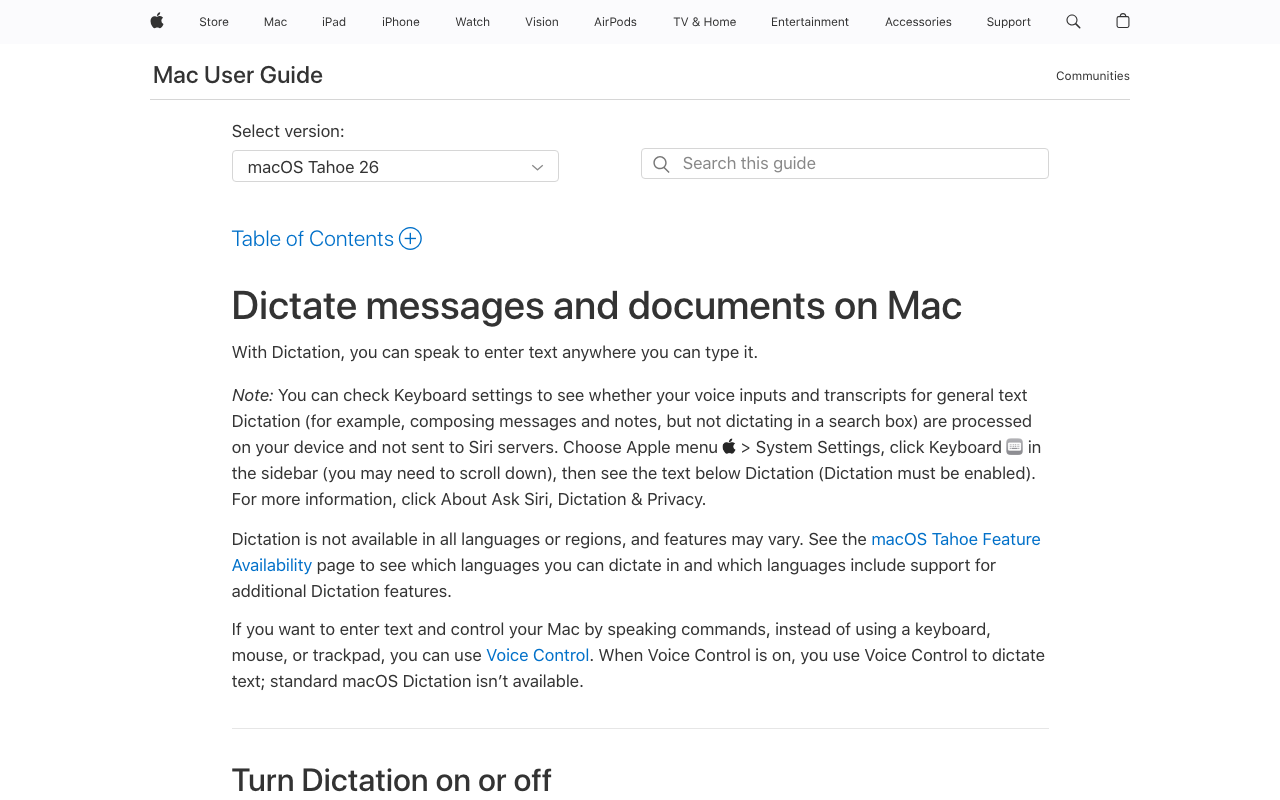
Apple Dictation ships with every Mac at no cost, and its hotkey-toggle activation (press to start, press again to stop) passes the RSI test. On Apple Silicon Macs, most processing happens on-device. If you are not yet sure dictation fits how you work, this is the zero-commitment way to find out.
The limits you will hit with sustained use: no custom vocabulary, no floating preview window, and no per-app behavior. On session length, Apple's current documentation for macOS Tahoe 26 states you can dictate text of any length, with dictation stopping automatically after 30 seconds of silence — but earlier macOS versions were widely reported to stop after roughly 30 seconds of continuous speech, and independent reports confirming the new no-length-cap behavior are still limited. For an RSI user, unpredictable early stops mean repeated re-activation taps, which is exactly the load pattern you are trying to reduce. Our switching from Apple Dictation guide covers where the ceiling sits and what to move to.
Key Takeaway
Use Apple Dictation to test whether voice input suits your RSI at zero cost. Move up when the missing vocabulary support or unpredictable session stops start costing you re-activation taps.
7. Dragon Professional — The Windows Professional Standard

Dragon Professional has the longest accommodation track record of any product here — decades of RSI users have run it as their primary input, and its voice command-and-control (navigate, edit, and correct by voice, not just transcribe) goes deeper than any consumer dictation app. Third-party rating: 4.0/5 from about 240 G2 reviews. Multiple activation modes include hands-free operation, and processing is on-device.
The constraints: Windows only — there has been no native Mac version since Nuance discontinued Dragon for Mac in 2018 — and $699.99 one-time for v16, the highest price in this list. Dragon Anywhere, the mobile companion, was discontinued in July 2026. If you are on Windows with an employer-funded accommodation or a vocabulary-heavy professional workflow, Dragon is still the deepest option; details in our Dragon pricing breakdown.
Key Takeaway
Dragon Professional remains the deepest Windows option for RSI-driven voice work, at the highest price and with no Mac path. On Mac, Whisper-based tools cover the dictation core for a fraction of the cost.
How to Choose: A Decision Tree for RSI Dictation
Three questions, in order:
- Can you still use the keyboard for short interactions? No — typing is effectively off the table → Talon (free), on any platform, and budget the learning weeks. Yes → continue.
- Mac or Windows? Windows → Voibe (private-cloud, $149 lifetime), Wispr Flow ($144/year) if you also need mobile, or Dragon Professional ($699.99) for employer-funded professional depth. Mac → continue.
- Working default or configure-it-yourself? Want tap activation working immediately → Voibe (7-day trial, no signup). Comfortable configuring toggle activation and want deeper per-app control → Superwhisper ($249.99 lifetime). Want the cheapest passing license → VoiceInk ($29). Not sure dictation fits at all → Apple Dictation first, free.
Use-Case Cheat Sheet: Matching Your Situation to a Tool
| Your situation | Best fit | Why |
|---|---|---|
| Early RSI symptoms, testing whether dictation helps | Apple Dictation, then Voibe's 7-day trial | Free test first; the trial adds Hands-Free Mode and Live Dictation with no signup. |
| Active flare, typing limited to minutes per day | Voibe with the hotkey on a single key | Tap activation plus long sessions minimizes total hand involvement. |
| Severe RSI, keyboard and mouse both painful | Talon (consider pairing with Voibe for prose) | Full voice control of the OS; dictation app covers long text with less command overhead. |
| Wearing a wrist brace or splint | Voibe or any toggle-activation app | Brief taps work with the wrist immobilized; held keys do not. |
| Flares severe enough that even taps hurt | Voibe + USB foot switch or Stream Deck | Remappable hotkey moves activation off the hands entirely. |
| RSI as a developer | Voibe Developer Mode, or Talon for voice coding | File and folder name resolution for prompts and commit messages; Talon for full code-by-voice. |
| Dictating about symptoms, clinicians, or HR accommodations | Voibe on-device mode, Superwhisper, or VoiceInk | On-device processing keeps health context on your machine. |
| Tightest budget, comfortable with fewer accessibility features | VoiceInk ($29 lifetime) or Talon (free) | Lowest cost paths that still pass the activation test. |
| Mac at work, Windows at home, phone in between | Wispr Flow (enable the hands-free toggle) | Only tool here covering all four platforms. |
| Windows-only professional workflow, employer paying | Dragon Professional | Deepest command-and-control and vocabulary tooling; $699.99 one-time. |
The 3-Year Cost Picture
Pre-calculated, using each vendor's live pricing as of the August 2026 verification: Talon and Apple Dictation cost $0. VoiceInk is $29–$69 lifetime. Voibe is $149 lifetime. Superwhisper is $249.99 lifetime. Wispr Flow Pro annual totals $432 over three years. Dragon Professional is $699.99 one-time. Against Wispr Flow's three-year total, Voibe saves $283 (66%) and VoiceInk's entry tier saves $403 (93%); against Dragon, Voibe saves $550 (79%).
One RSI-specific note on pricing models: RSI symptoms wax and wane. A lifetime license keeps the tool installed and ready through symptom-free months without a running subscription; a monthly plan invites cancelling in a good month and re-subscribing mid-flare, which is exactly when setup friction hurts most.
Frequently Asked Questions About Dictation for RSI
Basics
Can dictation replace typing entirely? Usually not entirely, and it does not need to. The common pattern occupational therapists recommend is dictating the high-volume writing while keeping short edits and shortcuts on the keyboard, holding total hand load below your symptom threshold. Your clinician can help calibrate the right level for your case.
Is dictation only for people whose RSI is already severe? No — reducing typing volume before symptoms escalate is a prevention lever, not just a treatment one. Our RSI prevention guide covers dictation alongside setup and pacing for computer users who are not yet in pain daily.
Activation and Setup
Which activation options avoid hand use completely? Talon's voice and noise triggers use no hands at all. Voibe's hotkey remaps to a USB foot switch, Stream Deck button, or accessibility switch, which moves activation to a foot or an elbow. Toggle-activation apps still need one brief keypress per session.
Does a wrist brace rule out dictation? No. Brief taps and single-key toggles work with an immobilized wrist; sustained push-to-talk holds are what braces make painful.
Workplace and Accommodation
Can I request dictation software through my employer? Yes — the Job Accommodation Network lists speech recognition software as a standard accommodation for cumulative trauma conditions, and our reasonable accommodation guide includes an HR request template and an IT-security brief you can forward.
Pricing
What is the cheapest way to start? Free: Apple Dictation (built in) or Talon. Cheapest paid license: VoiceInk at $29 lifetime. Voibe's 7-day trial is free with no signup, and its paid plans are $7.50/month, $59/year, or $149 lifetime.
Related Reading
- RSI Prevention for Computer Users — The companion guide: workstation setup, pacing, and load reduction before pain forces the tool decision.
- Accessibility Dictation Hub — The full condition-by-condition map: carpal tunnel, arthritis, tendinitis, hand pain, post-surgery, ADHD, dyslexia.
- Best Dictation Software for Carpal Tunnel — The median-nerve-specific version of this comparison, if your diagnosis is CTS rather than general RSI.
- Best Dictation Software for Tendinitis — Hotkey mapping by inflamed tendon, for RSI that presents as tendon pain.
- Best Dictation Software for Hand Pain — Symptom-based picks for pain that does not fit a single diagnosis.
- Best Dictation Software for Developers — The developer-workflow version, including the Voibe-plus-Talon pairing for coding through RSI.
- Dictation as a Reasonable Accommodation — HR request template and forwardable IT-security brief.
- Why Offline Dictation Matters — Why on-device processing matters when you dictate about your health.
- Job Accommodation Network: Cumulative Trauma Conditions — The U.S. accommodation reference for RSI, listing speech recognition software.
- NHS: Repetitive Strain Injury — Clinical overview of RSI symptoms, causes, and treatment.
Final Verdict
For most Mac users with RSI, Voibe is the most direct fit: Hands-Free Mode passes the no-held-key test without configuration, the hotkey moves to a foot switch when taps hurt, sessions run as long as you need, and the 7-day free trial — no account, no card — lets you verify all of that against your own symptoms before spending anything. The $149 lifetime license also fits the wax-and-wane reality of RSI better than a subscription you would cancel in good months.
If typing is fully off the table, learn Talon — it is free and nothing else offers hands-free control of the whole computer. If you want the deepest on-device configuration and will set up toggle activation yourself, Superwhisper earns its $249.99. If price decides, VoiceInk's $29 lifetime passes the activation test. Wispr Flow covers the most platforms; Dragon Professional remains the Windows professional standard; Apple Dictation is the free way to find out whether dictation suits you at all.
Whichever you pick, apply the one test this whole page turns on: if the app makes you hold a key while you speak, it is not solving your RSI.
Tip
The fastest way to know if dictation fits your hands: download Voibe's 7-day free trial (no account, no card), remap the hotkey to your most comfortable key, and dictate one real workday's email. If your symptoms are better by evening than a typing day leaves them, you have your answer.
Best AI Dictation and Meeting Notes for Confidential Work
Draft letters, notes and emails 5x faster on Windows and Mac. Get meeting notes without a bot on Mac. Nothing used to train AI.
- Mac + Windows
- No bot in your calls
- Nothing used to train AI
- 7-day free trial
Want to compare plans first? View pricing →
Related Articles
Best Dictation Software for Dysgraphia (2026): 8 Tools Compared
Compared 8 dictation tools for dysgraphia. Voibe removes both the motor and spelling load of writing with an on-device mode and a private cloud option; honest takes on Read&Write, Apple Dictation, Superwhisper, more.
Best Dictation Software After Hand Surgery (2026): 6 Apps for One-Handed Recovery
Compared 6 dictation apps for one-handed post-op use. Voibe's Hands-Free Mode + configurable hotkey let you keep working through carpal tunnel release, trigger finger, or Dupuytren's recovery without re-aggravating the surgical site.
Best Dictation Software for Tendinitis (2026): 6 Apps Compared
Compared 6 dictation apps for wrist tendinitis (de Quervain's, ECU, flexor tendinopathy). Voibe's Hands-Free Mode removes the held-key load other apps require. Honest paragraphs on Superwhisper, Wispr Flow, Apple Dictation, Dragon, MacWhisper.