
MacWhisper Review: On-Device Transcription (€64) — But Not a Dictation App
MacWhisper runs Whisper on your Mac to transcribe files, meetings, and audio — €64 once for Pro with lifetime updates, and now on iPhone too. My review: accuracy, the 3.9/5 App Store rating, and why it's a transcription tool first, not a system-wide dictation app.

Pros
- +Excellent on-device transcription accuracy, especially with the larger Whisper models — audio never leaves your Mac
- +Best-in-class file and batch transcription: drag in audio/video, transcribe whole folders, paste a YouTube URL
- +One-time pricing — around €64 (~$69) Gumroad lifetime, with a free tier for basic local transcription
- +Rich export and meeting features: SRT/VTT subtitles, DOCX/PDF/Markdown, speaker diarization (beta), and meeting auto-detection for Zoom/Teams/etc.
- +Rapid, well-loved feature cadence from a trusted indie developer (Jordi Bruin / Good Snooze)
- +Bulk licenses plus a 25% discount for students, journalists, and nonprofits, and MDM support for organizations
Cons
- -It is primarily a file-transcription tool, not a real-time dictation app — system-wide dictation exists but is a secondary feature
- -Apple platforms only — the direct Gumroad app is Mac-only, and the App Store app is now universal (iPhone on iOS 18+, iPad, Mac, Apple Vision) — but no Windows, Linux, or Android
- -The full feature set (batch, larger models, AI) requires the paid Pro upgrade
- -Two confusingly different products: 'MacWhisper' on Gumroad and 'Whisper Transcription' on the App Store, with different pricing and feature limits
- -Speaker diarization is beta and can split a single speaker into several
- -Cloud AI features (the optional Assistant add-on) are a separate paid subscription with their own privacy considerations
TL;DR: MacWhisper, from indie developer Jordi Bruin (Good Snooze), is one of the best on-device transcription apps on the Mac. It earns a 7.5/10. It runs OpenAI's Whisper model locally to turn audio and video into text — interviews, meetings, lectures, subtitles — quickly, accurately, and privately, at around €64 (~$69) one-time. The single most important thing to understand is scope: MacWhisper is built for transcribing files, not for dictating into apps. It includes a system-wide dictation feature, but that is secondary to its core job. If you need transcription, MacWhisper is a top pick. If you need real-time dictation — speaking text into emails, docs, code, and chat as you work — that is a different tool: Voibe offers on-device transcription (Whisper on Apple Silicon on Mac) or a private zero-retention cloud mode for $149 lifetime and is purpose-built for live dictation. Plenty of Mac users run both — MacWhisper for files, Voibe for dictation — paid once.
Disclosure: Voibe is our product. MacWhisper is not a direct competitor — it solves a different problem — and this review treats it on its own terms as fairly as possible. Every pricing and feature claim is grounded in public sources and verified as of June 2026.
Key Takeaway
MacWhisper scores 7.5/10 — one of the best on-device Mac transcription apps, accurate, private, and great value at ~€64/$69 one-time. The key nuance: it's built for transcribing files, not real-time dictation, so for live dictation a purpose-built tool is the better fit. Many users run both.
Info
What this review covers: what MacWhisper is (and isn't), the difference between the Gumroad and App Store versions, 2026 pricing, file/batch/meeting transcription, accuracy, on-device privacy, third-party ratings, and how it compares to dictation-first tools like Voibe and Superwhisper. Pricing verified June 2026; confirm the exact Gumroad euro price on the page.
MacWhisper Review Score Breakdown
| Aspect | Rating | Summary |
|---|---|---|
| Transcription Accuracy | 9/10 | Excellent, especially with the larger Whisper models |
| File & Batch Transcription | 9/10 | Its core strength — drag-and-drop, folders, YouTube URLs |
| On-Device Privacy | 9/10 | Local Whisper; audio never leaves the Mac, works offline |
| Value (one-time price) | 9/10 | ~€64 (~$69) lifetime with a usable free tier |
| Real-Time Dictation | 5/10 | Exists as a secondary feature — not the product's focus |
| Polish & Feature Cadence | 8/10 | Refined and frequently updated by a trusted indie dev |
| Platform Reach | 6/10 | Mac + iOS only — no Windows, Linux, or Android |
| Cross-App Workflow | 6/10 | File-first; dictating into apps is not its main job |
| Overall | 7.5/10 | A superb transcription app — just not a dictation-first one |
Who Should Use MacWhisper — and Who Should Skip It
MacWhisper Is Best For
- Anyone transcribing recordings. Journalists, researchers, podcasters, and students who need accurate transcripts of interviews, meetings, and lectures will find MacWhisper fast, private, and cheap.
- Video creators. Subtitle export (SRT/VTT) and YouTube URL transcription make it a strong captioning tool.
- Privacy-conscious users. Core transcription is on-device — your audio never leaves the Mac and works offline.
- People who want to pay once. At around €64 (~$69) Gumroad lifetime, it is excellent value with no subscription.
MacWhisper Is Not Ideal For
- People who mainly want to dictate. If your goal is speaking text into emails, documents, code, and chat all day, a dictation-first tool like Voibe is purpose-built for that; MacWhisper's dictation is a secondary feature.
- Windows, Linux, or Android users. MacWhisper is Apple-only: the direct Gumroad app is Mac-only, while the App Store app ('Whisper Transcription') is now a universal app that runs on iPhone (iOS 18+), iPad, Mac, and Apple Vision — nothing outside the Apple ecosystem.
- Teams needing formal compliance attestations. It is an indie app; there is no SOC 2 or HIPAA program (though on-device processing is itself a strong privacy posture).
- Users who want polished multi-speaker transcripts out of the box. Diarization is beta and may need cleanup.
What Is MacWhisper?
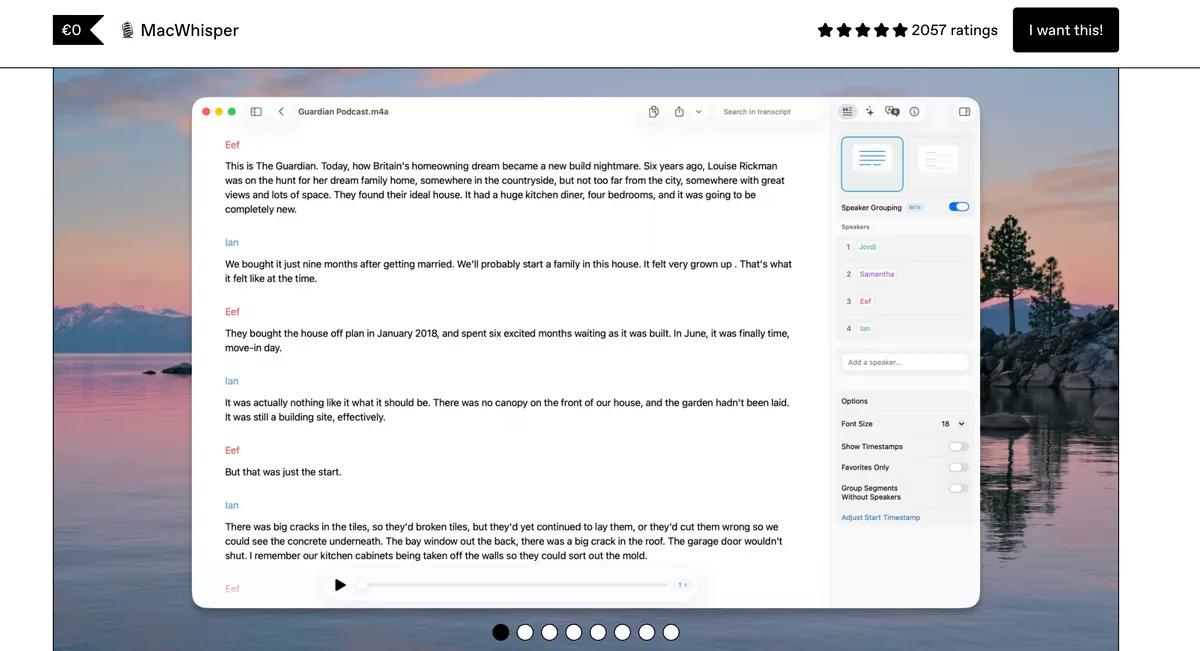
MacWhisper is a Mac transcription app from Jordi Bruin, operating as Good Snooze — a respected indie developer. It runs OpenAI's Whisper model on-device (via whisper.cpp) to turn audio and video into text, entirely on your Mac. Drag in a file, paste a YouTube link, or record a meeting, and MacWhisper produces a transcript locally — no cloud round-trip required.
Its core capabilities are transcription-focused: batch/folder transcription, YouTube and URL transcription, rich export (SRT/VTT subtitles, DOCX, PDF, Markdown, HTML, CSV), speaker diarization (beta), and system audio recording with meeting auto-detection for Zoom, Teams, Webex, Skype, Chime, and Discord. It supports 100+ languages and, beyond Whisper, newer models like NVIDIA Parakeet. The Gumroad version also offers BYOK AI integration with multiple providers and a system-wide dictation feature that types into any text field.
One source of confusion worth clearing up: MacWhisper exists as two products. 'MacWhisper' on Gumroad is the full-featured Mac app with a one-time license; 'Whisper Transcription' on the App Store is the same developer's app, now a universal app that runs on iPhone (iOS 18+), iPad, Mac (macOS 15+), and Apple Vision, free with in-app purchases and slightly fewer AI options due to App Store rules. They share a foundation but differ on pricing and feature limits.
The Key Distinction: Transcription vs Dictation
Because this review sits on a dictation site, the most useful thing it can do is draw a clear line. MacWhisper and a dictation app sound similar — both turn speech into text with Whisper — but they solve different problems.
Transcription (MacWhisper's job): you already have a recording — an interview, a meeting, a video, a voice memo — and you want it converted to text. The work is asynchronous; you feed in a file and get a transcript out.
Dictation (a dictation app's job): you have no recording. You want to speak and have text appear, live, in whatever app you're using — an email, a document, a code editor, a chat box. The work is synchronous and happens inside your active app.
MacWhisper is outstanding at the first and includes a basic version of the second. A dictation-first tool like Voibe is built around the second: a global hotkey, real-time insertion at the cursor, custom vocabulary, Developer Mode for IDEs, Live Dictation, spoken punctuation, and hands-free operation. Neither replaces the other. The honest recommendation for a Mac user who does both is to run both — they are complementary, and both are on-device and paid once.
MacWhisper Pricing & Plans (2026)
MacWhisper comes in two versions with different pricing. The Gumroad version (MacWhisper) has a free tier and a one-time Pro license; the App Store version (Whisper Transcription) is free with in-app purchases. All figures are verified June 2026 — confirm the exact Gumroad euro price on the page, as it is listed in EUR.
Gumroad — MacWhisper (Mac)
| Plan | Price | Notes |
|---|---|---|
| Free | $0 | Basic local transcription with standard models |
| Pro (lifetime) | ~€64 (~$69) one-time | Batch, larger models, AI providers, system-wide dictation |
| Bulk licenses | 5 / 10 / 20 / 50 packs | Per-seat discounts; 25% off for students, journalists, nonprofits |
App Store — Whisper Transcription (Mac + iOS)
| Plan | Price | Notes |
|---|---|---|
| Pro Monthly | $6.99/mo | Subscription |
| Pro Yearly | $29.99/yr | Subscription |
| Pro Lifetime | $99.99 | One-time (a $89.99 tier also appears) |
| Assistant add-on | $9.99/mo or $89.99/yr | Optional cloud transcription + AI chat |
| Pro + Assistant bundle | $12.99 | Combined |
The On-Device Mac Stack
MacWhisper is not a tool you compare to a dictation app on price — they do different jobs. The useful framing is the combined on-device stack for someone who needs both transcription and dictation:
| Setup | Cost | What it covers |
|---|---|---|
| MacWhisper Pro (Gumroad) | ~$69 once | File & meeting transcription |
| Voibe | $149 once | Real-time dictation |
| Both (Mac stack) | ~$218 once | Transcription + dictation, with an on-device mode |
| Cloud dictation subscription (e.g. Wispr Flow) | $432 over 3 years | Dictation only, cloud |
The two tools together (~$218, paid once) cost less than three years of a single cloud dictation subscription. For the full MacWhisper plan breakdown, see our MacWhisper Pricing 2026 guide; for the dictation side, the Mac dictation app pricing hub. The EARLYBIRD offer brings Voibe Lifetime from $149 to $119.
Does MacWhisper Have a Lifetime Deal? (2026)
Effectively yes — MacWhisper Pro is already sold as a lifetime deal: the Gumroad license is a one-time €64 (~$69 USD) purchase with lifetime updates, and the App Store version (Whisper Transcription) sells a $99.99 Pro Lifetime in-app purchase. There is no time-limited lifetime-deal campaign to wait for on official store pages as of June 2026 — the standard one-time price is the lifetime license, and the only published discount on it is the 25% code for students, journalists, and nonprofits (~€48 / ~$52). The full plan-by-plan breakdown is in our MacWhisper Pricing 2026 guide, and for how every pay-once option in the category compares, see our roundup of the best dictation app lifetime deals.
What that lifetime license buys is file transcription — the distinction this review keeps returning to. MacWhisper Pro covers batch folder processing, larger Whisper models, subtitle export, and meeting transcription; system-wide dictation is included on the Gumroad version but is a secondary feature. Voibe’s lifetime license is the dictation-side equivalent: $149 one-time on Mac, or $119 with code EARLYBIRD (20% off, limited licenses), for real-time system-wide dictation into any Mac app with Custom Vocabulary and Developer Mode for VS Code and Cursor.
The honest caveat: MacWhisper’s lifetime price is lower than Voibe’s. If your workflow is transcribing pre-recorded audio and video, MacWhisper Pro at ~$69 is the cheaper and correct lifetime purchase — Voibe would be the wrong category at any price. If your workflow is dictating into Mac apps all day, Voibe Lifetime is the purpose-built buy, and MacWhisper’s secondary dictation is not what its €64 is priced for.
- Buy MacWhisper Pro (~$69 lifetime) if you transcribe files, meetings, and videos.
- Buy Voibe Lifetime ($149, or $119 with code EARLYBIRD) if you dictate into Mac apps in real time.
- Buy both (~$188–$218 one-time) for a complete on-device transcription-and-dictation stack — still less than three years of Wispr Flow Pro annual at $432 (see MacWhisper vs Wispr Flow).
Key Takeaway
MacWhisper Pro is effectively a permanent lifetime deal — €64 (~$69) one-time on Gumroad or $99.99 lifetime on the App Store, covering file transcription — while Voibe Lifetime ($149 one-time on Mac, $119 with code EARLYBIRD) is the buy-once license for real-time system-wide dictation.
Performance & Accuracy
Accuracy: MacWhisper is widely praised for accuracy, especially with the larger Whisper models. One Product Hunt reviewer wrote that 'the accuracy, especially when using the largest model, is FANTASTIC.' Because you choose the model, you can trade speed for precision: smaller models are fast, the largest models are the most accurate but slower, and newer options like NVIDIA Parakeet add more choices.
Speed and processing: Transcription runs on-device, GPU/Metal-accelerated via whisper.cpp, so performance scales with your Mac's hardware and the model you pick. Batch transcription lets you queue whole folders. There is no network dependency for core transcription, so large jobs run reliably offline.
Multi-speaker limits: Speaker diarization (labeling who said what) is in beta and can occasionally split one speaker into several, so multi-speaker transcripts may need light manual cleanup. For single-speaker recordings — voice memos, solo videos, dictated notes — this is not a factor.
MacWhisper Privacy & Data Handling
MacWhisper's privacy story is one of its strongest selling points, with one clear exception to understand.
On-Device by Default
Core transcription runs entirely on your Mac using Whisper via whisper.cpp. Your audio is never uploaded for the local transcription path — one reviewer described it as a 'private transcription assistant that never phones home.' For sensitive recordings — interviews with confidential sources, medical or legal audio, internal meetings — this on-device architecture is a genuine advantage over cloud transcription services.
The Cloud Exception: Assistant
The App Store version offers an optional Assistant add-on that uses cloud AI for transcription and chat. That feature, by definition, sends data off-device, so if you enable it the on-device guarantee no longer applies to that path. The core local transcription remains on-device; the cloud behavior is opt-in and separately priced.
Indie, Not Audited
MacWhisper is an indie product without formal SOC 2 or HIPAA attestations. For most individuals, on-device processing is a stronger practical privacy posture than a cloud tool's policy promises — but organizations that require audited compliance should note the absence.
How This Compares to Dictation
The same on-device principle is available in Voibe for real-time dictation: in on-device mode Whisper runs locally on Apple Silicon and nothing leaves your Mac, and there is also a private zero-retention cloud mode that runs open-source models and discards audio the moment transcription completes. Either way, your audio is never stored, sold, or used to train AI. If you value MacWhisper's on-device privacy for transcription, the same on-device option is available for dictation. See our cloud vs local dictation guide for the architectural breakdown.
Is MacWhisper Safe? The Direct Answer
Yes — MacWhisper is one of the safest transcription apps you can put on a Mac, for a simple structural reason: its core transcription never touches the internet. Whisper runs on your machine via whisper.cpp, so your audio is not uploaded anywhere, works fully offline, and — as one reviewer put it — the app 'never phones home.' You cannot leak, breach, or subpoena a recording that only ever existed on your own laptop, which is why on-device processing is a stronger practical posture than any cloud transcription service's policy promises. MacWhisper also comes from a trusted, long-established indie developer (Jordi Bruin / Good Snooze), is distributed through Gumroad and the Mac App Store, and has no public record of a data breach.
The one caveat to understand: the optional cloud Assistant add-on on the App Store version uses cloud AI for transcription and chat, and by definition that path sends data off-device. It's opt-in and separately priced — leave it off and the on-device guarantee holds; turn it on and that specific feature no longer keeps your data local. The other honest note is compliance paperwork, not safety: as an indie app, MacWhisper carries no SOC 2 or HIPAA attestation, so teams that require audited certifications should weigh that even though the on-device architecture itself is privacy-protective.
Put simply: for the recordings you care about most — confidential interviews, medical or legal audio, internal meetings — MacWhisper's default local processing is exactly the model you want, because the file never leaves your Mac. That's the same architecture Voibe uses in its on-device dictation mode, covered in our cloud vs local dictation guide and across the wider offline dictation apps field.
Key Takeaway
MacWhisper is safe: core transcription is fully on-device, so audio never leaves your Mac, works offline, and can't be leaked from a server that never had it. The only caveat is the optional cloud Assistant add-on (opt-in, sends data off-device) and the absence of formal SOC 2/HIPAA attestations for a solo-dev app.
MacWhisper Pros & Cons
Pros
- Excellent on-device transcription accuracy — especially with the larger Whisper models
- Best-in-class file and batch transcription — drag-and-drop, folders, YouTube URLs, meeting recording
- One-time pricing — ~€64 (~$69) Gumroad lifetime, with a usable free tier
- Rich export and meeting features — SRT/VTT subtitles, DOCX/PDF/Markdown, diarization (beta), meeting auto-detection
- Loved, fast-moving indie app — frequent updates from Jordi Bruin / Good Snooze
- Bulk licenses and discounts — 25% off for students, journalists, and nonprofits; MDM support
Cons
- Primarily a transcription tool — real-time dictation exists but is a secondary feature
- Mac + iOS only — no Windows, Linux, or Android
- Full features require Pro — batch, larger models, and AI are gated
- Two different products — Gumroad 'MacWhisper' vs App Store 'Whisper Transcription' can confuse buyers
- Diarization is beta — may split one speaker into several
- Cloud AI (Assistant) is a separate subscription with its own privacy considerations
What Reviewers Say About MacWhisper
Third-Party Ratings
MacWhisper is well-rated, with the most representative sample on the App Store — now a combined universal listing spanning iPhone, iPad, Mac, and Apple Vision.
| Platform | Rating | Sample Size | What It Reflects |
|---|---|---|---|
| App Store (universal) | 3.9/5 | 161 ratings | Combined universal listing across iPhone, iPad, Mac, and Apple Vision |
| Product Hunt | No verified score | Enthusiast reviews | Positive qualitative sentiment; no verifiable numeric rating |
The App Store 3.9/5 across 161 ratings is the figure to anchor on — the combined universal listing now covers iPhone, iPad, Mac, and Apple Vision in a single score. Product Hunt sentiment is very positive among enthusiasts, though no numeric Product Hunt rating could be verified.
What Users Praise
Reviewers consistently cite accuracy and value. On Product Hunt, Johann Ziegel wrote, 'I could not imagine my work anymore without this tool... One of the best value for money tools I have ever bought,' and Jonas Maaløe praised 'the selection of features that get added at a rapid pace.' The combination of on-device privacy, accuracy, and a one-time price is the recurring theme.
What to Weigh
The honest caveats are scope and platform: it is a transcription app first (not a dictation-first tool), Mac + iOS only, and its advanced features are behind Pro. For the cost detail, see our MacWhisper pricing guide; for how it sits next to raw Whisper, see MacWhisper vs OpenAI Whisper.
MacWhisper Alternatives: The Best Options in 2026
The right alternative depends on the job you actually need done. If you want transcription, MacWhisper is already near the top; the alternatives below matter most if your real need is dictation, cross-platform reach, or raw open-source Whisper.
This section covers the shortlist. For the wider field — eleven tools compared on price, platform and what each is actually built for — see our roundup of the 10 best MacWhisper alternatives.
Voibe — Best for Real-Time Dictation on Mac

Voibe is the dictation-first counterpart to MacWhisper. Where MacWhisper transcribes files, Voibe lets you speak and have text appear live in whatever app you're using. It gives you a choice of modes: an on-device mode that runs OpenAI Whisper locally on Apple Silicon (nothing leaves your Mac, works fully offline, no account), or a private zero-retention cloud mode that runs open-source models and deletes audio the moment transcription completes. At $7.50/month or $149 lifetime ($119 with code EARLYBIRD), it shares MacWhisper's pay-once philosophy. Your audio is never stored, sold, or used to train AI.
Why Voibe is the dictation half of the stack:
- Real-time insertion at the cursor — dictate into email, docs, code, and chat as you work
- On-device mode: audio transcribed locally and discarded, no cloud, no account (or a private zero-retention cloud mode)
- Custom vocabulary for names, jargon, and technical terms
- Developer Mode resolves VS Code, Cursor, and Windsurf file and folder names when you dictate
- Live Dictation shows your words on-screen as you speak; hands-free dictation via Fn+Space
- Spoken punctuation and structure commands processed on-device
Trade-offs: Voibe does not do file/batch transcription the way MacWhisper does — it is built for live dictation, not converting recordings. That's exactly why the two pair so well. If your job is transcription, keep MacWhisper; if it's dictation, add Voibe. Try Voibe for free →
Superwhisper — On-Device Dictation Power User
Superwhisper is another on-device Mac dictation app, at $249.99 lifetime, with the most flexible mode system in the category. Like Voibe, it is dictation-first rather than transcription-first, so it complements MacWhisper rather than replacing it. It is more configurable but more complex and more expensive than Voibe. See MacWhisper vs Superwhisper for the head-to-head.
OpenAI Whisper — The Free Open-Source Model
OpenAI Whisper is the open-source model MacWhisper is built on — free under the MIT license, on GitHub. It is the right choice for developers who want to script their own pipeline, but it has no GUI, no real-time dictation, and requires setup. MacWhisper exists precisely to wrap Whisper in a polished Mac app. See MacWhisper vs OpenAI Whisper and how Whisper works for the model-vs-product distinction.
VoiceInk — Open-Source On-Device Dictation
VoiceInk is an open-source Mac dictation app that runs Whisper locally at around $29 one-time (or a free source build). Like Voibe and Superwhisper, it is dictation-first and on-device, and genuinely auditable because the code is open. It is less polished than MacWhisper and serves a different job (dictation, not file transcription). See MacWhisper vs VoiceInk.
Frequently Asked Questions About MacWhisper
Basics
What is MacWhisper?
MacWhisper is an on-device Mac transcription app from Jordi Bruin (Good Snooze) that runs Whisper locally to turn audio and video into text. It handles file and batch transcription, YouTube URLs, meeting recording, subtitle export, and more. It comes as 'MacWhisper' on Gumroad (Mac) and 'Whisper Transcription' on the App Store (Mac + iOS).
Is MacWhisper a dictation app?
Primarily no — it's a transcription app. It includes a secondary system-wide dictation feature, but for real-time dictation into apps, a dictation-first tool like Voibe is purpose-built.
Pricing
How much does MacWhisper cost?
The Gumroad version has a free tier and a one-time Pro license around €64 (~$69). The App Store version is free with in-app purchases: Pro at $6.99/mo, $29.99/yr, or $99.99 lifetime, plus an optional cloud Assistant add-on.
Is MacWhisper free?
There's a free tier for basic local transcription. Advanced features (batch, largest models, AI, more exports) require Pro.
Privacy & Accuracy
Does MacWhisper work offline?
Yes — core transcription is on-device via Whisper and works without internet. The exception is the optional cloud Assistant add-on, which sends data off-device.
Is MacWhisper accurate?
Yes, especially with the larger Whisper models. Speaker diarization is beta and may need cleanup on multi-speaker audio.
Comparisons
MacWhisper vs Voibe?
MacWhisper transcribes recordings; Voibe dictates live into apps. Many people run both — about $218 once for the stack. See our full Voibe vs MacWhisper comparison for the head-to-head.
What is the best MacWhisper alternative?
For dictation: Voibe ($149 lifetime) or Superwhisper ($249.99). For raw open-source Whisper: OpenAI Whisper. For open-source dictation: VoiceInk (~$29).
Final Verdict: Should You Use MacWhisper in 2026?
MacWhisper is one of the best on-device transcription apps on the Mac, and at around €64 (~$69) one-time it is genuinely excellent value. For converting recordings into text — interviews, meetings, lectures, video subtitles — it is accurate, private (audio stays on your Mac), feature-rich, and beloved by its users. As a transcription app, it earns its 7.5/10.
The only thing to be clear-eyed about is scope. MacWhisper is built for transcribing files, not for dictating into apps. It includes a system-wide dictation feature, but that is secondary to its design — so if your real need is speaking text into your work in real time, you'll be happier with a dictation-first tool.
If you need to transcribe audio and video on a Mac, buy MacWhisper — it's a top pick. If you need real-time dictation, Voibe runs Whisper on Mac for $149 lifetime and is built for exactly that — live insertion at the cursor, custom vocabulary, Developer Mode for IDEs, Live Dictation, and hands-free operation, with a fully on-device mode or a private zero-retention cloud mode. And if you need both, run both: the stack is about $218 paid once, less than three years of a cloud dictation subscription. For an on-device dictation power-user app, Superwhisper is the alternative.
Related reading:
- MacWhisper Pricing 2026: full plan breakdown
- MacWhisper vs OpenAI Whisper
- Apple Dictation vs MacWhisper — one types live, one transcribes files: pick by job
- MacWhisper vs Superwhisper
- MacWhisper vs VoiceInk
- MacWhisper vs Wispr Flow
- Superwhisper review
- How Whisper works
- Best offline dictation apps
- Cloud vs local dictation
- Mac dictation app pricing hub
Tip
MacWhisper is the on-device pick for transcribing recordings on a Mac. For real-time dictation — speaking into your apps as you work — Voibe runs Whisper for $149 lifetime ($119 with EARLYBIRD), with an on-device mode or a private zero-retention cloud mode, built for live dictation. Run both for a complete stack (~$218 once). Try Voibe free at getvoibe.com.
Verdict
MacWhisper is one of the best on-device transcription apps on the Mac, and at around €64 (~$69) one-time it is excellent value. It earns a 7.5/10. For turning recordings into text — interviews, meetings, lectures, video subtitles — it is polished, accurate, private (audio stays on your Mac), and loved by its users. The one thing to be clear about is scope: MacWhisper is built for transcribing files, not for dictating into apps all day. It does include a system-wide dictation feature, but that is secondary to its core job. If your need is transcription, MacWhisper is a top pick. If your need is real-time dictation — speaking text into emails, documents, code, and chat as you work — that is a different tool: Voibe offers on-device transcription (Whisper on Apple Silicon) or a private zero-retention cloud mode for $149 lifetime and is built for live dictation. Many Mac users happily run both: MacWhisper for files, Voibe for dictation, paid once.
Best AI Dictation and Meeting Notes for Confidential Work
Draft letters, notes and emails 5x faster. Get meeting notes without a bot joining your call. Nothing used to train AI.
- Mac + Windows
- No bot in your calls
- Nothing used to train AI
- 7-day free trial
Want to compare plans first? View pricing →
Related Articles
Apple Dictation vs MacWhisper: One Types Live, One Transcribes Files
Apple Dictation types what you say, live. MacWhisper (~$69 once) transcribes recordings. Most people comparing them need to pick a job, not an app.
How to Dictate in Microsoft Word: Speech to Text With or Without 365
Word's Dictate button needs Microsoft 365 — the other two paths don't. How to set up all three ways to dictate in Microsoft Word, greyed-out button included.
How to Dictate in Google Docs: Voice to Text With or Without Chrome
Google Docs voice to text, two ways: free Voice Typing if you live in Chrome, or a system-wide on-device tool for any browser and every app. Setup and fixes.