
RSI Prevention for Computer Users: The Lever Everyone Skips
Ergonomic advice fixes your posture and leaves the workload alone. The RSI prevention lever computer users keep skipping — and a one-week plan to pull it.

You've read the RSI advice: sit straight, raise the monitor, buy the chair. And your forearms still ache at 4pm. That's because the standard advice fixes your posture and leaves the workload alone — your hands still make thousands of small repetitive motions a day, and the NHS is blunt about what causes RSI: pain from repeated movement. Prevention that ignores the repetition count is rearranging the furniture around the problem. I type a fraction of what I used to — most of my workday goes through dictation — and that shift is the lever this guide is really about.
TL;DR: RSI prevention for computer users comes down to three levers, pulled together: setup (a workstation that lowers strain per keystroke — the OSHA computer workstation guidance is the free reference), pacing (short frequent breaks and task variation, so load arrives in doses your tissues recover from), and load (fewer keystrokes in the first place — text expansion, autofill, and voice dictation for the high-volume writing). Most people stop after the first lever. The third is where the biggest reduction lives, and it deserves the most attention.
Key Takeaways: The Three Levers of RSI Prevention
| Lever | What it changes | Highest-impact moves |
|---|---|---|
| 1. Setup | Strain per keystroke | Neutral wrists, split or low-force keyboard, vertical mouse or trackball, monitor at eye height |
| 2. Pacing | Recovery between loads | Micro-pauses every 20–30 minutes, hourly posture changes, task variation, a break reminder app |
| 3. Load | Total repetitions per day | Dictate high-volume writing, text expansion for boilerplate, autofill for credentials, hotkey navigation |
The levers compound: a good setup makes each keystroke cheaper, pacing gives tissues recovery windows, and load reduction shrinks the number of keystrokes the first two levers have to cope with.
What RSI Is — and Why Computer Users Are the Classic Case
Repetitive strain injury is an umbrella term, not a single diagnosis. The NHS uses it for pain caused by repeated movement of part of the body, with symptoms that develop gradually: aching, burning, or throbbing pain, stiffness, weakness, tingling, numbness, cramp, and swelling — most often in the shoulders, elbows, forearms, wrists, hands, and fingers. Specific conditions such as carpal tunnel syndrome and tendinitis sit under the umbrella, which is why persistent symptoms deserve a clinician's diagnosis rather than guesswork about gear.
Computer work is the classic RSI setting because it combines the three ingredients: high repetition (typing and mousing all day), low variation (the same small motions in the same posture), and long duration (careers, not projects). None of the three is dangerous in a single afternoon; the pattern across months is what accumulates. That framing is also the good news — every ingredient is modifiable, and you do not need to be in pain yet for modifying them to be worth it.
One boundary before the practical part: this is a work-habits guide, not a medical one. If you already have persistent pain, numbness, or weakness, the right first step is a clinician — the NHS pathway includes physiotherapy and occupational therapy — and the right reading is our dictation software comparison for RSI, which covers working through symptoms rather than preventing them.
Lever 1 — Setup: Lower the Strain per Keystroke
The setup lever is the one most RSI advice covers, so this section stays brief and points at the primary source: OSHA's free computer workstations eTool walks through monitor, keyboard, mouse, chair, and lighting positioning, with checklists — and is explicit that there is no single correct posture for everyone.
The changes with the most leverage for hands and wrists specifically:
- Neutral wrists. Wrists in line with the forearms — not bent up at a raised keyboard edge, not deviated outward toward a too-narrow keyboard. Split and tented keyboards exist to make neutral the default rather than an effort.
- Lower-force keys. Mechanical switches in the 35–45g actuation range reduce the peak force per keystroke compared with stiff laptop scissor switches. Larger keycaps reduce precision demands.
- A pointing device that doesn't pronate the forearm. A vertical mouse keeps the forearm in a handshake position; a trackball removes whole-arm travel. Alternate between two devices if mousing dominates your day.
- Monitor at eye height, close enough to read without craning. Neck and shoulder tension changes how the whole arm carries load.
- Laptop-only is the worst default. A laptop couples the screen to the keyboard, so one of neck or wrists always loses. An external keyboard or a stand plus external input turns a laptop into a configurable workstation.
Setup is worth doing properly once — and it is still only the first lever, because it changes the cost of each repetition without changing how many repetitions there are.
Key Takeaway
Workstation setup lowers the strain of each keystroke but leaves the keystroke count untouched. Do it once, do it properly — OSHA's free eTool is the reference — then move to the levers that address the repetition itself.
Lever 2 — Pacing: Give Tissues Time to Recover
Repetitive strain accumulates when load arrives faster than tissues recover. Pacing controls the arrival rate. Occupational health guidance — the NHS advice on RSI includes taking regular breaks and adjusting tasks with your employer — consistently favors short, frequent interruptions over occasional long ones.
A practical pattern:
- Micro-pauses every 20–30 minutes. Hands off the keyboard, arms relaxed, roll the shoulders, look away from the screen. Twenty seconds counts. The point is interrupting the sustained posture, not resting for minutes.
- A real posture change every hour. Stand, walk, stretch — anything that swaps the loaded structures.
- Task variation. Batch your day so typing-heavy blocks alternate with meetings, reading, or review rather than stacking back-to-back.
- Automate the remembering. Break discipline decays by mid-afternoon exactly when fatigue makes it matter most. macOS break reminder apps (Time Out, Stretchly, and similar) or even repeating timers outsource the memory.
Pacing is free and it works with the other levers rather than instead of them: micro-pauses between dictated paragraphs happen naturally, because your hands are already resting while you speak.
Lever 3 — Load: Type Less Without Producing Less
The lever most prevention advice skips is the most direct one: reduce the number of repetitions. A computer user's repetition budget is spent overwhelmingly on text entry, and much of that text does not need to be typed.
Dictate the high-volume writing
Email, documents, Slack and Teams messages, meeting notes, tickets — the long-form bulk of a knowledge worker's output — can move to voice. Speaking uses the vocal apparatus instead of finger flexion, so the repetitive hand load for that output drops to nearly zero while the output itself stays constant. This is the same intervention the Job Accommodation Network lists as a standard accommodation for cumulative trauma conditions — applied before injury instead of after.
One detail decides whether dictation actually reduces load: the activation model. An app that requires holding a key while you speak replaces keystroke repetition with a sustained hold — a strain pattern of its own. Voibe — the app we build — uses Hands-Free Mode: double-tap to start, hands rest while you speak, double-tap to stop, with the hotkey remappable to a single key or a USB foot switch. On Mac, Live Dictation streams your words into a floating window as you speak, and there is no length cap forcing re-activation taps mid-thought. Processing is on-device on Apple Silicon Macs (or a private zero-retention cloud), the free tier needs no signup, and the Memory feature inserts saved text blocks from a spoken trigger — keystrokes that never happen. The full comparison, including free options like Talon and Apple Dictation, is in our best dictation software for RSI roundup.
Stop retyping what a tool can insert
- Text expansion (macOS Text Replacement, Raycast snippets, TextExpander): short trigger in, full signature, address, or boilerplate paragraph out.
- Autofill and password managers (Keychain, 1Password, Bitwarden): credentials, addresses, and payment details inserted, not typed.
- Hotkey-driven navigation (Spotlight, Raycast, Alfred): a few keystrokes replace mouse trips through menus.
- Templates for anything you write more than weekly: status updates, review comments, onboarding replies.
Each of these subtracts keystrokes permanently. Together with dictation for the long-form writing, most knowledge workers can cut their daily hand load by more than half without producing a word less — that arithmetic is the heart of prevention.
Key Takeaway
Load reduction is the prevention lever most advice skips: dictating high-volume writing, expanding boilerplate, and autofilling credentials can cut a knowledge worker's daily hand load by more than half with output unchanged.
Early Warning Signs: When Prevention Needs to Escalate
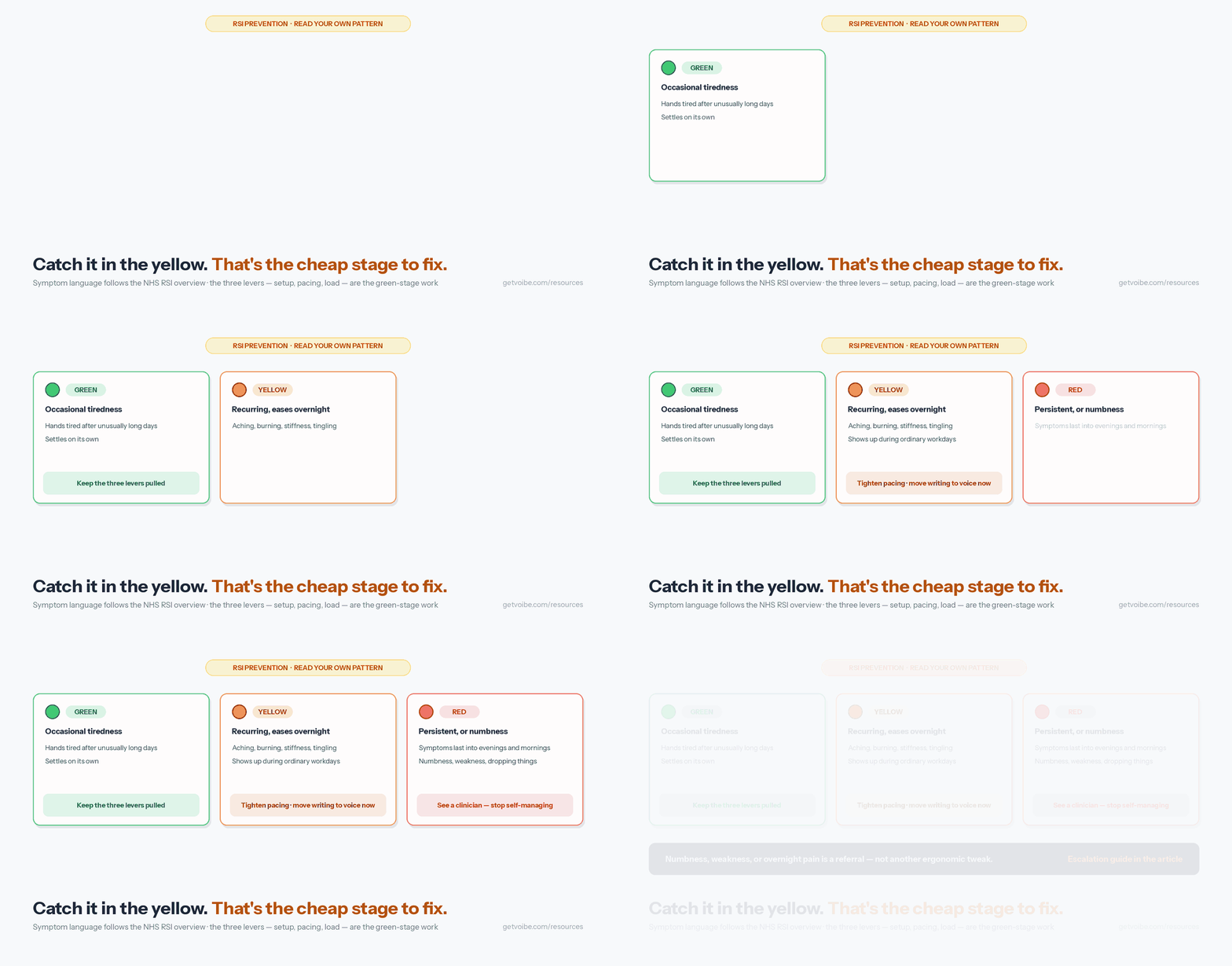
RSI symptoms develop gradually, which makes the early stage easy to rationalize away — and the easiest stage to fix. A useful way to read your own pattern:
- Green — occasional tiredness in the hands after unusually long days. Normal. Keep the three levers pulled.
- Yellow — recurring aching, burning, stiffness, or tingling that shows up during ordinary workdays and eases overnight. The load is outrunning recovery. Tighten pacing, and move more writing to voice now rather than after it worsens; the NHS lists exactly this kind of gradual-onset pain as the signature of RSI.
- Red — symptoms that persist into evenings and mornings, numbness, weakness, or dropping things. Stop self-managing. See a clinician (GP, physiotherapist, or occupational health) for a diagnosis — carpal tunnel, tendinitis, and nerve entrapments each have different treatment paths, and the earlier the clinical input, the more of those paths stay open.
If work is a driver, the escalation can be formal: the Job Accommodation Network documents accommodations for cumulative trauma conditions, and our reasonable accommodation guide walks through requesting dictation software with an HR template. If you already have a diagnosis, the condition-specific pages on our accessibility dictation hub — carpal tunnel, tendinitis, arthritis, hand pain — go deeper than this prevention guide can.
Warning
Numbness, weakness, dropping objects, or pain that persists overnight are signals for a clinician, not for another round of ergonomic tweaks. This guide covers work habits; diagnosis and treatment belong with your doctor, physiotherapist, or occupational therapist.
A One-Week Prevention Starting Plan
The three levers translate into a week of small setup steps:
- Day 1 — audit the workstation against the OSHA checklist. Fix monitor height and wrist angles with what you own; list any gear worth buying (split keyboard, vertical mouse) rather than panic-purchasing.
- Day 2 — install a break reminder and set micro-pauses at 25 minutes. Let it interrupt you for one full workday before judging it.
- Day 3 — set up text expansion and autofill. Move your five most-retyped snippets (signature, address, standard replies) into macOS Text Replacement or Raycast; confirm your password manager autofills everywhere you log in.
- Day 4 — try dictation on one real task. Download Voibe (free, no signup), turn on Hands-Free Mode, and dictate one day's email. Note how it feels to end a writing-heavy day with your hands having done a fraction of the work.
- Day 5 — move one recurring document type to voice. Meeting notes and status updates are the usual first wins; add your project's jargon to the Dictionary if terms come out wrong.
- Weekend — check the pattern. Which hours still concentrated typing? That block is next week's dictation or template candidate.
None of these steps requires being in pain to justify it. The whole point of pulling the levers now is never finding out what the red-zone version of this article feels like to need.
On equipment: our keyboards-for-arthritis guide covers the same feature set that matters for RSI — actuation force, split layouts, tenting, and negative tilt — with the free posture adjustments listed before the purchases.
Related Reading
- Best Dictation Software for RSI — The companion comparison: seven tools ranked by activation model, for when you are choosing the dictation half of the load lever.
- Accessibility Dictation Hub — Condition-by-condition dictation guidance: carpal tunnel, arthritis, tendinitis, hand pain, post-surgery, and more.
- How to Type With Carpal Tunnel — If your symptoms already point at the median nerve, the CTS-specific setup and workflow guide.
- Typing With Arthritis — Joint-protection principles applied to computer work.
- Dictation as a Reasonable Accommodation — Requesting dictation software at work, with an HR template.
- Why Offline Dictation Matters — Why on-device processing matters once your dictation includes health context.
- OSHA Computer Workstations eTool — The free workstation-setup reference with checklists.
- NHS: Repetitive Strain Injury — Clinical overview of symptoms, causes, and treatment paths.
- Job Accommodation Network: Cumulative Trauma Conditions — U.S. workplace accommodation reference covering RSI.
Frequently Asked Questions
What is RSI, exactly?
Does an ergonomic keyboard prevent RSI on its own?
How often should I take breaks from typing?
Can dictation software actually prevent RSI, or is it only for people who already have it?
What early symptoms mean I should change something now?
Is RSI a recognized reason for workplace adjustments?
Best AI Dictation and Meeting Notes for Confidential Work
Draft letters, notes and emails 5x faster. Get meeting notes without a bot joining your call. Nothing used to train AI.
- Mac + Windows
- No bot in your calls
- Nothing used to train AI
- 7-day free trial
Want to compare plans first? View pricing →
Related Articles
I Ranked 7 Dictation Apps for RSI — Most Fail One Simple Test
Push-to-talk just moves RSI strain from typing to a held key. How I ranked 7 dictation apps for RSI — and the one test that decides the whole list.
Best Dictation Software for ADHD (2026): 8 Tools Compared
Compared 8 dictation tools for ADHD writers. Voibe captures thought at the speed of speech with Continuous Transcription and an on-device mode; honest takes on Wispr Flow, Superwhisper, Otter, Apple Dictation, and more.
Voice Typing for ADHD Writers: A Practical Guide (2026)
How to use voice typing for ADHD: set up low-friction dictation on a Mac, run the Capture-First Draft to beat the blank page and working-memory drop, and tame rambling.