
The Best Microphone for Dictation Is Probably One You Already Own
Most dictation errors aren't microphone problems. The five-minute test that tells you which kind you have — and the mics worth buying if it is.

Before you spend $300 on a microphone: open your dictation app, say a paragraph into your laptop's built-in mic, then say the same paragraph into the wired earbuds in your bag. If the earbuds win clearly, a better microphone will help you. If they come out about the same, the microphone was never your bottleneck and no amount of money will change that.
The short version: for dictation specifically, two things determine audio quality — how close the capsule sits to your mouth, and whether the pickup pattern is directional. A $30 headset that gets both right outperforms a $300 desk microphone sitting 50 cm away. And a large share of the errors people blame on microphones are actually vocabulary errors, which no microphone fixes.
We do not run an affiliate program and we earn nothing from any link on this page, so the recommendations here are shorter and less enthusiastic than the ones you will find elsewhere. Most people need one of the first two items on the list.
Key Takeaways: What to Buy, If Anything
| Your situation | What to get | Cost |
|---|---|---|
| You haven't tested anything yet | The wired earbuds you already own | $0 |
| You dictate a few hours a week, quiet room | A cheap speech-oriented USB headset (Andrea NC-181VM class) | ~$30 |
| You dictate daily and share a space | A dynamic USB mic on a boom — Samson Q2U or Audio-Technica ATR2100x-USB | ~$50–$70 |
| Dictation is most of your working day | SpeechWare FlexyMike Dual Ear Cardioid | ~$150–$289 |
| You also record podcasts or video | Shure MV7+ — but you're buying it for the podcast, not the dictation | ~$299 |
| Your errors are names and jargon | Nothing. Fix your custom vocabulary instead | $0 |
Prices verified 2026-08-11 and they move constantly — street prices on the mid-tier options in particular drift by $20 in either direction depending on the week and the retailer.
Key Takeaway
Distance and directionality are the whole game. A $30 headset worn correctly beats a $300 microphone sitting across the desk, and neither one fixes a vocabulary problem.
Why Distance Beats Price
Speech recognition does not care how expensive your microphone is. It cares about the ratio between your voice and everything else the mic picked up — the signal-to-noise ratio. There are only two practical levers on that ratio, and spending money is not directly one of them.
Lever one: get the capsule closer. Sound pressure from your voice falls off sharply with distance while the room's ambient noise stays roughly constant. A headset boom sitting 2–5 cm from your mouth therefore starts with an enormous advantage over a laptop lid mic 40–60 cm away, regardless of which capsule is technically better. This is why a cheap headset routinely embarrasses an expensive desk mic in dictation, and why the same expensive desk mic wins easily in a podcast where the host leans into it.
Lever two: make the mic directional. A cardioid pattern is most sensitive to what is directly in front of it and progressively rejects sound from the sides and rear. An omnidirectional capsule — which is what most laptops and many cheap earbuds use — treats your voice and your keyboard and the person on the phone behind you as equally interesting.
The directional-pickup principle is best documented in the hearing-aid literature, where studies comparing directional against omnidirectional processing in the same device report signal-to-noise improvements in the range of roughly 6–8 dB for speech in noise. That research is about hearing aids, not dictation headsets, so treat it as the underlying physics rather than a benchmark for your setup — but the mechanism is the same one your microphone is using, and it is why "cardioid" is the single most useful word on a spec sheet you are reading for dictation.
What this means in practice: when you compare two microphones, compare where they will actually sit. A boom or gooseneck that holds position near your mouth is doing more work than any frequency-response chart on the box.
Start Here: The Microphone You Already Own
Genuinely, before buying: try these in this order.
Wired earbuds with an inline mic. The $10 ones that came with an old phone. The mic sits near your jaw rather than across the room, it is wired so there is no Bluetooth codec in the path, and for a lot of people this is the end of the story. Unglamorous and frequently sufficient.
AirPods or similar wireless earbuds. Better than a laptop lid mic in most rooms, and convenient. The catch is Bluetooth: when a headset's microphone is active, some devices drop into a lower-quality audio profile, and the microphone path is not the same one your music uses. In practice AirPods are fine for dictation and noticeably not the best thing you own. Worth testing rather than assuming either way.
A gaming headset, if you have one. These are usually cardioid, usually on a boom, and usually already tuned for voice. Frequently the best microphone in the house for someone who never thought of it as one.
Your laptop's built-in mic. Modern MacBooks have capable built-in arrays and they still lose on distance, because physics. Fine for a quiet room and short bursts; the first thing to blame in a noisy one. It is also what most people actually use: in the State of AI Dictation report, 331 of 507 people dictated through a built-in laptop or desktop microphone and only 15 through AirPods or EarPods.
Test two or three of these against the same paragraph before spending anything. Most people find a clear winner they already had, and a meaningful number find the difference small enough that the real problem is elsewhere.
Tip
Test with the paragraph you actually dictate — an email, a note, a chunk of your real work — not a tongue twister. Recognition behaves differently on natural phrasing than on test sentences.
If You Do Want to Buy One: Four Picks, By How Much You Dictate
1. Andrea NC-181VM — around $30, the honest budget pick
A single-ear USB headset built specifically for speech recognition rather than for music or gaming, with a noise-cancelling boom mic, inline volume and mute. It is not a nice-feeling piece of hardware and it does not need to be. It puts a directional capsule next to your mouth over USB for about thirty dollars, which is the entire job. This is the one to buy if you tested your earbuds, saw a real improvement, and want the cheapest permanent version of that improvement.
2. Samson Q2U or Audio-Technica ATR2100x-USB — around $50–$70, the desk option
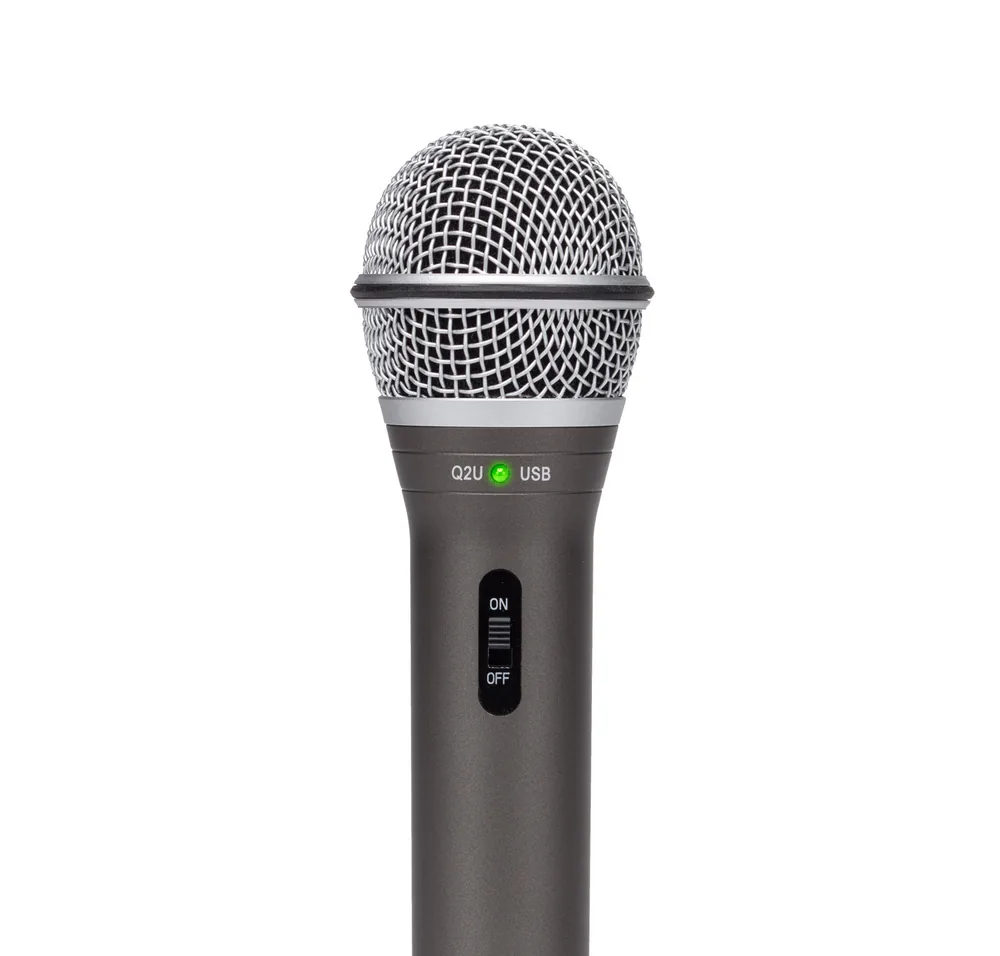
These two are close enough that you should buy whichever is cheaper on the day. Both are dynamic USB/XLR microphones, and the dynamic part is what makes them good for dictation in a shared space: dynamic capsules are far less sensitive to distant sound than the condenser mics that dominate this price bracket, so they hear you and largely ignore the room. Both list around $69.99 with street prices often lower — the ATR2100x-USB is regularly seen nearer $50.
The catch, and it is the whole catch: a desk mic only beats a headset if you actually keep it close. On a boom arm, positioned near your face, either of these is excellent. Sitting on the desk behind your keyboard, a $30 headset will beat both. Budget for the arm or buy the headset.
3. SpeechWare FlexyMike Dual Ear Cardioid — around $150 for the mic, about $289 bundled with SpeechWare's USB MultiAdapter
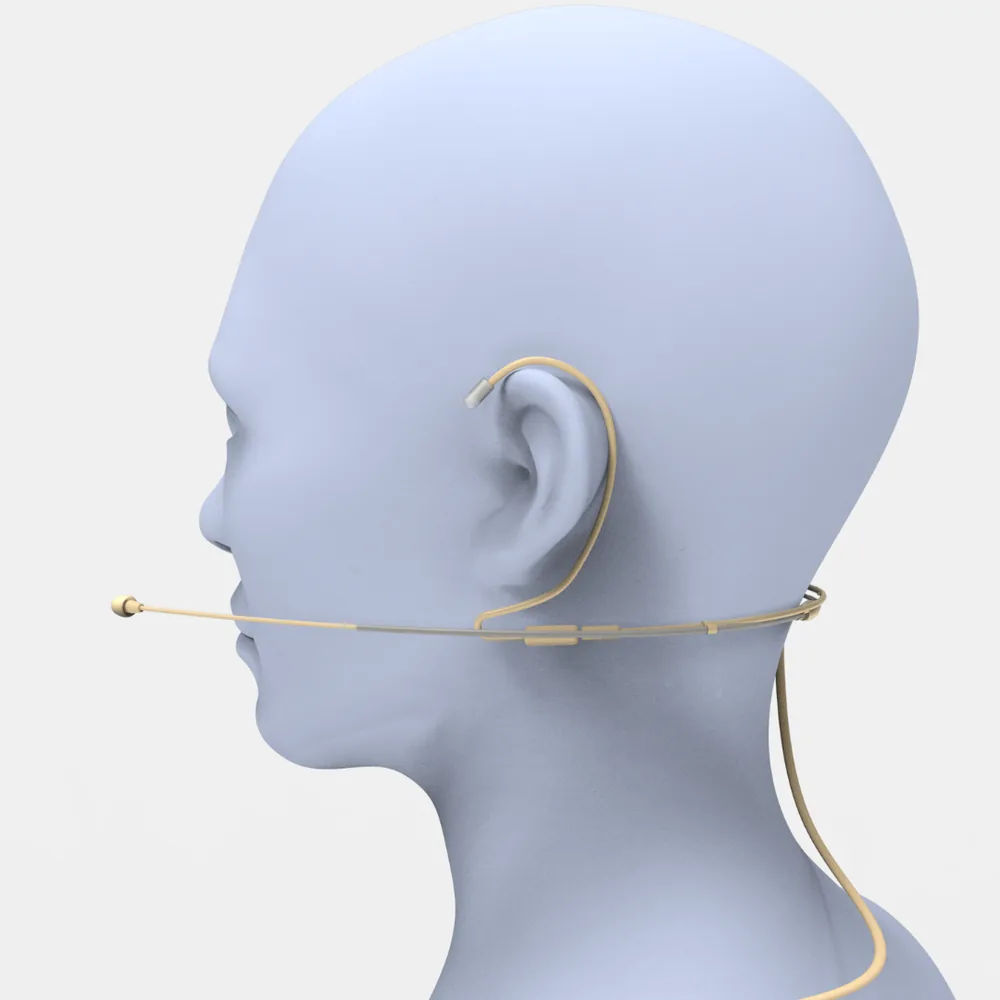
This is the enthusiast answer and the one long-time Dragon users keep recommending to each other. It is a very light dual-ear headset — roughly 25 grams — with a cardioid capsule on a flexible gooseneck, built for one purpose. Macworld's review called it one of the finest mics available for dictation on a Mac, which matches what the speech-recognition community has said about it for years.
Worth being clear about who this is for: someone who dictates for hours daily and for whom small reductions in correction time compound into real hours. If you dictate a few emails a day, this is a lot of money for a marginal gain over the $30 option. Note also that the bare mic is 3.5 mm — the price jumps when you add SpeechWare's USB adapter, and the adapter is a meaningful part of why the bundle performs.
4. Shure MV7+ — around $299, and probably not for dictation
Included because it comes up constantly. It is an excellent dynamic broadcast microphone with USB-C and XLR, auto level mode, and a digital pop filter. For dictation specifically, it is a $299 answer to a question the $30 headset already answered, and it has the same positioning problem as any desk mic. Buy it if you also record a podcast, stream, or take a lot of video calls where you want to sound good. Do not buy it to make your dictation more accurate.
When a Better Microphone Won't Fix It
This is the section most microphone roundups leave out, and it is the one that saves people money. Sort your errors by type before you sort microphones by price.
If it gets the same words wrong every time — it's vocabulary, not audio. Proper nouns, colleague names, product names, technical jargon, drug names, file and folder names. Your microphone is transmitting these perfectly; the model has simply never seen them and is guessing at the nearest common word. The fix is a custom vocabulary list in your dictation app, and it takes about twenty minutes. Most tools have one somewhere in settings; in Voibe — ours — it is the Dictionary, and it takes a bulk paste rather than one-at-a-time entry, which is the difference between a twenty-minute job and an evening. Worth knowing about a second category too: if the problem is not that a word comes out wrong but that you dictate the same block of text constantly — an address, a signature, standard phrasing — that is text expansion rather than vocabulary. Voibe calls it Memory: a short spoken trigger expands into the full block, so you stop dictating it at all. Neither of those is a hardware problem, which is the point — a $300 microphone will reproduce the same wrong word with beautiful fidelity.
If it cuts you off mid-thought — it's the software. Apple Dictation stops automatically after 30 seconds of silence, and that is documented behavior with no setting to extend it. No microphone affects this. See switching from Apple Dictation for what actually addresses it.
If punctuation and formatting are the problem — it's the software. Whether you get paragraph breaks, correct capitalization, and sensible commas is a function of what the app does with the transcript, not what the mic captured.
If it's slow — it's usually the architecture, not the audio. A cloud dictation tool sends your audio to a server and waits. On-device dictation does not. Our cloud versus local comparison covers the trade-off.
If accuracy collapses only in specific apps — that is a text-insertion problem, not a recognition problem, and it is worth reading why Mac dictation stops working before buying hardware.
The honest split from what we see: audio problems are real and a good headset fixes them, but they are a minority of the complaints people arrive with. Vocabulary and software account for most of it.
The Five-Minute Test Before You Buy Anything
Do this properly and you will know exactly what to spend, including possibly nothing.
- Pick a real paragraph. Something from your actual work — an email you would send, a note you would write. Roughly 100 words, and use it unchanged for every run.
- Dictate it three times: once into your laptop's built-in mic, once into wired earbuds, once into any headset you own. Same room, same time of day, same speaking voice.
- Count error types, not error counts. Mark each mistake as vocabulary (a name or term it has never seen), audio (a common word heard wrong), or software (punctuation, formatting, a session that ended early).
- Read the result. If the audio column shrinks a lot between the built-in mic and the earbuds, buy a microphone — you have a real audio problem and the fix is cheap. If the vocabulary column dominates in all three runs, close this page and go build a custom vocabulary list. If the software column dominates, the tool is the problem.
- Then repeat once in your worst room — the noisy one, the one with the fan. This tells you whether you need directional rejection or just proximity, which is the difference between the $30 pick and the $70 one.
Five minutes of this beats every microphone roundup on the internet, including this one, because it measures your voice in your room with your vocabulary.
The Bottom Line

Buy the $30 headset if your test showed an audio problem. Buy the $150 FlexyMike if you dictate for hours a day and the marginal gain is worth real money to you. Buy nothing if your errors are names and jargon, and spend the twenty minutes on a custom vocabulary list instead — that is the highest-return twenty minutes available in dictation and it costs nothing.
What we would push back on is the premise that better hardware is the natural next step. The dictation software you run makes a larger difference than anything in this price range: whether it can learn your vocabulary at all, whether it stops after 30 seconds, whether it processes on your machine or ships your audio to a server. Voibe — ours — runs Whisper on-device on Apple Silicon, takes a bulk-pasted custom vocabulary list, and costs $149 lifetime or $7.50/month, which is roughly one FlexyMike.
If you want to compare the software layer properly first, start with the speech-to-text app roundup or the free options — both sit under our dictation on Mac hub. Then, if audio is still your bottleneck, come back and buy the headset.
Frequently Asked Questions
What is the best microphone for dictation?
Does a better microphone actually improve dictation accuracy?
Is a USB headset better than a desk microphone for dictation?
Should I get a cardioid or omnidirectional microphone for dictation?
Are AirPods good enough for dictation?
How much should I spend on a dictation microphone?
Why does my dictation get names and technical terms wrong?
Does a microphone fix Apple Dictation stopping after 30 seconds?
Best AI Dictation and Meeting Notes for Confidential Work
Draft letters, notes and emails 5x faster. Get meeting notes without a bot joining your call. Nothing used to train AI.
- Mac + Windows
- No bot in your calls
- Nothing used to train AI
- 7-day free trial
Want to compare plans first? View pricing →
Related Articles
Best Free Dictation Apps for Windows: Two Are Already on Your PC
Five genuinely free ways to dictate on Windows — two ship with the OS. What each costs you in caps, cloud, and vocabulary, and when paying starts to make sense.
Dictation Not Working on Windows? 8 Fixes, From Win+H to Voice Access
Windows dictation usually 'breaks' in one of three boring ways: a mic permission, a privacy toggle, or no internet. Here's the 8-fix sequence that finds yours.
How to Use Dictation on Windows — Win+H, Voice Access, and the Setting Everyone Misses
Windows ships two dictation tools — one cloud, one offline — and one default setting that makes both feel broken. Set up Win+H and Voice Access properly.