
Is Granola Safe? No Bot Joins, but Your Notes Live in Its Cloud
Is Granola safe? No bot joins your call, but notes sit in Granola's US cloud indefinitely and AI training is on by default. The five settings to change today.
Is Granola Safe? The Short Answer
Granola never sends a bot into your call. Nobody on the other side sees it join, and that's a big part of why people love it. But the meeting doesn't stay on your laptop. The notes and the transcript land in Granola's US cloud and stay there until someone deletes them.
So "is Granola safe?" really asks where the meeting goes, and what the vendor promised to do with it.
The FTC’s Office of Technology warned AI companies on January 9, 2024 that breaking a privacy promise, such as a pledge that they "won't use customer data for secret purposes, such as to train or update their models", may make them liable under the laws the FTC enforces.
Short answer: Granola is safe for most everyday meetings, and it needs a few settings changed before confidential ones. It holds SOC 2 Type II, deletes audio after transcription, and doesn't let third parties like OpenAI or Anthropic train on your data.
The risks sit in its defaults, all spelled out in Granola's own security page, help center and privacy policy:
- AI training is on by default on Free and Business. Granola trains its own models on anonymised meeting data until you opt out, and the opt-out only covers future data.
- Notes are kept indefinitely. Notes and transcripts live in Granola's US-hosted AWS cloud unless you or an admin set a retention policy.
- US storage only. Granola offers no EU, UK or other regional data residency.
- Consent tools are opt-in. The chat message and on-video watermark stay off until each user turns them on. Only Enterprise admins can enforce them.
- An open lawsuit. Chamberlain v. Granola, a wiretap class action filed July 30, 2026, is still at an early stage (the Granola lawsuit explained).
How we tested
- Hands-on: We tested Granola and the notetakers we compare it with ourselves, and the findings here are based on our own tests.
- Vendor documents: We checked every claim against Granola's security page, help center, pricing page and privacy policy (effective September 8, 2026) on October 10, 2026.
- Courts and incidents: We read the Chamberlain v. Granola docket and Granola's own security post-mortems the same day.
- Our wording: Where Granola claims something we couldn't confirm independently, we say "Granola says".
Price, lock-in and the alternative
Price isn't the safety problem. Granola Basic is free, and every plan is broken down in our Granola pricing guide. Worried about getting your notes back out? The encrypted local cache and the export options are covered in Granola encrypted your meeting notes.
If the defaults rule Granola out, Voibe Work (the app we build) keeps no copy of the meeting on its side: no bot on Mac or Windows, audio deleted as soon as processing completes, notes saved on your computer, never trained on. Other picks are in our Granola alternatives.
Consent stays your job with either tool. Voibe reminds you to tell everyone you're taking notes, and you're responsible for the recording-consent rules.
Key Takeaway
Granola is a polished, SOC 2 Type II notetaker with no bot and no stored audio. The risks are its defaults: AI training on for Free and Business, notes kept indefinitely in Granola's US cloud, no EU residency, opt-in consent tools and an open lawsuit. Opt out of training and set transcript auto-delete today.
Key Takeaways: Granola Safety at a Glance (October 2026)
Every row comes from our own tests and Granola's own documents, checked October 10, 2026.
| Question | Granola's answer (October 2026) | Source |
|---|---|---|
| Does a bot join? | No. Granola records your mic and your computer's meeting audio, and you start it manually for each meeting. | Granola security page |
| Is the audio kept? | No. Audio is cached during the meeting and deleted after transcription, from Granola and third-party systems. There's no playback. | Granola security FAQ |
| Where are notes stored? | Amazon Web Services in the United States, encrypted at rest and in transit, backed up daily. Notes are also cached on your device. | Granola security FAQ and security page |
| How long? | Indefinitely, unless you or your admin set a retention policy. | Granola security FAQ |
| Automatic deletion? | Transcripts only, on every plan: 1 day to 1 year, with a one-week cooldown. Notes stay. Enterprise admins can set a workspace-wide policy. | Granola help center |
| Trained on? | Yes, by default on Free and Business (anonymised data). Opt-out per user, for future data only. Off by default on Enterprise. | Granola pricing FAQ, help center, privacy policy |
| Third-party AI training? | Not allowed. "We do not allow third parties (like OpenAI or Anthropic) to use your data to train their AI models." | Granola pricing FAQ |
| Chat model caveat | On Business, the selectable Fable 5 chat model "is not subject to zero data retention"; Anthropic keeps its logs for 30 days. | Granola billing docs |
| Attestations | SOC 2 Type II; GDPR and UK GDPR. No ISO 27001, not FERPA compliant, no NHS DSP Toolkit. | Granola help center |
| BAA | Enterprise only, and it covers the desktop and laptop apps only. | Granola help center and privacy policy |
| Data residency | US only. "We do not offer EU, UK, or other regional data residency at this time." | Granola security FAQ |
| Sign-in security | No built-in 2FA or MFA. SSO is Enterprise-only, for 50+ users. | Granola help center and pricing page |
| Consent tools | Automated chat message and Granola Watermark, opt-in per user; admin-enforceable on Enterprise only. | Granola help center |
| Lawsuit | Chamberlain v. Granola (N.D. Cal., filed July 30, 2026). No answer or motion to dismiss on the docket as of October 10, 2026. | Our case explainer |
| Security incidents | Three post-mortems published by Granola, all from 2025. None found in 2026. | Granola security page |
| Ratings | App Store 4.96 (14,356 ratings); Google Play 4.9 (3.13K reviews). | App Store; Google Play |
| Price | Basic $0; Business $14 per user per month, billed monthly ($168 a year); Enterprise $35 per user per month. | Granola pricing page; our Granola pricing guide |
What Is Granola, and How Does It Capture a Meeting?
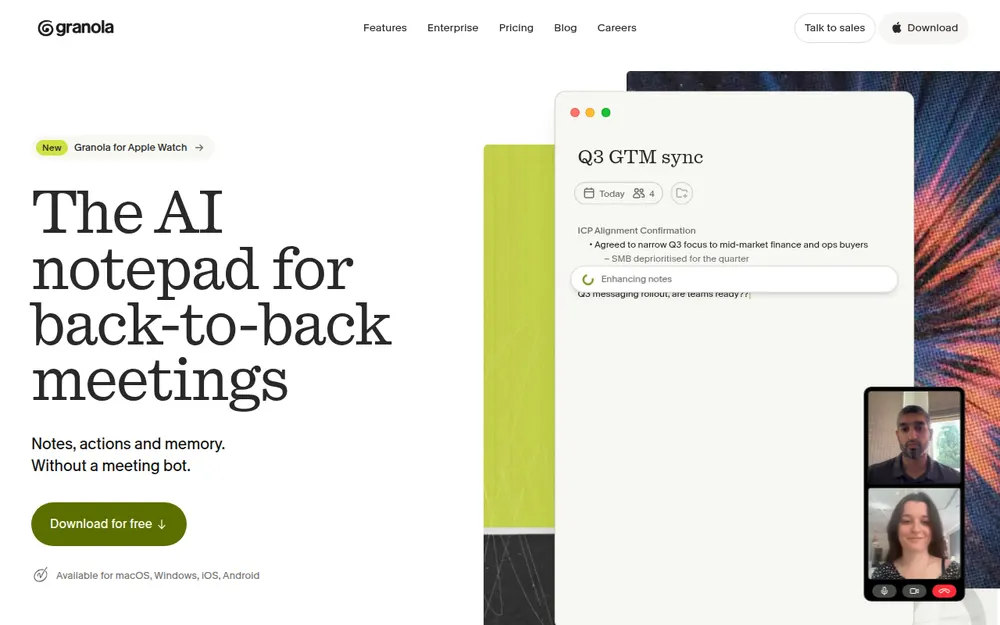
Granola is a bot-free AI notetaker for Mac, Windows, iPhone, Android and Apple Watch. It listens to your microphone and your computer's meeting audio, then turns the call into notes you can edit, search and chat with.
How capture works
- You start it. Granola's security page says "You have to manually start Granola for a meeting (it won't auto-join or auto-record anything)."
- No bot. Granola "does not add a bot to your video call." Nobody gets an extra tile in the participant list.
- Phones for the room. "Granola for Mobile is built for in-person meetings," per the same page. The mobile apps are free on every plan.
- Languages. Granola's help center lists 31 languages on desktop and 17 on mobile.
What users say
Users rate it highly: 4.96 out of 5 from 14,356 ratings on the App Store, 4.9 from 3.13K reviews on Google Play, 4.8 from 56 reviews on Product Hunt, and 4.6 from 20 ratings for the Granola Companion extension on the Chrome Web Store, all checked October 10, 2026.
Those scores tell you the notes are good. They don't tell you where the meeting goes, which is the rest of this page.
Where Does a Granola Meeting Go? Your Computer, Then Granola's US Cloud
A Granola meeting goes to Amazon Web Services servers in the United States. The audio is deleted along the way. The notes and the transcript are kept.
The path, step by step
- Capture on your computer. Granola records your mic and your computer's meeting audio. No bot joins.
- Transcription. Audio is "temporarily cached during the meeting for transcription only." Granola says it's then "deleted from our systems and any third-party services. We do not retain audio recordings." That's why there's no playback.
- Storage. "All data is stored on Amazon Web Services (AWS) servers located in the United States. Data is encrypted both at rest and in transit." Granola's security page adds that notes are backed up daily.
- Summaries and chat. Third-party AI providers turn the transcript into notes and answer your chat questions.
- A local copy. Notes are also cached on your device for fast, offline viewing. That cache has been encrypted since 2026; here’s what changed and how to export.
Who else touches the meeting
Granola names its vendors only as examples: "best-in-class transcription providers (like Deepgram and Assembly) and AI providers (like OpenAI and Anthropic)". The full subprocessor list sits on Granola's trust center, which we couldn't read on October 10, 2026, so we haven't guessed at the rest.
One detail matters on Business. Granola's billing docs list Fable 5 as a selectable chat model and say "Fable 5 is not subject to zero data retention, and Anthropic retains agent input-output logs for 30 days for trust and safety purposes."
Basic users can't select Fable 5, and on Enterprise an admin has to enable it. You also can't bring your own model: "We don't support bringing your own models at this time."
Where Your Meetings Go: Granola vs Otter vs Fathom vs Voibe Work
Same five questions, four notetakers. Otter and Fathom each get the full treatment in Is Otter Safe? and Is Fathom Safe?.
| Tool | Bot in the call? | What's kept, and where | Retention | Training default | Attestations |
|---|---|---|---|---|---|
| Granola | No (Mac, Windows, iPhone, Android) | Audio deleted after transcription; notes and transcripts in a US-hosted AWS cloud | Indefinitely unless a policy is set; transcript auto-delete on every plan | On for Free and Business (anonymised); opt-out covers future data; off on Enterprise | SOC 2 Type II; HIPAA and BAA on Enterprise only |
| Otter | Yes by default; the desktop app records without a bot (Mac, Windows) | Audio and transcript; Otter cloud | Until you delete; custom retention through an account manager | On (de-identified audio and transcripts); no opt-out found | SOC 2 Type II; HIPAA on Enterprise only |
| Fathom | Yes by default; bot-free in the Mac app | Video, audio or transcript, by capture mode; Fathom cloud, US | Until you delete; auto-delete on Enterprise only | On (de-identified); opt-out | Fathom states SOC 2 Type II, GDPR, HIPAA; signed BAA on Enterprise |
| Voibe Work | No (Mac and Windows) | Audio deleted as soon as processing completes; transcript and summary saved on your computer | Your files, your choice | Never trained on | None claimed; BAA available on request |
Key Takeaway
Granola keeps no audio, but it keeps notes and transcripts in its US AWS cloud indefinitely by default. That's the real difference between Granola and a notetaker that saves the notes on your computer.
Does Granola Train on Your Data? Yes, by Default on Free and Business
Yes. On Free and Business, Granola trains its own models on anonymised meeting data unless you opt out. Enterprise workspaces are opted out by default.
Granola's pricing FAQ says it directly: "Granola trains on your anonymized data so we can keep making Granola better. Each individual user can opt out of this in your Settings with one click."
Four details in the fine print
- The opt-out isn't retroactive. Granola's security FAQ: "We cannot guarantee that anonymised data wasn't used before you changed the setting. However, once you opt out, none of your data will be used for any future model training."
- Trained data can stay. The privacy policy says de-identified data built into AI models "may remain in those models and datasets indefinitely, as removal may not be technically feasible without complete model retraining."
- Business admins can't flip it for everyone. "On the Business plan, each user needs to opt out individually." A workspace-wide opt-out is an Enterprise feature.
- No toggle on Android. "The toggle isn't available in the Android app yet — change it from desktop or iOS and it will apply everywhere."
What isn't trained on
Third-party AI labs are excluded: "We do not allow third parties (like OpenAI or Anthropic) to use your data to train their AI models."
Read the marketing with care, though. Granola's Enterprise page says "Your conversation data is never used to train AI models." That's true on Enterprise, where training starts off. It isn't the Free or Business default.
Why your guests should care
The switch belongs to whoever runs Granola. Clients, candidates and patients on your call have no Granola setting of their own, so if you never opt out, their anonymised words are eligible for training. That gap is one of the allegations in the Granola lawsuit.
Granola isn't unusual here: Fathom and Otter train by default too, and Otter documents no opt-out. Voibe never trains on audio or text, from dictation or from meetings.
Tip
Opt out today: Settings → Preferences → Data & sharing, then turn off "Use my data to improve models for everyone." On Business, ask every teammate to do the same. On Android, change it from the desktop or iOS app.
How Long Does Granola Keep Your Notes and Transcripts?
Granola keeps notes and transcripts indefinitely by default. Its security FAQ says: "Notes and transcripts are retained indefinitely unless you or your admin configures a retention policy."
The controls that exist
- Transcript auto-deletion, on every plan. Choose 1 day, 1 week, 1 month, 3 months, 6 months or 1 year. Individual settings come with a one-week cooldown period.
- Notes aren't touched. Granola's help center: "your notes are not affected and will remain available." The summary of a confidential call stays until you delete it by hand.
- Enterprise policies. Admins can set a workspace-wide policy with no cooldown, set up through Granola. Enterprise also has a legal-hold API that stops deletion for covered people.
- Basic's 30-day window isn't deletion. On the free plan, "notes older than 30 days are stored (not deleted), but they aren't accessible in the app until you upgrade."
- Account deletion. Settings → Profile → Delete Account. Granola says "all your data is permanently removed from our systems within 30 days."
Want copies before you delete? Granola's CSV export now includes transcripts and your full note history, with one export every 24 hours. The walkthrough is in our guide to Granola’s encrypted notes.
Is Granola HIPAA Compliant? SOC 2, the BAA and What's Missing
Granola is HIPAA compliant for Enterprise customers only. Its help center says: "Granola is HIPAA compliant for Enterprise customers and can sign a Business Associate Agreement (BAA). HIPAA support is not available on Free, Personal, or Business plans."
What Granola holds
- SOC 2 Type II, on every plan. "Granola holds SOC 2 Type II certification." The report sits behind a "Request Access" button on its trust center.
- GDPR and UK GDPR, with a standard data processing agreement and standard contractual clauses. "Custom DPAs are not available."
- A BAA on Enterprise, desktop only. "Our BAA currently covers the Granola desktop and laptop apps only." The phone apps aren't covered.
What Granola doesn't have
- No ISO 27001: "ISO 27001 is not yet available."
- No FERPA: "Granola is not currently FERPA compliant," which matters for schools and universities.
- No NHS DSP Toolkit accreditation, which matters for UK health providers.
- No built-in 2FA or MFA. "All authentication is delegated to your identity provider," so the security of your sign-in is the security of the account you sign in with. SSO needs Enterprise and 50+ users.
- No regional residency. No EU or UK hosting option.
The question certificates don't answer
SOC 2 is an audit and a BAA is a contract. Neither decides whether the transcript of a patient conversation should sit in a vendor's cloud for years. That's why our HIPAA dictation guide starts with the data flow, not the certificates.
Key Takeaway
SOC 2 Type II on every plan; HIPAA and a BAA on Enterprise only, covering the desktop apps only. No ISO 27001, no FERPA, no built-in 2FA and no EU data residency.
Has Granola Been Sued or Breached?
Granola is being sued, and it has published three security post-mortems, all from 2025. We found no 2026 incident and no institutional ban naming Granola.
The lawsuit, in three lines
- The case: Chamberlain v. Granola, Inc., 3:26-cv-07926-EMC (N.D. Cal.), filed July 30, 2026 and assigned to Judge Edward M. Chen.
- The claim: a wiretap class action alleging that Granola's bot-free capture records other participants without their knowledge, and trains on the content by default.
- The status: as of October 10, 2026 the docket shows new stipulations and an administrative motion, but no answer or motion to dismiss from Granola.
Claims, timeline and what it means for users: the Granola lawsuit explained.
Three security post-mortems from 2025
- An exposed transcription key. An AssemblyAI API key shipped in an early iOS TestFlight beta, exposed from November 27, 2024 until it was revoked on March 11, 2025. Granola says one other IP accessed "29 transcriptions from 16 external beta testers". It notified 333 testers on May 16, 2025.
- A session bug. Sessions stayed valid after a Google account was suspended or deleted, affecting 187 users. It was reported May 12, 2025 and fixed by June 2, 2025.
- Workspace auto-join. Auto-join matched on email domain alone. It was fixed May 23, 2025, and Granola states there was "no unauthorized access to Granola workspaces via unmanaged accounts."
Granola admits it "missed Tenable's initial email" about the exposed key, which is the uncomfortable part. Publishing all three write-ups is the reassuring part. Granola also pays monetary rewards for valid vulnerability reports, though it has no formal bug bounty.
Recording Consent: Granola's Chat Message and Watermark Are Opt-In
Granola has consent tools, but they're off until you turn them on. Its help center describes two:
- An automated chat message. When transcription starts, Granola posts a message in the meeting chat, such as "Hey, I'm using www.granola.ai to transcribe and take notes."
- Granola Watermark. A visible indicator on your video that stays on screen for the whole call.
- Where they work: Google Meet (through the Granola browser extension), Zoom and Microsoft Teams on Mac and Windows, and Slack huddles on Mac only.
- Who controls them: each user on Free and Business, under Settings > Preferences > Transparency. Only Enterprise admins can enforce them, and an org-wide notification is an Enterprise pilot.
Granola is clear about whose job consent is: "You are responsible for obtaining consent from participants before using Granola." Its help center adds that customers "remain responsible for determining what notice or consent is required."
One-party vs all-party consent
Federal law and most states need only one party's consent. Barnes & Thornburg, in an August 12, 2026 alert on the Granola case, put it plainly: "an interception is lawful if one party to the communication, here, the Granola user, consents." The real exposure is in all-party states.
Here are the all-party-consent states and the ones with important nuances, per Justia’s 50-state survey:
- California: California Invasion of Privacy Act (CIPA), statutory damages of $5,000 per violation.
- Connecticut: one-party for criminal liability, but civil liability for recording phone calls without all-party consent.
- Delaware: arguably all-party; the law is ambiguous.
- Florida.
- Illinois: Eavesdropping Act; generally all-party.
- Maryland.
- Massachusetts.
- Michigan: technically all-party, though courts have held that participants in a conversation can record it.
- Montana: an all-party "knowledge" state.
- Nevada: all-party for phone calls, one-party in person.
- New Hampshire.
- Oregon: all-party for in-person conversations, one-party for phone calls.
- Pennsylvania.
- Washington: generally all-party.
A one-line script that covers most calls
Turn on the chat message or the watermark, then say it out loud: "I'm taking AI notes on this call. Is everyone OK with that?" Wait for a yes from each person.
The same rule holds for Voibe Work: it reminds you to tell everyone you're taking notes when recording starts, and following each participant's consent rules is your responsibility.
The Granola Safety Decision Tree
Five questions, from the easiest case to the hardest. Stop at the first one where Granola's answer doesn't work for you.
- Is it an internal, non-confidential meeting? Stand-ups, planning, your own team. If yes, Granola's a good choice once you've opted out of training and set transcript auto-delete.
- Will people outside your company join? Clients, patients, candidates and partners never saw Granola's terms. Turn on the chat message or watermark, and ask out loud.
- Will health information come up? Granola's BAA is Enterprise only and covers the desktop apps only, so the phone apps are out for patient conversations.
- Must the data stay in the EU or UK? Granola stores everything in the US and offers no regional residency, so it can't meet this requirement today.
- Can the notes sit in Granola's US cloud until someone deletes them? If not, use a tool that keeps no copy of the meeting on its side.
Most sales, customer and internal calls stop at question 1 or 2, and Granola handles them well. Legal, medical and financial client calls usually reach question 5. Our notetaker guides for lawyers and financial advisors walk through those professions' rules.
The 5-Step Granola Safety Audit: Settings to Check Today
Keeping Granola? These five checks cover most of the risk.
- Opt out of AI training. Settings → Preferences → Data & sharing, then turn off "Use my data to improve models for everyone." On Business, every user does this individually. On Android, use the desktop or iOS app.
- Turn on transcript auto-deletion. Pick the shortest window you can live with, from 1 day to 1 year. Expect the one-week cooldown, and remember notes aren't deleted, so prune sensitive ones by hand.
- Turn on the chat message and watermark. Settings > Preferences > Transparency. Enable both for any call with people outside your company.
- Set link sharing on purpose. Your default can be "Anyone with the link", "Only my company" or "Private". Granola's docs don't state the out-of-the-box value, so check yours and pick Private or Only my company.
- Choose the chat model on Business. Fable 5 "is not subject to zero data retention", and Anthropic keeps its logs for 30 days. Keep it off confidential meetings.
On step 4, the new default only applies to notes created after the change, so check links you've already shared. A browser link shows only the summarized notes, while desktop collaborators can see the full transcript.
Which two steps matter most
Steps 1 and 2. They decide who learns from the meeting and how long it exists.
Warning
Your settings protect your guests too. A client on your call can't opt out of Granola's training or set a retention window, so on client calls your choices are the only protection they get.
A Setup With No Bot and No Vendor-Side Copy: Voibe Work
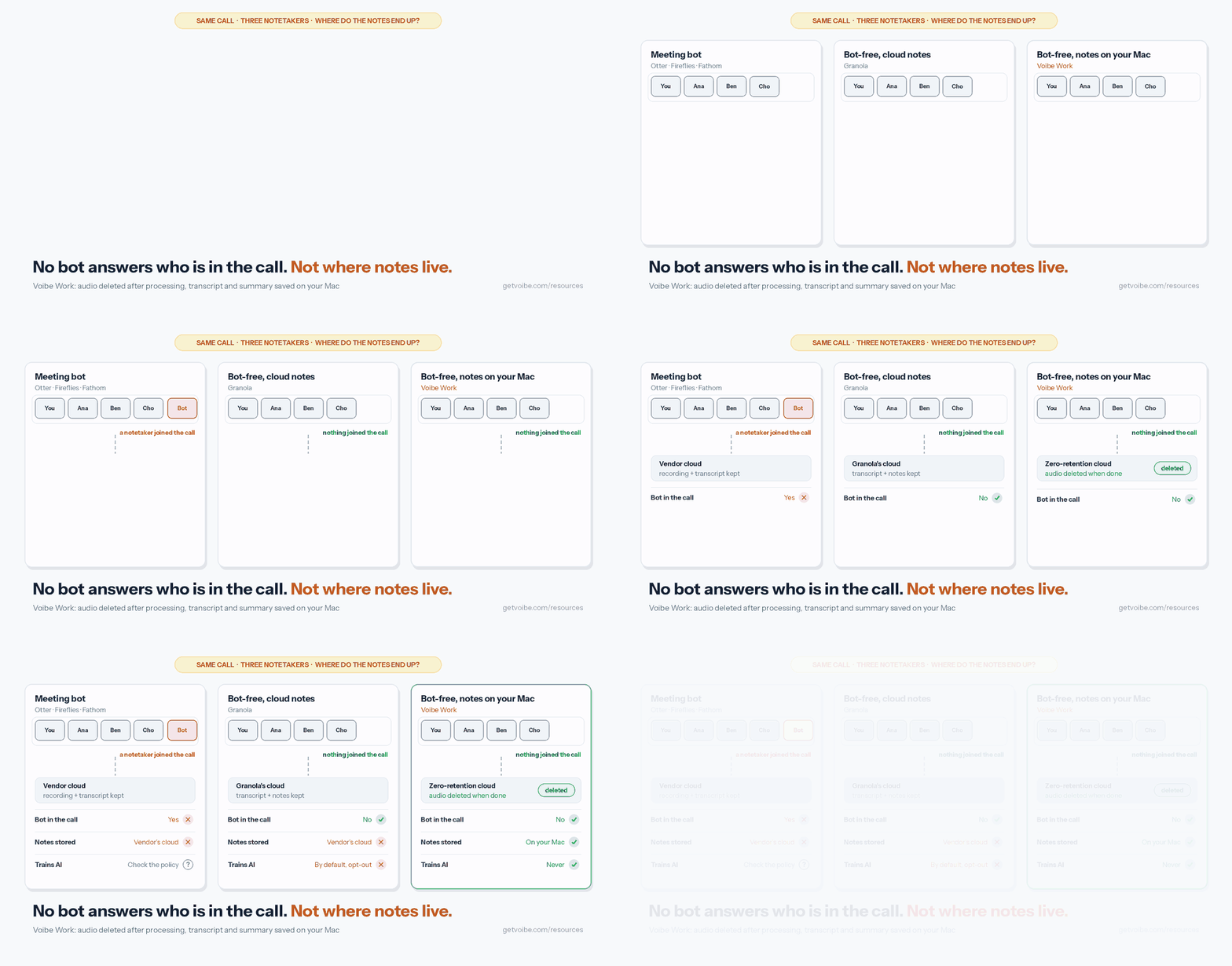
Granola already solved the bot. What it keeps is everything after: notes and transcripts in its cloud, trained on by default. Voibe Work (ours) removes both.
What Voibe Work does differently
- No bot in the call, on Mac or Windows. Voibe Work captures Zoom, Microsoft Teams, Google Meet, Webex, Slack huddles or any other meeting app from your computer, and records in-person meetings through your Mac or PC's mic.
- Audio deleted after processing. Meeting audio is processed by open-source models on zero-retention cloud providers and deleted as soon as processing completes (what zero data retention means).
- Notes saved on your computer. The transcript and summary are saved on your device, not on Voibe's servers, so retention is your own file-management call.
- Never trained on. There's no setting to find and nothing for your guests to opt out of.
- The rest of the workflow. Summary templates for each type of meeting, chat with your meetings on the same zero-retention cloud with nothing you ask stored, and one-click copy and PDF export.
- Dictation included. Every Voibe Work seat includes Voibe Dictation on Mac and Windows. BAA available on request.
Consent doesn't change. When recording starts, Voibe reminds you to tell everyone you're taking notes, and you're responsible for the consent rules in every participant's state.
Where Granola wins
- Price: Granola Basic is free. Voibe Work isn't.
- Phones: Granola has iPhone, Android and Apple Watch apps for meetings away from your desk. Voibe Work has no phone app.
- Teams: Granola has shared folders, speaker tags, Slack, Notion, HubSpot and Zapier integrations, and an API. Voibe Work doesn't list speaker labels, integrations or team workspaces.
- Paperwork: Granola holds SOC 2 Type II. Voibe claims no certification; its answer is the architecture, plus a BAA available on request.
- Internet: Voibe Work's meeting notes need a connection. On-device processing is a dictation feature on Apple Silicon Macs, not a meeting-notes feature.
What a year costs: Granola vs Voibe Work
Granola Business is billed monthly only, at $14 per user per month, so a year costs $168. Prices come from Granola's pricing page, Wispr Flow's pricing page and getvoibe.com/pricing, checked October 10, 2026.
- Against Granola Basic ($0): Voibe Work costs $140 a year more.
- Against Granola Business ($168 a year): $28 (16.7%) less, at the same $14 monthly price. The $349 lifetime plan equals 25 months of Granola Business.
- Against Granola Business plus Wispr Flow Pro ($168 + $144 = $312): $172 (55.1%) less a year, because Voibe Work includes dictation.
- Against Granola Enterprise ($35 per user per month, $420 a year): $280 (66.7%) less, though Enterprise adds SSO and a HIPAA BAA.
Every Granola plan and discount is in our Granola pricing guide, and the two-bundle comparison is in Wispr Flow Notetaker vs Voibe Work.
Voibe Work comes with a 7-day free trial of every feature, no credit card and no automatic charge, plus a 30-day money-back guarantee. Try Voibe Work free.
Key Takeaway
Voibe Work keeps no copy of the meeting on its side: no bot, audio deleted as soon as processing completes, notes saved on your computer, never trained on, dictation included, $140 a year. Granola Basic is free and Granola has phone apps. Consent is your job with both: Voibe reminds you to tell everyone you're taking notes.
Who Granola Is Safe For, and Who Should Pick Something Else
Granola is safe for most internal, sales and customer calls, once training is off and everyone knows you're taking notes. It's a weaker fit where the stored transcript is itself the risk.
Find your situation:
| Your situation | Granola verdict | What to do |
|---|---|---|
| Internal stand-ups and planning | Safe | Opt out of training; set transcript auto-delete |
| Sales and customer calls | Safe with notice | Turn on the chat message or watermark; announce the notes |
| Participants in California, Florida or another all-party state | Safe only with everyone's consent | Ask each person and wait for a yes |
| Patient conversations with health information | Enterprise only, desktop only | Get the BAA; keep the phone apps out of patient conversations |
| Students' education records | Not FERPA compliant | Use a tool your institution has approved |
| Data that must stay in the EU or UK | Not possible today | Granola has no regional residency |
| Privileged legal calls | Risky | Read the lawyers guide; prefer no vendor-side copy |
| Client reviews at an advisory firm | Check recordkeeping rules first | See the financial advisors guide |
| Your team needs enforced MFA or SSO | Enterprise, 50+ users | Granola has no built-in 2FA; MFA comes from your identity provider |
| Confidential calls you don't want in any vendor's cloud | Pick something else | Voibe Work, or the options in our Granola alternatives |
Comparing every bot-free option? See the best no-bot meeting note takers.
Is Granola Safe? FAQ
Straight answers on Granola's privacy, security and consent, grouped by theme.
Privacy and Your Data
Is Granola safe to use? Yes, for most everyday business meetings. Granola holds SOC 2 Type II, adds no bot to your call, deletes audio after transcription, and doesn't let third parties like OpenAI or Anthropic train on your data.
The risks are its defaults: on Free and Business, Granola trains its own models on anonymised meeting data until you opt out, notes and transcripts stay in its US AWS cloud indefinitely unless you set a retention policy, and there's no EU or UK data residency. Chamberlain v. Granola, a wiretap class action, is also pending.
Does Granola train AI on my meetings? Yes, by default on Free and Business. Granola trains its own models on anonymised data, and each user can opt out in Settings → Preferences → Data & sharing. On Business, every user opts out individually; Enterprise is opted out by default.
The opt-out only covers future data. Granola says it "cannot guarantee that anonymised data wasn't used before you changed the setting", and the Android app has no toggle yet.
Where does Granola store my notes, and for how long? On Amazon Web Services servers in the United States, encrypted at rest and in transit, with a local cache on your device. Notes and transcripts are kept indefinitely unless you or your admin set a retention policy.
Transcript auto-deletion, from 1 day to 1 year with a one-week cooldown, is available on every plan, but it deletes transcripts only. Notes stay until you delete them, and deleting your account removes your data within 30 days.
Security and Compliance
Is Granola HIPAA compliant? Only for Enterprise customers. Granola says it is HIPAA compliant for Enterprise and can sign a Business Associate Agreement; HIPAA support isn't available on Free or Business.
The BAA covers the desktop and laptop apps only, so Granola's phone apps aren't covered for patient conversations.
Is Granola SOC 2 certified, and is it secure? Yes, Granola holds SOC 2 Type II on every plan, encrypts data at rest and in transit, and backs notes up daily. It doesn't have ISO 27001, isn't FERPA compliant and has no built-in 2FA; sign-in security comes from your identity provider.
Granola has published three security post-mortems, all from 2025: an exposed AssemblyAI key in an early iOS beta, a session bug that affected 187 users, and a workspace auto-join flaw. We found no 2026 incident.
Does Granola record audio, and does it keep it? Granola records your microphone and your computer's meeting audio, but it doesn't keep the audio. Audio is cached during the meeting and deleted from Granola's and third-party systems once transcription completes, so there's no playback.
What Granola keeps is the transcript and the notes, in its US cloud, indefinitely by default.
Consent, Legal and Alternatives
Can Granola record a meeting without anyone knowing? Yes, by default. Granola adds no bot, and its consent tools, an automated chat message and an on-video watermark, are off until each user turns them on; only Enterprise admins can enforce them.
Granola says you're responsible for getting participants' consent. In all-party-consent states such as California, Florida, Maryland, Massachusetts, New Hampshire and Pennsylvania, every participant must agree.
Is Granola being sued? Yes. Chamberlain v. Granola, Inc. (3:26-cv-07926-EMC, N.D. Cal.) was filed July 30, 2026 as a wiretap class action over Granola's bot-free capture and default training.
As of October 10, 2026, the docket showed new stipulations and an administrative motion, but no answer or motion to dismiss from Granola.
What is a safer alternative to Granola for confidential meetings? Pick a notetaker that keeps no copy of the meeting on the vendor's side and never trains on it. Voibe Work captures meetings from your Mac or Windows PC with no bot, deletes the audio as soon as processing completes, saves notes on your computer and never trains on them.
It includes dictation for $140 a year, $28 (16.7%) less than Granola Business, and a BAA is available on request. Voibe reminds you to tell everyone you're taking notes; consent rules are your responsibility.
The Bottom Line: Is Granola Safe in 2026?
Granola is a polished, well-rated notetaker that's safe for everyday business calls, once you change two defaults. It holds SOC 2 Type II, deletes audio after transcription and keeps OpenAI and Anthropic from training on your data.
Its weak points are choices, not breaches:
- AI training is on by default on Free and Business, and opting out only covers future data
- notes and transcripts stay in Granola's US cloud indefinitely by default
- there's no EU or UK data residency
- the consent tools are off until you turn them on
- a wiretap class action is pending
Keeping Granola? Do the five-step audit today: opt out of training, turn on transcript auto-delete, enable the chat message and watermark, set link sharing on purpose, and keep Fable 5 off confidential calls.
If the meeting shouldn't sit on a vendor's servers at all, Voibe Work captures it from your Mac or Windows PC with no bot, deletes the audio as soon as processing completes, saves the notes on your computer and never trains on them. Dictation's included, for $140 a year.
Voibe reminds you to tell everyone you're taking notes; you're responsible for the consent rules. Start the 7-day free trial (no credit card).
Related reading:
- Granola pricing
- Granola alternatives
- The Granola lawsuit and Granola’s encrypted notes
- Is Fathom Safe? and Is Otter Safe?
- Our AI Tool Privacy Tracker, which scores Granola alongside other notetakers
Info
We checked Granola's pricing page, security page, help center and privacy policy on October 10, 2026. If Granola's privacy policy shows an effective date later than September 8, 2026, re-check before relying on these facts.
Best AI Dictation and Meeting Notes for Confidential Work
Draft letters, notes and emails 5x faster. Get meeting notes without a bot joining your call. Nothing used to train AI.
- Mac + Windows
- No bot in your calls
- Nothing used to train AI
- 7-day free trial
Want to compare plans first? View pricing →
Related Articles
Granola Pricing
Every Granola plan, what Basic leaves out, and what a year of Business costs.
Granola Alternatives
Notetakers that skip the bot, keep no vendor copy, or cost less than Granola.
The Granola Lawsuit, Explained
Chamberlain v. Granola: the wiretap claims, the training allegation and the case status.
Granola's Encrypted Notes
How Granola locked its local cache, and how to export your notes today.