
Wispr Flow Notetaker vs Voibe Work: Where Do Your Meeting Notes End Up?
Both bundle dictation with no-bot meeting notes. Wispr stores notes in its US cloud and trains by default on Free/Pro; Voibe Work keeps them on your Mac. $312 vs $140/yr.

Wispr Flow Notetaker
Bot-free meeting notetaker built into the Wispr Flow dictation app, on Mac and Windows since September 2026. Speaker names, calendar integration, MCP access and Granola/Otter import; transcripts and summaries are stored in Wispr's US cloud.
Free (weekly limit); Pro $15/mo or $144/yr (higher limits); Growth + Notetaker $33/mo or $312/yr (unlimited)
Pros
- + Mac and Windows today
- + Speaker names from calendar and context
- + Google and Outlook calendar, call detection
- + MCP access from Claude, ChatGPT and Gemini
- + Posts a consent notice in the meeting chat
- + Free tier with a weekly limit
Cons
- - Transcripts and summaries stored in Wispr's cloud with no opt-out
- - Training on Notetaker content on by default on Free and Pro
- - Unlimited notes cost $312/yr (Growth + Notetaker)
- - Disabled on BAA accounts
- - No PDF export or summary templates found
Voibe Work
WinnerMeeting notes with no bot in the call plus Voibe's dictation app. Audio deleted after processing by open-source models on zero-retention cloud providers; transcript and summary saved on your Mac; never used to train AI. Meeting notes Mac-only, Windows coming soon.
Voibe Work: $14/mo, $140/yr, or $349 lifetime. Voibe Dictation: $7.50/mo, $75/yr, or $149 lifetime (Mac + Windows)
Pros
- + Transcript and summary saved on your Mac
- + Audio deleted after processing; never trained on
- + Open-source models only, no big-lab model in the audio path
- + Unlimited meetings for $140/yr or $349 once
- + Summary templates and PDF export
- + BAA available on request
Cons
- - Meeting notes Mac-only (Windows coming soon)
- - No speaker labels, calendar or integrations listed
- - No free tier after the 7-day trial
- - No sync, sharing or phone app for notes
Wispr Flow Notetaker vs Voibe Work: The Short Answer
Wispr Flow and Voibe both started as dictation apps. Within a few weeks of each other in 2026, both added meeting notes with no bot in the call. On paper they're now the same product: hold a key to dictate, click once to take notes on a call.
They split on the question that matters most in a meeting: what's left afterwards, and where. Wispr Flow Notetaker stores your transcripts and summaries in Wispr's US cloud, with no setting to turn that off. Voibe Work deletes the audio once processing finishes and saves the notes on your Mac.
The short answer: Voibe Work is the better choice if you're on a Mac and your meetings are confidential, or if you want unlimited meeting notes for $140 a year instead of $312. Wispr Flow Notetaker is the better choice if you need meeting notes on Windows today, want speaker names in the transcript, or want your notes wired into your calendar and your AI tools.
I've used both on my own calls, and I went through both vendors' pricing, help-center and privacy pages on September 28, 2026. Voibe is the app we build.
Key takeaways
| Feature | Wispr Flow Notetaker | Voibe Work | Winner |
|---|---|---|---|
| Bot in the call | No | No | Tie |
| Where transcripts and summaries live | Wispr's cloud (US), no opt-out | On your Mac | Voibe Work |
| AI training on meeting content | On by default on Free and Pro (opt-out) | Never | Voibe Work |
| Meeting-note platforms | Mac and Windows | Mac (Windows coming soon) | Wispr Flow |
| Speaker names | Yes, from calendar and context | Not listed | Wispr Flow |
| Unlimited meeting notes, per year | $312 (Growth + Notetaker) | $140 | Voibe Work ($172 less) |
| Pay once | No | $349 lifetime | Voibe Work |
| Consent notices | Posts a notice in the meeting chat | Reminds you when recording starts | Wispr Flow |
Key Takeaway
Wispr Flow Notetaker and Voibe Work both take meeting notes without a bot and both bundle a dictation app. Voibe Work saves notes on your Mac, never trains on them, and costs $140 a year for unlimited meetings, $172 (55.1%) less than Wispr's $312 unlimited tier. Wispr Flow Notetaker wins on Windows support, speaker names, integrations and consent notices.
Quick Comparison: Wispr Flow Notetaker vs Voibe Work
Here's the whole comparison on one screen. Every row is sourced in the sections below.
| Wispr Flow Notetaker | Voibe Work | |
|---|---|---|
| Pricing | Free (weekly limit); Pro $15/mo or $144/yr (higher limits); unlimited notes on Growth + Notetaker, $33/mo or $312/yr | $14/mo, $140/yr or $349 lifetime, unlimited meetings; 7-day free trial |
| Platform | Mac (macOS 13+) and Windows; iPhone app views meetings only | Mac, Intel and Apple Silicon (Windows coming soon); dictation on Mac and Windows |
| Technology | Cloud: Soniox transcription, Anthropic and Google models for summaries and chat | Zero-retention cloud: open-source models, audio deleted after processing |
| Where notes live | Wispr's cloud (AWS, US) | On your Mac |
| Best for | Windows users, teams, people who want notes in Claude or ChatGPT | Confidential meetings on a Mac, and value |
| Rating | iOS App Store 4.84/5 (16,279 ratings, dictation keyboard app); Product Hunt 4.7/5 (80 reviews) | Product Hunt 4.8/5 (6 reviews) |
| Key differentiator | Speaker names, calendar, MCP, Granola and Otter import | Nothing kept on the vendor's side, nothing trained on, pay-once option |
What Is Wispr Flow Notetaker?
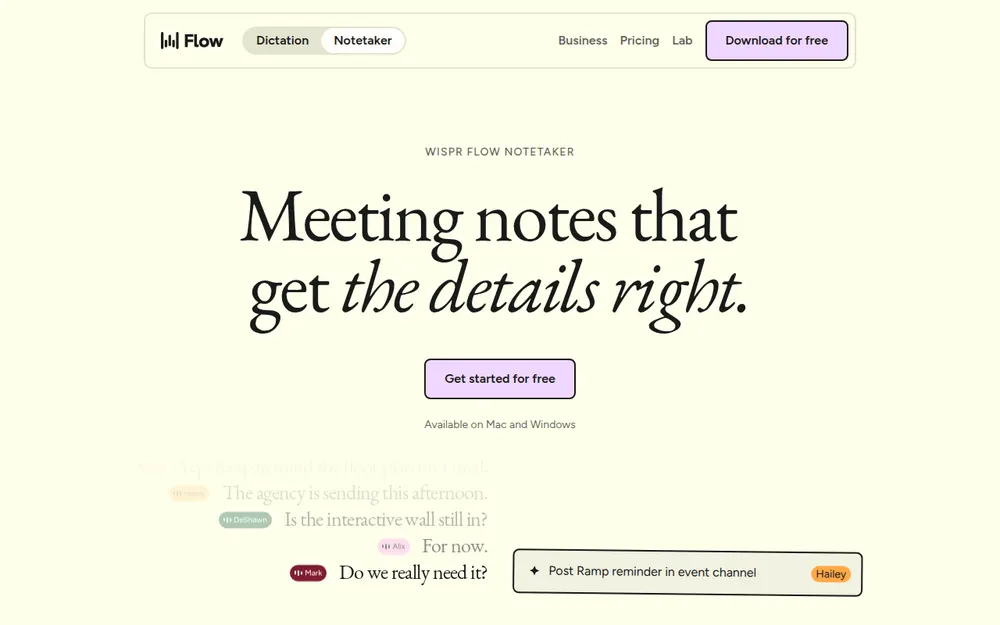
Wispr Flow is the cloud dictation app from Wispr AI, the San Francisco company that raised a $280 million Series B at a $2 billion valuation in August 2026. Notetaker is its first product beyond dictation. It launched on Mac on August 5, 2026 and on Windows on September 15 (9to5Mac coverage).
It records your microphone and your computer's system audio, so nothing joins the call. It works with Zoom, Google Meet, Teams, Slack huddles, Discord and calls in your browser, and it can take notes on in-person meetings through your mic. If you join a call that isn't on your calendar, it notices and asks whether you want notes.
After the call you get:
- A transcript that gets a second pass from a stronger model
- Speaker names from the calendar invite, your dictionary and the conversation
- A "Flow Summary" with next steps, decisions and your to-dos (Wispr docs)
- Ask Wispr, a chat across your meetings that can also search the web (Wispr docs)
It connects to Google and Outlook calendars. It lets Claude, ChatGPT and Gemini read your notes over MCP, and it imports notes from Granola and Otter (Wispr's changelog).
Who it's for: Wispr Flow users who want meeting notes in the same subscription, especially on Windows, and teams that want their notes flowing into their AI tools. For the dictation side, see our Wispr Flow review.
What Is Voibe Work?
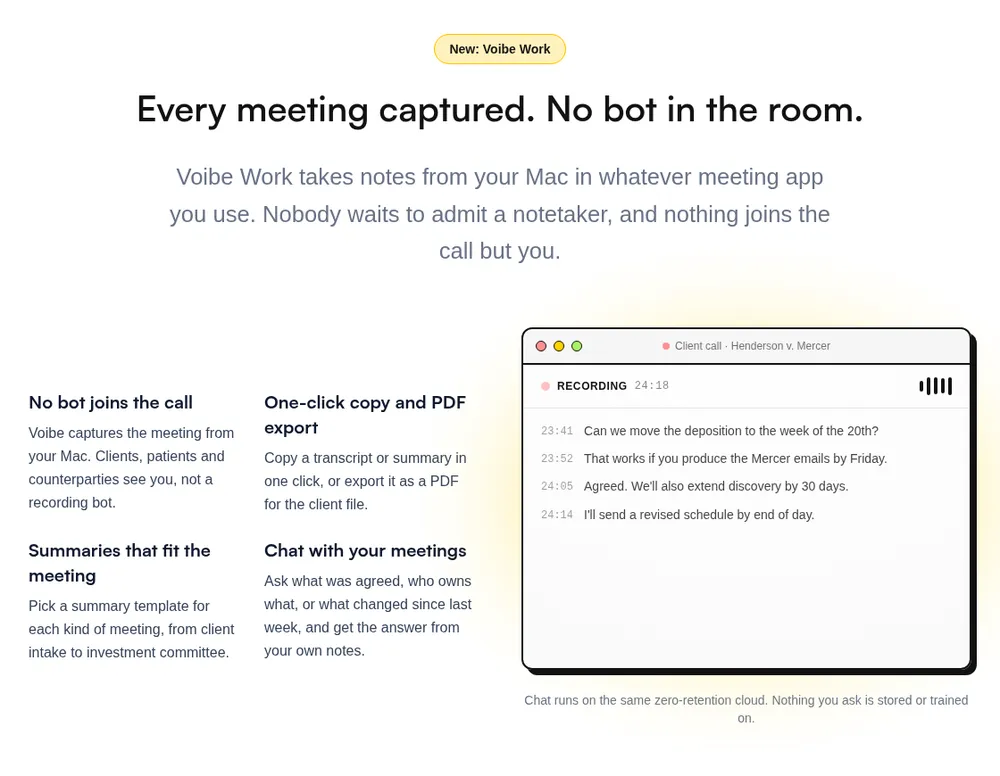
Voibe Work is the meeting-notes plan from Voibe, launched in September 2026. It includes everything in Voibe Dictation plus meeting notes.
It captures the meeting from your Mac in Zoom, Microsoft Teams, Google Meet, Webex, Slack huddles or any other meeting app. No bot joins, so nobody has to admit a notetaker. Meeting audio is processed by open-source models on zero-retention cloud providers and deleted as soon as processing completes. The transcript and summary are saved on your Mac, not on Voibe's servers, and they're never used to train AI.
After the call you get:
- An AI summary, with templates for each type of meeting, from client intake to investment committee
- Chat with your meetings, on the same zero-retention cloud. Nothing you ask is stored
- One-click copy and PDF export of transcripts and summaries
When recording starts, Voibe reminds you to tell everyone you're taking notes. You're responsible for your local consent rules.
The dictation half runs on Mac and Windows. It works on-device on Apple Silicon Macs (no internet needed), or on the same zero-retention cloud. It includes Dictionary, Developer Mode for Cursor, VS Code and Windsurf, and 90+ languages (Voibe review).
Who it's for: people on a Mac whose meetings are confidential, such as lawyers, clinicians, advisors and founders in deal talks, plus anyone who'd rather no vendor held a copy of every call.
Where Your Meeting Notes End Up: The Real Difference
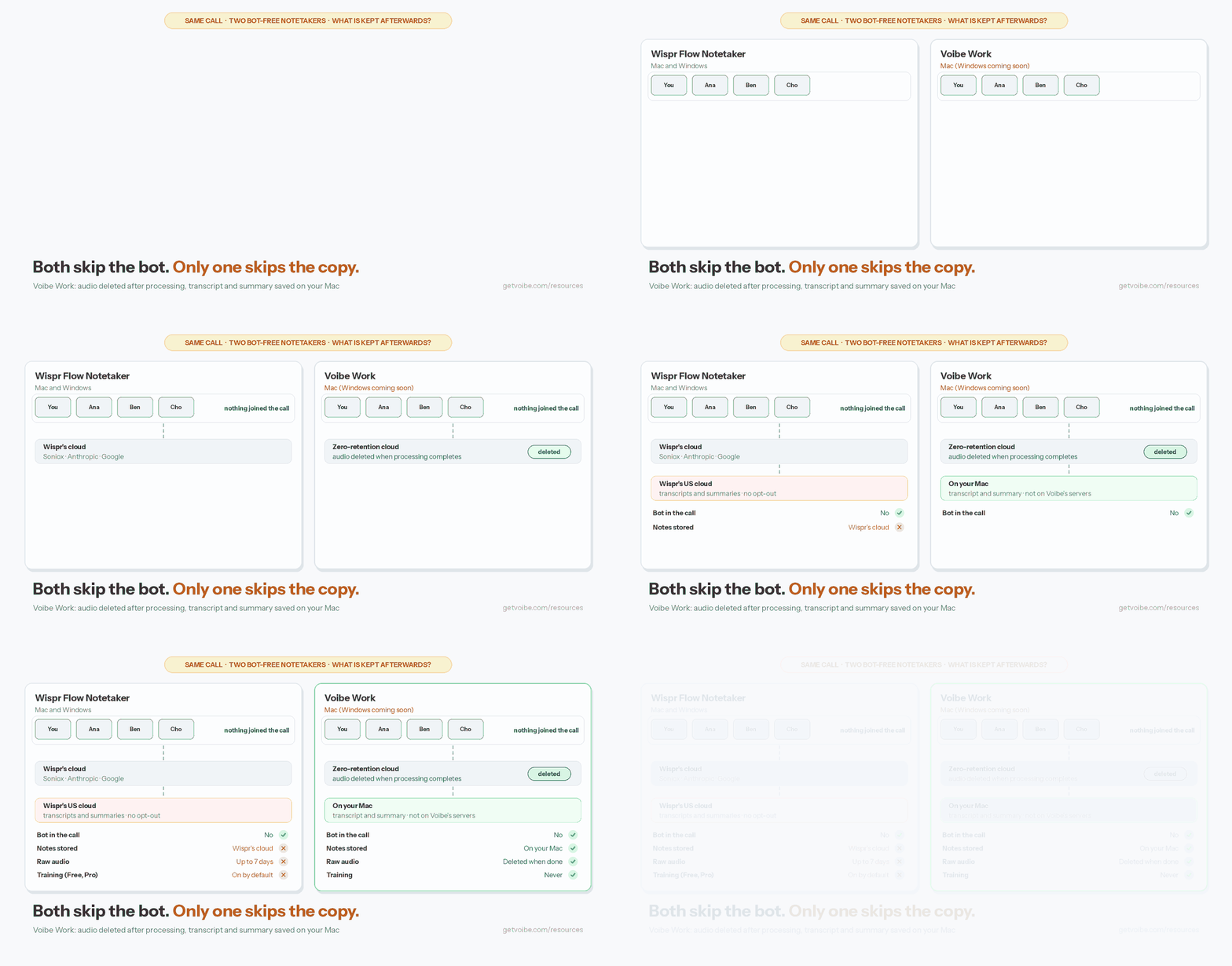
Both apps capture the call on your computer, and both send the audio to the cloud for transcription. Neither takes meeting notes on-device. The difference is what's kept afterwards, and who else touches it.
Wispr Flow Notetaker: your notes live in Wispr's cloud
- Transcripts and summaries: "Notetaker stores meeting transcripts and summaries in Wispr's cloud, and there is no setting to opt out of that storage" (Wispr help center). Wispr stores customer data in the United States, with AWS us-east-1 as its primary region (Wispr Trust Center).
- How long: transcript retention defaults to "Never delete". You can choose 1, 7, 30, 90, 180 or 365 days, but titles, notes and summaries aren't removed by that setting (Wispr docs).
- Audio: Wispr attempts to delete uploaded audio after processing. Its Trust Center says raw meeting audio is retained for up to seven days, and local copies expire seven days after they were last written (Wispr docs).
- AI vendors: Soniox transcribes meeting audio. Transcripts, notes and your questions are routed through OpenRouter to Anthropic and Google models for recaps and Q&A, and Anthropic writes the summaries (Wispr subprocessor list). Wispr says some Notetaker features, such as briefs, rely on third-party AI features "that are not supported under zero data retention" (Wispr data controls).
- Training: here Wispr contradicts itself. Its Windows launch post says "Your meeting data is never used to train AI models." Its help center says the "Improve the model for everyone" setting, which covers "content from Notetaker and dictation", is "on by default for Free and Pro". Growth admins can switch it off for the whole organization; on Enterprise it's locked off. If you're on Free or Pro, check that toggle.
Voibe Work: your notes live on your Mac
- Transcript and summary: saved on your Mac, not on Voibe's servers.
- Audio: deleted the moment processing completes.
- AI vendors: open-source models on zero-retention providers. No OpenAI, Google, Anthropic or Microsoft model is in the audio path (Voibe cloud privacy page).
- Training: never. There's no toggle to find, because nothing is kept on Voibe's side to train on.
- Chat: runs on the same zero-retention cloud. Nothing you ask is stored.
The trade-off cuts both ways. A copy that doesn't exist on the vendor's servers can't be breached there, handed over from there, or folded into a training set. But it also can't be synced, shared by link or opened from your phone. Voibe Work doesn't list any of those features; Wispr has all three.
Winner: Voibe Work. For confidential meetings, where the notes end up matters more than any feature. Our zero data retention explainer covers why vendor-side copies are the risk to manage.
Feature Comparison: Which Notetaker Does More?
On features alone, Wispr Flow Notetaker does more. It's been out since August and has been adding something almost every week. Here's each round.
Capture and platforms
Wispr records meetings on Mac (macOS 13 or later) and Windows. Its iPhone app only shows meetings recorded on a computer, and there's no Android app (Wispr docs). It also records in-person meetings through your mic, and caps live sessions at 3 hours. Voibe Work records on Mac, Intel and Apple Silicon. Windows is "coming soon" with no date, and there's no phone app. Winner: Wispr Flow Notetaker.
Speaker names
Wispr names speakers from the calendar invite, your dictionary and the conversation, and falls back to "Speaker 1" and "Speaker 2". Automatic naming works on Google Meet in Chromium browsers, Teams, the Zoom Mac app and the Slack desktop app (Wispr docs). It isn't perfect: in Hirekai's test, "Three of five voices separated correctly, two people merged into one." Voibe doesn't list speaker labels for Voibe Work. Winner: Wispr Flow Notetaker.
Summaries and templates
Wispr's Flow Summary is organized by topic, with Next Steps, Decisions and My todos, and each next step is labeled with its owner. I couldn't find a way to choose a summary template in Wispr's pricing page, Notetaker page or help center. Voibe Work offers templates for each type of meeting, so a client intake and an investment committee meeting come out in different shapes. Winner: Voibe Work if your meetings follow a format; Wispr if you mainly want owners on action items.
Chat with your meetings
Ask Wispr searches across meetings with citations, can search the web, drafts follow-ups and briefs, and answers "What did I miss?" mid-meeting. Voibe Work's chat answers questions about your meetings on its zero-retention cloud, and nothing you ask is stored. Wispr's chat does more. Voibe's keeps less. Winner: Wispr on features, Voibe Work on privacy.
Export and sharing
Wispr copies notes, summary, attendees and transcript as Markdown. It shares a summary-only link, or the summary plus transcript by email invite (Wispr docs). I found no PDF export. Voibe Work has one-click copy and PDF export, which is what you want for a client file, but no sharing features are listed. Winner: tie. Wispr for sharing with a team, Voibe Work for a PDF on file.
Calendar, detection and integrations
Wispr connects Google and Outlook calendars (iCloud isn't supported), reminds you before scheduled meetings, and has a Join + Start button (Wispr docs). Your notes reach Claude, ChatGPT and Gemini over MCP, and it imports Granola and Otter notes. Voibe doesn't list calendar integration or integrations for Voibe Work. Winner: Wispr Flow Notetaker.
Consent notices
Wispr can post a notice in the meeting chat for you. The default text is "using Wispr Notetaker", and it works in the Zoom and Teams desktop apps, Slack huddles and Google Meet in Chrome. A reminder also stays on screen while it records, and organizations can require users to confirm consent (Wispr docs). Voibe Work reminds you to tell everyone when recording starts. With either app, you're responsible for following your recording-consent laws. Winner: Wispr Flow Notetaker.
Languages
Wispr Notetaker transcribes 21 languages and detects the language automatically, and some summary headings stay in English (Wispr docs). Voibe doesn't publish a language count for meeting notes; its dictation supports 90+ languages, against Wispr dictation's 100+. Winner: Wispr Flow Notetaker, the only one with a published meeting-language list.
The dictation app you also get
Both plans include a full dictation app. Wispr's is cloud-only, with AI auto-editing, and runs on Mac, Windows, iPhone and Android. Voibe's runs on Mac and Windows. On Apple Silicon Macs it can transcribe on-device, with no internet and nothing leaving the machine. Smart Formatting cleans up punctuation and filler without rewriting what you said. Wispr covers your phone; Voibe gives you an on-device option. See our Otter vs Wispr Flow comparison for how Wispr's dictation compares with a meeting-first tool. Winner: tie, depending on whether you need a phone app or an on-device mode.
Security and compliance
Wispr states SOC 2 Type II and ISO 27001 certification on its Trust Center. It offers a BAA, but "Notetaker and Scratchpad are disabled on BAA accounts" (Wispr pricing). Voibe doesn't claim SOC 2 or ISO 27001; its privacy is how it's built: audio deleted, nothing kept, nothing trained on. A BAA is available on request. Winner: Wispr on certifications. If you need a BAA, note that Wispr's switches its Notetaker off.
Pricing Breakdown: Wispr Flow Notetaker vs Voibe Work
Wispr's Notetaker pricing takes some reading. The plan that gives you unlimited meeting notes isn't Pro. It's Growth with the Notetaker add-on (Wispr pricing, checked September 28, 2026):
| Plan | Per month | Per year | Meeting notes |
|---|---|---|---|
| Wispr Flow Free | $0 | $0 | Weekly limit (number not published; recordings under five minutes don't count) |
| Wispr Flow Pro | $15 | $144 ($12/mo) | "Higher limits", "longer Notetaker history" |
| Wispr Flow Growth (dictation only) | $23 | $216 ($18/mo) | Free through October 31, 2026, then limited |
| Wispr Flow Growth + Notetaker | $33 | $312 ($26/mo) | Unlimited |
| Wispr Flow Enterprise | Custom | Annual only | Unlimited as an add-on |
| Voibe Work | $14 | $140, or $349 once | Unlimited |
| Voibe Dictation | $7.50 | $75, or $149 once | None (dictation only) |
Wispr's own pages disagree on the limits. One help article says Notetaker "isn't limited" on Free (Wispr docs), and the Notetaker FAQ says "Upgrade to Pro for unlimited use." The pricing table, which is what you're billed against, shows Pro as "Higher limits" and unlimited only on Growth and Enterprise. I've used the pricing table.
What you save with Voibe Work
- Unlimited meeting notes, annual: $140 vs $312. Voibe Work is $172 a year (55.1%) cheaper.
- Unlimited meeting notes, monthly: $14 vs $33. Voibe Work is $19 a month (57.6%) cheaper.
- Against Wispr Pro: $140 vs $144 a year, $4 (2.8%) less, and Voibe Work's meetings are uncapped while Pro's are limited.
- Lifetime: Voibe Work's $349 one-time price equals about 13.4 months of Wispr's annual unlimited plan. After that, it's free.
3-year cost of unlimited meeting notes, per user
| Option | 3-year total | vs Wispr Growth + Notetaker (annual) |
|---|---|---|
| Wispr Growth + Notetaker, monthly | $1,188 | +$252 |
| Wispr Growth + Notetaker, annual | $936 | baseline |
| Voibe Work, annual | $420 | $516 less (55.1%) |
| Voibe Work, lifetime | $349 | $587 less (62.7%) |
Where Wispr wins on price: it has a free tier you can keep. Voibe Work has a 7-day free trial of every feature, with no credit card and no automatic charge, then a 30-day money-back guarantee. If you only have one or two short calls a week, Wispr Free may cost you nothing. For Voibe's full plan details, see getvoibe.com/pricing; for Wispr's, our Wispr Flow pricing breakdown.
Pros and Cons of Each
Wispr Flow Notetaker
Pros
- Runs on Mac and Windows today
- Speaker names from the calendar and conversation
- Google and Outlook calendar, call detection, Join + Start
- MCP access from Claude, ChatGPT and Gemini; Granola and Otter import
- Posts a consent notice in the meeting chat for you
- A free tier with a weekly limit
- Wispr states SOC 2 Type II and ISO 27001
Cons
- Transcripts and summaries are stored in Wispr's US cloud with no opt-out; transcript retention defaults to "Never delete"
- Model training on Notetaker content is on by default on Free and Pro
- Anthropic and Google models see transcripts; briefs aren't covered by zero data retention
- Unlimited notes cost $312 a year on Growth + Notetaker
- Notetaker is switched off if you sign Wispr's BAA
- No PDF export and no summary templates found
Voibe Work
Pros
- Transcript and summary saved on your Mac, not on Voibe's servers
- Audio deleted as soon as processing completes; never used to train AI
- Open-source models only; no OpenAI, Google, Anthropic or Microsoft model in the audio path
- Unlimited meetings for $140 a year, or $349 once
- Summary templates for each type of meeting, PDF export
- Dictation with an on-device mode on Apple Silicon Macs
- BAA available on request
Cons
- Meeting notes are Mac-only; Windows is coming with no date
- No speaker labels, calendar integration or integrations listed
- No free tier after the 7-day trial
- No sync, share links or phone app for notes
- Consent is a reminder to you, not a notice to participants
- No SOC 2 or ISO 27001 certification
Which Should You Choose?
Choose Voibe Work if:
- Your meetings carry client, patient or deal information, and you don't want a vendor holding the transcript
- You don't want to police a training toggle: Voibe never trains on meeting content
- You want unlimited meeting notes without paying $312 a year, or you'd rather pay once ($349)
- Your meetings follow a format and you want the summary to match it, then a PDF for the file
Choose Wispr Flow Notetaker if:
- You're on Windows, or your team is split across Mac and Windows
- You need speaker names in the transcript
- You want notes in your calendar flow and readable from Claude, ChatGPT or Gemini over MCP
- You already pay for Wispr Flow Pro and have only a few meetings a week
By situation
| You are… | Pick | Why |
|---|---|---|
| A solo lawyer or advisor on a Mac | Voibe Work | Notes stay on your Mac; nothing trained on; $140 a year |
| A clinician who needs a BAA | Voibe Work | A BAA is available on request; Wispr's BAA turns Notetaker off |
| A sales team on Windows | Wispr Flow Notetaker | Windows today, speaker names, calendar |
| A founder in fundraising or M&A calls | Voibe Work | No vendor-side copy of deal talk |
| Someone who lives in Claude or ChatGPT | Wispr Flow Notetaker | MCP gives your AI tools your meeting notes |
| A Wispr Pro user with two calls a week | Wispr Flow Notetaker | Already included at no extra cost |
| Someone leaving Granola | Either | Wispr imports Granola notes; Voibe Work keeps new ones off any vendor's servers (Granola alternatives) |
How we scored them
We weight privacy most because a meeting holds other people's words, not only yours. Scores are out of 10.
| Criterion (weight) | Wispr Flow Notetaker | Voibe Work |
|---|---|---|
| Privacy and data handling (30%) | 5 | 10 |
| Price for unlimited notes (20%) | 5 | 10 |
| Meeting features (20%) | 9 | 6 |
| Platforms (10%) | 8 | 5 |
| Consent tooling (10%) | 9 | 6 |
| Dictation app included (10%) | 8 | 9 |
| Weighted score | 6.8 | 8.2 |
What Users and Reviewers Say
Wispr Flow: the dictation app holds 4.84/5 from 16,279 ratings on the iOS App Store (that's the keyboard app; it can't record meetings) and 4.7/5 from 80 reviews on Product Hunt. None of the Product Hunt reviews I read mention Notetaker yet.
The independent Notetaker reviews are mostly launch-week write-ups. Hirekai liked the Slack connector and pre-meeting briefs, but found "two people merged into one" in speaker labels and called the action items "completely inert" in the note. Several early reviews call Notetaker Mac-only and English-only. Both were true at launch and aren't any more.
Voibe: 4.8/5 from 6 reviews on Product Hunt, written about the dictation app. Voibe Work launched in September 2026 and has no independent reviews yet.
For the wider field, including Granola, Quill, Jamie and Krisp, see our best no-bot meeting note takers roundup.
Frequently Asked Questions: Wispr Flow Notetaker vs Voibe Work
Basics
What is the difference between Wispr Flow Notetaker and Voibe Work?
Both are dictation apps that take meeting notes with no bot in the call. Wispr Flow Notetaker stores transcripts and summaries in Wispr's US cloud and runs on Mac and Windows. Voibe Work deletes meeting audio after processing, saves the transcript and summary on your Mac, never trains on them, and is Mac-only for meeting notes, with Windows coming soon.
Does Wispr Flow Notetaker or Voibe Work use a bot?
No. Both capture the meeting from your computer's microphone and system audio, so nothing joins the call and nobody has to admit a notetaker. Both still require you to tell participants you're taking notes.
Privacy
Does Wispr Flow Notetaker use my meetings to train AI?
It can. Wispr's help center says the 'Improve the model for everyone' setting covers content from Notetaker and dictation and is on by default on Free and Pro. Growth admins can switch it off, and it's locked off on Enterprise. Wispr's Windows launch post says meeting data is never used to train AI models, so check the setting yourself. Voibe Work never trains on meeting content.
Where does Voibe Work store my meeting notes?
On your Mac. Meeting audio is processed by open-source models on zero-retention cloud providers and deleted as soon as processing completes. The transcript and summary are saved on your Mac, not on Voibe's servers.
Do either of them take meeting notes offline?
No. Both send meeting audio to the cloud for transcription. Wispr can keep recording while you're offline and transcribes once you're back online. Voibe's on-device mode on Apple Silicon Macs applies to dictation, not meeting notes.
Pricing
Is Wispr Flow Notetaker free?
Wispr Flow Free includes Notetaker with a weekly limit that resets every Monday; recordings under five minutes don't count. Pro ($15 a month or $144 a year) has higher limits. Unlimited meeting notes need Growth with the Notetaker add-on, $33 a month or $26 a month billed annually ($312 a year).
How much cheaper is Voibe Work than Wispr Flow Notetaker?
For unlimited meeting notes, Voibe Work costs $140 a year against Wispr's $312, which is $172 (55.1%) less. Monthly it's $14 against $33, or $19 (57.6%) less. Over three years, Voibe Work's $349 lifetime price is $587 (62.7%) less than Wispr's annual unlimited plan.
Features and platforms
Does Voibe Work run on Windows?
Voibe Work's meeting notes are Mac-only today, on Intel and Apple Silicon Macs, with Windows 'coming soon' and no date. Voibe's dictation app already runs on Mac and Windows. Wispr Flow Notetaker runs on Mac and Windows.
Which one labels speakers?
Wispr Flow Notetaker names speakers using the calendar invite, your dictionary and the conversation, falling back to Speaker 1 and Speaker 2. Voibe doesn't list speaker labels for Voibe Work.
Can I import my Granola notes?
Wispr Flow Notetaker imports notes from Granola and Otter. Voibe Work doesn't offer an import; your old notes stay where they are.
Consent and compliance
Do these notetakers tell other people they're being recorded?
Wispr Flow Notetaker can post a notice in the meeting chat for you in the Zoom and Teams desktop apps, Slack huddles and Google Meet in Chrome. Voibe Work reminds you to tell everyone when recording starts. With either one, you're responsible for your local recording-consent laws.
Can I use Wispr Flow Notetaker under a BAA?
No. Wispr's pricing page says Notetaker and Scratchpad are disabled on BAA accounts, so a signed BAA covers dictation only. Voibe offers a BAA on request; a BAA is a contract, not a certification.
Final Verdict: Wispr Flow Notetaker or Voibe Work?
Wispr Flow Notetaker is the more capable notetaker. It works on Windows, names speakers, knows your calendar, and hands your notes to Claude or ChatGPT. If your meetings are internal stand-ups and sales calls, and you already live in Wispr Flow, it's a good product.
Voibe Work is the one I'd use for meetings I can't afford to leak. The audio is gone after processing, the notes sit on my Mac, and there's no training toggle to hunt for. At $140 a year for unlimited meetings, it's $172 cheaper than Wispr's unlimited plan, and it's the only one of the two you can buy once.
Both include a good dictation app, so you're not giving that up either way. It comes down to what's in your meetings.
Try Voibe Work free for 7 days → Every feature, no credit card. Or try Wispr Flow Notetaker on its free plan.
Related reading
- 9 Granola alternatives, compared: Wispr Flow Notetaker and Voibe Work against the rest
- The best no-bot meeting note takers
- The Granola lawsuit, explained: why no-bot capture isn't the same as consent
- Is Wispr Flow safe? and our Wispr Flow review
- Voibe review
- All dictation and notetaker comparisons
Meeting notes without a bot in your call
Voibe Work takes notes from Zoom, Teams and Meet on your Mac, with dictation included. Nothing used to train AI.
- Mac + Windows
- No bot in your calls
- Nothing used to train AI
- 7-day free trial
Want to compare plans first? View pricing →