
Introducing Voibe Work: AI Meeting Notes With No Bot in the Call
Today we're launching Voibe Work: meeting notes from your Mac with no bot in the call, notes saved on your Mac, and Voibe dictation included. From $14/mo.

Every Meeting Notetaker Wanted One of Two Compromises

Every AI notetaker we tried before building our own asked for one of two compromises.
Either a bot joins your call, and your client has to let it in.
Or there's no bot, but the whole meeting still ends up on the vendor's servers. Often kept indefinitely. Sometimes trained on by default.
We didn't want to ship either one. So we waited until we could ship neither.
Today, Voibe Work is live.
TL;DR:
- No bot in the call. Voibe Work takes notes from your Mac in Zoom, Microsoft Teams, Google Meet, Webex, Slack huddles or any other meeting app.
- No copy in our cloud. Open-source models on zero-retention providers write the notes. The audio is deleted as soon as processing completes, and the transcript and summary are saved on your Mac.
- Dictation included. It's everything in Voibe Dictation plus meeting notes, so one plan replaces Granola and Wispr Flow.
- $14/month, $140/year or $349 lifetime. That's $172 (55.1%) a year less than Granola Business plus Wispr Flow Pro. 7-day free trial, no card.
- On every Mac today. Intel and Apple Silicon, with Windows coming soon.
Key Takeaways: Voibe Work at a Glance
The launch in one table.
| Question | Answer |
|---|---|
| What launched? | Voibe Work: all of Voibe Dictation plus meeting notes. Live September 2026. |
| Does a bot join the call? | No. It captures the meeting from your Mac, in any meeting app. |
| What happens to the audio? | Open-source models on zero-retention providers process it, then it's deleted. Never used to train AI. |
| Where do the notes live? | On your Mac, not on Voibe's servers. |
| What do you get? | Summary templates per meeting type, chat with your meetings, one-click copy and PDF export. |
| What does it replace? | Granola ($168/yr) plus Wispr Flow Pro ($144/yr). $312 a year becomes $140. |
| What does it cost? | $14/mo, $140/yr or $349 lifetime per seat. 7-day free trial, no card. |
| Which platforms? | Meeting notes: every Mac (Intel and Apple Silicon), Windows coming soon. Dictation: Mac and Windows. |
The Two Compromises We Refused
Compromise one: a bot in your meeting
The first wave of notetakers joins the call as a participant. That's fine for a team standup.
It's awkward when the other side is a client, a patient or a counterparty, and the first thing they see is a stranger named after your software asking to be let in.
The platforms are pushing back too:
- Google Meet now holds unknown joiners in a second queue that denies by default (from March 24, 2026).
- Microsoft Teams tags third-party bots in the lobby and makes you admit them separately (from May 2026).
- Morgan State University banned Fireflies, Otter, Read.ai and MeetGeek outright in June 2026.
More on that shift in the best no-bot meeting note takers.
Compromise two: no bot, but your meeting lives in their cloud
Bot-free notetakers fixed the first problem and kept the second. The bot leaves the call. The transcript still goes to the vendor.
- Granola keeps notes in its US cloud, "retained indefinitely unless you or your admin configures a retention policy." Anonymised data can train its models by default on Free and Business.
- Wispr Flow Notetaker stores transcripts and summaries in Wispr's cloud with no opt-out. Retention defaults to "Never delete", and training is on by default for Free and Pro (Wispr Flow Notetaker vs Voibe Work).
- Otter can now record without a bot, but it trains on de-identified recordings and transcripts (is Otter safe?).
Granola is also being sued by a meeting participant who says she never knew it was running (the Granola lawsuit, explained).
None of this is hidden. It's in each vendor's own documentation.
It's also exactly the trade our dictation users came to Voibe to avoid. When we brought Voibe to Windows and the cloud in July, the rule was simple: process the audio, delete it, train on nothing.
Meeting notes had to pass that rule plus one more: the finished notes can't live with us either.
How Voibe Work Takes Notes Without Joining the Call
Voibe Work never enters the call. It captures the meeting on your Mac, so nothing joins but you.
From there, four steps:
- Capture. Meeting audio is captured on your Mac. No bot, no participant tile, nothing to admit.
- Process. Open-source models on zero-retention cloud providers write the transcript and summary, on the same principle as Voibe's zero-retention cloud for dictation.
- Delete. The audio is deleted as soon as processing completes. Never stored, never used to train AI.
- Save. The transcript and summary are saved on your Mac, not on Voibe's servers.
Meeting notes use the zero-retention cloud, so they need an internet connection. Dictation still runs fully on-device on Apple Silicon Macs, exactly as before.
Key Takeaway
Voibe Work captures meetings from your Mac with no bot in the call. The audio is deleted as soon as processing completes, and the transcript and summary are saved on your Mac, not on Voibe's servers.
What You Get After the Call
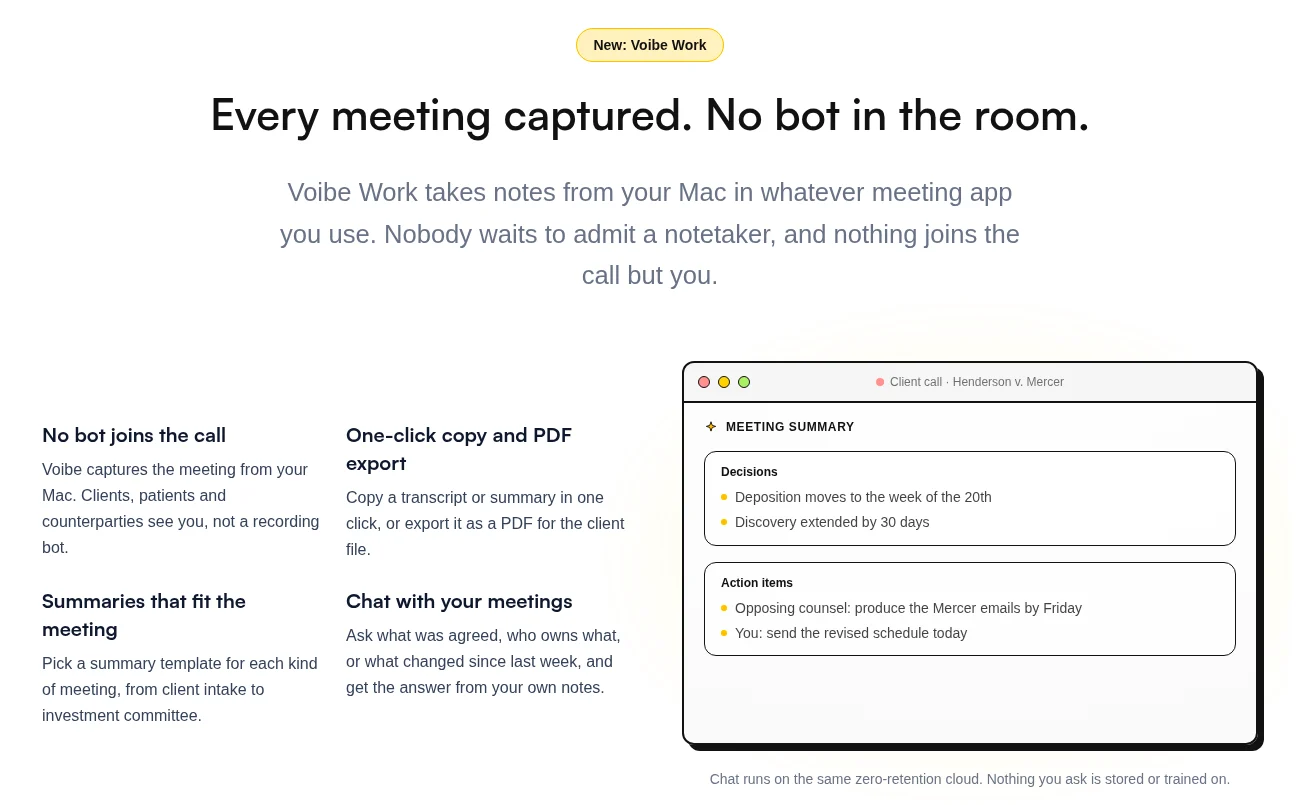
A raw transcript is a wall of text. What you actually want is the write-up you'd otherwise do by hand.
That's what Voibe Work builds:
- Summaries that fit the meeting. Pick a template for each meeting type, from client intake to investment committee. A client call and a board prep get different headings.
- Chat with your meetings. Ask what was agreed, who owns what, or what changed since last week. Nothing you ask is stored or trained on.
- One-click copy and PDF export. Paste the summary into an email, or drop a PDF in the client file.
The follow-up happens in the same app. Voibe Work includes all of Voibe Dictation, so you can dictate the recap email, the file note or the Linear ticket right after the call.
Your Dictionary handles names and jargon. Memory handles boilerplate. Developer Mode works in Cursor, VS Code and Windsurf.
Not sure which tool does which job? Dictation vs notetaker vs meeting assistant separates the four.
Granola and Wispr Flow in One Plan
This is the part we're proudest of on price.
Until now, covering your whole workday by voice took two subscriptions: Granola for meetings, and Wispr Flow for everything you type.
Voibe Work is both. One app, one bill.
| Setup | Monthly | Per year | Over 3 years |
|---|---|---|---|
| Granola Business (meeting notes) | $14 | $168 (billed monthly only) | $504 |
| Wispr Flow Pro (dictation) | $15 | $144 (billed annually) | $432 |
| Both, bought separately | $29 | $312 | $936 |
| Voibe Work (both, one plan) | $14 | $140 | $349 once (lifetime) |
What you save:
- Monthly: $15 (51.7%) less, every month.
- Annual: $172 (55.1%) less, every year.
- Three years: $587 (62.7%) less with the lifetime plan, and the savings keep going after year three.
Put another way: Voibe Work costs the same per month as Granola alone, and the dictation app comes free.
You also trade two privacy policies for one. With the two-app stack, your meetings sit in Granola's cloud and your dictation runs through Wispr's.
With Voibe Work, dictation runs on-device (Apple Silicon) or in the zero-retention cloud, and meeting notes stay on your Mac.
If your workday happens on a Mac, nothing else covers this much for this little.
Key Takeaway
Voibe Work replaces a meeting notetaker and a dictation app in one plan. Granola Business plus Wispr Flow Pro costs $312 a year; Voibe Work costs $140, which is $172 (55.1%) less, or $349 once for lifetime access.
Voibe Work vs Granola, Otter, Fireflies and Wispr Flow: Where Your Notes End Up
Every tool here writes a decent summary. So the real question is simpler: where do the notes sit after the call, and what are they used for?
Here's the answer for the four names people ask about most, from each vendor's own published policies (September 2026):
| Notetaker | Bot in the call? | Where notes are kept | Trained on? | Paid price |
|---|---|---|---|---|
| Voibe Work | No | Your Mac | Never | $14/mo, $140/yr, $349 lifetime |
| Granola | No | Granola's US cloud, kept indefinitely by default | On by default (opt-out) | $14/user/mo, monthly only ($168/yr) |
| Wispr Flow Notetaker | No | Wispr's US cloud, no opt-out | On by default on Free and Pro | Unlimited: $33/mo or $26/mo annual ($312/yr) |
| Otter | Yes by default (desktop app can skip it) | Otter's cloud | De-identified recordings and transcripts | Pro $16.99/mo or $8.33/mo annual |
| Fireflies | Yes by default (desktop app can skip it) | Fireflies' cloud | "Never", per Fireflies | Pro $18/mo or $10/mo annual |
On price:
- vs Granola Business: $28 (16.7%) less per year. The $349 lifetime plan is $155 (30.8%) less than three years of Granola ($504).
- vs Wispr Flow's unlimited Notetaker: $172 (55.1%) less per year.
- vs Otter and Fireflies: they look cheaper on paper (about $100 and $120 a year billed annually). But both send a bot by default, keep your notes in their cloud, and include no dictation at all.
Want the full field, including fully local tools like Quill and open-source Anarlog? See the best Granola alternatives.
If you're a lawyer, the best AI meeting note takers for lawyers adds bar opinions and privilege to the same comparison.
Pricing: Voibe Now Has Two Plans
Voibe now has two plans, both priced per seat (current pricing):
| Plan | Monthly | Annual | Lifetime | Includes |
|---|---|---|---|---|
| Voibe Dictation | $7.50 | $75 | $149 | Dictation on Mac and Windows, on-device or zero-retention cloud |
| Voibe Work | $14 | $140 | $349 | Everything in Dictation, plus unlimited meeting notes on Mac |
Meeting notes add just $6.50 a month, $65 a year or $200 lifetime on top of Voibe Dictation.
The fine print, all in your favour:
- Annual: pay for 10 months, get 12.
- Lifetime: includes all future updates of that plan.
- Free trial: 7 days with every Voibe Work feature. No card, no automatic charge.
- Guarantee: 30-day money-back on both plans.
- Teams: up to 10 seats per checkout. Enterprise (10+ seats) adds team admin, central billing, custom terms and a BAA on request.
- Already on Voibe Dictation? Email support to upgrade. They'll prorate or refund the difference.
Key Takeaway
Voibe Work costs $14/month, $140/year or $349 lifetime per seat and includes all of Voibe Dictation. It's $28 (16.7%) a year less than Granola Business, with a 7-day free trial that needs no card.
Info
Nothing changes for Voibe Dictation customers. Your plan, your price, on-device mode on Apple Silicon and the zero-retention cloud all stay exactly as they are. Voibe Work is an upgrade you can choose, not a migration.
No Bot in the Call Doesn't Mean No Need for Consent
A notetaker with no bot is invisible by design. That makes telling people your job, not the app's.
So when recording starts, Voibe reminds you to let everyone know you're taking notes. Following the consent rules for your meetings is on you.
That matters. About a dozen US states, including California, Florida, Illinois, Maryland, Massachusetts, Pennsylvania and Washington, require everyone on a private call to agree to a recording (Justia's 50-state survey).
Five seconds at the start of the call covers it:
"I'm using an AI note taker so I can focus. It doesn't join as a bot. Is everyone okay with that?"
If someone says no, turn it off.
More on consent in our no-bot note taker roundup. This is general information, not legal advice.
Who Voibe Work Is Built For
Anyone whose meetings shouldn't end up on someone else's servers. In practice, that's people like:
- Lawyers on client calls, where a bot in the waiting room is the last thing opposing counsel should see (AI note takers for lawyers).
- Clinicians and therapists who want session notes without a copy parked in a vendor's cloud. A BAA is available on request.
- Financial advisors running client reviews and investment committees, with a summary template for each.
- Founders in fundraising and deal talks, where the room is small and the stakes are high.
- Anyone paying for Granola and Wispr Flow who'd rather pay less for one app and keep the notes.
What's next: Voibe Work runs on every Mac today, Intel and Apple Silicon. Windows is coming soon (which devices Voibe runs on).
FAQ: The Voibe Work Launch
The basics
What is Voibe Work? A Voibe plan that includes everything in Voibe Dictation plus meeting notes with no bot in the call. Launched September 2026.
Which meeting apps does it work with? Zoom, Microsoft Teams, Google Meet, Webex, Slack huddles or any other meeting app on your Mac. It captures from your Mac, so there's no per-app integration to set up.
Is it on Windows? Coming soon. Meeting notes run on every Mac today. The dictation part already runs on Mac and Windows.
Privacy and your meetings
Does a bot join the call? No. Nothing joins the call but you.
Where do my meeting notes go? The audio is processed by open-source models on zero-retention providers, then deleted. The transcript and summary are saved on your Mac and never used to train AI.
Does it need internet? Yes, for meeting notes. Dictation also works offline, on-device, on Apple Silicon Macs.
Is it HIPAA compliant? Voibe doesn't claim HIPAA compliance or certification. It offers the architecture above, and a BAA is available on request.
Do I need to tell people? Yes. Voibe reminds you when recording starts. The consent rules for your meetings are your responsibility.
Pricing
What does it cost? $14/month, $140/year or $349 lifetime per seat. 7-day free trial, no card, and a 30-day money-back guarantee.
Can it replace Granola and Wispr Flow? Yes. The pair costs $312 a year; Voibe Work costs $140, which is $172 (55.1%) less.
I already pay for Voibe Dictation. What changes? Nothing, unless you want meeting notes. Email support to upgrade, and they'll prorate or refund the difference.
The Bottom Line: No Bot, No Copy, No Compromise to Pick
Every notetaker asked you to pick: a bot in the call, or a copy of every meeting in someone else's cloud.
Voibe Work takes both off the table. The meeting is captured on your Mac, the audio is deleted after processing, and the notes come home to your Mac.
And because dictation comes with it, one $140-a-year plan replaces a $312 Granola-plus-Wispr-Flow stack.
Comparing first? Start with the Granola alternatives or Wispr Flow Notetaker vs Voibe Work. Want the full picture, dictation included? Read the Voibe review.
Got a client call this week? Try Voibe Work free for 7 days →
No card required. Just remember to tell the room.
Meeting notes without a bot in your call
Voibe Work takes notes from Zoom, Teams and Meet on your Mac, with dictation included. Nothing used to train AI.
- Mac + Windows
- No bot in your calls
- Nothing used to train AI
- 7-day free trial
Want to compare plans first? View pricing →
Related Articles
Wispr Flow Notetaker vs Voibe Work: Where Do Your Meeting Notes End Up?
Both bundle dictation with no-bot meeting notes. Wispr stores notes in its US cloud and trains by default on Free/Pro; Voibe Work keeps them on your Mac. $312 vs $140/yr.
8 Best No-Bot Meeting Note Takers in 2026 (Compared & Reviewed)
Best no-bot meeting note takers in 2026, compared on privacy and price: 1. Granola 2. Voibe Work 3. Quill 4. Jamie 5. Krisp 6. Anarlog 7. Bluedot 8. Tactiq
9 Best Granola AI Alternatives in 2026 (Compared & Reviewed)
Best Granola AI alternatives in 2026, compared: 1. Fathom 2. Voibe Work 3. Quill 4. Jamie 5. Wispr Flow 6. Krisp 7. Anarlog 8. Circleback 9. Otter