
Is Fathom Safe? Fine for Sales Calls, Riskier for Client Calls
Is Fathom safe? We tested it: fine for everyday calls, but a bot joins, AI training is on, and recordings stay until you delete them. Here's what to change.
Is Fathom Safe? The Short Answer
Fathom's free plan records unlimited meetings and keeps every one of them, forever. Every call, video included, sits on Fathom's US servers until someone deletes it, and unless you flip one setting, Fathom trains its own AI models on de-identified copies.
So "is Fathom safe?" really means "where does my meeting go?" The New York City Bar's Formal Opinion 2025-6 (December 22, 2025) asks lawyers who record client calls with AI the same thing: get consent, then check where the data is stored and for how long, whether the tool trains on it, and whether it can be deleted.
Short answer: Fathom is safe enough for everyday business calls, and it needs care for confidential ones. Fathom states SOC 2 Type II, GDPR and HIPAA compliance. It says its AI subprocessors (Anthropic, OpenAI and Google) can't train on your data, and we found no lawsuit naming Fathom on October 8, 2026.
The risks are three defaults and one new owner, all spelled out in Fathom's own privacy policy and help center:
- A bot joins by default. Bot-free capture is in Fathom's Mac app only. Fathom's help center says Windows support is "coming soon", with no date.
- AI training is on by default. Fathom trains its in-house models on de-identified meeting data. Opt out in My Settings; Team and Business admins can opt out everyone from Organization Settings.
- Recordings stay until you delete them. Automatic deletion is Enterprise only, and it isn't self-serve.
- Superhuman owns it now. Superhuman, the company formerly called Grammarly, acquired Fathom on September 14, 2026. Fathom says "Nothing changes today", and its privacy policy (dated August 16, 2026) hasn't changed since the deal.
How we tested
- Hands-on: We tested Fathom ourselves, and the findings here are based on our own tests.
- Vendor documents: We checked every claim against Fathom's privacy policy, terms, data processing addendum, pricing page and help center on October 8, 2026.
- Courts and news: We searched the web, news coverage and CourtListener for lawsuits and breaches naming Fathom the same day.
- Our wording: Where Fathom claims something we couldn't confirm independently, we write "Fathom states".
The price, and the no-bot option
Price isn't the problem. Fathom Free costs $0, and no paid notetaker beats that, ours included. Every plan, cap and seat minimum is in our Fathom pricing breakdown, and tools that skip the bot or keep no copy are in our Fathom alternatives.
If those defaults rule Fathom out, Voibe Work (the app we build) flips them: no bot on Mac or Windows, audio deleted as soon as processing completes, and notes saved on your computer, never trained on. Dictation's included, for $140 a year.
That's $52 (27.1%) less than Fathom Premium billed annually ($192), and $140 more than Fathom Free. Consent stays your job with either tool: Voibe reminds you to tell everyone you're taking notes, and you're responsible for the recording-consent rules.
Key Takeaway
Fathom is a mainstream notetaker with a SOC 2 Type II claim and no lawsuits we could find. The risks are its defaults: a bot joins unless you're on the Mac app, training's on until you opt out, and recordings stay in Fathom's US cloud until you delete them (auto-delete is Enterprise only). Superhuman owns it now. Turn training off today and pick the capture mode per meeting.
Key Takeaways: Fathom Safety at a Glance (October 2026)
Every row comes from our own tests and Fathom's own pages, checked October 8, 2026. Where Fathom claims something we couldn't confirm, the row says "Fathom states".
| Question | Fathom's answer (October 2026) | Source |
|---|---|---|
| Does a bot join? | Yes, by default. Bot-free capture is in the Mac app only (Fathom 3.0); Windows is "coming soon". | Fathom help center |
| What is kept? | Video, audio, transcript, summary and clips in bot mode. Transcript Only mode saves no recording. | Fathom 3.0 upgrade guide |
| Where is it stored? | "All Fathom data is stored in the United States." | Fathom help center ("Is Fathom secure?") |
| How long? | Indefinitely, until you delete it. Free and Premium include unlimited storage. | Fathom help center (storage) |
| Automatic deletion? | Enterprise only, set up by emailing Fathom; one policy per team. | Fathom help center (retention) |
| Trained on? | Yes, by default: de-identified data trains Fathom's in-house models. Opt-out in My Settings; org-wide opt-out in Organization Settings. | Fathom privacy policy (August 16, 2026) |
| Third-party AI training? | No. Anthropic, OpenAI and Google are not contractually permitted to train on user data. | Fathom help center ("Is Fathom secure?") |
| Attestations | Fathom states SOC 2 Type II, GDPR and HIPAA. No ISO 27001. EU-U.S. Data Privacy Framework certified. | Fathom help center; Fathom DPA |
| BAA | A click-through BAA is incorporated in Fathom's terms; a signed BAA is listed for Enterprise only. | Fathom terms; Fathom pricing page (plan breakdown) |
| Owner | Superhuman (formerly Grammarly), since September 14, 2026. | Fathom announcement; TechCrunch |
| Lawsuits | None found naming Fathom in a search on October 8, 2026 (not a docket-verified negative). | Web and CourtListener search |
| Institutional blocks | Case Western Reserve University blocked Fathom and other third-party notetakers from September 12, 2025. | CWRU notice |
| Ratings | Chrome Web Store 4.9 (1.7K ratings); Capterra 5 (809 reviews). | Chrome Web Store; Capterra |
| Price | Free $0; Premium $20/mo or $16/mo annual ($192/yr); Team $19 or $15 annual; Business $34 or $25 annual (both 2-seat minimum); Enterprise custom. | Fathom pricing page; our Fathom pricing breakdown |
What Is Fathom, and How Does It Record a Meeting?
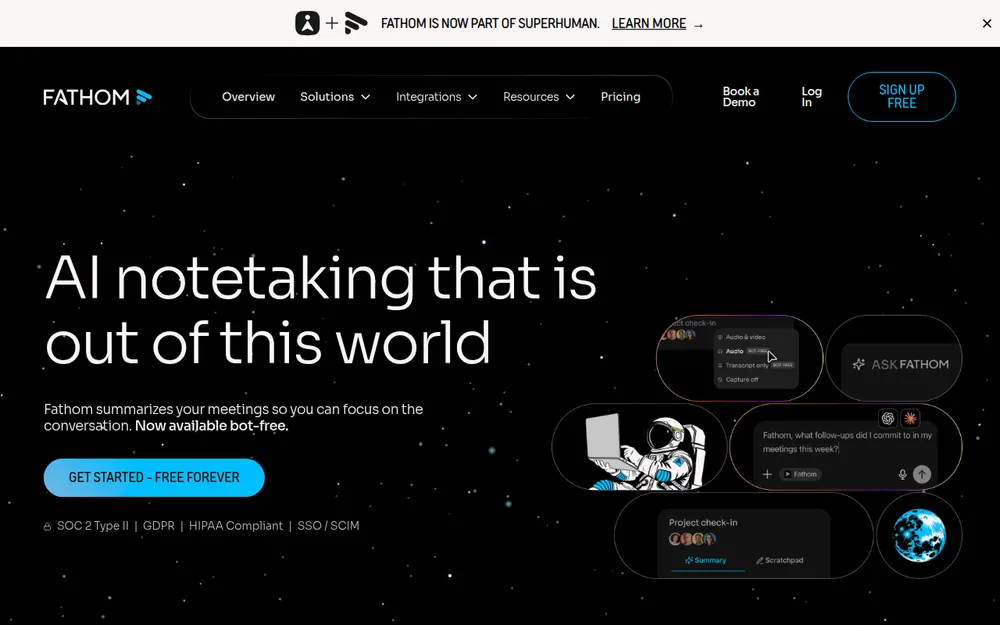
Fathom is an AI meeting notetaker from Fathom Video Inc. of San Francisco. It records Zoom, Google Meet and Microsoft Teams calls, transcribes them in 38+ languages, and turns each one into a summary, action items, clips and an "Ask Fathom" chat.
It's big. TechCrunch reports that Fathom was founded in 2020, has raised over $30 million and has over 400,000 monthly active users. Fathom's homepage says it's used at 300K+ companies.
Four capture modes decide everything else
How Fathom captures a meeting decides almost everything about its privacy. Fathom's help center lists four capture modes in Fathom 3.0:
- Audio & Video (Bot): "A bot joins the meeting." This is the default, and the only way Fathom records on Windows today.
- Audio Only (bot-free): "Audio is captured locally on your device, no video."
- Transcript Only (bot-free): "No recording is saved; you get transcript and a summary only."
- Capture Off.
Bot-free is a Mac feature, for now
- Mac app only: Fathom's 3.0 upgrade guide (edited October 2, 2026) says "Right now, Fathom 3.0+ is only available for Mac users".
- Video without a bot: Fathom's bot-free capture article says bot-free video capture is now available on Mac for Zoom.
- Slack huddles: captured bot-free only, through the desktop app, per Fathom's help center.
- Webex: not mentioned anywhere in Fathom's help center.
- iPhone: an app launched September 30, 2026 records in-person conversations and needs an internet connection to process them. There's no Android app.
- Downloads: recordings can be downloaded as MP4.
What users say
Users rate Fathom highly: 4.9 out of 5 from 1.7K ratings on the Chrome Web Store (600,000 users) and 5 out of 5 from 809 reviews on Capterra, both checked October 8, 2026.
The new iPhone app had only 2 App Store ratings that day, too few to mean anything. And high ratings tell you the notes are useful. They tell you nothing about where the recording goes.
Where Does a Fathom Meeting Go? Bot Mode vs Mac Desktop Mode
To Fathom's cloud in the United States. In the default bot mode, that means the video, the audio and the transcript.
What Fathom's documents say
- Location: Fathom's security help article says "All Fathom data is stored in the United States", and its privacy policy says the service is "hosted in the United States".
- EU data: Fathom is certified under the EU-U.S. Data Privacy Framework.
- Subprocessor changes: Fathom's data processing addendum (last updated May 5, 2026) promises 10 business days' notice.
How much each capture mode keeps
- Bot mode keeps the most. Audio & Video (Bot) records the call as video, so faces, shared screens and slides are stored too.
- Transcript Only keeps the least. Fathom saves no recording, only the transcript and summary. Those still live in Fathom's cloud.
- Audio Only sits in between. Fathom says audio is captured locally on your device. Its help article covers how the audio is captured, not where it's kept afterwards, so assume Fathom processes and stores it like any other recording.
What we couldn't verify
Fathom publishes its full subprocessor list, and presumably its cloud provider and encryption details, on its trust center. That page wouldn't load without JavaScript when we checked on October 8, 2026.
No other Fathom page we could read names a transcription vendor, a cloud provider or encryption specifics. We haven't guessed at them.
Where Your Meetings Go: Fathom vs Otter vs Granola vs Voibe Work
Same five questions, asked of Fathom's two capture styles and three other notetakers. The Otter and Granola rows are covered in detail in Is Otter Safe? and our Granola alternatives guide.
| Tool | Bot in the call? | What's kept, and where | Retention | Training default | Attestations |
|---|---|---|---|---|---|
| Fathom, bot mode | Yes (default; Mac and Windows) | Video, audio, transcript, summary; Fathom cloud, US | Until you delete; auto-delete Enterprise only | On (de-identified); opt-out | Fathom states SOC 2 Type II, GDPR, HIPAA; signed BAA Enterprise |
| Fathom, Mac desktop mode | No (Mac app only) | Audio or transcript only, by mode; Fathom cloud, US | Until you delete; auto-delete Enterprise only | On (de-identified); opt-out | Same as above |
| Otter | Yes by default; desktop app records without a bot (Mac, Windows) | Audio and transcript; Otter cloud | Until you delete; custom retention through an account manager | On (de-identified); no opt-out found | SOC 2 Type II; HIPAA as an Enterprise add-on |
| Granola | No | Audio deleted after transcription; notes in a US-hosted AWS cloud | Indefinitely unless a retention policy is set | On for Free and Business (anonymised); opt-out; off on Enterprise | SOC 2 Type II; HIPAA and BAA Enterprise only |
| Voibe Work | No (Mac and Windows) | Audio deleted as soon as processing completes; transcript and summary saved on your computer | Your files, your choice | Never trained on | None claimed; BAA available on request |
Key Takeaway
In bot mode, Fathom keeps the video, audio and transcript in its US cloud until you delete them. Transcript Only, in the Mac app, is the lowest-retention way to use Fathom: no recording is saved, but the transcript and summary still live on Fathom's servers.
Does Fathom Train on Your Data? Yes, by Default, With an Opt-Out
Yes. Fathom trains its own AI models on your meetings by default, using de-identified data, and you can opt out.
Fathom's privacy policy (August 16, 2026): "Based on how you configure your account settings, we may use and create de-identified data generated from Meeting Content Information to improve our Service by training, improving, and customizing our in-house artificial intelligence models. You can opt out from this use of your data in your account settings."
Where the switch is
Fathom's help center: "You can opt out of this anytime in your My Settings, and Organizations on Team Edition can opt out all users on their account by going to Organization Settings."
Fathom names no difference by plan, so assume training is on for Free, Premium, Team and Business alike.
What the default means for you
- The opt-out belongs to whoever records. Your clients, candidates and patients have no Fathom setting of their own. If the host never opts out, their de-identified speech is eligible for training.
- De-identified isn't deleted. De-identification strips names and identifiers; the content of the conversation can still shape the model.
- Third-party AI models are excluded. Fathom says: "None of our AI sub-processors (Anthropic, OpenAI, or Google) are contractually permitted to use our users' data to train their AI models." The policy repeats that it doesn't authorize OpenAI, Anthropic or Google to train on meeting content.
Two smaller policy details
- Voiceprints: collected only from iPhone users who opt in to that feature. The policy notes they may count as biometric information under laws like the Illinois Biometric Information Privacy Act.
- HubSpot analytics: California privacy law may treat this as a "sale" or "share". Fathom says that data doesn't include meeting content.
How that compares
Fathom's default matches Otter's and Granola's: both train on de-identified or anonymised meeting data unless you act, and Otter documents no opt-out at all (details on Otter). Fathom's switch is easier to find than most.
Voibe never trains on audio or text, from dictation or from meetings.
Tip
Open Fathom, go to My Settings and opt out of AI training today. Admin on a Team or Business account? Use Organization Settings so the opt-out covers every user, including people who join later.
How Long Does Fathom Keep Your Recordings?
Until you delete them. Fathom's storage help article says: "Both Free and Premium users can store unlimited recordings in Fathom, forever! … we will store all of your recordings indefinitely (or until you manually delete them)."
Here are the controls that exist:
- Automatic deletion is Enterprise only. Fathom's retention article (edited August 7, 2026) says "This feature is available only for users of the Enterprise Plan", that it "isn't self-serve yet" (you email help@fathom.video), and that "we only support a single policy per team".
- Manual deletion works on every plan. MP4 downloads are copies on your own drive that you then manage yourself.
- Account deletion: Fathom's help center says "all recording data and metadata are removed. After an additional 7 days, all data is also removed from our backups." The privacy policy is more cautious: deletion "within 30 days of your account deletion request, although we cannot guarantee" it.
- Team plans: Team, Business and Enterprise members ask their admin.
- Ask Fathom: "Ask Fathom's history is not saved," per Fathom's help center.
So on Free, Premium, Team and Business, a meeting from two years ago is still on Fathom's servers unless somebody deleted it by hand.
For sales calls, that's a feature. For a client call about a lawsuit, a merger or a diagnosis, it's a liability you have to manage.
Is Fathom HIPAA Compliant? What SOC 2 Type II, GDPR and the BAA Cover
Fathom says it is. Its help center states: "Fathom is HIPAA, SOC2 Type II, and GDPR-compliant", and its homepage lists SOC 2 Type II, GDPR, HIPAA and SSO/SCIM.
Those are Fathom's statements. We couldn't open the SOC 2 report or any auditor detail, because the trust center where Fathom publishes them didn't load on October 8, 2026.
What each claim covers, and what it doesn't
- SOC 2 Type II is an independent audit of Fathom's security controls over a period of time. It says Fathom runs its systems carefully. It doesn't change the training default, the retention default or the bot.
- HIPAA needs a Business Associate Agreement. Fathom's terms incorporate a click-through BAA (Fathom's BAA page, last updated September 9, 2026) for customers HIPAA applies to, and a 2025 help article offers a signed one on request.
- A signed BAA is Enterprise only. Fathom's pricing table lists "HIPAA: signed BAA" on Enterprise and no lower plan (plan-by-plan breakdown).
- GDPR is handled through a data processing addendum and Data Privacy Framework certification, with data stored in the US.
- ISO 27001: "We don't have ISO27001," Fathom's help center says.
The question certificates don't answer
A BAA is a contract and SOC 2 is an audit. Neither one decides whether a recording should exist.
If you handle protected health information, get the countersigned BAA and read what it covers. Then ask where the recording lives and for how long. That's why our HIPAA dictation guide starts with data flow, not certificates.
Key Takeaway
Fathom states SOC 2 Type II, GDPR and HIPAA compliance and has no ISO 27001. A click-through BAA sits in its terms; a signed BAA is Enterprise only. The audit report and subprocessor list live on a trust center we couldn't read on October 8, 2026.
Fathom Is Now Part of Superhuman: What Changes for Your Data
Superhuman bought Fathom on September 14, 2026, as TechCrunch reported that day. Fathom's CEO Richard White wrote that "Fathom is now officially part of Superhuman" and that "Nothing changes today for Fathom users. Same app, same login, same product experience."
Superhuman's own announcement calls the buyer "Superhuman (formerly Grammarly)". Grammarly bought the Superhuman email app in 2025 and renamed the whole company Superhuman on October 29, 2025, keeping the Grammarly product name.
What's changed for your data so far
- The privacy policy: nothing yet. It's still dated August 16, 2026, still names Fathom Video Inc., and doesn't mention Superhuman.
- The Superhuman Go connector: already live. Fathom's announcement says "Our Fathom connector in Superhuman Go is already live". Superhuman Go is Superhuman's AI assistant, so Fathom meetings can already be connected to it.
What to watch over the next few months
- A new privacy policy date. Any version that names Superhuman as an affiliate or recipient of meeting data is your cue to re-read the training and sharing sections.
- Subprocessor notices. Fathom's DPA promises 10 business days' notice of subprocessor changes. Customers covered by the DPA are owed those notices, so make sure they reach someone who reads them.
- The training wording. Today the opt-out is one setting. Watch whether that survives a merged product.
- Integrations. The Superhuman Go connector already exists. Check which apps are connected to your Fathom account after each update.
A big, established buyer isn't a red flag on its own. It's a reason to re-run the five-step audit below every time the policy date changes.
Has Fathom Been Sued or Banned? Lawsuits and Institutional Blocks
We found no lawsuit naming Fathom Video Inc. on October 8, 2026, and no reported data breach.
That search was incomplete. CourtListener was rate-limiting requests that day, so this is a negative from web and news searches, not a verified docket check.
Two competitors are in court over meeting capture
- Otter is the defendant in In re Otter.AI Privacy Litigation (5:25-cv-06911, N.D. Cal.). On August 13, 2026 the court let the federal and California wiretap claims, the Illinois biometric claims, unjust enrichment and the UCL claim go forward. Otter filed its answer on September 17, 2026, and the class-certification motion is due May 13, 2027. The case turns on a visible bot and training by default, the same two defaults Fathom has. Full detail: Is Otter Safe?.
- Granola faces Chamberlain v. Granola (3:26-cv-07926, N.D. Cal., filed July 30, 2026), a wiretap class action aimed at bot-free capture; Granola's response is due October 12, 2026. Full detail: the Granola lawsuit explained.
So the bot doesn't protect you, and neither does going bot-free. Both designs are being tested in court, and the common thread is whether everyone on the call agreed.
Institutional Blocks: Case Western Reserve University
Case Western Reserve University announced on September 3, 2025 that "Starting Sept. 12" it would block third-party AI notetakers on Zoom, Microsoft Teams and Google Meet. The notice names "Fireflies.ai, Read.ai and Fanthom.video" (Fathom, misspelled in the original).
One of its reasons: "CWRU does not have enterprise contracts with these vendors". The other university blocks we've tracked, at Morgan State University (June 10, 2026) and Eastern Washington University, named other notetakers such as Otter, Fireflies and Read.ai, not Fathom.
If your employer or school has an approved-tools list, it overrides anything here.
Key Takeaway
No lawsuit naming Fathom turned up on October 8, 2026, though the docket search was incomplete. Otter (bot by default) and Granola (no bot) are both being sued over meeting capture, so the legal risk follows consent, not the presence of a bot.
Recording Consent: What Fathom's Bot Tells People, and What Desktop Mode Doesn't
Using Fathom without telling everyone is risky wherever all-party consent applies. Here are the all-party-consent states and the ones with important nuances, per Justia’s 50-state survey:
- California: California Invasion of Privacy Act (CIPA), statutory damages of $5,000 per violation.
- Connecticut: one-party for criminal liability, but civil liability for recording phone calls without all-party consent.
- Delaware: arguably all-party; the law is ambiguous.
- Florida.
- Illinois: Eavesdropping Act; generally all-party.
- Maryland.
- Massachusetts.
- Michigan: technically all-party, though courts have held that participants in a conversation can record it.
- Montana: an all-party "knowledge" state.
- Nevada: all-party for phone calls, one-party in person.
- New Hampshire.
- Oregon: all-party for in-person conversations, one-party for phone calls.
- Pennsylvania.
- Washington: generally all-party.
What Fathom's bot mode tells people
- A visible participant. The bot joins the call, and Fathom's help center says "There's no way to silently record".
- A Recording Notice. Fathom 3.0 shows "Fathom is recording and taking notes, and you consent by continuing".
- Consent emails. For scheduled meetings, Fathom can email external participants about recording "24 hours before the meeting", per its help center.
- Two settings that make it quieter. Fathom's pricing table lists "Disable in-meeting banner" and "Custom bot name" from Premium up. Both make Fathom less obvious to the people on the call, so think twice before turning them on.
What changes in Mac desktop mode
No bot means no extra tile in the participant list, so nobody sees Fathom arrive. The Recording Notice and your own spoken announcement are all that tell people.
Fathom is clear about who carries the risk: "It is the recording owner's responsibility to make sure all participants have given consent to be recorded."
A one-line script that covers most calls
The same rule holds for every notetaker here. Voibe Work reminds you to tell everyone you're taking notes when recording starts, and following each participant's consent rules is your responsibility.
Say: "I'm taking AI notes on this call. Is everyone OK with that?" Then wait for a yes from each person.
The Fathom Safety Decision Tree
Five questions, from the easiest case to the hardest. Stop at the first one where you can't accept Fathom's answer.
- Is it an internal, non-confidential meeting? Stand-ups, planning, your own team. If yes, Fathom's a reasonable choice once you've opted out of training. If not, keep going.
- Will people outside your company join? Clients, patients, candidates and partners never saw Fathom's terms. Every one of them needs notice and, in the states above, consent. Keep the Recording Notice on and say it out loud.
- Will health information come up? A signed BAA is an Enterprise-only line on Fathom's pricing table. Below Enterprise you're relying on the click-through BAA in the terms; ask your compliance lead whether that's enough.
- Must there be no bot in the call? On a Mac, switch to a bot-free mode. On Windows, Fathom records with the bot until bot-free support arrives, so it can't meet this requirement today.
- Can the meeting sit in a vendor's cloud until someone deletes it? Below Enterprise, there's no automatic deletion. If the answer is no, use a tool that keeps no copy on its side.
Most sales, customer-success and internal calls stop at question 1 or 2, and Fathom handles them well. Legal, medical and financial client calls usually reach question 5.
Our notetaker guide for lawyers and notetaker guide for financial advisors walk through those professions' rules.
The 5-Step Fathom Safety Audit: Settings to Check Today
Keeping Fathom? These five checks take about ten minutes and cover most of the risk.
- Turn off AI training. Open My Settings and opt out of Fathom using your data to train its models. Team or Business admin? Do it in Organization Settings so the opt-out covers every user, including people who join later.
- Pick the capture mode for each meeting. In the Mac app (Fathom 3.0), use Transcript Only for sensitive calls, which saves no recording, or Audio Only if you need audio but not video. Keep Audio & Video (Bot) for calls where everyone expects it. On Windows, the bot is the only option for now.
- Check who gets shared recordings. Review share links, team folders and playlists, then your integrations: CRM syncs to HubSpot, Salesforce or Close, Zapier and Make, the Claude and ChatGPT integrations, the public API and MCP, and the Superhuman Go connector. Each one sends meeting data to another company under that company's terms. Disconnect what you don't use.
- Delete what you don't need. Fathom keeps recordings until you delete them, and auto-delete is Enterprise only (email help@fathom.video to set it up). Below Enterprise, put a monthly reminder in your calendar to clear out old client calls. MP4 downloads are copies you now manage.
- Keep every notice on. Leave the Recording Notice and in-meeting banner on, let Fathom send consent emails 24 hours before external scheduled meetings, and announce the recording at the start of each call. In Mac desktop mode, the notice and your announcement are the only signals participants get.
Which two steps matter most
Steps 1 and 4. They decide who learns from the meeting and how long it exists.
Warning
The training opt-out in step 1 covers your account, not your guests'. A client on your call can't opt out of anything in Fathom, so on client calls your settings are the only protection they get.
A Setup With No Bot and No Vendor-Side Copy: Voibe Work
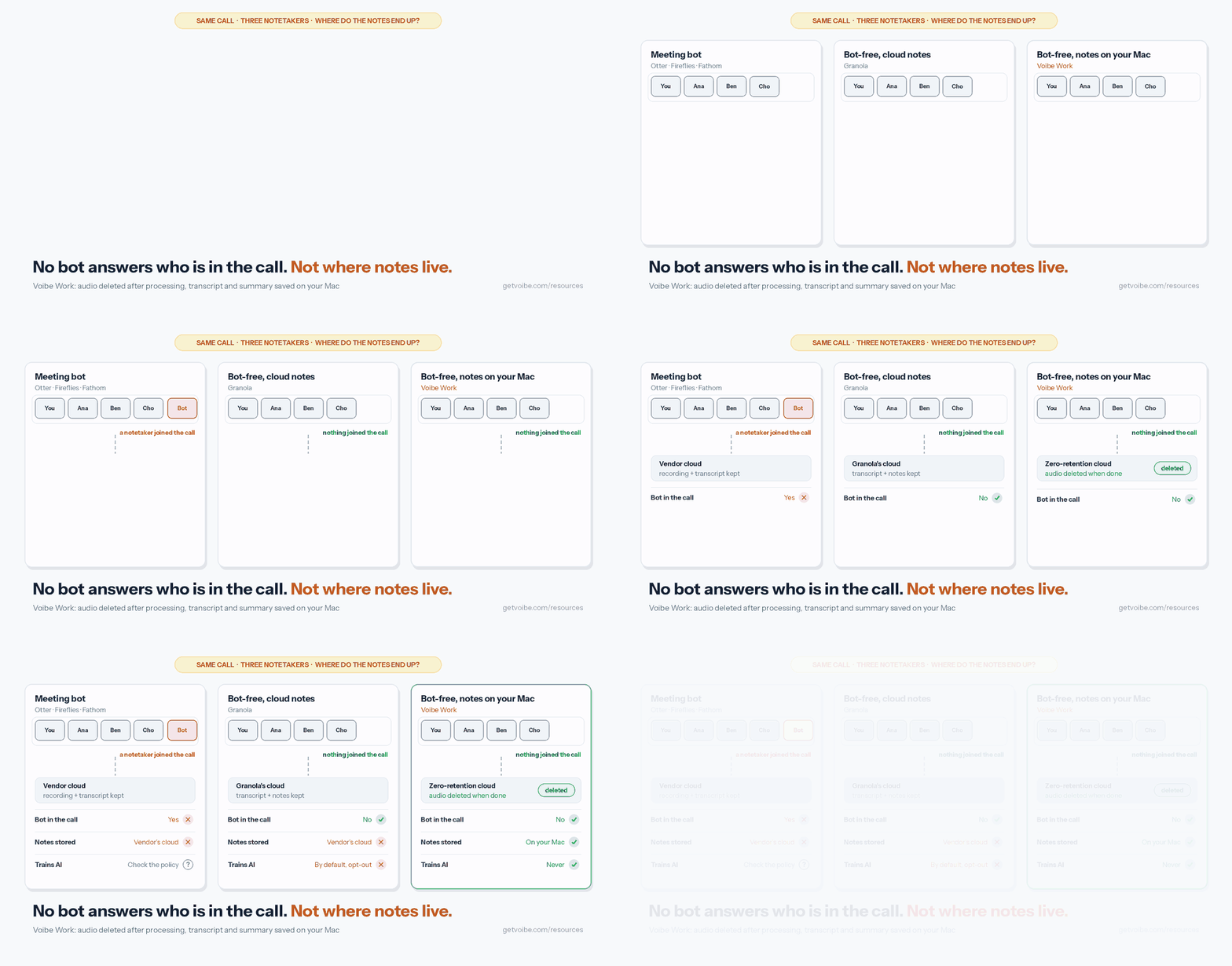
Most of Fathom's risk comes from two design choices: the meeting is stored on Fathom's servers, and it's trained on unless you opt out. Voibe Work (ours) removes both.
What Voibe Work does differently
- No bot in the call, on Mac or Windows. Voibe Work captures Zoom, Microsoft Teams, Google Meet, Webex, Slack huddles or any other meeting app from your computer, and records in-person meetings through your Mac or PC's mic. Nothing joins the participant list.
- Audio deleted after processing. Meeting audio is processed by open-source models on zero-retention cloud providers and deleted as soon as processing completes (what zero data retention means).
- Notes saved on your computer. The transcript and summary are saved on your device, not on Voibe's servers, so retention is your own file-management call. You don't need an Enterprise plan to get deletion, because Voibe keeps no copy of the meeting on its side.
- Never trained on. There's no setting to find and nothing for your guests to opt out of.
- The rest of the workflow. Summary templates for each type of meeting, chat with your meetings on the same zero-retention cloud with nothing you ask stored, and one-click copy and PDF export.
- Dictation included. Every Voibe Work seat includes Voibe Dictation on Mac and Windows for the follow-up email and the CRM note.
- BAA available on request, for practices that need one.
Consent doesn't change. When recording starts, Voibe reminds you to tell everyone you're taking notes, and you're responsible for the consent rules in every participant's state.
Where Fathom wins
- Price: Fathom Free costs nothing and records unlimited meetings.
- Video: Fathom records video and lets you clip and download it. Voibe Work doesn't list audio playback.
- Phone: Fathom has an iPhone app for in-person meetings away from your desk. Voibe Work has no phone app.
- Teams: Fathom syncs to CRMs and offers team folders and shared playlists. Voibe Work doesn't list speaker labels, calendar auto-join, CRM integrations or team workspaces.
- Internet: Voibe Work's meeting notes need a connection. On-device processing is a Voibe dictation feature on Apple Silicon Macs, not a meeting-notes feature.
What It Costs: Fathom vs Voibe Work, With and Without a Dictation App
Fathom has no dictation app, so a fair comparison adds one. Prices come from Fathom's pricing page, Wispr Flow's pricing page and getvoibe.com/pricing, checked October 8, 2026; Team and Business are per seat with a 2-seat minimum.
Plan-by-plan detail: Fathom pricing and Wispr Flow pricing.
| Setup | Monthly | Per year (annual billing) | 3 years | Covers |
|---|---|---|---|---|
| Fathom Free | $0 | $0 | $0 | Meetings (advanced summaries for 5 calls a month) |
| Fathom Premium | $20 | $192 | $576 | Meetings |
| Fathom Team (per seat) | $19 | $180 | $540 | Meetings |
| Fathom Business (per seat) | $34 | $300 | $900 | Meetings |
| Fathom Free + Wispr Flow Pro | $15 | $144 | $432 | Meetings + dictation |
| Fathom Premium + Wispr Flow Pro | $35 | $336 | $1,008 | Meetings + dictation |
| Voibe Work | $14 | $140 | $349 lifetime ($420 on annual) | Meetings + dictation (Mac and Windows) |
- Against Fathom Free: Voibe Work costs $140 a year more. Against Fathom Free plus Wispr Flow Pro ($144), it is $4 (2.8%) less.
- Against Fathom Premium: $52 (27.1%) less a year ($140 vs $192), or $6 (30.0%) less a month ($14 vs $20).
- Against Fathom Premium plus Wispr Flow Pro: $196 (58.3%) less a year ($140 vs $336). Over three years, the $349 lifetime plan is $659 (65.4%) less than $1,008.
- Against Fathom Team and Business: $40 (22.2%) and $160 (53.3%) less per seat per year.
Voibe Work comes with a 7-day free trial of every feature, no credit card and no automatic charge, plus a 30-day money-back guarantee. You can try Voibe Work for free.
Want more no-bot options? See the best no-bot meeting note takers.
Key Takeaway
Voibe Work keeps no copy of the meeting on its side: no bot, audio deleted as soon as processing completes, notes saved on your computer, never trained on, dictation included, $140 a year. Fathom Free is $140 cheaper and does more for teams (video, iPhone app, CRM sync). Consent is your job with both: Voibe reminds you to tell everyone you're taking notes.
Who Fathom Is Safe For, and Who Should Pick Something Else
Fathom's safe for most sales, customer-success and internal calls, once training is off and everyone knows the call is recorded. It's a weaker fit where the recording itself is the risk.
Find your situation:
| Your situation | Fathom verdict | What to do |
|---|---|---|
| Internal stand-ups and planning | Safe | Opt out of training; delete old calls periodically |
| Sales and customer-success calls | Safe with notice | Keep the Recording Notice and banner on; announce the recording |
| Participants in California, Florida or another all-party state | Safe only with everyone's consent | Ask each person and wait for a yes |
| You want no bot, on a Mac | Workable | Use Transcript Only or Audio Only in the Mac app |
| You want no bot, on Windows | Not yet | Wait for Fathom's bot-free Windows support, or use a no-bot tool |
| Patient conversations with health information | Enterprise only | Get the signed BAA; otherwise choose a tool whose BAA terms you've read |
| Privileged legal calls | Risky | Read the lawyers guide; prefer no vendor-side copy |
| Client reviews at an advisory firm | Check recordkeeping rules first | See the financial advisors guide |
| Your university or employer blocks third-party notetakers | Not allowed | Follow the policy (Case Western Reserve University blocks Fathom) |
| You need meetings auto-deleted on a schedule | Enterprise only | Buy Enterprise, or use a tool that keeps no copy |
Want one tool for meetings and dictation? The Wispr Flow Notetaker vs Voibe Work comparison covers the two bundles.
Not sure which category you need? The dictation vs notetaker breakdown explains how they differ.
Is Fathom Safe? FAQ
Straight answers on Fathom's safety, privacy and ownership, grouped by theme.
Privacy and Your Data
Is Fathom safe to use? Yes, for most everyday business calls. Fathom states SOC 2 Type II, GDPR and HIPAA compliance, says its AI subprocessors (Anthropic, OpenAI and Google) can't train on user data, and we found no lawsuit naming Fathom on October 8, 2026.
The risks are its defaults: a bot joins unless you use the Mac app's bot-free mode, Fathom trains its own models on de-identified meeting data until you opt out in My Settings, and recordings stay in Fathom's US cloud until you delete them (auto-delete is Enterprise only). Superhuman (formerly Grammarly) has owned Fathom since September 14, 2026.
Does Fathom train AI on my meetings? Yes, by default. Fathom's privacy policy (dated August 16, 2026) says it may use de-identified data from meeting content to train its in-house AI models, and that you can opt out in your account settings.
The switch is in My Settings; Team and Business admins can opt out every user from Organization Settings. Fathom says its AI subprocessors, Anthropic, OpenAI and Google, aren't contractually permitted to train on your data.
Where does Fathom store my recordings, and for how long? In the United States, until you delete them. Free and Premium include unlimited storage, and automatic deletion on a schedule is Enterprise only, set up by emailing Fathom.
When you delete your account, Fathom's help center says data is removed and purged from backups after 7 more days; the privacy policy says within 30 days.
Security and Compliance
Is Fathom HIPAA compliant? Fathom states that it's HIPAA, SOC 2 Type II and GDPR compliant. Its terms incorporate a click-through Business Associate Agreement for customers HIPAA applies to, and its pricing table lists a signed BAA on Enterprise only.
If you handle protected health information, get the countersigned BAA, confirm what it covers, and decide whether recordings should sit in Fathom's cloud at all, since auto-delete is Enterprise only too.
Is Fathom SOC 2 certified, and is it secure? Fathom states that it holds SOC 2 Type II, an independent audit of security controls over time. It doesn't have ISO 27001, and we found no reported breach involving Fathom as of October 8, 2026.
The SOC 2 report, full subprocessor list, cloud provider and encryption details sit on Fathom's trust center, which didn't load without JavaScript when we checked that day, so we couldn't verify them.
Can Fathom record without a bot joining the call? Yes, but only in the Mac app. Fathom 3.0 offers bot-free Audio Only and Transcript Only modes on Mac, plus bot-free video capture for Zoom on Mac, and Slack huddles are captured bot-free through the desktop app.
Fathom's help center says bot-free Windows support is coming soon, with no date. On Windows, Fathom records with a bot that joins the call as a visible participant.
Ownership, Consent and Alternatives
Did Superhuman buy Fathom, and does that change my privacy? Yes. Superhuman, the company formerly called Grammarly, acquired Fathom on September 14, 2026. Fathom said "Nothing changes today for Fathom users," and as of October 8, 2026 its privacy policy is still the August 16, 2026 version, which doesn't mention Superhuman.
Watch for a new policy date, subprocessor-change notices (Fathom's DPA promises 10 business days' notice) and changes to the training opt-out.
Is it legal to use Fathom without telling everyone on the call? Not everywhere. In all-party-consent states such as California, Florida, Maryland, Massachusetts, New Hampshire and Pennsylvania, and generally Illinois and Washington, every participant must consent to recording.
Fathom's bot is visible, it can post a Recording Notice, and it can email external participants 24 hours before scheduled meetings, but Fathom says getting everyone's consent is the recording owner's responsibility. In Mac desktop mode there's no bot tile, so your announcement matters more.
What is a safer alternative to Fathom for confidential meetings? Pick a notetaker that keeps no copy on the vendor's side and never trains on your data. Voibe Work (ours) captures meetings from your Mac or Windows PC with no bot, deletes the audio as soon as processing completes, saves notes on your computer and never trains on them.
Dictation's included for $140 a year, and a BAA is available on request. That's $140 more than Fathom Free and $52 (27.1%) less than Fathom Premium annual. Voibe reminds you to tell everyone you're taking notes; consent rules are your responsibility.
The Bottom Line: Is Fathom Safe in 2026?
Fathom is a mainstream, well-rated notetaker that's safe for everyday business calls, once you change its defaults. It states SOC 2 Type II, GDPR and HIPAA compliance, keeps third-party AI vendors from training on your data, and has no lawsuit we could find.
Its weak points are choices, not breaches:
- a bot joins unless you're on the Mac app
- training's on until you opt out
- recordings stay in Fathom's US cloud until you delete them
- the company changed hands on September 14, 2026
Keeping Fathom? Do the five-step audit today: opt out of training, use Transcript Only for sensitive calls on a Mac, prune your integrations, delete old recordings and keep every notice on. Re-check when the privacy policy date moves past August 16, 2026.
If the meeting shouldn't sit on a vendor's servers at all, Voibe Work captures it from your Mac or Windows PC with no bot, deletes the audio as soon as processing completes, saves the notes on your computer and never trains on them. Dictation's included, for $140 a year.
Voibe reminds you to tell everyone you're taking notes; you're responsible for the consent rules. Start the 7-day free trial (no credit card).
Related reading:
- Fathom pricing
- Fathom alternatives
- Is Otter Safe?
- Otter AI alternatives
- The Granola lawsuit and Granola alternatives
- Our AI Tool Privacy Tracker, which scores Fathom alongside other notetakers
Info
We checked Fathom's pricing page, privacy policy, terms, DPA and help center on October 8, 2026. If Fathom's privacy policy shows a date newer than August 16, 2026, re-check before relying on these facts.
Best AI Dictation and Meeting Notes for Confidential Work
Draft letters, notes and emails 5x faster. Get meeting notes without a bot joining your call. Nothing used to train AI.
- Mac + Windows
- No bot in your calls
- Nothing used to train AI
- 7-day free trial
Want to compare plans first? View pricing →