
Dictation, Notetaker, Meeting Assistant or Transcription? Pick in 3 Questions
Dictation types what you say; a notetaker writes up what everyone said. How all four tools differ, what meeting dictation means, and when one plan covers two.

AI Dictation App vs. AI Notetaker vs. AI Meeting Assistant vs. Transcription App: The Short Answer
TL;DR: An AI dictation app types your live speech at your cursor in real time — you speak, and text appears in whatever app you're working in. An AI notetaker turns conversations or voice memos into structured, summarized notes. An AI meeting assistant records, transcribes, and summarizes meetings, adding speaker labels, action items, and team integrations. A transcription app converts pre-recorded audio or video files into text documents. All four convert speech to text; they differ on what goes in (live speech vs. recordings), when text appears (instantly vs. after processing), what comes out (your exact words vs. a summary), and whose voice is captured (only yours vs. everyone in the conversation).
These distinctions matter because the four categories are priced, regulated, and architected differently. Meeting tools are per-user subscriptions that record other people — which triggers consent laws in about a dozen US states. Dictation and transcription tools capture only audio you control, and they are the two categories where fully on-device tools are the norm in 2026. Most people end up needing two of the four, and in 2026 that no longer has to mean two subscriptions. This guide defines each category, compares them dimension by dimension, and gives you a three-question test to pick the right one.
Key Takeaway
Dictation apps type your speech in real time at the cursor. Notetakers summarize conversations into notes. Meeting assistants record and document meetings for teams. Transcription apps convert recorded files into documents. Choose by input, timing, output, and whose voice gets captured.
Key Takeaways: How the Four Voice-to-Text Categories Differ
| Category | What It Does | When Text Appears | Best For | Typical 2026 Pricing |
|---|---|---|---|---|
| AI dictation app | Types your live speech at the cursor in any app | Instantly, as you speak | Replacing typing: email, documents, AI prompts | Free (Apple Dictation) to $15/mo; lifetime licenses $199–$249.99 |
| AI notetaker | Turns conversations or voice memos into structured notes | During and after the conversation | Personal meeting notes, idea capture | Free tiers; $14–$18/user/mo |
| AI meeting assistant | Records, transcribes, and summarizes meetings with speaker labels, action items, and integrations | After the meeting | Team documentation, sales calls, CRM workflows | Free tiers; $8.33–$29/user/mo |
| Transcription app | Converts recorded audio and video files into text documents | After upload and processing | Interviews, podcasts, lectures, archives | €64 one-time (MacWhisper) to $0.25/min (Rev AI) |
Disclosure: Voibe — a dictation app for Mac and Windows with an on-device mode on Apple Silicon, plus Voibe Work, its no-bot meeting-notes plan for Mac and Windows — is our product. This guide compares tool categories on verifiable characteristics: input, output, timing, pricing, and privacy architecture.
Why Dictation Apps, Notetakers, Meeting Assistants, and Transcription Apps Get Confused
The four categories get confused because they share one underlying technology — automatic speech recognition — and because vendors market across category lines. Otter.ai calls itself an AI meeting assistant while also publishing guides about AI notetakers. MacWhisper is a file transcription app that includes system-wide dictation as a secondary feature. Several dictation vendors shipped meeting-notes and insights features in mid-2026 — Monologue launched Monologue Notes, for example. Reading vendor labels alone, you cannot reliably tell what a tool does.
The dependable way to categorize any voice tool is to ignore the label and ask four questions: What audio goes in? When does text come out? Is the output verbatim or summarized? And whose voice is captured? The diagram below maps all four categories across these dimensions.
What Is an AI Dictation App?
An AI dictation app converts your live speech into text at your cursor, in real time, in whatever application you're working in. You press a hotkey, speak, and the words appear where you would have typed them — in Gmail, Slack, a Google Doc, a code editor, or an AI chat box. Modern dictation apps run Whisper-class speech models that handle natural speech, punctuation, and technical vocabulary far better than the dictation built into your operating system.
The defining characteristics of a dictation app:
- Input: your voice only, live from the microphone
- Output: your exact words as text (some tools offer optional, bounded cleanup that removes filler words without changing meaning)
- Timing: real time — text appears moments after you speak
- Destination: the cursor in any app on your system, not a separate workspace
Representative tools and 2026 pricing: Voibe costs $9.90/month, $99/year or $199 lifetime, runs on Mac and Windows, and processes speech either on-device on Apple Silicon Macs or in a zero-retention cloud that deletes audio the moment transcription completes. Wispr Flow costs $15/month ($12/month billed annually, $144/year) and processes speech in the cloud across Mac, Windows, and mobile. Superwhisper costs $8.49/month or $249.99 lifetime with on-device processing and optional cloud modes. Apple Dictation is free and built into macOS, but times out on longer dictation sessions and struggles with technical vocabulary. The on-device vs. cloud split within this category is significant enough that we cover it separately in our cloud vs. local dictation guide.
A dictation app is the right category when the text you want is text you're about to write: emails, documents, messages, commit notes — and increasingly, prompts. Dictating into ChatGPT, Claude, or Cursor is one of the fastest-growing dictation use cases, because spoken prompts carry more context with less friction; see our guide to voice prompting AI tools and our complete overview of dictation on Mac.
What Is an AI Notetaker?
An AI notetaker converts spoken conversations or voice memos into structured, summarized notes. Unlike a dictation app, a notetaker does not type at your cursor — it listens to longer stretches of speech, then produces organized output in its own workspace: summaries, bullet points, headings, and highlights you can edit and share.
The category splits into two sub-types:
- Meeting notetakers capture calls and produce notes. Granola is the best-known example in 2026: it captures your Mac or Windows system audio directly — no bot joins the call — and merges your rough typed notes with an AI-generated summary. Granola's Basic plan is free with limited meeting history; the Business plan costs $14/user/month with unlimited history and integrations for Notion, Slack, and HubSpot.
- Voice-memo notetakers such as AudioPen and Voicenotes let you ramble into your phone or laptop and hand back cleaned-up, structured notes — closer to thinking out loud than to writing.
The line between notetakers and meeting assistants is blurry, and some products span both — Otter.ai markets itself in both categories. The practical distinction: a notetaker is notes-first and personal, and its job ends when you have usable notes. A meeting assistant is documentation-first and team-oriented — it keeps recordings, identifies speakers, and pushes structured data into other systems.
An AI notetaker is the right category when you attend conversations you need to remember, and a summary serves you better than a word-for-word record. One caveat: bot-free capture is not the same as private processing. No bot appears in the meeting, but the audio is still processed by cloud AI models — an important distinction if you handle confidential material. Bot-free capture also carries legal risk: a July 2026 federal class action, Chamberlain v. Granola, Inc. (N.D. Cal.), alleges Granola records meeting participants without their knowledge or consent and uses their communications to train its AI models by default. Both points are covered in the privacy section below.
What Is an AI Meeting Assistant?
An AI meeting assistant records, transcribes, and summarizes your meetings, then turns them into a searchable team archive with speaker labels, action items, and integrations. Most join Zoom, Google Meet, or Microsoft Teams calls as a visible bot participant — Otter's OtterPilot and Fireflies' notetaker bot work this way — then deliver a transcript, an AI summary, and assigned action items after the call ends. Business tiers push this data into CRMs such as Salesforce and HubSpot.
A fast-growing group skips the bot. Granola, Jamie, Quill Meetings and Voibe Work (ours) capture the call from your own computer, so nothing joins the meeting. Removing the bot doesn't remove the consent question, and these tools differ most on where the transcript ends up: on your computer or on the vendor's servers. Our roundups of the best no-bot meeting note takers and the best Granola alternatives compare them on exactly that.
Representative tools and 2026 pricing:
- Otter.ai — free plan with 300 transcription minutes/month; Pro costs $16.99/month billed monthly or $8.33/month billed annually ($99.96/year) with 1,200 minutes/month and 10 file imports/month (official pricing). Rated 4.4/5 on G2. See our Otter.ai alternatives guide and Otter privacy investigation.
- Fireflies.ai — free plan; Pro costs $10/user/month billed annually ($18 billed monthly), with 8,000 minutes of storage per seat and 20 AI credits; Business at $19/user/month billed annually ($29 monthly) adds unlimited storage, 30 AI credits, conversation intelligence and team analytics (official pricing). Rated 4.8/5 on G2.
- Fathom — free plan with unlimited recordings and transcriptions; Premium costs $20/month billed monthly or $16/month billed annually (official pricing). Rated 5.0/5 on G2 from more than 6,800 reviews — the highest G2 rating among the major meeting assistants.
- Zoom's built-in AI (Zoom retired the “AI Companion” name in June 2026) — meeting summaries are included on paid Zoom plans (Pro $16.99/month, or $14.16/month billed annually); the free plan gets summaries for 3 hosted meetings a month. It covers Zoom's own calls only.
An AI meeting assistant is the right category when meetings are a team workflow rather than a personal memory problem: sales teams reviewing calls, managers distributing action items, organizations that need a searchable record (our guide to building an organizational audio knowledge base goes deep on that use case). Healthcare has its own vertical version of this category — AI medical scribes that turn patient visits into clinical notes.
What the two best-known meeting assistants cost, plan by plan: our Otter pricing and Fathom pricing breakdowns.
A newer twist is the bundle: one plan for meeting notes and dictation. Wispr Flow, Laxis, Fireflies and Voibe Work all sell one now, and they differ on the bot and on where the audio goes. Our Laxis alternatives guide compares them.
Warning
AI meeting assistants record every participant. About a dozen US states — including California, Florida, Illinois, Maryland, Massachusetts, Pennsylvania, and Washington — require all-party consent before recording a private conversation. Announce the recording at the start of every meeting, whichever tool you use.
What Is a Transcription App?
A transcription app converts pre-recorded audio or video files into text transcripts. You upload or drag in a file — an interview, a podcast episode, a lecture recording, a meeting you recorded separately — and receive a document with timestamps, speaker labels, and export options (TXT, DOCX, SRT subtitles). Nothing happens in real time, and nothing lands at your cursor: the output is a document.
Representative tools and 2026 pricing:
- MacWhisper — free version available; the Pro license costs €64 (about $69) one-time and transcribes audio files, videos, YouTube URLs, and podcasts on-device using Whisper models. See our MacWhisper review and MacWhisper pricing breakdown.
- TurboScribe — a web-based cloud service at $10–20/month with unlimited transcription. See our TurboScribe alternatives guide.
- Rev — AI transcription at $0.25 per audio minute and human transcription at $1.99 per audio minute, with 45 free AI minutes per month (official pricing). One hour of audio costs $15 with AI or $119.40 with human transcribers. Journalists weighing options can start with our Rev alternatives for journalists.
- OpenAI Whisper — the open-source model behind many of these tools, free to run from the command line if you're comfortable with technical setup. Our explainer on how Whisper works covers the details.
The most common way people land in this category is by accident: they recorded a call and then discovered there was no transcript waiting for them. That is exactly what happens on Zoom’s free plan, and we walk the whole fix — which file Zoom saved, where, and how to turn it into text — in how to transcribe a Zoom recording.
A transcription app is the right category when the audio already exists. It is also the category where per-minute pricing punishes volume: transcribing ten hours of interviews per month costs $150/month at Rev's AI rate, while MacWhisper's €64 one-time license handles unlimited volume on your own hardware.
The Split Inside the Transcription Category: An App You Drive vs. an API Your Agent Drives
Every tool named above is an app a person sits in front of: you open it, you add the file, you wait, you copy the text out. That is one half of the category. The second half now matters as much — a transcription API your agent calls on your behalf. Nothing gets opened. A recording lands in a folder and the transcript, the summary and the action items exist by the time you look.
The reason this stopped being a developer-only distinction is that connecting one no longer requires code. Voibe's speech-to-text API, for example, runs a hosted MCP server: in Claude Cowork, Claude desktop or Claude web you add it under Customize › Connectors › Add custom connector, sign in once, and then ask for what you want in a sentence — “transcribe everything in my Zoom folder from this week and give me one document per call with the decisions and action items.” Developers get the same server in Claude Code with a single claude mcp add command, or skip MCP and call the REST endpoints from a cron job. Other always-on agents — OpenClaw, Hermes, Grok Bot — reach it the same way.
So the category question has changed shape. It used to be which transcription app should I open? The more useful version is now do I want to do this by hand, or hand it over? If you have a folder of recordings and a recurring job, the API route removes the app entirely. If you need to scrub audio, fix speaker labels by ear, or edit and export, you want a real interface, and MacWhisper or Descript remain the right answer. Transcribing a Zoom recording walks through the handed-over version end to end, including setup for each client.
Dictation vs. Notetaker vs. Meeting Assistant vs. Transcription: Side-by-Side Comparison
The table below compares all four categories across the dimensions that determine fit: input, output, timing, privacy, and pricing model.
| Dimension | AI Dictation App | AI Notetaker | AI Meeting Assistant | Transcription App |
|---|---|---|---|---|
| Primary input | Your live speech | Live conversations or voice memos | Live meetings (Zoom, Meet, Teams) | Recorded audio/video files |
| Output | Your exact words | Summarized, structured notes | Transcript + summary + action items | Verbatim transcript document |
| When text appears | Instantly, as you speak | During and after the conversation | After the meeting | After upload and processing |
| Where text lands | At your cursor, in any app | The notetaker's workspace | The assistant's workspace and integrations | Export files (TXT, DOCX, SRT) |
| Records other people | No | Yes, in conversations | Yes, every participant | Only what is in the source file |
| Speaker labels | No — single voice | Sometimes | Yes | Yes, on most tools |
| Fully offline option | Yes (Voibe on-device mode on Apple Silicon, Superwhisper local mode) | Rare — a few open-source tools (Meetily, Anarlog) run locally; most, including Granola and Voibe Work, need the internet | No — cloud services | Yes (MacWhisper, open-source Whisper) |
| Consent considerations | None — your voice only | Yes, when others are recorded | Yes — all-party consent states apply | Applies to the original recording |
| Typical pricing model | Free–$15/mo; lifetime $199–$249.99 | Free tiers; $14–$18/user/mo | Free tiers; $8.33–$29/user/mo | One-time (€64) to per-minute ($0.25/min AI, $1.99/min human) |
| Representative tools | Voibe, Wispr Flow, Superwhisper | Granola, Voibe Work, AudioPen, Voicenotes | Otter.ai, Fireflies.ai, Fathom | MacWhisper, Rev, TurboScribe |
The Three-Question Voice Tool Test: How to Pick the Right Category
The Three-Question Voice Tool Test identifies the right voice-to-text category for any workflow using three questions:
- Is the audio live or already recorded? If a file already exists, you need a transcription app. If the speech is live, continue.
- Is it only your voice, or a conversation? If you're speaking in order to write — email, documents, prompts — you need a dictation app. If multiple people are talking, continue.
- Do you need personal notes or team documentation? If usable notes for yourself are the goal, an AI notetaker is enough. If you need recordings, speaker labels, action items, and CRM or project-tool integrations, you need an AI meeting assistant.
Two edge cases the test resolves quickly. Recorded meetings: a recording exists, so use a transcription app — or import the file into a meeting assistant (Otter Pro allows 10 file imports per month). Voice memos to yourself: the speech is live and solo, but you want notes rather than cursor text, so use a voice-memo notetaker like AudioPen — or dictate directly into your notes app with a dictation tool and skip the extra service.
What Is Meeting Dictation Software?
“Meeting dictation software” gets used for two different jobs, and they land in different categories.
- Dictating your own meeting notes or minutes. The meeting ends (or pauses) and you speak the summary, the decisions and the follow-ups into your minutes template, your CRM or an email. That is a dictation app. Only your voice is captured, so there is no consent question, and with an on-device dictation tool nothing leaves your machine. It is how a clerk drafts minutes, how a lawyer writes a file note after a client call, and how a doctor documents a consult.
- Capturing the meeting itself. Software listens to everyone on the call and writes up a transcript and summary. That is an AI notetaker or meeting assistant. It records other people, so all-party consent laws can apply, and almost every tool in this group processes the audio in the cloud.
| Dictating your meeting notes | Capturing the meeting | |
|---|---|---|
| Whose voice | Yours only | Everyone on the call |
| When | After the meeting, or between agenda items | During the meeting |
| Output | Your words, typed at the cursor in any app | A transcript and an AI summary |
| Consent | Not needed: nobody else is recorded | Required in all-party-consent states; announce it every time |
| Works offline | Yes, with on-device dictation (Voibe on Apple Silicon) | Rarely; Voibe Work, Granola and Otter all need internet |
| Examples | Voibe, Wispr Flow, Superwhisper | Voibe Work, Granola, Otter.ai, Fireflies.ai |
There is a third reading: you already recorded the meeting and want the minutes typed from the file. That is transcription, not dictation, and how to transcribe a Zoom recording walks through it.
Plenty of people need both of the first two jobs, which is where the next question comes in.
Key Takeaway
Meeting dictation means one of two jobs: dictating your own notes or minutes (a dictation app, your voice only, no consent question) or capturing the meeting itself (a notetaker that records everyone, so consent rules apply). Name the job before you pick the tool.
Can One App Do All Four Jobs in 2026?
No single app currently does all four jobs well, although vendors in every category expanded into neighboring ones during 2025–2026. Otter.ai spans notetaking and meeting assistance. MacWhisper added system-wide dictation to its transcription core — while its own positioning remains transcription-first. Dictation vendors moved toward notes: Monologue launched Monologue Notes, Wispr Flow added a notetaker, and in September 2026 Voibe added Voibe Work, which pairs its dictation app with no-bot meeting notes saved on your computer.
Bundling has real costs, which is why the categories persist:
- Privacy concentration. An app that dictates, records meetings, and stores transcripts holds far more sensitive data than a single-purpose tool. Every added capture surface — microphone, system audio, meeting bots — widens the exposure if the vendor is breached or changes its data policy.
- Pricing creep. Multi-function voice tools are subscription products almost without exception, because the stored archive of recordings justifies the recurring fee. (Voibe Work, which saves notes on your computer instead of in a vendor archive, is one of the few with a one-time option: $399 lifetime.) Single-purpose dictation and transcription tools are where one-time pricing survives: Voibe at $199 lifetime, MacWhisper Pro at €64.
- Divided engineering priorities. Real-time dictation demands instant response and system-wide reliability; meeting documentation demands storage, search, and collaboration. Optimizing for one degrades the other — our MacWhisper pricing analysis reaches the same conclusion from the transcription side: its dictation is a secondary feature, not the reason to buy it.
The practical pattern in 2026 is a two-tool stack: one dictation app for daily writing, plus one meeting or transcription tool if your work requires it. MacWhisper Pro (€64) plus Voibe ($199 lifetime) is a common all-local, one-time-purchase pairing — roughly $268 total for dictation and file transcription with no subscription attached.
Do You Need Two Tools? Dictation and Meeting Notes in One Plan
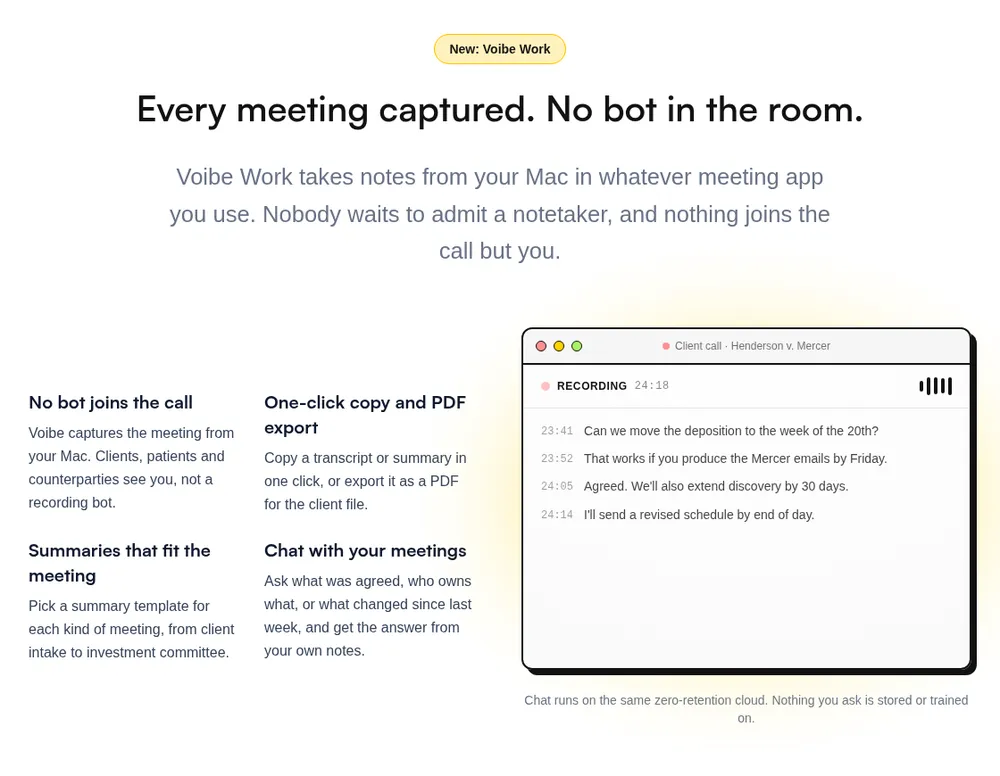
The two-tool stack above usually means one specific pair: a dictation app for your own writing and a no-bot notetaker for calls. Wispr Flow plus Granola is the best-known version. You need both jobs covered. You no longer need two subscriptions to do it.
Disclosure first: Voibe Work is ours. It's the plan we built for exactly this pair. Every Voibe Work seat includes everything in Voibe's dictation app (Mac and Windows), plus meeting notes captured from your Mac or Windows PC with no bot in the call.
| Setup | Per month | Per year | Over 3 years |
|---|---|---|---|
| Wispr Flow Pro + Granola Business | $29 ($15 + $14) | $312 ($144 + $168) | $936 |
| Wispr Flow Growth + Notetaker (its unlimited meeting tier) | $33 | $312 ($26/mo annual) | $936 |
| Voibe Work | $19 | $149 | $399 lifetime, paid once |
| Voibe Work saves vs Wispr Flow Pro + Granola Business | $10 (34.5%) | $163 (52.2%) | $537 (57.4%) |
Against Granola Business on its own ($168 a year, billed monthly only), Voibe Work is $19 (11.3%) less per year and adds the dictation app. If you only need dictation, Voibe Dictation alone is $9.90 a month, $99 a year or $199 lifetime; Voibe Work adds meeting notes for $50 a year more.
What the meeting side does, and what it doesn't
- No bot. It captures the meeting from your Mac or Windows PC in Zoom, Microsoft Teams, Google Meet, Webex, Slack huddles or any other meeting app. Nobody has to admit a notetaker.
- Notes on your computer. Meeting audio is processed by open-source models on zero-retention cloud providers and deleted as soon as processing completes. The transcript and summary are saved on your computer, not on Voibe's servers, and never used to train AI.
- Needs internet. That processing step happens in the cloud, so meeting notes don't work offline. On-device processing is a dictation feature, on Apple Silicon Macs.
- Consent is still yours. When recording starts, Voibe reminds you to tell everyone you're taking notes. Following the consent rules where you and the other participants are is your responsibility.
- Desktop only. Meeting notes and dictation run on Mac (Intel and Apple Silicon) and Windows. There is no phone app.
When two tools still make sense: you need meeting notes on a phone, or what you actually need is a team meeting assistant with CRM sync and a shared call archive. That's a different category, covered above.
Voibe isn't the only bundle. Wispr Flow shipped its own bot-free Notetaker in 2026, but notes are stored in Wispr's US cloud, and Wispr's help center says model training is on by default on its Free and Pro plans; Wispr Flow Notetaker vs Voibe Work compares the two. Every dictation-plus-meetings bundle we priced is in the best no-bot meeting note takers, and if you're coming from a bot-based tool, start with the Otter.ai alternatives.
Key Takeaway
The most common two-tool stack is a dictation app plus a no-bot notetaker. Bought separately (Wispr Flow Pro + Granola Business) that is $312 a year; Voibe Work covers both jobs for $149 a year, $163 (52.2%) less. Its meeting notes run on Mac and Windows.
Privacy and Consent: The Dimension Most Voice Tool Comparisons Skip
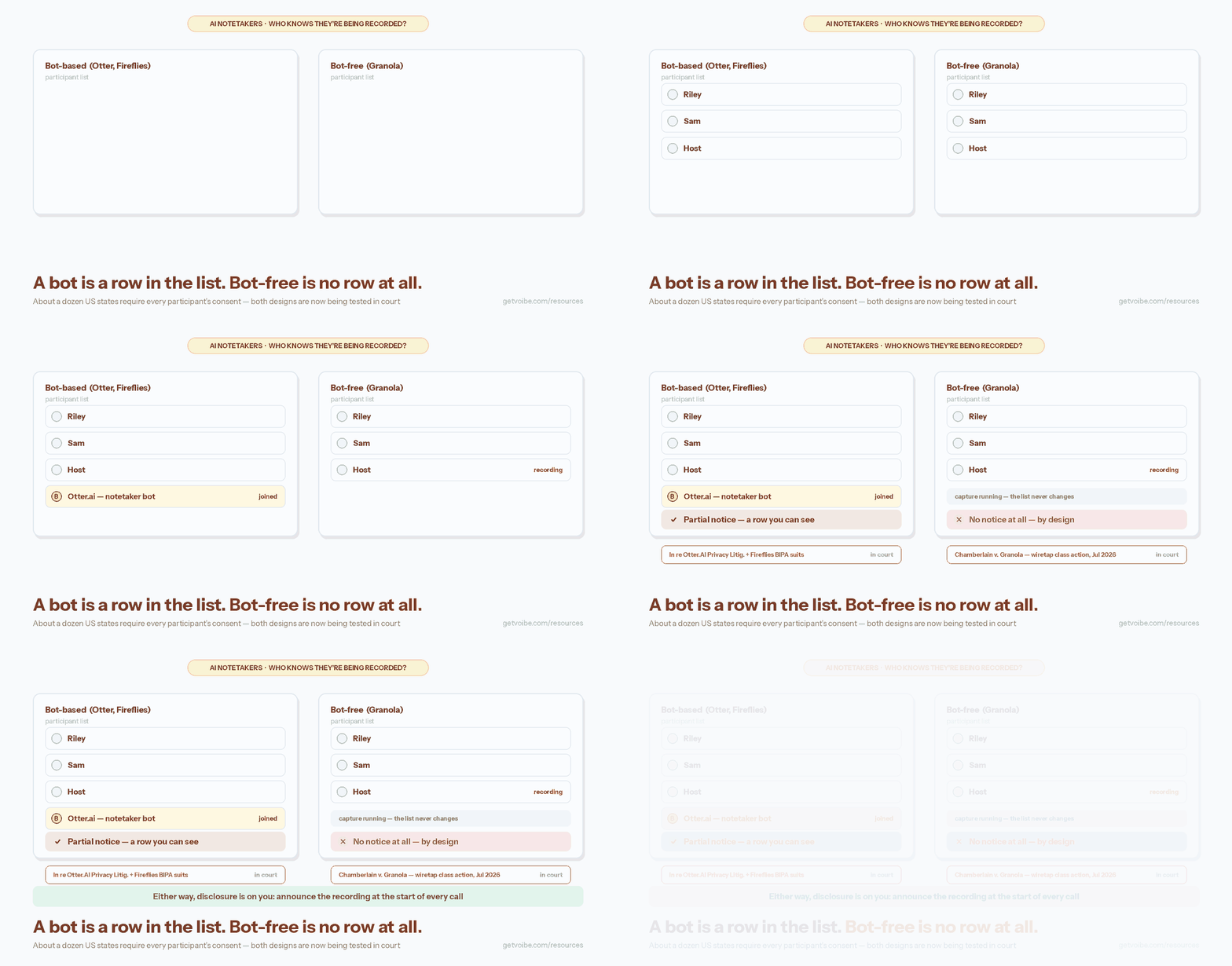
Privacy differences between the four categories come down to two questions: whose voice is captured, and where the audio is processed.
Whose voice is captured. A dictation app captures only you, speaking deliberately, one utterance at a time. A transcription app processes recordings you already control. Notetakers and meeting assistants capture everyone in the conversation — which is a legal question, not just an etiquette question. About a dozen US states, including California, Florida, Illinois, Maryland, Massachusetts, Pennsylvania, and Washington, require all-party consent to record a private conversation; federal law and most other states require one-party consent. Justia maintains a 50-state survey of recording laws, and the Reporters Committee for Freedom of the Press publishes a Reporter's Recording Guide. Meeting bots announce themselves in the participant list partly for this reason; bot-free notetakers shift the disclosure burden entirely onto you.
That bot-free design is now being tested in court. Chamberlain v. Granola, Inc. (No. 3:26-cv-07926, N.D. Cal., filed July 30, 2026) is a putative class action alleging that Granola's notetaker intercepts and records virtual-meeting participants without their knowledge or consent — and, by default, uses those communications to train Granola's AI models — in violation of the federal Wiretap Act (ECPA) and California's Invasion of Privacy Act, among other claims. The complaint stresses that participants who aren't Granola users get no notice at all, and the AI-training opt-out lives only in the Granola user's own account settings, leaving everyone else in the meeting no way to decline. Granola joins Otter (In re Otter.AI Privacy Litigation, N.D. Cal.) and Fireflies (BIPA suits in N.D. Ill.) among notetaking vendors facing recording-consent litigation — our continuously updated AI Tool Privacy Tracker follows all three cases, and our full breakdown of the Granola lawsuit explains the claims and what they mean for users and participants.
Where the audio is processed. Almost every mainstream AI notetaker and meeting assistant is a cloud service: audio is uploaded, processed on vendor servers, and retained in an archive — the archive is the product. The exceptions split two ways: a few open-source notetakers (Meetily, Anarlog) run locally, and Voibe Work processes meeting audio on zero-retention cloud providers, deletes it once processing completes and saves the transcript on your computer instead of in a vendor archive (it still needs an internet connection). Dictation and transcription are the categories where fully on-device tools are mainstream in 2026: Voibe's on-device mode processes dictation on Apple Silicon and never stores audio, while MacWhisper and open-source Whisper transcribe files locally. If your work involves privileged or regulated material — attorney-client communication, patient information, unreleased financials — the category choice is a compliance decision before it is a features decision. Our cloud vs. local dictation guide and dictation and HIPAA guide cover the details, and our analysis of US v. Heppner explains the SDNY ruling that public AI chats are not protected by attorney-client privilege — third-party-disclosure logic that extends to cloud voice tools.
Key Takeaway
Dictation and transcription tools capture only audio you control, and both have fully on-device options. Notetakers and meeting assistants record other people and mostly process audio in the cloud — bringing consent laws and vendor retention policies into scope.
Use-Case Cheat Sheet: 12 Scenarios Matched to the Right Voice Tool
Use this cheat sheet to jump from a scenario straight to the right category and a representative tool at its verified 2026 price.
| Scenario | Right Category | Example Tool (2026 Pricing) |
|---|---|---|
| You dictate email, documents, and Slack messages all day on a Mac | AI dictation app | Voibe ($9.90/mo or $199 lifetime) |
| You write long AI prompts to Claude, ChatGPT, or Cursor by voice | AI dictation app | Voibe Developer Mode ($199 lifetime) |
| You have RSI or hand pain and need to replace typing | AI dictation app | See our accessibility dictation hub |
| You want personal notes from back-to-back calls, without a bot joining | AI notetaker | Granola (free Basic; $14/user/mo Business) |
| You want dictation and no-bot meeting notes without paying for two apps | Dictation app + notetaker, one plan | Voibe Work ($19/mo or $149/yr; meeting notes on Mac and Windows) |
| You dictate your own meeting minutes or file notes after each call | AI dictation app (meeting dictation) | Voibe ($9.90/mo; on-device on Apple Silicon) |
| You capture ideas as voice memos on walks | AI notetaker (voice-memo) | AudioPen or Voicenotes |
| Your sales team needs call recordings synced to the CRM | AI meeting assistant | Fireflies.ai Business ($19/user/mo annual) |
| Your team wants free meeting recording, transcripts, and summaries | AI meeting assistant | Fathom (free; Premium $16/mo annual) |
| You need live captions plus a searchable minutes archive | AI meeting assistant | Otter.ai Pro ($8.33/mo annual) |
| You transcribe podcast episodes or interviews every week | Transcription app | MacWhisper Pro (€64 one-time) |
| You need a publication-grade transcript of a recorded interview | Transcription app (human) | Rev human transcription ($1.99/min) |
Doctors documenting patient visits sit in a specialized vertical of the meeting assistant category — see our AI medical scribe roundup for doctors.
What This Means for Your Workflow and Budget
Most people need one or two of these categories, not all four. Match the categories to your actual week:
- Writers, developers, and anyone drowning in typing: a dictation app alone covers you. Dictation is the only category that changes how you work hour to hour, because it replaces the keyboard instead of documenting events.
- Managers and salespeople: a dictation app for your own writing, plus a meeting tool for calls — or one plan that covers both (see above). At zero budget, Fathom's free plan plus Apple Dictation is a workable starting stack.
- Journalists, podcasters, and researchers: a dictation app plus a transcription app. If sources are confidential, keep both on-device — see our best offline dictation apps roundup.
- Students: a transcription app for lectures (check your institution's recording policy first) and free built-in dictation for writing.
The budget math favors mixing pricing models. An all-subscription stack — Wispr Flow Pro at $144/year, Otter Pro at $99.96/year, and TurboScribe at about $120/year — costs $363.96 per year, or $1,091.88 over three years. A stack covering the same jobs with one-time purchases — Voibe at $199 lifetime, MacWhisper Pro at €64 (about $69), and Fathom's free plan — costs roughly $268 once: about $824 less over three years, a 75% saving. Full market pricing is tracked in our Mac dictation app pricing guide.
If dictation is where you'd start — and for most Mac users it is — try Voibe for free. It works in every app on Mac and Windows, runs on-device on Apple Silicon Macs (or in a zero-retention cloud on Windows and Intel Macs), and costs $9.90/month, $99/year or $199 once. Our getting-started guide takes about five minutes.
Coaches and consultants sit across three of the four categories at once: a dictation app for the writing, a transcription route for recorded sessions, and a notetaker only for calls they do not host. We worked that through, with prices and a session-notes workflow, in AI tools for coaches: the 2026 stack that wins back your admin hours.
Bottom Line: Four Categories, One Decision Framework
AI dictation apps, AI notetakers, AI meeting assistants, and transcription apps solve four different jobs that happen to share a technology. Dictation apps replace typing in real time. Notetakers turn conversations into usable summaries. Meeting assistants turn meetings into team documentation. Transcription apps turn recordings into documents. Run the Three-Question Voice Tool Test — live or recorded, solo or conversation, notes or documentation — and the right category falls out in seconds.
Where to go next depends on the category you landed on:
- Dictation: our complete guide to dictation on Mac and the cloud vs. local dictation comparison
- Meeting tools: the best Otter.ai alternatives, the best no-bot meeting note takers, and our Otter safety investigation
- Transcription: our MacWhisper review and TurboScribe alternatives
- Pricing across the market: the Mac dictation app pricing guide
Two cross-category pairings come up so often they earned dedicated pages: Rev vs Wispr Flow (transcription service vs dictation app) and Dragon vs Otter (dictation software vs meeting assistant) — both walk the routing question with full pricing math.
And if the answer was a dictation app, learn more about Voibe — private by design, on Mac and Windows, on-device on Apple Silicon. If you need meeting notes too, Voibe Work adds them for $149 a year.
Across all four categories the deciding question is the same one: what does the tool keep? Zero data retention explained gives you the five-level framework and a ten-minute test that works on any of them. For a worked example of this decision in a regulated profession — where the notetaker-vs-dictation choice carries consent and books-and-records weight — see dictation for financial advisors.
Frequently Asked Questions
What is meeting dictation software?
What is the difference between an AI dictation app and a transcription app?
Is an AI notetaker the same as an AI meeting assistant?
Can I use an AI meeting assistant like Otter for dictation?
Can a dictation app transcribe audio files?
Which is better for meetings: Granola, Otter, Fireflies, or Fathom?
Do I need consent to record meetings with an AI assistant?
Which voice-to-text tools work completely offline?
Which voice-to-text category is cheapest over three years?
Is there a free option in every voice-to-text category?
What's the difference between a meeting recorder app and a transcription API?
Is there one app that does dictation and meeting notes?
Best AI Dictation and Meeting Notes for Confidential Work
Draft letters, notes and emails 5x faster. Get meeting notes without a bot joining your call. Nothing used to train AI.
- Mac + Windows
- No bot in your calls
- Nothing used to train AI
- 7-day free trial
Want to compare plans first? View pricing →
Related Articles
7 TurboScribe Alternatives That Fix Its Billing Trap
TurboScribe's free plan stops at 3 files a day, 30 minutes each; billing is the top complaint. 7 TurboScribe alternatives we tested, from free to $199 lifetime.
Best Transcription App for Mac? It Depends on the Job
Best transcription apps for Mac: 1. MacWhisper 2. Voibe Work 3. Superwhisper 4. Aiko 5. Voice Memos 6. TurboScribe 7. Otter 8. Granola 9. Rev 10. whisper.cpp
How to Run Your Coaching Business on AI in 2026: 6 Tools, $120 a Month
A how-to for coaches: run bookings, session notes, client recaps and follow-ups on AI with Voibe API + Claude, Claude Pro, Voibe, Calendly, Paperbell or CoachAccountable, and Zapier. 2026 prices, notes for $0.30 a call, $120 a month total.