
One in Ten Dictations Isn't in English. Multilingual Dictation Has Gone Mainstream.
Non-English dictation rose from 8.3% to 10.1% in our opt-in data. Here's what good multilingual dictation needs, and how Voibe handles 90+ languages.

Company
Voibe
Industry
Opted-in Voibe users, aggregate
10.1%
of dictations now in another language
90+
languages Voibe dictates in
2
private modes: on-device or zero-retention cloud
One in ten dictations in our opt-in usage data is now in a language other than English.
In mid-August 2026, the share of Voibe dictations that weren't in English reached 10.1%, up from an 8.3% average over the previous 90 days. German, Ukrainian and French led the rise.
The short answer: multilingual dictation is going mainstream, and it works when four things line up: the right language, a multilingual model, no silent rewriting, and a hotkey that works in every app. Voibe does all four, in 90+ languages, on Mac and Windows.
Key takeaways
| Finding | Number | What it means for you |
|---|---|---|
| Dictations not in English | 8.3% to 10.1% | Dictating in your own language is now normal, not an edge case |
| Biggest non-English language | German | Pick a tool built on a multilingual model, not an English-first one |
| Fastest-growing language | Ukrainian | Make sure your tool writes the language you spoke, not a neighbour |
| Languages Voibe dictates in | 90+ | One app covers every language you work in |
Non-English Dictation Grew From 8.3% to 10.1%
Non-English dictation grew from 8.3% to 10.1% of all dictations in our opt-in data, about 22% more in relative terms.
The headline numbers
- 8.3%: the average share of non-English dictations over the 90 days before August 19, 2026.
- 10.1%: the share in mid-August, with four daily readings above 10% in six days.
- +1.8 points: one more dictation in every 55 is now in another language.
The languages behind the rise
- German is the biggest non-English language, about half of all non-English dictation on its own.
- Ukrainian is the fastest-growing.
- French is close behind, growing quickly from a smaller base.
What's likely driving it
- More platforms: Voibe came to Windows in July 2026, opening it to many more people.
- It works in more languages: when dictation handles someone's first language well, they tend to use it for real work, not just English emails.
- Speaking to AI: prompts, messages and notes get dictated in whatever language the person thinks in.
What Good Multilingual Dictation Needs
Good multilingual dictation needs four things to line up. Miss one and you get the wrong language, garbled text or an unwanted translation.
1. It Transcribes the Language You Speak
A multilingual tool should transcribe the language you actually speak.
- The problem: most Whisper-based apps guess the language from the audio. Dictations are short, often a single sentence (see the 8-second sentence), so the guess has little to go on.
- Where it goes wrong: close languages get mixed up. Users of other apps report Ukrainian and Slovak coming back as Russian.
- In Voibe: on Mac, set a Primary Language in Settings once. Voibe then transcribes in that language every time you press the key.
2. It Runs a Truly Multilingual Model
The model underneath decides whether your language works at all.
- The problem: some Whisper builds are English-only. OpenAI's Whisper README lists them separately and notes that performance "varies widely depending on the language."
- What to look for: a multilingual model trained on dozens of languages, not an English model with extras.
- In Voibe: cloud mode uses Whisper Large Turbo, a multilingual open-source model. On Apple Silicon Macs you can run multilingual Whisper fully on-device, with no internet needed. How Whisper works explains the models.
3. It Never Translates or Rewrites Your Words
Your dictation should come back in your words, in your language.
- The problem: some apps run an AI "rewrite" step after transcription. Users of those apps report German dictation coming back translated into English.
- What to look for: a formatter that fixes punctuation and capitals, not a rewriter that paraphrases.
- In Voibe: Smart Formatting adds punctuation, capitals and paragraphs and removes filler words. It never translates, paraphrases or changes your meaning.
4. It Works in Every App and Every Script
Dictation should work wherever you type, in whatever script your language uses.
- The problem: many tools only work inside their own app, or were tested mostly on English.
- What to look for: one hotkey that types into any text field, with Latin, Cyrillic, Japanese, Chinese and Korean text landing correctly.
- In Voibe: hold the hotkey (Fn by default) in any app: email, Slack, Google Docs, ChatGPT, Claude or your code editor. Punctuation is added automatically as you speak.
How Voibe Handles Multilingual Dictation
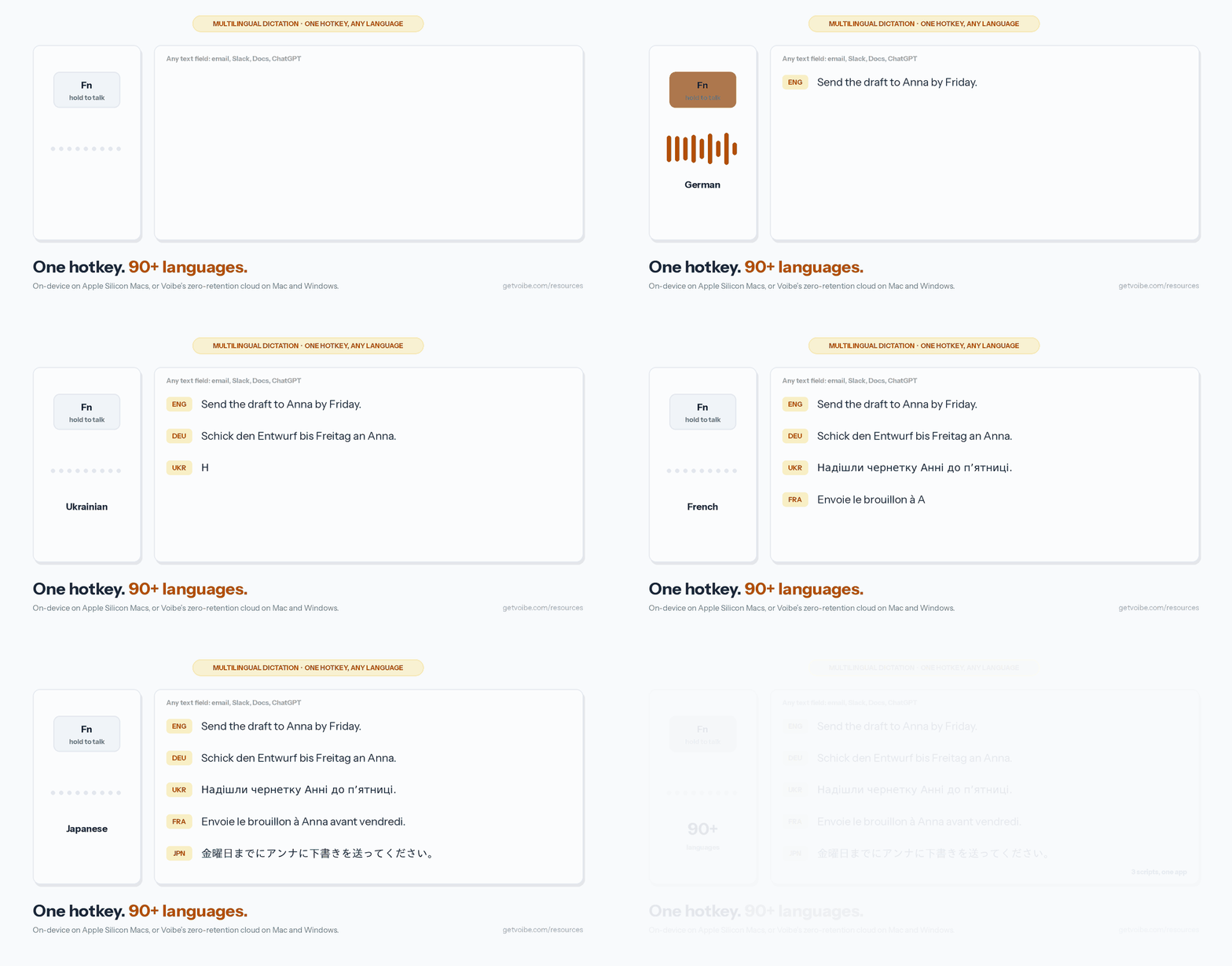
Voibe is a private dictation app for Mac and Windows that dictates in 90+ languages.
Two private ways to dictate
- On-device (Apple Silicon Macs): Whisper runs on your Mac. It works offline and nothing leaves the machine.
- Zero-retention cloud (Mac and Windows): audio is transcribed by open-source Whisper Large Turbo on zero-retention providers and deleted the moment transcription completes. Never stored, never used to train a model.
Features that matter for other languages
- Primary Language (Mac): choose the language Voibe transcribes in.
- Dictionary: add names, places and jargon so they come out spelled right.
- Smart Formatting: clean punctuation and capitals, no rewriting or translating.
- Memory: say a short trigger and Voibe types a saved block of text, such as a signature or address.
- Works everywhere: push-to-talk or Hands-Free Mode, in any app.
One plan, both platforms
- Voibe runs on Mac and Windows. The Windows app (launched 2026) uses Voibe's zero-retention cloud; the fully on-device mode is Mac-only (Apple Silicon).
- One seat covers both, at the same price.
Dictating in German, Ukrainian, French, Spanish and Japanese
Here's what to expect, and one tip, for the languages growing fastest in our data.
German
- Works well for: long compound nouns, English tech words mixed into German sentences, formal emails.
- Tip: add product names and colleagues' names to the Dictionary so they're spelled right first time.
Ukrainian
- Works well for: messages, notes and AI prompts written in Ukrainian.
- Tip: on Mac, set Ukrainian as your Primary Language so Voibe never has to guess between Ukrainian and Russian.
French
- Works well for: emails and documents, with accents and capitals handled for you.
- Tip: speak naturally. Voibe adds commas and full stops as you go, so you don't need to say them.
Spanish
- Works well for: everyday messages, documents and prompts, with accents and question marks in place.
- Tip: keep each dictation in one language for the cleanest result.
Japanese
- Works well for: short messages and notes, with kanji and kana typed straight into the field.
- Tip: judge results by how few corrections you make, not by word counts. Most counters split on spaces, and Japanese doesn't use them, so word counts undercount (Unicode's UAX #29 explains why).
How to Set Up Voibe for Your Language
Setting up Voibe for your language takes about two minutes.
- Download Voibe for Mac or Windows and start the free 7-day trial (no credit card).
- Pick a mode: on-device on an Apple Silicon Mac, or the zero-retention cloud.
- On Mac, set your Primary Language in Voibe → Dashboard → Settings.
- Add key names and terms to the Dictionary.
- Hold Fn and speak in any text field.
The getting started guide walks through each step, and the multilingual speech-to-text page covers language support in more detail.
Which Voibe Setup Fits You
Pick your setup by how and where you work.
| Your situation | Best Voibe setup |
|---|---|
| You dictate in one language other than English | Set it as your Primary Language (Mac) and dictate as normal |
| You switch between English and another language | Change Primary Language when you switch, and keep each dictation in one language |
| You need dictation to work offline | On-device mode on an Apple Silicon Mac |
| You work on Windows or an Intel Mac | Zero-retention cloud mode (see Voibe for Windows) |
| You use lots of names, brands or jargon | Add them to the Dictionary |
| You write AI prompts in your own language | Hold the hotkey in ChatGPT, Claude or Cursor (see voice-prompting AI) |
Where the Data Comes From, and What Voibe Never Collects
Every number on this page comes from anonymous usage data, shared by a small group of Voibe users who opted in.
- Aggregate only: we see totals across the group, never one person's activity. Voibe holds no individual-level usage data.
- No transcripts read: the figures are counts of dictations by language, never the words inside them.
- Your audio stays private: on-device, nothing leaves your Mac; in the zero-retention cloud, audio is deleted the moment transcription completes (Voibe cloud privacy).
- The window: the 90 days before August 19, 2026. It's a small opt-in group, not a random sample of all dictation users.
Frequently Asked Questions About Multilingual Dictation
About multilingual dictation
How much dictation isn't in English? In Voibe's opt-in usage data, 10.1% of dictations in mid-August 2026 weren't in English, up from an 8.3% average over the previous 90 days.
Why does my dictation app type the wrong language? Most apps guess the language from a few seconds of audio, so close languages like Ukrainian and Russian get mixed up. Setting your language removes the guess.
Why does my German come back in English? Some apps run an AI rewrite step after transcription that can translate your text. Voibe's Smart Formatting only fixes punctuation, capitals and filler words.
About Voibe
How many languages does Voibe support? Voibe dictates in 90+ languages, using Whisper on-device on Apple Silicon Macs or Whisper Large Turbo in its zero-retention cloud.
Can I choose my dictation language in Voibe? Yes, on Mac. Set Primary Language in Voibe → Dashboard → Settings.
Does Voibe work offline in other languages? Yes, in on-device mode on Apple Silicon Macs. Windows and Intel Macs use the zero-retention cloud.
How much does Voibe cost? Voibe Free is $0 with limited words on one device. Voibe Dictation is $9.90 a month, $99 a year or $199 lifetime, covering Mac and Windows, with a 7-day free trial and a 30-day money-back guarantee.
About the data
Did Voibe read people's dictations to get these numbers? No. Every figure is a count of dictations by language, aggregated across a small group of users who opted in. No transcript content was read.
Dictate in the Language You Think In
Non-English dictation is growing because it finally works. If you think in German, Ukrainian, French or any of 90+ languages, you can now dictate in it as easily as in English.
- Try it: Voibe Free is $0 with limited words on one device. Voibe Dictation is $9.90 a month, $99 a year or $199 once, with a 7-day free trial and a 30-day money-back guarantee.
- Read next: the State of AI Dictation report on where people dictate, and why offline dictation matters on the privacy side.
Best AI Dictation and Meeting Notes for Confidential Work
Draft letters, notes and emails 5x faster. Get meeting notes without a bot joining your call. Nothing used to train AI.
- Mac + Windows
- No bot in your calls
- Nothing used to train AI
- 7-day free trial
Want to compare plans first? View pricing →