
Voibe Has a Free Plan Now. And Meeting Notes Got 10x Faster.
We shipped four things in October: a free-forever plan, meeting notes on Windows, notes that come back 10-20x faster, and meetings that run up to 4 hours.

What's New in Voibe This October
Voibe never had a free plan. You got 7 days, and then it was pay or uninstall.
As of this month, that's gone. There's a free plan now, and it doesn't run out.
That's one of four things we shipped in October:
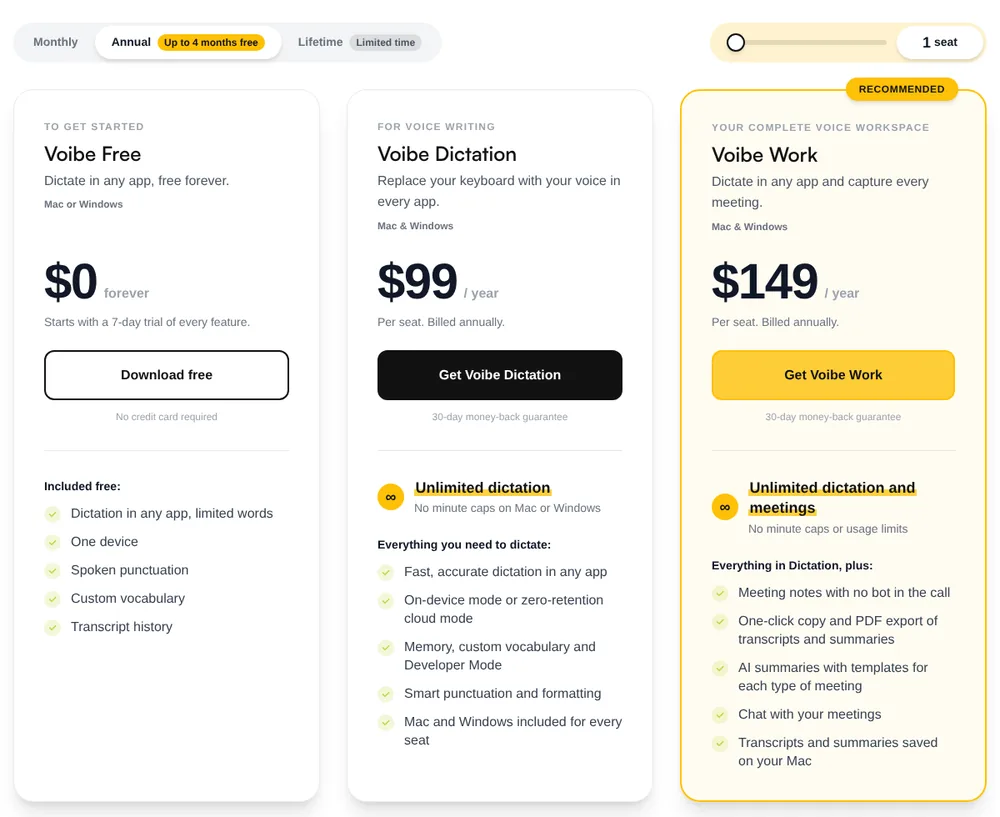
- Voibe Free. Dictate in any app on your Mac or Windows PC. It's $0 and stays $0. There's a word limit, and it works on one device.
- Meeting notes on Windows. Voibe Work used to be Mac only. Since Voibe for Windows 2.0 on October 6, it runs on Windows too, and one seat covers both.
- Faster notes. Transcripts and summaries come back 10 to 20 times faster than before, by our own measurements.
- Longer meetings. One meeting can now run up to 4 hours. It used to be 2.
The privacy side didn't move. Dictation still runs on-device on Apple Silicon Macs or in our zero-retention cloud. Meeting audio still gets deleted once it's processed. Your notes still live on your computer.
Key Takeaways: Voibe Before and After October 2026
If you just want the short version:
| What | Before | Now (October 2026) |
|---|---|---|
| Using Voibe for free | 7-day trial, then pay or stop | Voibe Free: $0 forever, dictation in any app with limited words, one device |
| Meeting notes on Windows | Voibe Work launched on Mac in September 2026 | Mac and Windows (Windows app 2.0.0, October 6), one seat covers both |
| Wait for transcript and summary | Baseline | 10 to 20 times faster (our own measurements) |
| Longest single meeting | 2 hours | 4 hours |
| Privacy | Same as before. Meeting audio deleted after processing, notes saved on your computer, never used to train AI. | |
The paid plans are Voibe Dictation ($9.90/month, $99/year or $199 lifetime) and Voibe Work ($19/month, $149/year or $399 lifetime). If you're on Voibe Work, the three meeting updates are already part of your plan.
Voibe Free: Dictation in Any App, $0, Forever
The 7-day trial was fine for finding out whether you like dictating. It wasn't great if you only dictate a handful of emails a day and don't want another subscription for that.
So now, when the trial ends, nothing breaks. You don't get charged. Your account drops to Voibe Free and keeps working.
On the free plan you get (straight from our pricing page):
- Dictation in any app, up to a word limit
- One device, either a Mac or a Windows PC
- Spoken punctuation. Say "comma" or "new paragraph", or just talk and let Voibe punctuate
- Custom vocabulary for names, jargon and acronyms
- Your transcript history
We don't publish a number for the word limit.
Getting it
- Download Voibe for Mac or Windows. No card.
- You get every Voibe Work feature for 7 days, meeting notes included.
- After that you're on Voibe Free. No charge, nothing to cancel.
When you'll want to upgrade
Mostly when you hit the word limit. Our release notes spell out the rest: the free plan covers dictation, the Dictionary and spoken punctuation, while AI clean-up and new Memory entries need a paid plan.
Voibe Dictation ($9.90/month, $99/year or $199 lifetime) removes the word limit and adds Smart Formatting, Memory shortcuts, Developer Mode, and the choice between on-device and cloud mode. Voibe Work adds meeting notes on top.
How Voibe Free compares with other free dictation apps
Free dictation isn't new, so I'd rather be upfront about where we stand. These numbers come from each app's own pricing page (September and October 2026):
| Free option | Free limit | Platforms |
|---|---|---|
| Voibe Free | Limited words (no published number), one device | Mac or Windows |
| Wispr Flow Free | 2,000 words a week on desktop, 1,000 on mobile | Mac, Windows, iOS, Android |
| Superwhisper free plan | Unlimited with local models | Mac, Windows, iOS, Android |
| Fireflies Talk | Unlimited dictation on every Fireflies plan, Free included | Mac and Windows |
| Apple Dictation / Windows Voice Typing | Unlimited, built in | Mac / Windows |
Superwhisper's free plan and Fireflies Talk don't cap your words. Voibe Free does.
What you do get is the actual Voibe app, custom vocabulary included, with the same privacy rules as the paid plans. Nothing you dictate is used to train AI. And if you outgrow it, the upgrade gets you meeting notes too.
For the full list, see the best free dictation apps, or free dictation apps for Windows if you're on a PC.
Voibe Work Meeting Notes Now Run on Windows
When Voibe Work launched in September, meeting notes only worked on a Mac. That was the obvious gap, because plenty of people take their calls on a Windows work laptop.
On October 6 we shipped Voibe for Windows 2.0, and Voibe Work came with it. It works the same way it does on the Mac:
- When a call starts, Voibe offers to take notes. Click it and it records from your PC.
- It works with Zoom, Teams, Google Meet, Webex, Slack huddles or whatever meeting app you use. Nothing to connect.
- No bot joins the call, so nobody has to admit anything.
- For in-person meetings, it records through your PC's mic.
- Open-source models on zero-retention providers write the notes. The audio is deleted once that's done, and the transcript and summary are saved on your PC.
- You get a summary and the full transcript when the meeting ends. The transcript labels each speaker and puts a time next to every line. Rename a speaker, and the summary updates to use the name.
- Pick a summary style for each kind of meeting, or rewrite a summary in another style afterwards.
- Ask your meetings what was agreed or who owns what, and copy or export the notes as a PDF in one click.
One seat covers a Mac and a Windows PC at the same price. If you're on Windows at work and a Mac at home, you pay once.
Two things are still Mac only, and both are dictation features. Fully on-device dictation needs an Apple Silicon Mac, and so does Live Dictation. On Windows, dictation runs in our zero-retention cloud. Meeting notes need internet on both.
There's no phone app, so your laptop has to be in the room.
The same Windows release brought a few dictation fixes too:
- Dictionary and spoken punctuation now work on Windows. Teach Voibe your names and terms, and say "comma" or "new line" as you talk.
- You choose your dictation language in Settings, and dictating in another language no longer comes back in English.
- Closing the window keeps Voibe running in the tray, so your shortcut always works.
- The last word of a dictation no longer gets cut off.
Voibe for Windows 2.0 needs 64-bit Windows 10 (version 1809 or later) or Windows 11. The full list is in our release notes.
More on the Windows app in Voibe for Windows. If you're comparing, here are the best AI dictation apps for Windows.
One thing on consent. With no bot, nobody in the call sees a notetaker join. So when you start recording, Voibe reminds you to tell people you're taking notes. Following the consent rules where you are is on you.
Key Takeaway
Voibe Work meeting notes now run on Windows PCs as well as Macs, and one seat covers both. No bot joins the call, the audio is deleted once it's processed, and the transcript and summary are saved on your computer.
Meeting Notes Are Now 10 to 20 Times Faster
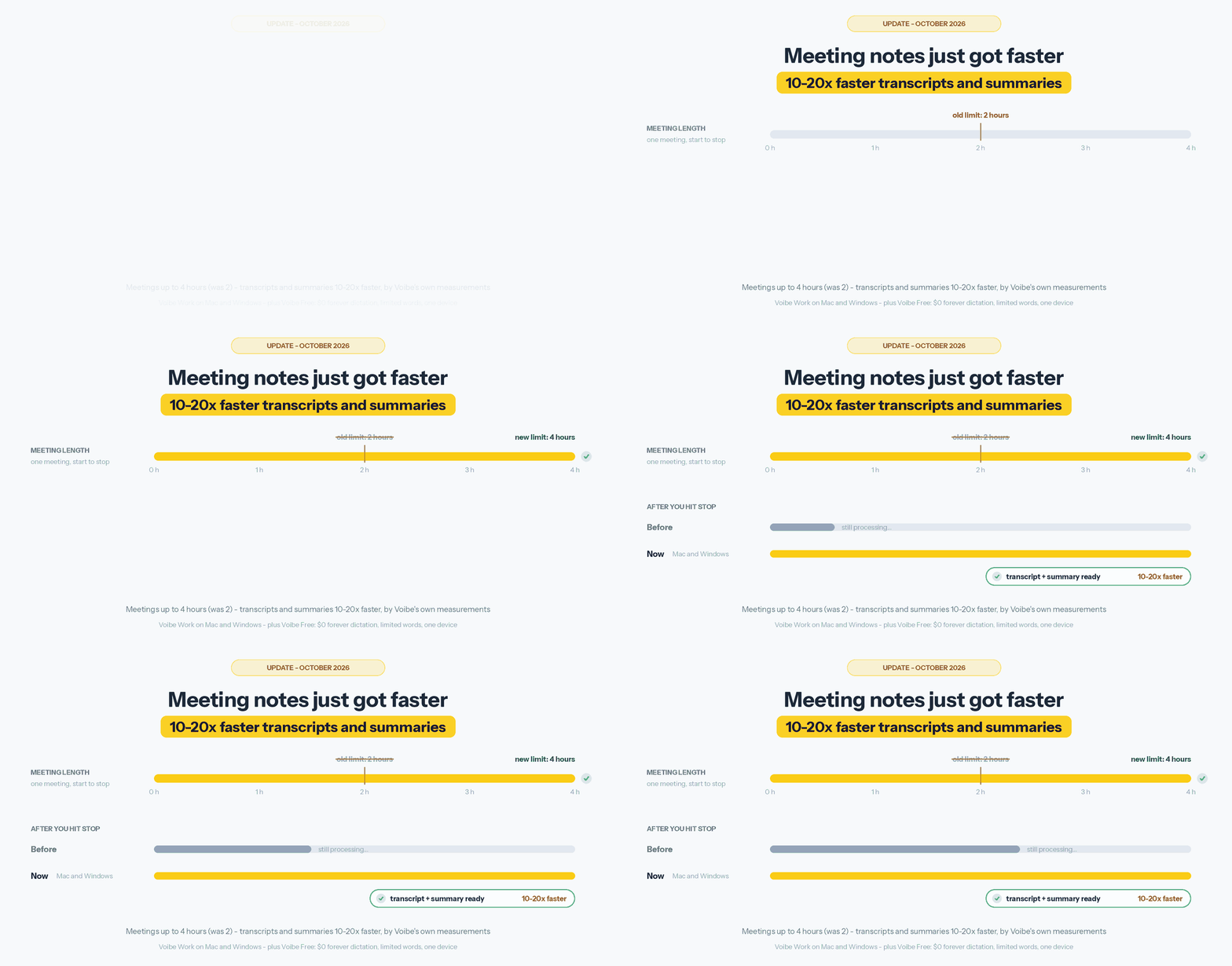
At launch, there was a wait between hitting stop and getting your notes. We've cut most of it.
Transcripts and summaries now come back 10 to 20 times faster than they did before this update. Those are our own measurements.
That matters because you use meeting notes right after the call. You send the recap, file the note, open the ticket. Now the notes are ready while the call is still fresh, and chat with your meetings works as soon as the summary lands.
How long you wait still depends on how long the meeting was, so we're not putting a number of seconds on it.
And no, we didn't trade privacy for speed. It's still open-source models on zero-retention providers. The audio is still deleted once it's processed. Your notes are still saved on your computer and never used for training.
It's live on Mac and Windows, on every Voibe Work plan.
Key Takeaway
Voibe Work now returns meeting transcripts and summaries 10 to 20 times faster than before, by Voibe's own measurements, on Mac and Windows. Processing still runs on open-source models on zero-retention providers, and the audio is still deleted once it's processed.
Meetings Can Now Run Up to 4 Hours
Two hours covers most calls. It doesn't cover a board meeting, a half-day workshop or an investment committee that runs long.
So we doubled it. One Voibe Work meeting can now run up to 4 hours. You can still record as many meetings as you want, and paid plans have no minute caps.
Here's how that compares with other note takers, from their own pricing pages (checked October 8-13, 2026):
| Plan | Longest single meeting | Annual price per seat |
|---|---|---|
| Voibe Work | 4 hours (was 2) | $149 |
| Otter Pro | 90 minutes | $99.96 |
| Otter Business | 4 hours | $239.88 |
| Laxis Premium | 2 hours | $119.88 |
| Laxis Business | 4 hours | $239.88 |
| Read AI Pro | 4 hours (Free: 1 hour) | $180 |
| Bluedot Basic | 1 hour, audio only | $168 |
| Jamie Free | 30 minutes, 10 AI notes a month | $0 |
| Notta Pro | 5 hours, 1,800 minutes a month | $97.99 |
A few things stand out:
- Otter Business and Laxis Business also stop at 4 hours, and both cost $239.88 a year. Voibe Work is $149, so $90.88 (37.9%) less.
- Read AI Pro gives you 4 hours for $180 a year. Voibe Work is $31 (17.2%) less.
- Otter Pro is $49.04 a year cheaper than Voibe Work (we cost 49.1% more). But it stops at 90 minutes, sends a bot by default and doesn't include dictation.
- Notta Pro records 5 hours at a time for $97.99 a year, which is $51.01 less than us. It does cap you at 1,800 minutes a month. Voibe Work doesn't.
- If you need a full day in one recording, Read AI Enterprise+ goes to 8 hours.
The full breakdown of Otter's tiers is in Otter pricing.
Key Takeaway
A single Voibe Work meeting can now run up to 4 hours, up from 2. That's the same cap as Otter Business and Laxis Business ($239.88 a year each), and Voibe Work is $149 a year, which is $90.88 (37.9%) less.
What Voibe Costs Now: Three Plans, One Free
Voibe has three plans now, all priced per seat (pricing page):
| Plan | Monthly | Annual | Lifetime | What you get |
|---|---|---|---|---|
| Voibe Free (new) | $0 forever | Dictation in any app with limited words, one device (Mac or Windows), spoken punctuation, custom vocabulary, transcript history | ||
| Voibe Dictation | $9.90 | $99 | $199 | Unlimited dictation on Mac and Windows, on-device or zero-retention cloud, Memory, Developer Mode, Smart Formatting |
| Voibe Work | $19 | $149 | $399 | Everything in Dictation, plus meeting notes with no bot on Mac and Windows, now faster and up to 4 hours per meeting |
Some quick math so you don't have to do it:
- Going from Dictation to Work costs $50 more a year, $9.10 more a month or $200 more for lifetime.
- Paying yearly saves $19.80 on Dictation (about 2 months free) and $79 on Work (about 4 months).
- Granola Business ($168) plus Wispr Flow Pro ($144) is $312 a year. Voibe Work does both jobs for $149, which is $163 (52.2%) less.
Lifetime plans are on offer right now and include future updates to that plan. Paid plans have a 30-day money-back guarantee. You can buy up to 10 seats at once. Above that, there's Enterprise with team admin, central billing and a BAA on request.
To see us next to everyone else, check dictation app pricing.
Info
Already on Voibe Work? You don't need to do anything. Windows meeting notes, faster notes and 4-hour meetings are part of your plan.
Which Voibe Plan Should You Pick?
- Voibe Free if you dictate a few emails and messages a day, or want to try Voibe without a card.
- Voibe Dictation if you write a lot by voice: long docs, reports, code. It's also the plan for offline dictation on an Apple Silicon Mac, and for Developer Mode in Cursor, VS Code and Windsurf.
- Voibe Work if you're on calls a lot and want notes without a bot. That goes double if you're on Windows, your meetings run past 2 hours, or you're paying for Granola and Wispr Flow separately right now.
- Enterprise if you're rolling it out to more than 10 people.
A paid seat covers your Mac and your Windows PC. Voibe Free covers one device.
New to Voibe? Start with getting started with Voibe, or read the full Voibe review.
FAQ: Voibe Free, Windows Meeting Notes and the October Update
Voibe Free
Is Voibe free now? There's a free plan, yes. Voibe Free is $0 forever: dictation in any app, with a word limit, on one Mac or Windows PC.
How many words do I get on Voibe Free? We don't publish a number. The pricing page says "limited words". Paid plans have no cap.
Do I need a credit card? No. You get a 7-day trial of everything, then you move to Voibe Free. Nothing gets charged.
Does Voibe Free include meeting notes? No, meeting notes are on Voibe Work. You can try them during the 7-day trial.
Meeting notes
Does Voibe Work run on Windows? Yes, since October 2026. One seat covers a Mac and a Windows PC.
How much faster are the meeting notes? Transcripts and summaries come back 10 to 20 times faster than before this update, by our own measurements.
Does Voibe Work label speakers? Yes, on Mac and Windows. Every line of the transcript shows who spoke and when, and you can rename a speaker to update the summary.
How long can a meeting be? Up to 4 hours. It used to be 2. Paid plans have no limit on how many meetings you record.
Did anything change on privacy? No. No bot joins the call, the audio is deleted after processing, and the notes are saved on your computer. Voibe reminds you to tell people you're taking notes, and the consent rules are your responsibility.
Pricing and plans
What do the paid plans cost? Voibe Dictation is $9.90/month, $99/year or $199 lifetime. Voibe Work is $19/month, $149/year or $399 lifetime. The meeting updates are included in Voibe Work.
Is there a mobile app? No. Voibe runs on Mac and Windows.
Try Voibe Free on Mac or Windows
If you've been curious about Voibe but didn't want to pay to find out, you don't have to anymore. Download it, use everything for a week, then keep dictating for free.
If meetings are where your day goes, Voibe Work now runs on Windows, gets your notes to you 10 to 20 times faster, and handles meetings up to 4 hours. Your notes still stay on your computer.
Still comparing? Here are the best no-bot meeting note takers and the best free dictation apps.
Download Voibe free for Mac or Windows →
No card needed.
Best AI Dictation and Meeting Notes for Confidential Work
Draft letters, notes and emails 5x faster. Get meeting notes without a bot joining your call. Nothing used to train AI.
- Mac + Windows
- No bot in your calls
- Nothing used to train AI
- 7-day free trial
Want to compare plans first? View pricing →
Related Articles
Introducing Voibe Work: AI Meeting Notes With No Bot in the Call
Today we're launching Voibe Work: meeting notes on Mac and Windows with no bot in the call, notes saved on your computer, dictation included. From $19/mo.
We Re-Read 58 AI Privacy Policies in October. 25 Changed.
Wispr Flow now trains by default, Google Meet takes notes on its own, and Zoom got sued. Every AI privacy change we found, Sept 10 to Oct 13, 2026.
No Bot in the Client Review. How a Financial Planner Takes Notes Now
A financial planner on how they take client meeting notes now: no bot in the call, no copy kept on our servers, and the CRM note dictated, not typed.