
Is Fireflies Safe? No AI Training, but It Keeps Your Meetings
Is Fireflies safe? I read its policy and terms. It won't train AI on your calls, but it keeps them, HIPAA is Enterprise-only and a BIPA suit is pending.

Is Fireflies Safe? The Short Answer
I read Fireflies' privacy policy and terms line by line. One promise stands out, because most notetakers won't make it: Fireflies doesn't train AI on your personal information, and it bans its vendors from doing so by contract.
Otter, Fathom and Granola all train on de-identified or anonymised meeting data by default.
But a promise about training isn't a promise about storage. Every meeting Fireflies records stays in its cloud while your account is active. And a federal court in Illinois is weighing a class action alleging Fireflies collected voiceprints without consent.
Short answer: Fireflies is safe enough for everyday business calls. Its no-training terms are among the strongest in the category. It's riskier for confidential or regulated calls.
Fireflies states SOC 2 Type II, ISO 42001 and GDPR. It encrypts data at rest and in transit, and keeps its AI vendors on zero data retention.
Where the risk sits
- A bot joins by default. The bot-free path, Take Notes in the desktop app (Mac and Windows), labels speakers only "Speaker 1 / Speaker 2".
- Your meetings live in Fireflies' cloud. Transcripts and summaries (plus audio and video in bot mode) sit on servers "located in the United States and other countries". They stay until you delete them or close your account. Custom retention is Enterprise only.
- HIPAA is Enterprise only. The BAA comes on Enterprise with Private Storage, $39 per seat a month billed annually.
- An open BIPA lawsuit. Fricker v. Fireflies.AI, a biometric-privacy class action, awaits a ruling on Fireflies' motion to dismiss. The claims are allegations only.
- Sharing is wide by design. Recap emails can go to participants, depending on your settings. Non-participants can view shared transcripts without a Fireflies account.
The real question: where does the meeting go?
The New York City Bar's Formal Opinion 2025-6 (December 22, 2025) puts it to lawyers who record client calls with AI. Get consent. Then check where the data is stored and for how long, whether the tool trains on it, and whether it can be deleted.
How I checked
- I read Fireflies' privacy policy and terms (both last updated September 28, 2026), its security, pricing and help pages, the Fricker v. Fireflies.AI docket on CourtListener and the university notices, all on October 26, 2026.
- I haven't used Fireflies hands-on yet. How it behaves comes from its own documentation.
- Where I couldn't confirm a claim, I write "Fireflies states".
What it costs, and the no-bot option
Price isn't the safety problem. Every limit and AI-credit rule is in our Fireflies pricing breakdown, and notetakers that keep no vendor copy are in our Fireflies alternatives guide.
If where the meeting lives is the deal-breaker, look at Voibe Work (the app we build). No bot joins, on Mac or Windows. The audio is deleted as soon as processing completes. The transcript and summary are saved on your computer, never trained on.
It costs $149 a year. The honest math:
- vs Fireflies Pro annual ($120): $29 (24.2%) more. Pro is the cheaper buy.
- vs Business annual ($228): $79 (34.6%) less.
- vs Enterprise ($468), the only Fireflies plan with a BAA: $319 (68.2%) less.
Voibe reminds you to tell everyone you're taking notes when recording starts. The recording-consent rules are yours to follow.
Key Takeaway
Fireflies doesn't train AI on your meetings and bars its vendors from doing so, which beats Otter, Fathom and Granola's defaults. The risks are elsewhere: a bot joins by default, meetings stay in Fireflies' cloud while your account is active, HIPAA is Enterprise only, and a BIPA voiceprint class action is pending with no ruling as of October 26, 2026.
Key Takeaways: Fireflies Safety at a Glance (October 2026)
Every row comes from Fireflies' own pages, court records and rating pages. I checked them on October 26, 2026.
| Question | Fireflies' answer (October 2026) | Source |
|---|---|---|
| Does a bot join? | Yes, by default ("Invite Notetaker"). Take Notes in the desktop app (macOS 12+, Windows 10+) records without a bot; the Chrome extension records Google Meet without one. | Fireflies help center; pricing page |
| What is kept? | Bot mode: audio, video, transcript and summary. Take Notes: "notes and transcript only", no audio or video. | Fireflies help center (bot vs no-bot) |
| Where is it stored? | "Servers located in the United States and other countries." Private Storage on Enterprise lets you pick the location. | Fireflies privacy policy; security page |
| How long? | As long as your account is active. Deleted within 30 days of closing the account. Custom retention is Enterprise only. | Fireflies privacy policy; pricing page |
| Trained on? | No. "We do not use personal information for AI model training." The terms also bar training generative AI on your content, but allow "derived" usage data. | Fireflies privacy policy and terms (September 28, 2026) |
| Third-party AI training? | No. Vendors are contractually barred from training and kept on zero data retention for meeting content. | Fireflies privacy policy |
| Voice data | Service providers may extract voice characteristics to tell speakers apart; Fireflies says this "may be considered 'biometric identifiers'". | Fireflies privacy policy (Voice Data) |
| Attestations | Fireflies states SOC 2 Type II, ISO 42001 and GDPR; EU-U.S. and Swiss-U.S. Data Privacy Frameworks plus the UK Extension. | Fireflies security page; privacy policy |
| BAA | BAA for healthcare and DSA for education "available on Enterprise with Private Storage". | Fireflies security page |
| Lawsuits | Fricker v. Fireflies.AI (N.D. Ill.), a BIPA class action consolidated with Martinez; motion to dismiss fully briefed August 26, 2026, no ruling as of October 26, 2026. Allegations only. | CourtListener docket |
| Institutional blocks | Case Western Reserve University (September 2025), UC Riverside (October 2025) and Morgan State University (June 2026) block Fireflies' bot. | CWRU notice; UCR bulletin; Morgan State IT |
| Ratings | App Store 4.82 (5,365 ratings); Chrome Web Store 4.6 (207 ratings, 200,000 users). | App Store; Chrome Web Store |
| Price | Free $0; Pro $18/mo or $10/mo annual ($120/yr); Business $29 or $19 annual ($228/yr); Enterprise $39/mo, annual only ($468/yr). | Fireflies pricing page; our Fireflies pricing breakdown |
What Is Fireflies, and How Does It Record a Meeting?
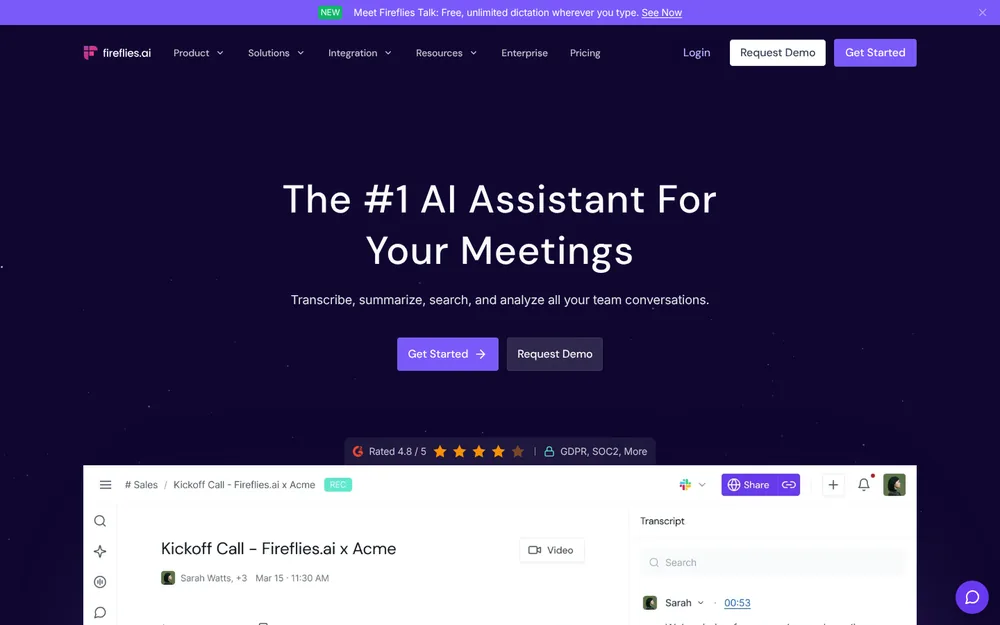
Fireflies.ai is a US-based AI meeting notetaker. Its homepage pitch: "Transcribe, summarize, search, and analyze all your team conversations".
Its pricing FAQ calls English the primary language, alongside Spanish, French, Portuguese, Italian and "100+ other languages in beta".
Three ways Fireflies captures a call
- The bot ("Invite Notetaker"). It joins as a visible participant, labels speakers and saves audio and video. The free-plan guide says "Auto-join allows unlimited transcriptions on the Free plan". With auto-join on, the bot turns up to calendar meetings on its own.
- Take Notes in the desktop app (no bot). The app is "Available on Windows 10+ and MacOS 12+". Take Notes captures system audio, so it also covers phone calls (iPhone calls through FaceTime on a Mac), WhatsApp, Discord, Aircall, Slack and in-person conversations. When a meeting starts, the app offers "Invite Notetaker" or "Take Notes".
- The Chrome extension. Fireflies' pricing table lists "Record using Chrome extension without Fireflies bot" for Google Meet.
What changes without the bot
Fireflies' own bot vs no-bot comparison is unusually candid. With Take Notes you get:
- No speaker labels ("Speaker 1 / Speaker 2")
- "Audio/video saved ❌ No — notes and transcript only"
Its help center adds: "Recording without a Fireflies.ai Notetaker (bot) does not save audio or video files."
That's a real privacy win: there's no recording to leak. The transcript and summary still go to Fireflies' cloud, though.
Fireflies Talk, the dictation feature
Fireflies Talk is free unlimited dictation on every plan, Free included. Fireflies says "Your dictations are stored on your device. Fireflies doesn't keep a copy" and they "are never used to train models".
The fine print: speech-to-text providers receive the dictation audio. Formatting providers get the text plus "Screen Context", per the privacy policy.
What users say
- 4.82 out of 5 from 5,365 ratings on the App Store
- 4.6 out of 5 from 207 ratings on the Chrome Web Store, where it lists 200,000 users
Both checked October 26, 2026. High ratings say the notes are useful, not where the recording goes.
Where Does a Fireflies Meeting Go? Bot Mode vs Take Notes
To Fireflies' cloud. In bot mode, that's the audio, the video, the transcript and the summary. In Take Notes, it's the transcript and summary only.
What Fireflies' documents say
- Location. "Fireflies.ai is based in the United States, and we and our service providers process and store personal information on servers located in the United States and other countries." The policy doesn't name the other countries.
- Encryption. The pricing FAQ says "256-bit AES encryption in storage and 256-bit SSL/TLS encryption in transit". The database is "hosted in a virtual private cloud".
- Choosing the location. Private Storage, on Enterprise only, lets you "store your meeting data at your preferred location".
- Video kept. 720p on Pro and Business, 1080p on Enterprise, none on Free.
- Vendors. Meeting content is not "(1) stored by any third-party vendor after processing". It's not "(2) accessed by any third-party vendor once the service is completed". And it's not "(3) used for training internal or external AI models."
Zero retention at the vendors isn't zero retention at Fireflies
That vendor promise is strong, and easy to misread. It covers the companies Fireflies sends your audio to. Fireflies itself keeps the meeting: "We store personal information associated with your account for as long as your account remains active."
For a sales team that wants every call searchable next year, that's the product working. For a client call about a lawsuit or a diagnosis, it's a copy you now have to manage.
What I couldn't verify
Fireflies' subprocessor list sits on its trust center, which loads only with JavaScript. I couldn't read it on October 26, 2026, so I haven't named a cloud provider or transcription vendor.
Where Your Meetings Go: Fireflies vs Otter vs Fathom vs Granola vs Voibe Work
Same five questions, two Fireflies capture paths, four other notetakers. Deep dives:Is Otter Safe?, Is Fathom Safe? and Is Granola Safe?.
| Tool | Bot in the call? | What's kept, and where | Retention | Training default | Attestations |
|---|---|---|---|---|---|
| Fireflies, bot mode | Yes (default) | Audio, video, transcript, summary; Fireflies cloud (US and other countries) | While the account is active; custom retention Enterprise only | Never (policy); vendors barred | Fireflies states SOC 2 Type II, ISO 42001, GDPR; BAA on Enterprise with Private Storage |
| Fireflies, Take Notes | No (Mac and Windows desktop app) | Transcript and notes only, no audio or video; Fireflies cloud | While the account is active | Never (policy) | Same as above |
| Otter | Yes by default; desktop app records without a bot (Mac, Windows) | Audio and transcript; Otter cloud | Until you delete; custom retention through an account manager | On (de-identified); no opt-out found | SOC 2 Type II; HIPAA as an Enterprise add-on |
| Fathom | Yes by default; bot-free in the Mac app | Video, audio, transcript, summary; Fathom cloud, US | Until you delete; auto-delete Enterprise only | On (de-identified); opt-out | Fathom states SOC 2 Type II, GDPR, HIPAA; signed BAA Enterprise |
| Granola | No | Audio deleted after transcription; notes in a US-hosted AWS cloud | Indefinitely unless a retention policy is set | On for Free and Business (anonymised); opt-out; off on Enterprise | SOC 2 Type II; HIPAA and BAA Enterprise only |
| Voibe Work | No (Mac and Windows) | Audio deleted as soon as processing completes; transcript and summary saved on your computer | Your files, your choice | Never trained on | None claimed; BAA available on request |
Key Takeaway
Bot mode keeps audio, video and the transcript in Fireflies' cloud; Take Notes saves no audio or video, but the transcript and summary still live there. Vendors keep nothing after processing. Fireflies keeps everything while your account is active.
Does Fireflies Train on Your Data? No, and It Says So in Two Documents
No. Both the privacy policy and the terms say Fireflies doesn't train AI models on your meetings. It's the strongest part of its privacy story.
The two documents, word for word
- Privacy policy, September 28, 2026. "We do not use personal information for AI model training and we contractually prohibit our vendors from using this information for their own model training."
- Terms of service, same date. Fireflies "will not use your User Content to train, retrain, fine-tune or otherwise improve any generative artificial intelligence models".
Three details worth reading twice
- The marketing says "by default". The security page says "We don't train on it by default unlike other AI companies." The binding policy has no "by default", so treat it as the operative text.
- Derived data is allowed. The terms say Fireflies "may derive usage, statistical, and other data from your User Content and use such derived data for its internal business purposes". That isn't model training. It isn't nothing, either.
- The licence is broad. You grant Fireflies a "nonexclusive, royalty-free, worldwide, fully paid, and sublicensable … perpetual and irrevocable" licence to your content, limited to providing the service. Standard legal plumbing for cloud apps, but worth knowing.
- Advertising data is separate. Identifiers and browsing activity go to "Marketing and advertising partners", which "may be considered 'sales,' 'sharing,' or … 'targeted advertising'" under US state privacy laws. Meeting content isn't listed in that table.
Why a written promise matters
On January 9, 2024, the FTC’s Office of Technology warned AI companies that breaking a privacy promise may make them liable under the laws the FTC enforces. Its example: a pledge that they "won't use customer data for secret purposes, such as to train or update their models".
Fireflies' no-training line is that kind of promise, in writing.
How that compares
Otter, Fathom and Granola all train on de-identified or anonymised meeting data unless you act (Otter, Fathom, Granola). On training alone, Fireflies beats all three.
Voibe doesn't train on audio or text either, from dictation or meetings. So the gap with Voibe Work isn't training. It's where the transcript lives afterwards.
Tip
Save a dated copy of Fireflies' privacy policy and terms (both last updated September 28, 2026) with your vendor records. If the no-training wording ever changes, you'll be able to show what you agreed to.
How Long Does Fireflies Keep Your Recordings?
For as long as your account is active. Fireflies' privacy policy: "If you close your account, we will delete personal information related to your account within 30 days."
The controls that exist
- Custom data retention is Enterprise only. So is "Transcript + Summary only mode", per Fireflies' pricing page.
- Manual deletion works on every plan. The terms say deleted content is removed "within a reasonable timeframe, unless such content remains in another user's account". Archival, backup or legally required copies may persist.
- Voice data has its own clock. Under the policy's Illinois BIPA section, it's destroyed when its purpose is satisfied, or within 3 years of your last interaction with Fireflies.
Storage caps do some of the deleting for you
Fireflies' storage guide says "Storage reflects the total minutes of meetings you can store—not per month":
- Free: 400 minutes per seat. "If you hit the limit, delete older files to store new ones."
- Pro: 8,000 minutes per seat.
- Business and Enterprise: unlimited.
One catch before you delete: the free-plan guide says "Downloading transcripts requires a paid plan". So a Free user can't keep a local copy of what they delete.
Plan-by-plan detail on those caps is in our Fireflies pricing guide.
Is Fireflies HIPAA Compliant? SOC 2, ISO 42001, GDPR and the BAA
On Enterprise, Fireflies says yes. Its security page reads: "HIPAA & FERPA: BAA for healthcare and DSA for education, available on Enterprise with Private Storage". It adds: "The Fireflies HIPAA Compliant version is available on request".
Those are Fireflies' statements. Its audit report sits on the same trust center I couldn't load, so I haven't seen it.
What each claim covers, and what it doesn't
- SOC 2 Type II is an independent audit of security controls over a period of time. It says Fireflies runs its systems carefully. It doesn't change where your meetings are stored, or for how long.
- ISO 42001 covers how a company manages AI systems. Fireflies says it's "Certified to the international standard for governing and managing AI responsibly".
- HIPAA needs a Business Associate Agreement. Fireflies offers one only on Enterprise, and only with Private Storage. Enterprise is $39 per seat a month, billed annually ($468 a year). Fireflies also says "We have signed BAAs with our vendors".
- FERPA: schools get a data sharing agreement (DSA), on the same Enterprise-with-Private-Storage terms.
- GDPR and transfers: Fireflies states GDPR compliance. It participates in the EU-U.S. and Swiss-U.S. Data Privacy Frameworks and the UK Extension.
- Other controls: AES-256 at rest, TLS in transit and a bug bounty. SSO, SCIM and audit logs come on Enterprise. All per Fireflies' security and pricing pages.
The question certificates don't answer
A BAA is a contract. SOC 2 is an audit. Neither one decides whether a copy of the meeting should exist on someone else's servers.
Handle protected health information below Enterprise? Then Fireflies isn't an option for those calls. On Enterprise, get the BAA, read what it covers and set custom retention. Our HIPAA dictation guide starts with data flow for the same reason.
Key Takeaway
Fireflies states SOC 2 Type II, ISO 42001 and GDPR. Its BAA (healthcare) and DSA (education) are Enterprise only, with Private Storage, at $468 per seat a year. Below Enterprise, keep health information out of Fireflies.
Has Fireflies Been Sued? Voiceprints and the BIPA Lawsuits
Yes. Fireflies is the defendant in a pending biometric-privacy class action in Illinois. Nothing has been decided. The claims are allegations only.
Fricker v. Fireflies.AI Corp.
- The case: Fricker v. Fireflies.AI Corp., 1:26-cv-02675, Northern District of Illinois, before Judge Steven C. Seeger. Filed in March 2026 under the Illinois Biometric Information Privacy Act (BIPA), it's about voiceprints.
- Consolidated: a related case, Martinez v. Fireflies.AI Corp. (26-cv-3512), was reassigned and consolidated with it. A consolidated complaint followed on June 24, 2026.
- Fireflies' response: a motion to dismiss on July 15, 2026, for lack of jurisdiction and failure to state a claim. The plaintiffs opposed on August 12. Fireflies replied on August 26. Discovery is stayed until the court rules.
- Status: no ruling on the CourtListener docket as of October 26, 2026.
Two other cases
- Cruz v. Fireflies.AI Corp., a BIPA suit, was filed December 18, 2025 in the Central District of Illinois. It was voluntarily dismissed on March 11, 2026.
- A further case against Fireflies was filed in the Northern District of California in March 2026. I couldn't read its claims, so I don't describe them.
Why voiceprints come up at all
BIPA requires notice and written consent before a company collects biometric identifiers such as voiceprints. Fireflies' privacy policy addresses this directly:
- its service providers "may use voice recordings to extract or generate data about participants' voice characteristics", to tell speakers apart
- that data "may be considered 'biometric identifiers'"
- "we never receive or process this information on our own servers"
The people on your call never accepted Fireflies' terms. That's why consent matters more than any setting.
Your own claims go to arbitration
Fireflies' terms require binding individual arbitration (AAA) with a class-action waiver. There's an opt-out. If that matters, read the procedure soon after you sign up.
Fireflies isn't the only notetaker in court
- Otter faces a consolidated privacy class action in California (details on Otter).
- Granola faces a wiretap class action aimed at bot-free capture (the Granola lawsuit explained).
Bot or no bot, the common thread is whether everyone on the call agreed.
Key Takeaway
Fricker v. Fireflies.AI, a BIPA voiceprint class action consolidated with Martinez, has a fully briefed motion to dismiss and no ruling as of October 26, 2026. Cruz was voluntarily dismissed in March 2026. These are allegations; no court has found Fireflies liable.
Which Universities and Platforms Block Fireflies' Bot?
At least three US universities block Fireflies' bot from their meetings:
- Case Western Reserve University announced on September 3, 2025 that "Starting Sept. 12" it would block third-party AI notetakers "such as Fireflies.ai, Read.ai and Fanthom.video" (Read.ai's record is in our Is Read AI safe? review). The block covers Zoom, Microsoft Teams and Google Meet. One reason: "CWRU does not have enterprise contracts with these vendors".
- UC Riverside's October 2025 tech bulletin set the date at October 10, 2025. From then, "Fireflies AI, Spinach AI, and Read AI will be blocked from joining meetings hosted by UCR-based Zoom accounts".
- Morgan State University blocked third-party AI note-taking bots on June 10, 2026. It named Fireflies, Otter, Read.ai and MeetGeek (Morgan State IT).
The platforms are adding gates too
- Google Meet: the "safeguarded guest admit flow", in place since March 24, 2026, sends guests such as bots to a second admission queue. That queue defaults to deny.
- Microsoft Teams: began tagging third-party bots in the lobby in May 2026. They're admitted separately.
A bot that used to slip in now has to be let in on purpose.
None of these blocks touch Take Notes, because no bot joins. That doesn't make it allowed: an employer's or school's approved-tools list overrides anything here.
Recording Consent: Fireflies' Take Notes Has Better Notices Than Most
Using Fireflies without telling everyone is risky wherever all-party consent applies.
The states where everyone has to agree
All-party-consent states, and the ones with important nuances, per Justia’s 50-state survey:
- California: California Invasion of Privacy Act (CIPA), statutory damages of $5,000 per violation.
- Connecticut: one-party for criminal liability, but civil liability for recording phone calls without all-party consent.
- Delaware: arguably all-party; the law is ambiguous.
- Florida.
- Illinois: Eavesdropping Act; generally all-party. BIPA applies to voiceprints on top.
- Maryland.
- Massachusetts.
- Michigan: technically all-party, though courts have held that participants in a conversation can record it.
- Montana: an all-party "knowledge" state.
- Nevada: all-party for phone calls, one-party in person.
- New Hampshire.
- Oregon: all-party for in-person conversations, one-party for phone calls.
- Pennsylvania.
- Washington: generally all-party.
What Fireflies tells the people on your call
In bot mode, the notetaker is a visible participant in the call. In Take Notes, Fireflies' help center lists four notices:
- an audio consent message, played about 10 seconds after recording starts
- a meeting-chat message (Mac only)
- a "Fireflies Watermark" virtual camera that reads "AI Taking Notes"
- a first-run consent modal
"The consent options are enabled by default." That's more consent tooling than most bot-free notetakers ship. Credit where it's due: don't switch any of it off.
Where Fireflies' defaults are loose: recaps and sharing
- Recap emails: "depending on your settings, we may send a meeting recap email (which may include a summary and a link to meeting content) to select recipients."
- Shared links: the free-plan guide says "Non-participants can view transcripts—even without a Fireflies account."
- Privacy levels: each meeting, and your account default, can be set to anyone with the link, your workspace, participants or only you.
A recap in a client's inbox with a link anyone can open is a disclosure, even if the recording was consented to.
A one-line script that covers most calls
Say: "I'm taking AI notes on this call. Is everyone OK with that?" Then wait for a yes from each person.
Voibe reminds you to tell everyone you're taking notes when recording starts. The recording-consent rules are yours to follow.
The Fireflies Safety Decision Tree
Five questions, from the easiest case to the hardest. Stop at the first one where you can't accept Fireflies' answer.
- Is it an internal, non-confidential meeting? Stand-ups, planning, your own team. If yes, Fireflies is a reasonable choice. Set meeting privacy to Participants or Only me, and check who gets recap emails.
- Will people outside your company join? Clients, patients, candidates and partners never saw Fireflies' terms. Each needs notice and, in the states above, consent. Keep the consent options on, and say it out loud.
- Will health or student records come up? Fireflies' BAA and DSA come only on Enterprise with Private Storage. On any other plan, keep those conversations out of Fireflies.
- Must there be no bot in the call? Use Take Notes on Mac or Windows. You lose speaker names ("Speaker 1 / Speaker 2"), and the transcript still goes to Fireflies' cloud.
- Can the meeting sit in a vendor's cloud while your account is active? Below Enterprise there's no custom retention. If the answer is no, use a tool that keeps no copy on its side.
Most sales, recruiting and internal calls stop at question 1 or 2, and Fireflies handles them well. Legal, medical and financial client calls usually reach question 5. Our notetaker guide for lawyers and notetaker guide for financial advisors cover those rules.
The 5-Step Fireflies Safety Audit: Settings to Check Today
Keeping Fireflies? These five checks take about ten minutes and cover most of the risk.
- Set meeting privacy and recap emails. Change the default from link sharing to Participants or Only me. Check who receives recap emails, and review shared links. Disconnect integrations you don't use; each one sends meeting data to another company.
- Control auto-join and the capture mode. Decide which meetings the bot joins on its own. For sensitive calls, use Take Notes, which saves no audio or video.
- Check AI credits and the features that use them. This one's messy. Fireflies' AI-credits guide says "Daily Digest and Meeting Prep are enabled by default and consume AI credits". When credits run out, it says Fireflies "automatically subscribes you to the lowest AI credits tier ($5/month for 50 credits)". But the terms (September 28, 2026) say "Auto-Upgrade is off by default and requires your express affirmative consent to enable." The documents disagree, so check the Auto upgrade toggle under Settings → Billing → AI Credits yourself.
- Keep the Take Notes consent options on. The spoken notice, the chat message (Mac) and the "AI Taking Notes" watermark are on by default. Leave them that way.
- Delete what you don't need. Below Enterprise there's no custom retention, so set a monthly reminder to clear old client calls. Closing the account? Export first (downloads need a paid plan).
Which two steps matter most
Steps 1 and 5. They decide who sees the meeting and how long it exists. Fireflies already handles training for you.
Warning
Your settings cover your account, not your guests'. Fireflies' terms say deleted content can remain "in another user's account", so a meeting shared with a colleague outlives your delete.
A Setup With No Bot and No Vendor-Side Copy: Voibe Work
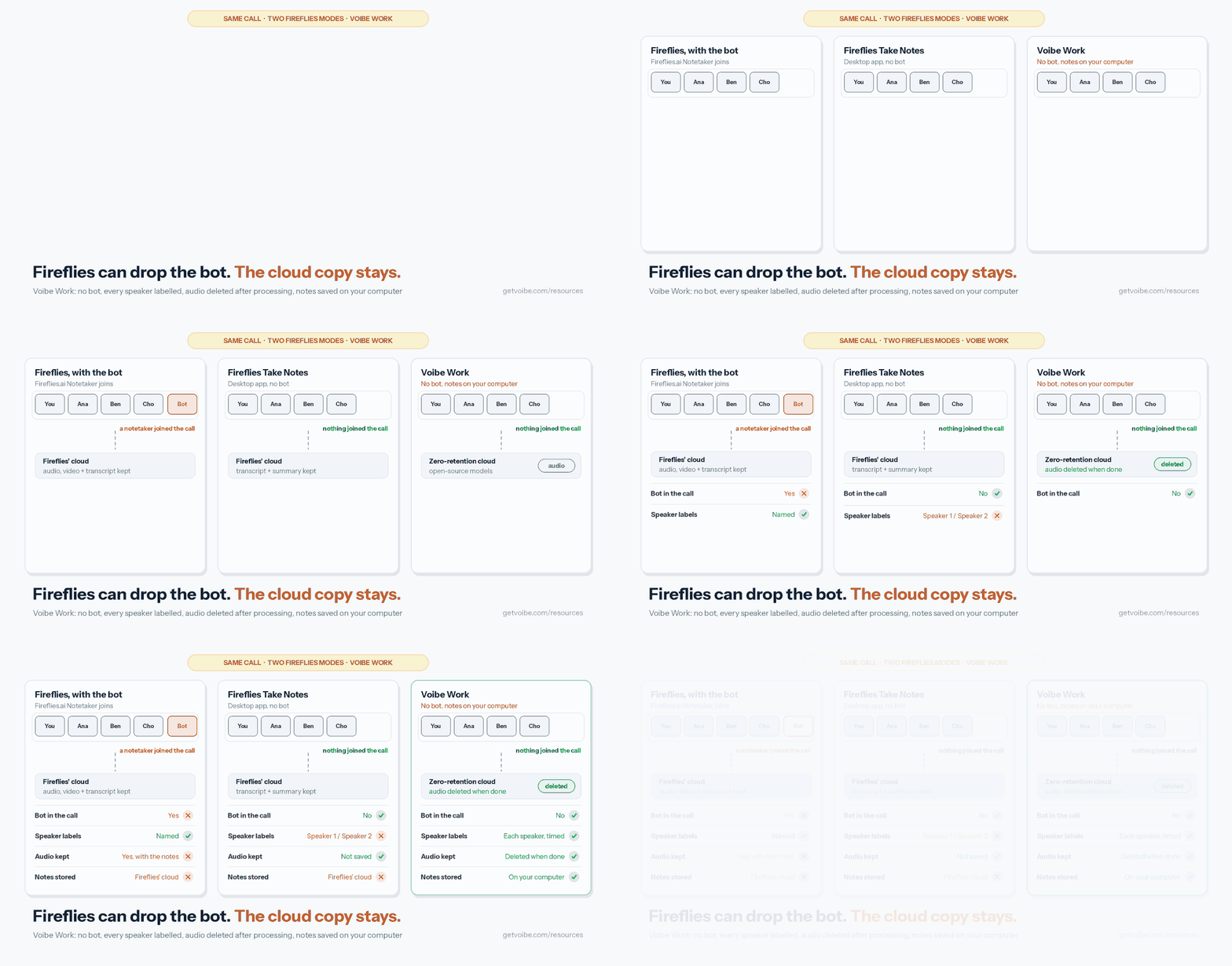
Fireflies already solved training. What it can't change without changing the product is that the meeting lives on its servers. Voibe Work (ours) is built the other way round.
What Voibe Work does differently
- No bot in the call, on Mac or Windows. It captures Zoom, Microsoft Teams, Google Meet, Webex, Slack huddles or any other meeting app from your computer. It also records in-person meetings through your Mac or PC's mic.
- Speaker labels without a bot. Each speaker is labelled, with a time next to every line. Click a name to rename them and the summary updates. Names aren't pulled from a calendar.
- Audio deleted after processing. Open-source models on zero-retention cloud providers process the audio, then it's deleted as soon as processing completes (what zero data retention means).
- Notes saved on your computer, not on Voibe's servers, and never trained on. Retention is your call, no Enterprise plan needed.
- Longer meetings, no credits meter. Up to 4 hours per meeting (Fireflies Free and Pro stop at 2), unlimited meetings. Summaries, templates for each type of meeting and chat with your meetings come with the plan. On Fireflies, AskFred, AI Skills and custom summary sections run on AI credits.
- The rest. Chat runs on the same zero-retention cloud, nothing you ask stored. Plus one-click copy, PDF export and dictation on Mac and Windows.
- BAA available on request, for practices that need one.
Consent doesn't change. Voibe reminds you to tell everyone you're taking notes when recording starts. The recording-consent rules are yours to follow.
Where Fireflies wins
- Consent tooling. Its spoken notice, chat message and camera watermark, all on by default, do more than Voibe Work's reminder.
- Price at the low end. Fireflies Free costs nothing, and Pro annual undercuts Voibe Work (math below).
- Free dictation. Fireflies Talk is unlimited on every plan, so a dictation bundle isn't an argument against it.
- Reach. Fireflies captures phone calls, has iPhone and Android apps, records video, autofills CRMs and offers conversation intelligence on Business. Voibe Work has no phone app and no audio or video playback. It doesn't list calendar auto-join, CRM integrations or team workspaces.
- Internet. Voibe Work's meeting notes need a connection. On-device processing is a Voibe dictation feature on Apple Silicon Macs, not a meeting-notes feature.
What It Costs: Fireflies vs Voibe Work
Prices from Fireflies' pricing page (checked October 26, 2026) and getvoibe.com/pricing. Fireflies plans are per seat. Full detail: Fireflies pricing.
| Plan | Monthly | Per year (annual billing) | 3 years | Longest meeting |
|---|---|---|---|---|
| Fireflies Free | $0 | $0 | $0 | 2 hours |
| Fireflies Pro (per seat) | $18 | $120 | $360 | 2 hours |
| Fireflies Business (per seat) | $29 | $228 | $684 | 3 hours |
| Fireflies Enterprise (per seat) | $39 (annual only) | $468 | $1,404 | 4 hours |
| Voibe Work | $19 | $149 | $399 lifetime ($447 on annual) | 4 hours |
- Against Fireflies Pro: Voibe Work is $29 (24.2%) more a year ($149 vs $120), or $1 (5.6%) more a month ($19 vs $18).
- Against Fireflies Business: $79 (34.6%) less a year ($228 − $149 = $79; $79 ÷ $228). Against Business billed monthly ($348 a year), it's $199 (57.2%) less.
- Against Fireflies Enterprise, the only plan with a BAA: $319 (68.2%) less a year ($468 − $149 = $319; $319 ÷ $468).
- Over three years: the $399 lifetime plan is $39 (10.8%) more than three years of Pro annual ($360). It's $285 (41.7%) less than three years of Business annual ($684).
My take: if your calls are routine and Fireflies' cloud doesn't bother you, Pro is the better deal. If the stored transcript is the risk, Voibe Work costs less than the Fireflies plans that address it.
Voibe Work starts with a 7-day free trial of every feature, no credit card and no automatic charge. Then it moves to Voibe Free unless you buy. Paid plans carry a 30-day money-back guarantee.
See Voibe Work pricing, read the October update on Windows meeting notes and 4-hour meetings, or compare the best no-bot meeting note takers.
Key Takeaway
Voibe Work keeps no copy of the meeting on its side: no bot, speaker labels with a time on every line, audio deleted as soon as processing completes, notes saved on your computer, never trained on, $149 a year. Fireflies Pro is $29 (24.2%) cheaper and has stronger consent notices; Business and Enterprise cost $79 and $319 more. Consent is your job with both.
Who Fireflies Is Safe For, and Who Should Pick Something Else
Fireflies is safe for most sales, recruiting and internal calls. Tighten sharing first, and make sure everyone knows the call is recorded.
It's a weaker fit where the stored transcript itself is the risk. Find your situation:
| Your situation | Fireflies verdict | What to do |
|---|---|---|
| Internal stand-ups and planning | Safe | Set meeting privacy to Participants; delete old calls periodically |
| Sales and recruiting calls | Safe with notice | Keep consent options on; check recap-email recipients |
| Participants in California, Illinois or another all-party state | Safe only with everyone's consent | Ask each person and wait for a yes |
| You want no bot | Workable | Use Take Notes on Mac or Windows; expect Speaker 1 / Speaker 2 labels |
| Patient conversations with health information | Enterprise only | Get the BAA with Private Storage, or choose a tool whose BAA terms you've read |
| Student records | Enterprise only | Get the DSA with Private Storage |
| Privileged legal calls | Risky | Read the lawyers guide; prefer no vendor-side copy |
| Client reviews at an advisory firm | Check recordkeeping rules first | See the financial advisors guide |
| Your university or employer blocks third-party notetakers | Not allowed | Follow the policy (Case Western, UC Riverside and Morgan State block Fireflies' bot) |
| You need meetings auto-deleted on a schedule | Enterprise only | Buy Enterprise for custom retention, or use a tool that keeps no copy |
Weighing a different notetaker altogether? Our Fireflies alternatives compare where each one keeps your meetings.
Not sure which category you need? The dictation vs notetaker breakdown explains how they differ. Our AI privacy guide covers the wider picture.
Is Fireflies Safe? FAQ
Straight answers on Fireflies' privacy, security, lawsuits and consent, grouped by theme.
Privacy and Your Data
Is Fireflies safe to use? Yes, for most everyday business calls.
- It won't train AI on your meetings, bars vendors from training on or keeping them, and states SOC 2 Type II, ISO 42001 and GDPR.
- The catches: a default bot, transcripts kept in its cloud while your account is active, and an Enterprise-only BAA. A BIPA voiceprint class action, Fricker v. Fireflies.AI, is pending with no ruling as of October 26, 2026.
Does Fireflies train AI on my meetings? No. Its privacy policy (last updated September 28, 2026) says "We do not use personal information for AI model training", and it bars vendors from training too.
- Its terms rule out training generative AI models on your content.
- Two caveats: the security page says "by default", and the terms let Fireflies derive usage and statistical data for internal business purposes.
Where does Fireflies store my recordings, and for how long? On servers "located in the United States and other countries", while your account is active, and deleted within 30 days of closing it.
- Custom retention and Private Storage (you pick the location) are Enterprise only.
- Bot mode keeps audio and video; Take Notes keeps only the transcript and notes. Storage is 400 minutes per seat on Free and 8,000 on Pro.
Security, Compliance and Lawsuits
Is Fireflies HIPAA compliant? Only on Enterprise, where its BAA for healthcare (and DSA for education) is "available on Enterprise with Private Storage".
- Enterprise costs $39 per seat a month, billed annually ($468 a year).
- Below Enterprise, keep protected health information out of Fireflies. On Enterprise, read what the BAA covers and set custom retention.
Is Fireflies SOC 2 certified, and is it secure? Fireflies states SOC 2 Type II, ISO 42001 and GDPR.
- It lists AES-256 encryption at rest, TLS in transit, a virtual private cloud and a bug bounty.
- I couldn't verify the audit report or subprocessor list, because its trust center didn't load without JavaScript on October 26, 2026.
Is Fireflies being sued over voiceprints? Yes. Fricker v. Fireflies.AI Corp. (1:26-cv-02675, N.D. Ill.) is a BIPA class action, consolidated with Martinez v. Fireflies.AI.
- The motion to dismiss was fully briefed on August 26, 2026, with no ruling as of October 26, 2026. The claims are allegations only.
- An earlier BIPA suit, Cruz v. Fireflies.AI, was voluntarily dismissed in March 2026.
Ownership, Consent and Alternatives
Can Fireflies record without a bot, and does it tell people? Yes. Take Notes in the desktop app (Mac and Windows) skips the bot, saves no audio or video, and labels speakers "Speaker 1 / Speaker 2". The Chrome extension does the same for Google Meet.
- It plays a spoken consent notice, posts a chat message on Mac and shows an "AI Taking Notes" watermark, all on by default.
- Getting everyone's consent is still your responsibility.
Who owns my Fireflies transcripts? Fireflies' terms treat your meetings as your User Content.
- You grant Fireflies a "nonexclusive, royalty-free, worldwide, fully paid, and sublicensable … perpetual and irrevocable" licence, limited to providing the service.
- Deleted content may remain "in another user's account" and in backups. Disputes go to individual arbitration with a class-action waiver, with an opt-out.
What is a safer alternative to Fireflies for confidential meetings? A notetaker that keeps no copy on the vendor's side.
- Voibe Work (ours) has no bot, labels speakers, deletes the audio after processing and saves notes on your computer, never trained on. BAA available on request.
- At $149 a year, it's $29 (24.2%) more than Fireflies Pro annual, $79 (34.6%) less than Business annual and $319 (68.2%) less than Enterprise.
- Voibe reminds you to tell everyone you're taking notes; recording-consent rules are yours to follow.
The Bottom Line: Is Fireflies Safe in 2026?
Fireflies is a well-rated notetaker that's safe for everyday business calls. Its no-training terms are stronger than Otter's, Fathom's or Granola's. Its bot-free Take Notes ships better consent notices than most.
Its weak points are about where the meeting lives, not what's done with it:
- a bot, unless you pick Take Notes and lose speaker names
- transcripts in Fireflies' cloud while your account is active
- an Enterprise-only BAA and custom retention
- a pending BIPA voiceprint class action, no ruling as of October 26, 2026
If you're keeping Fireflies
I'd keep it for internal, sales and recruiting calls. Do the five-step audit today: privacy and recaps, auto-join, Auto upgrade under AI Credits, consent options, old calls. Re-check when the privacy policy date moves past September 28, 2026.
If the meeting shouldn't sit on a vendor's servers
Voibe Work captures it from your Mac or Windows PC with no bot and labels speakers. The audio is deleted as soon as processing completes, and the notes are saved on your computer, never trained on. Dictation's included, for $149 a year.
Voibe reminds you to tell everyone you're taking notes when recording starts. The recording-consent rules are yours to follow. Start the 7-day free trial (no credit card).
Related reading
- Fireflies pricing
- Fireflies alternatives
- Is Otter Safe?, Is Fathom Safe? and Is Granola Safe?
- The Granola lawsuit
- Wispr Flow Notetaker vs Voibe Work
- Our AI Tool Privacy Tracker, which scores notetakers side by side
Info
I checked Fireflies' privacy policy, terms, security page, pricing page and help center, plus the Fricker v. Fireflies.AI docket, on October 26, 2026. If Fireflies' privacy policy shows a date newer than September 28, 2026, re-check before relying on these facts.
Best AI Dictation and Meeting Notes for Confidential Work
Draft letters, notes and emails 5x faster. Get meeting notes without a bot joining your call. Nothing used to train AI.
- Mac + Windows
- No bot in your calls
- Nothing used to train AI
- 7-day free trial
Want to compare plans first? View pricing →