
Wispr Flow Analyzed What Users Dictate — and Posted It on LinkedIn
A Wispr Flow team member published word-frequency data mined from user dictations. What the LinkedIn post proves about dictation without zero data retention.

A Wispr Flow Employee Posted Data From What Users Dictate
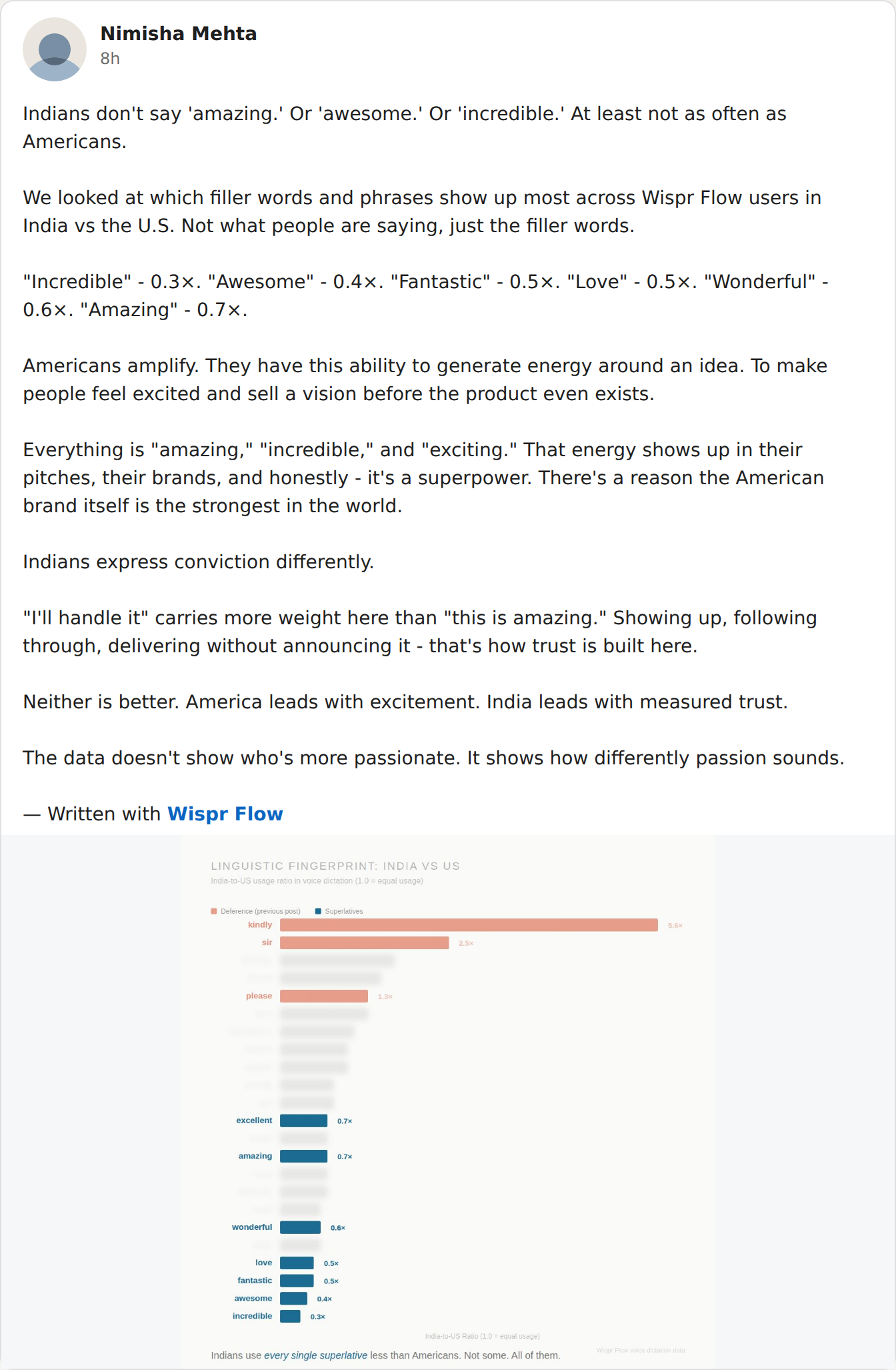
“Indians don't say ‘amazing.’ Or ‘awesome.’ Or ‘incredible.’” That's how a member of the Wispr Flow team opened a public LinkedIn post on August 10, 2026.
How would she know? Because the company looked. In the post's own words: “We looked at which filler words and phrases show up most across Wispr Flow users in India vs the U.S.”
Read that again. A dictation company counted the words its users speak, split them by country, and turned the result into social content. It even signs off: “— Written with Wispr Flow.”
TL;DR: Wispr Flow keeps what you dictate unless you opt out. Its own Security and Compliance FAQ says so: “Privacy Mode is off by default. When off, dictation data may be used to improve Wispr Flow.” The LinkedIn post is what that permission looks like in practice — your words, in a database, queryable by the vendor, publishable as marketing. The numbers, the quotes, and the fix are below.
Key Takeaway
A Wispr Flow team member published word-frequency data mined from user dictations. That is only possible because dictation content is retained and queryable by default. Zero-retention and on-device tools make this class of analysis impossible.
Key Takeaways: What the LinkedIn Post Shows
| Question | Answer (as of August 10, 2026) | Source |
|---|---|---|
| What was published? | India-vs-US word-frequency ratios from user dictations: superlatives at 0.3×–0.7×, plus “kindly” 5.6×, “sir” 2.5×, “please” 1.3× from an earlier post in the series. | Public LinkedIn post + companion chart |
| Whose words are in it? | Wispr Flow users' dictations, segmented by country — “across Wispr Flow users in India vs the U.S.,” per the post. | Post text |
| Is that a hack or leak? | No. It is the company's own team using company-held dictation data, published as social content, chart labeled “Wispr Flow voice dictation data.” | Post + chart |
| What makes it possible? | Retention is the default: “Privacy Mode is off by default. When off, dictation data may be used to improve Wispr Flow.” | Wispr Flow Security Overview |
| Who should be excluded? | Users with Privacy Mode enabled or the in-app BAA signed (zero data retention), per Wispr Flow's documentation. | Wispr Flow HIPAA/ZDR docs |
| Is this new behavior? | It matches the analytics culture the founder described on camera in June 2026 — per-user word counts, app usage, identity. This post extends it from metadata to the words themselves. | Think School podcast, June 2026 |
| What makes it impossible? | Architecture: on-device or zero-retention dictation keeps no corpus of user words to analyze. | Architectural comparison |
Each row is unpacked below — the post, the caveat, the policy behind it, and what to do about it.
What the Post Said, Number by Number
The post is by Nimisha Mehta, whose LinkedIn headline reads “Building Wispr Flow.” It is public — read it yourself.
The method, quoted in full: “We looked at which filler words and phrases show up most across Wispr Flow users in India vs the U.S. Not what people are saying, just the filler words.”
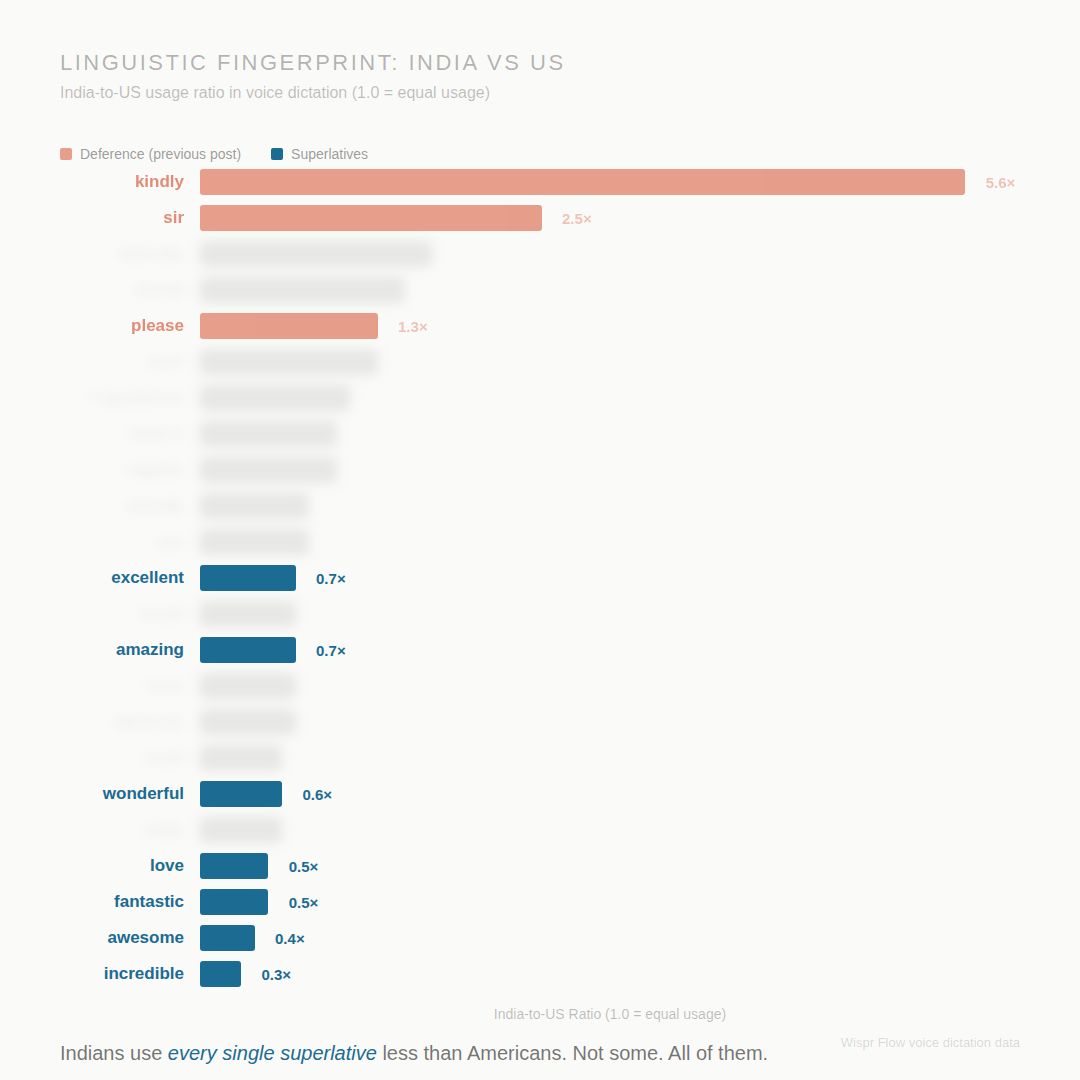
The numbers. Each is an India-to-US usage ratio, where 1.0× means both groups say the word equally often:
- “Incredible” — 0.3× (Indian users dictate it at 30% of the US rate)
- “Awesome” — 0.4×
- “Fantastic” — 0.5×
- “Love” — 0.5×
- “Wonderful” — 0.6×
- “Amazing” — 0.7×
The companion chart — titled “Linguistic Fingerprint: India vs US,” credited in the corner to “Wispr Flow voice dictation data” — adds “excellent” at 0.7×, plus a second series from an earlier post: “kindly” at 5.6×, “sir” at 2.5×, “please” at 1.3×.
So this is a series. At least two posts, built on user dictations, weeks apart. The chart's own caption: “Indians use every single superlative less than Americans. Not some. All of them.”
Below: the original chart from the post, then our recreation of the readable figures (the original blurs several rows). The live post is the source of record.
“Just the Filler Words” — Why the Caveat Doesn’t Help
The post answers the obvious objection in one line: “Not what people are saying, just the filler words.”
Fine. Nobody is claiming an employee sat reading your transcripts. They don't need to.
To count how often you say “kindly,” a system has to transcribe your dictation on their servers, keep the content in queryable form, tie it to your country, and let staff run queries over it. A word count is content analysis — done at the vocabulary level.
And a corpus that can count “kindly” can count anything. A company name. A drug name. A case number. The word “divorce.”
“We only counted filler words” describes the query they chose to run. It says nothing about what the corpus can answer.
We have seen this machine before. In June, Wispr Flow's founder demoed the metadata layer on camera — word counts per user, which apps you dictate into, your name and employer (our full report, with his quotes). The August posts show the content layer: the words themselves. Both disclosures were voluntary. Neither was a leak.
When I wrote my own response on LinkedIn, I put it plainly: they're not confessing. They're bragging.
Is This Against Their Privacy Policy? No — and That’s the Problem
Here's the uncomfortable answer: this probably breaks nothing in Wispr Flow's privacy policy. That is the problem.
Their Security and Compliance FAQ says it in two sentences: “Privacy Mode is off by default. When off, dictation data may be used to improve Wispr Flow.”
You didn't tick a box agreeing to this. You didn't have to — it's the default. Install the app, start dictating, and your words are in the corpus. Opting out means finding a toggle in Settings → Data and Privacy that most users never open.
To be fair on the details: Wispr Flow says data is never sold, third-party LLMs delete it after 30 days, and anyone who enables Privacy Mode or signs the in-app BAA gets zero data retention — those users should be out of this dataset entirely. Our Is Wispr Flow safe? investigation covers the mechanics.
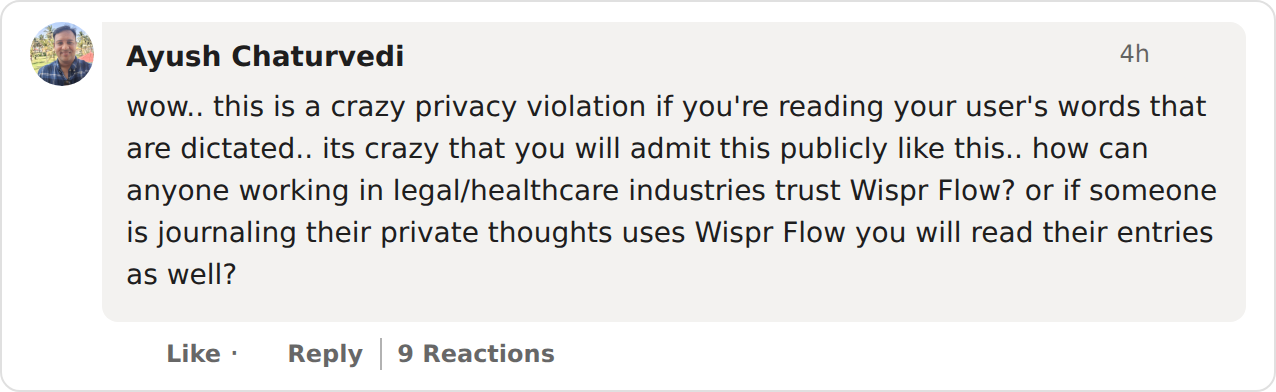
But nothing in the public docs addresses turning user dictations into LinkedIn content, and the company hasn't commented on the post. So the real question isn't “did they break a rule?” It's the one I asked in my comment on the post: if the company can read — even in aggregate — what users dictate, how does anyone doing legal or healthcare work trust the pipeline? And are private journal entries in the same corpus?
A day of dictation is not filler words. It's contracts. Diagnoses. Messages you almost didn't send. The post is cheerful trivia precisely because the capability behind it is total: everything default-tier users say is in scope, and which slice becomes content is an editorial choice.
Warning
The defaults are the policy. “Privacy Mode is off by default. When off, dictation data may be used to improve Wispr Flow” — Wispr Flow's own Security Overview. If you never opened Settings → Data and Privacy, your dictated words are in scope for company-side analysis. Inclusion is the default; exclusion is the opt-in.
No Zero Data Retention Means Your Words Are Their Dataset
This is what happens when you use a dictation app without zero data retention: your words become the vendor's dataset.
Not through a hack. Not through malice. Through a default.
Wispr Flow's own public record now shows all three standard uses of retained dictation: model training (“may be used to improve Wispr Flow” — their docs), sales analytics (the founder's June demo), and now marketing content (the August posts). None of that is unusual for a cloud company. That's the point — it's what retention makes normal.
Zero data retention kills the chain at step one. A vendor can only analyze words it kept. If the transcript is discarded the moment it's delivered, there is nothing to query, nothing to segment, nothing to post. On-device dictation goes one further: your words never reach the vendor at all, so the guarantee doesn't depend on the vendor's discipline.
That's how Voibe — the app behind this site — works. On Apple Silicon Macs it runs fully on-device: transcribed locally, pasted, discarded. On Windows and Intel Macs it uses a private zero-retention cloud: open-source models, nothing stored, no account, no identity attached. A “our users say ‘kindly’ 5.6× more” post about Voibe users isn't a promise we make. It's a query that cannot be run, because the corpus never exists. The same logic covers VoiceInk and Superwhisper in offline mode — our privacy-focused alternatives roundup compares them all.
The private option is also the cheaper one: Voibe is $7.50/month, $59/year, or $149 one-time. Wispr Flow Pro is $144/year — $432 over three years versus $149, a $283 (65%) saving.
Two months after this post, that dataset got a product. In August 2026 Wispr raised $280 million and previewed Canto, its first proprietary speech model — built, in the CEO's words, “for where people actually use Flow” — without publishing what trained it. The capability this page describes is the mechanism that makes such a model possible: Whose Voice Trained Canto?
If You Dictate Client Work, Patient Notes, or a Journal
Now apply this to what people actually dictate.
- Lawyers: client matters, settlement drafts, privileged strategy. A vendor that can run word-frequency queries across dictation content is a fact you don't want to explain in a discovery dispute. See our Wispr Flow alternatives for lawyers.
- Doctors and therapists: dictating anything touching PHI without the BAA is indefensible. The BAA is self-serve and locks zero retention on permanently — sign it before the next note, or use a tool that never sees the note. Our dictation and HIPAA guide covers the decision.
- Anyone journaling by voice: people dictate journals at their most vulnerable — grief, anxiety, the 2 a.m. thoughts they would never type into a cloud doc. There's no compliance framework for that. Just one question: are you comfortable that the app's team could count the words in your entries? If not, the fix isn't a toggle. It's the architecture.
Info
Nothing in the LinkedIn post singles out any individual, and aggregate research is standard practice in cloud analytics. The reason it matters for sensitive work is different: it demonstrates, from the vendor's own team, that dictation content is retained in queryable form under default settings. Confidentiality review is about capability, not intent.
What to Do Tonight If You Use Wispr Flow
Five moves, strongest first. The first three make Wispr Flow safer. The last two remove the question.
- Turn on Privacy Mode now. Settings → Data and Privacy → Privacy Mode. Per Wispr Flow's docs, your dictation data is then not stored or used for training.
- Better: sign the in-app BAA (Desktop or iOS). It locks zero data retention on permanently — and any Pro user can sign it, not just healthcare workers.
- Check Context Awareness in the same screen — when on, it samples content from your active app. Details in our safety investigation.
- Move sensitive dictation to a no-retention tool. Voibe is on-device on Apple Silicon and zero-retention cloud on Windows — $7.50/month, $59/year, or $149 lifetime, no account. Try Voibe for Free — turn Wi-Fi off and watch it keep working.
- Verify, don't trust. Run Little Snitch (or any network monitor) while dictating. On-device shows zero outbound traffic. Cloud shows exactly where your words go.
The Bottom Line: The Post Is Trivia. The Capability Is the Story.
The post itself is harmless trivia — Indians say “kindly” more and “amazing” less, and neither style is better. Nobody was named.
The capability is the story. A dictation vendor counted its users' words, split them by nationality, and published the result as marketing. Twice. Because under default settings, it can.
So stop reading privacy policies for comfort and ask one architectural question: does this app retain what I say? If yes, your words are a dataset — for training, for analytics, for whatever the next LinkedIn post needs. If no — zero retention, or fully on-device — there is nothing to read, nothing to count, and nothing to brag about. That standard exists at every price: Voibe at $149 lifetime, VoiceInk at $29, Superwhisper offline at $249.99 — while Wispr Flow Pro costs $144 every year for the version where your words are in scope until you opt out.
Further reading: the founder's June 2026 analytics walkthrough, Is Wispr Flow safe?, the Wispr Flow review and pricing breakdown, privacy-focused alternatives, and the architecture background in cloud vs. local dictation and why offline dictation matters.
Sources: the public LinkedIn post and companion chart (August 2026, linked above; quotes verbatim); Wispr Flow's Security Overview, privacy policy, and HIPAA/ZDR docs; the June 2026 Think School podcast. This article reports public statements as of August 10, 2026. It does not allege any breach of law or contract, and it will be updated if Wispr Flow responds.
The structural lesson generalizes past Wispr Flow: a corpus that exists can be analyzed, and the setting that prevents the corpus is usually off by default. See zero data retention explained for the five levels of retention and the clauses that keep the corpus legal.
Key Takeaway
Cloud dictation without zero data retention turns your words into the vendor’s dataset — for training, analytics, and now LinkedIn content. On-device and zero-retention tools make the whole category of analysis impossible.
Frequently Asked Questions
What did the Wispr Flow LinkedIn post reveal about user data?
Does Wispr Flow read what you dictate?
Where can I see the original Wispr Flow LinkedIn post?
Did the LinkedIn post violate Wispr Flow's privacy policy?
Is my dictation data included in Wispr Flow's analysis?
What does this mean for lawyers, doctors, and people who journal by voice?
How do I stop Wispr Flow from using my dictations?
Which dictation apps make this kind of analysis impossible?
Best AI Dictation and Meeting Notes for Confidential Work
Draft letters, notes and emails 5x faster. Get meeting notes without a bot joining your call. Nothing used to train AI.
- Mac + Windows
- No bot in your calls
- Nothing used to train AI
- 7-day free trial
Want to compare plans first? View pricing →
Related Articles
What Wispr Flow's Founder Revealed About User Tracking
The June 2026 podcast where Wispr Flow's CEO demoed per-user analytics — word counts, apps, names, employers.
Is Wispr Flow Safe?
Cloud architecture, Privacy Mode defaults, the Delve audit scandal, and the on-device alternative.
Privacy-Focused Wispr Flow Alternatives
On-device and zero-retention dictation apps for privacy-sensitive work.
Cloud vs. Local Dictation
The architectural difference that decides where your words live.