
Switch to Voibe: We'll Cover What's Left on Your Old Plan
Cancel Wispr Flow, Granola, Otter or any paid dictation app or notetaker, and get Voibe Work free for the time you had left, plus a bonus month. Here's how.

The hardest part of leaving a dictation app or a meeting notetaker usually isn't learning the new one. It's the months you've already paid for on the old one.
You bought the yearly plan in March. You've gone off it since. But there are seven months left, so you keep using it, because walking away feels like throwing that money out.
So we'll cover those months.
Here's the offer: cancel your paid dictation app or notetaker, whether that's Wispr Flow, Granola, Otter, Fireflies, Superwhisper or anything else, and email the cancellation confirmation to hi@getvoibe.com. You get Voibe Work free for the time you had left on that plan, plus one bonus month, up to 12 months in total. Bought a lifetime deal instead? Send your proof of purchase and you get one bonus month of Voibe Work.
Voibe Work is our full plan: dictation in any app plus meeting notes with no bot in the call, on Mac and Windows. You get every feature. It's not a trial version.
The Voibe Switch Offer at a Glance
The whole offer fits in one table:
| You're leaving | What to send to hi@getvoibe.com | What you get |
|---|---|---|
| A paid subscription (monthly or yearly) to a dictation app or notetaker | Your Voibe account email, plus a screenshot of the cancellation confirmation showing the app, that it was a paid plan, and the date your access ends | Voibe Work free for the time left on that plan, plus 1 bonus month, up to 12 months in total |
| A lifetime deal or one-time licence | Your Voibe account email, plus your proof of purchase (a receipt or order confirmation) | 1 bonus month of Voibe Work |
Three things hold for everyone:
- The free time is Voibe Work with every feature: dictation and meeting notes, on Mac and Windows.
- Time left is rounded up to whole months, then the bonus month goes on top.
- The total stops at 12 months. One claim per Voibe account.
Key Takeaway
Cancel a paid dictation app or notetaker subscription, email proof of cancellation to hi@getvoibe.com, and Voibe gives you Voibe Work free for the time left on that plan plus one bonus month, up to 12 months. Lifetime-deal owners send proof of purchase and get one bonus month of Voibe Work.
How Many Free Months You Get: Four Examples
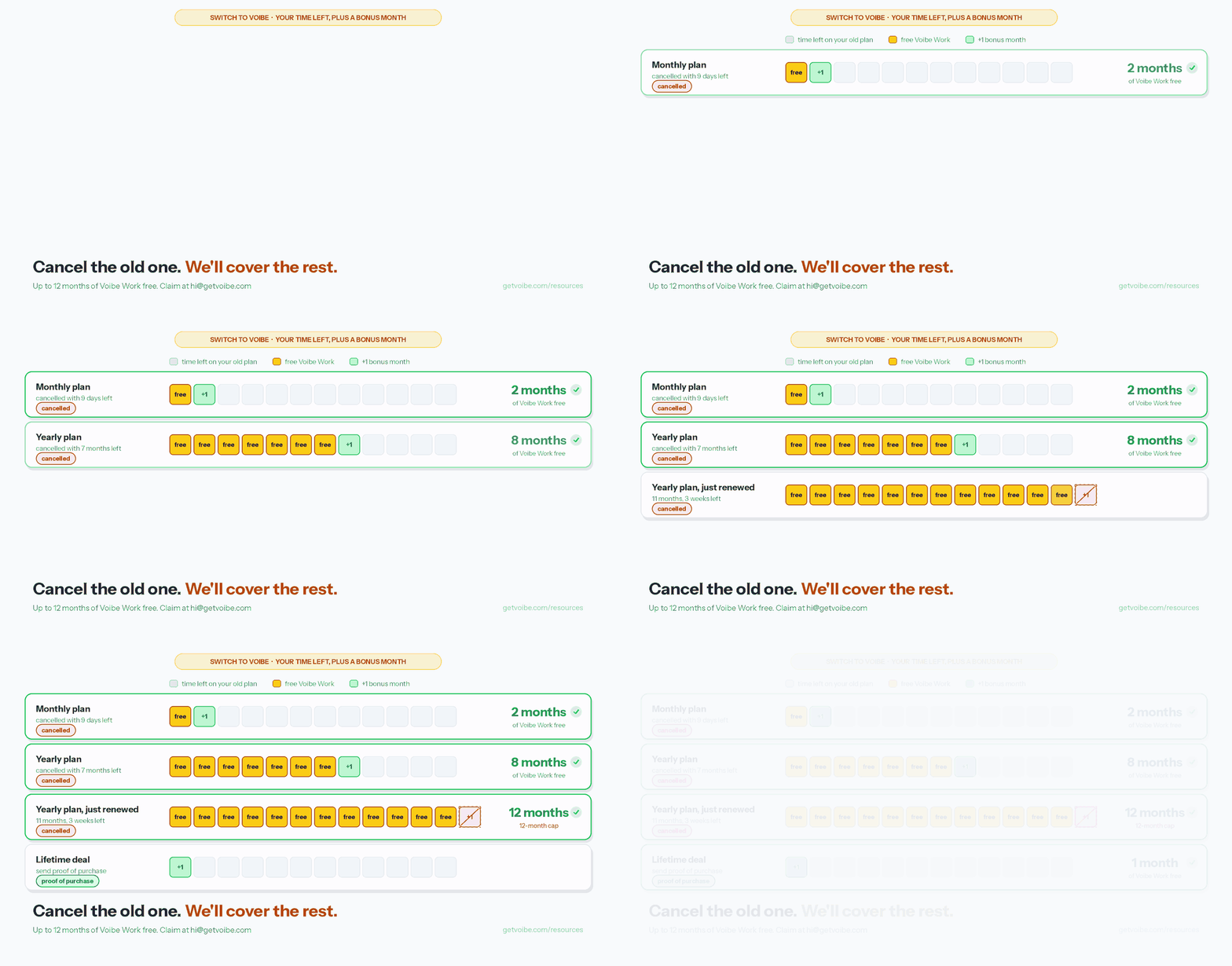
Your free time is the time left on the plan you cancelled, rounded up to whole months, plus one bonus month. The total stops at 12 months.
Here's how that works out for four common cases:
| What you're cancelling | Time left when you cancel | How it's worked out | Free Voibe Work |
|---|---|---|---|
| Granola Business (billed monthly) | 9 days | 9 days rounds up to 1 month, plus 1 bonus month | 2 months |
| Wispr Flow Pro (billed yearly) | 7 months | 7 months, plus 1 bonus month | 8 months |
| Otter Pro (billed yearly, renewed last week) | 11 months, 3 weeks | Rounds up to 12 months; the bonus month would make 13, so it stops at the cap | 12 months |
| Superwhisper lifetime | No end date | Lifetime deals get the bonus month | 1 month |
If your monthly plan renews tomorrow, cancelling still gets you 2 months: the part-month rounds up to one, and the bonus month goes on top.
The cancellation screen does most of the work here. Most apps show the date your access ends right on it, and that date is how we count your months.
How to Claim the Switch Offer in Four Steps
- Get Voibe. Download it for Mac or Windows and create your account. Note the email you sign up with, because that's where the free months go.
- Cancel your old subscription. Take a screenshot of the cancellation confirmation. It needs to show three things: the app's name, that it was a paid plan, and the date your access ends. Own a lifetime deal? Skip the cancelling and find your receipt or order confirmation instead.
- Email your proof to hi@getvoibe.com. Put your Voibe account email in the message and attach the screenshot or receipt.
- We add your free months. We check your proof, add the free Voibe Work time to your account and email you back.
Here's an email you can copy:
To: hi@getvoibe.com
Subject: Switching to VoibeHi, I've cancelled [app name] and I'd like the switch offer. My Voibe account email is [your email]. My cancellation confirmation (or proof of purchase) is attached.
New to Voibe? Getting started with Voibe walks through installing, granting permissions and setting up your hotkey.
Tip
Can't find the confirmation screen? Most apps also send a cancellation email, and the billing or subscription page in the app's settings usually shows the date your plan ends once you've cancelled. If you subscribed through the App Store, the Subscriptions screen shows the date it expires. A screenshot of any of these works.
Which Apps Qualify: 35 Dictation Apps and Notetakers You Can Switch From
Any paid dictation app or meeting notetaker qualifies, whether you pay monthly, yearly or bought a lifetime deal. Here are 35 of them.
Don't see your app? If you pay for a dictation app or meeting notetaker that isn't listed, email your proof to hi@getvoibe.com anyway. We'll review it and get back to you.
Dictation apps
Voibe Work replaces these with dictation in any app on Mac and Windows, plus the Dictionary, Memory shortcuts, Smart Formatting and Developer Mode.
| App | How you paid | What you get |
|---|---|---|
| Wispr Flow | Subscription | Time left + 1 bonus month |
| Superwhisper | Subscription or lifetime licence | Time left + 1 bonus month, or 1 bonus month for lifetime |
| Aqua Voice | Subscription | Time left + 1 bonus month |
| Willow Voice | Subscription | Time left + 1 bonus month |
| Typeless | Subscription | Time left + 1 bonus month |
| Monologue | Subscription | Time left + 1 bonus month |
| DictaFlow | Subscription | Time left + 1 bonus month |
| Paraspeech | Subscription | Time left + 1 bonus month |
| Spokenly | Subscription (Pro) | Time left + 1 bonus month |
| OpenWhispr | Subscription (Pro) | Time left + 1 bonus month |
| Glaido | Subscription | Time left + 1 bonus month |
| SpeakOneAI | Paid plan | Time left + 1 bonus month |
| Voicy | Subscription or lifetime licence | Time left + 1 bonus month, or 1 bonus month for lifetime |
| Blip AI | Subscription or AppSumo lifetime deal | Time left + 1 bonus month, or 1 bonus month for lifetime |
| VoiceDash | Yearly plan or AppSumo lifetime deal | Time left + 1 bonus month, or 1 bonus month for lifetime |
| MacWhisper | One-time Pro licence or App Store subscription | 1 bonus month for the licence, or time left + 1 bonus month |
| VoiceInk | One-time licence | 1 bonus month |
| Dragon | One-time licence (Dragon Professional) or subscription (Dragon Medical One) | 1 bonus month for the licence, or time left + 1 bonus month |
Meeting notetakers
Voibe Work replaces these with meeting notes from your Mac or Windows PC, with no bot in the call, notes saved on your computer, summary templates, chat with your meetings and PDF export. Every one of them is sold as a subscription, so cancel and send the confirmation.
| App | How you paid | What you get |
|---|---|---|
| Granola | Subscription | Time left + 1 bonus month |
| Otter | Subscription | Time left + 1 bonus month |
| Fireflies | Subscription | Time left + 1 bonus month |
| Fathom | Subscription | Time left + 1 bonus month |
| Read AI | Subscription | Time left + 1 bonus month |
| Wispr Flow Notetaker | Subscription | Time left + 1 bonus month |
| Circleback | Subscription | Time left + 1 bonus month |
| Bluedot | Subscription | Time left + 1 bonus month |
| Quill Meetings | Subscription | Time left + 1 bonus month |
| Laxis | Subscription | Time left + 1 bonus month |
| Jamie | Subscription | Time left + 1 bonus month |
| Krisp | Subscription | Time left + 1 bonus month |
| Tactiq | Subscription | Time left + 1 bonus month |
| Notta | Subscription | Time left + 1 bonus month |
| Fellow | Subscription | Time left + 1 bonus month |
| Anarlog | Subscription | Time left + 1 bonus month |
| Meetily Pro | Subscription | Time left + 1 bonus month |
Paying for a dictation app and a notetaker?
Cancel both and send both screenshots in one email. Your free months are based on whichever plan had the most time left, plus the bonus month, up to 12 months. One Voibe Work plan then covers both jobs.
What doesn't qualify
Free tools and free plans, because there's no paid time to carry over. That includes Apple Dictation, Windows Voice Typing, Handy, FluidVoice, Wisprtype, and the free tier of any app above. If a free tool is all you use, you don't need the offer: Voibe Free is $0 forever, with a word limit on one device.
Still deciding where to go? Our alternatives guides cover most of the apps above.
What You Get: Voibe Work With Every Feature
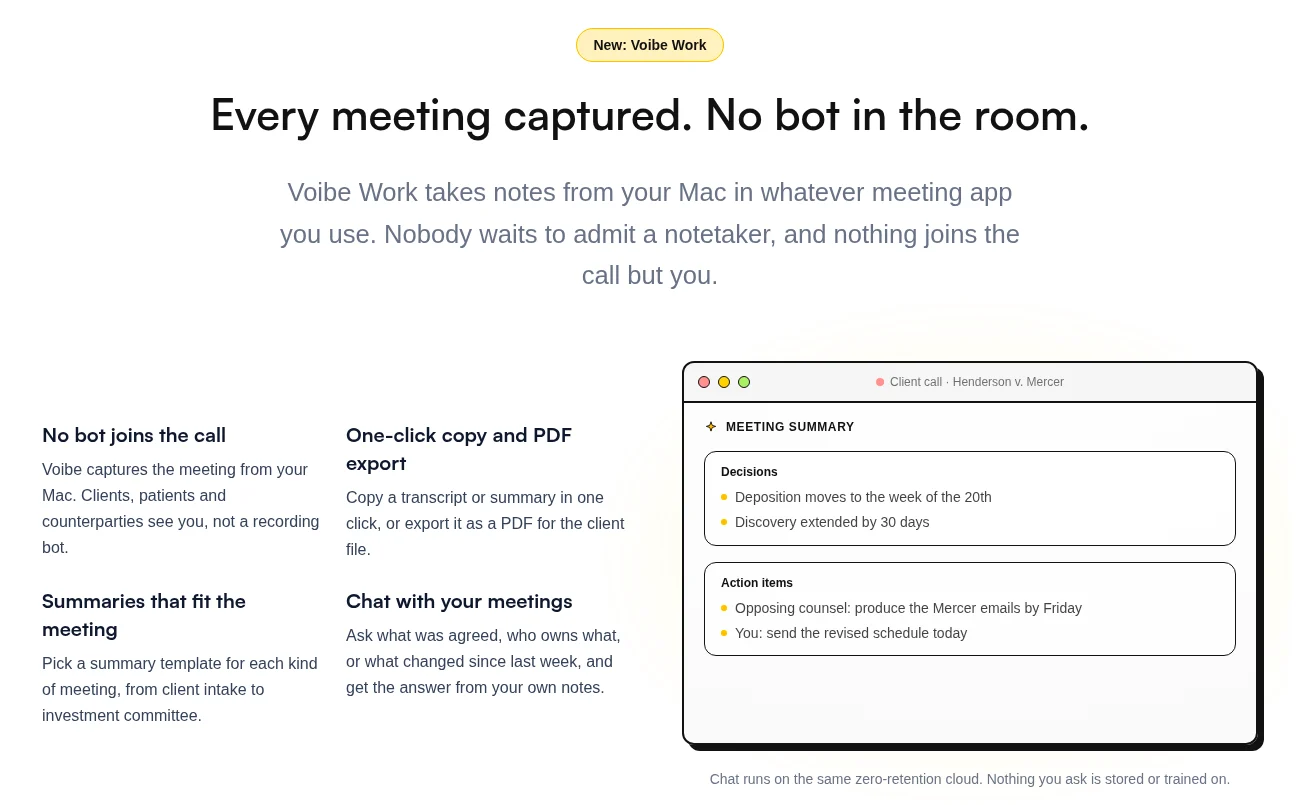
Your free months are Voibe Work, our top plan. It replaces a dictation app and a notetaker at once.
Dictation, in any app
- Hold the hotkey (Fn by default), talk, let go. The text lands wherever your cursor is, on Mac and Windows.
- The Dictionary teaches Voibe your names, jargon and acronyms, and it shapes the transcription itself rather than fixing words afterwards. You can paste in a whole list at once.
- Memory turns a spoken trigger into preset text: your signature, an address, a prompt you reuse.
- Smart Formatting fixes punctuation, capitals and filler words without rewriting what you said.
- Developer Mode recognises file names and variables in Cursor, VS Code and Windsurf.
- 90+ languages. On an Apple Silicon Mac you can run dictation fully on-device, with no internet. On Windows and Intel Macs it runs in our zero-retention cloud.
Meeting notes, with no bot in the call
- Voibe Work records Zoom, Teams, Google Meet, Webex, Slack huddles or any meeting app from your Mac or Windows PC. Nobody has to admit a notetaker. In-person meetings work too, through your computer's mic.
- The audio is processed by open-source models on zero-retention cloud providers and deleted as soon as processing is done.
- The transcript and summary are saved on your computer, not on Voibe's servers, and never used to train AI.
- Speaker labels with a time next to every line, summary templates for each kind of meeting, chat with your meetings, and one-click copy or PDF export.
- One meeting can run up to 4 hours, and there's no cap on how many meetings you record.
Meeting notes need an internet connection. When you start recording, Voibe reminds you to tell everyone you're taking notes. Following the consent rules where you are is your responsibility.
The full tour is in our Voibe Work launch post.
What Voibe Work Costs Once Your Free Months End
After your free months, Voibe Work is $19 a month, $149 a year or $399 lifetime (pricing page). If you only want dictation, Voibe Dictation is $9.90 a month, $99 a year or $199 lifetime, and Voibe Free is $0 forever with a word limit on one device.
Here's how Voibe Work compares with paying for two apps, using annual prices from each app's own pricing page (checked October 2026):
| What you pay for now | Per year | Voibe Work ($149/yr) saves you |
|---|---|---|
| Granola Business ($14/mo, billed monthly only) + Wispr Flow Pro ($144/yr) | $312 | $163 (52.2%) |
| Otter Pro ($99.96/yr) + Wispr Flow Pro ($144/yr) | $243.96 | $94.96 (38.9%) |
| Granola Business alone | $168 | $19 (11.3%) |
We're not the cheapest option for every single app, and it's worth knowing that before you switch:
- Wispr Flow Pro on its own is $144 a year, so Voibe Work costs $5 (3.5%) more. The difference buys you meeting notes.
- Otter Pro is $99.96 a year, so Voibe Work costs $49.04 (49.1%) more. Otter Pro stops a meeting at 90 minutes and doesn't include dictation.
- Fireflies Pro is $120 a year, so Voibe Work costs $29 (24.2%) more. Fireflies now includes free dictation (Fireflies Talk) on every plan.
Where Voibe Work wins is when you're paying for two apps, or when you want your notes on your own computer. The full breakdown is in dictation app pricing.
Before You Cancel: Export What You Want to Keep
Cancelling doesn't always delete your data straight away, but some apps limit what you can see on their free plan, and some delete recordings after you leave. Take five minutes to save what matters first.
- Meeting notes. Export the summaries and transcripts you want to keep. Granola's free Basic plan only shows your last 30 days of notes in the app, and a CSV export of your summaries is available on every plan (more in Granola encrypted your notes). Bluedot says it deletes recordings after you cancel.
- Your custom words. Copy the word list from your old app's dictionary or vocabulary settings, then paste it into Voibe's Dictionary in one go. Coming from Dragon? The Vocabulary Center exports to TXT or XML, and switching from Dragon to Voibe walks through it.
- Snippets and templates. Copy your text shortcuts (Dragon calls them Auto-Texts) so you can recreate them as Memory shortcuts in Voibe.
Then cancel, and screenshot the confirmation.
Where Your Meeting Notes Live: Your Old App vs Voibe Work
Switching notetakers also changes where your meetings end up. Here's what each app's own pages say (checked September and October 2026):
| App | Bot in the call? | Where your notes are kept | Used to train AI? |
|---|---|---|---|
| Granola | No bot | Granola's cloud, with a local copy for faster access | Granola trains on anonymized data unless you opt out in Settings (Granola's pricing FAQ) |
| Wispr Flow Notetaker | No bot | Wispr's US cloud; transcripts are kept until you delete them by default | On by default on Free and Pro, per Wispr's help center |
| Otter | Bot by default; the desktop app records without one | Otter's cloud | Trains on de-identified audio and transcripts, per Otter's privacy policy |
| Fathom | Bot by default; bot-free capture is a Mac beta | Fathom's US cloud | Trains on de-identified data by default, with an opt-out |
| Fireflies | Bot, or a bot-free desktop mode | Fireflies' cloud | No, per Fireflies ("never used for AI model training") |
| Voibe Work | No bot | On your computer. The audio is deleted once it's processed | Never |
The longer version, app by app, is in the best no-bot meeting note takers.
Should You Switch? Who Voibe Work Suits, and Who It Doesn't
A free year doesn't help if the app is wrong for you. Here's the honest version.
Switch if
- You pay for a dictation app and a notetaker separately. Voibe Work does both jobs for $149 a year.
- You'd rather nobody had to admit a bot into your calls.
- You want your meeting notes saved on your own computer instead of in someone else's cloud.
- You work on a Mac and a Windows PC. Voibe runs on both.
- You handle confidential work. On an Apple Silicon Mac, dictation can run fully on-device, and a BAA is available on request.
Stay where you are if
- You dictate on your phone. Voibe has no iPhone or Android app. Wispr Flow does.
- You want notes to start from your calendar. Voibe offers to take notes when a call starts, but it doesn't join meetings from your calendar.
- You only need cheap meeting notes. Otter Pro is $49.04 a year less than Voibe Work, if 90-minute meetings and a bot are fine.
- You need meeting notes offline. Voibe's meeting notes need internet. Only dictation runs offline, and only on Apple Silicon Macs.
- You're on Linux. Voibe runs on Mac and Windows only.
Not sure yet? Every new Voibe account starts with 7 days of every Voibe Work feature, no card needed, so you can try it before you cancel anything. For a full review, see our Voibe review.
The Fine Print
- The offer covers paid dictation apps and meeting notetakers: monthly and yearly subscriptions, lifetime deals and one-time licences. Free plans and free trials don't qualify. Apps not listed on this page are reviewed case by case: email your proof and we'll get back to you.
- Subscriptions: send proof of cancellation showing the app, that it was a paid plan, and the date your access ends.
- Lifetime deals and one-time licences: send proof of purchase. You don't need to cancel anything.
- Free time: the time left on your cancelled plan, rounded up to whole months, plus 1 bonus month, up to 12 months in total. Lifetime deals get 1 bonus month.
- The free time is Voibe Work with every feature.
- Claims go to hi@getvoibe.com. One claim per Voibe account.
- Voibe isn't affiliated with any of the apps named on this page. Their names belong to their owners.
FAQ: The Voibe Switch Offer
Who qualifies
Which apps qualify? Any paid dictation app or meeting notetaker, including Wispr Flow, Superwhisper, Aqua Voice, Willow Voice, Typeless, Monologue, MacWhisper, VoiceInk, Dragon, Granola, Otter, Fireflies, Fathom and Read AI. The full list of 35 is above. Paying for one we didn't list? Email your proof to hi@getvoibe.com and we'll review it.
Does a lifetime deal count? Yes. Send your proof of purchase and you get one bonus month of Voibe Work. You don't need to cancel anything.
Does a free plan or free trial count? No. The offer covers time you paid for.
Claiming
Do I have to cancel my old app? If it's a subscription, yes. Send a screenshot of the cancellation confirmation to hi@getvoibe.com.
What counts as proof of cancellation? A screenshot that shows the app's name, that it was a paid plan, and the date your access ends. A cancellation email or the billing page after you cancel works too.
My subscription ends in a few days. Is it worth it? Yes. The part-month rounds up to one month and the bonus month goes on top, so you get 2 months of Voibe Work.
I pay for a dictation app and a notetaker. Can I claim for both? Cancel both and send both screenshots in one email. Your free months are based on the plan with the most time left, plus the bonus month, up to 12 months.
After you switch
What do I get? Voibe Work with every feature: unlimited dictation and meeting notes on Mac and Windows, no bot in the call, notes saved on your computer.
What does Voibe Work cost after the free months? $19 a month, $149 a year or $399 lifetime.
Can I bring my custom words with me? Yes. Paste your word list into Voibe's Dictionary in one go. Dragon's Vocabulary Center export works too.
Cancel the Old One. We'll Cover the Rest.
If you've been holding on to an app because of the months you'd already paid for, you can stop. Cancel it, send us the confirmation, and use Voibe Work for that time plus a bonus month.
Download Voibe for Mac → · Get Voibe for Windows →
Then email your proof to hi@getvoibe.com.
Cancel the old one. We'll cover the rest.
Switch from any paid dictation app or notetaker and get Voibe Work free for the time you had left, plus a bonus month. Then email your proof to hi@getvoibe.com.
- Mac + Windows
- No bot in your calls
- Nothing used to train AI
- 7-day free trial
Want to compare plans first? View pricing →
Related Articles
We Re-Read 58 AI Privacy Policies in October. 25 Changed.
Wispr Flow now trains by default, Google Meet takes notes on its own, and Zoom got sued. Every AI privacy change we found, Sept 10 to Oct 13, 2026.
Wispr Flow Notetaker vs Voibe Work: Where Do Your Meeting Notes End Up?
Both bundle dictation with no-bot meeting notes. Wispr stores notes in its US cloud and trains by default on Free/Pro; Voibe Work keeps them on your computer. $312 vs $149/yr.
Wispr Flow vs Otter AI: Meeting Transcription or Dictation?
Otter transcribes meetings; Wispr Flow types what you say and now takes no-bot meeting notes too. Prices, privacy, and one plan that does both for $149/yr.