
How to Build an Open Source Wispr Flow Alternative — and What Breaks
The exact commands to build an open source Wispr Flow alternative, the five things that break after the build succeeds, and when you should just buy the app.

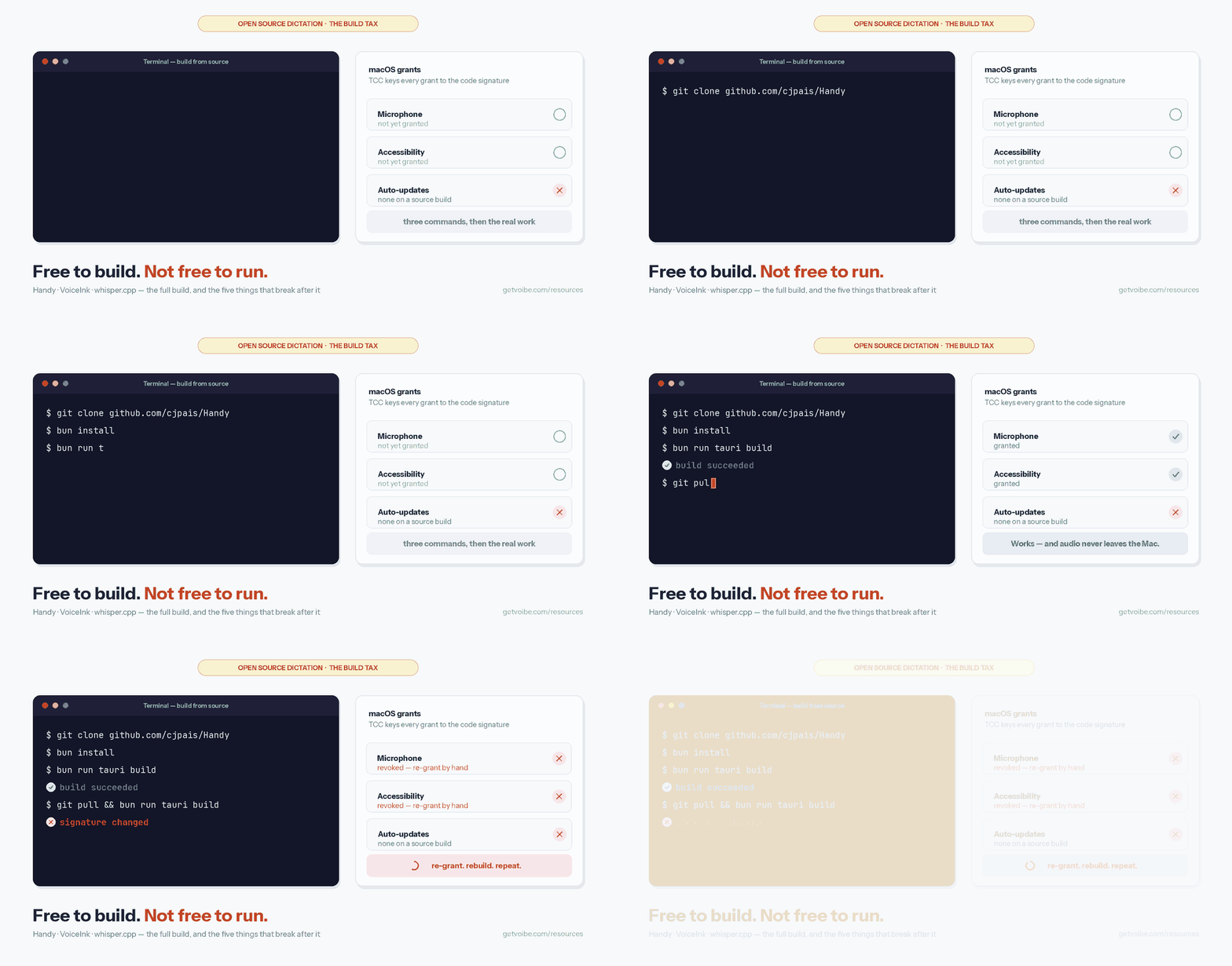
The commands to build your own Wispr Flow replacement are short enough to fit in a tweet. git clone, bun install, bun tauri dev, and a Whisper model lands on your disk and starts typing for you. That part is genuinely easy. The part nobody writes down is what happens the second time you rebuild — when macOS quietly forgets it ever gave the app permission to hear you, and you get to re-grant Microphone and Accessibility from scratch. Again.
Short answer: you build an open source Wispr Flow alternative by cloning an existing on-device dictation project and compiling it locally — Handy (MIT, Rust + Tauri, macOS/Windows/Linux) or VoiceInk (GPL v3.0, Swift, Mac only). Handy needs Rust and Bun and takes three commands. VoiceInk needs Xcode plus a locally compiled whisper.cpp xcframework. Both are free to build. Neither is free to run — the recurring cost is code signing, permission re-grants, and being your own update channel forever.
This is the hands-on companion to our roundup of the best open source Wispr Flow alternatives. That page tells you which project to pick. This one walks the build, names what breaks, and is honest about the point where buying a maintained app is the cheaper engineering decision.
The six steps, start to finish:
- Install the toolchain — Rust and Bun for Handy, or Xcode and Swift on macOS 14.4+ for VoiceInk.
- Clone the repository from GitHub.
- Compile:
bun run tauri buildfor Handy, ormake localfor an ad-hoc-signed VoiceInk. - Download a Whisper model (75 MiB for tiny, up to 2.9 GiB for large).
- Grant Microphone and Accessibility permissions to the binary you just built.
- Bind a push-to-talk hotkey and dictate.
Who this is for: developers comfortable with a terminal who want their voice audio to never leave their machine. Time to first dictation: under an hour for Handy on a supported platform; longer for VoiceInk, because you compile whisper.cpp for four Apple platforms before Xcode will link it.
| Question | Answer |
|---|---|
| Easiest project to build | Handy — three commands, MIT license, works on Mac, Windows and Linux |
| Closest to Wispr Flow on Mac | VoiceInk — Swift, native, GPL v3.0, requires Apple Silicon and macOS 14.4+ |
| Hardest step | Neither compile step. It is code signing and permission re-grants after every rebuild |
| License cost over 3 years | Handy $0 · VoiceInk $29–$69 one-time · Wispr Flow Pro $432 |
| When to stop building | When dictation is a tool you use, not a project you maintain |
Key Takeaway
Building an open source Wispr Flow alternative takes under an hour. Owning one takes an ongoing commitment: you become the code-signing authority, the update channel, and the support desk for your own dictation app.
What You Are Actually Building When You Replace Wispr Flow
A dictation app looks like one feature and is actually five. Wispr Flow hides all five behind an installer; when you build from source, you inherit every one of them. We call this the Five-Layer Dictation Stack, and knowing the layers is what tells you in advance which step is going to eat your evening.
- Hotkey listener. A global shortcut that fires no matter which app has focus. Both projects ship this and both default to push-to-talk.
- Audio capture. Reading the microphone, handling device switches when you plug in headphones, resampling to what the model expects.
- Inference engine plus model weights. The actual speech recognition. Handy uses ONNX Runtime and ships Whisper Small, Medium, Turbo and Large alongside NVIDIA's Parakeet V3. VoiceInk links whisper.cpp, which you compile yourself. Either way the weights are a separate download of 75 MiB to 2.9 GiB.
- Text injection. Getting transcribed text into whatever app you are looking at. On macOS this runs through the Accessibility APIs. On Linux under Wayland there is no universal path, which is why Handy's docs tell you to install
wtypeordotool. - OS permission and signing layer. macOS gates the microphone and Accessibility behind TCC, and TCC keys its grants to the app's code signature. Change the signature, lose the grants.
Layers 1 through 4 are solved problems you get for free by cloning someone else's repository. Layer 5 is the one you maintain forever, and it is the reason a source build feels different on day thirty than it did on day one. If you want the background on what the model in layer 3 is actually doing, our explainer on how Whisper works covers the architecture.
The reason to take all five on is the one thing Wispr Flow structurally cannot offer: local processing. Wispr Flow's own security and compliance FAQ states that all customer data is processed and stored in the US and that the service cannot operate without decrypting audio on Wispr's backend. There is no offline mode. A locally built Whisper app has no backend to decrypt anything on.
Info
Neither project sends audio anywhere or trains on it. Both run Whisper locally, which is the entire point of the exercise — and the one thing a cloud dictation service cannot match no matter how good its privacy policy reads.
Step 1: Pick Your Project — Handy for Cross-Platform, VoiceInk for Mac
Pick Handy if you use more than one operating system or want the simplest build. Pick VoiceInk if you are on Apple Silicon and want the closest native-Mac match to Wispr Flow's behavior. Those are the only two source builds worth your first evening; everything else in the category is either a file-transcription tool or a Linux-only command-line wrapper.
| Handy | VoiceInk | |
|---|---|---|
| License | MIT | GPL v3.0 |
| Language / framework | Rust + Tauri v2 | Swift + whisper.cpp |
| Platforms | macOS (Intel + Apple Silicon), Windows x64/ARM, Linux x64/ARM | macOS 14.4+, Apple Silicon |
| GitHub stars | 27,785 | 5,702 |
| Open issues | 83 | 211 |
| Accepts pull requests | Yes — 97 open, 2,414 forks | No — fork-for-personal-use only |
| Prebuilt binary price | $0 | $29 Solo / $49 Personal / $69 Extended, one-time |
| Build difficulty | Three commands | Compile whisper.cpp first, then Xcode |
Star counts, fork counts and issue counts above were read from the GitHub API on July 29, 2026. Both repositories had commits pushed on July 28, 2026, so both are actively maintained as of publication.
One line in VoiceInk's README deserves more attention than it usually gets. The project is "not accepting pull requests at this time" — you are welcome to fork and modify it for your own use, but you cannot contribute upstream. The code is open under GPL v3.0 and auditable, which is what most people actually want. It is not a collaborative project, which is what most people assume "open source" means. Handy, by contrast, takes contributions and has 2,414 forks.
For the fuller picture on either tool, we have a hands-on Handy review and a VoiceInk review, plus privacy teardowns at is Handy safe and is VoiceInk safe.
Tip
If you only want the app and not the compiler, both projects ship prebuilt binaries: handy.computer/download for Handy (free), and brew install --cask voiceink for VoiceInk. Skip to Step 4 — the permission and model steps still apply.
Step 2: Build Handy From Source on macOS, Windows, or Linux
Handy builds in three commands once the toolchain is in place. The prerequisites differ by platform and the platform-specific ones are where first-time builds fail, so install them before you clone.
Every platform needs:
- Rust, latest stable, via rustup.rs
- The Bun package manager
- The Tauri v2 prerequisites for your OS
Then the platform-specific pieces:
- macOS: Xcode Command Line Tools via
xcode-select --install. Intel Macs additionally need ONNX Runtime from Homebrew, linked dynamically. - Windows: Microsoft C++ Build Tools (Visual Studio 2019 or 2022), CMake via
winget install Kitware.CMake, and the Vulkan SDK viawinget install KhronosGroup.VulkanSDK. - Linux (Ubuntu/Debian): one long apt line, reproduced below. Fedora and Arch package lists are in the repo's BUILD.md.
sudo apt install build-essential libasound2-dev pkg-config libssl-dev \
  libvulkan-dev vulkan-tools glslc spirv-headers glslang-tools libgtk-3-dev \
  libwebkit2gtk-4.1-dev libayatana-appindicator3-dev librsvg2-dev \
  libgtk-layer-shell0 libgtk-layer-shell-dev patchelf cmake
With the toolchain ready, the build itself is:
git clone git@github.com:cjpais/Handy.git
cd Handy
bun install
bun tauri dev          # run in development
bun run tauri build    # produce a release binary
What to expect: bun tauri dev compiles the Rust workspace on first run, which is the long part — a cold Rust build of a Tauri app with native audio and ONNX dependencies is not fast on any machine. Subsequent runs are incremental. When the window appears, Handy has not yet downloaded a model; that happens in Step 4.
Three failure modes the maintainers document explicitly:
- Intel Mac linker errors. Prefix the dev and build commands with
ORT_LIB_LOCATION=$(brew --prefix onnxruntime)/lib ORT_PREFER_DYNAMIC_LINK=1. - Windows path-length errors. Mitigated automatically since
transcribe-cpp0.1.3 via an NTFS junction workaround; if you still hit it, setCARGO_TARGET_DIRto a short path. Windows signing errors during bundling are avoided withbun run tauri build --no-bundle. - Linux AppImage bundling failures. Skip the AppImage with
bun run tauri build -- --bundles deband install from the .deb instead.
The canonical source for all of this is BUILD.md in the Handy repository. Read it at the commit you cloned, not from memory — the dependency list has changed more than once.
Warning
Handy's README lists a known issue where Whisper models crash on certain Windows and Linux hardware configurations. If your build succeeds but transcription hard-crashes the app, try the Parakeet V3 model before you start bisecting your toolchain.
Step 3: Build VoiceInk From Source With Xcode and whisper.cpp
VoiceInk's build has one extra stage: you compile whisper.cpp into an Apple xcframework yourself, then link it into the Xcode project. There is no package manager step that does this for you.
Prerequisites: macOS 14.4 or later, a current Xcode, a current Swift toolchain, and Git. The paid binary additionally requires Apple Silicon, and the on-device inference path is built around it.
1. Build the whisper.cpp xcframework:
git clone https://github.com/ggerganov/whisper.cpp.git
cd whisper.cpp
./build-xcframework.sh
This produces build-apple/whisper.xcframework. It is the slowest single step in this entire guide, because the script builds slices for multiple Apple platforms rather than just the Mac you are sitting at. Start it and go do something else.
2. Link the framework into the Xcode project. Clone github.com/Beingpax/VoiceInk, open the project in Xcode, and either drag ../whisper.cpp/build-apple/whisper.xcframework into the project navigator, or add it manually under Frameworks, Libraries, and Embedded Content.
3. Build without an Apple Developer account. A standard build wants a real Apple Developer certificate. For personal use, the repo ships a separate configuration:
make localThat builds with ad-hoc signing using LocalBuild.xcconfig and a stripped-down entitlements file, and needs no paid developer account. It is the path most people building VoiceInk for themselves should take — and it is also the direct cause of the permission problem in the next section.
If the build fails, the maintainer's troubleshooting order is: clean the build folder with Cmd+Shift+K, clean the build cache by pressing Cmd+Shift+K twice, confirm your Xcode and macOS versions meet the requirements, and verify that whisper.xcframework actually built and is actually linked. Full instructions live in BUILDING.md.
If none of that appeals, brew install --cask voiceink installs the signed build in one line, and the free trial runs before you decide about a license. The Homebrew cask is the maintainer's own distribution channel.
Step 4: Download a Whisper Model and Pick the Right Size
A compiled binary with no model does nothing. Whisper's weights are a separate download, and choosing the size is the single biggest lever you have over accuracy, latency and memory use. These are the official figures from the whisper.cpp repository:
| Model | Disk | Memory at runtime | Practical use |
|---|---|---|---|
| tiny | 75 MiB | ~273 MB | Testing the pipeline works; accuracy is poor for real writing |
| base | 142 MiB | ~388 MB | Short commands, low-power machines |
| small | 466 MiB | ~852 MB | The usual starting point for everyday dictation |
| medium | 1.5 GiB | ~2.1 GB | Noticeably better on proper nouns and technical vocabulary |
| large | 2.9 GiB | ~3.9 GB | Best accuracy; heaviest on RAM and slowest to first token |
Handy downloads models from inside the app — open settings and pick from Whisper Small, Medium, Turbo or Large, or NVIDIA's Parakeet V3, which the project describes as a CPU-optimized model with automatic language detection. Parakeet is the one to try first if you are on a machine without a strong GPU, or if Whisper is crashing on your hardware.
VoiceInk downloads its models in-app as well. If you are working directly with whisper.cpp, the download script is:
sh ./models/download-ggml-model.sh base.enSubstitute any model name — small, medium, large-v3. The .en suffix selects English-only variants, which are smaller and more accurate on English but useless if you code-switch between languages.
Optional: Core ML acceleration on Apple Silicon. whisper.cpp can run the encoder on the Apple Neural Engine, which the project's documentation describes as more than three times faster than CPU-only execution. It costs you a Python detour:
pip install ane_transformers openai-whisper coremltools
./models/generate-coreml-model.sh base.en
cmake -B build -DWHISPER_COREML=1
cmake --build build -j --config Release
Note what just happened: a Rust-and-Swift privacy project now needs a working Python environment with three ML packages, per model, on every machine. This is the shape of nearly every hidden cost in a source build. Nothing is hard. There is just always one more thing. Our guide to picking the right local Whisper model goes deeper on the accuracy-versus-speed trade.
Key Takeaway
Start with the small model at 466 MiB and about 852 MB of RAM. Move up to medium only if proper nouns and technical terms are landing wrong — the large model costs 2.9 GiB on disk and about 3.9 GB of RAM for a difference most dictation users will not notice.
Step 5: Grant Microphone and Accessibility Permissions
Both apps need two permissions to work: the microphone, to hear you, and Accessibility, to type into other applications. Handy's own documentation calls out both as required during initial setup.
On macOS:
- Launch the app you just built. It will prompt for microphone access — approve it.
- Open System Settings → Privacy & Security → Accessibility and enable your build. Without this, transcription runs but no text ever appears in your editor.
- If you built with ad-hoc signing, macOS Gatekeeper will also refuse the first launch. Right-click the app and choose Open, or clear the quarantine attribute, to get past it.
On Windows: allow microphone access when prompted. Windows does not gate synthetic keystrokes the way macOS gates Accessibility, so text injection generally works once the app runs.
On Linux: this is the platform where a source build is most likely to leave you stuck. Handy's README states that Wayland support is limited and that text input requires wtype or dotool, and that the recording overlay can interfere with pasting. X11 sessions have fewer problems. If you are on GNOME under Wayland, budget real time for this step.
Now the part that surprises people. macOS keys TCC permission grants to the app's code signature. When you rebuild from source with ad-hoc signing, the signature changes, and macOS treats the result as a different application. Your Accessibility and Microphone approvals do not carry over. You re-grant them — sometimes after removing the stale entry from the Accessibility list first, because the old one is still sitting there looking correct while doing nothing.
This is not a bug in either project. It is macOS working exactly as designed, and it is the single most-reported friction point in self-built Mac dictation tools. A signed and notarized release binary keeps a stable signature across updates, which is precisely what you gave up by building it yourself.
Warning
If dictation suddenly stops typing after you pull and rebuild, check Accessibility first. Nine times out of ten the app is transcribing correctly and macOS is silently discarding the keystrokes because the new binary's signature no longer matches the grant.
Step 6: Bind a Hotkey and Run Your First Dictation
Open the app's settings and set the push-to-talk binding. Handy enables push-to-talk by default and lets you change the key binding; VoiceInk uses a global shortcut with a push-to-talk option. Then verify the whole chain end to end:
- Open a plain text editor — not your terminal, not an IDE with autocomplete fighting you.
- Hold your hotkey and say a sentence with a proper noun and a number in it. "Ship the v2 migration to staging on Thursday" is a good test.
- Release. Text should appear at the cursor within a second or two on the small model.
- Disconnect from Wi-Fi and repeat. If the transcription still works, your build is genuinely running on-device — which is the whole reason you did this.
That last step is the one worth doing deliberately. It is the difference between believing a privacy claim and verifying it, and it takes ten seconds. Our writeup on cloud versus local dictation covers what each architecture actually exposes.
If text appears in some apps but not others, the Accessibility grant is partial or stale — go back to Step 5. If transcription is accurate but slow, you are on a model that is too large for your hardware; drop from large to medium, or medium to small. If accuracy is poor on technical terms, go the other direction, or add the terms to the app's custom dictionary — VoiceInk ships a Personal Dictionary for exactly this.
The Build Tax: Five Things That Break After the Build Succeeds
The build succeeding is not the end of the project. It is the start of a maintenance relationship that the download page never mentions. We call the recurring cost the Build Tax, and it has five line items.
1. Every rebuild costs you your permissions. Covered above, and worth repeating because it is the one people underestimate. macOS ties Accessibility and Microphone grants to the code signature. An ad-hoc-signed local build gets a new signature every time, so every git pull followed by a rebuild means walking back through System Settings.
2. You are the update channel. There is no auto-updater on a source build. When the maintainer ships a fix for the crash you have been hitting, nothing tells you. You find out by checking the repository, pulling, rebuilding, re-signing and re-granting. VoiceInk's README is blunt about this: automatic updates are listed as a benefit of the paid compiled version, not of the source you compile yourself.
3. Support is a public issue queue. As of July 29, 2026, Handy has 83 open issues and VoiceInk has 211. Those are healthy numbers for active projects with real users — they are also the entire support organization. There is no escalation path at 11pm before a deadline. With VoiceInk specifically, note that priority support via Discord and email is explicitly a paid-license benefit.
4. Toolchain drift breaks builds you never touched. Your Rust toolchain updates. Xcode updates and changes the Swift version. macOS 27 ships and moves a permission dialog. A transitive Cargo dependency yanks a version. None of this is anyone's fault and all of it lands on you, on the day you wanted to dictate rather than debug. This is why a build that worked in March can fail in July with no changes on your side.
5. You now own the accuracy trade-off. Commercial dictation apps tune the model-size decision for you and hide it. With a source build, latency and accuracy are your settings to get wrong. Most people install large because bigger sounds better, discover their machine cannot keep up, and never revisit it — concluding that open source dictation is slow when the real answer was to use the small model.
None of this makes the OSS path wrong. Our open source Wispr Flow alternatives roundup recommends these projects genuinely and on the merits. But the honest framing is that a source build converts a $144/year subscription into an unpaid part-time job, and whether that is a good trade depends entirely on whether you enjoy the job.
Tip
If you want the audited, on-device architecture but not the maintenance, install the project's prebuilt signed binary instead of compiling. Handy's binaries are free at handy.computer/download; VoiceInk's are $29 to $69 one-time. You keep the right to read the source at any time without owning the toolchain.
What a Free Build Actually Costs Over Three Years
A source build costs $0 in license fees. It does not cost $0. Here is the comparison with the money made explicit, using Wispr Flow Pro's annual plan as the baseline.
Wispr Flow Pro is $15 per user per month billed monthly, or $12 per month billed annually, which is $144 per year and $432 over three years. The free tier is capped at 2,000 words per week. Full breakdown on our Wispr Flow pricing page.
| Option | 3-year license cost | Saved vs Wispr Flow Pro | What you pay instead |
|---|---|---|---|
| Handy (source or binary) | $0 | $432 (100%) | Build time, permission re-grants, self-support |
| VoiceInk source build | $0 | $432 (100%) | Xcode setup, whisper.cpp compile, no auto-updates, no priority support |
| VoiceInk Solo binary | $29 one-time | $403 (93%) | Nothing beyond the license — auto-updates and support included |
| VoiceInk Extended (3 Macs) | $69 one-time | $363 (84%) | Nothing beyond the license |
| Voibe lifetime | $199 one-time | $233 (53.9%) | Nothing beyond the license |
| Wispr Flow Pro | $432, and still counting | — | Cloud processing with no offline mode |
VoiceInk's pricing is worth checking before you decide: as of July 29, 2026, tryvoiceink.com lists Solo at $29, Personal at $49 for two Macs, and Extended at $69 for three, all one-time with a 14-day refund guarantee, alongside a notice reading "New prices start August 1. Through July 31, you will pay the lower price shown at checkout." These are increases over the $25/$39/$49 tiers the project carried earlier in 2026.
Now price the time. If your evening is worth $50 an hour and the build plus troubleshooting plus permission re-grants across three years costs you eight hours — a conservative estimate for a tool you use daily across OS updates — the free build cost $400 in time to save $432 in license fees. That math flips hard the moment you enjoy the build, and it flips the other way the moment you do not.
Key Takeaway
Over three years, a Handy source build saves $432 (100%) against Wispr Flow Pro's $432, a $29 VoiceInk Solo license saves $403 (93%), and a $199 Voibe lifetime license saves $233 (53.9%). The free options are only free if your time is.
How to Choose: Build It, Install It, or Buy It
Four questions, answered honestly, put you in the right column. There is no wrong answer here — there is only a mismatch between what you want and what you signed up to maintain.
1. Do you need to read the code that handles your voice?
Yes → you need open source. Build Handy or VoiceInk, or install their binaries and audit the source separately. No, I need the audio to stay private → that is a different requirement, and any on-device app satisfies it, open source or not.
2. Is compiling software something you enjoy or something you tolerate?
Enjoy → build from source. The Build Tax is a hobby, not a cost. Tolerate → install the prebuilt binary. You lose nothing that matters and skip every item in the previous section.
3. What happens if dictation breaks on a deadline?
I debug it → source build is fine. I need it working now → you need a support email, which means a paid product. GitHub issue queues do not have SLAs.
4. Which platforms do you need?
Linux → Handy, and read the Wayland caveats first. Mac only → VoiceInk or Voibe. Mac and Windows → Handy for the OSS path, or Voibe as a maintained app on both; see our Wispr Flow alternatives for Windows roundup for the commercial options.
| Your situation | What to do |
|---|---|
| Developer who wants to audit the data path | Build Handy from source — MIT license, 2,414 forks, active contributions |
| Mac user who wants Wispr Flow's feel, on-device | VoiceInk — build with make local or buy Solo at $29 |
| Linux user on X11 | Handy — the only actively maintained cross-platform option here |
| Linux user on Wayland | Handy plus wtype or dotool, and expect friction |
| Windows user without a C++ toolchain | Handy's prebuilt .exe or .msi — skip the Visual Studio and Vulkan SDK install |
| You tried the build and lost an evening to permissions | Install a signed binary. That is what signing is for |
| Dictation is a tool you use, not a project you maintain | A maintained product — Voibe at $199 lifetime, or VoiceInk at $29–$69 |
| You handle client or patient data | On-device processing with a real support contact — see best offline dictation apps |
For the full budget ranking of both camps — free builds, $29–$69 binaries, and the maintained apps — see our most affordable Wispr Flow alternatives guide.
Where a Maintained Product Fits: Voibe
Voibe — the app we build — is not open source, and this guide is not going to pretend otherwise. If reading the source is your requirement, build Handy or VoiceInk and stop here; they are good projects and they will do the job.
What Voibe does share with a source build is the architecture. On Apple Silicon Macs it runs OpenAI's open-source Whisper models fully on-device, with zero data leaving the machine — the same inference path you would compile yourself, and the same disconnect-your-Wi-Fi test passes. Voibe also runs on Windows through a native app launched in 2026 on a private zero-retention cloud, where audio is never stored, sold, or used to train AI. Pricing is $199 lifetime on the current live-site rate, or $9.90 a month.
The difference is the five items in the Build Tax section. Updates arrive signed, so your Accessibility grant survives them. Support is an email address rather than an issue queue. The model choice is tuned rather than delegated to you. Developer mode resolves file and folder names in VS Code and Cursor, which is the sort of integration work that only exists when someone is paid to do it.
If you want the head-to-head against the two projects in this guide, we have Voibe vs Handy and Voibe vs VoiceInk, both written with the OSS strengths left intact. The broader case for keeping audio local is in why offline dictation matters.
Try Voibe for free if you want to compare it against whatever you just compiled. Running both for a week is the only benchmark that reflects your voice, your vocabulary and your machine.
Frequently Asked Questions About Building an Open Source Wispr Flow Alternative
Build and setup
How long does it take to build an open source Wispr Flow alternative?
Handy is realistically under an hour on a supported platform once Rust, Bun and the Tauri prerequisites are installed — three commands plus a cold Rust compile. VoiceInk takes longer because ./build-xcframework.sh compiles whisper.cpp for multiple Apple platforms before Xcode can link it. Add time on Linux under Wayland, where text injection needs wtype or dotool configured separately.
Do I need an Apple Developer account to build VoiceInk?
No. The repository ships a make local target that builds with ad-hoc signing using LocalBuild.xcconfig and a stripped-down entitlements file, which requires no Apple Developer account. The trade-off is that ad-hoc signatures change on every rebuild, so macOS treats each build as a new app and discards your Accessibility and Microphone permission grants.
Can I contribute my fixes back to these projects?
To Handy, yes — it is MIT-licensed, accepts pull requests, and had 97 open pull requests and 2,414 forks as of July 29, 2026. To VoiceInk, no. Its README states the project is not accepting pull requests at this time, and directs users to fork and modify for personal use only. The GPL v3.0 license still lets you read, audit and fork the code; it just is not a collaborative project.
Permissions and troubleshooting
Why did my dictation stop typing after I rebuilt the app?
Because macOS keys TCC permission grants to an application's code signature, and an ad-hoc-signed rebuild produces a new signature. macOS sees a different app and silently discards the keystrokes. Fix it by removing the stale entry from System Settings → Privacy & Security → Accessibility and re-adding your new build. Transcription usually still works during this — only the text injection is blocked, which is what makes it confusing.
Why does my build crash when transcription starts on Windows or Linux?
Handy's README documents a known issue where Whisper models crash on certain Windows and Linux hardware configurations. Switch to the Parakeet V3 model, which the project describes as a CPU-optimized model with automatic language detection, before you start debugging your toolchain. If the build itself fails on Linux at the AppImage stage, use bun run tauri build -- --bundles deb and install from the .deb.
Does open source dictation work on Linux under Wayland?
Partially. Handy's README states that Wayland support is limited, that text input requires wtype or dotool, and that the recording overlay can interfere with pasting. X11 sessions have materially fewer problems. Wayland is the platform combination most likely to turn a one-hour build into a weekend.
Models and performance
Which Whisper model size should I use for dictation?
Start with small, which is 466 MiB on disk and about 852 MB of memory at runtime per the whisper.cpp documentation. Move to medium (1.5 GiB, about 2.1 GB memory) if proper nouns and technical terms are landing wrong. The large model is 2.9 GiB and about 3.9 GB of memory, and on most laptops the added latency is more noticeable than the added accuracy for everyday dictation.
Is a self-built Whisper app as accurate as Wispr Flow?
They differ in kind, not just degree. Wispr Flow runs a cloud pipeline that includes LLM-based text cleanup, which is why its output often reads more polished. A local Whisper build gives you raw transcription from the model you chose, on hardware you control, with no network round trip. Accuracy on your own voice and vocabulary is the only benchmark that matters — run both for a week on the same work.
Cost and maintenance
Is building it yourself actually cheaper than Wispr Flow?
In license fees, yes and by a lot: $0 versus $432 over three years for Wispr Flow Pro at $144 a year, a saving of $432 (100%). In total cost it depends on your hourly rate. Eight hours across three years on setup, toolchain drift and permission re-grants at $50 an hour is $400 of time to avoid $432 of subscription. Prebuilt binaries collapse most of that time cost — Handy's are free, VoiceInk's are $29 to $69 one-time.
What happens to my build if the maintainer walks away?
The code keeps working until an OS update breaks it, then it is yours to fix or abandon. This is not hypothetical in this category: savbell/whisper-writer, a popular Whisper dictation tool with over a thousand stars, has not seen a commit since August 2024. Both projects in this guide are healthy today — Handy at 27,785 stars and VoiceInk at 5,702, both with commits pushed July 28, 2026 — but a permissive license guarantees you the code, not the maintenance.
Do I need to rebuild every time the project updates?
With a source build, yes. There is no auto-updater, so the loop is check the repository, git pull, rebuild, re-sign, and re-grant permissions on macOS. VoiceInk's README lists automatic updates as a benefit of the paid compiled version specifically. Installing a signed prebuilt binary from either project removes this loop entirely.
The Honest Verdict on Building Your Own Dictation App
Build it. Seriously — clone Handy, run three commands, watch a Whisper model type your words with your Wi-Fi switched off. It takes an evening, it costs nothing, and understanding the Five-Layer Dictation Stack from the inside changes how you evaluate every dictation product you look at afterward. You will never again wonder what a "privacy-first" claim actually means in implementation terms.
Then decide, with information you did not have before, whether you want to keep maintaining it. For a meaningful number of people the answer is yes, and Handy at $0 or VoiceInk at $29 to $69 is the correct end state. For everyone else, the build was the education and a maintained product is the tool — and there is nothing inconsistent about wanting on-device processing without also wanting to own a code-signing pipeline.
What is not defensible is paying $144 a year for a service that cannot work offline while believing you had no alternative. As of July 2026 there are two actively maintained open source projects and several maintained commercial ones that keep your audio on your machine. The choice is real now in a way it was not two years ago.
Next steps: compare the full OSS field in our best open source Wispr Flow alternatives roundup, check the privacy-first commercial options in privacy-focused Wispr Flow alternatives, or browse every roundup on our alternatives hub. If you want a maintained on-device app to benchmark your build against, try Voibe for free.
Best AI Dictation and Meeting Notes for Confidential Work
Draft letters, notes and emails 5x faster. Get meeting notes without a bot joining your call. Nothing used to train AI.
- Mac + Windows
- No bot in your calls
- Nothing used to train AI
- 7-day free trial
Want to compare plans first? View pricing →
Related Articles
7 Affordable Wispr Flow Alternatives for 2026: Free Exists. I Pay $99 Anyway.
Wispr Flow Pro costs $144/year in 2026. I ranked 7 affordable alternatives by real cost — from $0 open source to the $99/year pick I use — and why free lost.
I Tried Every Wispr Flow Alternative: The Best for Privacy and Stability (2026)
I tested the main Wispr Flow alternatives for one thing: privacy and stability. Here are the 6 that actually keep your voice on-device and don't break your flow.
Best Open Source Wispr Flow Alternatives (2026)
9 open source Wispr Flow alternatives compared on license, platform, upkeep and cost, plus which ones stay $0 forever and which are only free to start.