

AI Meeting Minutes: The Short Answer
Your AI note taker just sent a tidy summary of last night's board meeting. Topics, a few quotes, some next steps.
It doesn't say who moved the budget motion. Or that it passed six to one. Minutes exist to prove that.
What AI meeting minutes are
AI meeting minutes are a formal record of what a body decided, drafted by AI from a transcript.
- The AI drafts. It's good at the first pass.
- A person checks. Someone who was there verifies the draft.
- The members approve. Only then is it the record.
How to write meeting minutes with AI in six steps
- Decide what kind of minutes you need. A board, an HOA and a team sync need different records.
- Get consent, then record. Tell everyone before recording starts.
- Get a transcript with speaker labels and times.
- Turn it into a draft with the prompt and template below.
- Check the draft by hand against the agenda: names, motion wording, vote counts.
- Circulate it, approve it at the next meeting, then file it.
- Who it's for: board and committee secretaries, HOA and nonprofit officers, clerks, and anyone told to "take the minutes".
- You'll need: the agenda, the attendance list, and a recording or transcript.
Key takeaways
| Concept | Key point | Why it matters |
|---|---|---|
| Minutes vs notes | Minutes record actions: attendance, motions, votes, decisions | Robert's Rules: minutes record "what was done", not what was said |
| Transcript | Raw material, not the record | A verbatim record can be pulled into a dispute |
| The AI's job | A first draft from the transcript | Microsoft says AI recap content "may occasionally be inaccurate" |
| Your job | Check names, motions and vote counts | A person who was there adopts the minutes, not the AI |
| Approval | Members approve at the next meeting | Draft minutes aren't official until approved |
Key Takeaway
AI can draft your minutes from a transcript. It can't make them official. Minutes record attendance, motions, votes and actions; a person who was there checks the draft; the members approve it at the next meeting.
Meeting Notes vs Summary vs Transcript vs Minutes: What's the Difference?
Minutes are the official record of what a group did. Notes, summaries and transcripts are just inputs.
AI note takers produce the inputs. Here's how the four compare.
| Document | What it holds | Who writes it | Official record? |
|---|---|---|---|
| Transcript | Every word, labelled by speaker and time | Speech-to-text software | No |
| Meeting notes | Points someone chose to keep | You, or an AI note taker | No |
| AI summary | Topics, decisions and next steps, in the AI's words | An AI model | No |
| Minutes | Attendance, quorum, motions, votes, actions, adjournment | The secretary; approved by the members | Yes, once approved |
For the wider map of tools, see dictation vs note taker vs meeting assistant vs transcription.
Where an AI summary falls short as minutes
- It paraphrases. Minutes need each motion's exact wording.
- It skips procedure. Quorum, who moved, how the vote went.
- It keeps opinions. "Some members felt the price was high" belongs in nobody's minutes.
- Nobody approved it. Minutes are adopted by a vote or general consent.
Why Minutes Record What Was Done, Not What Was Said
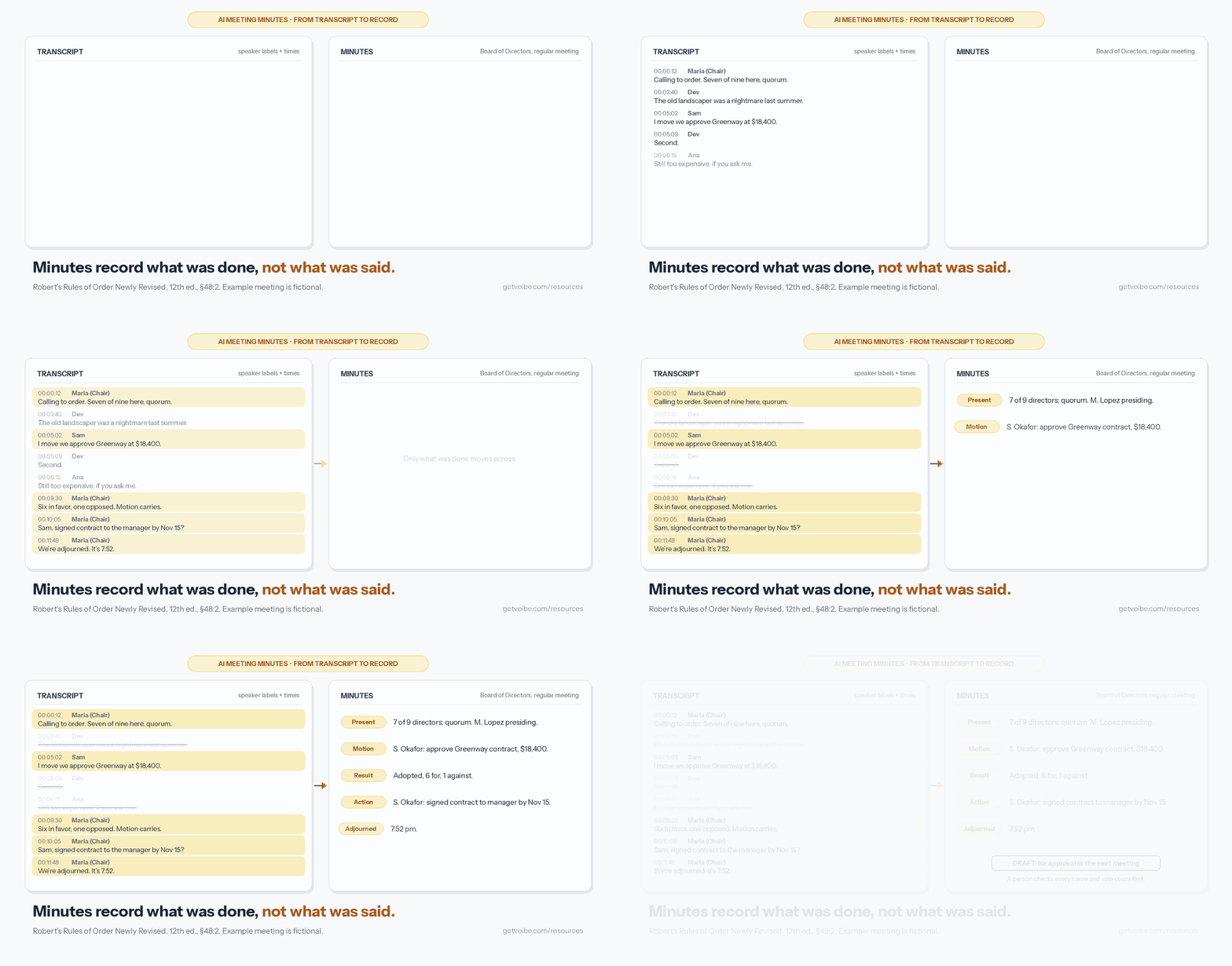
Many boards and committees run on Robert's Rules of Order Newly Revised. On minutes, it's blunt.
"The minutes should contain mainly a record of what was done at the meeting, not what was said by the members." (Robert's Rules of Order Newly Revised, 12th ed., §48:2, as quoted by Michigan State University Academic Governance)
By default, debate stays out. A body can vote to add more for one meeting (§48:3).
Why a verbatim transcript is a liability in minutes
- People remember it differently. Madison's City Attorney warns that going beyond the minimum is risky, because "persons may disagree about what was said" (City of Madison).
- It can be pulled into a dispute. Debevoise & Plimpton tells not-for-profits to consider two things:
- Litigation holds: whether AI transcripts fall under one.
- Discovery: "how that information is preserved and reviewed for discovery".
- It can expose privileged talk. The same guidance says AI meeting tools "may not be appropriate" for privileged matters such as ongoing litigation.
- It buries the decision. A long transcript hides the one vote that matters.
The safe default: treat the transcript as working material, nothing more.
After approval, delete it under a written retention rule, unless a litigation hold applies.
What Professional Meeting Minutes Must Contain: A Checklist
Professional meeting minutes contain the same core items, whatever the body.
This checklist follows Robert's Rules, as summarized by parliamentarian Jim Slaughter and Michigan State University.
Always include
- Meeting basics: kind of meeting (regular or special), the body's name, date, time and place.
- Officers: who presided and who took the minutes.
- Attendance: members present and absent, and whether there was a quorum.
- Previous minutes: whether they were approved, as read or as corrected.
- Main motions: each one's exact wording, who moved it, and what happened.
- Votes: counts when a count was taken; names and votes for a roll call.
- Procedure: points of order and appeals.
- Close: time of adjournment, and the secretary's signature.
Not on Robert's list: action items. Most boards and teams add them anyway: task, owner, due date.
Leave out
- Debate: opinions and who said what.
- The seconder: leave the name out, unless your rules ask for it.
- Guest remarks: their name and subject are enough.
- Withdrawn motions: leave them out, with a few exceptions.
- Transcript quotes: none at all.
When your own rules ask for more
Madison's City Attorney, for one, asks city committees for these (City of Madison):
- Mover and seconder: both names.
- Method of vote: how the vote was taken.
- Members present: to show a quorum.
Step 1: Decide What Kind of Minutes You're Writing
Goal: know your minutes' rules before the AI writes a word.
The body sets the rules. A team-sync draft is too thin for a city board.
| Meeting | What the minutes need | Rules to check |
|---|---|---|
| Nonprofit board | Motions, votes, approvals, conflicts declared | Your bylaws; IRS Form 990 |
| HOA or condo board | Motions, votes, budget and contract decisions | Governing documents; state HOA law |
| Committee | Recommendations and votes to report up | The committee's charter |
| Public body (council, school board) | Whatever the open-meetings law lists | Your state's open-meetings act |
| Company or team meeting | Decisions, owners, due dates | Usually none; keep it short |
Nonprofit boards: the IRS question
Form 990, Part VI, line 8 asks whether you documented board and committee meetings at the time.
- What counts: "approved minutes, email, or similar writings that explain the action taken, when it was taken, and who made the decision" (IRS Instructions for Form 990).
- When: by the next meeting or 60 days after, whichever is later.
- Not required: a word-for-word transcript.
Choosing a tool for a board? See AI note takers for nonprofits.
Public bodies: open-meetings laws
State open-meetings laws often dictate a public body's minutes. Take Michigan's Open Meetings Act (MCL 15.269):
- Contents: date, time, place, members present and absent, decisions made, and all roll call votes.
- Corrections: made at the next meeting, showing both the original entry and the correction.
- Deadlines: proposed minutes public within 8 business days; approved minutes within 5 business days of approval.
Watch out: other states differ. Check yours before you rely on an AI draft.
Step 2: Get Consent, Then Record the Meeting
Goal: everyone knows they're being recorded before the first word.
Recording laws differ by state. Some require every party's consent; our state-by-state AI notetaker consent table lists each one.
- All-party consent states include California, Florida, Maryland, Massachusetts, Montana, New Hampshire and Pennsylvania, per the Reporters Committee for Freedom of the Press recording guide.
- Calls across state lines: follow the strictest law that applies.
- Your own rules: some bylaws and open-meetings laws address recordings directly.
- Executive session: stop recording. Note that it was held, and its purpose if your rules require it.
A line you can read out
"Before we start: I'm recording this meeting so I can write accurate minutes. The recording is only for drafting them. Is everyone okay with that?"
Tip: Voibe Work reminds you to tell everyone you're taking notes when recording starts.
Watch out: a reminder isn't consent. Recording-consent rules and your organization's policy are on you.
Warning
This is a summary to help you plan, not legal advice. Check your state's recording law, your bylaws and any open-meetings law that covers your body before you record.
Step 3: Get a Transcript With Speaker Labels and Times
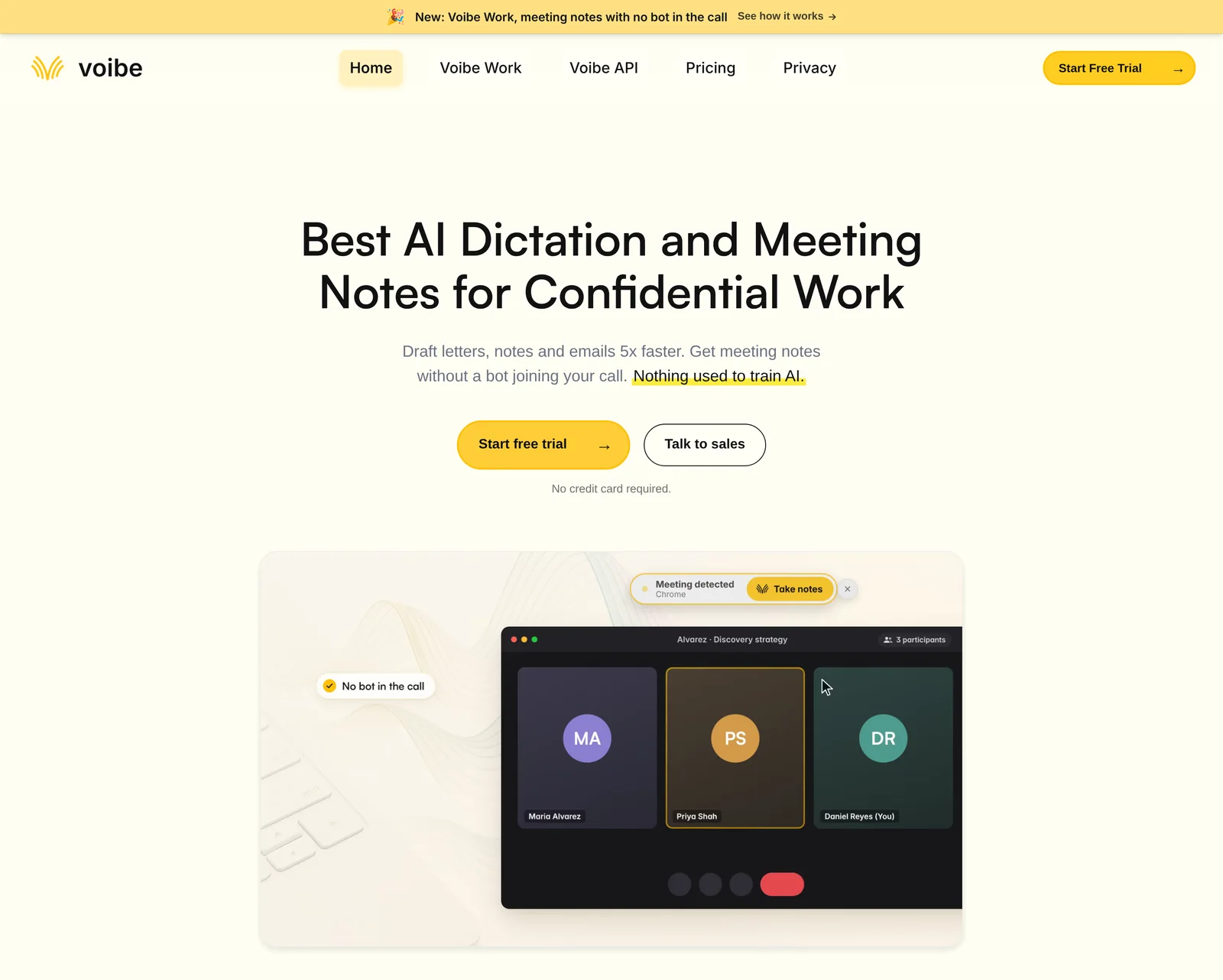
Goal: a transcript that shows who spoke, and when.
Garbage transcript, garbage draft. Speakers and times let you find and check each motion.
Option A: capture the meeting live with Voibe Work
Voibe Work is the meeting-notes plan in Voibe, the app we build.
- Any meeting app: it captures Zoom, Microsoft Teams, Google Meet, Webex, Slack huddles or any other from your Mac or Windows PC.
- No bot: nothing joins the call, and nobody has to admit a notetaker.
- In the room: it records an in-person board meeting through your Mac or PC's mic.
- Speaker labels: every line shows who spoke and when. Click a name to rename the speaker, and the summary updates.
- Names: they aren't pulled from a calendar, so rename speakers before you draft.
- Long meetings: one meeting can run up to 4 hours.
- Templates: one for each type of meeting, plus custom templates you create yourself.
- Export: one-click copy and PDF export of the transcript and summary.
- Price: $19 a month, $149 a year or $399 once, Mac and Windows.
- Trial: every new account gets 7 days of every Voibe Work feature. No credit card, no automatic charge.
The Voibe Work launch post follows a meeting from capture to saved notes.
Option B: upload a recording to the free audio-to-text tool
Already have a recording? Use our free audio to text converter. No signup.
- Upload the file. Each file can be up to 30 minutes and 100 MB.
- Under "What is the recording?", choose "Meeting notes and action items".
- Tick "Timestamps and speaker labels".
- Copy the transcript, or download it as TXT.
The tool's summary (overview, decisions, action items, open questions) isn't minutes. Use the transcript.
Over 30 minutes? Split it, or follow how to transcribe a Zoom recording with the Voibe API.
Option C: your meeting platform's transcript
Teams, Zoom and Google Meet transcribe their own meetings, usually on paid plans. Download it with speaker names.
Watch out: fix speaker names before you draft. Labels slip when people talk over each other.
Trusted by 4,000+ professionals, including people at Netflix, NVIDIA, Amazon, Twilio, and Intercom





See Voibe Work in action
Draft your next minutes from a meeting with no bot in it
Start free on Mac or Windows. 7 days of every Voibe Work feature, no credit card required.
Step 4: Convert the Transcript to Meeting Minutes With AI
Goal: a first draft in minutes format, with every guess flagged.
To convert a transcript to meeting minutes, give the AI three inputs and strict rules.
- The agenda: the items, in order.
- The attendance list: for names and quorum.
- The transcript: with speaker labels and times.
The rules matter most. Without them, you get a summary, quotes, and guesses in the gaps.
The AI meeting minutes prompt
Paste this into the AI tool your organization allows. Add the template below, then the transcript.
You are drafting formal meeting minutes from a transcript.
Follow Robert's Rules of Order: record what was done,
not what was said.

Meeting: [body], [regular/special] meeting, [date],
[start time], [place or platform]
Presiding: [name]    Secretary: [name]
Present: [names]     Absent: [names]
Quorum: [yes/no] ([number] of [number] members)
Agenda: [paste the agenda items in order]

Write draft minutes from the transcript below, using the
template I give you. Rules:
1. One entry per agenda item, in agenda order.
2. For every motion: the exact wording, who moved it, and
   what happened (adopted, failed, amended, postponed,
   referred). Leave out who seconded it.
3. Give a vote count only if the chair announced one.
   Never calculate or guess a count.
4. Action items: task, owner, due date. Write
   "no date stated" if none was said.
5. Leave out debate, opinions, jokes, side conversations
   and guest speakers' remarks.
6. No quotes from the transcript. No adjectives about
   how the discussion went.
7. If a name, a motion's wording or a number is unclear,
   write [CHECK: what is unclear] instead of guessing.
8. End with a list of every [CHECK] item and every place
   where the transcript and the agenda disagree.

Template:
[paste the template]

Transcript:
[paste the transcript with speaker labels and times]
Why each rule is there
- Exact wording: minutes record a motion as adopted, not a paraphrase.
- Announced counts only: after a voice vote there is no count. Only a count the chair announced goes in.
- [CHECK] flags: they turn guesses into a to-do list for Step 5.
- No seconder: Robert's Rules leaves it out. Add it back if your bylaws ask for it.
Which AI to use
- A Voibe Work custom template: save the template below as a custom template, with this prompt's rules. Summaries you run with it follow the minutes layout.
- Chat with your meetings: inside Voibe Work, it answers "what was agreed, who owns what" from one meeting. Use it to double-check motions and owners.
- Chat's privacy: it runs on the same zero-retention cloud. Nothing you ask is stored.
- ChatGPT or Claude: whatever you paste becomes part of that chat, under OpenAI's or Anthropic's terms. Check your organization's AI policy first.
- Meeting MCP: Voibe Work's optional Meeting MCP lets you ask ChatGPT and Claude about all your meetings. The same OpenAI and Anthropic terms apply to what they read.
Watch out: whichever AI writes it, the output is still a draft. Step 5 isn't optional.
Meeting Minutes Template You Can Copy
This meeting minutes template follows Robert's Rules order. Fill the brackets; delete what doesn't apply.
[NAME OF BODY]
Minutes of the [regular / special] meeting
Date: [date]   Time: [start time]   Place: [location or platform]

Presiding: [name, title]      Secretary: [name]
Present: [names]
Absent: [names]
Quorum: [present / not present] ([number] of [number] members)
Guests: [names and organizations only]

1. Call to order
   The meeting was called to order at [time] by [name].

2. Previous minutes
   The minutes of the [date] meeting were approved
   [as distributed / as corrected].

3. Reports
   The [report name] was received and placed on file.

4. Motions and decisions
   [Name] moved "[exact wording of the motion]."
   Amendment: [wording]; [adopted / failed].
   Result: [adopted / failed / postponed to (date) /
   referred to (committee)].
   Vote: [count, if one was announced]
   [Roll call: each member's name and vote]

5. Action items
   - [Task]. Owner: [name]. Due: [date].

6. Next meeting
   [date, time, place]

7. Adjournment
   The meeting adjourned at [time].

Submitted by: [secretary's name]       Date: [date]
Approved by the [body] on [date], [as distributed / as corrected].- Team meetings: keep sections 1, 4, 5 and 7. Skip quorum and approvals unless you need them.
- Roll call votes: list each member's name and vote. Public bodies often must.
- Corrections later: enter them in these minutes, not in the minutes of the meeting that approves them.
- Reuse it in Voibe Work: save this template as a custom template. Paste in the prompt's rules too, so every draft starts in this shape.
Worked Example: Turning One Transcript Into Minutes
A short, fictional HOA board meeting, the same one as in the animation above.
The transcript
[00:00:12] Maria Lopez (Chair): Calling the meeting to order.
           Seven of nine directors are here, so we have a quorum.
[00:03:40] Dev Patel: The old landscaper was a nightmare last summer.
[00:05:02] Sam Okafor: I move we approve the Greenway landscaping
           contract at $18,400.
[00:05:09] Dev Patel: Second.
[00:06:15] Ana Chen: Still too expensive, if you ask me.
[00:09:30] Maria Lopez (Chair): Six in favor, one opposed.
           The motion carries.
[00:10:05] Maria Lopez (Chair): Sam, can you get the signed contract
           to the manager by November 15?
[00:11:48] Maria Lopez (Chair): We're adjourned. It's 7:52.
The draft minutes
RIVERSIDE COMMUNITY ASSOCIATION, BOARD OF DIRECTORS
Minutes of the regular meeting, [date], [start time], [place]

Presiding: Maria Lopez. Present: 7 of 9 directors; quorum present.
[CHECK: names of directors present and absent]

Mr. Okafor moved "to approve the Greenway landscaping contract
at $18,400." Adopted, 6 for, 1 against.

Action: S. Okafor to send the signed contract to the manager
by November 15.

The meeting adjourned at 7:52 pm.
What changed, and why
- Dropped: Dev's complaint about the old landscaper and Ana's view on price. That's debate.
- Dropped: Dev's "Second." Robert's Rules doesn't record the seconder.
- Kept, the record: the quorum, the motion with its mover, and the result with the announced count (6 for, 1 against).
- Kept, the follow-up: the action with an owner and a November 15 date, and the 7:52 pm adjournment.
- Flagged: the transcript never names the absent directors. The draft says [CHECK] instead of guessing.
- Filled in by hand: the date, start time and place, from the agenda.
Step 5: Check the Draft Against the Agenda, by Hand
Goal: a draft where every name, motion and number matches the meeting.
Check every AI draft by hand before anyone else sees it.
Why you can't skip the check
AI gets names, motions and numbers wrong. Two sources say so:
- Microsoft, on its own Teams recaps: "The AI-generated content may occasionally be inaccurate, incomplete, or inappropriate" (Microsoft Support).
- Debevoise & Plimpton: AI transcripts and summaries "may contain inaccuracies and should not be considered final" (Debevoise & Plimpton).
The five-point check
- Agenda match: every agenda item appears, in order, with an outcome.
- Motion wording: compare each motion with the transcript at its timestamp. Use the wording as adopted, after amendments.
- Movers: confirm each name. Speaker labels slip when people talk over each other.
- Vote counts: keep only counts the chair announced. Delete any number nobody said.
- [CHECK] flags: resolve every one, then delete the flag.
Watch out: the checker should have been there. Debevoise suggests someone "such as the secretary or their delegate".
That person adopts the draft as accurate.
Step 6: Circulate the Draft, Approve It at the Next Meeting, Then File It
Goal: turn the draft into the official record.
Draft minutes become official only when members approve them, usually at the next regular meeting.
- Mark it "Draft for approval" and send it to members before the meeting.
- Ask for corrections. The chair asks, "Are there any corrections?" Members offer corrections, not objections.
- Approve. With no further corrections, the chair declares the minutes approved as distributed or as corrected.
- Record it. The next meeting's minutes note the approval. Corrections go into the minutes being corrected.
- Sign and file. The secretary signs. Store the approved minutes where your records policy says.
- Clean up. Delete the recording and transcript under your retention rule, unless a litigation hold applies.
Source: steps 2 to 4 follow parliamentarian C. Alan Jennings in Robert’s Rules For Dummies.
Tip: long gap until the next meeting? A committee or the executive board can approve them.
Common Mistakes When Writing Meeting Minutes With AI
Most bad AI minutes fail in the same few ways. Here's what to watch for.
- Pasting in the summary. An AI summary paraphrases motions and leaves out quorum and movers.
- Quoting people. Verbatim quotes turn minutes into a transcript that nobody agrees on later.
- Trusting an AI vote count. A voice vote has no count. Check that the chair actually announced the number in the draft.
- Inventing a motion. "We should probably approve this" is not a motion. An AI draft can read it as one.
- Treating "agreed" as decided. Only a vote or general consent decides. Nods in the transcript don't.
- Attaching the transcript. It becomes part of the record you have to keep.
- Recording executive session. Pause the recording. Minute only what your rules allow.
- Skipping consent. A quiet, bot-free recorder still means telling everyone.
Which Tools Write Meeting Minutes for You
No tool writes approved minutes. They write transcripts, summaries or drafts.
Here's what each does for minutes, checked on vendor pages on October 29, 2026.
| Tool | What it does for minutes | Bot in the call? | Price (annual billing) | Rating |
|---|---|---|---|---|
| Voibe Work (ours) | Speaker-labelled transcript; meeting-type and custom templates; chat; copy and PDF export | No; captures from your Mac or PC | $149/yr ($19/mo; $399 once) | Product Hunt 4.8/5 (6) |
| Microsoft Teams intelligent recap | AI notes and follow-up tasks from recorded or transcribed Teams meetings (Microsoft) | No; built into Teams | Teams Premium $10/user/mo ($120/yr), or a Microsoft 365 Copilot license (Microsoft) | App Store 4.8/5 (3,382,121) |
| Zoom (ZoomMate) | Meeting summaries for Zoom meetings on eligible paid plans | No; built into Zoom | Workplace Pro $14.16/user/mo ($169.92/yr) (Zoom) | App Store 4.7/5 (3,259,296) |
| Fellow | Drafts recaps with decisions and action items; minutes templates for board and committee meetings (Fellow) | Yes, with a botless option | Business $15/user/mo ($180/yr) (Fellow) | App Store 3.2/5 (24) |
| Boardable or BoardEffect | Board portals that draft minutes from a transcript; Boardable routes them for eSignature (Boardable, BoardEffect) | Boardable Video transcribes its own meetings; others need an uploaded transcript | Boardable Professional+ $35.99/user/mo ($431.88/yr); BoardEffect on request | Boardable App Store 3.9/5 (11) |
| Otter | Summaries with action items, advanced meeting templates, PDF and DOCX export on Pro (Otter) | Yes, or its desktop app without a bot | Pro $8.33/user/mo ($99.96/yr); 90 minutes per meeting | App Store 4.8/5 (87,018) |
| Fireflies | AI summaries, action items and customized summaries (Fireflies) | Yes, with a bot-free desktop mode | Pro $10/seat/mo ($120/yr) | App Store 4.8/5 (5,387) |
Which one I'd pick
- Board already on a portal: use the portal's minutes workflow. Boardable already routes minutes for eSignature.
- Any other meeting: capture it without a bot in Voibe Work. Draft with the prompt above, saved as a custom template.
Voibe Work's $149 a year, against each
- Otter Pro ($99.96): Voibe Work costs $49.04 more (49.1%).
- Fireflies Pro or Teams Premium ($120): Voibe Work costs $29 more (24.2%).
- Zoom Workplace Pro ($169.92): Voibe Work is $20.92 less (12.3%).
- Fellow Business ($180): Voibe Work is $31 less (17.2%).
- Boardable Professional+ ($431.88): Voibe Work is $282.88 less (65.5%), but Boardable is a whole board portal.
Where to go next
- The full ranking: best AI meeting note takers.
- Board minutes and nonprofit discounts: AI note takers for nonprofits.
- Verbatim transcripts with timestamps: best meeting transcription apps.
- Privileged meetings: AI note takers for lawyers.
Where Your Meeting Recording Goes: Privacy and AI Minutes
Minutes get shared. The recording and transcript usually don't. Ask where they go before you press record.
- Voibe Work: zero-retention processing, notes on your computer (Voibe cloud privacy).
- Audio: processed by open-source models on zero-retention cloud providers, then deleted as soon as processing completes.
- Notes: the transcript and summary are saved on your computer, not on Voibe's servers.
- Training: nothing is used to train AI.
- Connection: it needs an internet connection.
- Our free audio-to-text tool: audio is deleted once the transcript is saved. The transcript and summary are deleted after 24 hours. Nothing is used for training.
- Bot note takers: recordings, transcripts and summaries usually stay in the vendor's cloud until someone deletes them.
- Otter specifically: its privacy policy says it trains on de-identified audio and transcripts (Is Otter safe?).
- Bot-free isn't automatically private: Granola keeps notes in its US cloud.
- Granola's class action: a federal suit alleges it records participants without consent and trains AI on their calls by default (the Granola lawsuit).
- Board portals: in Boardable, uploaded transcripts are visible to every admin and meeting participant.
The trade-off with notes on your computer
Notes on the secretary's laptop? Then the laptop is the safeguard.
- Encryption: turn on full-disk encryption (FileVault or BitLocker).
- Login: use a unique login and an automatic lock.
- Retention: write a retention rule for transcripts.
- Personal laptops: if a volunteer secretary uses one, say where the minutes go.
Comparing capture methods? See the best no-bot meeting note takers.
Troubleshooting AI Meeting Minutes
- The draft has a motion nobody made. Delete it. Search the transcript for "move" and "motion" to find the real ones.
- Speakers are mislabeled. Rename them before drafting. In Voibe Work, renaming a speaker updates the summary.
- The recording is over 30 minutes. Split it for the free tool, or capture live with Voibe Work, up to 4 hours per meeting.
- The chair took a voice vote. Write "adopted" or "failed" with no count.
- A member wants their comment in. The body can vote to include it (§48:3). Otherwise it stays out.
- The AI wrote a narrative. Paste the template again and repeat rule 6: no quotes, no adjectives.
Frequently Asked Questions About AI Meeting Minutes
Basics
What are AI meeting minutes?
AI meeting minutes are a formal record of a meeting's actions, drafted by AI from a transcript.
They become official once someone who was there checks them and the members approve them.
Is an AI meeting summary the same as meeting minutes?
No. An AI summary paraphrases topics and next steps.
Minutes record each motion's exact wording, mover, result and vote count. Then the members approve them.
What should professional meeting minutes include?
Attendance, quorum, previous minutes, each motion's exact wording, mover and result, vote counts, action items and adjournment.
Add the meeting's kind, body, date, time and place, and who presided. Leave out debate and opinions.
Writing minutes with AI
How do I write meeting minutes with AI?
Record with consent and get a speaker-labelled transcript. Give an AI the agenda, attendance list, transcript and strict rules.
Check names, motions and vote counts by hand. Members approve the draft at the next meeting.
How do I convert a transcript to meeting minutes?
Give an AI strict rules: one entry per agenda item, exact motion wording and mover, announced vote counts only.
Ban quotes and opinions. Unclear items get a [CHECK] flag instead of a guess.
Can ChatGPT write meeting minutes?
Yes, as a draft, given the agenda and strict rules. Anything you paste becomes part of that chat, under OpenAI's terms.
Check your organization's AI policy first. A person still verifies every motion and vote count.
Rules and approval
Should meeting minutes include what people said?
Usually not. Robert's Rules says minutes should contain "mainly a record of what was done at the meeting, not what was said by the members."
A body can vote to include more for one meeting.
Who approves meeting minutes?
The members, usually at their next regular meeting. The chair asks for corrections, then declares them approved.
Long gap before the next meeting? A committee or executive board can approve them.
Should I keep the recording after the minutes are approved?
Set a written retention policy. Many organizations delete recordings and transcripts after approval: a verbatim record can be pulled into a dispute.
Pause deletion under a litigation hold. Check any public-records law too.
Tools and privacy
What is the best meeting minutes application?
For boards, a portal such as Boardable drafts minutes and routes them for approval.
For any meeting, bot-free: Voibe Work on Mac and Windows. Its speaker-labelled transcript is saved on your computer.
Does Voibe Work write meeting minutes?
It writes the raw material: a speaker-labelled transcript and a templated summary, with one-click copy and PDF export.
Save the template above as a custom template for a minutes-format draft. Then check it by hand.
Is it legal to record a meeting to write the minutes?
It depends where everyone is. California, Florida and Pennsylvania are among the states requiring every party's consent.
Tell everyone first and follow the strictest law that applies. Voibe Work reminds you; consent is your responsibility.
Let AI Draft the Minutes. Let the Members Approve Them.
AI meeting minutes work when each part does its job. The transcript captures. The AI drafts. The secretary checks. The members approve.
- Any meeting, no bot: Voibe Work, $149 a year or $399 once, on Mac and Windows. Save the minutes template as a custom template.
- Consent first: tell everyone you're taking notes. Voibe reminds you.
- Already recorded: the free audio to text converter, up to 30 minutes per file.
- Board paperwork in one place: a board portal such as Boardable, for agendas, votes and signatures.
Leaving a paid note taker? Voibe’s switch offer has you covered.
- What you get: Voibe Work free for the time left on your old plan, plus a bonus month, up to 12 months in total.
- How to claim it: cancel the old plan, then email the cancellation confirmation to hi@getvoibe.com.
Try Voibe Work free for 7 days → Every feature, no credit card, no automatic charge.