
Free Audio to Text Converter and AI Summarizer
Transcribe and summarize meeting recordings, client and sales calls, depositions, interviews and voice memos. Speaker labels and timestamps if you want them. Nobody keeps your audio, and nobody trains on it.
No file handy?
No signup. Your file is transcribed by open-source Whisper on Voibe's zero-retention cloud. The audio is deleted once the transcript is saved and is never used to train any model.
What this converter does
This is a free audio to text converter: upload an audio or video file of up to 30 minutes and get a full transcript, with no account. It accepts MP3, M4A, WAV, MP4, MOV, FLAC, OGG, WEBM and iPhone voice memos. Turn on timestamps and speaker labels for interviews, meetings and subtitles, then copy the text or download it as a TXT file or SRT subtitles.
Every transcript also comes with an AI summary in the format the recording needs. Tell the page what you uploaded and the summary matches it: decisions and action items for a meeting, follow-ups for a client call, objections and next steps for a sales call, topics and witness statements for a deposition, quotes for an interview, or study notes for a lecture.
Transcription runs on open-source Whisper large-v3-turbo on zero-retention providers. Your audio is deleted once the transcript is saved, the transcript is deleted 24 hours later, and nothing is used to train a model. Most free converters ask you to sign up or keep your files in their cloud. This one does neither.
Key Takeaways
| Question | Answer |
|---|---|
| Cost | Free, no signup, no card |
| File limit | Up to 30 minutes and 100 MB per file |
| Formats | MP3, M4A, WAV, MP4, MOV, FLAC, OGG, WEBM, voice memos |
| Timestamps and speaker labels | Optional, one switch; needed for SRT |
| Summary styles | General, meeting notes, client call notes, sales call summary, deposition summary, interview highlights, lecture notes |
| Exports | Copy, TXT, SRT subtitles (with timestamps on), plus an AI summary |
| Speech model | Whisper large-v3-turbo (open source, multilingual) |
| What is kept | Audio: deleted once the transcript is saved. Transcript: deleted after 24 hours. Training: never. |
How to convert audio to text for free
- Drop your file into the box above. Any audio or video file up to 30 minutes works, including an iPhone voice memo exported from the Voice Memos app.
- Choose what the recording is. Meeting, client call, sales call, deposition, interview or lecture: the AI summary comes back in that format. The transcript is the same either way.
- Tick "Timestamps and speaker labels" if more than one person talks or you want subtitles. Leave it off for voice memos and lectures; the transcript comes back sooner.
- Click "Transcribe for free" and keep the tab open. The file uploads over an encrypted connection and transcription starts the moment it lands.
- Copy or download the result. Choose TXT for notes and documents, or SRT to add captions to a video in YouTube, Premiere, Final Cut or CapCut.
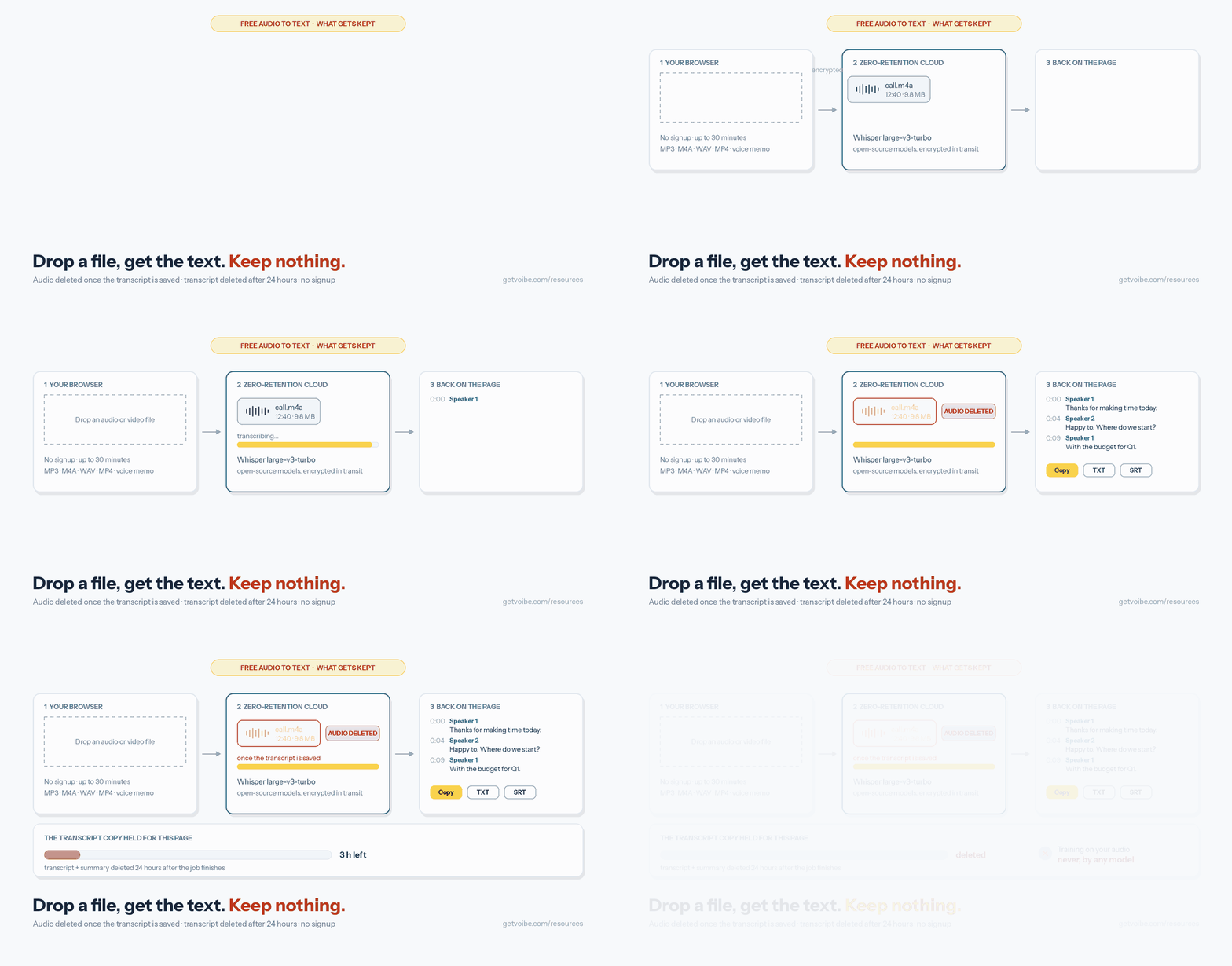
What happens to your file
The file goes from your browser straight to storage over an encrypted connection, without passing through the page you are on. Whisper large-v3-turbo transcribes it on a zero-retention provider, pyannote adds speaker labels when you ask for them, and gpt-oss-120b writes the summary from the text only. The audio is deleted once the transcript is saved. The transcript and summary are kept for 24 hours so this page can fetch them, then deleted. Nothing is used to train any model.
Supported formats and limits
| What you have | Works? | Notes |
|---|---|---|
| MP3, WAV, M4A, FLAC, OGG | Yes | Read directly |
| MP4, WEBM video | Yes | The audio track is transcribed; SRT export for captions |
| MOV, AAC, AIFF, other formats | Usually | Converted first when the audio can be read |
| iPhone voice memo (.m4a) | Yes | Share from Voice Memos → Save to Files, then upload |
| Zoom or Teams recording | Yes | Upload the audio-only M4A for a smaller file |
| Files over 30 minutes or 100 MB | No | Split the recording into shorter files |
| YouTube links | No | Upload a file you own instead |
Free audio to text converters compared
Most transcription companies give away some free minutes. The difference is what you trade for them: an account, a monthly cap, or your recordings sitting in their cloud. Free tiers below are from each vendor's own pages, checked October 2026.
| Tool | Free allowance | Worth knowing |
|---|---|---|
| Voibe (this page) | Up to 30 min per file, no signup | Audio deleted once transcribed, transcript after 24 hours, no training; speaker labels and SRT included |
| TurboScribe | 3 files a day, up to 30 min each | Unlimited plan is $10/month billed annually ($120/year) |
| Riverside free transcriber | "Unlimited transcriptions for free. No sign up required" | Free tier assigns all text to one speaker; TXT or SRT |
| Otter free plan | 3 file imports per account | Account required; privacy policy says it trains on de-identified audio and transcriptions |
| Rev free plan | 45 AI minutes | Account required; Essentials is $29.99/month |
For a deeper look at paid options, see our TurboScribe alternatives guide and the best transcription apps for Mac. For live meetings, compare the best meeting transcription apps.
Transcribe and summarize recordings by use case
The transcript is the same whatever you upload. What changes is the summary: pick the matching option under "What is the recording?" and it pulls out what that kind of recording is for. Here is what to choose for each.
| Recording | Choose | Speaker labels | The summary pulls out |
|---|---|---|---|
| Meeting recording | Meeting notes and action items | On | Overview, decisions, action items with owners and dates, open questions |
| Client call | Client call notes | On | Client goals and concerns, what was agreed, follow-ups for each side, figures and deadlines |
| Sales call | Sales call summary | On | Needs and pain points, objections and answers, budget, competitors, next steps |
| Deposition | Deposition summary | On | Topics in order, key statements and admissions, objections, exhibits |
| Interview or research call | Interview highlights | On | Main themes, word-for-word quotes, facts, figures and names |
| Lecture or class | Lecture or class notes | Off | Key concepts, definitions, examples, assignments and dates |
| Voice memo or podcast | General summary | Off (on for podcasts) | The main points in a few lines |
Meeting recordings: transcript, minutes and action items
Upload a Zoom, Microsoft Teams or Google Meet recording and choose "Meeting notes and action items". You get the full transcript with who said what, plus meeting minutes: a one-line overview, the decisions made, action items with owners and due dates when they were said, and open questions. Our Zoom recording guide shows where Zoom saves the audio file. If you take meeting notes every week, Voibe Work captures the call from your computer with no bot joining and no file to upload.
Client calls: call notes and follow-ups
For advisors, consultants, agencies and lawyers, choose "Client call notes". The summary lists the client's goals and concerns, what was agreed, the follow-ups each side owns and any figures or deadlines mentioned, ready to paste into your CRM or a follow-up email. Get everyone's agreement before you record: you are responsible for recording-consent rules where you and your client are.
Sales calls: objections, budget and next steps
Upload a discovery or demo call and choose "Sales call summary". It pulls out the prospect's needs and pain points, every objection and how it was answered, any budget or pricing discussed, competitors named, and the agreed next steps with dates. With speaker labels on, the transcript separates the rep from the prospect, which makes it easy to review a call or coach on it.
Depositions: transcript and deposition summary
Upload the deposition audio or video, turn on speaker labels and choose "Deposition summary". You get a timestamped transcript plus a neutral summary: the topics covered in the order they came up, key statements and admissions by the witness, objections noted and exhibits mentioned, with no legal conclusions drawn. This is an AI transcript, not a certified court reporter's transcript, so use it to review testimony and prepare, and check quotes against the recording. More tools for legal work are in our legal transcription guide.
Interviews and research calls: quotes you can check
Choose "Interview highlights" for the main themes, word-for-word quotes and the facts, figures and names mentioned. Every transcript line carries a timestamp, so you can find a quote and check it against the recording before you publish or cite it.
Lectures, podcasts and voice memos
Choose "Lecture or class notes" for study notes with key concepts, definitions, examples and any assignments or dates. For a voice memo, leave it on "General summary": a rambling five-minute memo comes back as the few points you meant to make. For a podcast, turn on timestamps and download the SRT to publish captions.
When to use something other than this converter
This page is built for one file at a time. If you transcribe meetings every week, use Voibe Work, which records Zoom, Teams and Google Meet calls from your Mac or Windows PC with no bot in the call and saves notes on your computer. If the recording must never leave your computer, use an on-device tool: Voibe dictation runs Whisper locally on Apple Silicon Macs, and MacWhisper transcribes files locally. If you want to write by speaking rather than transcribe a file, use Voibe dictation in any app.
Frequently Asked Questions
Use Cases
How do I summarize a meeting recording?
Can I transcribe and summarize a sales call?
Can I transcribe a client call?
How do I make a deposition summary from a recording?
Do I need consent to record and transcribe a call?
Using the Converter
Is this audio to text converter really free?
Which file formats can I upload?
Can it tell who is speaking?
How long does a transcription take?
What languages does it support?
Privacy and Data
What happens to my audio after I upload it?
Does OpenAI, Google or another AI lab see my file?
Should I upload confidential recordings?
Exports and Next Steps
Can I get subtitles (SRT) from a video?
Can Voibe transcribe my meetings without a recording file?
Sources and References
- Voibe transcription documentation (models, formats, retention: audio deleted once the transcript is saved; transcripts deleted 24 hours after the job finishes)
- Voibe cloud AI privacy (zero-retention providers, open-source models)
- Riverside free audio transcriber (free tier terms, retrieved 2026-10-28)
- Otter privacy policy (training on de-identified audio recordings and transcriptions)
- Rev pricing and TurboScribe pricing
Related Tools and Resources
Dictation vs Notetaker vs Transcription
Which kind of voice tool fits the job in front of you.
TurboScribe Alternatives
Paid file-transcription tools compared on price and privacy.
Best Transcription Apps for Mac
Desktop apps for transcribing files, compared by job.
Free Tools Hub
Every free voice and typing tool by Voibe.
Got a recording to transcribe?
Drop it into the converter at the top of this page and get the text back, with speaker labels and timestamps if you want them.
- Free, no signup
- MP3, M4A, WAV, MP4 and more
- Audio deleted once transcribed
- Never used for training