

Voibe vs Voicy: The Short Answer
Voicy and Voibe both turn your voice into text in any app, and they cost within a couple of dollars a month of each other. So the deciding question isn't price. It's whether you need dictation on every device you own, or more than dictation on the computer you work at.
Short answer: choose Voicy if you dictate across Linux, an iPhone, an Android phone or a browser extension, or if you want the lowest subscription price. Choose Voibe if you work on a Mac or Windows PC and want a free plan, the cheaper lifetime licence, on-device dictation on an Apple Silicon Mac, or one app for dictation and meeting notes with no bot in the call.
That last point is the bundle. Voicy has no meeting notes, so a Voicy user who records calls pays for a second app: Voicy Pro plus Otter Pro is $181.96 a year. Voibe Work does both for $149.
I checked both pricing pages, both privacy pages and Voicy's changelog on October 30, 2026. Voibe is the app we build, so where Voicy is better, this page says so first.
Key Takeaways
| Question | Voibe | Voicy | Who wins |
|---|---|---|---|
| Cheapest subscription | $9.90/mo or $99/yr | $8.49/mo or $82/yr | Voicy ($17 a year less) |
| Cheapest lifetime | $199 once | $260 once | Voibe ($61 less) |
| Free forever plan | Voibe Free: one device, 2,000 cloud words a week | No; a 30-minute trial | Voibe |
| Platforms | Mac, Windows | Mac, Windows, Linux, iPhone, Android, Chrome | Voicy |
| Meeting notes | Voibe Work bundles them with dictation: $149/yr, no bot | None (Voicy + Otter Pro = $181.96/yr) | Voibe |
| Offline dictation | On-device on Apple Silicon Macs | Offline mode on Mac, Windows, Linux | Voicy for breadth, Voibe for a named model |
| Upload an audio file | Speech-to-text API, 15 free minutes | Built into the app | Voicy |
Voibe
Private AI dictation for Mac and Windows (one plan covers both). On Apple Silicon Macs it can run open-source Whisper on-device with no internet; everywhere else it uses a zero-retention cloud where audio is deleted the moment transcription completes and is never stored, sold or used to train AI. Live Dictation (Mac), Developer Mode for Cursor, VS Code and Windsurf, Dictionary, Memory, Smart Formatting and 90+ languages. The Voibe Work plan adds meeting notes with no bot in the call on Mac and Windows. Files are transcribed through the Voibe speech-to-text API and MCP server.
Voibe Free: $0 forever (one device, 2,000 cloud words a week with AI clean-up). Voibe Dictation: $9.90/mo, $99/yr, or $199 lifetime (Mac + Windows). Voibe Work (dictation + bot-free meeting notes): $19/mo, $149/yr, or $399 lifetime
Pros
- + One app for dictation and meeting notes: Voibe Work ($149/yr) costs $32.96 a year less than Voicy Pro plus Otter Pro
- + Voibe Free at $0 forever: one device, 2,000 cloud words a week with AI clean-up
- + $199 lifetime is $61 less than Voicy's $260 and the cheapest three-year path
- + On-device Whisper on Apple Silicon Macs; zero-retention cloud on Windows and Intel Macs
- + Voibe Work adds meeting notes with no bot in the call on Mac and Windows
- + Live Dictation (Mac) and Developer Mode for Cursor, VS Code and Windsurf
- + 7-day trial of every Voibe Work feature with no card, and a 30-day money-back guarantee
Cons
- - No Linux, iPhone, Android or browser extension
- - Subscriptions cost $1.41 a month or $17 a year more than Voicy
- - No offline mode on Windows or Intel Macs
- - No file upload in the desktop app; files go through the API
- - No AI rewriting; Smart Formatting keeps your words
Voicy
Cross-platform dictation app from London (founded 2024 by Kourosh Ghaffari) for Mac, Windows, Linux, iPhone, Android and Chrome. Cloud transcription through the Groq API with zero data retention is the default; since version 3.0.0 (October 12, 2026) the Mac, Windows and Linux apps also have an offline mode in 25 languages. Adds AI rewriting, a dictionary, voice shortcuts and in-app file transcription.
Free trial: 30 minutes of recording, no card. Pro: $8.49/mo, $82/yr, or $260 lifetime. Team: $6.79/user/mo, 3-user minimum
Pros
- + Runs on Mac, Windows, Linux, iPhone, Android and Chrome
- + Cheapest subscription: $8.49 a month or $82 a year
- + Offline mode on Mac, Windows and Linux desktops
- + File transcription inside the app
- + Team plan at $6.79 per user a month; 20% student and disability discounts
Cons
- - No free plan; a one-time 30-minute trial
- - $260 lifetime is $61 more than Voibe's
- - No meeting notes
- - Offline model is not named; mobile apps are cloud-only
- - Text appears after you finish speaking
Quick Comparison: Voibe vs Voicy on 14 Dimensions
Voibe and Voicy split 14 dimensions almost evenly: Voicy wins 6, Voibe wins 6 and 2 are ties. The table below gives each verdict with the figure behind it.
| Dimension | Voibe | Voicy | Winner |
|---|---|---|---|
| Monthly price | $9.90 (Voibe Dictation) | $8.49 (Pro) | Voicy |
| Annual price | $99 | $82 | Voicy |
| Lifetime price | $199 | $260 | Voibe |
| Free access | Voibe Free forever (one device, 2,000 cloud words a week with AI clean-up) plus a 7-day trial of every Voibe Work feature | 30 minutes of recording, once, no card | Voibe |
| Desktop platforms | Mac, Windows | Mac, Windows, Linux | Voicy |
| Mobile and browser | None | iPhone keyboard, Android, Chrome extension | Voicy |
| Offline dictation | Apple Silicon Macs only; open-source Whisper on the Neural Engine | Mac, Windows and Linux desktop apps; 25 languages; model not named | Voicy (more platforms) |
| Cloud privacy | Zero-retention cloud: open-source models, audio deleted when transcription completes | Groq API with zero data retention; Voicy says it stores no recordings | Tie |
| Meeting notes | Voibe Work: no bot, Mac and Windows, in-person too | None | Voibe |
| Audio file transcription | Via the Voibe API and MCP server | In the app (since May 2026) | Voicy |
| See words as you speak | Live Dictation (Mac) | Text appears after you stop | Voibe |
| Coding | Developer Mode for Cursor, VS Code, Windsurf | General coding vocabulary | Voibe |
| Languages | 90+ | 50+ online, 25 offline | Voibe |
| Teams | $9.90 per seat, up to 10 per checkout; Enterprise above 10 | $6.79 per user a month, 3-user minimum | Tie (Voicy cheaper; Voibe adds Enterprise) |
Voicy is the broader app. Voibe is the deeper one on the two desktops it covers. If you have seen Voibe quoted at lower prices on other comparison pages, those figures were retired on October 12, 2026; the prices on this page come from getvoibe.com/pricing, checked October 30, 2026.
What Is Voicy? Dictation on Every Device You Own
Voicy is a cross-platform dictation app from London that runs on Mac, Windows, Linux, iPhone, Android and as a Chrome extension. Developer Kourosh Ghaffari founded it in 2024, and Voicy's about page describes a small, bootstrapped team with no outside investment (the sources are cited in our Voicy review).
Voicy's strength is reach. One Pro subscription covers "unlimited personal devices", so the same account works on your work PC, your Linux laptop and your phone. It adds AI rewriting, a custom dictionary, voice shortcuts that expand a spoken phrase into an address or signature, automatic punctuation, language detection mid-sentence and, since version 2.2.0 in May 2026, file transcription for recordings you already have.
The newest change matters for this comparison. Voicy 3.0.0 (October 12, 2026) added an offline mode to the Mac, Windows and Linux apps: after you download the speech model, dictation works without internet in 25 languages. Cloud transcription stays the default, the mobile apps and extension stay cloud-only, and Voicy doesn't name the offline model. Our full Voicy review cites the changelog and covers the rest of the product.
Voicy pricing: $8.49 a month, $82 a year or $260 lifetime for Pro; a team plan at $6.79 per user a month with a 3-user minimum; 20% off for students and for people with a disability; a 30-minute free trial with no card; and a 7-day money-back guarantee (Voicy's pricing page, checked October 30, 2026; every plan is broken down in Voicy's pricing, explained).
What Is Voibe? Private Dictation Plus Meeting Notes on Mac and Windows
Voibe is a private dictation app for Mac and Windows with an optional meeting-notes plan, Voibe Work, that records calls with no bot in the meeting. One plan covers both platforms at the same price.
On an Apple Silicon Mac (M1 or later), Voibe can run open-source Whisper on the Neural Engine: dictation works with no internet and nothing leaves the Mac. On Windows and Intel Macs, and on any Mac when you pick it, Voibe uses its zero-retention cloud: Whisper Large Turbo on Groq or Cloudflare transcribes the audio, the audio is deleted the moment transcription completes, and GPT-OSS 120B on Cerebras formats the text without ever seeing audio. You never create an AI-vendor account or paste an API key.
The dictation features are aimed at people who write for a living: Live Dictation on Mac streams words on screen as you speak, Developer Mode resolves file names and variable names in Cursor, VS Code and Windsurf, the Dictionary injects names and jargon into transcription itself, Memory expands a spoken trigger into preset text, and Smart Formatting cleans up punctuation and filler words without rewriting what you said. Voibe supports 90+ languages. The Voibe review goes deeper.
Voibe pricing: Voibe Free is $0 forever on one device with 2,000 cloud words a week and AI clean-up. Voibe Dictation is $9.90 a month, $99 a year or $199 lifetime. Voibe Work, which adds meeting notes, is $19 a month, $149 a year or $399 lifetime. Every new account starts with a 7-day trial of every Voibe Work feature with no credit card, and paid plans carry a 30-day money-back guarantee (getvoibe.com/pricing, October 30, 2026).
Where Your Audio Goes: Voicy's Cloud and Offline Mode vs Voibe's On-Device and Zero-Retention Cloud
Both companies say they don't store your recordings, and both apps now offer a way to dictate with no internet. The difference is where each offline mode runs and how much each company says about its models.
Voicy's data path
By default, Voicy sends audio to its servers (EU servers, or US servers for US users) and on to the Groq API for Whisper transcription. Voicy's privacy policy says it has turned on Groq's Zero Data Retention setting and that "We do not store any recording or transcription data." The no-training promise ("We do not use your recordings to train an AI model") sits on Voicy's homepage rather than in the policy. In offline mode on Mac, Windows or Linux, audio is "not sent to Voicy's servers or to Groq." Our Is Voicy safe? page quotes and cites the policy line by line.
Voibe's data path
Voibe's on-device mode runs only on Apple Silicon Macs and needs no internet. Everywhere else, Voibe uses a zero-retention cloud described on getvoibe.com/cloud-ai-privacy: audio is encrypted in transit, transcribed by an open-source model on Groq or Cloudflare, deleted when transcription completes, and never stored, sold or used to train any model. Only open-source or open-weight models are used, and no OpenAI, Google, Anthropic or Microsoft model sits in the audio path.
What that means for you
- Offline on Windows or Linux: only Voicy offers it. Voibe on Windows is cloud-only.
- Offline on an Apple Silicon Mac: both offer it. Voibe names the model (open-source Whisper on the Neural Engine); Voicy does not name its offline model.
- Cloud mode: both route Whisper transcription through a zero-retention provider, and both can use Groq. Treat this one as a tie.
- Compliance: neither app publishes a SOC 2 report. For Voibe, a BAA is available on request; Voicy's site doesn't mention HIPAA or a BAA.
Feature Comparison: Who Wins Each Category
Feature by feature, Voicy wins on where you can dictate and Voibe wins on what you can do at a desk. Each category below names a winner.
Linux, iPhone, Android and the browser: Voicy wins
Voicy ships a Linux app for Ubuntu, Debian and Fedora plus an AppImage, an iPhone keyboard app, an Android app and a Chrome extension. Voibe has none of these; it runs on Mac and Windows only, with no phone app (more in does Voibe work on iPhone and Android?). If you dictate on Linux or on your phone, Voicy is the answer and Voibe is not.
Meeting notes: Voibe wins
Voicy has no meeting-notes feature. Voibe Work captures Zoom, Microsoft Teams, Google Meet, Webex, Slack huddles or any other meeting app from your Mac or Windows PC with no bot joining the call, and records in-person meetings through your Mac or PC's mic. Audio is processed by open-source models on zero-retention cloud providers and deleted when processing completes; the transcript and summary are saved on your computer, not on Voibe's servers. Meeting notes need internet. You get speaker labels you can rename, summary templates (or your own), chat with your meetings, PDF export and meetings up to 4 hours. At the start of each recording Voibe reminds you to tell everyone you're taking notes; you're responsible for the recording-consent rules where you are. See how Voibe Work takes meeting notes with no bot.
Transcribing an audio file: Voicy wins
Voicy transcribes uploaded recordings inside the app. Voibe's desktop app does not import files; Voibe's file path is the Voibe speech-to-text API and MCP server ($10 for 2,000 minutes, per-second billing, 15 free minutes), which suits developers and AI agents more than a one-off voice memo.
Seeing words as you speak: Voibe wins
Voibe's Live Dictation on Mac streams words on screen while you talk, so you can fix a name before it lands. One user review on Voicy's own reviews page notes that "no text appears until you finish dictating and turn off the microphone." More user feedback is collected in our Voicy review.
Cleanup versus rewriting: depends on you
Voicy offers AI rewriting and, since version 3.0.3 (October 25, 2026), a formatting step that drops self-corrections ("Tuesday, eh, I mean Monday" becomes "Monday"). Voibe's Smart Formatting fixes punctuation, capitalization, paragraphs and filler words but does not paraphrase. Pick Voicy if you want your speech reshaped, Voibe if you want your own words kept.
Vocabulary and shortcuts: tie
Both apps have a custom dictionary and spoken text shortcuts (Voicy's voice shortcuts, Voibe's Memory). Voibe's Dictionary influences transcription itself and accepts a Dragon Vocabulary Center export; on Voibe Free, new Memory entries need a paid plan.
Coding: Voibe wins
Voibe's Developer Mode scans your workspace locally and resolves file names, folder paths and variable names in Cursor, VS Code and Windsurf. Voicy handles coding vocabulary in general but has no workspace-aware mode.
Languages: Voibe wins on count
Voibe supports 90+ languages. Voicy supports 50+ languages online and 25 in offline mode, with automatic detection when you switch language mid-sentence.
Key Takeaway
Voicy wins on Linux, mobile, the browser and in-app file transcription. Voibe wins on meeting notes, Live Dictation, Developer Mode and language count. Vocabulary tools are a tie, and rewriting versus faithful cleanup depends on what you want.
Voibe vs Voicy Pricing: Monthly, Annual, Lifetime and Teams
Voicy is cheaper on every subscription and Voibe is cheaper on lifetime. Voicy Pro costs $1.41 a month less than Voibe Dictation ($8.49 vs $9.90, 14.2% less) and $17 a year less on annual billing ($82 vs $99, 17.2% less). Voibe Dictation's $199 lifetime licence costs $61 less than Voicy's $260 lifetime (23.5% less).
| Plan | Voibe | Voicy | Difference |
|---|---|---|---|
| Free | Voibe Free, $0 forever: one device, 2,000 cloud words a week with AI clean-up | None; 30-minute trial | Voibe has a free plan |
| Monthly | $9.90 | $8.49 | Voicy $1.41 less (14.2%) |
| Annual | $99 | $82 | Voicy $17 less (17.2%) |
| Lifetime | $199 | $260 | Voibe $61 less (23.5%) |
| Teams | $9.90 per seat a month, up to 10 seats; Enterprise above 10 (team admin, central billing, BAA on request) | $6.79 per user a month, 3-user minimum | Voicy $3.11 per seat a month less (31.4%) |
| With meeting notes | Voibe Work: $19/mo, $149/yr, $399 lifetime | Not offered | Voibe Work costs $67 a year more than Voicy annual and adds meetings |
| Trial and refunds | 7-day trial of every Voibe Work feature, no card; 30-day money-back | 30 minutes free, no card; 7-day money-back | Voibe (longer trial and refund window) |
The bundle: dictation plus meeting notes
If you record meetings as well as dictate, the fair comparison is Voibe Work against Voicy plus a separate notetaker, because Voicy has no meeting notes.
| Setup | Per year | Lifetime, over 3 years | Voibe Work saves |
|---|---|---|---|
| Voibe Work (dictation + bot-free meeting notes) | $149 | $399 once | — |
| Voicy Pro + Otter Pro (meeting bot) | $181.96 | $559.88 ($260 Voicy lifetime + 3 years of Otter) | $32.96 a year (18.1%); $160.88 over 3 years (28.7%) |
| Voicy Pro + Granola Business (no bot) | $250 | $764 ($260 + 3 years of Granola) | $101 a year (40.4%); $365 over 3 years (47.8%) |
- Annual: Voicy Pro $82 + Otter Pro $99.96 = $181.96, so Voibe Work at $149 is $32.96 (18.1%) less. With Granola Business ($168), the pair costs $250 and Voibe Work is $101 (40.4%) less.
- Lifetime: Voibe Work's $399 licence against Voicy's $260 lifetime plus three years of Otter Pro ($299.88) is $160.88 (28.7%) less over three years.
- Adding meetings to Voibe: Voibe Work costs $50 a year more than Voibe Dictation ($149 vs $99), and $67 more than Voicy alone.
- The honest limit: if you never record meetings, the bundle buys you nothing and Voicy's $82 annual plan stays the cheaper subscription.
Notetaker prices come from our AI meeting note taker pricing comparison (checked October 30, 2026).
Voicy also offers discounts Voibe doesn't: it takes 20% off for students and for people with a disability. Full Voicy plan details live in our Voicy pricing breakdown.
Three-Year Cost: When Voibe's Lifetime Beats Voicy's Subscription
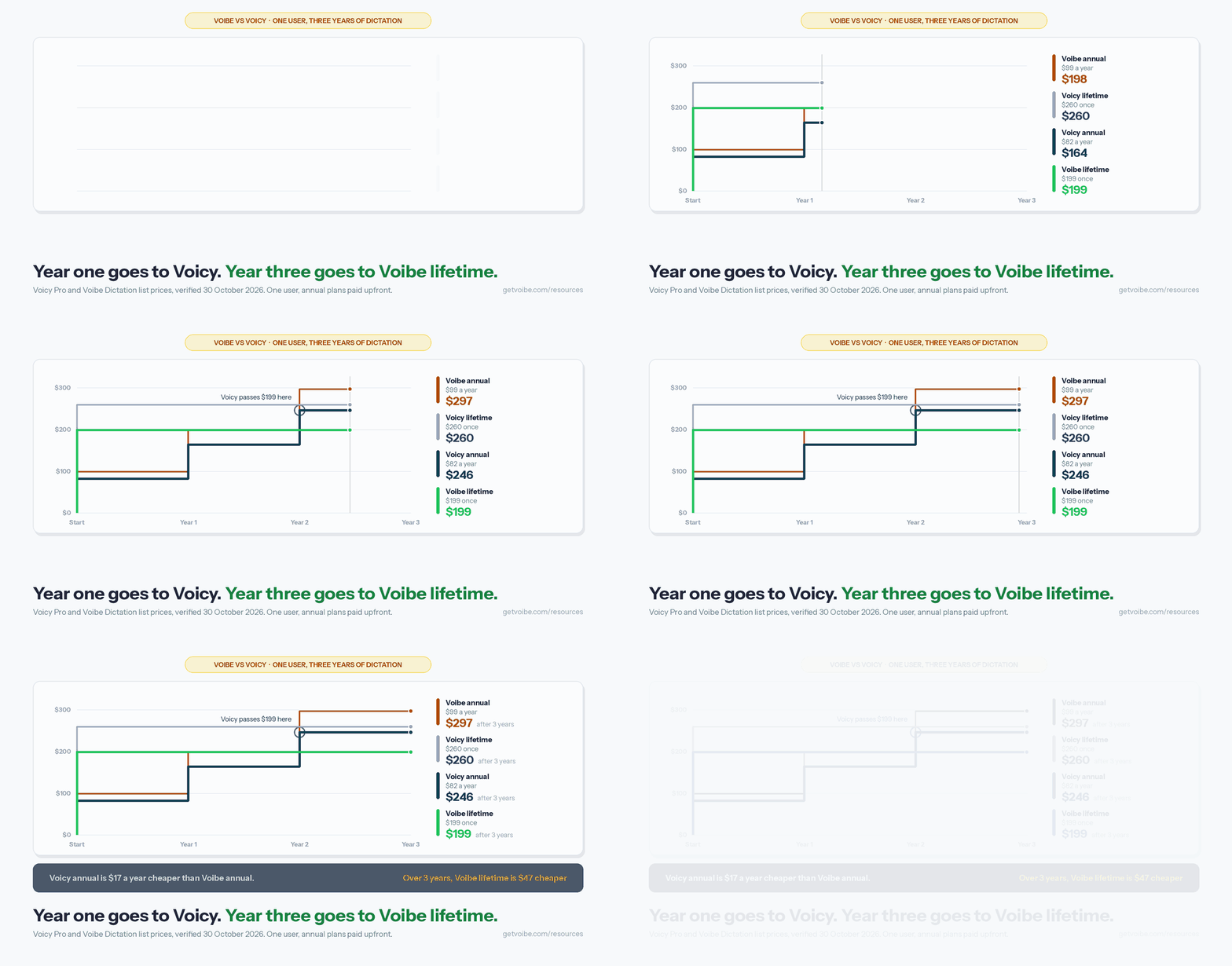
Over three years, the cheapest way to dictate on a Mac or Windows PC is Voibe's $199 lifetime licence. Over one or two years, Voicy's $82 annual plan is cheaper.
| Horizon | Voibe lifetime | Voicy annual | Voicy lifetime | Voibe annual | Voicy monthly |
|---|---|---|---|---|---|
| 1 year | $199 | $82 | $260 | $99 | $101.88 |
| 2 years | $199 | $164 | $260 | $198 | $203.76 |
| 3 years | $199 | $246 | $260 | $297 | $305.64 |
- Voibe lifetime vs Voicy annual: Voicy is $35 cheaper after two years ($164 vs $199). Voicy's third annual payment takes its total to $246, so over three years Voibe's lifetime is $47 (19.1%) cheaper.
- Voibe lifetime vs Voicy monthly: the $199 licence pays for itself after 23.4 months ($199 ÷ $8.49), and over three years it is $106.64 (34.9%) cheaper than $305.64 of Voicy monthly billing.
- Voicy's own lifetime: $260 takes 3.2 years to beat Voicy's $82 annual plan ($260 ÷ $82), so a Voicy buyer saves money with lifetime only after year three.
- Annual vs annual: over three years Voicy costs $246 and Voibe $297, so Voicy saves $51.
- Free first: if you dictate fewer than 2,000 words a week on one device, Voibe Free costs $0. On a Mac, Voibe keeps dictating on-device after the cloud words run out (on-device mode needs Apple Silicon).
Is Voicy Free? Is Voibe Free?
Voibe has a free plan and Voicy does not. Voicy offers a one-time trial of 30 minutes of recording with full access and no credit card; after that you pay. Voibe Free is $0 forever on one Mac or Windows PC with 2,000 cloud words a week, AI clean-up included, spoken punctuation, custom vocabulary and transcript history. Every new Voibe account also starts with a 7-day trial of every Voibe Work feature, including meeting notes, then moves to Voibe Free unless you buy a plan. The October 2026 change is covered in the Voibe Free launch post.
Voicy is free to download on Linux, too, but the same 30-minute trial applies there. For a free, open-source option on Linux, see our Handy review.
Voibe vs Voicy Pros and Cons
Voicy
Pros:
- Runs on six platforms: Mac, Windows, Linux, iPhone, Android and Chrome
- Cheapest subscription: $8.49 a month or $82 a year
- Offline mode on Mac, Windows and Linux desktops (25 languages)
- File transcription built into the app
- AI rewriting for people who want speech reshaped
- Team plan from $6.79 per user, plus 20% student and disability discounts
Cons:
- No free plan after the 30-minute trial
- Lifetime costs $260, $61 more than Voibe's
- No meeting notes
- Offline model unnamed; cloud is the default and the mobile apps are cloud-only
- Text appears after you stop speaking, not while you speak
Voibe
Pros:
- Voibe Free forever: one device, 2,000 cloud words a week with AI clean-up
- $199 lifetime, the cheapest three-year path in this comparison
- On-device Whisper on Apple Silicon Macs; zero-retention cloud everywhere else
- Voibe Work meeting notes with no bot, on Mac and Windows
- Live Dictation (Mac), Developer Mode, Dictionary, Memory, 90+ languages
- 7-day trial of every feature and a 30-day money-back guarantee
Cons:
- No Linux, iPhone, Android or browser extension
- Subscriptions cost more: $1.41 a month or $17 a year over Voicy
- No offline mode on Windows or Intel Macs
- No file upload in the desktop app (the API handles files)
- No AI rewriting; Smart Formatting cleans up but keeps your words
Which Should You Choose: Voicy or Voibe?
Pick by the device you dictate on first, then by price horizon, then by whether meetings matter.
Pick Voicy if…
- You dictate on Linux, an iPhone, an Android phone or in a Chrome extension
- You want offline dictation on Windows or Linux
- You want the lowest subscription and expect to switch apps within two years
- You transcribe recorded audio files often and don't want an API
- You're a team of 3 or more who wants the $6.79 per-user rate
Pick Voibe if…
- You want one app for dictation and meeting notes with no bot in the call: Voibe Work is $149 a year, $32.96 less than Voicy plus Otter Pro
- You work on a Mac or Windows PC and want a free plan you can keep
- You'll dictate for three years or more and prefer one $199 payment
- You want on-device dictation on an Apple Silicon Mac with a named open-source model
- You code by voice in Cursor, VS Code or Windsurf, or want to see words as you speak
Decision tree
- Do you need Linux, iPhone, Android or a browser extension? Yes: Voicy. No: go to 2.
- Do you need meeting notes too? Yes: Voibe Work ($19/mo, $149/yr, $399 lifetime). No: go to 3.
- Do you need offline dictation on Windows? Yes: Voicy. No: go to 4.
- Do you dictate fewer than 2,000 words a week on one computer? Yes: Voibe Free. No: go to 5.
- Will you use it for three years or more? Yes: Voibe lifetime ($199). No: Voicy annual ($82).
Use-case cheat sheet
| Your situation | Pick | Why |
|---|---|---|
| Linux desktop developer | Voicy | Voibe has no Linux app |
| Dictating on your phone between meetings | Voicy | iPhone keyboard and Android app |
| Writing in Google Docs on a Chromebook | Voicy | Chrome extension |
| Offline dictation on a Windows laptop | Voicy | Voibe on Windows is cloud-only |
| Transcribing interview recordings, no code | Voicy | File upload in the app |
| Light dictation on one Mac or PC, $0 budget | Voibe Free | 2,000 cloud words a week, forever |
| Lawyer or clinician with client calls | Voibe Work | Dictation plus bot-free meeting notes, BAA available on request |
| Coding by voice in Cursor or VS Code | Voibe | Developer Mode resolves file and variable names |
| Confidential drafting on an M-series Mac | Voibe | On-device Whisper, nothing leaves the Mac |
| Buying once and keeping it 3+ years | Voibe | $199 lifetime vs $260 |
| Agent or app that transcribes files | Voibe API | REST API and MCP server, 15 free minutes |
What Users and Reviewers Say About Voicy and Voibe
Voicy has the larger public rating sample; Voibe's is small but positive.
- Voicy, Chrome Web Store: 4.6 out of 5 from 103 ratings and 10,000 users (Chrome Web Store listing, October 30, 2026). Voicy's site shows 4.9/5, which links to its own reviews page rather than a third-party platform.
- Voibe, Product Hunt: 4.8 out of 5 from 6 reviews (Product Hunt, October 30, 2026).
What users say, both ways:
"Voicy is more reliable and is over half the price." — Gavin Walsh, comparing Voicy with another mobile dictation app, on Voicy's reviews page (July 2026)
"The only unnerving fact: no text appears until you finish dictating and turn off the microphone." — Ilya Alekseyeff, on Voicy's reviews page (October 2025)
"Stayed because it is stupidly fast." — jackson fernandez, Voibe review on Product Hunt
"Finally found a good app for that." — Eswari, Voibe review on Product Hunt
How we score: each dimension in the comparison table goes to the app with the better verified figure or feature, and the overall rating weighs price over three years, platforms, privacy architecture, free access and work features equally. That gives Voibe 9/10 and Voicy 7.5/10. Voicy loses most of its points on the missing free plan and meeting notes; Voibe loses its point on platform reach.
Frequently Asked Questions: Voibe vs Voicy
Basics
What is the difference between Voibe and Voicy?
Voicy is a dictation app for Mac, Windows, Linux, iPhone, Android and Chrome with an $8.49 monthly subscription. Voibe is a dictation app for Mac and Windows with a free plan, a $199 lifetime licence, on-device mode on Apple Silicon Macs and an optional meeting-notes plan, Voibe Work.
Is Voicy the same as Voicy Network?
No. Voicy (usevoicy.com) is the dictation app compared here. Voicy Network (voicy.network) is an unrelated soundboard site.
Pricing
Is Voicy free?
No. Voicy gives you 30 minutes of recording as a one-time trial with no credit card, then Pro costs $8.49 a month, $82 a year or $260 lifetime. Voibe Free is $0 forever on one device with 2,000 cloud words a week.
Is Voicy cheaper than Voibe?
On subscriptions, yes: Voicy is $1.41 a month and $17 a year cheaper than Voibe Dictation. On lifetime, no: Voibe's $199 is $61 cheaper than Voicy's $260. Over three years, Voibe lifetime ($199) beats Voicy annual ($246) by $47.
Is Voibe Work cheaper than Voicy plus a meeting notetaker?
Yes, if you record meetings. Voicy has no meeting notes, so you would add a notetaker: Voicy Pro ($82 a year) plus Otter Pro ($99.96) costs $181.96 a year, and Voibe Work at $149 a year is $32.96 (18.1%) less; Voicy Pro plus Granola Business ($168) costs $250, and Voibe Work is $101 (40.4%) less. On lifetime licences, Voibe Work's $399 is $160.88 less than Voicy's $260 lifetime plus three years of Otter Pro. If you never record meetings, Voicy's $82 annual plan stays cheaper than any Voibe subscription.
Platforms
Does Voicy work on Linux? Does Voibe?
Voicy has a Linux app for Ubuntu, Debian and Fedora plus an AppImage, with an offline mode. Voibe has no Linux app; it runs on Mac and Windows.
Do Voibe and Voicy work on iPhone and Android?
Voicy has an iPhone keyboard app and an Android app. Voibe has no phone app.
Privacy and offline
Do Voicy and Voibe work offline?
Both do on some computers. Voicy's offline mode (since October 12, 2026) runs on its Mac, Windows and Linux apps in 25 languages. Voibe's on-device mode runs only on Apple Silicon Macs. Voibe on Windows and Intel Macs, and Voibe Work meeting notes, need internet.
Which is more private, Voibe or Voicy?
In the cloud they are close: both use zero-retention providers for Whisper transcription, and both say they don't store recordings. Voibe names every model in its path and offers a BAA on request; Voicy's offline mode covers more operating systems.
Features
Does Voicy take meeting notes?
No. Voibe Work does, with no bot in the call, on Mac and Windows, for $19 a month, $149 a year or $399 lifetime.
Can Voibe transcribe audio files like Voicy?
Not in the desktop app. Voibe transcribes files through its speech-to-text API and MCP server, with 15 free minutes; Voicy does it inside the app.
Final Verdict: Voicy for Reach, Voibe for Depth and the Long Run
Voibe vs Voicy is a different-fits decision. Voicy is the better choice if you dictate across Linux, phones or a browser, want offline dictation on Windows, or want the cheapest subscription for a year or two. Voibe is the better choice if you work on a Mac or Windows PC and want one app for dictation and bot-free meeting notes (Voibe Work, $149 a year, less than Voicy plus any notetaker we priced), a free plan, the cheaper $199 lifetime, or on-device dictation on Apple Silicon.
If you're on a Mac or Windows PC and still undecided, the free routes settle it fast: Voicy's 30-minute trial and Voibe's 7-day trial of every feature both need no card. Start with Voibe at getvoibe.com or download Voibe for Mac, and read our Voicy review before you try Voicy.
Voibe is our product. Voicy facts were checked on Voicy's own site (pricing, privacy policy, refund policy, offline-dictation page and changelog) on October 30, 2026; the sources are cited on our Voicy review, Voicy pricing and Is Voicy safe? pages.
Related Voicy and Voibe Comparisons
- Voicy Review: the full hands-on look at Voicy
- Voicy Pricing: every Voicy plan and the cost math
- Is Voicy Safe?: Voicy's Groq cloud path and privacy policy
- Voicy Alternatives: nine tools ranked against Voicy
- Voicy vs Wispr Flow: the two cross-platform cloud apps compared
- Voibe vs Typeless and Voibe vs Handy: Voibe against other cross-platform picks