

Voibe Meeting MCP: Your Meetings, Now in Claude and ChatGPT
Your meetings are full of answers. Until now, getting them into Claude meant copying and pasting transcripts, one call at a time.
Today we're launching Voibe Meeting MCP. It connects Claude, ChatGPT, Cursor, Claude Code and other AI apps to every meeting Voibe Work has taken notes for. Ask a question, and your AI app reads the meetings it needs to answer it.
It's live now in Voibe for Mac 3.2.1 and Voibe for Windows 2.2.0 (release notes), and it comes with Voibe Work.
Voibe Meeting MCP at a Glance
| Voibe Meeting MCP | |
|---|---|
| Works with | Claude, ChatGPT, Cursor, Claude Code and other AI apps |
| Setup | Meetings › MCP in the Voibe app. Claude Desktop connects in one click, with no API key |
| What apps can read | Meeting titles, summaries and transcripts |
| What stays out | Your dictation. It's never shared |
| Turning it off | One switch stops every connected app at once |
| Plan | Voibe Work: $19/month, $149/year or $399 lifetime, Mac and Windows. Included in the 7-day free trial |
See Voibe Meeting MCP in Action

Ask Claude: “Go through this month's customer calls and write up the feature requests.”
Claude finds the customer calls, reads their summaries and transcripts, and writes the list. No exporting, no pasting, no digging through a month of notes.
Voibe Work's built-in chat is still there for questions about a single meeting. Meeting MCP is for the questions that cut across all of them, asked in the app where you're already writing the doc, the email or the code.
Key Takeaway
Voibe Meeting MCP lets Claude, ChatGPT and other AI apps read the meetings Voibe Work took notes for, so you can ask across all of them from the app you already work in. One switch in Voibe stops every connected app at once.
Connect Claude to Your Meetings in Three Clicks
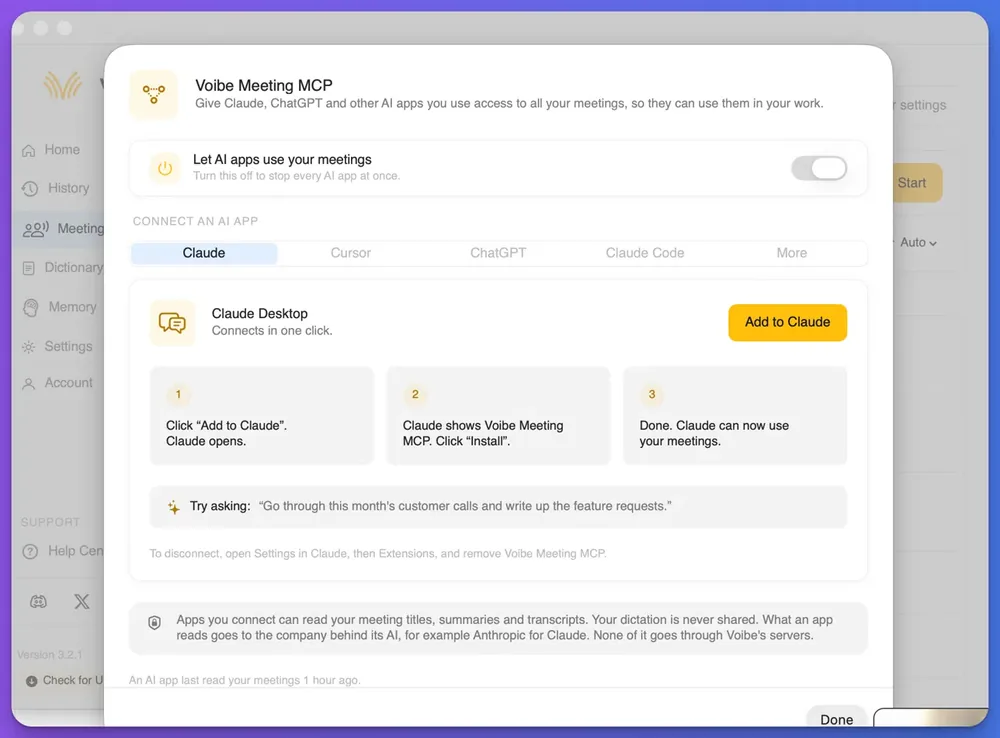
- In Voibe, open Meetings and click MCP. Check that “Let AI apps use your meetings” is on.
- Pick Claude and click “Add to Claude”. Claude Desktop opens.
- Click “Install”. That's it. Claude can now use your meetings.
Cursor, ChatGPT and Claude Code have their own tabs in the same panel, and a More tab covers other apps. To disconnect Claude, open Settings in Claude, then Extensions, and remove Voibe Meeting MCP.
What Voibe Meeting MCP Shares, and What It Doesn't
- Apps can read your meeting titles, summaries and transcripts.
- Your dictation is never shared.
- What an app reads goes to the company behind its AI, for example Anthropic for Claude. None of it goes through Voibe's servers.
- You stay in control. Turn off “Let AI apps use your meetings” and every app stops at once. The panel also shows when an AI app last read your meetings.
Everything else about Voibe Work stays the same. No bot joins your calls, the audio is deleted once it's processed, and your notes are saved on your computer. Voibe still reminds you to tell everyone you're taking notes, and following recording-consent rules is up to you.
Warning
Client, patient or deal calls? Check your organization's AI policy before you connect an AI app. Once Claude or ChatGPT reads a transcript, it's part of that chat under Anthropic's or OpenAI's terms.
Five Things to Ask Your Meetings
- “Go through this month's customer calls and write up the feature requests.”
- “List every pricing objection from last week's demos and who raised it.”
- “What did I commit to in my 1:1s this month, and what's still open?”
- “Draft a follow-up email to Northwind based on our last call.”
- “Read yesterday's design review and turn the decisions into a to-do list for this repo.” (in Cursor or Claude Code)
The answer comes from your AI app, so check names and numbers against the transcript before you send anything.
Voibe Meeting MCP Pricing and Availability
Meeting MCP comes with Voibe Work: $19 a month, $149 a year or $399 lifetime per seat, and one seat covers a Mac and a Windows PC. Voibe Free and Voibe Dictation don't include it.
New to Voibe? Every account starts with a 7-day trial of every Voibe Work feature, Meeting MCP included, with no credit card. Moving over from Granola, Otter or another note taker? Our switch offer covers the time left on that plan.
Info
Already on Voibe Work? Update to Voibe for Mac 3.2.1 or Voibe for Windows 2.2.0, then click MCP on the Meetings page. There's nothing extra to buy.
FAQ: Voibe Meeting MCP
Setup
Which AI apps can I connect? Claude, ChatGPT, Cursor and Claude Code each have a tab in the panel, and a More tab covers other apps.
Do I need an API key? No. Claude Desktop connects in one click.
Privacy
Can AI apps read my dictation? No. Only meeting titles, summaries and transcripts.
Does Voibe see what Claude reads? None of it goes through Voibe's servers. What an app reads goes to the company behind its AI, for example Anthropic for Claude.
How it compares
How is it different from Granola's or Otter's MCP? Their MCPs read notes stored in their cloud. Voibe Work saves your notes on your computer, and none of what an app reads goes through Voibe's servers. For a closer look at a rival, see our Wispr Flow MCP guide.
Is it the same as the Voibe API's MCP server? No. The Voibe Speech-to-Text API has its own MCP server for transcribing audio files. Meeting MCP reads the meetings Voibe Work recorded.
Try Voibe Meeting MCP Free for 7 Days
Record a few calls with Voibe Work, connect Claude, and ask your meetings a question. The 7-day trial covers every feature, and there's no card to enter.
Still choosing a note taker? Start with the best no-bot meeting note takers, or catch up on everything we shipped in October.