

Is Notta Safe? The Short Answer
Notta's bot-free recorder has a five-word pitch: "No one knows but you."
On November 2, 2026, I read Notta's privacy policy, terms, security page and help center. I wanted three answers:
- where a recorded meeting goes
- who knows it's being recorded
- how long it stays there
Notta's security basics are solid. Below Enterprise, it's a weak fit for confidential meetings. The risk comes from its default settings, not from hackers.
Where the risk sits
- Tokyo. Notta's help center says your data is stored in a data center there, on AWS.
- Transcripts are kept indefinitely until you delete them. Auto-delete is Enterprise only.
- No data training is listed as an Enterprise feature, and Enterprise starts at 51 seats.
- In bot-free mode, other attendees get no sign that the meeting is being transcribed.
- No BAA. The security page says Notta follows HIPAA guidelines.
- I found no business associate agreement on any public page.
What Notta gets right
- It states a SOC 2 Type II audit, AES-256 encryption at rest and TLS 1.2 in transit.
- AI Notes summaries and Notta Brain each say they don't use your data for training.
- Privacy Mode (Pro and up, desktop beta) transcribes on your computer.
- It keeps those files in a local folder.
- Its one public incident, a login outage, was disclosed with times and a cause.
- I found no data breach report and no lawsuit naming Notta as of November 2, 2026.
Why institutions care
The University of Waterloo's IT office spells out the general risk in its Waterloo guideline:
- The vendor or its subprocessors may process meeting content.
- That content may be used to train AI models.
- Third-party AI note-taking bots aren't allowed in UW-hosted meetings.
The guideline names Fireflies, Otter and Read AI, not Notta. Notta's bot is the same kind of tool.
How I checked
- I read Notta's privacy policy (effective September 2, 2025) and terms (effective September 2, 2026).
- I also read its security and pricing pages.
- Plus more than 20 help-center articles and the App Store listing.
- I searched news and the web for breaches, lawsuits and institutional bans.
- I haven't used Notta hands-on. How it behaves comes from its own documentation.
What it costs, and the no-bot option
Price isn't the safety problem. Every plan and trial rule is in our Notta pricing breakdown.
If the Tokyo copy is a deal-breaker, look at Voibe Work (the app we build). No bot joins, on Mac or Windows.
- The audio is deleted as soon as processing completes.
- The notes are saved on your computer.
- $149 a year, which is $51.01 (52.1%) more than Notta Pro annual ($97.99).
- That's $50.99 (25.5%) less than Notta Business annual ($199.99 a seat).
- Enterprise, the only Notta plan with the no-training control, is quoted on request, from 51 seats.
Other tools that keep no vendor copy are in our Notta alternatives guide.
Voibe reminds you to tell everyone you're taking notes when recording starts. The recording-consent rules are yours to follow.
Key Takeaway
Solid encryption and SOC 2 Type II, no breach found. But meetings sit in Tokyo indefinitely, no-training is Enterprise-only, and bot-free mode tells no one.
Key Takeaways: Notta Safety at a Glance (November 2026)
Every row comes from Notta's own pages, the App Store and rating sites. I checked them on November 2, 2026.
| Question | Notta's answer (November 2026) | Source |
|---|---|---|
| Does a bot join? | The Notta Bot joins Zoom, Google Meet, Teams and Webex if you invite it or turn on calendar auto-join. Notta Desktop records with no bot (beta, Mac and Windows). | Notta help center |
| Do others get told? | Bot notices are optional settings. In bot-free mode, other attendees get no indication. | Notta help center |
| Where is it stored? | A data center in Tokyo, on AWS. | Notta help center; security page |
| How long? | Indefinitely, unless you delete it. Auto-delete is Enterprise only. The Trash empties after 30 days. | Notta help center |
| Trained on? | A no-training control is listed for Enterprise only. Below it, only feature-level statements (AI Notes, Notta Brain, Privacy Mode). | Notta help center; pricing page |
| Who else can see it? | A workspace admin can access its content. A leaver's recordings move to the workspace owner. | Privacy policy (September 2, 2025); help center |
| Attestations | SOC 2 Type II (independent audit), ISO 27001 guidelines followed, GDPR and CCPA, per Notta. AES-256 and TLS 1.2. | Notta security page |
| HIPAA | Says it follows HIPAA guidelines. No BAA found on any public page. | Notta security page; help-center search |
| Breaches | No public breach report found as of November 2, 2026. One login outage on March 10, 2026. Notta says no user data was impacted. | Web and news search; Notta help center |
| Lawsuits | None naming Notta found as of November 2, 2026. | Web and news search |
| Institutional bans | None naming Notta found. Some universities ban third-party note-taking bots as a category. | University of Waterloo IT |
| Ratings | App Store 4.07 (1,474 ratings); Google Play 4.12 (21,583); Chrome Web Store 2.8 (44). Trustpilot withholds its score. | App Store; Chrome Web Store |
| Price | Free $0 (3 minutes per conversation); Pro $97.99 a year or $13.49 monthly; Business $199.99 or $27.99 a seat; Enterprise custom, 51+ seats. | Our Notta pricing breakdown |
What Is Notta, and How Does It Record a Meeting?
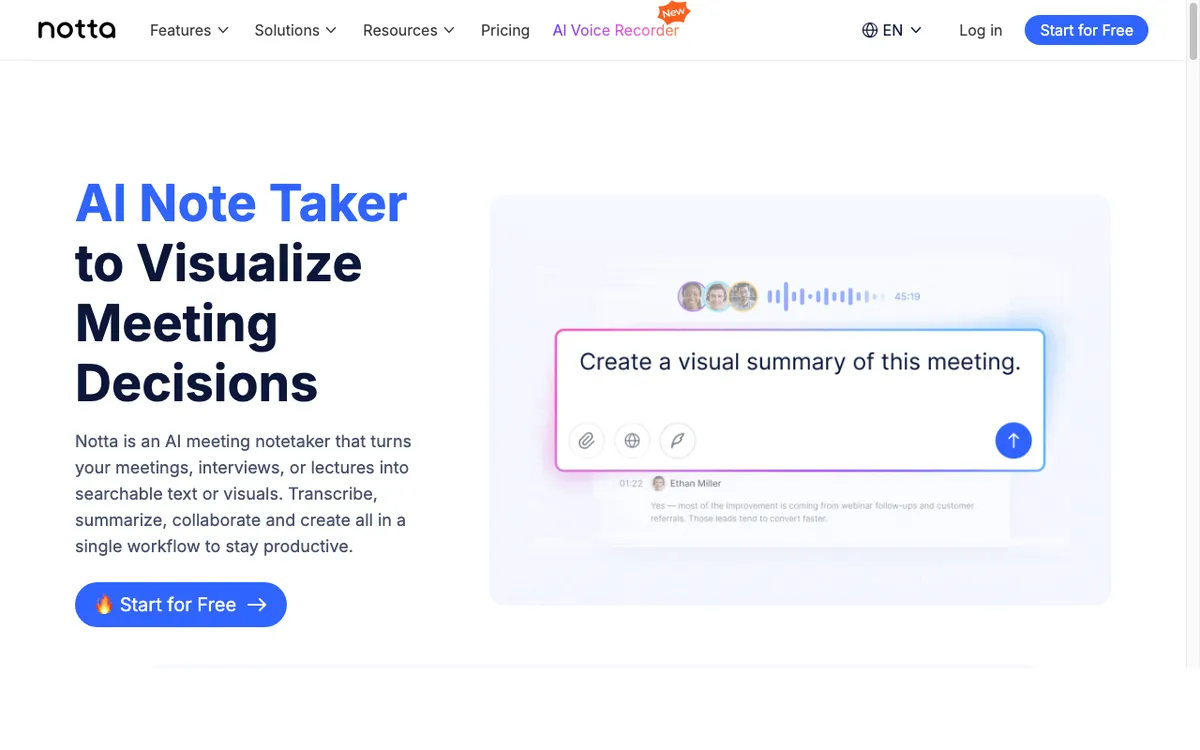
Notta is an AI transcription and meeting-notes service. Per its terms, it's run by Notta PTE. LTD. in Singapore, or Notta 株式会社 for users registered in Japan.
Its history, per Japanese tech outlet THE BRIDGE (August 2024):
- It began as a service of Langogo, a Shenzhen company.
- It spun out, with its head office in Singapore.
- Japan is its largest market.
On the App Store, the seller is listed as Mind Cruiser Limited.
Five ways Notta captures a conversation
- Notta Bot: joins Zoom, Google Meet, Microsoft Teams and Webex as a participant. You invite it, or it auto-joins from your calendar.
- Notta Desktop records system audio and your mic on Mac or Windows, with no bot. It's a beta, open to all Notta users at no extra cost.
- The iPhone and Android apps record in-person conversations and upload the audio to Notta's servers for processing.
- File uploads, links and the Chrome extension feed the same cloud.
- Privacy Mode, a desktop setting on Pro and up, transcribes on your computer.
It reaches past meetings
- Google and Outlook calendars, Slack, Notion, Google Drive and others
- Salesforce, HubSpot and other CRMs, on Business
- Notta Brain, which answers questions across all your meetings
- A Notta MCP server that lets Claude Desktop, Cursor and Codex read your recordings
Connect only the integrations you'll use.
What users say
- 4.07 out of 5 from 1,474 ratings on the App Store
- 4.12 out of 5 from 21,583 ratings on Google Play
- 2.8 out of 5 from 44 ratings on the Chrome Web Store, which shows 100,000 users
I checked all three on November 2, 2026. Ratings tell you whether the app works, not where the meeting goes.
Where Does a Notta Meeting Go? Bot, Desktop and Tokyo
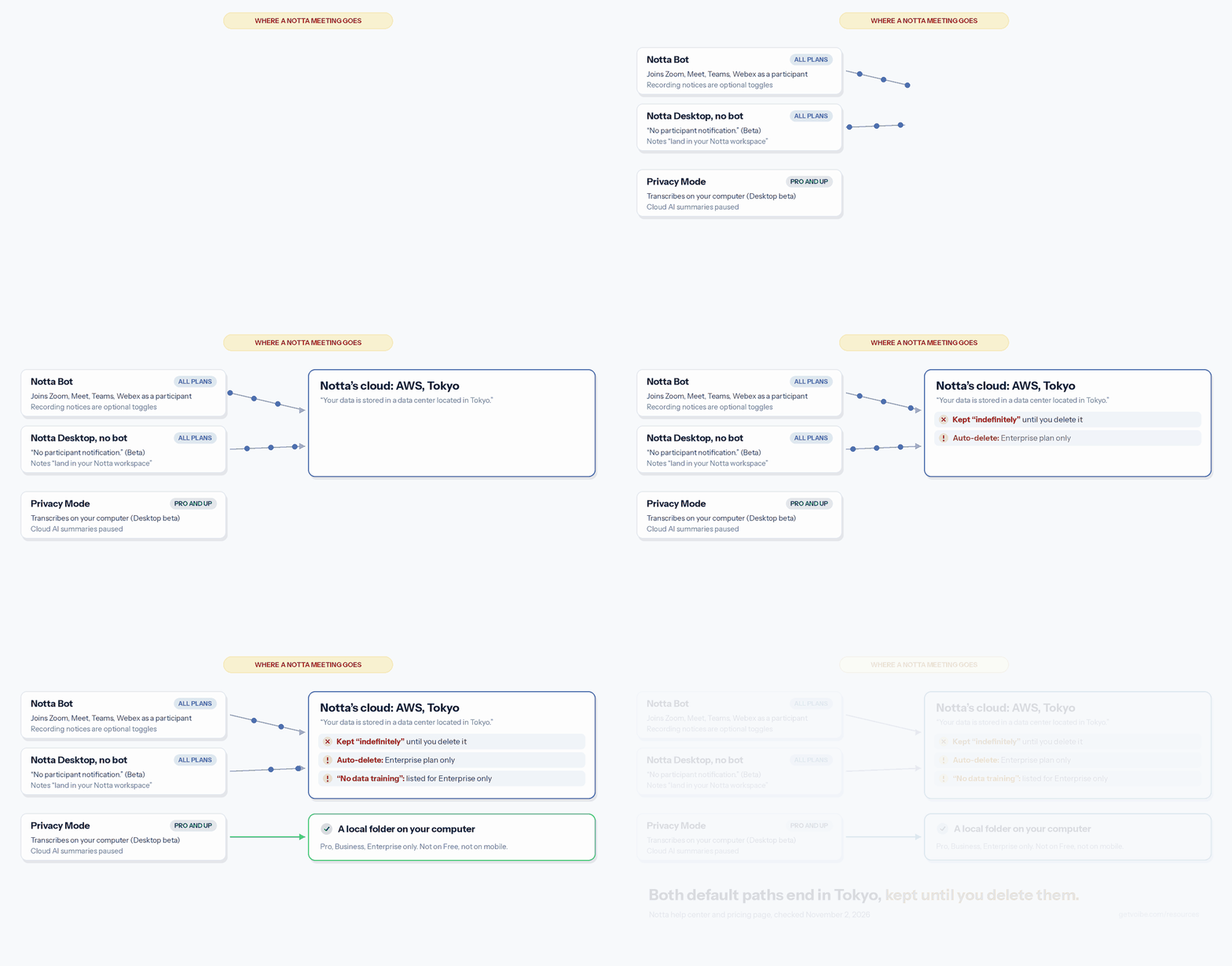
Whichever way you capture it, the meeting goes to Notta's cloud in Tokyo. Privacy Mode is the one exception.
What Notta's documents say
- Notta runs on Amazon Web Services, per its help center.
- In its words: "Your data is stored in a data center located in Tokyo."
- I found no US or EU storage option on any public page.
- Encryption is TLS 1.2 in transit and AES-256 at rest. Backups sit on AWS S3 and Aurora, per the security page.
- Bot-free still means cloud. Notta's bot-free page says notes go straight to your workspace, which lives in Notta's cloud.
- The privacy policy covers audio, video, voice and text, used for transcripts, summaries and translations.
- It also collects device data, IP-based location and usage data.
The exception: Privacy Mode
Privacy Mode runs in Notta Desktop on Pro, Business and Enterprise. Recordings and transcripts stay only in a local folder you choose.
- Cloud transcription, cloud AI summaries, cross-device sync and team collaboration are paused or limited.
- It's a beta.
- It isn't on Free or on the phone apps.
Copies you may not expect
- The admin of a workspace you join can access its content, per the privacy policy.
- When someone leaves, their recordings and folders move to the workspace owner automatically.
- If colleagues in two workspaces both use auto-join, two bots join and two transcripts are made.
Who processes it
The privacy policy describes providers by type: cloud storage, payment processing, voice transcription. It names only two companies:
- Stripe, for payments
- AWS, for hosting
I found no subprocessor list. I can't tell you who transcribes your audio.
Where Your Meetings Go: Notta vs Otter vs Fathom vs Granola vs Fireflies vs Read AI vs Voibe Work
Same five questions, seven notetakers.
| Tool | Bot in the call? | What's kept, and where | Retention | Training default | Attestations |
|---|---|---|---|---|---|
| Notta | Bot if invited or auto-joined; Notta Desktop with no bot (beta) | Audio, transcripts and summaries; AWS in Tokyo (Privacy Mode: local folder, Pro and up) | Indefinitely until you delete; auto-delete Enterprise only | No-training control on Enterprise only; no plan-wide promise below | Notta states SOC 2 Type II, ISO 27001 guidelines, GDPR, CCPA; no BAA found |
| Otter | Yes by default; desktop app records without a bot (Mac, Windows) | Audio and transcript; Otter cloud | Until you delete; custom retention through an account manager | On (de-identified); no opt-out found | SOC 2 Type II; HIPAA as an Enterprise add-on |
| Fathom | Yes by default; bot-free in the Mac app | Video, audio, transcript, summary; Fathom cloud, US | Until you delete; auto-delete Enterprise only | On (de-identified); opt-out | Fathom states SOC 2 Type II, GDPR, HIPAA; signed BAA Enterprise |
| Granola | No | Audio deleted after transcription; notes in a US-hosted AWS cloud | Indefinitely unless a retention policy is set | On for Free and Business (anonymised); opt-out; off on Enterprise | SOC 2 Type II; HIPAA and BAA Enterprise only |
| Fireflies | Yes by default; Take Notes in the desktop app without one | Transcript and summary, plus audio and video in bot mode; Fireflies cloud | While the account is active; custom retention Enterprise only | Never (policy) | Fireflies states SOC 2 Type II, ISO 42001, GDPR; BAA on Enterprise with Private Storage |
| Read AI | Yes by default; desktop app and Google Meet integration without one | Reports and transcripts; AWS us-east-1 | Paid: until you stop paying or ask; audio and video at most 2 years | Off (opt-in) | Read states SOC 2 Type II, GDPR; HIPAA on Enterprise+; BAA on request |
| Voibe Work | No (Mac and Windows) | Audio deleted as soon as processing completes; transcript and summary saved on your computer | Your files, your choice | Never trained on | None claimed; BAA available on request |
Deep dives on the others:
Key Takeaway
Bot and bot-free capture both land in Notta's Tokyo cloud, kept until you delete them. Only Privacy Mode (Pro and up) stays local.
Does Notta Train on Your Data? Only Enterprise Gets the Promise
Below Enterprise, Notta makes no plan-wide promise not to train on your meetings.
Notta's help center lists features by plan. In the Enterprise column, under Security, it reads "No data training".
- Free, Pro and Business don't list it.
- Enterprise starts at 51 seats.
The Enterprise wording is narrower than it sounds
The pricing page explains Enterprise's full data access control in two rules:
- On Enterprise, Japanese transcripts aren't used for AI training by default.
- For other languages, audio isn't used for AI training at all.
Non-Japanese audio is never used for training, on any plan. Non-Japanese transcripts aren't mentioned.
Japanese transcripts are excluded by default only on Enterprise. For other plans, Notta doesn't say.
Feature-level promises that do exist
- AI Notes: your data isn't used for AI training.
- Notta Brain doesn't use customer information for AI training.
- Privacy Mode recordings (Pro and up) aren't used for AI model training.
Those cover summaries, the AI assistant and local recordings. None covers your stored transcripts in general.
What the policy and terms say
- The privacy policy's only training sentence is about Google data. Notta doesn't use Google Workspace APIs to train general AI or ML models.
- The policy lists analyzing and improving the Services as a use of your information.
- The terms let Notta process your data only as needed to run and update the service.
My read
Nothing I read says Notta trains on your transcripts. Below Enterprise, nothing says it won't, in plan-wide terms.
- Fireflies never trains on meetings, per its policy (Is Fireflies Safe?).
- Read AI training is opt-in (Is Read AI Safe?).
- Voibe doesn't train on audio or text, from dictation or meetings, on any plan.
If training worries you, get Notta's position in writing.
Tip
On Free, Pro or Business? Get Notta's no-training position in writing. Keep dated copies of its privacy policy and terms.
How Long Does Notta Keep Your Meetings, and Who Can Delete Them?
Until you delete them. Notta's help center says it is "committed to securely storing your transcription data indefinitely."
Data goes only when you delete a recording, the workspace or your account. Otherwise it stays on Notta's servers for good.
The controls that exist
- Manual delete, on every plan. Deleted items sit in the Trash for 30 days, then go for good. You can empty it sooner.
- Auto-delete, on Enterprise only.
- Account deletion removes all your data permanently. It can't be recovered.
Deleting an account has conditions
- Any paid plan must have fully expired.
- Cancel the subscription first, on the web, Apple or Google.
- Deleting the app doesn't cancel the subscription or delete the account.
Shared links stay open by default
Public share links never expire unless you change the setting. You can set them to expire, up to 30 days.
Business and Enterprise can switch off public sharing for the whole workspace. Old links stop working when they do.
Free accounts after a downgrade
Your data stays when you drop to Free. On Free, you only see the first 3 minutes of each transcript.
- Export what you need first.
- Then delete it.
Plan-by-plan detail is in our Notta pricing guide.
Is Notta HIPAA Compliant? SOC 2, ISO 27001 and the Missing BAA
No, and I found no BAA. Its security page only promises to "Follow HIPAA guidelines" for health records.
I searched Notta's help center for HIPAA and for BAA on November 2, 2026. Neither search returned an article.
Guidelines aren't a contract
A covered entity needs a business associate agreement before it shares protected health information. Following guidelines doesn't give you one.
What Notta does state
- SOC 2 Type II, obtained through an independent audit, per Notta.
- ISO 27001: the security page says Notta follows the guidelines. The App Store listing and pricing FAQ call it certified, so ask for the certificate.
- GDPR and CCPA compliance, per the security page.
- Japan's APPI privacy law, added in the help center.
- Security certification reports, as a Business feature.
What each claim covers, and what it doesn't
- SOC 2 Type II audits security controls. It doesn't change where meetings are stored, or for how long.
- GDPR compliance doesn't mean EU storage. Notta's data sits in Tokyo.
- A BAA is a contract, not a certificate. Without one, health data has no HIPAA footing.
The practical rule
Keep patient conversations out of Notta, on every plan. Our HIPAA dictation guide starts with the same data-flow question.
For Voibe, a BAA is available on request. It's a contract, not a certification.
Key Takeaway
Notta says it will "Follow HIPAA guidelines" but offers no public BAA. Keep health information out. It states SOC 2 Type II, GDPR and CCPA.
Has Notta Had a Security Breach? Incidents, Lawsuits and Bans
I found no public report of a Notta data breach as of November 2, 2026. That's a search result, not a guarantee.
I searched news and the web. Notta's help center has no article on breaches either.
The one incident on record
On March 10, 2026, some users couldn't log in. The outage ran from 10:32 AM to 2:52 PM Japan time.
- Notta blamed an update from a third-party software provider.
- It says no audio, transcripts or personal information was impacted.
- It says no unauthorized access occurred.
Why Trustpilot mentions a breach
If you've seen Notta linked to a breach, it may be Trustpilot. Notta's Trustpilot page shows no score: "This company's rating is unavailable due to a breach of our guidelines."
- The notice is about reviews, not data.
- Trustpilot says it removed a number of fake reviews for Notta.
- Of the 170 reviews left, 87% are 1-star.
Has Notta been sued?
I found no lawsuit naming Notta as of November 2, 2026. CourtListener doesn't accept anonymous searches, so I couldn't run a docket search.
Re-check before you rely on this. Other notetakers are in court:
- Otter faces a consolidated privacy class action in California (details on Otter).
- Granola faces a wiretap class action aimed at bot-free capture (the Granola lawsuit explained).
- Fireflies faces a BIPA voiceprint class action (details on Fireflies).
Granola's case is the closest match. Notta's bot-free mode also records from your computer without telling anyone.
Does anyone ban Notta?
I found no university or agency that bans Notta by name. Several ban third-party note-taking bots as a category.
- The University of Waterloo doesn't allow third-party AI note-taking bots in UW-hosted meetings.
- Case Western Reserve blocked third-party AI note-takers on Zoom, Microsoft Teams and Google Meet from September 12, 2025.
Notta's bot falls in that category. Notta Desktop gets past a bot block, because nothing joins the call.
That doesn't make it allowed. Your employer's or school's approved-tools list comes first.
Tracking in the iPhone app
- The App Store privacy label says identifiers are used to track you, for third-party advertising.
- The privacy policy names advertising partners, including Facebook.
This is about ads, not your recordings. Keep it in mind before you install the app on a work phone.
Key Takeaway
No breach report or lawsuit found as of November 2, 2026. Notta says its one incident, a March 2026 login outage, touched no user data.
Recording Consent: "No One Knows but You" Is the Problem
Notta's bot-free mode is built not to be noticed. Its feature page sells it as bot-free recording with no participant notification.
The help center says the same: "Other attendees have no indication that the meeting is being transcribed."
The bot's notices are optional
The Notta Bot shows up as a participant. Its other notices are settings you choose:
- Show recording notification poster tells all participants the meeting is being recorded.
- Let others know you're using Notta AI posts a message in the meeting chat.
- With Require Host Approval off, the bot can record Zoom meetings without the host's OK.
If you use the bot, switch both notices on and leave host approval on.
Notta puts consent on you
Notta's bot-free recording guides all end with the same warning. Consent is your job, and Notta doesn't check it.
Its terms agree. You and the people you record are solely responsible for the content.
Consent laws by state
Some US states, including California, require everyone in a private conversation to agree to a recording. Our AI notetaker consent laws guide covers every state, with disclosure scripts.
A silent recorder leaves that consent to you alone. This is general information, not legal advice.
A one-line script that covers most calls
- Say: "I'm taking AI notes on this call. Is everyone OK with that?"
- Wait for a yes from each person.
Voibe Work has no bot in the call either. It reminds you to tell everyone you're taking notes when recording starts.
The recording-consent rules are still yours to follow.
The Notta Safety Decision Tree
Five questions, from the easiest case to the hardest. Stop at the first one where you can't accept Notta's answer.
- Is it an internal, non-confidential meeting? Stand-ups, planning, your own team. If yes, Notta is a reasonable choice. Turn on the bot's poster and chat notice.
- Will people outside your company join? Clients, patients, candidates and partners never saw Notta's terms. Each needs notice, and in some states consent.
- Will health information come up? Notta offers no public BAA. Keep those calls out of Notta on every plan.
- Can the meeting sit in Tokyo until you delete it? Below Enterprise there's no auto-delete. You'd delete by hand and empty the Trash.
- Do you need a no-training promise in writing? It's listed for Enterprise only, from 51 seats. Smaller teams need another tool.
Most internal calls stop at question 1 or 2, and Notta handles them. Legal, medical and financial client calls usually reach question 3 or 5.
Our notetaker guide for lawyers and notetaker guide for financial advisors cover those rules.
The 5-Step Notta Safety Audit: Settings to Check Today
Keeping Notta? These five checks cover most of the risk.
- Turn on the bot's notices. In Notta Bot settings, switch on Show recording notification poster and Let others know you're using Notta AI. Keep Require Host Approval on.
- Narrow auto-join to Internal meetings only, or turn it off. Blacklist keywords let you skip client calls.
- Delete old recordings, then empty the Trash. Nothing auto-deletes below Enterprise, and the Trash keeps items for 30 days.
- Expire public share links. By default they never expire. On Business, you can disable public sharing.
- Use Privacy Mode for sensitive calls, on Pro and up. The recording stays in a local folder, but you lose cloud summaries and sync.
Then talk to your team
Your settings cover your account only. A workspace admin can access content in the workspace.
Agree who owns the workspace before you record clients in it.
Which steps to do first
- Steps 1 and 2 decide who knows.
- Steps 3 to 5 decide how long the meeting lives, and where.
Warning
In bot-free mode, other attendees get no indication, and Notta doesn't verify consent. Say it out loud at the start of every recorded call.
A Setup With No Bot and No Vendor Copy: Voibe Work
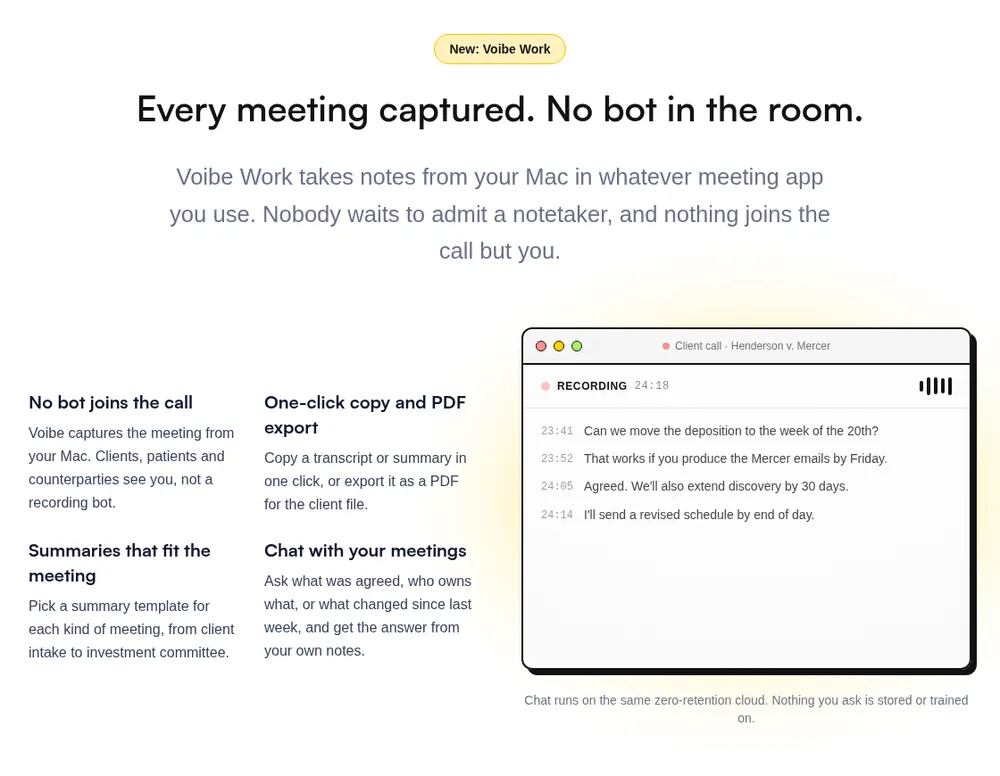
Notta's encryption and audit are solid. The Tokyo copy and the silent mode are part of the product.
Voibe Work (ours) is built the other way round.
What Voibe Work does differently
- No bot in the call, on Mac or Windows. It captures Zoom, Microsoft Teams, Google Meet, Webex, Slack huddles or any other meeting app from your computer.
- It also records in-person meetings through your Mac or PC's mic.
- Voibe reminds you to tell everyone you're taking notes when recording starts.
- Open-source models on zero-retention cloud providers process the audio. It's deleted as soon as processing completes (what zero data retention means).
- Notes are saved on your computer, not on Voibe's servers, and never trained on.
- Retention is your call, with no Enterprise plan needed.
- Speaker labels, with a time next to every line. Rename a speaker and the summary updates.
- Up to 4 hours per meeting, and unlimited meetings.
- Templates for each type of meeting, plus your own custom ones.
- Chat with your meetings, one-click copy and PDF export.
- Dictation on Mac and Windows is included.
- BAA available on request, for practices that need one.
Consent doesn't change. The recording-consent rules are yours to follow, with Voibe or Notta.
Where Notta wins
- Offline transcription. Privacy Mode (Pro and up, desktop beta) transcribes on your computer. Voibe Work's meeting notes need an internet connection.
- Price. Notta Pro is $97.99 a year, $51.01 less than Voibe Work.
- Notta Free is $0, though it stops each conversation at 3 minutes.
- iPhone and Android apps, file uploads and 5-hour recordings
- A bot that joins for you, and CRM integrations
Voibe Work has no phone app and no audio playback. It doesn't list calendar auto-join, CRM, email or Slack integrations.
What It Costs: Notta vs Voibe Work
Prices come from Notta's pricing page (checked November 2, 2026) and getvoibe.com/pricing. Full detail: Notta pricing.
| Plan | Monthly | Per year (annual billing) | 3 years | Longest recording |
|---|---|---|---|---|
| Notta Free | $0 | $0 | $0 | 3 minutes |
| Notta Pro (1 seat) | $13.49 | $97.99 | $293.97 | 5 hours |
| Notta Business (per seat) | $27.99 | $199.99 | $599.97 | 5 hours |
| Notta Enterprise (51+ seats) | Custom | Custom | Custom | 5 hours |
| Voibe Work | $19 | $149 | $399 lifetime ($447 on annual) | 4 hours |
- Against Pro, Voibe Work costs $51.01 (52.1%) more a year ($149 − $97.99 = $51.01; $51.01 ÷ $97.99).
- Against Business, it costs $50.99 (25.5%) less a year ($199.99 − $149 = $50.99; $50.99 ÷ $199.99).
- Enterprise, the plan with the no-training control, is quoted by Notta from 51 seats. Voibe Work stays $149 a seat.
- Notta has no dictation app. Notta Pro plus Wispr Flow Pro is $241.99 a year ($97.99 + $144). Voibe Work covers both for $92.99 (38.4%) less.
My take: for internal calls on a budget, Notta Pro is the better deal. Voibe Work removes the Tokyo copy and the training gap, for $149.
Trying it, or switching
- The 7-day free trial covers every Voibe Work feature, with no credit card and no automatic charge.
- After the trial, you move to Voibe Free unless you buy a plan.
- Paid plans carry a 30-day money-back guarantee.
Already paying for Notta? Cancel it, then email the cancellation confirmation to hi@getvoibe.com.
Voibe's switch offer gives you Voibe Work free for the time left on your Notta plan. You also get a bonus month, up to 12 months in total.
Key Takeaway
Voibe Work: no bot, a consent reminder, audio deleted after processing, notes on your computer. $149 a year, $51.01 more than Notta Pro.
Who Notta Is Safe For, and Who Should Pick Something Else
Notta is safe for most internal calls. Turn on the bot's notices, and tell everyone the call is recorded.
It's a weaker fit where the stored copy, or the silence, is the risk. Find your row:
| Your situation | Notta verdict | What to do |
|---|---|---|
| Internal stand-ups and planning | Safe | Turn on the poster and chat notice; delete old recordings |
| Lectures, interviews, podcasts with consent | Safe | Get consent on the recording; export, then delete |
| Sales calls with prospects | Safe with notice | Use the bot with notices on, or say it out loud in bot-free mode |
| Participants in California or another all-party state | Safe only with everyone's consent | Ask each person and wait for a yes |
| You want no cloud copy at all | Workable on Pro and up | Use Privacy Mode in Notta Desktop (beta); no cloud summaries |
| Patient conversations with health information | Not suitable | No BAA found; keep it out of Notta |
| Privileged legal calls | Risky | Read the lawyers guide; prefer no vendor-side copy |
| Client reviews at an advisory firm | Check recordkeeping rules first | See the financial advisors guide |
| Your data must stay in the US or EU | Not suitable | Notta stores data in Tokyo; no region choice found |
| You need meetings auto-deleted on a schedule | Enterprise only | Buy Enterprise (51+ seats), or use a tool that keeps no copy |
| Your university or employer bans third-party note-takers | Not allowed | Follow the policy, bot or no bot |
Weighing a different notetaker? Our Notta alternatives compare where each one keeps your meetings.
- The dictation vs notetaker breakdown explains how the categories differ.
- Our AI privacy guide covers the wider picture.
Is Notta Safe? FAQ
Answers on Notta's privacy, security, consent and alternatives, grouped by theme.
Privacy and Your Data
Is Notta safe to use? For most internal calls, yes.
- Notta states a SOC 2 Type II audit and encrypts data with AES-256 and TLS 1.2.
- Below Enterprise, it's a weaker fit for confidential calls. Meetings sit in Tokyo indefinitely, with no plan-wide no-training promise and no public BAA.
Does Notta train AI on my recordings? Notta lists its no-training control as an Enterprise feature only.
- On every plan, AI Notes and Notta Brain say they don't use your data for training. Privacy Mode (Pro and up) says the same.
- The pricing page adds that non-Japanese audio is never used for training.
- Non-Japanese transcripts aren't addressed.
Where does Notta store my data, and for how long? In an AWS data center in Tokyo, per Notta's help center.
- Transcripts are kept indefinitely until you delete them.
- Auto-delete is Enterprise only, and the Trash empties after 30 days.
Security, Breaches and Compliance
Has Notta had a data breach? I found no public report of one as of November 2, 2026.
- Notta's only published incident is a login outage on March 10, 2026. Notta says it impacted no user data.
- The breach notice on Notta's Trustpilot page is about fake reviews, not data security.
Is Notta HIPAA compliant? No.
- Notta's security page says it follows HIPAA guidelines. No business associate agreement is offered on any public Notta page.
- Keep health information out of Notta on every plan.
Is Notta SOC 2 certified? Notta says it obtained SOC 2 Type II certification through an independent audit.
- It says it follows ISO 27001 guidelines and is GDPR and CCPA compliant.
- Business plans include its security certification reports.
Recording, Ownership and Alternatives
Can other people tell when Notta is recording? The Notta Bot appears as a participant. Its poster and chat notices are optional settings.
- In Notta Desktop's bot-free mode, Notta says other attendees get no indication the meeting is being transcribed. Tell everyone yourself.
Is Notta a Chinese company? Notta is run by Notta PTE. LTD. in Singapore, or Notta 株式会社 in Japan, per its terms.
- It began as a service of Langogo, a Shenzhen company, and later spun out, per THE BRIDGE.
- Its data is stored in Tokyo.
What is a safer alternative to Notta for confidential meetings? A notetaker with no bot and no vendor-side copy.
- Voibe Work (ours) deletes the audio after processing and saves notes on your computer, never trained on.
- A BAA is available on request.
- It costs $149 a year: $51.01 more than Notta Pro and $50.99 less than Business.
- Voibe reminds you to tell everyone you're taking notes. The recording-consent rules are yours to follow.
The Bottom Line: Is Notta Safe in 2026?
Notta's security is solid, but its privacy defaults are weak. Its audit, encryption and incident disclosure are what you'd want.
I found no breach and no lawsuit. The weak points are where the meeting goes and who knows:
- meetings stored in Tokyo, kept indefinitely until you delete them
- a no-training control listed only on Enterprise, from 51 seats
- no public BAA, only a promise to follow HIPAA guidelines
- a bot-free mode that gives attendees no indication
- bot notices that are optional settings, not fixed behaviour
If you're keeping Notta
I'd keep it for internal calls, plus lectures and interviews with consent. Do the five-step audit today: notices, auto-join, deletion, share links, Privacy Mode.
Re-check when the privacy policy date moves past September 2, 2025.
If the meeting shouldn't leave your computer
Voibe Work captures it from your Mac or Windows PC with no bot. The audio is deleted as soon as processing completes.
- Notes are saved on your computer and never trained on.
- Dictation is included, for $149 a year.
- Voibe reminds you to tell everyone you're taking notes when recording starts.
The recording-consent rules are yours to follow. Start the 7-day free trial (no credit card).
Related reading
- Notta pricing
- Notta alternatives
- Is Read AI Safe?, Is Fireflies Safe?, Is Otter Safe? and Is Granola Safe?
- Wispr Flow Notetaker vs Voibe Work
- Our AI Tool Privacy Tracker, which scores notetakers side by side
Info
I checked Notta's policy, terms, security, pricing and help pages on November 2, 2026. If the privacy policy shows a newer date, re-check.