

Can you run your meeting notes on Circleback for $0? Yes, for as many meetings as you like. The free plan only lets you see the last 30 days of them, though, and every paid plan is non-refundable once the card is charged.
Paying is how you get every meeting back. Circleback pricing for Pro is $18 a month, or $15 a month billed annually ($180 a year).
Business is $29 a month, or $25 billed annually ($300 a year). Enterprise is $35 a month per seat, billed annually only ($420 a year). All of these are US prices per seat.
In your position I'd stay on Free until 30 days starts to feel short. Then I'd pay $18 for a single month of Pro before putting $180 into a year I can't get back.
Four plan rules that change the bill
Refunds come first. Circleback's Terms call payments non-cancelable and non-refundable, apart from cases they list, so an annual plan is a year you've committed to. Free shows the last 30 days of meetings, while Pro and up keep every meeting.
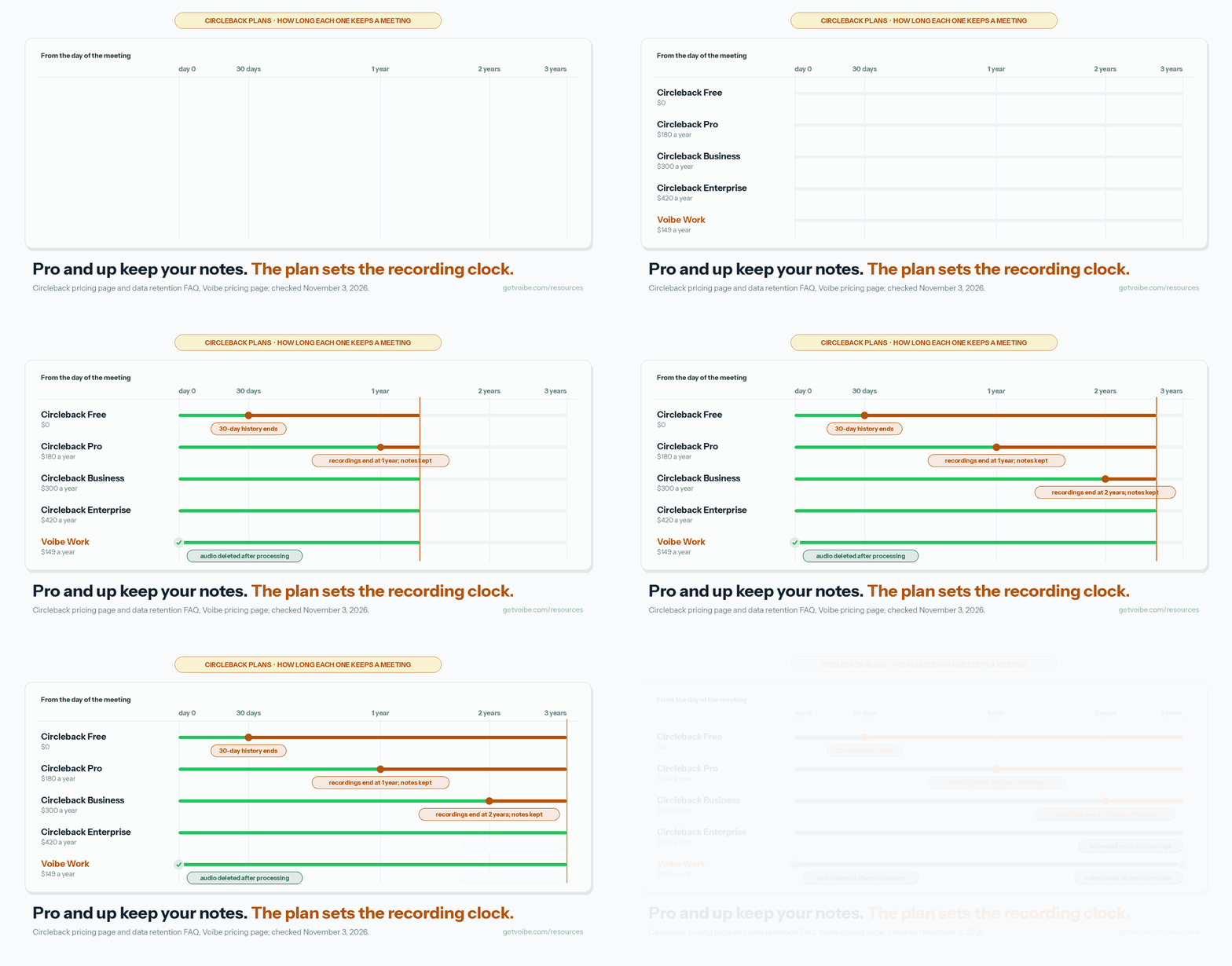
Recordings run on their own clock: 30 days on Free, 1 year on Pro and 2 years on Business. And if most of your team only reads notes, free viewers are a Business feature that Pro doesn't list.
Against Voibe Work
I work on Voibe, so I've priced every plan against our own meeting-notes plan, Voibe Work. At $149 a year it costs $31, or 17.2%, less than Circleback Pro billed annually ($180). Against Business annual ($300) it's $151 (50.3%) less.
Paid monthly, Circleback Pro comes out ahead: Voibe Work's $19 is $1 (5.6%) above Pro's $18. Circleback sells no dictation app, and Voibe Work includes one. If you write by voice too, Circleback Pro plus Wispr Flow Pro comes to $324 a year, and Voibe Work is $175 (54.0%) less.
Nothing beats Circleback Free at $0, because Voibe's own free plan covers dictation only. For a wider field, see Circleback alternatives or AI meeting note taker pricing.
How I checked
I've used Circleback on my own calls, and the verdicts here come from that. For the numbers I went through the pricing page on both billing toggles and its pricing file. I also read the Terms (effective April 7, 2026), the help center and the trust center.
Every price and rating was re-checked on November 3, 2026. I priced each plan per seat over 1, 3 and 5 years, for teams of 5 and 10, and with a dictation app added. Each percentage is the difference divided by the Circleback price.
Voibe Work's prices are from getvoibe.com/pricing. Otter, Fireflies, Fathom and Wispr Flow prices are from their own pricing pages, checked the same day.
Key Takeaways
| Circleback plan | Billed monthly | Billed annually | Meeting history | Recordings kept | Watch out for |
|---|---|---|---|---|---|
| Free | $0 | $0 | 30 days | 30 days | Limited automations; CRM integrations start on Pro |
| Pro | $18/mo ($216/yr) | $15/mo ($180/yr) | Unlimited | 1 year | No refunds; no free viewers listed |
| Business | $29/mo ($348/yr) | $25/mo ($300/yr) | Unlimited | 2 years | $120 a year more than Pro annual |
| Enterprise | Not offered | $35/mo ($420/yr), less per seat after 50 users | Unlimited | Unlimited | The only plan with a BAA; annual only |
| Voibe Work (for comparison) | $19/mo | $149/yr, or $399 lifetime | Unlimited meetings, up to 4 hours each | Audio deleted after processing; notes saved on your computer | No free plan for meeting notes (7-day trial, no card); no bot, no video |
Key Takeaway
Circleback Free costs $0 but shows only your last 30 days of meetings. Pro is $180 a year, Business $300 and Enterprise $420, and none of them refunds. Voibe Work is $149 a year.
How Much Is Circleback? The Four Plans
Circleback sells four plans. Every one of them, Free included, has unlimited meetings and comes with Circleback's API, MCP server and CLI. What changes as you pay more is how long it remembers, who can read your notes and how much an admin controls. These are US list prices per seat.
| Plan | Billed monthly | Billed annually | Per seat per year (annual) | Meeting history | Recording storage | Teams |
|---|---|---|---|---|---|---|
| Free | $0 | $0 | $0 | 30 days | 30 days | 2 |
| Pro | $18/seat/mo | $15/seat/mo | $180 | Unlimited | 1 year | 5 |
| Business | $29/seat/mo | $25/seat/mo | $300 | Unlimited | 2 years | Unlimited |
| Enterprise | Not offered | $35/seat/mo for the first 50 | $420 | Unlimited | Unlimited | Unlimited |
Annual or monthly?
The pricing page opens on yearly billing, which is why it shows $15, $25 and $35. A full year paid monthly costs $216 a seat on Pro and $348 on Business. Enterprise has no monthly option.
Annual billing saves $36 (16.7%) on Pro and $48 (13.8%) on Business.
Enterprise costs less per seat after 50 users
Enterprise is the only plan with volume pricing, and it works in bands:
- Users 1 to 50 pay $35 a month each.
- Users 51 to 100 pay $30 a month each.
- Users 101 to 250 pay $25 a month each.
- Users 251 to 1,000 pay $20 a month each.
- Users 1,001 to 5,000 pay $17.50 a month each.
- Users 5,001 and up pay $15 a month each.
Each rate covers only the users inside its band, per Circleback's pricing file, so your first 50 seats stay at $35. The pricing FAQ prices 50 users on annual billing at $9,000 a year on Pro, $15,000 on Business and $21,000 on Enterprise.
How Circleback records
Circleback leans on a bot. It joins Zoom, Google Meet, Microsoft Teams and Webex, and it can join from your Google or Outlook calendar. A desktop app for Mac and Windows records with no bot.
For in-person meetings there are iOS, Android and Apple Watch apps. You can also upload files up to 2 GB, such as MP3, MP4, WAV, M4A or MOV. The bot and the desktop app both record video by default, per Circleback's help center.
No dictation app in the lineup
Circleback's plans cover meetings, email drafts and automations. None of them includes dictation. If you also write by voice, you'll pay for a second tool, so I add one to the maths below.
Is Circleback Free? Yes, With a 30-Day Memory
Yes, Circleback Free costs $0, and it isn't a trial. Circleback's release note for its new plans (August 31, 2026) says so. On meetings, it's generous.
What Free includes
You get AI meeting notes and action items, Ask Circleback (its search across your meetings) and speaker-labeled transcripts. Meetings and members are unlimited, and you can record with a bot, the bot-free desktop app or the mobile and Apple Watch apps.
Automations are limited, but API, MCP and CLI access are all there, along with 2 teams.
The 30-day window
Free holds back on memory. It keeps 30 days of meeting and recording history, while Pro and up list unlimited meeting history. Circleback's help center doesn't say what happens to older meetings. A line in its app says Pro will "restore older meetings".
That suggests older meetings are hidden, not deleted, though I couldn't confirm it in the docs. Recordings are kept for your plan's recording storage, per the data retention FAQ. The Terms also let Circleback delete a Free account's data after a year without use.
Imports fall inside the same window
Free can import meetings from Fathom, Fireflies, Granola and Read AI, which makes it an easy place to land. Circleback's Fathom import page adds that Free covers 30 days of meeting history. Older imported meetings stay out of view until you upgrade.
How Free compares with Voibe
For meeting notes, Voibe offers a 7-day free trial of Voibe Work instead of a free plan. Every new account gets every feature for those 7 days, with no credit card.
Voibe Free ($0 forever) covers dictation, with 2,000 cloud words a week on one device. Voibe Work is $19 a month, $149 a year or $399 lifetime.
On a $0 budget, pick Circleback Free. Just export what you need before it passes 30 days.
What Pro, Business and Enterprise Add
Each step up adds one main thing. Pro gets you full history and every integration. Business adds admin control and free viewers, and Enterprise adds SSO, invoices and a BAA.
Pro: full history and all integrations ($180 a year)
Pro is $18 a month, or $15 a month billed annually. Circleback aims it at solo creators and independent professionals. You get unlimited meeting history and 1 year of recording storage.
Automations open up to every integration, such as Notion, HubSpot, Salesforce, Attio and webhooks. You also get custom AI insights, a custom name and image for the bot, and 5 teams. For a solo user who lives in a CRM, I'd start here.
Business: roles, viewers and retention ($300 a year)
Business is $29 a month, or $25 a month billed annually, and the pricing page marks it as the popular plan. It adds admin and member roles, unlimited free viewers, custom data retention and default settings an admin can enforce.
Recording storage doubles to 2 years, with a usage dashboard and unlimited teams. That costs $120 a year more than Pro annual, a 66.7% jump ($120 ÷ $180). I'd pay it when half your team only reads notes, and skip it when everyone records.
Enterprise: SSO, invoices and HIPAA ($420 a year)
Enterprise adds single sign-on (SAML or OIDC), SCIM provisioning, invoice and PO billing, unlimited recording storage and priority support. It's also where HIPAA support lives, through Circleback's standard BAA.
The plan is self-serve and billed annually only. It costs $120 a year more per seat than Business annual.
The same on every plan
Whatever you pay, you keep unlimited meetings, the bot-free desktop app, mobile and Apple Watch recording, and API, MCP and CLI access.
The Costs That Aren't on the Pricing Card
Circleback has no credit meter and no minute cap, which keeps the bill predictable. Its extra costs sit in the plan rules instead. I count seven.
1. No refunds once you pay
No money-back guarantee appears on the pricing page or in the help center. The Terms (effective April 7, 2026) make payments non-cancelable and non-refundable, apart from cases they list.
Cancelling stops the next renewal. It doesn't refund the time you've already paid for.
2. The trial length isn't published
Every paid card says "Start free trial", but Circleback doesn't say how long the trial lasts. The app text fills in a number of days at sign-up, and it isn't consistent about what comes next.
One version says your paid plan begins when the trial ends. Another says you move to the Free plan. Check the end date and card terms on screen before you start.
3. Recordings run on a clock
Recordings are kept for 30 days on Free, 1 year on Pro, 2 years on Business and without limit on Enterprise. Notes and transcripts work differently. Unless an admin sets retention, they aren't deleted on a schedule.
4. Free viewers start on Business
The pricing FAQ offers unlimited free viewers on Business and Enterprise. Pro doesn't list them, which matters if most of your team only reads.
5. CRM integrations start on Pro
Free has limited automations. HubSpot, Zapier and webhooks need Pro or higher, per Circleback's integration pages, so a sales team can't sync its CRM on Free.
6. A BAA costs $420 a seat a year
Circleback offers its BAA on Enterprise only, and its help center says custom BAAs aren't offered. For a clinic of 5, that's $2,100 a year.
Five Voibe Work seats cost $745, or $1,355 (64.5%) less, and Voibe has a BAA available on request.
7. Every recorder is a seat
For a team of 5 recorders on annual billing, the seats add up like this:
- Pro: 5 × $180 = $900 a year (monthly: 5 × $216 = $1,080)
- Business: 5 × $300 = $1,500 a year (monthly: 5 × $348 = $1,740)
- Voibe Work: 5 × $149 = $745 a year, which is $155 (17.2%) less than Pro and $755 (50.3%) less than Business.
One point goes to Circleback here. Business viewers are free, while on Voibe Work everyone who takes meeting notes needs a seat.
Where Your Meetings Live on Each Plan
Paying Circleback more changes how long your recordings stay. It doesn't change where your meetings live: Circleback's US cloud, on every plan.
| Question | Circleback Free | Circleback Pro | Circleback Business | Circleback Enterprise | Voibe Work |
|---|---|---|---|---|---|
| Does a bot join? | A bot joins Zoom, Meet, Teams and Webex calls if calendar joining is on. The desktop app records with no bot (Mac and Windows) | No bot (Mac and Windows) | |||
| Where meetings live | Circleback's cloud, hosted in the United States, per its privacy policy and trust center | On your computer, not Voibe's servers | |||
| Meeting history | 30 days | Unlimited | Unlimited, on your computer | ||
| Recordings kept | 30 days | 1 year | 2 years | Unlimited | Audio deleted as soon as processing completes |
| Custom retention | No | Yes, set by admins | You delete notes on your computer | ||
| Trains AI on your meetings? | No, per its security page and trust center | Never | |||
| Attestations | SOC 2 Type II and the EU-U.S. Data Privacy Framework | The same, plus Circleback's standard BAA | No certification claimed; BAA available on request | ||
| Consent tools | The bot posts a chat message that can't be turned off. No notice is documented for the desktop app | Reminds you to tell everyone you're taking notes | |||
The table draws on Circleback's privacy policy (effective July 15, 2024), Terms (April 7, 2026), trust center, pricing page, data retention FAQ and recording guides. Voibe's figures come from getvoibe.com/pricing.
Bot first, unless you switch it off
Circleback's desktop app can record any call without a bot, but its help center adds a condition. With joining preferences on, Circleback tries to join as a bot first. The desktop app records only if the bot can't get in.
If you never want a bot in the room, turn joining preferences off in Settings.
Consent is yours on both
When Circleback's bot joins, it posts a chat message that, per the help center, "cannot be disabled". Its docs show no consent reminder for desktop recording, and its DPA leaves notices and consents to the customer.
Voibe Work has no bot either, so the same duty lands on you. When you hit record, Voibe prompts you to let the call know you're taking notes, but knowing which consent law applies, and meeting it, stays your job. Our recording consent laws guide walks through them.
Is Circleback Worth It Over One, Three and Five Years?
I'd call Circleback Pro worth $180 a year if you want action items and automations that push to Notion, HubSpot, Salesforce or Linear. It also fits if you'll query meetings from Claude, ChatGPT or Cursor through its MCP server. A bot and Circleback's US cloud have to be fine for your calls.
Recording in-person meetings on a phone or an Apple Watch tips it further in Circleback's favour. Business earns its $300 once you need free viewers, admin roles or custom retention.
What users say
Circleback's mobile apps rate well. The iPhone app has 4.80 out of 5 on the App Store from 273 ratings. The Android app has 4.9 out of 5 on Google Play from 120 reviews, with 5K+ downloads.
Both scores rate the mobile apps, not the desktop app or the web app.
What each plan costs over 1, 3 and 5 years
| Plan | 1 year | 3 years | 5 years | vs Voibe Work lifetime ($399) |
|---|---|---|---|---|
| Circleback Free | $0 | $0 | $0 | Voibe Work costs $399 more |
| Circleback Pro (annual) | $180 | $540 | $900 | 3 years: $141 (26.1%) less. 5 years: $501 (55.7%) less |
| Circleback Pro (monthly) | $216 | $648 | $1,080 | 3 years: $249 (38.4%) less. 5 years: $681 (63.1%) less |
| Circleback Business (annual) | $300 | $900 | $1,500 | 3 years: $501 (55.7%) less. 5 years: $1,101 (73.4%) less |
| Circleback Pro (annual) + Wispr Flow Pro | $324 | $972 | $1,620 | 3 years: $573 (59.0%) less. 5 years: $1,221 (75.4%) less |
| Circleback Business (monthly) | $348 | $1,044 | $1,740 | 3 years: $645 (61.8%) less. 5 years: $1,341 (77.1%) less |
| Circleback Enterprise | $420 | $1,260 | $2,100 | 3 years: $861 (68.3%) less. 5 years: $1,701 (81.0%) less |
| Voibe Work (annual) | $149 | $447 | $745 | Lifetime is $48 less over 3 years and $346 less over 5 |
Circleback has no lifetime plan, so its cost climbs every year you stay. Voibe Work's $399 lifetime seat costs $219 more than Pro in year one ($399 against $180). It breaks even with Pro annual in about 2.2 years ($399 ÷ $180), and with Business annual in about 1.3 years ($399 ÷ $300).
On annual billing alone, Voibe Work saves $31 a year against Pro. That adds up to $93 over 3 years and $155 over 5.
Where Circleback is the better buy
- You need $0: Circleback Free has unlimited meetings, and Voibe's free plan covers dictation only.
- You want a bot to join calls for you: a no-bot tool records only from your own computer.
- You record on a phone or an Apple Watch: Voibe has no phone app.
- Your team works in HubSpot, Salesforce, Attio, Notion or Linear and wants notes pushed there.
- You want video recordings: Voibe Work records no video and deletes the audio after processing.
- You want an MCP server on a free plan: Circleback's is on every plan, and Voibe's Meeting MCP comes with Voibe Work.
- Most of your team only reads notes: those viewers are free on Business.
Circleback vs Otter, Fireflies and Fathom
Circleback Pro costs more than Otter Pro and Fireflies Pro, and a little less than Fathom Premium. These are each tool's cheapest paid plan, per seat.
| Tool and plan | Billed monthly | Per year (annual) | vs Circleback Pro ($180) | Free plan |
|---|---|---|---|---|
| Circleback Pro | $18 | $180 | Baseline | Unlimited meetings, 30 days of history |
| Otter Pro | $16.99 | $99.96 | $80.04 (44.5%) cheaper | 300 transcription minutes a month |
| Fireflies Pro | $18 | $120 | $60 (33.3%) cheaper | Limited AI summaries, 400 minutes of storage per team |
| Fathom Premium | $20 | $192 | $12 (6.7%) more | Unlimited recordings and transcriptions |
| Voibe Work | $19 | $149 | $31 (17.2%) cheaper | None for meetings; Voibe Free covers dictation |
Month to month the gaps shrink. Otter Pro is $1.01 (5.6%) cheaper than Circleback Pro. Fireflies Pro costs the same $18, and Fathom Premium costs $2 (11.1%) more.
Team plans side by side
Circleback Business costs $300 a seat a year. Otter Business is $239.88, or $60.12 (20.0%) cheaper. Fireflies Business is $228, or $72 (24.0%) cheaper.
Fathom Business matches Circleback at $300, with a 2-seat minimum. Fathom Team costs $180 a seat, also with a 2-seat minimum.
Add a dictation app
Otter, Fathom and Circleback sell no dictation app. Fireflies gives away Fireflies Talk, a free dictation app, per its homepage. Add Wispr Flow Pro to the others and the order changes:
- Circleback Pro + Wispr Flow Pro comes to $324 a year. Voibe Work is $175 (54.0%) less.
- Otter Pro + Wispr Flow Pro comes to $243.96. Voibe Work is $94.96 (38.9%) less.
- Fathom Premium + Wispr Flow Pro comes to $336. Voibe Work is $187 (55.7%) less.
- Fireflies Pro needs no second app, at $120. Voibe Work costs $29 (24.2%) more.
Otter's promo
Otter's pricing page showed a 50% discount on the day I checked. Pro annual dropped from $8.33 to $4.17 a month. The table uses list prices, since promos come and go.
Plan-by-plan detail lives in our Otter, Fireflies and Fathom pricing breakdowns.
Discounts: Half Off for Students, No Lifetime Deal
Circleback gives students 50% off and nonprofits 30% off, according to its pricing FAQ. Students sign up with a school email or send support proof they're a student. Nonprofits sign up with their nonprofit email, then contact support.
Startups get a program through partner VCs and accelerators, with no published rate. Referrals give you and the person you refer a free month each. Annual billing takes 16.7% off Pro and 13.8% off Business, and there's no lifetime deal or promo code on the pricing page.
What the discounts do to the maths
At 50% off, Pro would be $90 a year, if the discount applies to annual billing. Voibe Work would then cost 65.6% more ($149 against $90). At 30% off, Pro is $126 a year and Voibe Work is $23 (18.3%) more.
Business at 30% off comes to $210 a year, where Voibe Work is $61 (29.0%) less. Circleback doesn't say whether either discount stacks with annual billing, so ask support first.
How Voibe handles it
Voibe has no student or education discount, so a student is better off with Circleback's 50%. Voibe offers 7 days of every feature instead, with no credit card and no automatic charge, and a 30-day money-back guarantee on paid plans.
There's also a $399 lifetime option, which the pricing page marks as limited time. Nonprofits can compare published discounts in our AI note takers for nonprofits.
Cancelling, Refunds and Getting Your Meetings Out
Circleback doesn't refund a normal cancellation. To cancel, go to Settings, then Billing, then View all plans, and downgrade to Free. Plan changes are prorated, and leftover balance becomes a credit on future invoices.
Only two refund cases are documented. Join a workspace that pays for you, and your own plan is cancelled and refunded. The Terms also refund unused prepaid fees if you end the contract over Circleback's uncured breach.
What happens to your meetings when you downgrade
The Terms move a cancelled plan to a free version for viewing existing data. Today it's the Free plan, with 30 days of meeting and recording history. An unused Free account can be deleted after a year, per the Terms.
Deleted meetings sit in Recently deleted for 30 days. Then they're gone for good.
Export before you go
Go to Settings, then Account, then Export. You'll get notes, action items, insights, transcripts and recording download links. A single recording downloads from the meeting's Transcript tab, and the API, MCP server and CLI work on every plan.
Circleback doesn't name the export's file format, and no PDF export appears in its help center.
Try a month before a year
Start on Free. If you outgrow it, pay $18 for one month of Pro. That month costs $3 more than a month on annual billing, and I'd pay it before locking $180 into a year with no refunds.
Circleback vs Voibe Work
On annual billing, Voibe Work costs less than every paid Circleback plan. It's $149 a year against $180 for Circleback Pro, a $31 (17.2%) saving. Circleback Free costs less than both, at $0.
| Circleback setup | Per year | Voibe Work ($149) is |
|---|---|---|
| Pro, annual | $180 | $31 (17.2%) less |
| Pro, monthly × 12 | $216 | $67 (31.0%) less |
| Pro annual + Wispr Flow Pro | $324 | $175 (54.0%) less |
| Business, annual | $300 | $151 (50.3%) less |
| Business, monthly × 12 | $348 | $199 (57.2%) less |
| Business annual + Wispr Flow Pro | $444 | $295 (66.4%) less |
| Enterprise | $420 | $271 (64.5%) less |
| 10 seats on Pro, annual | $1,800 | Ten Voibe Work seats ($1,490): $310 (17.2%) less |
| 10 seats on Business, annual | $3,000 | Ten Voibe Work seats ($1,490): $1,510 (50.3%) less |
The headline row's maths: $180 − $149 = $31, and $31 ÷ $180 = 17.2%.
Month to month
Voibe Work is $19 a month. Against Circleback Pro at $18 it costs $1 (5.6%) more. Against Circleback Business at $29, it costs $10 (34.5%) less.
The dictation bundle
Circleback covers meetings, not dictation, so writing by voice means a second app. On annual billing, Wispr Flow Pro adds $144 to Pro's $180, which is the $324 row in the table. Monthly, Pro ($18) plus Wispr Flow Pro ($15) is $33, and Voibe Work's $19 is $14 (42.4%) less.
Voibe Work includes Voibe Dictation on Mac and Windows. Wispr Flow now has a bot-free notetaker too, which I cover in Wispr Flow Notetaker vs Voibe Work.
Both come with an MCP server
Circleback's MCP server is on every plan, Free included. Its switch page says agents can read transcripts and update notes and action items. Voibe Work's Meeting MCP lets you ask ChatGPT and Claude about all your meetings.
Meeting MCP comes with Voibe Work and the 7-day trial, not Voibe Free. You turn it on from the Meetings page, and one switch stops every AI app at once.
The panel spells out where your data goes: "What an app reads goes to the company behind its AI, for example Anthropic for Claude. None of it goes through Voibe's servers."
What Voibe Work includes
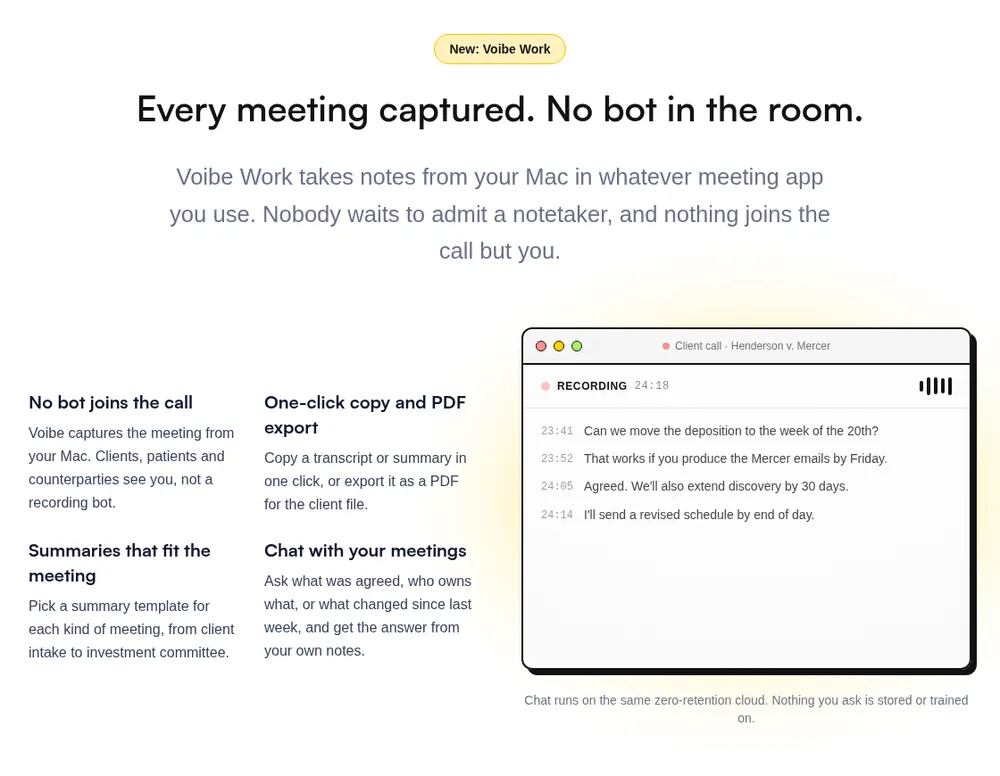
Voibe Work has no bot. It captures meetings from your Mac or Windows PC in Zoom, Microsoft Teams, Google Meet, Webex, Slack huddles or any other meeting app. It also records in-person meetings through your Mac or PC's mic.
The audio goes to open-source models on zero-retention cloud providers and is deleted once they finish. The transcript and summary are saved on your computer, not Voibe's servers, and never train AI.
Each transcript line gets a speaker label and a time, and renaming a speaker updates the summary. You also get templates for each type of meeting, your own custom templates, chat with your meetings, and one-click copy and PDF export.
Meetings are unlimited, each up to 4 hours, and Voibe Dictation is included. Meeting notes need an internet connection. Voibe nudges you to tell the room when a recording starts. As with Circleback's desktop app, the consent rules are yours to follow (see the recording consent laws guide).
What Voibe Work doesn't have
Circleback has a free plan for meeting notes, a bot that can join calls for you, and video recording with meeting clips. It has iOS, Android and Apple Watch apps. Voibe Work has none of these.
Circleback also runs automations into HubSpot, Salesforce, Notion and Linear, with free viewers on Business and SSO and SCIM on Enterprise. If those matter more than where your notes live, pick Circleback.
More on Voibe Work
- Launch details: Voibe Work: meeting notes with no bot
- The 4-hour and Windows update: our October update
- The bot-free field, ranked: best no-bot meeting note takers
Which Circleback Plan Should You Pick?
Work through these four questions in order, and stop at the first plan that fits.
1. Is 30 days of meeting history enough?
- Yes → Circleback Free ($0). Export anything you need before it passes 30 days.
- No, I need every meeting → go on to question 2.
2. Do you need free viewers, admin roles or custom retention?
- No → Circleback Pro ($180 a year, or $18 a month). Try a month first, since there are no refunds.
- Yes, at least one of those → go on to question 3.
3. Do you need SSO, SCIM, invoices or a BAA?
- No → Circleback Business ($300 a seat a year, or $29 a month).
- Yes → Circleback Enterprise ($420 a seat a year, annual only).
4. Should a bot or a vendor cloud be anywhere near these calls?
- Fine either way → stay with the Circleback plan you landed on above.
- No bot, and notes kept off vendor servers → Voibe Work ($149 a year, $19 a month or $399 lifetime, Mac and Windows). Voibe reminds you to tell people you're taking notes; checking the consent rules is still up to you.
- No bot, but free → Circleback Free's desktop app with joining preferences off. Your notes still live in Circleback's cloud.
Cheat sheet
| Your situation | Pick | Cost per year |
|---|---|---|
| A few meetings, 30 days of history is fine | Circleback Free | $0 |
| Solo, regular calls, happy with a bot or the desktop app | Circleback Pro | $180 |
| Sales team pushing notes to HubSpot or Salesforce | Circleback Pro | $180 a seat |
| Team where most people only read notes | Circleback Business | $300 a seat |
| Clinic or health team that needs a BAA | Circleback Enterprise, or Voibe Work (BAA available on request) | $420 a seat, or $149 |
| Student on a budget | Circleback Pro with 50% off | $90, if it applies to annual billing |
| Confidential client calls, notes on your own computer | Voibe Work | $149, or $399 lifetime |
| Meetings plus daily dictation | Voibe Work | $149 (vs $324 for Circleback Pro + Wispr Flow Pro) |
Key Takeaway
Stay on Free if 30 days of history is enough, and take Pro ($180/yr) to keep every meeting. Business ($300/yr) adds free viewers and Enterprise ($420/yr) a BAA. For no bot, Voibe Work is $149/yr.
Circleback Pricing FAQ
Short answers on plans, the free tier, refunds, imports and privacy, grouped by theme.
Plans and prices
How much is Circleback per month?
Per seat, Free is $0. Pro is $18 a month, or $15 a month billed annually ($180 a year). Business is $29 a month, or $25 a month billed annually ($300 a year). Enterprise is $35 a month, billed annually only ($420 a year).
How much is Circleback for a team?
On annual billing, 5 Pro seats cost $900 a year and 5 Business seats cost $1,500. Circleback's FAQ prices 50 users at $9,000 on Pro, $15,000 on Business and $21,000 on Enterprise. Five Voibe Work seats cost $745.
Is Circleback cheaper than Otter, Fireflies or Fathom?
Of the three, it's cheaper only than Fathom. Circleback Pro is $180 a year billed annually. Otter Pro is $99.96, or $80.04 (44.5%) cheaper. Fireflies Pro is $120, or $60 (33.3%) cheaper. Fathom Premium is $192, so Circleback is $12 cheaper.
Free plan, trial and refunds
Is Circleback free?
Yes. Circleback Free costs $0 and isn't a trial. It has unlimited meetings, 30 days of history and limited automations, and CRM integrations start on Pro.
What happens to meetings older than 30 days on Circleback Free?
Circleback's help center doesn't say. A line in its app says upgrading to Pro will restore older meetings, which suggests they're hidden, not deleted. Export anything you need before it passes 30 days.
How long is Circleback's free trial?
Circleback doesn't publish the length. Every paid plan offers a free trial, and the app fills in the days at sign-up. Check whether it ends on Free or on a paid plan.
Does Circleback offer refunds?
Not on a normal cancellation. The Terms (effective April 7, 2026) make payments non-cancelable and non-refundable, apart from listed cases. Try a month of Pro at $18 before paying $180 for a year.
Does Circleback have a student or nonprofit discount?
Yes. Students get 50% off with a school email, and nonprofits get 30% off through support. Voibe has no student or education discount.
Imports, privacy and alternatives
Can I import my Fathom meetings into Circleback?
Yes, on every plan, Free included. Go to Settings, then Import, and connect Fathom. Notes, transcripts, attendees, action items and available recordings come over, but Free shows only 30 days of history.
Does Circleback train AI on my meetings?
No, per its security page and trust center. Meetings are stored in the United States. They're kept until you delete them, unless an admin on Business or Enterprise sets retention.
Is Circleback cheaper than Voibe Work?
Circleback Free is, and so is Pro month to month, by $1. On annual billing, Voibe Work ($149) is $31 (17.2%) less than Pro ($180). It's $151 (50.3%) less than Business annual. For more options, see Circleback alternatives.
Is Circleback's Pricing Fair?
Circleback's prices are fair for what it does. Pro at $180 a year adds full history and every integration. Its MCP server and API come with every plan, Free included, and its trust center rules out training on your meetings.
Where the costs hide
There are no refunds on a normal cancellation, so an annual plan is a year's commitment. Free shows only 30 days of meetings. Recordings expire after 1 year on Pro and 2 years on Business, and the BAA needs Enterprise at $420 a seat a year.
The bot also joins first when calendar joining is on, and your meetings live in Circleback's US cloud.
When I'd pick Voibe Work instead
If the bot or the cloud worries you, I'd pick Voibe Work. It's $149 a year, $31 (17.2%) less than Circleback Pro, with dictation included.
No bot joins your calls, and your notes are saved on your computer. The 7-day trial covers every feature on Mac and Windows, with no credit card and no automatic charge. It reminds you to tell people you're taking notes, though following the consent rules is on you.
Try Voibe Work free for 7 days →
Switching from Circleback
If you already pay for Circleback, cancel it and email the cancellation confirmation to hi@getvoibe.com. Voibe's switch offer then gives you Voibe Work free for the time left on your Circleback plan, plus a bonus month, up to 12 months in total.
Tip
Try Circleback Free, then a month of Pro, before paying for a year. Fees are non-refundable. For no bot, try Voibe Work for 7 days.