

How to Take Notes on Diligence Calls: The Quick Answer
A diligence call is where a deal leaks. The target's CFO explains working capital, an expert describes a competitor's pricing, a customer says why they almost left. All of it lands in somebody's notes, and every copy of those notes is a place the deal can escape.
To take notes on diligence calls safely, decide the rules before the call and capture it without a bot. Then file one reviewed write-up where only the deal team can see it. The process fits in five steps:
- Read the NDA and any clean-team agreement before the call, and check what they say about who may receive the information.
- Set the ground rules: one notetaker, a code name for the deal, and consent from everyone on the call, including UK and EU counterparties.
- Use a diligence template that ties every question to the request list and separates answers, red flags and follow-ups.
- Capture by hand or with Voibe Work, which records from your own computer with no bot joining the counterparty's call.
- File one write-up in the deal folder, keep Meeting MCP off, and share it only with people who need it.
Expert-network calls add a layer: your compliance policy and the network's terms come before any of the steps above.
Key takeaways
| Stage | Do this | Why |
|---|---|---|
| Before the call | Check the NDA and clean-team rules, agree what may be recorded, pick one notetaker and a code name | The agreements decide who may hold the information, so they decide what your notes may hold |
| During the call | Log each question against its request-list ID, with the answer, its source, red flags and follow-ups | Notes keyed to the request list feed straight into the diligence tracker |
| Capture | By hand, or Voibe Work with your own diligence template | No bot appears in the counterparty's call, and Voibe Work saves the notes on your computer |
| After the call | Write up the same day, file in the deal folder, keep Meeting MCP off, share on a need-to-know basis | Every extra copy is one more place your compliance team has to account for |
| Expert-network calls | Pre-clear with compliance and follow the network's terms | SEC examiners have flagged advisers that didn't log expert calls or review the notes |
Whichever way you take notes, tell everyone at the start. Voibe Work reminds you to tell everyone you're taking notes, and following the recording-consent rules is your responsibility. Our state-by-state guide to AI notetaker consent laws covers who has to agree.
Key Takeaway
Take diligence call notes with one notetaker, a code name and a template keyed to the request list. Capture by hand or with Voibe Work so no bot joins the counterparty's call, then file one write-up in the deal folder with Meeting MCP off.
Where a Diligence Call Note Can End Up
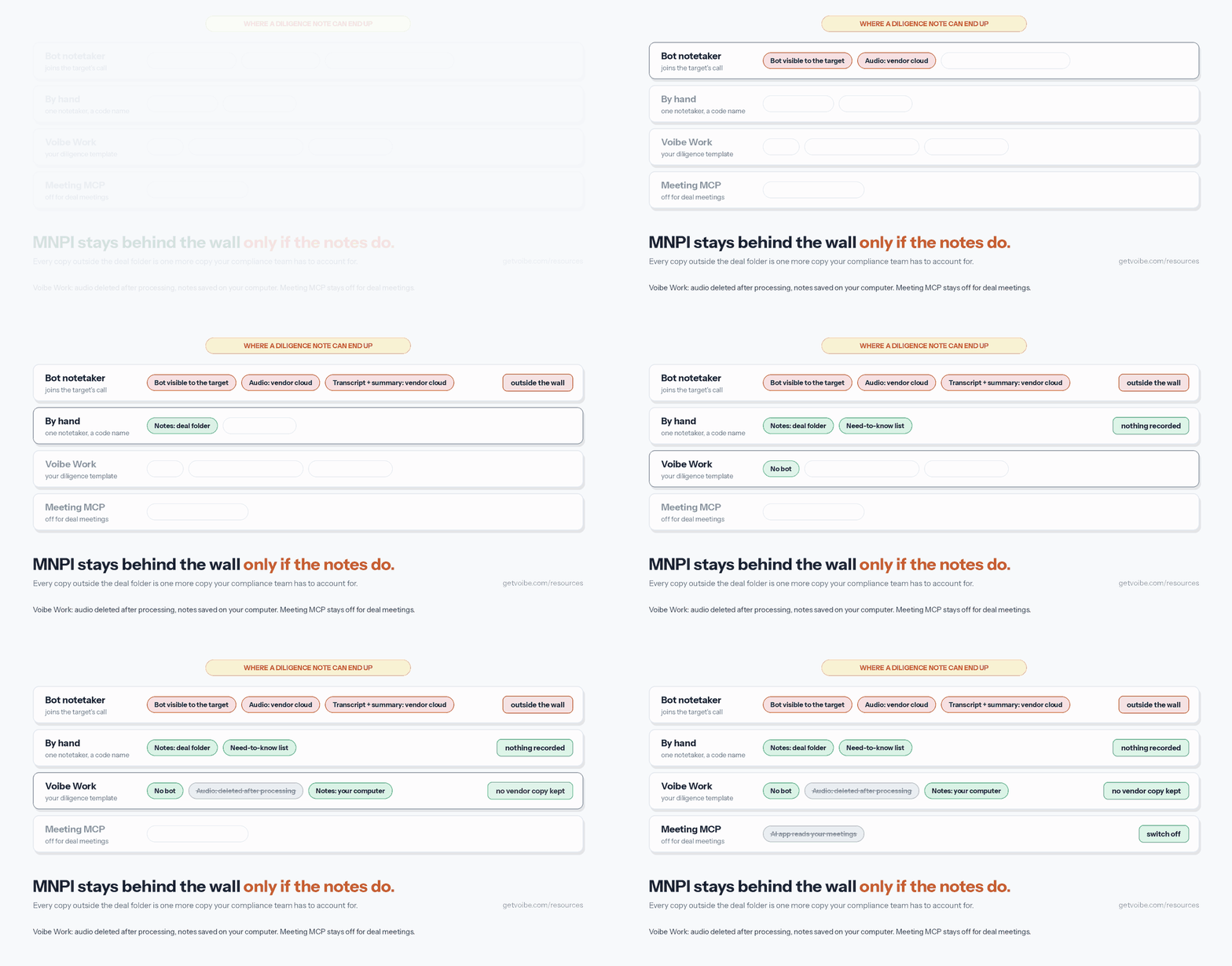
A diligence note can carry material, nonpublic information about a listed buyer, a listed target or a portfolio company. Securities law already expects firms to control where that information goes.
- Broker-dealers must keep written policies reasonably designed to prevent the misuse of material, nonpublic information (Exchange Act Section 15(g)).
- Investment advisers, registered or not, carry the same duty under Advisers Act Section 204A.
Your firm's information barrier decides who may see a deal. Each copy of a note is a new place that information lives. Four kinds of copy show up after most calls:
- A bot in the counterparty's call. The target's team sees a notetaker join, and a tool vendor is now part of the conversation.
- Audio and transcripts in a vendor's cloud. They stay there for as long as the vendor's plan keeps them.
- A summary emailed or shared by link. It can reach people outside the deal team with one forward.
- An AI app that reads your meetings. Whatever it reads goes to the company behind that AI.
Deals between competitors add an antitrust layer. The FTC's Bureau of Competition advises parties to share the least amount of information needed for effective due diligence. It also says clean teams should not include anyone responsible for competitive planning, pricing or strategy. Notes that record a customer's price fall under those same limits.
Those points come from the FTC staff post Avoiding antitrust pitfalls during pre-merger negotiations and due diligence, published March 20, 2018. It also tells recipients to follow the destruction terms in their confidentiality and clean-team agreements once bidding ends. Your notes count as documents.
Before the Call: Set the Rules for the Notes
Most mistakes in diligence notes are decided before anyone dials in. Fifteen minutes of setup covers the rules, the template and the consent line.
Step 1: Read the NDA and the clean-team agreement
- Check who the NDA lets receive confidential information: employees, advisers, financing sources, and whether a software vendor could count. Deal counsel decides that question, not the notetaker.
- Check whether a clean-team agreement applies. If it does, only clean-team members take notes on competitively sensitive topics. Their reports leave the team only in the blinded, aggregated form the agreement allows.
- Note any destruction or return obligations, so the notes have a planned end date.
Step 2: Agree what can be recorded
- Ask the sell-side banker or counsel whether recording or AI notes are allowed on management calls. Some processes ban them.
- For expert-network calls, check your compliance policy and the network's terms. Either can bar recording.
- If anyone says no, the call is by hand. Plan for that rather than arguing it on the call.
Step 3: Get consent, including from UK and EU counterparties
Federal US law allows recording when one party consents. States such as California, Florida, Maryland, Massachusetts, New Hampshire and Pennsylvania require everyone's consent. Deal calls cross state lines constantly, so follow the strictest rule that applies.
In the UK, the ICO says people have the right to be informed about how their personal data is used (ICO guidance). GDPR Article 13 sets the same duty in the EU. Say what you're recording, why, and how long you'll keep it. A line like this works:
Before we start, I'm taking AI-assisted notes for our deal file. No bot is joining. The audio is deleted after processing, and the notes stay on my computer. Is everyone comfortable with that?
Adjust the second half to what your tool does, and log the answer wherever your firm records consent.
Step 4: Use a code name and pick one notetaker
- Use the deal's code name in every file name, note title and template header. A misplaced page then identifies nobody.
- Name one notetaker per call. Two people taking overlapping notes means two copies to secure and two versions to reconcile.
- Load the request list and open questions into the template first. The notetaker then logs answers instead of rewriting questions.
During the Call: Use a Diligence Notes Template
A diligence call isn't a conversation to summarize. It's a set of answers to questions you already wrote down. Build the notes around the request list, not around who said what.
The copy-paste diligence template
PROJECT [CODE NAME] · DILIGENCE CALL NOTES · CONFIDENTIAL

Call:          [management / expert / customer reference / data-room Q&A]
Date:          [date]
Attendees:     [by role only: buy-side VP, target CFO, sell-side banker]
Ground rules:  Recording allowed? [yes/no]  Clean team only? [yes/no]
Consent:       [given at start by: ...]

QUESTION LOG
Request ID | Question | Answer (your words) | Source (said on call / doc ref)
4.2        | Customer concentration | ... | Said on call

RED FLAGS
- Anything that contradicts the data room or an earlier answer

FOLLOW-UPS AND DATA-ROOM REQUESTS
- Request | Owner | Due date | Request ID

NEXT STEPS AND OWNERS
- Who does what, by when

LEAVE OUT
- Customer names and customer pricing (clean team only)
- Personal data that no decision depends on

DISTRIBUTION: [need-to-know list]
The example row uses request 4.2, customer concentration. Swap in your own request-list numbering.
How to fill it in during the call
- Log answers against request IDs. When management answers a question from the list, write the ID first, then the answer in your own words.
- Record the source of every answer. Mark whether it was said on the call or points to a document. A verbal claim and a data-room file carry different weight.
- Quote exact words only for numbers and commitments. A figure, a date or a promise to send something is worth quoting. Everything else is paraphrase.
- Put red flags in their own section. An answer that contradicts the data room shouldn't be buried in the middle of the log.
- Turn every promise into a follow-up. Each request gets an owner, a due date and the ID it answers.
The leave-out section does real work on deals between competitors. Say customer pricing comes up and you aren't on the clean team. Write that the topic was raised, not what was said.
Capture the Call by Hand or With Voibe Work
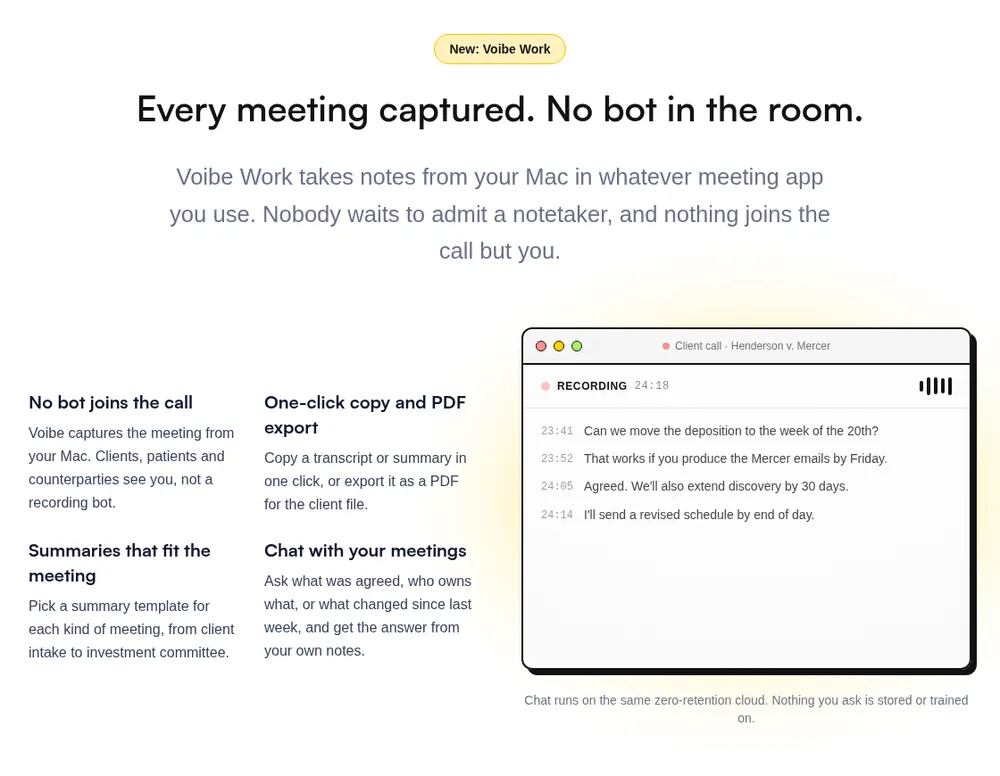
There are two good ways to capture a diligence call, and neither puts a bot in the counterparty's meeting. A visible bot tells the target's team that a tool vendor is now in the room. Some organizations block notetaker bots outright.
Option 1: By hand
Manual notes record nothing you didn't choose to write down. They're the right choice when the NDA, the clean-team agreement, the network's terms or the counterparty rules out recording.
- Type into the template in a local document, not a shared cloud doc that syncs to every device you own.
- Keep to the question log and the follow-ups. You'll miss exact wording, so quote only figures and commitments.
- Straight after the call, speak the recap into the document with Voibe's dictation. On an Apple Silicon Mac, on-device mode runs Whisper on the Neural Engine with no internet, and nothing leaves the Mac. On Windows and Intel Macs, dictation uses Voibe's zero-retention cloud.
Add the deal's code name and the target's jargon to Voibe's Dictionary once. Dictation spells them correctly from then on.
Option 2: Voibe Work with your own diligence template
Voibe Work is the meeting-notes plan we build. It captures the call from your Mac or Windows PC in Zoom, Microsoft Teams, Google Meet, Webex or any other meeting app. No bot joins the call. For a management presentation in a conference room, it records through your computer's microphone under the same rules.
Meeting audio is processed by open-source models on zero-retention cloud providers and deleted as soon as processing completes. The transcript and summary are saved on your computer, not on Voibe's servers, and never used to train AI. Meeting notes need an internet connection, since that processing runs in the cloud.
- Start the notes. When the call starts, Voibe offers to take notes. Accept, and say the consent line out loud, since Voibe reminds you to tell everyone.
- Use a diligence template. Voibe Work summarizes each meeting with a template for its type, and you can create your own. Give your diligence template the sections of the copy-paste version above. That means call and ground rules, the question log, red flags, follow-ups, owners and a leave-out list.
- Check the speakers. The transcript labels each speaker and puts a time next to every line. Rename a speaker, such as the target's CFO, and the summary updates.
- Ask follow-up questions. Chat with your meetings answers questions like what the CFO said about working capital. It runs on the same zero-retention cloud, and nothing you ask is stored.
- Export. Copy the summary in one click or export a PDF for the deal folder.
A template shapes the summary, not the transcript. If something sensitive was said, the transcript still holds it. Store the transcript with the same care as the summary.
One meeting can run up to 4 hours, which covers a long management presentation. Voibe Work costs $19 a month, $149 a year or $399 once. One seat covers Mac and Windows, with dictation included. More on why it has no bot is in the Voibe Work launch post.
See Voibe Work in action
Take your next diligence call without a bot
Start free on Mac or Windows. You get 7 days of every Voibe Work feature, including custom templates, with no credit card.
After the Call: Write Up, File and Limit Distribution
The write-up is the record the deal team will use, so it gets the care the raw notes don't. Do it the same day, while the call is still fresh.
Step 1: Write the structured write-up
- Start from the template, or from the Voibe Work summary, and check every answer against the transcript or your notes.
- Update the request list: mark each question answered, partly answered or open.
- Lift red flags into the deal team's issues list with an owner for each.
Step 2: File it in the deal folder
- Save the write-up as a PDF in the deal folder your firm controls, under the code name.
- Delete scratch copies: drafts on your desktop, notes in a personal app, anything outside the folder.
- Keep the NDA's destruction terms in mind, so the folder can be cleared when they require it.
Step 3: Keep Meeting MCP off for deal meetings
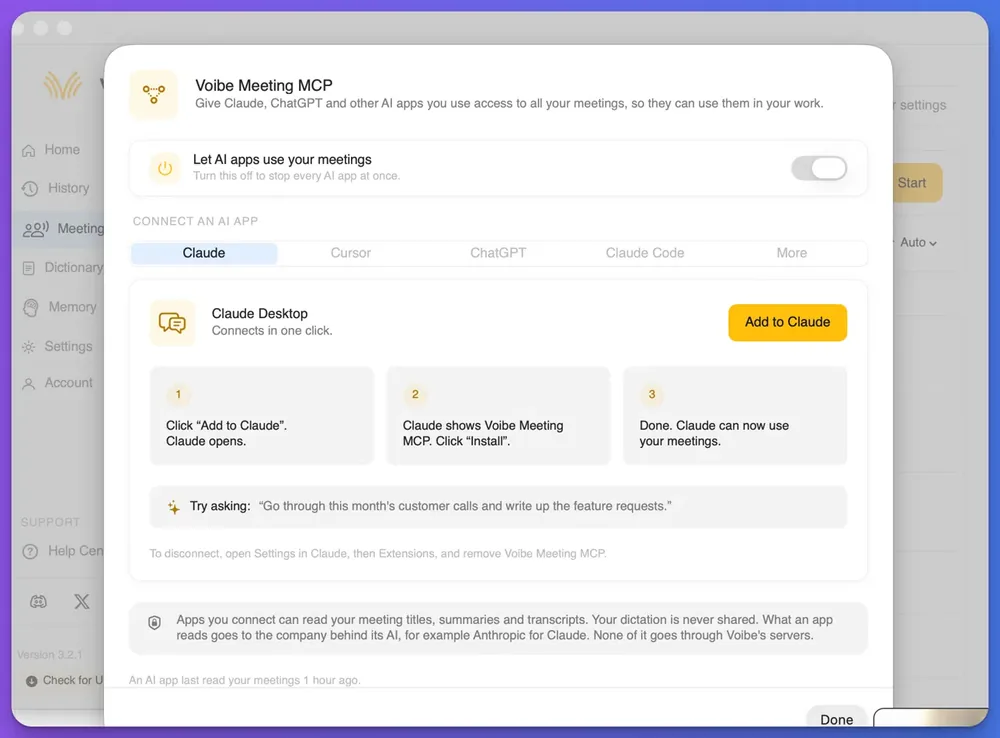
Voibe Meeting MCP lets AI apps such as Claude and ChatGPT read your Voibe Work meeting titles, summaries and transcripts. What an app reads goes to the company behind its AI, for example Anthropic for Claude.
None of it goes through Voibe's servers. Once an AI app has read a meeting, though, that text is under the AI company's terms.
- The panel's switch, Let AI apps use your meetings, stops every AI app at once.
- Voibe doesn't document a way to share some meetings and hold back others. Keep the switch off on any computer that holds deal meetings, unless compliance has approved the AI app.
- For questions about one call, use in-app chat with your meetings instead.
The panel and its privacy wording are covered in the Voibe Meeting MCP launch post.
Step 4: Share on a need-to-know basis
- Send a link to the file in the deal folder rather than an attachment, so access follows the folder's permissions.
- Send it only to the deal's distribution list. Leave the target's name out of the subject line.
- Never forward a raw transcript when the write-up will do.
Expert-Network Calls: Compliance Rules Come First
Expert-network calls are where diligence notes meet insider-trading risk most directly. An expert may work at, or recently have left, a company in the sector you're investing in. Your firm's written MNPI policies and the network's terms decide how the call runs. Your notes have to fit both.
What the SEC's examiners have flagged
On April 26, 2022, the SEC's Division of Examinations published a risk alert, Investment Adviser MNPI Compliance Issues. It lists deficiencies staff had seen under Section 204A. Some advisers did not appear to have, or to implement, adequate policies on calls with expert network consultants who may have MNPI, including:
- tracking and logging calls with expert network consultants;
- reviewing detailed notes from expert network calls; and
- reviewing staff trading in public companies in industries similar to those discussed on the calls.
The alert states the staff's views and is not a rule. It still tells you what an examiner may ask for, and detailed call notes are on that list. Write expert-call notes so a compliance reviewer can read them.
What a network's own terms say
Networks publish their own controls. On its compliance page, GLG says its experts agree they will not provide confidential information, including material non-public information, to clients. Employed experts are barred from projects about their own employer. Experts must also answer a client's custom screening questions before a consultation.
How to take notes on an expert call
- Pre-clear the expert and the topics with compliance before the call, as your policy requires.
- Check whether you may record. If your policy or the network's terms bar it, take notes by hand. If compliance chaperones the call, follow its instructions on notes.
- Log the call in the template: expert by role, network, topics cleared, and who was on the line.
- Stop if the expert drifts toward information they shouldn't share, such as their current employer's results. Leave it out of the notes and follow your firm's escalation procedure.
- Keep expert notes where compliance can review them, filed the same way as other deal notes.
None of this is legal advice. Your chief compliance officer and counsel decide how your firm handles expert calls.
Warning
If an expert call strays into material non-public information, stop the topic, keep it out of the notes, and follow your firm's written procedure. The firm's policy decides what happens next, not the notetaker.
Broker-Dealer and Adviser Recordkeeping for Diligence Notes
Diligence notes can also be business records. Broker-dealers keep business communications under SEC Rule 17a-4 and FINRA Rule 4511, and advisers keep advice-related communications under Rule 204-2. Whether a raw AI transcript or summary counts as a required record is a question for your chief compliance officer.
Voibe Work saves notes on your computer and holds no copy, so your archive holds nothing until you file the reviewed note. If your firm must capture every meeting automatically, a tool that feeds your archive fits better.
The rules and retention periods are in the recordkeeping section of our finance notetaker ranking. It also shows which tools archive automatically.
Which Method Fits Which Diligence Call
Work through four questions in order, and the method picks itself.
- Do the NDA, clean-team agreement or network terms bar recording? If yes, take notes by hand.
- Is it an expert-network call? If yes, clear it with compliance first, then use whatever method the policy allows.
- Did everyone on the call agree to AI notes? If not, take notes by hand. If they did, use Voibe Work with your diligence template.
- Must every meeting reach the archive automatically? If yes, use a capture tool your firm archives. If not, export the PDF to the deal folder.
Diligence call cheat sheet
| Call type | Method | Why |
|---|---|---|
| Management call on video | Voibe Work with your diligence template, Meeting MCP off | No bot in the target's call; notes saved on your computer, then filed as a PDF |
| Management presentation in a conference room | Voibe Work through the laptop microphone, or by hand | Same processing and deletion rules as a call; tell everyone in the room |
| Expert-network call | Whatever your compliance policy allows; by hand if recording is barred | Examiners have flagged advisers that didn't log calls or review the notes |
| Customer reference call | By hand, or Voibe Work if everyone agrees; clean-team rules for customer data | The FTC advises limiting customer-specific information to clean teams |
| Data-room Q&A session | Voibe Work, with the question log keyed to request IDs | Each answer maps back to the request list |
| Clean-team session on pricing or customers | By hand, by a clean-team member, as the agreement says | Reports leave the team only blinded and aggregated |
| Process where the sell side bans AI notes | By hand, with the recap dictated afterwards | Nothing about the call is recorded |
| Internal deal-team call | Voibe Work, Meeting MCP still off | The notes hold the same deal information as the external calls |
For the general version of this decision outside deal work, see how to take confidential meeting notes.
Tips for Better Diligence Call Notes
These habits apply whichever capture method you use.
- Prepare the question log before the call. A notetaker who only fills in answers keeps up far better than one rewriting questions.
- Separate what was said from what was shown. A verbal answer is a lead, and the document in the data room is the evidence.
- Never put the code name and the real name in the same file. The code name only protects the deal if the mapping lives somewhere else.
- Leave personal data out. Employee names, salaries and health details rarely belong in a call note unless a decision depends on them.
- Read every AI summary against the transcript. A summary can drop a qualifier like "subject to audit", and that qualifier can change the answer.
- File the same day and delete the scratch copies. A clean deal folder is easier to clear when the NDA's destruction terms apply.
The fifth habit is the one teams skip under deadline. A partner reading the write-up assumes someone checked it, so make sure someone did.
Tip
Build the leave-out list into your Voibe Work diligence template once, so every summary follows it without anyone remembering.
Why Your Diligence Notes Setup Isn't Working and How to Fix It
The counterparty asks whether you're recording. What do I say?
Say exactly what your tool does. With Voibe Work, no bot joins, the audio is deleted after processing, and the notes are saved on your computer. If anyone objects, switch to notes by hand and say so on the call.
The sell-side banker banned AI notetakers on management calls
Take notes by hand with the template, then dictate the recap straight after the call. On an Apple Silicon Mac, Voibe's on-device mode keeps that dictation on the Mac with no internet.
An expert started sharing something that sounds like MNPI
Stop the topic, leave it out of the notes, and follow your firm's written MNPI procedure. GLG's terms ask experts to end a project that moves into subjects they can't discuss. What happens next is your compliance team's decision.
Voibe Work didn't produce notes for a call I took on a plane
Voibe Work meeting notes need an internet connection, because the audio is processed in Voibe's zero-retention cloud. On-device mode covers dictation only. Without a connection, take notes by hand.
The transcript shows Speaker 1 and Speaker 2 instead of names
Voibe Work doesn't pull names from the meeting invite. Click a speaker's name in the transcript, rename them by role, and the summary updates to match.
Tools That Make Diligence Call Notes Easier
For deal teams, the shortlist comes down to where each tool keeps the notes and how they reach your archive. Prices are per seat per year, from vendor pages checked in October 2026 for our ranking of AI meeting note takers for finance.
| Tool | Bot in the call? | Where the notes live | Per seat per year |
|---|---|---|---|
| Voibe Work (ours) | No | On your computer; audio deleted after processing | $149 ($19/mo; $399 once) |
| Rogo Notes (formerly Arvo) | No | Rogo's cloud, per your retention setting; built for SEC archiving | No public price (demo) |
| Microsoft 365 Copilot | No third-party bot; Teams records | Your Microsoft 365 tenant | $360 add-on |
| Fellow Enterprise | Your choice: bot or no bot | Fellow's cloud; Global Relay connector | $300 (10-user minimum) |
| Quill Meetings Unlimited | No | On your computer | $203.88 |
What the numbers mean for a deal team
- Against Microsoft 365 Copilot: Voibe Work is $211 (58.6%) less per seat per year, but Copilot captures Teams meetings into your firm's tenant automatically.
- Against Fellow Enterprise: Voibe Work is $151 (50.3%) less, but Fellow archives to Global Relay and lets compliance set one firm-wide policy.
- Against Quill Unlimited: Voibe Work is $54.88 (26.9%) less, while Quill transcribes on the analyst's own machine.
- Cheaper option: Teams Premium is $120 a year, $29 less than Voibe Work, if every diligence call happens in Teams.
- A six-week diligence sprint: two months of Voibe Work on monthly billing costs $38 per seat.
Rogo Notes is the pick when MNPI flagging and SEC archiving must be built into the notetaker. Voibe Work is the pick when nothing should stay on the vendor's side and you can file the note yourself. Voibe is rated 4.8 out of 5 from 6 reviews on Product Hunt.
If you have deal-team colleagues on other bot-free tools, our ranking of no-bot meeting note takers compares the full field.
Diligence Call Notes FAQ
Confidentiality and MNPI
Can I use an AI notetaker on M&A diligence calls? Yes, if the NDA, any clean-team agreement and your firm's policies allow it, and everyone on the call agrees. Use a tool with no bot in the call, such as Voibe Work, and file the reviewed notes in the deal folder.
Why shouldn't a bot join a diligence call? A bot is a visible participant, so the target's team sees that a tool vendor is now part of the call. Bot notetakers also keep audio and notes in the vendor's cloud.
Should Meeting MCP be on for deal meetings? Keep it off unless compliance has approved the AI app. Whatever an AI app reads through Meeting MCP goes to the company behind that AI, and the switch stops every AI app at once.
Expert calls and consent
Can I record an expert-network call? Only if your compliance policy and the network's terms allow it. The SEC's 2022 risk alert flagged advisers that didn't track expert calls or review detailed notes from them.
Do I need consent from UK or EU counterparties? You need to tell them. UK GDPR and EU GDPR Article 13 give people the right to be informed about how their personal data is collected and used.
Tools and cost
How much does Voibe Work cost for a deal team? Voibe Work costs $19 per seat a month, $149 a year or $399 once, on Mac and Windows. Up to 10 seats fit in one checkout, and Enterprise covers larger teams.
Does Voibe Work archive diligence notes automatically? No. Voibe Work saves notes on your computer, and you export a PDF or copy the summary into your deal folder or archive.
Set the Rules Before the Next Diligence Call
Diligence notes go wrong when the rules are decided after the call. Read the agreements first, then pick one notetaker and a code name and get consent.
Use a template keyed to the request list and capture by hand or with Voibe Work. Then file one reviewed write-up where only the deal team can see it.
Keep Meeting MCP off for deal meetings, and treat expert calls as compliance's call before they're yours. Choosing a tool for the whole desk? The best AI meeting note takers for finance ranks nine of them by where MNPI goes.
You can try Voibe Work free for 7 days on Mac or Windows, with no credit card. More step-by-step guides are in our how-to guides.