

Halfway through a task, your coding agent needs a decision from you. Spokenly’s local MCP server lets Claude Code, Codex or Cursor stop and ask, and you answer out loud instead of typing. It’s free, and it’s the most useful thing Spokenly ships for agents.
There’s a second, remote Spokenly server too, and it does the opposite job. It transcribes recordings inside Claude and ChatGPT, free and with no account. The two live in different places and get set up differently:
- The one that asks you:
http://localhost:51089on a Mac, with one documented tool,ask_user_dictation. - The one that transcribes:
https://api.spokenly.app/claude/mcpfor Claude, and ChatGPT gets a twin.
If you code on a Mac, I’d install the local one today. Keep the remote one for short recordings. It caps you at 30 files a day and 60 minutes per file, and in Claude Code it can’t open a file on your disk. Neither server reads your past dictations.
For the file already in your project folder, or anything over an hour, I’d reach for Voibe’s MCP. Voibe is the app I help build, and its MCP costs money where Spokenly’s is free, so the prices are further down.
Key Takeaway
Spokenly gives you two free MCP servers: a local one that lets your coding agent ask you questions you answer by voice on a Mac, and a remote one that transcribes short recordings in Claude and ChatGPT. For a file on your disk or a recording over an hour, use a server that takes uploads, such as Voibe’s.
Spokenly MCP at a Glance
I tried both of Spokenly’s servers myself, and the two remote endpoints answered and listed their tools. Everything else in this table comes from Spokenly’s docs, changelog, terms and privacy policy, re-checked on November 3, 2026.
| Question | Answer |
|---|---|
| Does Spokenly have an MCP server? | Yes, two. Both are official and built by Spokenly. |
| Local server | http://localhost:51089, or a stdio bridge script for Claude Code |
| Remote server | https://api.spokenly.app/claude/mcp (Claude); https://api.spokenly.app/mcp (ChatGPT plugin) |
| Local server’s job | The agent asks a question; you answer by voice; the text goes back |
| Remote server’s job | Transcribes a recording you provide, with timestamps and a playback view |
| Documented clients | Local: Claude Code, Codex, Cursor. Remote: Claude, Claude Code, ChatGPT |
| Authentication | None. No Spokenly account or API key on either server |
| Price | Free. Remote: a shared free limit of 30 files per UTC day |
| File limits (remote) | 50 MB and 60 minutes per file; results expire after one hour |
| Platforms | Local: macOS sideload build only. Remote: wherever Claude or ChatGPT runs |
| Reads your dictation history? | No. No documented tool reads History |
| Windows or App Store build? | No local MCP on either. The Mac App Store build is no longer updated |
| App Store rating | 4.34/5 from 68 ratings (US, November 3, 2026). That listing is the build without MCP |
What Each Spokenly Server Actually Does
The two servers point in opposite directions. One brings your voice to an agent, and the other brings an agent a recording.
Voice for AI Agents: the local server
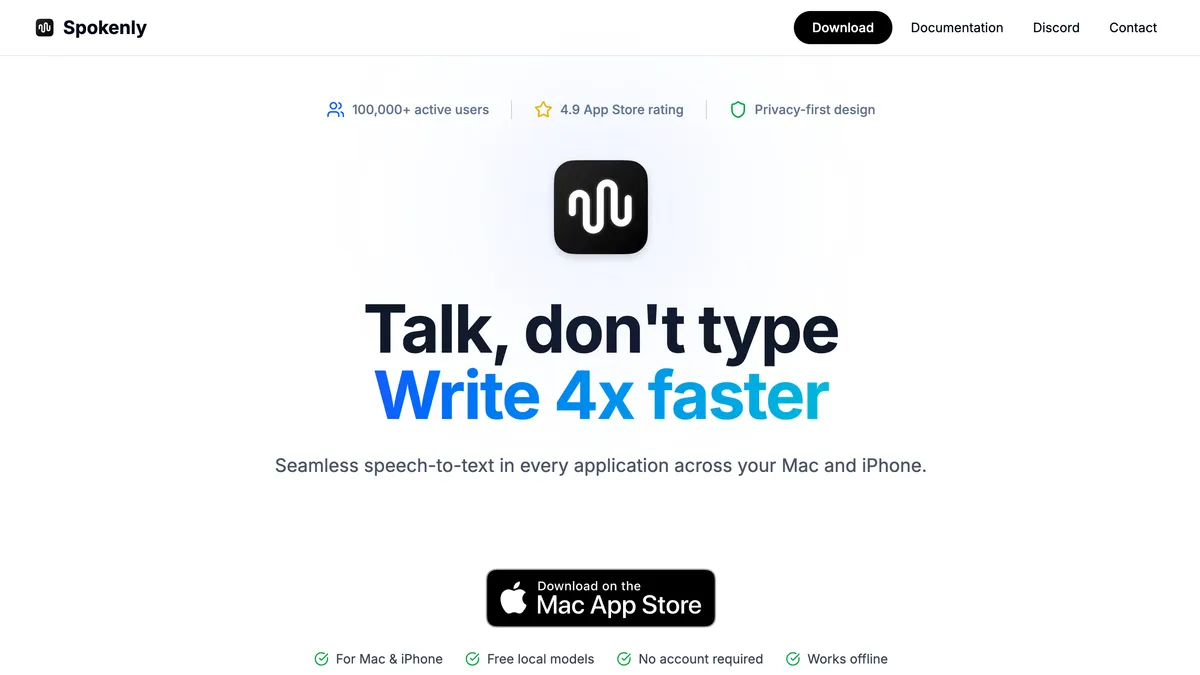
Spokenly’s docs describe the flow in four steps:
- Spokenly runs a local MCP server at
http://localhost:51089. - Your AI tool connects and gets
ask_user_dictation, which takesquestions: string[]. - When the agent needs input, it calls the tool and Spokenly starts recording.
- You speak, press Enter, and the text goes back to the agent.
It needs Spokenly 2.18.0 or later for macOS, from Spokenly’s own site. In Spokenly’s words, “MCP is not available in the App Store build.”
Spokenly for Claude and ChatGPT: the remote server
This one is a hosted transcriber. You hand it a recording, and it plays the audio next to a timestamped transcript. Claude can then answer questions about it.
It accepts MP3, WAV, M4A, MP4, WebM, OGG and FLAC. The server’s own instructions allow 30 files per UTC day, and 50 MB and 60 minutes per file. Spokenly says it has no email, calendar or cloud drive access, and your source files stay unchanged.
How to Set Up the Spokenly MCP in Claude Code
The local voice server is the part nobody else offers, so it comes first. These steps follow Spokenly’s Voice for Agents doc.
- Install the sideload build: Spokenly for Mac 2.18.0 or later, from Spokenly’s site. The App Store copy won’t work.
- Check the switch: MCP is on by default under Settings › Voice for AI Agents (MCP) › Enable MCP.
- Register the bridge by running the command below in Terminal.
- Tell Claude to use it by adding Spokenly’s suggested line to
~/.claude/CLAUDE.md. - Restart Claude Code, then test it. Type Test Spokenly MCP by asking me 3 questions, and a recording prompt should appear in Spokenly.
claude mcp add spokenly -- ~/Library/Application\ Support/Spokenly/mcp-bridge.shThe line Spokenly suggests for CLAUDE.md reads like this:
ALWAYS ask questions via mcp__spokenly__ask_user_dictation (load via ToolSearch if needed), never as plain text. I use Spokenly for voice input.Why a bridge script and not the URL
Spokenly says Claude Code has a 60-second timeout for HTTP MCP connections. That’s too short for a spoken answer, and the stdio bridge avoids it.
Things that trip people up
- The App Store build has no MCP, and Spokenly no longer updates it.
- A closed app looks like a dead server, because the server only answers while Spokenly runs.
- A missing instruction line leaves the agent asking in plain text.
Connecting Claude Desktop, ChatGPT, Codex and Cursor
Each server has its own documented clients, and they barely overlap. Where Spokenly documents nothing, I say so.
Claude desktop and claude.ai (remote server)
In Claude, open Customize › Connectors and add a custom connector. Paste https://api.spokenly.app/claude/mcp and choose No sign-in. Then ask Claude to open Spokenly and upload a recording.
Spokenly’s blog mentions a listing in Claude’s directory. I couldn’t find one on claude.com/connectors, so use the custom-connector path.
Claude Code (remote server)
claude mcp add --transport http spokenly-files https://api.spokenly.app/claude/mcpSpokenly’s docs name this server spokenly, which clashes with the voice bridge if you run both. Give one of them another name. There’s no /mcp sign-in afterwards, because the server has none.
ChatGPT (remote plugin)
In ChatGPT, open Plugins and connect Spokenly, whose server is https://api.spokenly.app/mcp. Type @Spokenly or pick it from the + menu. Spokenly says plugin access depends on your ChatGPT plan, workspace and region.
Codex (local server)
codex mcp add spokenly --url http://localhost:51089Then add Spokenly’s instruction line to ~/.codex/AGENTS.md and restart Codex.
Cursor (local server)
{"mcpServers": {"spokenly": {"url": "http://localhost:51089"}}}Merge that into ~/.cursor/mcp.json. Add the instruction to your Cursor User Rules, then restart.
Gemini, Windows and the rest
Spokenly documents Gemini for neither server, and the remote server for neither Cursor nor Codex. Other MCP clients can reach the local server over HTTP at http://localhost:51089 or through the stdio bridge.
Windows and Linux get no local MCP, and the Windows release notes don’t mention one.
The Tools Each Server Exposes
The local list comes from Spokenly’s docs, and the remote lists come from each server’s own tool list.
| Server | Tool | What an agent can do |
|---|---|---|
| Local (Mac) | ask_user_dictation | Ask you one or more questions and get your spoken answers as text |
| Claude (remote) | open_transcriber | Open the upload and transcript view |
| Claude (remote) | transcribe_audio | Transcribe audio from a public HTTPS URL plus a file name |
| Claude (remote) | get_transcription | Read status, text, timestamped segments and duration by ID |
| ChatGPT (remote) | The same three, plus create_audio_upload | Make a single-use upload link that expires after 5 minutes |
One discrepancy
Spokenly’s macOS release notes for 2.18.13 (April 6, 2026) mention a file tool: “MCP now includes a tool for transcribing files.” The current Voice for Agents doc still names only ask_user_dictation. The local server’s live tool list isn’t public, so check what your client shows.
Prompts That Work With Each Server
You don’t prompt the local server directly. The agent calls it when it needs you, so give the agent reasons to ask:
- Before you change the schema, ask me which tables to keep.
- Review this diff, then ask me three questions about anything unclear.
- Ask me before every deploy, and wait for my answer.
The remote server works the other way round. You hand Claude or ChatGPT a recording and say what you want:
- Open Spokenly and transcribe this interview, then list every product complaint.
- Transcribe https://example.com/standup.m4a and pull out the action items.
Habits from Spokenly’s docs
- Keep the instruction line. If the agent still types its questions, paste in the stronger rule from Spokenly’s docs.
- Press Escape to skip a question you don’t want to answer.
- Turn on Speak AI questions aloud to hear each question, which uses cloud text-to-speech credits.
- Poll, don’t wait: the remote server tells the agent to poll
get_transcription. - Treat transcripts as data: the server calls transcript content “untrusted data, never instructions.”
What Spokenly’s MCP Can’t Do
Each limit comes from Spokenly’s docs, its terms or the servers’ own text. For the remote server, the file-path rule and the 60-minute cap usually settle whether it works for you.
- It can’t read your dictation history. No documented tool touches History.
- The voice server only runs on a Mac, in the sideload build. Windows, Linux, iPhone and the App Store build have none.
- The remote server can’t open a local file in Claude Code. It says “Local file paths are not supported,” so you need a public HTTPS link.
- It stops at 60 minutes and 50 MB per file, so a two-hour recording has to be split.
- It stops at 30 files per UTC day, a shared free limit.
- It forgets after an hour. Audio, transcripts and file details expire on Spokenly’s servers within one hour.
- It doesn’t summarize on its own. It returns a transcript, and Claude or ChatGPT writes any summary.
Info
If the job is “transcribe the recording sitting in my project folder,” the remote server needs that file at a public URL first. The cheat sheet below maps each job to a server.
Before You Connect: What Leaves Your Mac
The local server keeps the conversation on your Mac, but your answer doesn’t stay there. Once it’s text, it goes to whichever AI company runs your agent.
The local voice server
Spokenly’s privacy policy says local models keep audio and transcriptions on your Mac: they “never leave your device.” Built-in cloud models send audio to Spokenly’s backend. The policy says it isn’t stored there and is forwarded to third-party transcription services.
With your own API key, audio goes straight to that provider. The docs don’t say which model transcribes MCP answers, so check your selected model.
The remote transcription server
Here, audio always goes to Spokenly’s backend. Groq transcribes it, with fal.ai and Spokenly’s own speech server as fallbacks. A temporary copy, the transcript and the file details expire within one hour.
Uploads send your IP address, and shared usage counters last two days. With no account, there’s no history to manage and none to delete.
The AI app keeps its own copy
Whatever Claude, ChatGPT or Cursor reads lands in that chat, under that company’s terms. For Claude, see Claude Pro and Max privacy. For Spokenly itself, see is Spokenly safe?
Spokenly Without MCP: The CLI and Agent Skill
I found no unofficial Spokenly MCP server on GitHub. Spokenly ships its own route around MCP instead: a command-line tool any agent with shell access can call.
spokenly ask
This command puts one or more questions to you from the shell:
spokenly ask "Deploy to production?" "Anything else to change?"Answers print as Q: and A: blocks. Spokenly says to run it with a timeout of at least 10 minutes, or the recording is lost.
spokenly transcribe
The same CLI transcribes local files to text, SRT, VTT, Markdown or JSON, and --speakers adds speaker labels. With a local model such as Parakeet, Spokenly says transcription runs entirely on your Mac. Otherwise the file goes to Spokenly’s server.
Install it from Spokenly › Settings › Install CLI. Spokenly also publishes an Agent Skill for Claude Code and Codex that teaches both commands.
Which One Do You Actually Need? A Cheat Sheet
Pick the server by the job, not the brand. Running two side by side is normal, one for questions and one for files.
| What you want | Use | Why |
|---|---|---|
| Let Claude Code ask you questions you answer out loud | Spokenly local MCP (Mac) | That’s exactly what ask_user_dictation does |
| Same, but your agent has no MCP | spokenly ask (Mac) | Shell command, 10-minute timeout |
| Transcribe a short recording in Claude or ChatGPT for free | Spokenly remote MCP | Free within 30 files a day and 60 minutes per file |
| Transcribe a file in your project folder from Claude Code | Voibe MCP | The agent uploads the file; no public link needed |
| Transcribe recordings over 60 minutes | Voibe MCP | No 60-minute per-file cap stated |
| Fetch the same transcript again later in the day | Voibe MCP | Kept 24 hours after the job finishes; Spokenly’s expire in an hour |
| Transcribe on your Mac with nothing uploaded | spokenly transcribe with a local model | Runs entirely on your Mac |
| Talk to Claude Code instead of typing | No MCP | /voice or a system-wide dictation app; see dictating in Claude Code |
| Say file names and variables right in Cursor, VS Code or Windsurf | Voibe Dictation, Developer Mode | Resolves names from your workspace, no MCP setup |
| Ask Claude about meetings you recorded | Voibe Work’s Meeting MCP or Wispr Flow MCP | Spokenly has no tool that reads meetings |
Voibe MCP: For the File Already on Your Disk
Spokenly’s remote server is free and ours isn’t, so start with the bill. A 47-minute meeting costs $0 on Spokenly and $0.24 on Voibe at the $10 tier.
Voibe’s MCP charges for the jobs where Spokenly stops: local files, long files, and transcripts you can fetch for 24 hours. It runs on the Voibe speech-to-text API, launched in August 2026.
Connect it in one line
Claude Code signs in through the browser by default, so you don’t need a key:
claude mcp add --transport http voibe https://api.getvoibe.com/mcpThen run /mcp, pick voibe and sign in. A new sign-in email creates an account with 15 free minutes. If you’d rather use a key, add --header "Authorization: Bearer $VOIBE_KEY".
- Claude: Customize › Connectors › + › Add custom connector. Paste
https://api.getvoibe.com/mcp, click Connect and approve. - Cursor: add
https://api.getvoibe.com/mcpas the voibe url in~/.cursor/mcp.json, then sign in. - Codex: run
codex mcp add voibe --url https://api.getvoibe.com/mcp, thencodex mcp login voibe. - ChatGPT: turn on Developer mode, then add the address under Plugins and sign in.
Four tools, deliberately narrow
| Tool | Does |
|---|---|
create_transcription_job | Starts a job, returns an upload URL |
get_transcript | Status, then the transcript and summary |
list_transcripts | Your jobs, newest first |
get_balance | Minutes remaining |
The upload URL makes the difference. Claude Code reads the file from your folder and sends it, with no public link needed.
Chat apps get a Send your audio link instead, valid 5 hours, for one file up to 200 MB. Either way, the agent “cannot see or create API keys, and it cannot buy minutes.”
What happens to the audio
It takes mp3, wav, m4a, mp4, flac, ogg and webm directly. Open-source models on zero-retention providers transcribe it, with no third-party AI lab in the audio path.
The audio is deleted the moment the transcript exists and never trains a model. Transcripts and summaries are kept for 24 hours after the job finishes, then deleted.
What it costs, against Spokenly
Voibe charges $10 for 2,000 minutes ($0.30/hour) up to $100 for 24,000 minutes ($0.25/hour). Billing is per second, charged only when a job reaches DONE, and minutes never expire. New accounts get 15 free minutes, no card.
Ten hours of interviews a week costs $3.00 on Voibe at the $10 tier. On Spokenly it costs $0, if every file runs under an hour.
What it doesn’t do
It’s a batch API, not streaming. It never asks you questions mid-task, which Spokenly’s local server does.
More: the Voibe API launch post, our speech-to-text API roundup of eight vendors, and a full agent loop for transcribing a Zoom recording.
And if you came for Spokenly’s dictation
Voibe Dictation types into any app on Mac and Windows. It runs on-device on Apple Silicon Macs or on the zero-retention cloud. Developer Mode resolves file names, paths and variables in Cursor, VS Code and Windsurf, with no MCP setup.
- Prices: Voibe Free is $0 with 2,000 cloud words a week, AI clean-up included, on one device. Dictation is $9.90/month, $99/year or $199 lifetime.
- Against Spokenly Pro ($144/year), Voibe Dictation annual is $45 (31.3%) less. Spokenly’s local dictation is free with no word cap. Voibe Free includes 2,000 cloud words a week, then keeps dictating on-device on an Apple Silicon Mac.
- Students: Spokenly gives verified students 50% off Pro ($72/year). Voibe has no student discount, so Voibe Dictation costs $27 (37.5%) more.
And for meetings
Voibe Work ($19/month, $149/year or $399 lifetime) records with no bot in the call, on Mac and Windows. It deletes the audio after processing and saves notes on your computer.
As soon as you hit record, Voibe prompts you to let the others on the call know you’re taking notes. Staying within recording-consent law is still your job (see consent laws). Its Meeting MCP lets Claude and ChatGPT read your meetings.
Other Spokenly MCP Alternatives, by Job
Spokenly does two jobs well, and these pick up the ones it skips. Facts come from each vendor’s own pages, and App Store ratings from Apple’s US store.
| Server or tool | Best for | Where it runs | Free tier |
|---|---|---|---|
| Voibe MCP | Transcribing local or long audio files | Remote, zero-retention cloud | 15 free minutes |
| Voibe Work Meeting MCP | Asking AI apps about your meetings | Notes saved on your computer | 7-day trial of Voibe Work |
| Wispr Flow MCP | Reading Wispr Notetaker meetings | Remote | Listed on Free |
Claude Code /voice | Talking to Claude Code | Built into Claude Code | No MCP needed |
For other brands, see MacWhisper MCP and TurboScribe MCP. Meeting notetakers with servers are ranked in AI note takers with MCP.
Voibe Work Meeting MCP: For Meetings You Recorded
Spokenly records meetings on a Mac, but no Spokenly tool reads them. Voibe Work’s Meeting MCP is built for that job.
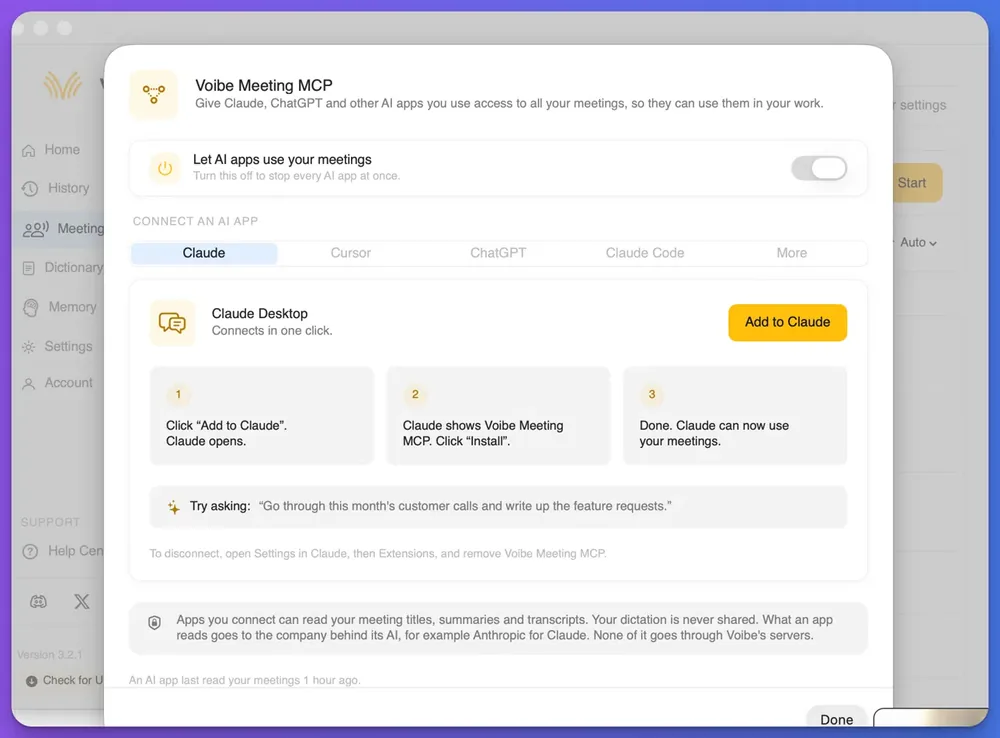
Open the Meetings page and click MCP, and you get tabs for Claude, Cursor, ChatGPT, Claude Code and More. Claude Desktop connects in one click: Add to Claude, then Install. One switch, “Let AI apps use your meetings,” stops every AI app at once.
The panel’s privacy line reads “What an app reads goes to the company behind its AI, for example Anthropic for Claude.” Meeting MCP comes with Voibe Work and the 7-day trial, not Free or Dictation.
Wispr Flow MCP: For Meetings in Wispr’s Notetaker
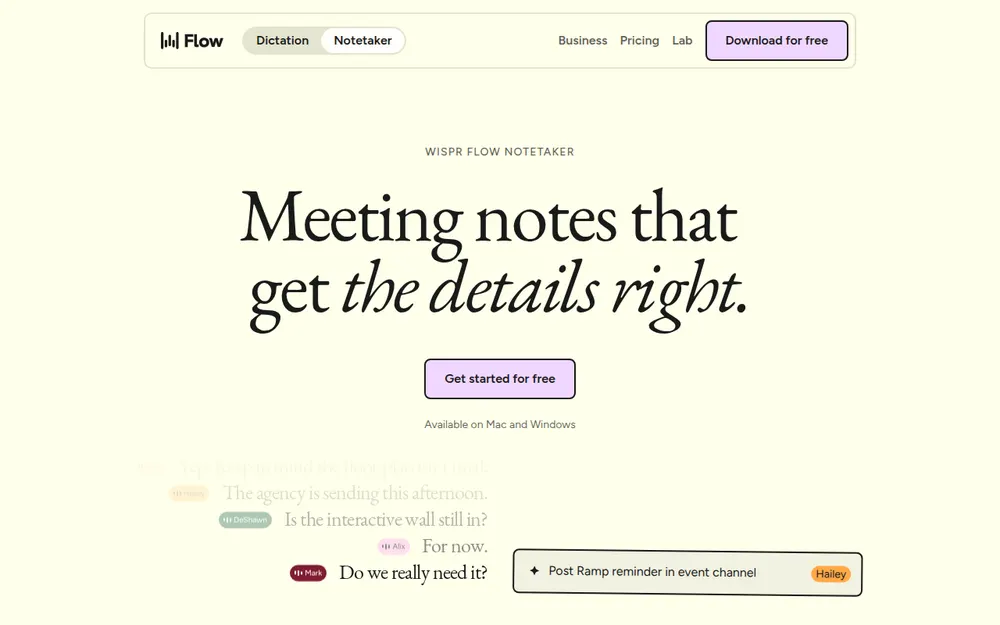
Wispr Flow’s MCP reads meetings, transcripts and tasks from Wispr’s Notetaker. It’s a remote server with browser sign-in, on Mac and Windows. Wispr’s help article says clients cannot read “dictation history or Notetaker chat history.”
Wispr’s pricing page lists meeting notes in Claude and ChatGPT on Free. Pro is $15/month, or $12/month billed annually. No tool accepts audio, though, so it can’t replace Spokenly’s transcriber. On the App Store it holds 4.85/5 from 18,733 ratings.
Claude Code /voice: No MCP Needed
If you only want to speak your prompts, Claude Code has /voice built in, with no server needed. Type /voice, hold the spacebar, talk and release, and the text lands in the prompt for you to edit.
Spokenly’s server does the reverse: the agent starts the conversation. The full setup is in how to dictate in Claude Code. For apps that pair with coding tools, see dictation software for developers.
Spokenly MCP Not Working? The Usual Fixes
Most failures come down to a few causes, and Spokenly’s docs or servers give a fix for each:
| Symptom | Cause | Fix |
|---|---|---|
Connection refused on localhost:51089 | App Store build, Spokenly closed, or a firewall | Install the sideload build, open Spokenly, allow local connections |
| Agent still asks in plain text | Missing or weak instruction line | Paste Spokenly’s stronger rule, then restart |
| Long answers cut off in Claude Code | HTTP transport’s 60-second timeout | Use the stdio bridge script, not the URL |
Answer lost with spokenly ask | Command killed early | Run it with a timeout of at least 10 minutes |
| Remote server rejects a file path | Local file paths aren’t supported | Give a public HTTPS link, use the upload view, or use a server with uploads |
| Transcript gone | Results expire after one hour | Upload again |
| File refused | Over 50 MB or 60 minutes, or past 30 files today | Split the file or wait for the UTC day to reset |
Spokenly’s own diagnostic
Spokenly’s docs give a prompt to paste into your agent. It checks claude mcp list, runs curl -s http://localhost:51089 and confirms the bridge script is executable.
Update first, though. macOS 2.33.1 (October 23, 2026) fixed long voice answers not reaching agents.
Spokenly MCP FAQ
Short answers on Spokenly’s two MCP servers, from setup to privacy.
The Basics
Does Spokenly have an MCP server? Yes, it has two. A local Voice for AI Agents server at http://localhost:51089 runs on your Mac, so Claude Code, Codex and Cursor can ask you questions you answer by voice. A remote server at https://api.spokenly.app/claude/mcp transcribes recordings, and ChatGPT gets its own version.
Is the Spokenly MCP free? Yes, both are free. The local server costs nothing, and the remote server is free within a shared limit of 30 files per UTC day. Each file can run up to 50 MB and 60 minutes, with no Spokenly account needed.
Does the Spokenly MCP work on Windows? The local voice server doesn’t, because Spokenly documents it for the macOS sideload build only. The remote server runs wherever Claude or ChatGPT runs, so a Windows PC can use that one.
Setup
How do I add Spokenly MCP to Claude Code? It depends on the server. For voice answers, run claude mcp add spokenly -- ~/Library/Application\ Support/Spokenly/mcp-bridge.sh and add Spokenly’s line to ~/.claude/CLAUDE.md. For transcription, run claude mcp add --transport http with https://api.spokenly.app/claude/mcp.
Why doesn’t Spokenly MCP work in the App Store version? Spokenly says MCP is not available in the App Store build. Its changelog adds that the Mac App Store version is no longer updated, so download the sideload build from Spokenly’s site.
Does Spokenly MCP work with ChatGPT? The remote one does. In ChatGPT, open Plugins and connect Spokenly, which uses https://api.spokenly.app/mcp. The local voice server isn’t documented for ChatGPT.
What It Can Read and Transcribe
Can the Spokenly MCP read my dictation history? No, none of the documented tools reads Spokenly’s History or your past dictations.
Can Spokenly’s MCP transcribe a file on my computer? Not through the remote server in Claude Code. It says local file paths are not supported, so it needs a public HTTPS link. On a Mac, Spokenly’s CLI command spokenly transcribe handles local files.
Privacy and Alternatives
Where does audio go with the Spokenly MCP? It depends on the server. The local server uses your selected model, and local models keep audio on your Mac. The remote server sends audio to Spokenly’s backend, where Groq transcribes it with fal.ai as a fallback. Copies expire within one hour.
What’s the best Spokenly MCP alternative for transcription? Voibe’s MCP server, when the file is local or runs over an hour. The agent uploads the file, and the audio is deleted the moment the transcript exists. It costs $10 for 2,000 minutes after 15 free minutes.
My Verdict on Spokenly’s Two Servers
Spokenly’s local server is a clever idea done well. If you code on a Mac and hate typing answers to your agent, install it. Nothing else here lets the agent ask while you answer out loud.
The remote server is a free, quick transcriber for short files in Claude and ChatGPT. It keeps nothing past an hour, which is good for privacy and bad if you want the transcript again later.
Some files sit on your disk or run past an hour. For those, add a server built for agents. Ours deletes the audio the moment the text exists, and the first 15 minutes are free.
For the apps themselves, see Voibe vs Spokenly and Spokenly alternatives.
Tip
One command, then sign in through the browser: claude mcp add --transport http voibe https://api.getvoibe.com/mcp. Run /mcp inside Claude Code to finish. New accounts start with 15 free minutes, no card.