

Is Jamie Safe? Mostly, With Gaps in Consent and Paperwork
Nobody on your call will see Jamie, because no bot joins. It can warn your guests two ways, and neither works until you set it up: the email needs your calendar, and the chat notice is a beta that starts off.
Is Jamie safe, then? For most internal and client calls, yes. Jamie handles meeting data better than most cloud notetakers, and its weak spots are consent and paperwork.
The audio is deleted once transcription completes, and transcripts are stored in the EU, on a server in Frankfurt per its help center. Its privacy policy bars training on your meetings, by Jamie and by its providers.
In your shoes, I'd keep Jamie for everyday calls and run the five settings checks further down before the first client call. The notice email and Speaker Memory matter most. I wouldn't put health information or privileged legal calls through it.
Which calls Jamie suits
- Fine as it comes: internal stand-ups and planning, with sharing kept private.
- Fine once you set it up: client and sales calls, with the notice email on and a sentence said out loud at the start.
- Keep out: calls with health information, because Jamie offers no BAA. Leave Speaker Memory off for anyone who hasn't agreed, since Jamie's own policy treats voice profiles as biometric data.
The loose ends
Transcripts and summaries stay in Jamie's cloud until you delete them, and custom retention is Enterprise only. SOC 2 Type II is still pending, though the ISO 27001:2022 certificate in its trust center is Jamie's own. The EU-only promise has four US exceptions, none of them for meeting content.
The strangest gap is the AI vendor. Jamie's help center says Anthropic or OpenAI writes your summary, its trust center says VertexAI or OpenAI, and its subprocessor list names neither OpenAI nor Anthropic. Every version keeps your meetings out of training, so it's a contract question more than a privacy one.
How I checked
I've used Jamie on my own calls and read the paperwork behind it: the privacy policy, terms, security page, trust center and subprocessor list. I also went through the pricing page, the App Store listing and the help articles on data, consent, deletion and MCP. All of it was re-checked on November 3, 2026.
If you'd rather no vendor kept a copy
Plans, credits and the no-refund terms are in our Jamie pricing breakdown, and other bot-free tools are in our Jamie alternatives.
The other route is Voibe Work, the meeting-notes plan in Voibe, the app I help build. It has no bot either, on Mac or Windows, and it saves your notes on your computer instead of on Voibe's servers.
At $149 a year, Voibe Work costs $139 (48.3%) less than Jamie Plus annual at $288. Jamie Free costs $0, though, so it wins for light use. Voibe also reminds you to tell everyone on the call when you start recording; meeting the recording-consent rules where you are is still on you.
Key Takeaway
Jamie is safe for most everyday calls once the notice email is on and Speaker Memory is off. Keep health information out of it, because Jamie offers no BAA.
Key Takeaways: Jamie Safety at a Glance
Every row comes from Jamie's own pages and rating pages, as of November 3, 2026.
| Question | Jamie's answer (November 2026) | Source |
|---|---|---|
| Does a bot join? | No. The desktop app captures your mic and system audio. No calendar invite goes out. | Jamie security page FAQ |
| Where does the audio go? | Uploaded to a server in Frankfurt, transcribed, then deleted as soon as transcription completes. | Help center; privacy policy §3.3 |
| Where are the notes stored? | An EU-based database, until you delete them or close your account. | Privacy policy v2.0 (Sept 15, 2026) |
| Custom retention? | Enterprise only. | Pricing page |
| Trained on? | No, by Jamie or its providers. "Contractually enforced with every provider in our stack." | Privacy policy §1.8; security FAQ |
| Which AI writes summaries? | Help center: Anthropic or OpenAI. Trust center: VertexAI or OpenAI. Subprocessor list: neither. | Help center; trust center |
| Outside the EU? | Four US subprocessors for non-meeting data: Clay, WorkOS, Loops, Superwall. | Privacy policy §6.1 |
| Attestations | ISO 27001:2022 (its own certificate) and GDPR. SOC 2 Type II pending. | Trust center; pricing page |
| HIPAA / BAA | No mention on any Jamie page I read. | Jamie pages, November 3, 2026 |
| Consent tools | Notice email before calendar meetings on every plan. In-meeting chat notice in beta, off by default. | Help center |
| Breaches, lawsuits, bans | No public reports found as of November 3, 2026. | Web search |
| Ratings | App Store 4.89 from 261 ratings. Trustpilot 4.8 from 77 reviews. | App Store; Trustpilot |
| Price | Free $0. Plus $24/mo billed annually ($288) or $29 monthly. Pro $46/mo annually ($552) or $55 monthly. | Our Jamie pricing breakdown |
What Is Jamie, and How Does It Record a Meeting?
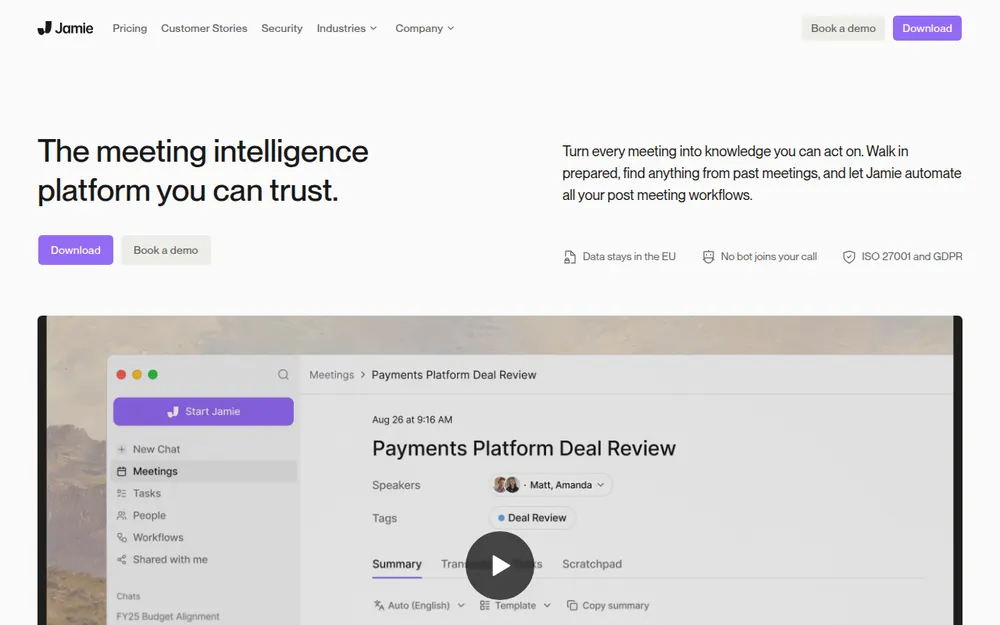
Jamie is an AI meeting notetaker from wespond UG, a German company in Rösrath, per its imprint. Its case studies are mostly private equity, M&A and consulting firms.
How Jamie captures a meeting
The desktop app runs on Mac (macOS 14.4 or later) and Windows. It records your mic and system audio in Zoom, Teams, Google Meet or any other app. For in-person meetings there are iPhone and Android apps, but the help center says they can't record phone calls. Jamie records audio only, never video.
Recording starts when you click Start Jamie or accept a reminder when a call is detected. Desktop auto-start exists, but it needs a connected calendar and is off by default.
Jamie's security FAQ says it "runs locally on your device". That's true of capture only, because transcription and summaries run in Jamie's cloud.
What users say
Jamie rates 4.89 out of 5 from 261 ratings on the App Store (US, version 2.8.0). On Trustpilot it has 4.8 out of 5 from 77 reviews. The Android app shows 5K+ downloads on Google Play, with no rating displayed.
The complaints in those reviews are about price and stuck uploads, not privacy.
Where Does a Jamie Meeting Go? Frankfurt, Then an EU Database
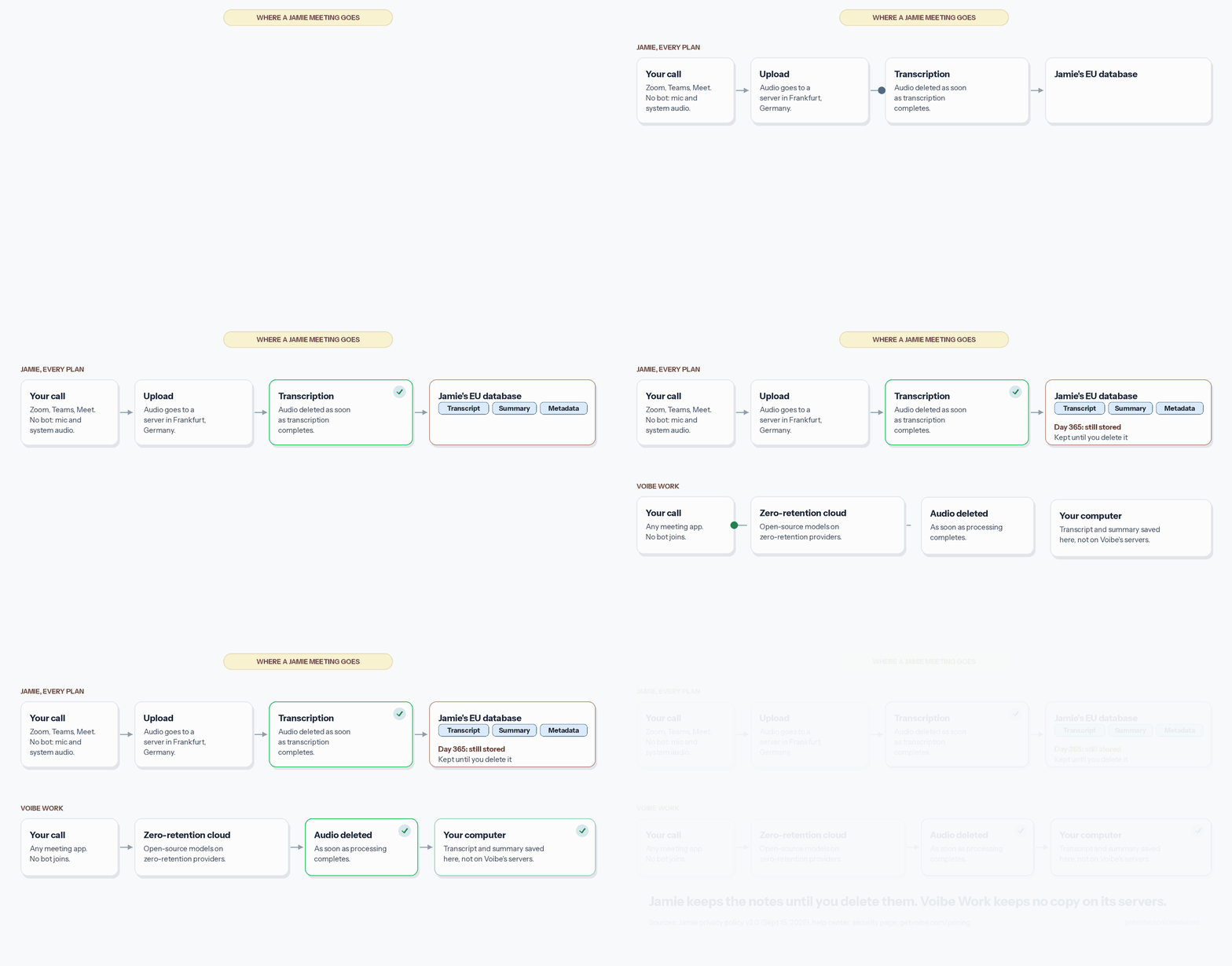
It goes to Frankfurt first, then into Jamie's EU database. The help center and privacy policy describe the same path.
- The desktop app captures the audio on your computer.
- The audio is uploaded to a server in Frankfurt, Germany.
- A speech-recognition service transcribes it. GPU work runs at Modal, where the help center says no data is stored.
- Once transcription is done, the audio is deleted permanently.
- Large language models read the transcript and write the summary.
- Transcripts, summaries and metadata stay in an EU-based database until you delete them.
How it's protected, and what Jamie leaves open
The security page lists TLS 1.2 in transit and AES-256 at rest. Meetings are visible only to you by default. Enterprise adds SAML SSO, SCIM, audit logs and an IP allowlist.
Three things stay unclear. You can't tell which LLM writes your summary (the next section has three answers). You can't see what the ISO 27001 certificate covers, because it sits behind a request form. And Jamie doesn't say whether Clay, a US subprocessor, touches meeting participants' data.
Where your meetings go with Jamie and five other notetakers
The other rows come from our safety reviews, linked by name.
| Tool | Bot in the call? | What's kept, and where | Retention | Training default | Attestations |
|---|---|---|---|---|---|
| Jamie | No; desktop app records mic and system audio (Mac, Windows); phone apps for in-person meetings | Audio deleted after transcription; transcripts and summaries in an EU database (Frankfurt) | Until you delete; custom retention Enterprise only | Never (policy §1.8) | ISO 27001:2022 (own), GDPR; SOC 2 Type II pending; no HIPAA claim, no BAA |
| tl;dv | Yes by default; desktop app records audio only without one | Recordings, transcripts, AI notes; EU (Google Cloud, Hetzner, Wasabi) | Free 3 months; paid until account deletion | Never (policy section 9) | SOC 2 Type II, GDPR; no HIPAA claim, no BAA |
| Krisp | No by default; optional bot from Core | Recordings, transcripts and summaries; Krisp's cloud on AWS, US | Until you delete; admin auto-delete available | Never (pricing FAQ) | Krisp states SOC 2 Type II, PCI DSS, GDPR, HIPAA; BAA on Enterprise at 100+ seats |
| Notta | Bot if invited or auto-joined; Notta Desktop with no bot (beta) | Audio, transcripts and summaries; AWS in Tokyo | Until you delete; auto-delete Enterprise only | No-training control on Enterprise only | Notta states SOC 2 Type II, GDPR, CCPA; no BAA found |
| Granola | No | Audio deleted after transcription; notes in a US-hosted AWS cloud | Indefinitely unless a retention policy is set | On for Free and Business (anonymised); opt-out | SOC 2 Type II; HIPAA and BAA Enterprise only |
| Voibe Work | No (Mac and Windows) | Audio deleted as soon as processing completes; transcript and summary saved on your computer | Your files, your choice | Never trained on | None claimed; BAA available on request |
Jamie and Granola work the same way at capture: no bot, and the audio deleted after transcription. The difference is the text. Jamie keeps notes in the EU and never trains on them, while Granola's sit in a US-hosted AWS cloud.
Key Takeaway
Jamie uploads the audio to Frankfurt, deletes it after transcription and keeps the transcript and summary in its EU database until you delete them.
Which AI Reads Your Transcript? Jamie's Own Pages Disagree
Jamie names its summary vendor in three places, and the three don't match.
Three pages, three answers
- Help center, data FAQ: the transcript goes to "an Anthropic or OpenAI API" for the summary.
- Trust center FAQ: the same answer names VertexAI or OpenAI instead. It adds that data isn't stored there or used for training.
- Subprocessor list: no OpenAI and no Anthropic. It names Soniox for speech recognition, Modal for GPU work and Google Cloud for machine learning, all in the EU.
The list is section 6.1 of the privacy policy (version 2.0, September 15, 2026). It doubles as Annex 2 of Jamie's DPA, and the trust center shows the same 15 entries.
My read
Google Cloud's entry includes machine learning services, which fits the trust-center answer, VertexAI. Neither page is dated against the other, so I can't say which is current.
Every version promises no storage at the LLM vendor and no training. That makes it a documentation problem more than a privacy one. If your contract names approved subprocessors, ask Jamie which LLM is live before you sign.
The US exceptions to "no data leaves the EU"
Jamie's security page says no data leaves the EEA, Switzerland and the UK, "ever". The subprocessor list shows four US exceptions:
- Clay Labs, for prospect lists and data enrichment
- WorkOS, which handles sign-in, SSO and SCIM
- Loops (Astrodon), which sends Jamie's marketing email
- Superwall (Nest 22), which runs the mobile paywall
None of the four is listed for meeting content. Soniox, Modal, Google Cloud and PlanetScale handle meetings, all in the EU. Soniox's entry does say limited system data may be processed outside the EEA.
Clay is the loose end: it sits under a heading that covers app users' data and meeting content, yet its description is about prospects. Jamie doesn't explain the overlap.
The marketing website also runs Google Analytics, Meta Pixel, LinkedIn and Microsoft Advertising tags. That's website data, not your meetings.
Does Jamie Train AI on Your Meetings? No, and Neither Do Its Providers
No, and Jamie's wording on training is among the clearest I've read. Section 1.8 of its privacy policy rules out training or fine-tuning AI models on personal data or meeting content. That covers models "neither our own nor those of our providers".
The security FAQ says this is "contractually enforced with every provider in our stack". Speaker identification works per account and isn't used to train models either, per the help center.
Otter, Fathom and Granola train on de-identified or anonymised data unless you act. Our reviews of Otter, Fathom and Granola cover the details.
If you connect AI apps
Jamie's MCP server (Pro and up) lets Claude, ChatGPT, Cursor and other apps reach your meetings. It signs in with OAuth, so no API key gets pasted anywhere. Meeting search covers the last 6 months by default.
Watch the write access. Its 17 tools read and write, so a connected app can create tasks, edit templates and delete tags, which can't be undone.
What an AI app reads falls under that AI company's terms, not Jamie's §1.8. Voibe Work's Meeting MCP works the same way on that point.
Tip
Save a copy of Jamie's privacy policy (version 2.0, September 15, 2026). If section 1.8 or the subprocessor list changes, you'll have the old wording.
Speaker Memory: Jamie's Voice Profiles Count as Biometric Data
Speaker Memory is optional. When it's on, Jamie learns voices so it can name speakers in later meetings, and that creates the most sensitive data Jamie holds.
What Jamie's documents say
Section 3.3 of the privacy policy says Jamie creates and stores voice profiles, called voice embeddings. It classes them as biometric data under Article 9(1) GDPR, processed only with explicit consent.
Terms §5.4.1 puts the job of getting that consent from all participants on you. Profiles are deleted when you turn the feature off or delete that speaker.
Why it needs care
Voiceprints are the subject of biometric privacy suits in the US. Fireflies faces a pending one in Illinois (details). If anyone on your calls hasn't agreed, leave Speaker Memory off and rename speakers by hand.
How Long Does Jamie Keep Your Meetings, and Can You Delete Them?
Jamie deletes the audio quickly and keeps the text indefinitely. When the text goes is up to you.
What stays, and for how long
- Audio: deleted as soon as transcription completes
- Transcripts, summaries and metadata: kept until you delete them or close the account
- Voice profiles: kept until you turn off Speaker Memory or delete the speaker
- Custom retention rules: Enterprise only, per the pricing table
The security page advertises flexible retention rules. Below Enterprise, that means deleting meetings by hand.
Deleting your account, and sharing
Personal accounts get a 2-day recovery window, then a hard delete. Enterprise workspaces can set 30, 60 or 90 days. Cancelling blocks the account once the termination takes effect (Terms §8.6), so export first.
Meetings are visible only to you by default. Share links from the phone app can be set to anyone with the link, so check them before you send.
Is Jamie HIPAA Compliant? ISO 27001, SOC 2 and GDPR
No, Jamie is not HIPAA compliant. It makes no HIPAA claim and offers no BAA. Neither term appears on its pricing, security or help pages, so keep protected health information out of Jamie. Our HIPAA dictation guide explains why the data flow comes first.
What each claim covers
- ISO 27001:2022 is Jamie's own, listed in its trust center behind a request form. Scope and certifying body aren't public.
- That's stronger than tl;dv, whose ISO 27001 belongs to its data centres.
- SOC 2 Type II is listed as pending on the pricing page.
- GDPR applies because Jamie is a German company. Its DPA is built into the Terms, and the supervisory authority is the LDI NRW in Düsseldorf.
- DORA, the EU's digital-resilience rules for financial firms, appears in the pricing table. I found no DORA document in the trust center.
- A penetration test report is listed in the trust center, also behind a request form.
An ISO certificate audits how Jamie runs security. It doesn't change where your meetings are stored.
Key Takeaway
No HIPAA claim and no BAA. ISO 27001:2022 is Jamie's own certificate. SOC 2 Type II is pending. GDPR applies as a German company.
Has Jamie Been Breached, Sued or Banned?
I found no public report of a breach, lawsuit or ban naming Jamie. My check was a web search, not a docket search, so re-check before you rely on it.
What I checked
Searches for Jamie and meetjamie with lawsuit, breach, incident and banned turned up suits against other notetakers only. I couldn't search US federal dockets, and I didn't search German court records. Jamie does run a public status page at status.meetjamie.ai.
University rules
The University of Waterloo bans third-party AI note-taking bots in its meetings. Its rule is about bots and doesn't mention desktop recorders like Jamie. No university notice I read names Jamie, so check your own institution's rules on recording tools.
Other notetakers are in court
Otter (details) and Fireflies (details) face privacy class actions. Granola faces a wiretap suit over capture without a visible bot. Jamie records the same way, so read our explainer on the Granola lawsuit.
Key Takeaway
No breach, lawsuit or university ban naming Jamie turned up as of November 3, 2026. The check was a web search, not a docket search.
Recording Consent: What Jamie Tells the Other People on the Call
Jamie gives you more consent tools than most bot-free notetakers. None of them is on by default in every meeting, though.
The notice email
- Available on every plan, per the pricing table
- Needs a connected calendar, so an unscheduled call gets no email
- Sent between 10 minutes and 48 hours before the meeting, 4 hours by default
- Skips you, your workspace members and attendees who declined
- Enterprise plans can customise the wording.
The in-meeting chat notice
The chat notice is in beta and off by default, per the help center. When it's on, it posts "Jamie (meetjamie.ai) is transcribing this meeting." in the call chat.
It works in Microsoft Teams and Zoom, desktop or browser, and in Google Meet in a browser. It doesn't post in other apps or on your phone. On a Mac, each user must grant Accessibility access, or no notice is posted.
Whose job it is
Yours, and Jamie says so. Its help center says you must inform all participants as the data controller, and its privacy policy agrees.
A one-line script works for most calls: "I'm taking AI notes on this call, is everyone OK with that?" Then wait for each person to say yes. Our AI notetaker consent laws guide covers one-party and all-party states, late joiners and bot-free capture.
With Voibe Work
Voibe Work sends no notice email and posts nothing in the chat, so Jamie does more here. What Voibe does is prompt you to tell people each time a recording starts, and meeting the recording-consent rules stays your job.
Is Jamie Safe for Your Call? A Five-Question Check
Work through these from the easiest case to the hardest. Stop at the first answer you can't accept.
- Is it an internal meeting with nothing confidential on it? For stand-ups, planning and your own team, Jamie is a reasonable choice. Keep sharing private.
- Will anyone from outside your company join? Turn on the notice email, and say it out loud too. Nobody sees a bot.
- Could health information come up on the call? Jamie offers no BAA, so keep those calls out of it.
- Do you want Jamie to remember voices with Speaker Memory? Voice profiles are biometric data, so get explicit consent from everyone first.
- Can the notes sit in Jamie's EU cloud? They stay until you delete them. If that's a problem, use a tool that keeps no copy on its servers.
Most internal and client calls stop at question 1 or 2, and those are fine on Jamie. Legal, medical and deal calls usually reach question 3 or 5. Our notetaker guides for lawyers and financial advisors cover those rules.
If You Keep Jamie, Check These Five Settings
Staying on Jamie? These five checks close most of the gaps above.
- Turn on the notice email. Connect your calendar and set the timing, so invited guests hear before the call.
- Turn on the chat notice if your workspace has it. On a Mac, grant Accessibility access, or nothing posts.
- Keep Speaker Memory off unless everyone on your calls has agreed. Delete any voice profiles you don't need.
- Review sharing and connected apps. Keep meetings private, and disconnect MCP apps you don't use.
- Delete old meetings yourself, because below Enterprise nothing expires on its own.
Which steps matter most
If you only do two, do steps 1 and 3. Step 1 tells guests a notetaker is running, which a bot would have shown them. Step 3 keeps biometric data out of your account. Training needs no setting, because the policy already rules it out.
Warning
Jamie blocks the account once a cancellation takes effect. Export the meetings you need before you cancel.
Where Voibe Work Differs: No Copy on Voibe's Servers
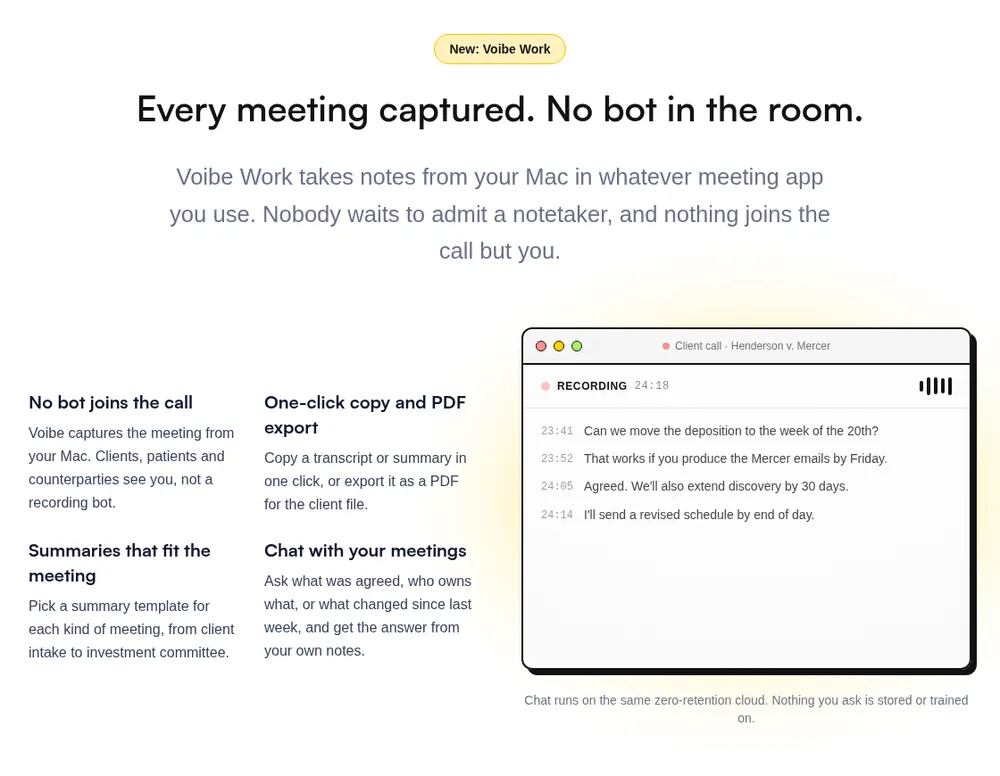
Jamie promises no training and EU storage, but it still keeps a copy of every meeting in its cloud. Voibe Work saves your notes on your computer instead.
What Voibe Work does differently
- No bot in the call, on Mac or Windows. It captures Zoom, Microsoft Teams, Google Meet, Webex, Slack huddles or any other meeting app from your computer.
- It also records in-person meetings through your Mac or PC's mic.
- The audio goes to open-source models on zero-retention providers and is deleted as soon as processing completes (what zero data retention means).
- Your transcript and summary are never used to train AI.
- You get speaker labels you can rename, up to 4 hours per meeting and unlimited meetings.
- Templates, chat with your meetings, and copy or PDF export are included, and so is dictation.
- BAA available on request, for practices that need one.
Where Jamie wins
- Jamie Free includes meeting notes, while Voibe Free covers dictation only.
- Jamie sends a notice email and can post a chat notice. Voibe Work only reminds you.
- Jamie has iPhone and Android apps, and Voibe has no phone app.
- Jamie holds its own ISO 27001 certificate. Voibe claims no certification.
- Jamie Pro records meetings up to 5 hours and syncs to CRMs.
- Voibe Work's meeting notes need an internet connection. On-device processing is a Voibe dictation feature on Apple Silicon Macs, not a meeting-notes one.
What it costs
Voibe Work is $19 a month, $149 a year or $399 once, per seat. Jamie Plus is $24 a month billed annually, which is $288 a year. Against Plus annual, Voibe Work is $139 (48.3%) less a year. The maths: $288 − $149 = $139, and $139 ÷ $288 = 48.3%.
Against Pro annual ($552), the gap is $403 (73.0%). Jamie Free costs $0, though, so Jamie is cheaper for light use. Every plan, credit and bundle is in our Jamie pricing breakdown.
Trying Voibe Work, and switching from Jamie
New accounts get a 7-day free trial of every Voibe Work feature, with no credit card and no automatic charge. After the trial you move to Voibe Free unless you buy a plan. Paid plans carry a 30-day money-back guarantee.
If you pay for Jamie now, cancel it and email the cancellation confirmation to hi@getvoibe.com. Voibe's switch offer gives you Voibe Work free for the rest of your Jamie plan. You also get a bonus month, up to 12 months in total.
Key Takeaway
Voibe Work has no bot, saves notes on your computer and costs $149 a year. Jamie Free costs less, and Jamie has more consent tools.
Who Jamie Is Safe For, and Who Should Pick Something Else
Jamie is safe for most internal and client calls. Turn on the notice email first, and keep Speaker Memory off without consent. It fits less well when a copy in the vendor's cloud would hurt you, so find your situation below.
| Your situation | Jamie verdict | What to do |
|---|---|---|
| Internal stand-ups and planning | Safe | Keep sharing private; delete what you don't need |
| Client and sales calls | Safe with notice | Turn on the notice email and say it out loud |
| EU teams that need EU data residency | Strong fit | Ask which LLM is live; the DPA is in the Terms |
| Participants in California, Illinois or another all-party state | Safe only with everyone's consent | Ask each person and wait for a yes |
| Using Speaker Memory | Consent needed | Explicit consent from everyone, or leave it off |
| Patient conversations with health information | Not supported | No BAA; use a tool that offers one |
| Privileged legal calls | Risky | Read the lawyers guide; prefer no vendor-side copy |
| Phone calls | Not possible | Jamie's phone apps record in-person meetings only |
| Teams that need SOC 2 Type II today | Wait | Jamie lists it as pending; ask for the ISO certificate |
Our Jamie alternatives compare where each notetaker keeps your meetings. The best no-bot meeting note takers skip the bot entirely. For the rest of your AI tools, see our AI privacy guide.
Is Jamie Safe? FAQ
Quick answers on Jamie's privacy, compliance and consent, grouped by topic.
Privacy and Your Data
Is Jamie safe to use? Yes, for most internal and client calls. No bot joins, the audio is deleted after transcription, and notes stay in the EU, never trained on. The gaps are its pages disagreeing on the AI vendor, a chat notice that starts off, and no BAA.
Does Jamie train AI on my meetings? No. Privacy policy §1.8 rules out training by Jamie or its providers. The security FAQ says this is contractually enforced with every provider. Apps you connect through MCP follow their own AI company's terms.
Where does Jamie store my meetings, and for how long? In the EU, until you delete them. The audio is uploaded to a server in Frankfurt and deleted after transcription. Transcripts and summaries stay in an EU-based database, and custom retention rules are Enterprise only.
Vendors, Compliance and Legal Record
Which AI does Jamie use for summaries? Jamie's own pages disagree. The help center says Anthropic or OpenAI, and the trust center FAQ says VertexAI or OpenAI. The subprocessor list names Soniox, Modal and Google Cloud, with no OpenAI or Anthropic.
Is Jamie HIPAA or GDPR compliant? It states GDPR compliance but makes no HIPAA claim and offers no BAA. Keep health information out. Its ISO 27001:2022 certificate is its own, and SOC 2 Type II is listed as pending.
Has Jamie had a data breach or lawsuit? I found no public reports of a breach, lawsuit or university ban naming Jamie. My check was a web search, and I couldn't search US federal dockets.
Consent and Alternatives
Does Jamie tell participants it is recording? Only if you set it up, since no bot appears in the call. A notice email goes out before calendar meetings on every plan. The in-meeting chat notice is in beta and off by default, and Jamie says informing participants is your job.
Is Jamie's Speaker Memory a privacy risk? It needs consent. It stores voice profiles, which Jamie's policy calls biometric data, and the Terms require express consent from all participants. Profiles are deleted when you turn it off or delete the speaker.
What is a safer alternative to Jamie for confidential meetings? A notetaker with no bot and no copy on the vendor's servers. Voibe Work has no bot, deletes the audio once processing completes and saves notes on your computer. BAA available on request. At $149 a year, it's $139 (48.3%) less than Jamie Plus annual.
Is Jamie Safe in 2026? My Verdict
Jamie's data handling is strong. No bot, audio deleted after transcription, EU storage, no training and its own ISO certificate. Its weak points are about consent and documents:
- three different answers on which AI writes your summary
- US exceptions to an EU-only promise, for non-meeting data
- a notice email that needs a calendar, and a chat notice that starts off
- voice profiles that count as biometric data under GDPR
- notes kept until you delete them, with custom retention on Enterprise only
- no BAA, and SOC 2 Type II still pending
If you're keeping Jamie
I'd keep it for internal and client calls, after running the five settings checks above. Re-check when the privacy policy moves past version 2.0.
If the meeting shouldn't sit in a vendor's cloud
Voibe Work captures it from your Mac or Windows PC with no bot. The audio is deleted as soon as processing completes. Notes are saved on your computer and never trained on. Dictation is included, it costs $149 a year, and it reminds you to tell people when recording starts.
Start the 7-day free trial, no credit card needed.
Related reading
- Our Jamie pricing breakdown, plan by plan
- The Jamie alternatives that skip the bot
- Safety reviews: Is tl;dv Safe?, Is Krisp Safe? and Is Notta Safe?
- AI meeting note taker pricing compared
- Our AI Tool Privacy Tracker, which scores notetakers side by side
Info
I checked every source on November 3, 2026. If Jamie's privacy policy is newer than version 2.0 (September 15, 2026), re-check before relying on these facts.