
Free Interview Transcription, With Quotes You Can Check
Upload an interview, name the speakers, and get a transcript with a timestamp on every line plus the quotes worth using. Nobody keeps your recording, and nobody trains on it.
No file handy?
No signup. Your file is transcribed by open-source Whisper on Voibe's zero-retention cloud. The audio is deleted once the transcript is saved and is never used to train any model.
What this interview transcription tool does
This page transcribes an interview recording for free: you get a speaker-labelled transcript with a timestamp on every line, a summary of themes and quotes, and no account. It is set up for interviews out of the box, with speaker labels on and the summary set to "Interview highlights".
Two things make an interview transcript usable: knowing who said each line, and being able to find it in the recording. So you can rename "Speaker 1" to "Interviewer" and "Speaker 2" to your guest's name, and download a TXT where every line starts with its time, like [12:04].
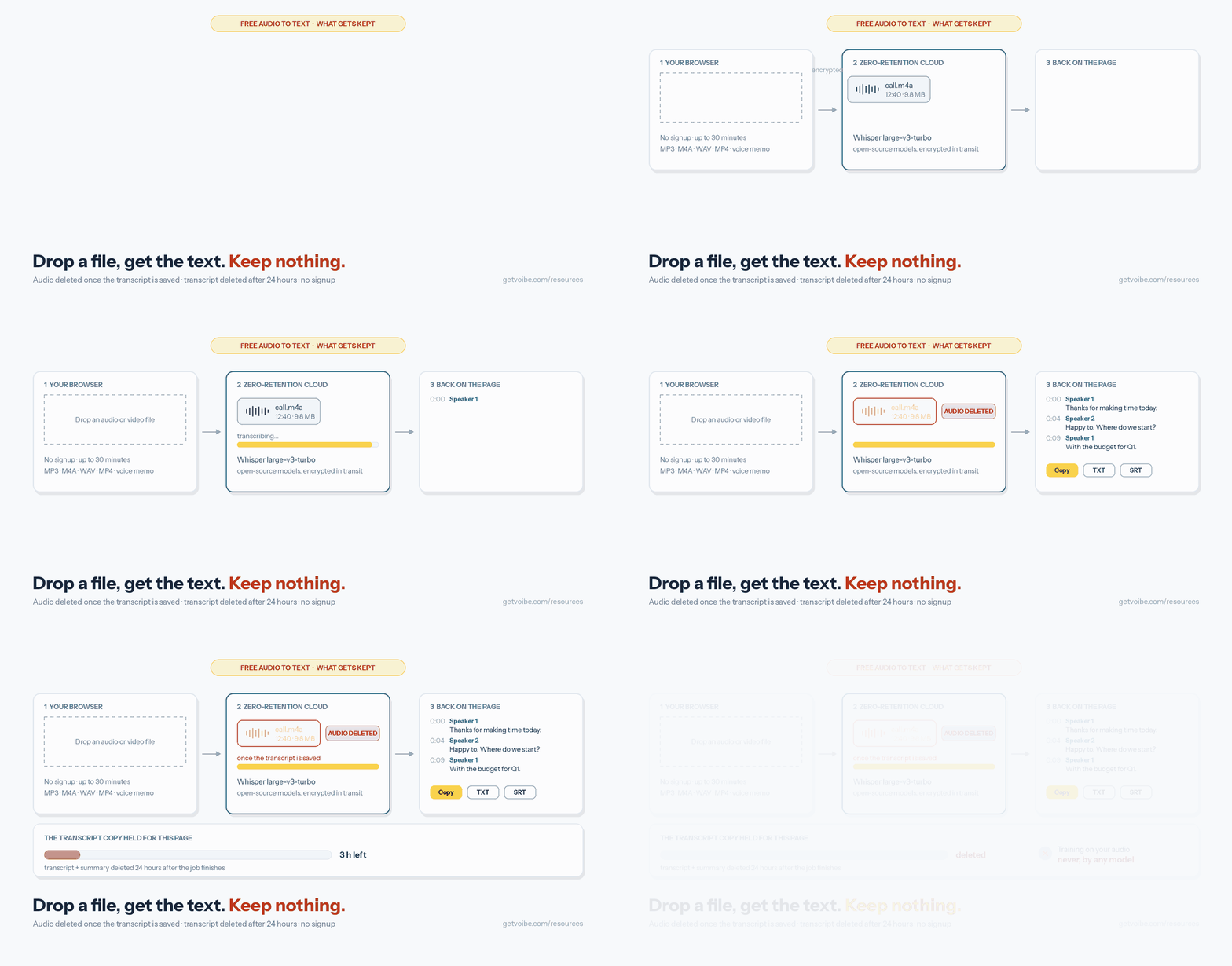
Transcription runs on open-source Whisper large-v3-turbo on Voibe's zero-retention cloud. The audio is deleted once the transcript is saved, the transcript 24 hours later, and nothing is used to train a model.
Key Takeaways
| Question | Answer |
|---|---|
| Cost | Free, no signup, no card |
| Recording length | Up to 30 minutes per file |
| Speaker labels | On by default; rename each speaker after transcription |
| Timestamps | On every line, on screen and in the timestamped TXT |
| Summary | Themes, word-for-word quotes, facts, figures and names |
| Exports | Copy, TXT, TXT with timestamps, SRT |
| Languages | Multilingual (Whisper large-v3-turbo) |
| What is kept | Audio: deleted once transcribed. Transcript: deleted after 24 hours. Training: never. |
How to transcribe an interview in five steps
- Record with consent, and keep the mic close to both voices. On a call, record in Zoom, Teams or Meet; in person, put the phone or recorder between you.
- Export the audio. An audio-only M4A or MP3 is far smaller than video. iPhone voice memos work: share from Voice Memos, then Save to Files.
- Drop the file into the box above and click "Transcribe for free". Speaker labels and the interview summary are already selected.
- Name the speakers. Type "Interviewer" and your guest's name over "Speaker 1" and "Speaker 2"; the summary updates too.
- Download "TXT with timestamps" and check your quotes. Every line carries the time it was said, so you can listen back before you publish.
From recording to a quote you can stand behind
A transcript you can't verify is a liability in a story, a research report or a hiring decision. The page is built around the checking step: speaker labels so a quote is attributed to the right person, names you choose so the transcript reads like your notes, and timestamps so every line can be found in the recording in seconds.
Which interviews it suits, and what to watch for
| Interview | Name the speakers | Watch for |
|---|---|---|
| User research / customer discovery | Researcher, Participant | Participant consent that covers cloud transcription; remove names before sharing quotes |
| Journalism | Reporter, Source | Check every printed quote against the timestamp; off-the-record parts stay in the transcript |
| Academic and oral history | Interviewer, Narrator | Your ethics board's rules on where recordings may be processed |
| Podcast interview | Host, Guest | Download SRT for captions; summary quotes make show notes |
| Hiring interview | Interviewer, Candidate | Candidate consent; many candidates dislike a bot joining, so record locally |
Comparing tools for a research team? See the best AI note takers for user interviews, Rev alternatives for journalists and the best transcription apps for Mac.
Ask Claude or ChatGPT about every interview: Voibe Meeting MCP
A single transcript answers a single question. A research round raises questions that span every interview: which themes came up most, who asked for what, which quotes back up a finding. Voibe Work's Meeting MCP gives Claude, ChatGPT and other AI apps you use access to all your meetings, so they can answer across them. In the app's own example, you ask: "Go through this month's customer calls and write up the feature requests."
- Connect from the Meetings page. Click MCP and pick Claude, Cursor, ChatGPT, Claude Code or another app. For Claude Desktop it connects in one click.
- One switch stops it. "Let AI apps use your meetings" turns off every AI app at once, and the panel shows when an AI app last read your meetings.
- Know where the text goes. In the panel's words: "Apps you connect can read your meeting titles, summaries and transcripts. Your dictation is never shared. What an app reads goes to the company behind its AI, for example Anthropic for Claude. None of it goes through Voibe's servers." Once an AI app reads an interview, that company's terms apply, so check your participants' consent covers it.
Meeting MCP reads interviews that Voibe Work recorded, on calls or in person, not files uploaded on this page. It comes with Voibe Work and the 7-day trial.
Transcribing a whole study? Use the Voibe API or MCP
This page takes one file at a time. For a backlog of interview recordings, the same transcription runs through the Voibe speech-to-text API or its MCP server: ask Claude, Claude Code or Cursor to transcribe a folder of interviews with speaker labels, or call the API from a script. Files can be up to 200 MB each, you can write your own summary prompt (for example, your interview guide's questions), and billing is per second, charged only when a job finishes. A new account gets 15 free minutes with no card, then packs start at $10 for 2,000 minutes and never expire. Speaker labels are off by default in the API, so send "diarize": true. The audio is deleted once the transcript exists, and transcripts and summaries are kept for 24 hours, then deleted.
Transcribe your interviews from Claude, Cursor or your code
The same pipeline as this page, for files up to 200 MB and with nothing to click per file, plus your own summary prompt instead of the presets. 15 free minutes on a new account, then $10 for 2,000 minutes, billed per second.
- Open Customize → Connectors (claude.ai/customize/connectors, or the sidebar in Claude Desktop and Cowork).
- Click +, then Add custom connector. Name it Voibe and paste the address below.
- Click Connect and sign in. A new email gets an account with 15 free minutes.
https://api.getvoibe.com/mcpThen ask: “Transcribe this call recording and list the decisions.”
Recording tips that make interview transcripts cleaner
- Avoid talking over each other. Overlapping speech is where speaker labels and words both go wrong. A short pause before you answer helps more than any setting.
- Record in a quiet room with soft surfaces. Echo from bare walls hurts recognition more than a little background noise.
- Say names and spell unusual ones at the start. Then you can fix a misheard name across the transcript in one search-and-replace.
- Upload audio only. An M4A or MP3 of a call is a fraction of the video's size and uploads faster.
When to use something other than this page
This page handles one recording at a time. If you interview people every week, Voibe Work records the call from your Mac or Windows PC with no bot in the call, records in-person interviews through your computer's microphone, and lets you create your own interview summary template. If the recording must never leave your computer, use an on-device app. For many files from code or an AI agent, use the Voibe speech-to-text API.
Frequently Asked Questions
Transcribing Interviews
How do I transcribe an interview for free?
Can I rename the speakers to Interviewer and the guest's name?
What does the interview summary include?
How do I check a quote before I publish it?
My interview is longer than 30 minutes. What can I do?
Privacy and Consent
What happens to the interview recording?
Do I need the interviewee's consent?
Is this suitable for confidential research data?
Recurring Interviews
Is there a way to skip the upload for interviews I run every week?
Can Claude or ChatGPT read all my interviews?
How much does Voibe Work cost?
Sources and References
- Voibe transcription documentation (models, speaker labels, retention: audio deleted once the transcript is saved; transcripts deleted 24 hours after the job finishes)
- Voibe cloud AI privacy (zero-retention providers, open-source models)
- Voibe pricing (Voibe Work, 7-day trial)
- Voibe release notes (Voibe Work speaker labels and renaming)
Related Tools and Resources
Audio to Text Converter
Meetings, sales calls, lectures and voice memos, with a summary for each.
AI Note Takers for User Interviews
Tools for research teams, compared on bots, consent and training.
Free Deposition Summary
The same transcription, set up for depositions and testimony.
Free Tools Hub
Every free voice and typing tool by Voibe.
Got an interview to transcribe?
Drop the recording into the box at the top of this page, name the speakers, and download a transcript you can quote from.
- Free, no signup
- Speaker names you choose
- Timestamp on every line
- Never used for training
Voibe Work records interviews from your Mac or Windows PC with no bot in the call, and Meeting MCP lets Claude and ChatGPT read them. No credit card for the trial.