

The Quick Answer: Your Laptop Is Already the Recorder
Before you spend $159 on a clip-on AI recorder, look at the meeting table. Your laptop is already on it. Its microphone can already hear the room.
Recording an in-person meeting on your laptop is mostly about placement. Put the laptop in the middle of the table, open a meeting-notes app and give it the microphone. Then tell everyone you're recording.
The app turns the audio into a transcript and a summary. You've got four good ways to do it, and I'd start with the first:
- Voibe Work through the laptop mic. It records the room through your Mac or PC's mic, deletes the audio after processing and saves the notes on your computer.
- A phone app. Apple Voice Memos, Otter, Granola or Jamie record on the phone in your pocket, which helps when there's no laptop around.
- A dedicated recorder like Plaud. It earns its price on walking meetings, site visits and phone calls, the jobs a laptop can't cover.
- Record a file, then transcribe it. QuickTime or Windows Sound Recorder saves the audio, and the Voibe API turns it into a transcript for $0.30 an hour.
Key takeaways
| Method | Best for | What you need | Cost |
|---|---|---|---|
| Voibe Work | Meetings at a desk or table, plus your online calls | A Mac or Windows PC with internet | $19/month, $149/year or $399 once; 7-day free trial |
| Phone app | Coffee meetings, hallways, conference days | An iPhone or Android phone | Voice Memos is built in; other apps vary |
| Plaud recorder | Walking meetings, site visits, phone calls | A $159 to $189 device plus the Plaud app on your phone | Free Starter plan (300 min a month) or Pro at $99.99/year |
| Local file + Voibe API | Rooms with no Wi-Fi, recordings you already have | A built-in recorder app | $0.30 per hour of audio; 15 free minutes |
Estimated time to complete: setup takes about 5 minutes before your first meeting.
Setup is a one-time job: install an app, allow the microphone, run a test. After that, recording a meeting takes one click and one sentence to the room.
Prices, ratings and features were checked November 5, 2026.
Thinking about a Plaud anyway? Three companion reads cover it:
- Plaud pricing adds up the device and the plan.
- Is Plaud safe follows a recording into Plaud's cloud.
- Plaud alternatives lines up the apps that replace it.
Key Takeaway
You already own the recorder. A laptop in the middle of the table, a notes app with microphone access and a spoken heads-up to the room cover most in-person meetings. Buy a dedicated recorder only for meetings away from a desk or for phone calls.
Where the Laptop Sits Matters More Than the App
A laptop mic records a small meeting well if you place it with care. Most bad room recordings come down to where the laptop sits, not the app doing the transcribing.
Six checks before people sit down
- Put the laptop in the middle of the table. Everyone should sit about the same distance from it, so no voice comes out much quieter than the rest.
- Keep the lid open and the charger in. Closing the lid usually puts a laptop to sleep, and a long meeting can drain a battery.
- Move away from noise. Projector fans, air vents, open doors and coffee machines all end up in the recording.
- Don't type on the recording laptop. The keyboard sits right next to the built-in mic, so take any notes on paper or a second device.
- Silence notifications. Turn on Focus on a Mac or Do Not Disturb on Windows, so alerts don't land on the recording.
- Ask people to speak one at a time. Crosstalk is hard for any transcription model to split into separate speakers.
Built-in mic or an external USB mic?
For a handful of people around one table, the built-in mic does the job. In a long room or a big group, the voices at the far end come out quiet.
A USB conference microphone in the centre of the table helps there. If you add one, make it the input in your computer's sound settings.
Then run a short test recording and listen back before people arrive. In a room I haven't used before, I wouldn't skip this.
Method 1: Voibe Work Through Your Laptop Mic (My Pick for a Table)
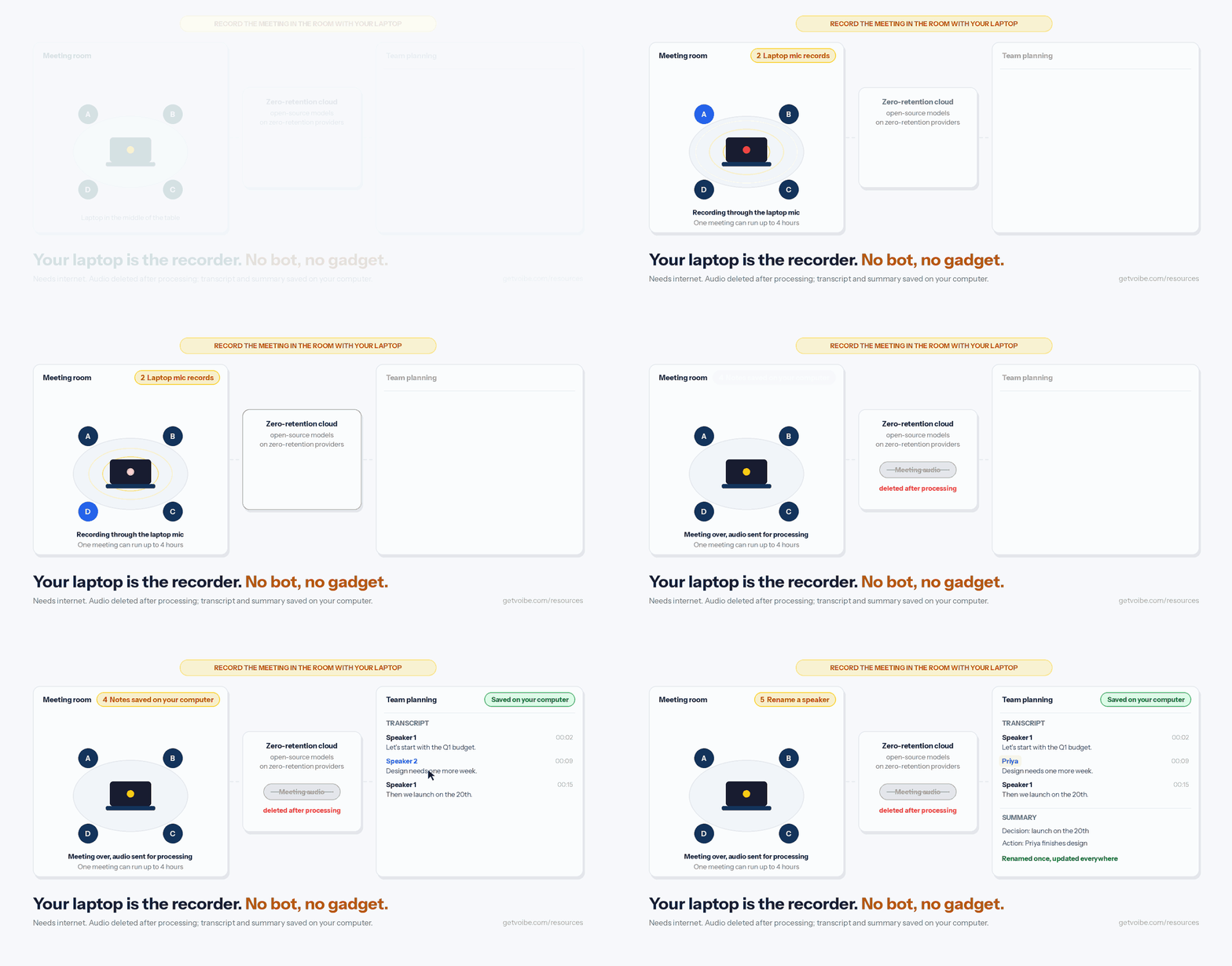
Voibe Work records in-person meetings through your Mac or PC's mic. It's the app we build, and it's the method I'd pick for any meeting at a table.
Plenty of the meetings that count still happen across a desk. The same app also takes notes on Zoom, Microsoft Teams, Google Meet and other calls, and no bot joins them.
Where your meeting audio goes
- Meeting audio is processed by open-source models on zero-retention cloud providers.
- That audio is deleted as soon as processing completes.
- The transcript and summary are saved on your computer, not on Voibe's servers, and never used to train AI.
Processing runs on that zero-retention cloud, so connect the laptop to the internet before the meeting starts.
Step 1: Install Voibe and start the free trial
- Download Voibe for Mac or Windows from getvoibe.com. You don't need an account to try it.
- New accounts get a 7-day trial of every Voibe Work feature, with no credit card and no automatic charge.
- After the trial, Voibe Work keeps your meeting notes going, and Voibe Free keeps dictation going with 2,000 cloud words a week.
Step 2: Give Voibe access to the microphone
- On a Mac: open System Settings, then Privacy & Security, then Microphone, and turn Voibe on.
- On Windows: open Settings, then Privacy & security, then Microphone, and allow microphone access for desktop apps.
- Record a short test meeting at your desk and check that the transcript picks up your voice.
Step 3: Start notes and tell the room
- Put the laptop in the middle of the table and start notes in Voibe before the first agenda item.
- Voibe reminds you to tell everyone you're taking notes. Say it out loud, because following the consent rules where you are is your responsibility.
- Let the meeting run. One meeting can last up to 4 hours, and paid plans put no cap on the number of meetings.
Step 4: Fix the speakers, then use the notes
- The transcript labels each speaker and puts a time next to every line. Click a speaker's name to rename them, and the summary switches to the new name.
- Pick a summary template for the type of meeting, such as client intake. For a meeting you hold every week, create your own template.
- Use chat with your meetings to ask what was agreed or who owns what. Chat runs on the same zero-retention cloud, and nothing you ask is stored.
- Copy the transcript or summary in one click, or export it as a PDF.
Since October, transcripts and summaries arrive 10 to 20 times faster than before, by Voibe's own measurements. The October update post has the details.
What Voibe Work costs, and what you get
Voibe Work costs $19 a month, $149 a year or $399 once. That plan comes with:
- One seat that covers both your Mac and your Windows PC.
- Voibe's dictation app, included in the same plan.
- BAA available on request, for teams whose work calls for one.
It runs on the Mac or PC you already bring to the meeting, so there's no extra device to charge, pair or carry.
For walks and phone calls, pair Voibe Work with one of the methods below. Does Voibe work on iPhone and Android? answers the phone question.
The Voibe Work launch post explains why it never sends a bot.
See Voibe Work in action
Record your next meeting with the laptop you already have
Start free on Mac or Windows. You get 7 days of every Voibe Work feature, including in-person meeting notes and custom templates, with no credit card.
Method 2: Use the Phone Already in Your Pocket
A phone app is the answer when the meeting happens away from your laptop. Think of a coffee, a conference hallway or a walk between buildings.
Your phone is already in your pocket, so there's nothing extra to carry.
Phone apps that record in-person meetings
- Apple Voice Memos (free, built in). Apple's iPhone User Guide (checked November 5, 2026) says Voice Memos can show a transcription while you record or after, on iPhone 12 or later in 10 languages.
- Apple Notes (also built in). Apple Notes records and transcribes too, per the same guide. Apple Intelligence can summarize the transcript on iPhone 15 Pro or later.
- Otter. The Otter iPhone app records and transcribes live, including through AirPods. It's rated 4.79 from 87,912 ratings on the App Store.
- Granola. The Granola iPhone app is built for coffee catch-ups and conference days. It also takes notes on outbound phone calls, and it's rated 4.96 from 14,668 ratings.
- Jamie. The Jamie iPhone app records in-person meetings through the phone's microphone. Its listing says phone calls and system audio aren't supported. It's rated 4.89 from 261 ratings.
For a quick coffee with nothing sensitive on the table, I'd start with Voice Memos. It's free and already on the phone.
If calls from the car are part of your week, Granola is the one here that handles outbound calls.
How to record a meeting with a phone app
- Install the app and allow microphone access when it asks.
- Put the phone face up in the middle of the table, never in a pocket or a bag.
- Tell everyone you're recording, then start.
- Turn on Do Not Disturb, and keep the phone on a charger for a long meeting.
Before you record a client on your phone
Otter, Granola and Jamie keep your notes in their own cloud. Before you record a client meeting, read is Granola safe and is Otter safe.
Plans are compared in Granola pricing and Otter pricing. Jamie's rivals are in Jamie alternatives.
Method 3: A Dedicated Recorder Like Plaud, for Meetings Off the Desk

A dedicated AI recorder earns its price when the meeting isn't at a desk. Plaud is the best-known example. It's good at exactly the jobs a laptop can't do.
What Plaud does that a laptop can't
- Records away from a computer. The NotePin and NotePin S clip on or hang from a lanyard. The Note rides in a pocket or on the back of your phone.
- Records phone calls. The Plaud Note and Note Pro attach to the back of your phone, where a vibration-conduction sensor picks up the call. The NotePin models record in-person audio only.
- Records with no signal. The devices store audio offline and sync later. Transcription still runs in Plaud's cloud, through the Plaud app on a paired phone with internet.
- Lasts all day. Plaud lists up to 30 hours of recording on the Note and up to 20 hours on the NotePin.
How to record a meeting with a Plaud
- Bind the device to the Plaud app. Recording, file transfers and plan benefits all start from a device bound to your account, per Plaud's help center (checked November 5, 2026).
- Press record. The red indicator light stays on for the whole recording and can't be turned off.
- Sync to the phone app. The device stores audio offline, so the sync to the Plaud app can wait until your phone has internet.
- Let transcription run. The transcript and summary are made in Plaud's cloud after the recording syncs.
- Choose Private Cloud Sync on or off. Off, Plaud says recordings, transcripts and summaries leave its servers right after processing. On, they stay in Plaud's cloud until you ask for deletion.
What a Plaud costs against Voibe Work
Plaud devices come at three prices, per Plaud's device comparison page (checked November 5, 2026). Each includes the free Starter plan with 300 transcription minutes a month.
- $159 gets you the Note, which records calls and meetings, or the NotePin, which records in person only.
- $179 gets you the NotePin S, which also records in-person audio only.
- $189 gets you the Note Pro, which records phone calls as well as meetings.
On top of the device, the Pro plan costs $99.99 a year for 1,200 minutes a month, per Plaud's pricing page (checked November 5, 2026). Unlimited costs $239.99 a year.
Put a Note on the Pro plan next to Voibe Work, and the years play out like this:
- Year one: a Note plus Pro costs $258.99, so Voibe Work at $149 is $109.99 (42.5%) less.
- Year two onward: the device is paid for, and Plaud Pro is $49.01 a year cheaper than Voibe Work.
- Light use: if 300 minutes a month is enough, a Note on the free Starter plan costs $159 in total, against $298 for two years of Voibe Work.
If you mostly meet at a table, I wouldn't buy the device for that alone. If you're out on site visits every week, a recorder starts to earn its keep.
When the laptop is the better recorder
For meetings at a table, a recorder is one more thing to buy, charge and carry. Two more details push me toward the laptop:
- Plaud splits the job. It positions its devices for in-person meetings and Plaud Desktop for online calls. On an individual plan, Plaud Desktop needs a Plaud device bound to your account.
- The room gets a light, not a heads-up. Plaud devices show a red recording light that can't be turned off, but nothing tells the room out loud.
Ask for consent the same way you would with a laptop. Every plan and device is priced in Plaud pricing, and the privacy side is covered in is Plaud safe.
Method 4: Record a File Now, Transcribe It Later With the Voibe API
This one's for a room with no Wi-Fi, or for a recording you already have. You save an audio file with a built-in app, then send it to the Voibe API once you're back online.
It's the most hands-on of the four methods, but it never needs Wi-Fi in the room.
Step 1: Record the room with a built-in app
- On a Mac: open QuickTime Player, choose File, then New Audio Recording, and click the record button. Save the file when the meeting ends.
- On Windows: open the built-in Sound Recorder app (called Voice Recorder on older versions) and start recording.
- Record audio only. The Voibe API takes up to 200 MB per file, and an audio file is far smaller than a video.
Step 2: Create a transcription job
Get a key from the Voibe API keys page. New accounts get 15 free minutes with no card, which covers a short meeting end to end.
curl -s -X POST https://api.getvoibe.com/v1/transcripts \
  -H "Authorization: Bearer $VOIBE_KEY" \
  -H "Content-Type: application/json" \
  -d '{"diarize": true}'
Speaker labels are off by default, so send diarize set to true for any meeting.
The response holds a job_id and an upload_url. An optional prompt field shapes the summary.
Step 3: Upload the file and save the transcript
curl -s -X PUT $UPLOAD_URL --data-binary @meeting.m4a
curl -s https://api.getvoibe.com/v1/transcripts/$JOB_ID \
  -H "Authorization: Bearer $VOIBE_KEY"
The status moves from QUEUED to PROCESSING to DONE. Voibe deletes the audio the moment the transcript exists and never uses it to train any model.
The transcript and summary are kept for 24 hours after the job finishes, then deleted. Save them to your laptop as soon as the job is done.
If you do this often, I'd script the save.
What the Voibe API costs
- Packs run from $10 for 2,000 minutes to $100 for 24,000 minutes, and they never expire.
- Billing is per second, and you're charged only when a job reaches
DONE. - At the $10 rate, a one-hour meeting costs $0.30, and ten one-hour meetings a month cost $3.
The full walkthrough, with real output, is in how to transcribe a Zoom recording. The Voibe speech-to-text API launch post introduces the product itself.
Get Consent Before You Record Anyone in the Room
Recording people across a table is a legal question before it's a technical one. A laptop in plain view helps, but it doesn't replace asking.
One-party and all-party consent
Federal law lets you record an in-person conversation with one party's consent, according to the Digital Media Law Project. Many states go further.
The Reporters Committee for Freedom of the Press counts about 11 states with all-party consent rules.
Those states are California, Delaware, Florida, Illinois, Maryland, Massachusetts, Michigan, Montana, New Hampshire, Pennsylvania and Washington. RCFP notes that Michigan's rule applies at least to recordings made by someone outside the conversation.
Where in-person rules differ from phone rules
A few states treat a meeting in the room differently from a call:
- Missouri and Oregon require every party's consent for in-person conversations.
- Connecticut and Nevada require every party's consent only for phone calls.
RCFP also says in-person consent rules generally apply when people have a reasonable expectation of privacy.
It adds that recording is generally legal when the device is in plain view. The same goes when people are warned and keep talking.
A consent routine for in-person meetings
This is the routine I'd use in any room, whatever state you're in:
- Put the laptop where everyone can see it.
- Say at the start that you're taking AI notes, and where the notes will be kept.
- Ask whether anyone objects, and take notes by hand if someone does.
- Repeat the notice when someone joins late.
Voibe reminds you to tell everyone you're taking notes when a recording starts. The consent rules where you are stay your responsibility.
State-by-state detail is in our guide to AI notetaker recording consent laws. None of this is legal advice, so check with a lawyer for anything sensitive.
Which Method Fits Your Meetings? Three Questions
The right method depends on where your meetings happen and whether there's internet in the room. Answer these three in order.
- Is the meeting at a table where your laptop can be? If it is, go to the next question. If not, skip to question three.
- Is there internet in the room? If there is, use Voibe Work through the laptop mic. If not, record a local file and transcribe it with the Voibe API later.
- Do you need phone calls recorded too? If you do, a Plaud Note or Note Pro covers calls, and Granola's iPhone app covers outbound calls. If not, a phone app covers meetings on the move.
Most meetings land on the first branch, because most meetings happen at a table.
Use-case cheat sheet
| Meeting | Method | Why |
|---|---|---|
| Client meeting in your office | Voibe Work through the laptop mic | No device to buy; notes saved on your computer |
| Weekly team meeting in a conference room | Voibe Work, with a USB mic in a big room | The same app takes your online calls |
| In-person user interview | Voibe Work with your own interview template | Every summary follows the same structure |
| Hybrid meeting with remote people on Teams | Voibe Work on the laptop running the call | One recording covers the room and the call |
| Coffee or conference hallway chat | A phone app | No laptop on the table |
| Site visit or walking meeting | Plaud NotePin or a phone app | Records away from a desk |
| Client phone call | Plaud Note or Note Pro, or Granola for outbound iPhone calls | A laptop mic can't hear the call |
| Workshop in a room with no Wi-Fi | Local recording, then the Voibe API | Voibe Work meeting notes need internet |
Running research sessions? The best AI note taker for user interviews compares the field. How to write AI meeting notes templates shows how to build the interview template.
Six Habits That Make Any Room Recording Better
These habits work with any of the four methods, and most of them cost nothing. If you only adopt one, make it the round of names.
Before and during the meeting
- Test in the actual room. Record a minute in the space you'll use, then listen back from the seat farthest from the laptop.
- Start with a round of names. It makes renaming speakers quick, and it reminds everyone the meeting is being recorded.
- Write a template for recurring meetings. In Voibe Work, create your own template once, and every weekly meeting gets the same summary structure.
After the meeting
- Check the summary against the transcript. An AI summary can drop a qualification that changes the meaning, so read it before it goes to anyone else.
- Keep notes in one place. Notes scattered across a phone, a laptop and three inboxes are harder to find and harder to delete. How to take confidential meeting notes covers the rest.
- Dictate a recap when recording isn't allowed. Speak your notes into a document straight after the meeting. Voibe Free covers that with 2,000 cloud words a week.
Tip
Ask everyone to say their name once at the start. You'll know which voice is which when you rename speakers afterwards.
Why Your In-Person Meeting Recording Isn't Working, and How to Fix It
Why is the transcript empty or silent?
The app probably can't reach the microphone. Check these three places:
- On a Mac: System Settings, then Privacy & Security, then Microphone.
- On Windows: Settings, then Privacy & security, then Microphone.
- On either: confirm the right input device is selected in your sound settings.
Why did the recording stop partway through?
A laptop that goes to sleep stops recording. Keep the lid open, plug in the charger, and don't close the notes app until the meeting ends.
Why are people at the far end of the table missing?
Move the laptop to the centre of the table, away from fans and vents. In a big room, add a USB conference microphone and ask people to speak one at a time.
Why does every speaker have a generic label?
Voibe Work labels speakers as Speaker 1, Speaker 2 and so on until you name them. Click a speaker's name in the transcript to rename them, and the summary updates.
What if there's no internet in the room?
Voibe Work meeting notes need an internet connection, because the audio is processed in the cloud.
Record a local file with QuickTime or Sound Recorder and transcribe it with the Voibe API later. A Plaud device also records offline and transcribes once it syncs.
The Tools Side by Side: What Records, and Where Notes Live

The shortlist comes down to two questions: what records the meeting, and where the notes end up. The table covers the tools people most often ask about for in-person meetings.
| Tool | Records with | Phone calls | Where notes live | Price |
|---|---|---|---|---|
| Voibe Work (ours) | Your Mac or PC's mic | No | On your computer; audio deleted after processing | $149/yr ($19/mo; $399 once) |
| Apple Voice Memos and Notes | iPhone 12 or later | Notes transcribes calls recorded in the Phone app | In Apple's apps | Free |
| Otter | Phone app | Not listed for in-person recording | Otter's cloud | See Otter pricing |
| Granola | Phone app | Outbound calls from iPhone | Granola's cloud | See Granola pricing |
| Jamie | iPhone mic | Not supported | Jamie's cloud | See Jamie alternatives |
| Plaud | A $159 to $189 device | Note and Note Pro | Plaud's cloud when sync is on | Device plus $0 to $239.99/yr |
| Voibe API | A file you recorded | Any file you have | Your laptop; Voibe deletes its copy after 24 hours | $10 for 2,000 minutes |
How the apps rate
- On the App Store, Plaud is rated 4.883 from 24,174 ratings.
- Otter sits at 4.79 from 87,912 App Store ratings, the biggest sample here.
- Granola has 4.96 from 14,668 App Store ratings, and Jamie has 4.89 from 261.
- Voibe is rated 4.8 out of 5 from 6 reviews on Product Hunt.
I'd read the counts before the stars. A score built on 87,912 ratings tells you more than one built on 261.
Where to compare further
For the full field, the best AI meeting note takers ranks every platform. The best no-bot meeting note takers covers the apps that never join a call.
Replacing a Plaud? Start with Plaud alternatives.
In-Person Meeting Recording FAQ
Recording on a laptop
Can I record an in-person meeting on my laptop?
Yes. Put the laptop in the middle of the table, give a notes app the microphone and tell everyone you're recording. Voibe Work records in-person meetings through your Mac or PC's mic and saves the transcript and summary on your computer.
Does recording an in-person meeting on a laptop work offline?
Voibe Work meeting notes need an internet connection, because the audio is processed in the cloud. With no Wi-Fi, record a local file with QuickTime or Windows Sound Recorder. Transcribe it with the Voibe API once you're back online.
How long a meeting can Voibe Work record?
One meeting can run up to 4 hours. Paid plans put no cap on the number of meetings or minutes.
Phones and recorders
Is a Plaud recorder worth it for in-person meetings?
A Plaud earns its keep on site visits, walking meetings and, with the Note or Note Pro, phone calls. At a table, your laptop already records the room. In year one, Voibe Work at $149 costs $109.99 less than a Note plus Pro ($258.99).
Can I record an in-person meeting on my phone instead?
Yes. Apple Voice Memos and Notes transcribe recordings on iPhone 12 or later. The Otter, Granola and Jamie iPhone apps also record in-person meetings. Put the phone face up in the middle of the table.
Does Voibe have a phone app for in-person meetings?
No. Voibe runs on Mac and Windows, so the laptop has to be in the room. For meetings away from a computer, use a phone app or a dedicated recorder.
Privacy and consent
Is it legal to record an in-person meeting?
It depends on where you are. Federal law allows recording with one party's consent. The Reporters Committee for Freedom of the Press counts about 11 states that require everyone's consent. Tell everyone you're recording before you start.
Our recording consent laws guide covers each state.
Where does Voibe Work send an in-person recording?
Meeting audio is processed by open-source models on zero-retention cloud providers and deleted as soon as processing completes. The transcript and summary are saved on your computer, not on Voibe's servers, and never used to train AI.
Cost
How much does Voibe Work cost?
Voibe Work costs $19 a month, $149 a year or $399 once, on Mac and Windows. New accounts get a 7-day trial of every Voibe Work feature with no credit card.
What is the cheapest way to transcribe an in-person meeting?
Recording a local file and sending it to the Voibe API costs $0.30 per hour of audio at the $10 rate. New accounts get 15 free minutes. Apple Voice Memos transcribes for free on iPhone 12 or later.
Start With the Laptop You Already Have
Most in-person meetings happen at a table, and the laptop on that table can record them. Put it in the middle, allow the microphone and tell the room.
Save the hardware for the meetings a laptop can't reach: phone calls, site visits and walks between buildings. When the room has no Wi-Fi, use a local file and the Voibe API.
Voibe Work turns the meeting into notes saved on your computer. You can try Voibe Work free for 7 days on Mac or Windows, with no credit card. More walkthroughs are in our how-to guides.