

One-on-One Meeting Notes Template: The Quick Answer
Three weeks ago you told your report you'd ask about the conference budget. Neither of you wrote it down, and now it's the first thing they bring up. Most 1:1 notes fail the same way: they record today's chat and lose last week's promises.
A one-on-one meeting notes template fixes this by starting with carry-overs, the actions and topics left open from the last meeting. The full template below has seven sections in the order a good 1:1 runs:
- Carry-overs from last time, each marked done, still open or dropped.
- Updates on what the report finished or moved forward.
- Blockers, with the help asked for and who can give it.
- Feedback in both directions, each point tied to an example.
- Career and growth goals, and the support you agreed.
- Actions with an owner and a due date.
- Carry forward: topics you raised but didn't finish.
The page also gives you a worked example, four prompts for what comes after the meeting, and an AI summary prompt in two versions. One version is for Voibe Work, the meeting-notes plan we build, and the other is for ChatGPT or Claude.
The template suits managers who run weekly or fortnightly 1:1s, and reports who want their own record. Copying the template takes a minute, and it pays off from the second 1:1.
Key takeaways
| Question | Answer |
|---|---|
| What goes in 1:1 notes? | Carry-overs, updates, blockers, feedback both ways, growth, actions and carry-forward topics |
| What stays out? | Health details, pay figures, family matters and anything said off the record |
| Who reads them? | Both people, so the language stays plain and neutral |
| How long is the template? | Under 2,000 characters, as are both summary prompts, so each also fits the 2,000-character prompt field of Voibe's transcription API |
| Can AI fill it in? | Yes. Paste the summary prompt below as your own template in Voibe Work, or into ChatGPT or Claude with a transcript |
| What does Voibe Work cost? | $19 a month, $149 a year or $399 once, after a 7-day trial with no credit card |
Key Takeaway
A one-on-one meeting notes template has seven sections: carry-overs from last time, updates, blockers, feedback both ways, career and growth, actions with owners, and topics to carry forward. Write it so both people can read it, and keep health, pay and family details out.
The One-on-One Meeting Notes Template to Copy
This one-on-one meeting notes template works on paper, in a shared doc, or as the shape you ask an AI summary to follow. Copy it as it stands, then rename any section to match how your team talks.
1:1 notes: [Manager] and [Report]
Date: [date]   Next 1:1: [date]

1. Carry-overs from last time
- [Action or topic from the last 1:1]: done / still open / dropped, and why

2. Updates
- [What the report finished or moved forward since the last 1:1, one line each]

3. Blockers
- [What is stuck]. Help asked for: [what], from [whom]

4. Feedback, both ways
- Manager to report: [the example, its effect, what to keep or change]
- Report to manager: [the example, what would help]

5. Career and growth
- Goal: [in the report's words]. Progress since last time: [one line]
- Support agreed: [course, project, introduction or stretch task]

6. Actions
| Owner | Action | Due |
| [name] | [action] | [date, or no date set] |

7. Carry forward to next time
- [Topic raised but not finished]

Keep out of these notes: health details, pay figures, family matters and
anything either person asked to keep off the record.
Why each section is there
- Carry-overs open the meeting because they test whether last time's actions happened. A dropped action is fine, but it should be dropped on purpose.
- Updates and blockers stay short, since status can travel by message. The 1:1 is for whatever a message can't fix.
- Feedback, both ways asks for an example every time. A note that says an incident write-up was clear, because its timeline showed the root cause, is useful at review time.
- Career and growth keeps the report's goal in their own words, so a quarter later you can see whether anything moved.
- Actions and carry forward split what someone agreed to do from what you simply ran out of time for.
The template is the full version of the short one-to-one template in our guide to writing AI meeting notes templates. That guide has seven more templates for other meetings.
The AI Summary Prompt for One-on-One Notes, in Two Versions
An AI note taker fills in the template only if you tell it how. The two prompts below produce notes in the same seven sections, and both stay under 2,000 characters. Version A is for Voibe Work, and Version B is for ChatGPT or Claude.
Version A: paste it as your own template in Voibe Work
Voibe Work summarizes each meeting with a template for its type, such as client intake or investment committee, and you can create your own template. Paste this one as your 1:1 template. The summary only sees the meeting in front of it, so this version records carry-overs that either person mentions out loud.
You are writing notes from a one-to-one meeting between a manager and a direct report. Both people will read the notes, so write plainly and neutrally, in the third person.

Sections, in this order:
1. Carry-overs: actions or topics from an earlier 1:1 that either person mentioned, each marked done, still open or dropped, as stated. If none came up, write none mentioned.
2. Updates: what the report finished or moved forward, one line each.
3. Blockers: what is stuck, the help asked for, and from whom.
4. Feedback: feedback given in either direction, with the example used. Skip this section if none was given.
5. Career and growth: goals, skills or plans discussed, and any support agreed.
6. Actions: a table with owner, action and due date. Write no date set if none was said.
7. Carry forward: topics raised but not finished, for the next 1:1.

Rules:
- Maximum 250 words. Bullets, with a table for Actions.
- No judgments about performance unless the manager stated one, in the manager's own words.
- Leave out: health details, pay figures, family matters and anything either person asked to keep off the record. If one came up, write only that a private topic was discussed.
- List an action only if someone agreed to do it. Otherwise put it under Carry forward.
- If a name, date or commitment is unclear, write [CHECK: what is unclear].
Version B: paste it into ChatGPT or Claude with a transcript
This version takes two inputs, last time's notes and today's transcript. With both in front of it, the assistant can check every earlier action against what was said today, even ones nobody raised.
Below are two things: the notes from my last 1:1 with [name], and the transcript of today's 1:1. Write today's notes for both of us to read, plainly and neutrally, in the third person.

Start with Carry-overs: for every action in the last notes, say whether today's transcript shows it done, still open or not mentioned.

Then these sections, in order:
1. Updates: what [name] finished or moved forward, one line each.
2. Blockers: what is stuck, the help asked for, and from whom.
3. Feedback: given in either direction, with the example used. Skip if none.
4. Career and growth: goals discussed and any support agreed.
5. Actions: a table with owner, action and due date, or no date set.
6. Carry forward: topics raised but not finished.

Rules:
- Maximum 250 words.
- No judgments about performance unless the manager stated one.
- Leave out health details, pay figures, family matters and anything said off the record.
- List an action only if someone agreed to it.
- If anything is unclear, write [CHECK: what is unclear] instead of guessing.

Last 1:1 notes:
[paste]

Today's transcript:
[paste]
Whatever you paste into ChatGPT or Claude goes to OpenAI or Anthropic under that company's terms. For a 1:1 with sensitive moments, paste the summary rather than the full transcript, or trim the transcript first.
A Worked One-on-One Example: From Transcript to Notes
The example below is invented. Daniel manages a software team, and Priya is an engineer who reports to him. Marcus and Ana, who come up along the way, are two other leads at their company. This excerpt comes from their weekly 1:1 transcript, with speaker labels and times:
[00:01:10] Daniel: Last time you were going to send the migration plan to the platform team. Did it go out?
[00:01:18] Priya: Sent it Tuesday. They want a second review before the code freeze, so I'll book one.
[00:03:40] Priya: Staging is still broken. I lost about two days to it this week.
[00:04:05] Daniel: I'll raise it with Marcus at Thursday's leads meeting.
[00:07:22] Daniel: Your incident write-up was clear. The timeline made the root cause easy to follow.
[00:08:10] Priya: It would help to hear about roadmap changes before the team meeting, not during it.
[00:12:30] Priya: I'd like to lead a project end to end this half.
[00:13:02] Daniel: The search rebuild could work. I'll ask Ana whether it can start in March.
[00:15:45] Priya: I have a doctor's appointment Friday, so I'm out that afternoon.
[00:16:20] Daniel: Can we come back to the on-call rota next time?
With Version A of the prompt, the excerpt comes back as notes in the template's shape:
Carry-overs
- Migration plan to the platform team (Priya): done. Sent Tuesday; the
  platform team asked for a second review before the code freeze.

Updates
- Priya wrote an incident write-up.

Blockers
- Staging is broken and cost Priya about two days. Daniel will raise it.

Feedback
- Daniel to Priya: the incident write-up was clear; the timeline made the
  root cause easy to follow.
- Priya to Daniel: share roadmap changes before the team meeting.

Career and growth
- Goal: lead a project end to end this half. Option: the search rebuild.

Actions
| Owner  | Action                                      | Due      |
| Daniel | Raise the staging outage with Marcus        | Thursday |
| Daniel | Ask Ana whether search can start in March   | no date set |
| Priya  | Book the second review of the migration plan | [CHECK: date] |

Carry forward
- The on-call rota.
- Priya is out Friday afternoon (private topic discussed).
What the prompt did with each line
- The migration plan from the last 1:1 landed under Carry-overs as done, with the follow-up attached.
- Daniel's praise kept its example, so Priya can point to it later.
- Priya's request about roadmap changes was recorded as feedback to Daniel, not as an action nobody agreed to.
- The doctor's appointment was left out. The notes say only that Priya is out Friday afternoon.
- Nobody gave a date for the second review, so the prompt flagged it with [CHECK] instead of guessing.
What to Capture in One-on-One Notes, and What to Leave Out
Capture what both people agreed, in words both would sign. Leave out anything personal, and anything that belongs in a formal HR process rather than a shared note.
Sensitive topics and where they belong
| Topic | In the shared notes | Where it goes instead |
|---|---|---|
| Health | Nothing beyond availability, such as out Friday afternoon | Your HR team's process, if an adjustment is needed |
| Pay and promotion | That pay was discussed, and the next step with a date | Your compensation process, with figures |
| Performance concerns | Facts and examples, in the manager's own words | Your company's written performance process |
| Family and personal life | Nothing | Nowhere, unless the report asks |
| Off the record | Nothing | Have that talk when no notes are being taken |
The transcript keeps every word
A leave-out rule shapes the summary, not the transcript. If a private topic came up in a recorded 1:1, the transcript still has it. Store 1:1 transcripts with the same care as the summary, and delete what you no longer need.
Consent comes before the first recorded 1:1
Ask your report before you record your first 1:1, and offer to share the notes the same day. When recording starts, Voibe reminds you to tell everyone you're taking notes. Following the consent rules where each person is stays your responsibility. Our guide to AI notetaker recording consent laws covers them state by state.
For calls where even a summary feels too much, how to take confidential meeting notes compares three ways to take notes with no bot in the call.
Run This Template on Every 1:1 With Voibe Work, With No Bot in the Call
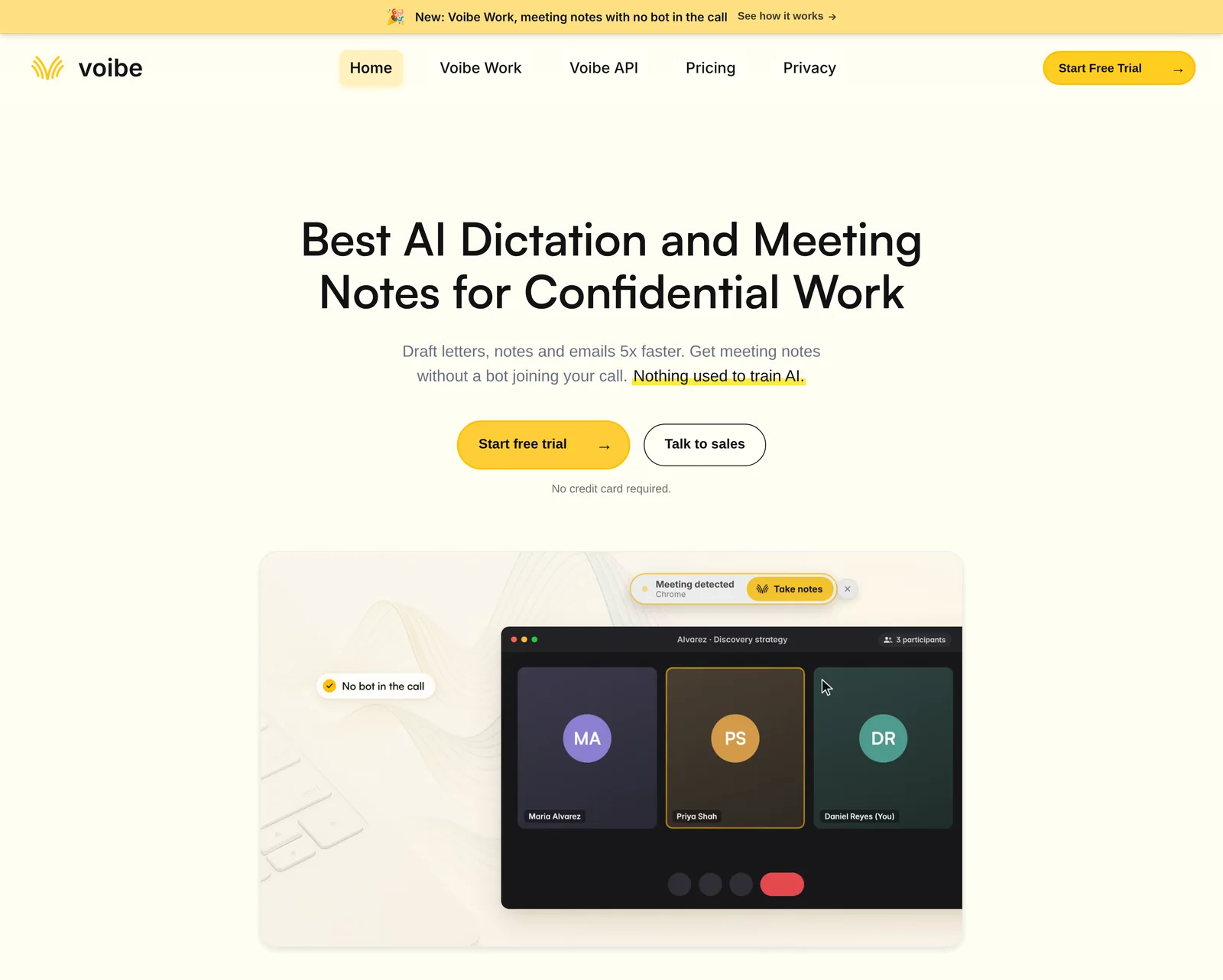
A 1:1 template only helps if it runs every week without anyone remembering to paste it. Voibe Work is the meeting-notes plan we build, and it can run your 1:1 template on every call.
How a 1:1 runs with Voibe Work
- Join the call as usual. Voibe Work captures meetings from your Mac or Windows PC in Zoom, Microsoft Teams, Google Meet, Webex, Slack huddles or any other app. No bot joins the call.
- Take notes when Voibe offers. Voibe offers to take notes when a call starts, which suits a 1:1 that happens every week.
- Use your own 1:1 template. Paste Version A of the prompt as your own template, and every 1:1 summary comes back in the same seven sections.
- Rename the speakers once. The transcript labels each speaker with a time on every line. Click a name to rename that speaker, and the summary updates.
- Share the notes. Copy the summary in one click, or export it as a PDF for your report.
For a 1:1 at your desk or in a meeting room, Voibe Work records the conversation through your computer's microphone. Our guide to recording an in-person meeting on your laptop covers the setup.
Where the 1:1 notes go
- Meeting audio is processed by open-source models on zero-retention cloud providers, then deleted as soon as processing completes.
- The transcript and summary are saved on your computer, not on Voibe's servers, and never used to train AI.
- Meeting notes are processed in the cloud, so they need an internet connection.
- For a quick question about one 1:1, you can chat with your meetings inside Voibe Work. The chat runs on the same zero-retention cloud, and nothing you ask is stored.
What Voibe Work costs
Voibe Work costs $19 a month, $149 a year or $399 once, with Mac and Windows on one seat. Twelve monthly payments come to $228, so the annual plan saves $79, or 34.6%.
Every new account starts with a 7-day trial of every Voibe Work feature. There's no credit card and no automatic charge. After the trial, the account moves to Voibe Free unless you buy a plan.
New to Voibe Work? The first-week setup guide walks you through it.
See Voibe Work in action
Run your next 1:1 with this template
7 days of every Voibe Work feature on Mac or Windows. No credit card.
Prompts for What Comes After This 1:1
The four prompts below turn your 1:1 notes into prep notes, follow-ups, review drafts and a goal tracker. Each comes in two versions.
The MCP version lets Claude read your meetings in Voibe directly. The paste version works in any assistant. Pick by how many meetings the job needs.
Pick the version that fits the job
| Job | Use |
|---|---|
| A quick question about one 1:1 | Chat with your meetings inside Voibe Work |
| Every 1:1 summarized in the same shape | Version A of the summary prompt, as your own template |
| One meeting, in any assistant | The paste version of each prompt below |
| Several 1:1s at once, such as a quarter | The MCP version of each prompt below, in Claude Desktop |
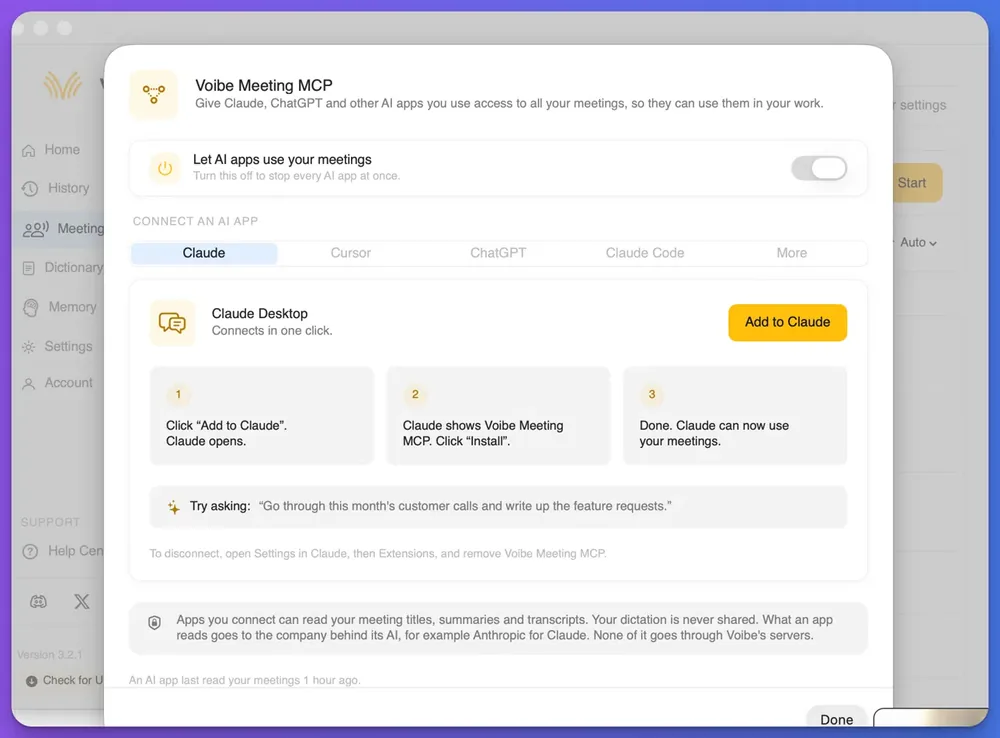
The MCP version, with Voibe Meeting MCP connected. MCP (Model Context Protocol) is a standard way for AI apps to connect to other software.
Voibe Meeting MCP lets Claude, ChatGPT and other AI apps read the meetings Voibe Work took notes for. It comes with Voibe Work and the 7-day trial. To connect Claude Desktop, follow these steps:
- In Voibe, open the Meetings page and click MCP.
- Check that the switch to let AI apps use your meetings is on.
- On the Claude tab, click Add to Claude, then click Install when Claude opens.
The paste version. Copy the summary or transcript from Voibe Work in one click, then paste it under the prompt in any assistant.
1. Prep for the next 1:1 from the last few
This prompt pulls open actions, unresolved blockers and growth goals from your recent 1:1s with one person. The MCP version reads the meetings itself:
Read my last four 1:1 meetings with Priya in Voibe. Write a prep note for our next 1:1, for me only, under 200 words.

Sections: open actions (owner, action, the date it was agreed); blockers still unresolved; feedback I promised to follow up on; Priya's growth goals and the latest progress mentioned; three questions to ask.

Use only what the meetings say. Give the meeting date for each item, and write [CHECK] for anything unclear.
The paste version works from the summaries you copy in:
Below are the notes from my last few 1:1s with Priya, oldest first, each with its date. Write a prep note for our next 1:1, for me only, under 200 words.

Sections: open actions (owner, action, the date it was agreed); blockers still unresolved; feedback I promised to follow up on; Priya's growth goals and the latest progress mentioned; three questions to ask.

Use only what the notes say, and write [CHECK] for anything unclear.

Notes:
[paste each summary with its date]
2. A follow-up message after the 1:1
A short message the same day confirms who owes what. The MCP version reads your latest 1:1 itself:
Read my most recent 1:1 with Priya in Voibe. Write a follow-up message from me to Priya for Slack, under 120 words, warm and plain.

Include the actions each of us agreed, with dates; the blocker I am taking on; and the topic we are carrying to next time. Use only commitments stated in the meeting. Add no praise or feedback that was not said, and mark anything unclear with [CHECK].
The paste version needs only today's summary:
Write a follow-up message from me to Priya after today's 1:1, for Slack, under 120 words, warm and plain. Use the notes below.

Include the actions each of us agreed, with dates; the blocker I am taking on; and the topic we are carrying to next time. Use only commitments in the notes, add no praise that was not said, and mark anything unclear with [CHECK].

Notes:
[paste today's summary]
3. A quarterly review draft from a quarter of 1:1s
This one only works well across many meetings, so the MCP version does the heavy lifting:
Read every 1:1 with Priya from 1 July to 30 September in Voibe. Draft input for her quarterly review, for me to edit, under 400 words.

Sections: what she delivered, with the meeting date each item came up; feedback given in either direction; growth goals and progress; blockers that came up more than once; commitments I made and whether I kept them.

Take every example from the meetings. Do not rate or score her performance, and add no conclusions I did not state. End with a list of every [CHECK] item.
For the paste version, use summaries, since they are far shorter than a quarter of transcripts:
Below are the summaries of my 1:1s with Priya from 1 July to 30 September, each with its date. Draft input for her quarterly review, for me to edit, under 400 words.

Sections: what she delivered, with dates; feedback given in either direction; growth goals and progress; blockers that came up more than once; commitments I made and whether I kept them.

Take every example from the summaries. Do not rate or score her performance. End with a list of every [CHECK] item.

Summaries:
[paste]
A review draft is input for your judgment, never the review itself. Check every example against the meeting it came from, and follow your company's review process.
4. A growth-goal tracker
A tracker shows whether a goal from March got any support by June. The MCP version reads the last eight 1:1s:
Read my last eight 1:1s with Priya in Voibe. Build a table of her growth goals with these columns: goal (in her words), date first mentioned, support agreed and who owns it, progress mentioned since, and status (on track, stalled, done, or not mentioned since).

Under 250 words. Use only what the meetings say, and write [CHECK] where a date or owner is unclear.
The paste version works from summaries, oldest first:
From the 1:1 summaries below, build a table of Priya's growth goals with these columns: goal (in her words), date first mentioned, support agreed and who owns it, progress mentioned since, and status (on track, stalled, done, or not mentioned since).

Under 250 words. Use only what the summaries say, and write [CHECK] where a date or owner is unclear.

Summaries:
[paste, oldest first]
What an AI app sees when you run these prompts
The Meeting MCP panel, the screen that opens when you click MCP on the Meetings page, states the privacy terms in its own words:
“Apps you connect can read your meeting titles, summaries and transcripts. Your dictation is never shared. What an app reads goes to the company behind its AI, for example Anthropic for Claude. None of it goes through Voibe's servers.”
The paste version works the same way, because what you paste into an assistant goes to that AI company under its terms. The panel's switch turns off every AI app at once. Keep it off if your 1:1s hold topics that shouldn't reach an AI company.
Before you send anything an assistant writes, check the names, numbers and commitments against the meeting. Our guide to giving Claude access to your meeting notes compares every route in more detail.
The same pattern works for team rhythms too. Our stand-up meeting notes template turns a week of stand-ups into a status update.
More prompts with their own pages
For more after-meeting jobs, the one-on-one prep prompt and the meeting action items prompt each have a full page with a worked example. Every prompt in the series is listed in our AI prompts for meeting notes library.
One-on-One Meeting Notes FAQ
Writing 1:1 notes
What should one-on-one meeting notes include? One-on-one notes should include carry-overs, updates, blockers and feedback in both directions. Add career goals, actions with an owner and a date, and topics to carry forward.
Who should take notes in a one-on-one? Either person can, as long as both read the result. Many managers write the notes and share them the same day, and some teams let the report keep them.
Should I share 1:1 notes with my direct report? Yes. Shared notes stop the two of you remembering a commitment differently, and writing for both readers keeps the language neutral.
AI and recording
Can AI take notes in a one-on-one meeting? Yes. An AI note taker such as Voibe Work transcribes the 1:1 and writes a summary from a template. Voibe Work records from your Mac or Windows PC with no bot in the call.
Do I need consent to record a 1:1? Ask your report first in every case. Voibe reminds you to tell everyone when recording starts, and the consent rules where each person is are your responsibility.
Privacy and sensitive topics
What should I leave out of 1:1 notes? Leave out health details, pay figures, family matters and anything said off the record. Note only that a private topic was discussed, and handle it through the right HR process.
Where does Voibe Work keep my 1:1 notes? Voibe Work saves the transcript and summary on your computer, not on Voibe's servers. The audio is deleted as soon as processing completes, and nothing is used to train AI.
Can Claude read my past 1:1s? Yes, if you connect Voibe Meeting MCP, which comes with Voibe Work. Claude can then read your meeting titles, summaries and transcripts, and what it reads goes to Anthropic.
Cost
How much does Voibe Work cost? Voibe Work costs $19 a month, $149 a year or $399 once, with Mac and Windows on one seat. New accounts get a 7-day trial of every feature with no credit card.
Keep Every 1:1 Connected to the Last One
Good 1:1 notes are short, shared and joined to the meeting before. Start each one with carry-overs, end it with what you didn't finish, and keep personal details out of the file.
Copy the template and paste Version A of the summary prompt as your own template in Voibe Work. Then run it on your next three 1:1s before you change any of its rules. For other meeting types, the AI meeting notes templates guide has more to copy.