

How to Take Confidential Meeting Notes: The Quick Answer
A notetaker bot joins your client call, and the person on the other side starts choosing their words. They have good reason to. That bot means a copy of the conversation now sits on a vendor's servers, under the vendor's retention rules.
To take confidential meeting notes, keep the number of copies small and know where each one lives. There are three good ways to do it, and none of them puts a bot in the call:
- By hand. Use a notebook or a local document, type it up the same day and store it on an encrypted drive. Nothing is recorded.
- Record, then transcribe the file. Save a local recording, send it to the Voibe API or its MCP server, and keep the transcript on your own disk. The audio is deleted once the transcript exists.
- Voibe Work meeting notes. Voibe Work captures the call from your Mac or Windows PC, summarizes it with a template you write yourself, and saves the notes on your computer.
Once the notes exist, you can let Claude read them through Voibe Meeting MCP. That step is optional, and it hands Anthropic a copy of whatever Claude reads, so it gets its own section below.
Key takeaways
| Method | Best for | Copies outside your computer | Cost |
|---|---|---|---|
| By hand | Board sessions, HR matters, any meeting where someone said no to recording | None | Free |
| Recording + Voibe API or MCP | A recording you already have, or a meeting everyone agreed to record | Audio until the transcript exists; transcript and summary for 24 hours, then deleted | $0.30 per hour of audio on the $10 pack; 15 free minutes |
| Voibe Work | Recurring client, deal or board calls, plus in-person meetings | Audio only while it's processed; notes saved on your computer | $19/month, $149/year or $399 once; 7-day free trial |
| + Voibe Meeting MCP | Asking Claude questions across many meetings | Whatever Claude reads goes to Anthropic | Included with Voibe Work |
Whichever method you pick, tell everyone you're taking notes before you start. Recording-consent rules depend on where each person is, and our state-by-state guide to AI notetaker consent laws covers them.
Key Takeaway
Confidential notes stay confidential when there are few copies and you know where each one lives. By hand keeps one, Voibe Work keeps the notes on your computer, and the Voibe API deletes the audio at the transcript and the transcript 24 hours later.
Before You Pick a Method, Count the Copies
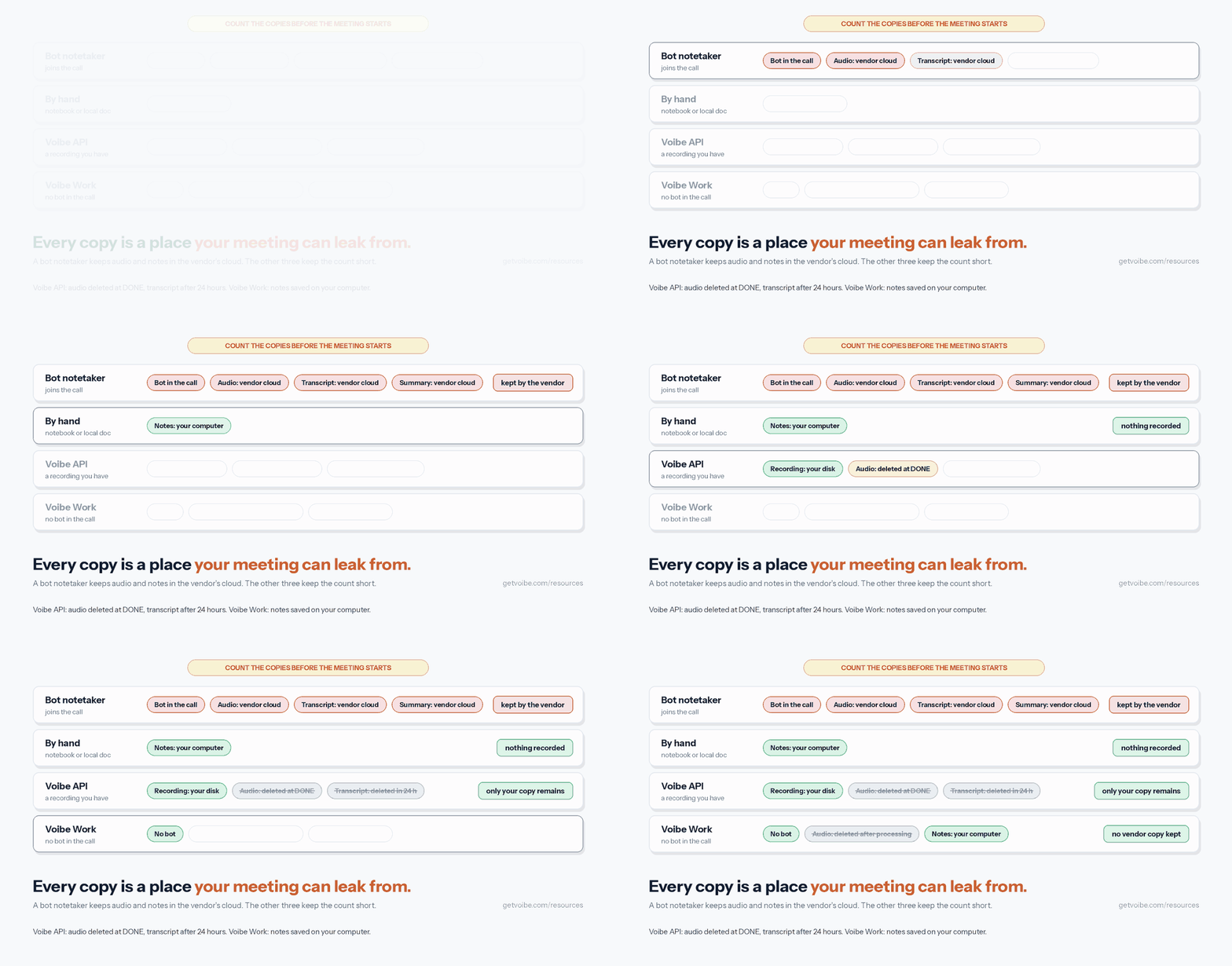
Confidential notes leak through copies, not through the meeting itself. Every notes method makes some: a recording, a transcript, a summary, a draft sitting in someone's inbox. I list them before the meeting starts, and I call that list the copy count.
Five questions give you the copy count for any notes method:
- Who else is in the call? A bot is a visible participant, and people often speak more carefully once it arrives.
- Where does the audio go? It stays on your disk, goes to a vendor's cloud, or isn't recorded at all.
- How long is it kept? Some services delete audio at once, some keep it for a set time, and some keep it until you delete it.
- Where do the finished notes live? They live on your computer or in an account on someone else's servers.
- Is anything used to train AI? Some note takers train on customer meetings by default on cheaper plans, as Wispr Flow's Notetaker does on its Free and Pro plans.
Run a typical bot notetaker through those questions and the count gets long. You get one extra participant, plus audio and notes in the vendor's cloud for as long as its plan keeps them. The three methods below keep the count short.
Comparing apps rather than methods? Our ranking of no-bot meeting note takers runs the same test across the field. Wispr Flow Notetaker vs Voibe Work shows where that training default comes from.
Method 1: Take Confidential Meeting Notes by Hand
Manual notes are the only method with no recording at all. Nothing is captured that you didn't choose to write down, which is why boards, HR investigations and privileged calls still rely on them.
The weakness is completeness. You'll miss exact wording, and the notes are only as good as the person writing them, so plan for that with a fixed structure.
Before the meeting
- Pick one notetaker. Give that person no other role, so the notes don't compete with chairing or presenting.
- Agree what goes on the record. Decide with the chair or the client which parts are minuted and which are discussion only.
- Prepare a template. Use fixed fields for the date, attendees by role, decisions, owners, deadlines and open questions.
- Use a code name for the matter. A project name instead of a client or deal name means a lost page identifies nobody.
During the meeting
- Write decisions, not dialogue. Record what was agreed, who owns it and by when, and quote exact words only where they carry weight.
- Leave out what the record doesn't need. Account numbers, health details and personal data can stay out of the notes unless a decision depends on them.
- Mark advice as advice. If a lawyer gives legal advice, label that passage so the firm can handle it as privileged later.
After the meeting
- Type the notes up the same day. Memory fades fast, and one clean file is easier to secure than a notebook that travels.
- Store them on an encrypted drive. Turn on FileVault on a Mac or device encryption on Windows, and keep the file out of shared folders.
- Shred the paper. Destroy handwritten pages once the typed version has been checked.
- Share on a need-to-know basis. Mark drafts confidential and keep minutes in draft until the chair approves them.
Dictate the recap instead of typing it
Typing up the notes is the slow part. You can speak the recap into a document with Voibe straight after the call, while the meeting is still fresh in your head.
On an Apple Silicon Mac, Voibe's on-device mode runs Whisper on the Neural Engine, works with no internet, and nothing leaves the Mac. On Windows and Intel Macs, dictation runs on Voibe's zero-retention cloud, where audio is deleted the moment transcription completes.
Voibe Free covers this on one device with 2,000 cloud words a week. Its Dictionary spells your code names and client jargon correctly.
If your notes have to become formal minutes, turning notes into meeting minutes walks through the format a board can approve.
Method 2: Record the Meeting, Then Transcribe It With the Voibe API or MCP
This method fits when you already have a recording, or when everyone agreed to one. You keep the recording on your own disk, send it out once, and get back a speaker-labelled transcript plus a summary you steer with a prompt.
Step 1: Record locally, with consent
- Ask everyone for permission to record before you start, and note who agreed.
- Use a local recording rather than a cloud recording, so the file never sits in the meeting app's cloud. Zoom's computer recording saves to
Documents/Zoomon every plan, free included. - Keep the audio-only file if your recorder makes one. In Zoom, pick the
audioM4A, which uploads far faster than the video.
Step 2: Create a transcription job
Get a key from the Voibe API keys page. New accounts get 15 free minutes with no card, which covers a short call end to end.
curl -s -X POST "https://api.getvoibe.com/v1/transcripts" \
  -H "Authorization: Bearer $VOIBE_KEY" \
  -H "Content-Type: application/json" \
  -d '{"diarize": true, "prompt": "Summarize as decisions, owners and deadlines. Leave out account numbers and personal details."}'
The response holds a job_id and an upload_url. The prompt shapes the summary and never touches the transcript, so it's a good place to say what the summary should leave out.
Step 3: Upload the file and read the transcript
curl -s -X PUT "$upload_url" \
  -H "Content-Type: application/octet-stream" \
  --data-binary @audio1234.m4a
curl -s "https://api.getvoibe.com/v1/transcripts/$job_id" \
-H "Authorization: Bearer $VOIBE_KEY"The status moves from QUEUED to PROCESSING to DONE. Save the transcript to your encrypted drive the moment it arrives.
Step 4: Delete what you no longer need
- Voibe deletes the audio the moment the transcript exists, and never uses it to train any model.
- The transcript and summary are kept for 24 hours after the job finishes, then deleted, so download them inside that window.
- Delete your local recording once the transcript is checked, unless a retention policy says to keep it.
Or let an agent do it with the Voibe MCP
The same API runs as an MCP server at https://api.getvoibe.com/mcp. In Claude Code, add it with one command, then run /mcp to sign in through your browser. In Claude Desktop, open Customize, then Connectors, and add it as a custom connector. An API key is optional.
claude mcp add --transport http voibe https://api.getvoibe.com/mcpOne difference from the direct API route: when Claude drives the MCP, Claude reads the transcript, and that text goes to Anthropic under your Claude plan's terms. For your most sensitive recordings, run the three API calls yourself and keep the AI app out of it.
What it costs
Packs run from $10 for 2,000 minutes to $100 for 24,000 minutes, with $25 and $50 packs in between, and they never expire. Billing is per second, and you're charged only when a job reaches DONE. At the $10 rate, a one-hour meeting costs $0.30, and ten one-hour meetings a month cost $3.
The full walkthrough with a real recording, including batch jobs for a whole folder, is in how to transcribe a Zoom recording. The product itself is introduced in the Voibe speech-to-text API launch post.
Recorded in Teams instead? How to transcribe a Teams recording covers where the MP4 lands, who can download it and how long Teams keeps it.
On Google Meet, the recording lands in the organizer's Drive; how to transcribe a Google Meet recording walks through downloading it and extracting the audio.
Method 3: Take Confidential Meeting Notes With Voibe Work
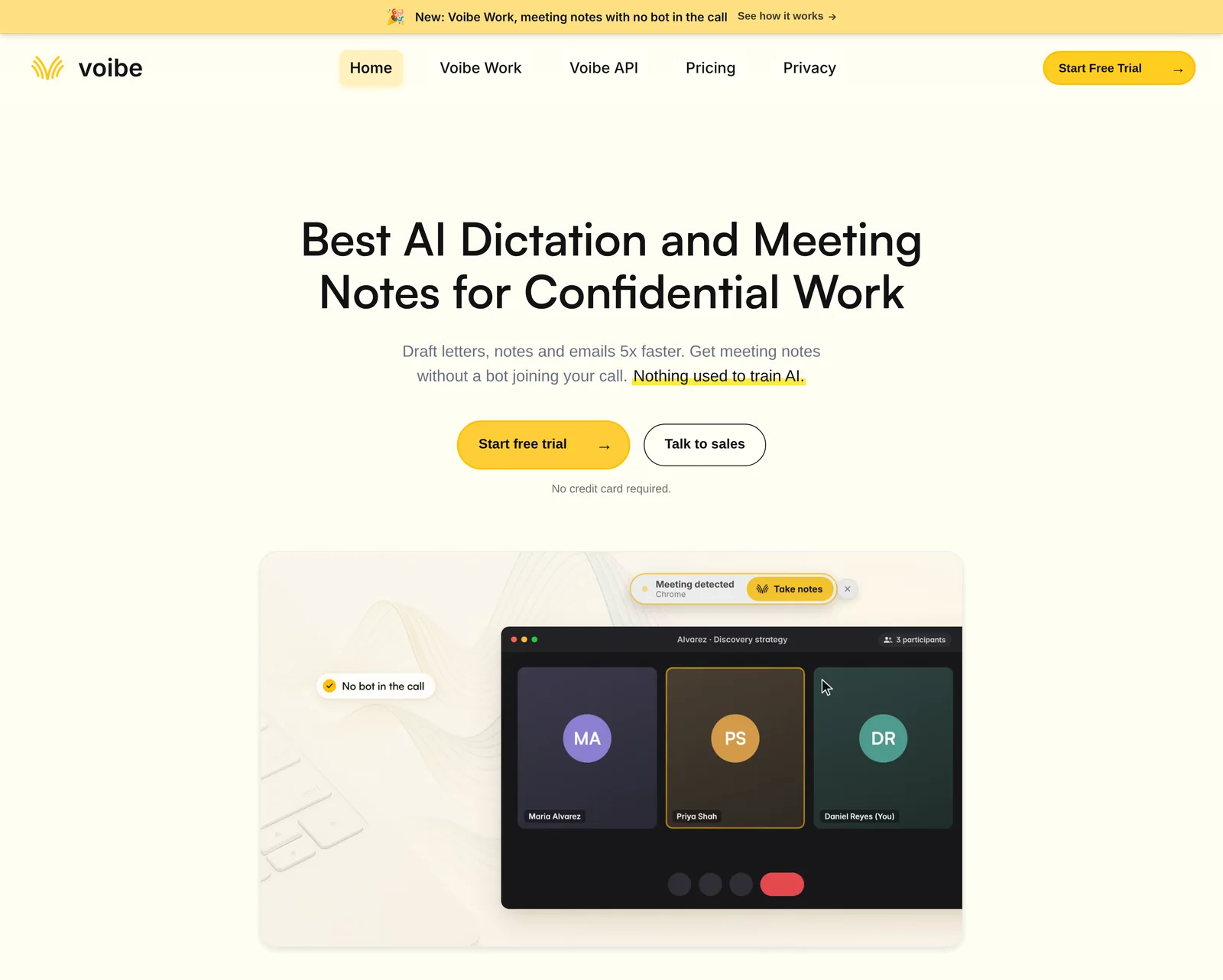
Voibe Work is the meeting-notes plan we build, and it's the method I'd pick for recurring confidential calls. It captures the meeting from your Mac or Windows PC in Zoom, Microsoft Teams, Google Meet, Webex, Slack huddles or any other meeting app. No bot joins the call, and nobody has to admit a notetaker.
Meeting audio is processed by open-source models on zero-retention cloud providers and deleted as soon as processing completes. The transcript and summary are saved on your computer, not on Voibe's servers, and never used to train AI. Because that processing happens in the cloud, meeting notes need an internet connection.
Step 1: Install Voibe and start the trial
- Download Voibe for Mac or Windows from getvoibe.com. You don't need an account to try it.
- Every new account starts with a 7-day trial of every Voibe Work feature, with no credit card and no automatic charge.
Step 2: Start notes when the call begins
- Join the call in your usual meeting app. When the call starts, Voibe offers to take notes, and you accept.
- Voibe reminds you to tell everyone you're taking notes. Say it out loud at the start, because following the consent rules where each person is stays your responsibility.
- Talk as long as you need to. One meeting can run up to 4 hours.
- For a meeting in the room, Voibe Work records through your Mac or PC's microphone, with the same processing and deletion rules as a call. Room setup is covered in how to record an in-person meeting on your laptop.
Step 3: Write your own template for confidential meetings
Voibe Work summarizes each meeting with a template for its type, such as client intake or investment committee. You can also create your own template, and that's where your confidentiality rules belong. A template for a privileged client call might ask for five sections:
- Matter: the code name only, never the client's name.
- Advice given: each point labelled as legal advice.
- Instructions: what the client decided or asked for.
- Action items: an owner and a deadline for each one.
- Leave out: account numbers, dates of birth and health details.
The template shapes the summary, not the transcript, which still holds every word that was said. Store the transcript with the same care as the summary.
The same idea works for board minutes, HR interviews and diligence calls: write one template per meeting type, once, and every summary after that follows it.
Step 4: Check the speakers, ask questions, export
- The transcript labels each speaker and puts a time next to every line. Click a speaker's name to rename them, and the summary updates to match.
- Use chat with your meetings to ask what was agreed or who owns what. Chat runs on the same zero-retention cloud, and nothing you ask is stored.
- Copy the transcript or summary in one click, or export it as a PDF for the matter file.
What Voibe Work costs
Voibe Work costs $19 a month, $149 a year or $399 once. One seat covers Mac and Windows, with Voibe's dictation app included, and a BAA is available on request.
- Against Granola Business ($168 a year): Voibe Work is $19 (11.3%) cheaper.
- Against Otter Pro ($99.96 a year): Voibe Work is $49.04 (49.1%) more, and Otter sends a bot into the call.
Why we built it without a bot is in the Voibe Work launch post.
The full privileged-call template, ready to paste, is in how to write AI meeting notes templates.
See Voibe Work in action
Take your next confidential call without a bot
Start free on Mac or Windows. You get 7 days of every Voibe Work feature, including custom templates and Meeting MCP, with no credit card.
Give Claude Your Meeting Notes With Voibe Meeting MCP
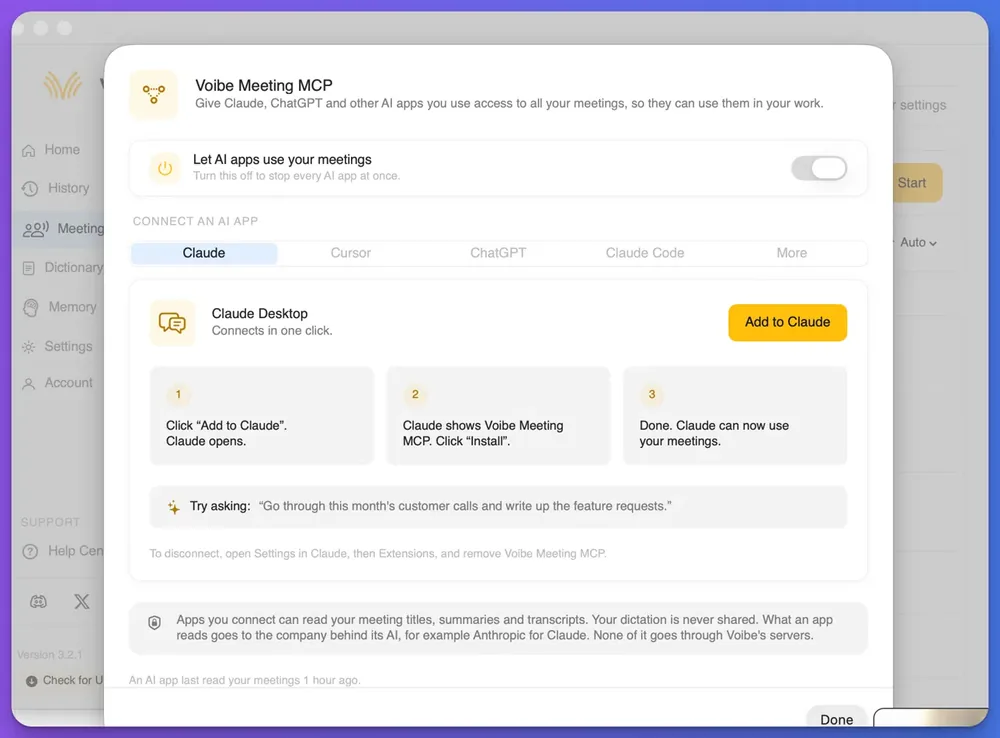
Voibe Meeting MCP lets Claude, ChatGPT, Cursor, Claude Code and other AI apps read your Voibe Work meetings. It comes with Voibe Work and the 7-day trial. Use it for questions that cut across many meetings, while in-app chat stays the tool for questions about one.
How to connect Claude Desktop
- In Voibe, open Meetings and click MCP.
- Check that the switch labelled Let AI apps use your meetings is on.
- Pick the Claude tab and click Add to Claude, and Claude Desktop opens.
- Claude shows Voibe Meeting MCP, and you click Install.
Then ask Claude for something that spans your meetings, such as this example from the panel:
Go through this month's customer calls and write up the feature requests.
Cursor, ChatGPT and Claude Code have their own tabs in the same panel, and a More tab covers other apps.
What Claude can read, and where it goes
- Connected apps can read your meeting titles, summaries and transcripts.
- Your dictation is never shared with any AI app.
- What an app reads goes to the company behind its AI, for example Anthropic for Claude. None of it goes through Voibe's servers.
- The panel shows when an AI app last read your meetings.
Rules for confidential meetings
Once Claude reads a meeting, that text is under Anthropic's terms, not Voibe's. Check your Claude plan's data settings before you connect; is Claude safe for confidential information goes through them plan by plan.
- The switch covers every meeting at once. If some meetings should never reach an AI app, keep the switch off and use in-app chat instead.
- Pasting a transcript into Claude sends Anthropic the same text that Meeting MCP would. The MCP route saves the copying and gives you one switch to stop every app.
- To disconnect Claude completely, open Settings in Claude, then Extensions, and remove Voibe Meeting MCP.
More on what the panel shows is in the Voibe Meeting MCP launch post. AI note takers with an MCP server compares it with Granola, Circleback and the rest.
One difference between the two routes: on consumer Claude plans, Anthropic says content read through connectors and MCP servers isn't used for training unless it's copied into the chat. Every other way to get notes into Claude, from exports to a Claude Project, is in how to give Claude access to your meeting notes.
Which Method Fits Which Confidential Meeting
The right method depends on two things: whether everyone agreed to be recorded, and how often this kind of meeting happens. Work through these questions in order.
- Did everyone agree to a recording? If not, take notes by hand. If they did, go to the next question.
- Does the recording already exist? If it does, transcribe the file with the Voibe API. If not, go to the next question.
- Will this kind of meeting happen again? If it will, use Voibe Work with a template written for it. For a one-off, a local recording and the API work just as well.
- Do you want Claude to work across your meetings? If you do, add Meeting MCP for meetings that can go to Anthropic. If not, keep the switch off.
Use-case cheat sheet
| Meeting | Method | Why |
|---|---|---|
| Privileged client call | Voibe Work with a privileged-call template, Meeting MCP off | No bot, notes saved on your computer, no AI app reads them |
| M&A or diligence call | Voibe Work, Meeting MCP off | No bot appears in the counterparty's call |
| Board meeting with a closed session | Voibe Work for the open session, by hand for the closed one | The closed session stays decisions-only and unrecorded |
| Investment committee | Voibe Work with its investment committee template | The template already exists, so there's nothing to write |
| HR investigation interview | By hand, or Voibe Work if the interviewee consents | Some interviewees won't agree to a recording |
| In-person partner meeting | Voibe Work through the computer's microphone | Same processing and deletion rules as a call |
| Interview recording you were sent | Voibe API or MCP | The file exists, and the audio is deleted at the transcript |
| A month of customer calls to summarize | Voibe Work plus Meeting MCP | Claude reads across every call in one request |
| Call where the other side bans AI tools | By hand, with the recap dictated afterwards | Nothing about the call is recorded |
Lawyers weighing note takers for client meetings will find the field compared in the best AI meeting note taker for lawyers.
Deal teams get the full process, from NDA and clean-team rules to expert-network calls, in how to take notes on diligence calls.
Tips for Better Confidential Meeting Notes
These habits apply whichever method you use, and most of them cost nothing.
- Say the notes out loud at the start. A one-line announcement covers consent and tells people which parts will be written down.
- Write less than you think you need. Decisions, owners and deadlines make a better record than a page of paraphrased discussion.
- Keep personal data out of summaries. Ask for it to be left out in your template or API prompt, so the summary you share is the safe version.
- Use one storage location. Notes scattered across email, chat and three laptops are harder to secure and harder to delete.
- Delete on a schedule. Decide how long recordings and drafts are kept, and delete them when the time is up.
- Review notes before they're shared. Read every AI summary against the transcript before it goes to a client or a board.
The last habit is the one people skip. An AI summary can sound sure of itself and still drop a qualification that changes the meaning, so a person checks it before anyone else sees it.
Tip
Put your confidentiality rules into the template or the API prompt once, rather than remembering them in every meeting.
Why Your Confidential Notes Setup Isn't Working and How to Fix It
The other side won't agree to a recording. What now?
Take notes by hand with the template above, then dictate the recap straight after the call. On an Apple Silicon Mac, Voibe's on-device mode keeps that dictation on the Mac.
The Voibe API returns a 402 error
A 402 means your account is out of minutes. Buy a pack on the platform site and resend the job; failed jobs are never charged.
My API transcript is gone
The Voibe API keeps transcripts and summaries for 24 hours after a job finishes, then deletes them. Save each transcript when the job reaches DONE, or run the file again, which is billed as a new job.
Claude can't see my meetings
Open Meetings, then MCP, in Voibe and check that Let AI apps use your meetings is on. Then confirm that Voibe Meeting MCP appears under Settings, then Extensions, in Claude Desktop, and that your Voibe Work plan or trial is active.
The speaker names are wrong
Voibe Work doesn't pull names from your calendar, so it labels speakers generically at first. Click a speaker's name in the transcript to rename them, and the summary updates.
Tools That Make Confidential Meeting Notes Easier
For confidential work, the shortlist comes down to where each tool keeps your meetings. The table covers the apps people most often ask about.
| Tool | Bot in the call? | Where the notes live | Price (annual) |
|---|---|---|---|
| Voibe Work (ours) | No | On your computer; audio deleted after processing | $149/yr ($19/mo; $399 once) |
| Granola | No | Granola's cloud | Business $168/yr |
| Otter | Yes | Otter's cloud | Pro $99.96/yr |
| Wispr Flow Notetaker | No | Wispr's US cloud; trains by default on Free and Pro | See the comparison |
| Voibe API | No, works on files | Your disk; Voibe deletes the transcript after 24 hours | $10 for 2,000 minutes |
Voibe is rated 4.8 out of 5 from 6 reviews on Product Hunt. For the full field, the best AI meeting note takers ranks every platform, and zero data retention explains which vendor promises hold up.
Confidential Meeting Notes FAQ
Methods
What is the safest way to take confidential meeting notes? Taking notes by hand is the safest, because nothing is recorded and no copy leaves the room. Among recorded methods, Voibe Work leaves the fewest copies: no bot joins, the audio is deleted after processing, and the notes are saved on your computer.
Is a bot notetaker or an on-device recorder better for confidential meetings? A tool that captures from your own computer is better, because no bot joins the call and nobody has to admit one. Check where it keeps the notes, though, since several bot-free apps still store meetings in their own cloud.
Can I take meeting notes in person without a bot? Yes. Voibe Work records an in-person meeting through your Mac or PC's microphone, with the same processing and deletion rules as a call.
Privacy and AI
Is it safe to paste confidential meeting transcripts into Claude? Pasting a transcript into Claude sends that text to Anthropic under your Claude plan's terms. Voibe Meeting MCP sends the same text when Claude reads a meeting, so check your Claude data settings either way.
Does Voibe keep my meeting audio? No. Voibe Work deletes meeting audio as soon as processing completes, and the Voibe API deletes it the moment the transcript exists. Neither uses it to train AI.
Are Voibe Work meeting notes stored on Voibe's servers? No. The transcript and summary are saved on your computer, not on Voibe's servers. Meeting notes still need an internet connection, because the audio is processed in Voibe's zero-retention cloud.
Consent and compliance
Do I need consent to take AI meeting notes? Often, yes, and the rules depend on where each person is. Voibe reminds you to tell everyone you're taking notes, and following the consent rules is your responsibility.
Is Voibe HIPAA compliant? Voibe doesn't claim HIPAA compliance or certification. A BAA is available on request for the app and the API. Privacy comes from the architecture: no bot, audio deleted after processing, notes saved on your computer.
Cost
How much does it cost to transcribe a confidential recording? The Voibe API charges $10 for 2,000 minutes, so a one-hour meeting costs $0.30. New accounts get 15 free minutes with no card.
How much is Voibe Work? Voibe Work costs $19 a month, $149 a year or $399 once, on Mac and Windows. New accounts get a 7-day trial of every feature with no credit card.
Pick the Method Before the Meeting Starts
Confidential notes go wrong when the method is chosen after the meeting, once the bot has already joined. Decide beforehand. Take notes by hand when nobody agreed to a recording, and use the Voibe API when the file already exists. For the calls you take every week, use Voibe Work with your own template.
Add Meeting MCP only for meetings you're comfortable sending to Anthropic, and keep the switch off for the rest. If you're also moving off a bot-based tool, Otter.ai alternatives without a bot is the next read.
You can try Voibe Work free for 7 days on Mac or Windows, with no credit card.
More step-by-step guides on meeting notes, recordings and dictation are in our how-to guides.